11
Palo Alto Networks - Authentication
Alberto Rivai – Senior Systems Engineer
2
Agenda
 Authentication Methods
 Supported Authentication in Palo Alto Networks firewall
 2FA demo
3
Authentication Protocols
 PAP
 CHAP
 MS-CHAP
 EAP
4
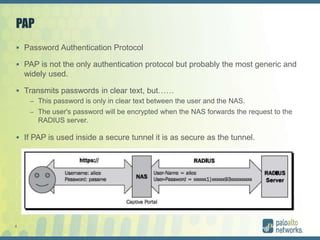
PAP
 Password Authentication Protocol
 PAP is not the only authentication protocol but probably the most generic and
widely used.
 Transmits passwords in clear text, but……
– This password is only in clear text between the user and the NAS.
– The user's password will be encrypted when the NAS forwards the request to the
RADIUS server.
 If PAP is used inside a secure tunnel it is as secure as the tunnel.
5
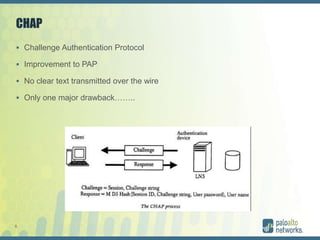
CHAP
 Challenge Authentication Protocol
 Improvement to PAP
 No clear text transmitted over the wire
 Only one major drawback……..
6
CHAP
 although the password is transmitted encrypted, the password source has to
be in clear text for RADIUS to perform password verification.
7
PAP VS CHAP
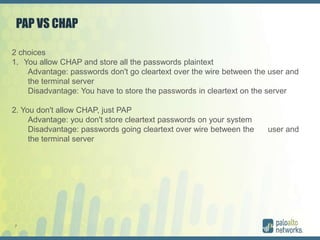
2 choices
1. You allow CHAP and store all the passwords plaintext
Advantage: passwords don't go cleartext over the wire between the user and
the terminal server
Disadvantage: You have to store the passwords in cleartext on the server
2. You don't allow CHAP, just PAP
Advantage: you don't store cleartext passwords on your system
Disadvantage: passwords going cleartext over wire between the user and
the terminal server
8
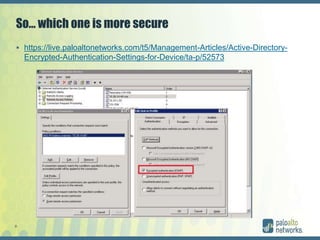
So… which one is more secure
 https://live.paloaltonetworks.com/t5/Management-Articles/Active-Directory-
Encrypted-Authentication-Settings-for-Device/ta-p/52573
9
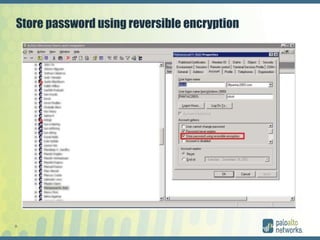
Store password using reversible encryption
10
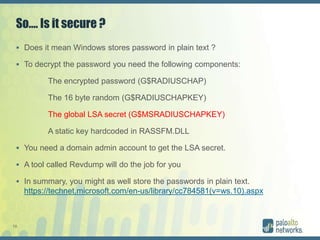
So…. Is it secure ?
 Does it mean Windows stores password in plain text ?
 To decrypt the password you need the following components:
The encrypted password (G$RADIUSCHAP)
The 16 byte random (G$RADIUSCHAPKEY)
The global LSA secret (G$MSRADIUSCHAPKEY)
A static key hardcoded in RASSFM.DLL
 You need a domain admin account to get the LSA secret.
 A tool called Revdump will do the job for you
 In summary, you might as well store the passwords in plain text.
https://technet.microsoft.com/en-us/library/cc784581(v=ws.10).aspx
11
MS-CHAP
 Microsoft version of CHAP
 More secure than CHAP
12
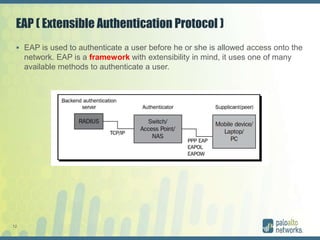
EAP ( Extensible Authentication Protocol )
 EAP is used to authenticate a user before he or she is allowed access onto the
network. EAP is a framework with extensibility in mind, it uses one of many
available methods to authenticate a user.
13
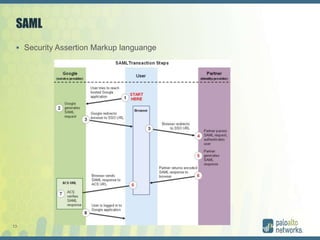
SAML
 Security Assertion Markup languange
14
RADIUS VSA
15
RADIUS VSA
 Vendor Specific Attributes
– specifies a method for communicating vendor-specific information between the
network access server and the RADIUS server.
– Attribute 26 encapsulates vendor specific attributes, thereby, allowing vendors to
support their own extended attributes otherwise not suitable for general use.
 There are 5 attributes:
 PaloAlto-Admin-Role: Attribute #1 - This can either be a default admin role name or a custom admin
role name.
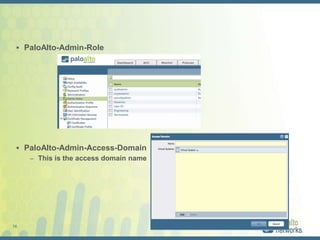
 PaloAlto-Admin-Access-Domain: Attribute #2 - This is used when a Palo Alto Networks device has
multiple vsys. This is the name of an Access Domain as created under Device > Access Domains.
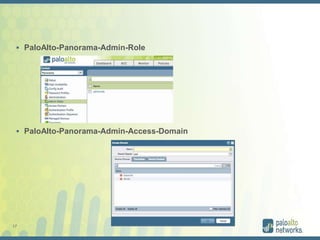
 PaloAlto-Panorama-Admin-Role: Attribute #3 - This can either be a default admin role name or a
custom admin role name on Panorama.
 PaloAlto-Panorama-Admin-Access-Domain: Attribute #4 - This is the name of an Access Domain
configured on Panorama as created under Panorama > Access Domains.
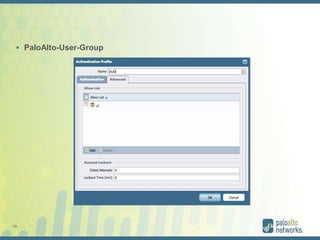
 PaloAlto-User-Group: Attribute #5 - This is the name of a group to be used in an Authentication
Profile.
16
 PaloAlto-Admin-Role
 PaloAlto-Admin-Access-Domain
– This is the access domain name
17
 PaloAlto-Panorama-Admin-Role
 PaloAlto-Panorama-Admin-Access-Domain
18
 PaloAlto-User-Group
19
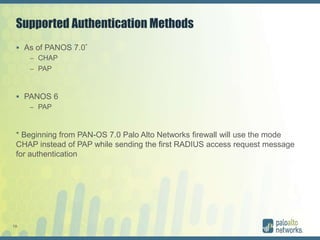
Supported Authentication Methods
 As of PANOS 7.0*
– CHAP
– PAP
 PANOS 6
– PAP
* Beginning from PAN-OS 7.0 Palo Alto Networks firewall will use the mode
CHAP instead of PAP while sending the first RADIUS access request message
for authentication
20
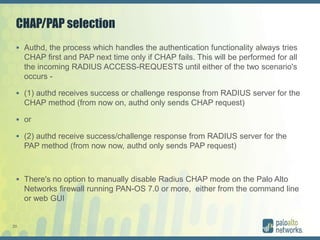
CHAP/PAP selection
 Authd, the process which handles the authentication functionality always tries
CHAP first and PAP next time only if CHAP fails. This will be performed for all
the incoming RADIUS ACCESS-REQUESTS until either of the two scenario's
occurs -
 (1) authd receives success or challenge response from RADIUS server for the
CHAP method (from now on, authd only sends CHAP request)
 or
 (2) authd receive success/challenge response from RADIUS server for the
PAP method (from now now, authd only sends PAP request)
 There's no option to manually disable Radius CHAP mode on the Palo Alto
Networks firewall running PAN-OS 7.0 or more, either from the command line
or web GUI
21
Palo Alto Networks Authentication
 Authentication can be used for
– GlobalProtect
– Device management/Role based access
22
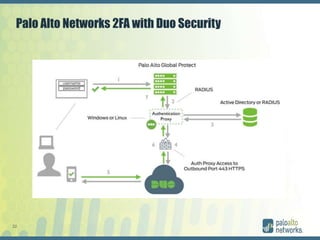
Palo Alto Networks 2FA with Duo Security
23
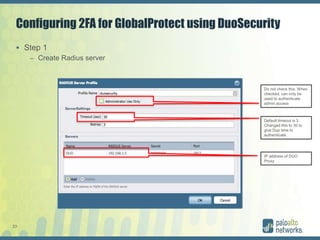
Configuring 2FA for GlobalProtect using DuoSecurity
 Step 1
– Create Radius server
Do not check this. When
checked, can only be
used to authenticate
admin access
Default timeout is 3.
Changed this to 30 to
give Dup time to
authenticate
IP address of DUO
Proxy
24
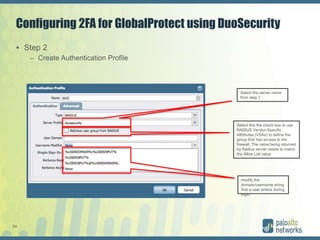
Configuring 2FA for GlobalProtect using DuoSecurity
 Step 2
– Create Authentication Profile
Select the server name
from step 1
Select this the check box to use
RADIUS Vendor-Specific
Attributes (VSAs) to define the
group that has access to the
firewall. The value being returned
by Radius server needs to match
the Allow List value
modify the
domain/username string
that a user enters during
login.
25
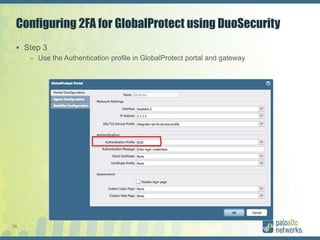
Configuring 2FA for GlobalProtect using DuoSecurity
 Step 3
– Use the Authentication profile in GlobalProtect portal and gateway
26
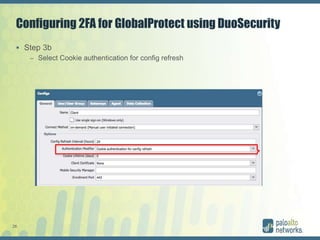
Configuring 2FA for GlobalProtect using DuoSecurity
 Step 3b
– Select Cookie authentication for config refresh
27
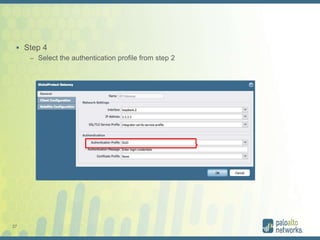
 Step 4
– Select the authentication profile from step 2
28
Duo Proxy configuration
[radius_client]
host=192.168.1.5
secret=pass123
port=1812
[radius_server_auto]
ikey=---------
skey=-------------
api_host=api-0e0dfbb4.duosecurity.com
radius_ip_1=192.168.1.2
radius_secret_1=pass123
failmode=safe
factors=auto
client=radius_client
port=1817
29
You are about to
witness a live demo.
Something will probably
go wrong.
(Whatever happens, keep smiling and don’t
panic!)
30
Demo
 WARNING
Live Demo !!!!
31

Palo Alto Networks authentication

  • 1.
    11 Palo Alto Networks- Authentication Alberto Rivai – Senior Systems Engineer
  • 2.
    2 Agenda  Authentication Methods Supported Authentication in Palo Alto Networks firewall  2FA demo
  • 3.
  • 4.
    4 PAP  Password AuthenticationProtocol  PAP is not the only authentication protocol but probably the most generic and widely used.  Transmits passwords in clear text, but…… – This password is only in clear text between the user and the NAS. – The user's password will be encrypted when the NAS forwards the request to the RADIUS server.  If PAP is used inside a secure tunnel it is as secure as the tunnel.
  • 5.
    5 CHAP  Challenge AuthenticationProtocol  Improvement to PAP  No clear text transmitted over the wire  Only one major drawback……..
  • 6.
    6 CHAP  although thepassword is transmitted encrypted, the password source has to be in clear text for RADIUS to perform password verification.
  • 7.
    7 PAP VS CHAP 2choices 1. You allow CHAP and store all the passwords plaintext Advantage: passwords don't go cleartext over the wire between the user and the terminal server Disadvantage: You have to store the passwords in cleartext on the server 2. You don't allow CHAP, just PAP Advantage: you don't store cleartext passwords on your system Disadvantage: passwords going cleartext over wire between the user and the terminal server
  • 8.
    8 So… which oneis more secure  https://live.paloaltonetworks.com/t5/Management-Articles/Active-Directory- Encrypted-Authentication-Settings-for-Device/ta-p/52573
  • 9.
    9 Store password usingreversible encryption
  • 10.
    10 So…. Is itsecure ?  Does it mean Windows stores password in plain text ?  To decrypt the password you need the following components: The encrypted password (G$RADIUSCHAP) The 16 byte random (G$RADIUSCHAPKEY) The global LSA secret (G$MSRADIUSCHAPKEY) A static key hardcoded in RASSFM.DLL  You need a domain admin account to get the LSA secret.  A tool called Revdump will do the job for you  In summary, you might as well store the passwords in plain text. https://technet.microsoft.com/en-us/library/cc784581(v=ws.10).aspx
  • 11.
    11 MS-CHAP  Microsoft versionof CHAP  More secure than CHAP
  • 12.
    12 EAP ( ExtensibleAuthentication Protocol )  EAP is used to authenticate a user before he or she is allowed access onto the network. EAP is a framework with extensibility in mind, it uses one of many available methods to authenticate a user.
  • 13.
  • 14.
  • 15.
    15 RADIUS VSA  VendorSpecific Attributes – specifies a method for communicating vendor-specific information between the network access server and the RADIUS server. – Attribute 26 encapsulates vendor specific attributes, thereby, allowing vendors to support their own extended attributes otherwise not suitable for general use.  There are 5 attributes:  PaloAlto-Admin-Role: Attribute #1 - This can either be a default admin role name or a custom admin role name.  PaloAlto-Admin-Access-Domain: Attribute #2 - This is used when a Palo Alto Networks device has multiple vsys. This is the name of an Access Domain as created under Device > Access Domains.  PaloAlto-Panorama-Admin-Role: Attribute #3 - This can either be a default admin role name or a custom admin role name on Panorama.  PaloAlto-Panorama-Admin-Access-Domain: Attribute #4 - This is the name of an Access Domain configured on Panorama as created under Panorama > Access Domains.  PaloAlto-User-Group: Attribute #5 - This is the name of a group to be used in an Authentication Profile.
  • 16.
  • 17.
  • 18.
  • 19.
    19 Supported Authentication Methods As of PANOS 7.0* – CHAP – PAP  PANOS 6 – PAP * Beginning from PAN-OS 7.0 Palo Alto Networks firewall will use the mode CHAP instead of PAP while sending the first RADIUS access request message for authentication
  • 20.
    20 CHAP/PAP selection  Authd,the process which handles the authentication functionality always tries CHAP first and PAP next time only if CHAP fails. This will be performed for all the incoming RADIUS ACCESS-REQUESTS until either of the two scenario's occurs -  (1) authd receives success or challenge response from RADIUS server for the CHAP method (from now on, authd only sends CHAP request)  or  (2) authd receive success/challenge response from RADIUS server for the PAP method (from now now, authd only sends PAP request)  There's no option to manually disable Radius CHAP mode on the Palo Alto Networks firewall running PAN-OS 7.0 or more, either from the command line or web GUI
  • 21.
    21 Palo Alto NetworksAuthentication  Authentication can be used for – GlobalProtect – Device management/Role based access
  • 22.
    22 Palo Alto Networks2FA with Duo Security
  • 23.
    23 Configuring 2FA forGlobalProtect using DuoSecurity  Step 1 – Create Radius server Do not check this. When checked, can only be used to authenticate admin access Default timeout is 3. Changed this to 30 to give Dup time to authenticate IP address of DUO Proxy
  • 24.
    24 Configuring 2FA forGlobalProtect using DuoSecurity  Step 2 – Create Authentication Profile Select the server name from step 1 Select this the check box to use RADIUS Vendor-Specific Attributes (VSAs) to define the group that has access to the firewall. The value being returned by Radius server needs to match the Allow List value modify the domain/username string that a user enters during login.
  • 25.
    25 Configuring 2FA forGlobalProtect using DuoSecurity  Step 3 – Use the Authentication profile in GlobalProtect portal and gateway
  • 26.
    26 Configuring 2FA forGlobalProtect using DuoSecurity  Step 3b – Select Cookie authentication for config refresh
  • 27.
    27  Step 4 –Select the authentication profile from step 2
  • 28.
  • 29.
    29 You are aboutto witness a live demo. Something will probably go wrong. (Whatever happens, keep smiling and don’t panic!)
  • 30.
  • 31.