

Windows 7 SecurityJorge OrchillesTerremark Worldwide
About MeIT Consultant over 7 years agoSecurity Analyst at TerremarkMaster’s of Science in Management Information Systems @ FIUAuthor of Microsoft Windows 7 Administrator’s Reference, Syngress PublishingFew certs: CCDA, CSSDS, MCTS, MCP, Security+
Audience SurveyXP Users?Vista Users?Windows 7 Users?Mac OS X?Linux/Unix?
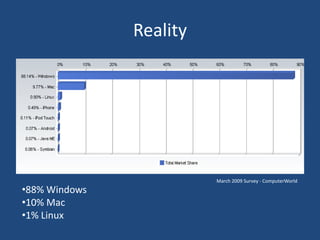
RealityMarch 2009 Survey - ComputerWorld88% Windows
10% Mac
1% LinuxRealityUp to 94% of corporations skipped Windows VistaNew PC users had a choice to “downgrade” to XPNew OEM PCs will include Windows 7 and no choice for Windows Vista or XP for that matter.  All enterprise systems will be required to upgrade to either Vista or Windows 7 soon! Microsoft is threatening cut off dates already.Windows XP is 8 years old!
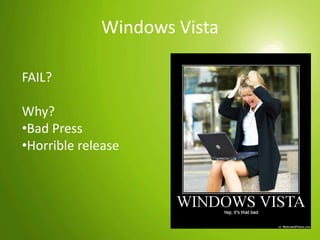
Windows Vista FAIL?Why?Bad Press
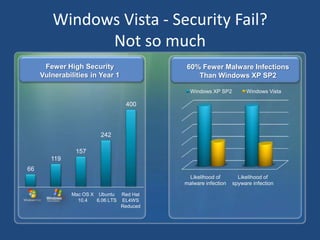
Horrible releaseWindows Vista - Security Fail?Not so muchFewer High Security Vulnerabilities in Year 160% Fewer Malware Infections Than Windows XP SP2Mac OS X 10.4Ubuntu6.06 LTSRed HatEL4WSReduced
Windows Vista - Security FeaturesSecurity Development LifecycleWindows Service HardeningWindows DefenderInternet Explorer 7 w/Phishing FilterNG TCP/IP –IPv6, IPSec., WFPVista Firewall – inbound and outboundNetwork Access ProtectionUser Account Control – consent and credential promptingCode Integrity – all OS DLLS and exec digitally signedBitLocker, Encrypted File Systems, & Trusted Platform Module
AgendaIntroduction to Windows 7Internet Explorer 8BitLocker and BitLocker to GoAppLockerIntroduction to Windows 7Incremental update to Windows Vista  Uses the same technologies already in place with VistaSimpler user interface and enhancements to performanceExtensive UAT via public Beta and RC
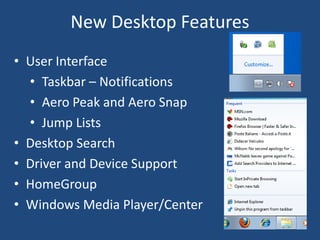
New Desktop FeaturesUser Interface
Taskbar – Notifications
Aero Peak and Aero Snap
Jump Lists
Desktop Search
Driver and Device Support
HomeGroup
Windows Media Player/CenterSecurity FeaturesAction CenterBetter UACBetter BitLockerBitLockerToGoBiometric securityInternet Explorer 8AppLockerDirectAccessPowerShell v2
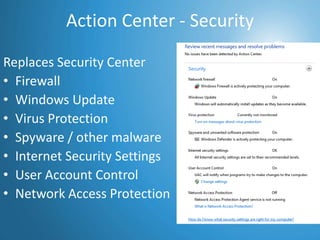
Action Center - SecurityReplaces Security CenterFirewall
Windows Update
Virus Protection
Spyware / other malware
Internet Security Settings
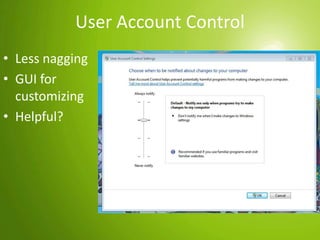
User Account Control
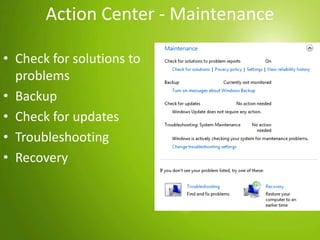
Network Access ProtectionAgendaIntroduction to Windows 7Internet Explorer 8BitLocker and BitLocker to GoAppLockerAction Center - MaintenanceCheck for solutions to problems
Backup
Check for updates
Troubleshooting
RecoveryAgendaIntroduction to Windows 7Internet Explorer 8BitLocker and BitLocker to GoAppLockerUser Account ControlLess nagging
GUI for customizing
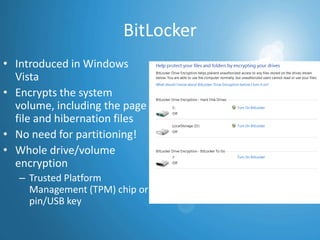
Helpful?BitLockerIntroduced in Windows VistaEncrypts the system volume, including the page file and hibernation filesNo need for partitioning!Whole drive/volume encryption Trusted Platform Management (TPM) chip or pin/USB key
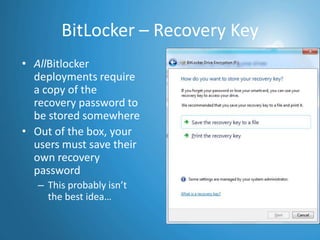
BitLocker – Recovery KeyAllBitlocker deployments require a copy of the recovery password to be stored somewhereOut of the box, your users must save their own recovery passwordThis probably isn’t the best idea…
BitLocker - IssuesHigh security environments can require a pin # or USB key before the system will bootRemote systems or servers in datacenter - BEWAREBitLocker is not a replacement for EFSBitLocker protects the whole drive at bootNo protection from user A seeing user B’s files post bootEFS solves this problem
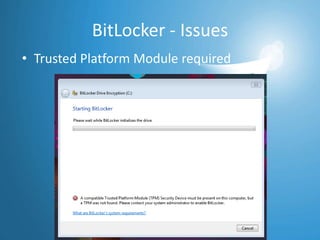
BitLocker - IssuesTrusted Platform Module required
BitLocker – Corporate EnvironmentRequires Windows Server 2003 SP1 or newer domain controllersGroup Policy – Require Encryption!Universal Recovery Key: Data Recovery AgentWhat about deleted/disabled computer accounts?Sales guy who’s always on the roadHigh-powered exec who goes on a 3-month sabbatical
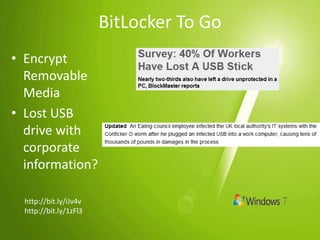
AgendaIntroduction to Windows 7Internet Explorer 8BitLocker and BitLocker to GoAppLockerBitLocker To GoEncrypt Removable Media
Lost USB drive with corporate information?http://bit.ly/iJv4vhttp://bit.ly/1zFl3
AgendaIntroduction to Windows 7Internet Explorer 8BitLocker and BitLocker to GoAppLockerBitLocker To Go - IssuesDoes not work with other OS
FAIL
On Vista and XP you can view content but not edit
FAIL

Windows 7 Security

Editor's Notes

  • #16 97 percent of stolen PCs are never recovered.
  • #24 DEP Prevents malicious code from writing to memory