 A wireless network uses radio waves, just like cell phones, televisions and
radios do. In fact, communication across a wireless network is a lot like
two-way radio communication. Here's what happens:
 A computer's wireless adapter translates data into a radio signal and
transmits it using an antenna.
 A wireless router receives the signal and decodes it. The router sends the
information to the Internet using a physical, wired Ethernet connection.
 The process also works in reverse, with the router receiving information
from the Internet, translating it into a radio signal and sending it to the
computer's wireless adapter.
 The radios used for WiFi communication are very similar to the radios used
for walkie-talkies, cell phones and other devices. They can transmit and
receive radio waves, and they can convert 1s and 0s into radio waves and
convert the radio waves back into 1s and 0s. But WiFi radios have a few
notable differences from other radios:
 "Wi-Fi" is a type of wireless networking protocol that allows devices to
communicate without cords or cables. Wi-Fi is technically an industry
term that represents a type of wireless local area network (LAN)
protocol based on the 802.11 IEEE network standard. It's the most
popular means of communicating data wirelessly, within a fixed
location, today.
 "Wi-Fi" is a trademark of the Wi-Fi Alliance, an international
association of companies involved with wireless LAN technologies and
products.
 Wi-fi is commonly mistaken as an acronymn for "wireless fidelity" and
often you may also see it spelled without the hyphen (wifi).
 The main ideas when developing the WiFi Direct standard were quite simple: make it
easy to set up, have it support all kinds of services and make it just as fast as any other
WiFi connection. The second and third are self-explanatory, since WiFi Direct is based
on "regular" WiFi, so it doesn't have any drawbacks.
 The way it works is rather simple too: one device discovers the other just like it would
discover a wireless network, you enter a password or push a button and voilá, the devices
are connected. No need to set up visibility, match long numeric codes or put up with any
of the problems Bluetooth has. And to top it all, only one of the devices has to be
compatible with WiFi Direct.
 Essentially, when you connect two devices via WiFi Direct, one of them creates an access
point similar to a router and the other device connects to it. You don't have to do it
manually, it's all automatic. The available features vary, depending on what kind of
devices are connected: you can print to a wireless printer, send pictures to a digital
picture frame, send files from a phone to a computer, or play music or movies on a TV
from a music player or phone. There are quite a lot of possibilities.
 Oh, and about passwords: you can forget about them. WiFi Direct relies on WiFi
Protected Setup (WPS) which is a simple way to securely connect two devices via WiFi.
Just like with modern routers, you only have to enter a number displayed on screen, or
press a button, and the devices connect.
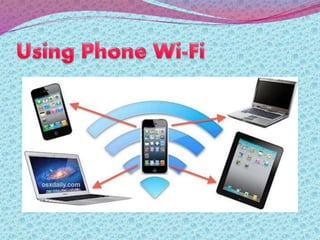
 Wi-Fi is a wireless internet connection that you can use to connect devices like
phones to the internet. Most home broadband routers have Wi-Fi connections, and
many public places like cafes and libraries offer them too.
 If you're connected using Wi-Fi we won't charge you for using data as it means
you're not connected to the internet over our network. If you’re using it on a home
broadband Wi-Fi, you should contact your internet provider to find out about any
potential data allowances you have with them.
 If you don’t have all-you-can-eat data and you’re worried about going over your
data allowance, you might want to use Wi-Fi to connect to the internet on your
phone if you're doing things that use a lot of data, like downloading large app or
phone operating system updates.
 When you’re connected to Wi-Fi, your calls and texts still go over our network, but
data use goes through your Wi-Fi connection rather than our network. This means
that using data while connected to Wi-Fi won’t come out of your data allowance. It
also that you can’t connect to certain secure services on our network, like your My3
account or the page to buy the Euro Internet Pass. To use these, you’ll need to turn
off your Wi-Fi connection in your phone’s settings.
 Wi-Fi is an abbreviation of the phrase Wireless Fidelity, which
translates as “wireless precision.” It was established in 1999 as a wireless
equivalent of Ethernet. Wi-Fi technology in recent years is growing
rapidly and is widely used throughout the world. She has great
potential, but, as with any other technology, along with the advantages,
there are disadvantages.
The main advantages of using Wi-Fi technology is the lack of
wires. This is a wireless connection that can merge together
multiple devices.
Wi-Fi network is particularly useful in cases where the wiring is
not possible or even unacceptable. For example, it is often used in
the halls of conferences and international exhibitions. It is ideal
for buildings that are considered architectural monuments of
history, as it excludes the wiring cables.
Wi-Fi networks are widely used to connect a variety of devices, not
only between themselves but also to the Internet. And almost all
modern laptops, tablets, and some mobile phones have this
feature. It is very convenient and allows you to connect to the
internet almost anywhere, not just where the cables are laid.
Today, you can access the network, for example, being in the park
for a walk across the street or in an airport lounge. The main thing
that was available near the point of Wi-Fi.
 Call quality is greatly influenced by the environment, is particularly sensitive to
electromagnetic radiation generated by household appliances. This primarily affects the
speed of data transmission.
 Despite the global standardization, many devices from different manufacturers are not
fully compatible, which in turn affects the speed of communication.
 Wi-Fi has a limited radius of action and it is suitable for home networking, which is more
dependent on the environment. For example, a typical home router with Wi-Fi in the
room has a range of up to 45 meters and up to 450 meters outside.
 At high density Wi-Fi-points operating in the same or adjacent channels, they can
interfere with each other. This affects the quality of the connection. This problem is
common in apartment buildings, where many residents are using this technology.
 Really Wi-Fi technology is not perfect and has many flaws that limit its use. However, the
benefits of it is much greater. Therefore, every day, this modern technology is
increasingly used and becomes a popula
Wifi

Wifi

  • 2.
     A wirelessnetwork uses radio waves, just like cell phones, televisions and radios do. In fact, communication across a wireless network is a lot like two-way radio communication. Here's what happens:  A computer's wireless adapter translates data into a radio signal and transmits it using an antenna.  A wireless router receives the signal and decodes it. The router sends the information to the Internet using a physical, wired Ethernet connection.  The process also works in reverse, with the router receiving information from the Internet, translating it into a radio signal and sending it to the computer's wireless adapter.  The radios used for WiFi communication are very similar to the radios used for walkie-talkies, cell phones and other devices. They can transmit and receive radio waves, and they can convert 1s and 0s into radio waves and convert the radio waves back into 1s and 0s. But WiFi radios have a few notable differences from other radios:
  • 3.
     "Wi-Fi" isa type of wireless networking protocol that allows devices to communicate without cords or cables. Wi-Fi is technically an industry term that represents a type of wireless local area network (LAN) protocol based on the 802.11 IEEE network standard. It's the most popular means of communicating data wirelessly, within a fixed location, today.  "Wi-Fi" is a trademark of the Wi-Fi Alliance, an international association of companies involved with wireless LAN technologies and products.  Wi-fi is commonly mistaken as an acronymn for "wireless fidelity" and often you may also see it spelled without the hyphen (wifi).
  • 4.
     The mainideas when developing the WiFi Direct standard were quite simple: make it easy to set up, have it support all kinds of services and make it just as fast as any other WiFi connection. The second and third are self-explanatory, since WiFi Direct is based on "regular" WiFi, so it doesn't have any drawbacks.  The way it works is rather simple too: one device discovers the other just like it would discover a wireless network, you enter a password or push a button and voilá, the devices are connected. No need to set up visibility, match long numeric codes or put up with any of the problems Bluetooth has. And to top it all, only one of the devices has to be compatible with WiFi Direct.  Essentially, when you connect two devices via WiFi Direct, one of them creates an access point similar to a router and the other device connects to it. You don't have to do it manually, it's all automatic. The available features vary, depending on what kind of devices are connected: you can print to a wireless printer, send pictures to a digital picture frame, send files from a phone to a computer, or play music or movies on a TV from a music player or phone. There are quite a lot of possibilities.  Oh, and about passwords: you can forget about them. WiFi Direct relies on WiFi Protected Setup (WPS) which is a simple way to securely connect two devices via WiFi. Just like with modern routers, you only have to enter a number displayed on screen, or press a button, and the devices connect.
  • 6.
     Wi-Fi isa wireless internet connection that you can use to connect devices like phones to the internet. Most home broadband routers have Wi-Fi connections, and many public places like cafes and libraries offer them too.  If you're connected using Wi-Fi we won't charge you for using data as it means you're not connected to the internet over our network. If you’re using it on a home broadband Wi-Fi, you should contact your internet provider to find out about any potential data allowances you have with them.  If you don’t have all-you-can-eat data and you’re worried about going over your data allowance, you might want to use Wi-Fi to connect to the internet on your phone if you're doing things that use a lot of data, like downloading large app or phone operating system updates.  When you’re connected to Wi-Fi, your calls and texts still go over our network, but data use goes through your Wi-Fi connection rather than our network. This means that using data while connected to Wi-Fi won’t come out of your data allowance. It also that you can’t connect to certain secure services on our network, like your My3 account or the page to buy the Euro Internet Pass. To use these, you’ll need to turn off your Wi-Fi connection in your phone’s settings.
  • 7.
     Wi-Fi isan abbreviation of the phrase Wireless Fidelity, which translates as “wireless precision.” It was established in 1999 as a wireless equivalent of Ethernet. Wi-Fi technology in recent years is growing rapidly and is widely used throughout the world. She has great potential, but, as with any other technology, along with the advantages, there are disadvantages.
  • 8.
    The main advantagesof using Wi-Fi technology is the lack of wires. This is a wireless connection that can merge together multiple devices. Wi-Fi network is particularly useful in cases where the wiring is not possible or even unacceptable. For example, it is often used in the halls of conferences and international exhibitions. It is ideal for buildings that are considered architectural monuments of history, as it excludes the wiring cables. Wi-Fi networks are widely used to connect a variety of devices, not only between themselves but also to the Internet. And almost all modern laptops, tablets, and some mobile phones have this feature. It is very convenient and allows you to connect to the internet almost anywhere, not just where the cables are laid. Today, you can access the network, for example, being in the park for a walk across the street or in an airport lounge. The main thing that was available near the point of Wi-Fi.
  • 9.
     Call qualityis greatly influenced by the environment, is particularly sensitive to electromagnetic radiation generated by household appliances. This primarily affects the speed of data transmission.  Despite the global standardization, many devices from different manufacturers are not fully compatible, which in turn affects the speed of communication.  Wi-Fi has a limited radius of action and it is suitable for home networking, which is more dependent on the environment. For example, a typical home router with Wi-Fi in the room has a range of up to 45 meters and up to 450 meters outside.  At high density Wi-Fi-points operating in the same or adjacent channels, they can interfere with each other. This affects the quality of the connection. This problem is common in apartment buildings, where many residents are using this technology.  Really Wi-Fi technology is not perfect and has many flaws that limit its use. However, the benefits of it is much greater. Therefore, every day, this modern technology is increasingly used and becomes a popula