SEMINAR ON

BLUEJACKING

GUIDED BY:
Dr. V.K.PATLE
SWARNIMA SHRIVASTAVA

SUBMITTED BYAKSHITA PILLAI
MCA 2nd SEM
OUTLINES
1.
2.
3.
4.
5.
6.
7.
8.
9.
10.
11.
12.

INTRODUCTION
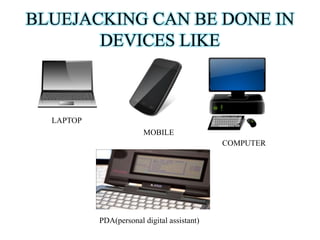
BLUEJACKING CAN BE DONE IN..
TECHNOLOGY USED
BLUETOOTH TECHNOLOGY
OBEX PROTOCOL
REQUIREMENTS
HOW TO BLUEJACK?
USAGE OF BLUEJACKING
CODE OF ETHICS
CONCEPTS i.e. BLUESNARFFING & BLUEBUGGING
PREVENTIONS
CONCLUSIONS
INTRODUCTION
• Bluejacking is sending of unsolicited message
over Bluetooth to Bluetooth-Enabled devices such
as mobile phone, PDA or Laptops, by sending a
vCard which typically contain a message in the
name field via OBEX protocol.
• Bluejacking do not remove or alter any data from
the device.
• The person who is being attacked does not know
any information about the hacker except the name
assigned to the hacker’s mobile phone.
BLUEJACKING CAN BE DONE IN
DEVICES LIKE

LAPTOP
MOBILE
COMPUTER

PDA(personal digital assistant)
TECHNOLOGY USED
• BLUETOOTH TECHNOLOGY.
• OBEX protocol.
BLUETOOTH TECHNOLGY
• Short private area that uses radio frequencies to
transmit data.
• Has a very limited range , usually 10 meters on
mobile phones and around 100 meters on laptops.
• Connects
various
devices
alike
laptop
, camera, mobile, mouse, etc. in a PAN (Personal
Area Network).
• Low power.
• Low cost.
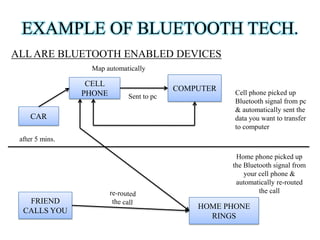
EXAMPLE OF BLUETOOTH TECH.
ALL ARE BLUETOOTH ENABLED DEVICES
Map automatically

CELL
PHONE
CAR

COMPUTER
Sent to pc

Cell phone picked up
Bluetooth signal from pc
& automatically sent the
data you want to transfer
to computer

after 5 mins.
Home phone picked up
the Bluetooth signal from
your cell phone &
automatically re-routed
the call

FRIEND
CALLS YOU

HOME PHONE
RINGS
OBEX PROTOCOL
• OBEX (abbreviation of Object Exchange) is a
communication protocol that facilitates the exchange
of binary objects between devices.
• Helps to exchange business card , data , even
applications.
• Initially OBEX was designed for infrared, latterly
now has been adopted by BLUETOOTH also used
over USB.
REQUIREMENTS
• A BLUETOOTH enabled cell phone.
• A place with a lot of people having their
BLUETOOTH device switched on.
HOW TO BLUEJACK
• Discover an area with a good number of mobile users
as restro , mall, railway station, bank, classroom, etc.
• Create a new contact in our phonebook of our cell
phone named something surprising as “Hey, you
have been Bluejacked” or “Virus Received”
• Search for the available BLUETOOTH in your range
to send the saved contact.
• The receiver is thereby distinguished by message tone
or by discovering the owner’s facial expression.
USAGE OF BLUEJACKING
•
•
•
•
•

Shopping mall
Train station
Cinema hall
Café/ Pub
Classroom
CODE OF ETHICS
•
•
•
•
•

Do not hack any device.
Do not send any abusive messages.
Do not threaten anyone.
Must not reveal yourself to the victim.
Do disable Bluetooth if you don’t want to be
BLUEJACKED.
RELATED CONCEPTS
• BLUESNARFING
• BLUEBUGGING
BLUESNARFING
• Stealing of information from victim’s Bluetooth
device often between phone, laptops, PDA’s , etc.
• This allows access to a calendar, contact list, emails
and sms and moreover some user can steal even
images and private videos.
BLUEBUGGING
• Form of Bluetooth Attack.
• Allows user to take control of a victim’s phone to call
the user’s phone and can even send messages.
• Mechanism is being carried out using Laptop, with
the use of powerful PDAs and mobile devices.
MEASURES/PREVENTIONS
• TURN OFF BLUETOOTH device until when not in
use.
• Set the BLUETOOTH device to HIDDEN mode.
CONCLUSION
BLUEJACKING is a technique by which we can
interact with a new person and can bring a great change
in the world of advertisement by sending about the
products , enterprises etc. on the Bluetooth.
So we conclude that in future this technology becomes
the key for advertisement to interact with the world.
REFRENCES
• http://en.wikipedia.org/wiki/Bluejacking
• http://www.seminarsonly.com/computer%20s
cience/Bluejacking.php
• http://www.slideshare.net
• http://electronics.howstuffworks.com/bluejac
king.htm
THANK YOU. . .
QUESTIONS ?

My seminar on bluejacking

  • 1.
    SEMINAR ON BLUEJACKING GUIDED BY: Dr.V.K.PATLE SWARNIMA SHRIVASTAVA SUBMITTED BYAKSHITA PILLAI MCA 2nd SEM
  • 2.
    OUTLINES 1. 2. 3. 4. 5. 6. 7. 8. 9. 10. 11. 12. INTRODUCTION BLUEJACKING CAN BEDONE IN.. TECHNOLOGY USED BLUETOOTH TECHNOLOGY OBEX PROTOCOL REQUIREMENTS HOW TO BLUEJACK? USAGE OF BLUEJACKING CODE OF ETHICS CONCEPTS i.e. BLUESNARFFING & BLUEBUGGING PREVENTIONS CONCLUSIONS
  • 3.
    INTRODUCTION • Bluejacking issending of unsolicited message over Bluetooth to Bluetooth-Enabled devices such as mobile phone, PDA or Laptops, by sending a vCard which typically contain a message in the name field via OBEX protocol. • Bluejacking do not remove or alter any data from the device. • The person who is being attacked does not know any information about the hacker except the name assigned to the hacker’s mobile phone.
  • 4.
    BLUEJACKING CAN BEDONE IN DEVICES LIKE LAPTOP MOBILE COMPUTER PDA(personal digital assistant)
  • 5.
    TECHNOLOGY USED • BLUETOOTHTECHNOLOGY. • OBEX protocol.
  • 6.
    BLUETOOTH TECHNOLGY • Shortprivate area that uses radio frequencies to transmit data. • Has a very limited range , usually 10 meters on mobile phones and around 100 meters on laptops. • Connects various devices alike laptop , camera, mobile, mouse, etc. in a PAN (Personal Area Network). • Low power. • Low cost.
  • 7.
    EXAMPLE OF BLUETOOTHTECH. ALL ARE BLUETOOTH ENABLED DEVICES Map automatically CELL PHONE CAR COMPUTER Sent to pc Cell phone picked up Bluetooth signal from pc & automatically sent the data you want to transfer to computer after 5 mins. Home phone picked up the Bluetooth signal from your cell phone & automatically re-routed the call FRIEND CALLS YOU HOME PHONE RINGS
  • 8.
    OBEX PROTOCOL • OBEX(abbreviation of Object Exchange) is a communication protocol that facilitates the exchange of binary objects between devices. • Helps to exchange business card , data , even applications. • Initially OBEX was designed for infrared, latterly now has been adopted by BLUETOOTH also used over USB.
  • 9.
    REQUIREMENTS • A BLUETOOTHenabled cell phone. • A place with a lot of people having their BLUETOOTH device switched on.
  • 10.
    HOW TO BLUEJACK •Discover an area with a good number of mobile users as restro , mall, railway station, bank, classroom, etc. • Create a new contact in our phonebook of our cell phone named something surprising as “Hey, you have been Bluejacked” or “Virus Received” • Search for the available BLUETOOTH in your range to send the saved contact. • The receiver is thereby distinguished by message tone or by discovering the owner’s facial expression.
  • 11.
    USAGE OF BLUEJACKING • • • • • Shoppingmall Train station Cinema hall Café/ Pub Classroom
  • 12.
    CODE OF ETHICS • • • • • Donot hack any device. Do not send any abusive messages. Do not threaten anyone. Must not reveal yourself to the victim. Do disable Bluetooth if you don’t want to be BLUEJACKED.
  • 13.
  • 14.
    BLUESNARFING • Stealing ofinformation from victim’s Bluetooth device often between phone, laptops, PDA’s , etc. • This allows access to a calendar, contact list, emails and sms and moreover some user can steal even images and private videos.
  • 15.
    BLUEBUGGING • Form ofBluetooth Attack. • Allows user to take control of a victim’s phone to call the user’s phone and can even send messages. • Mechanism is being carried out using Laptop, with the use of powerful PDAs and mobile devices.
  • 16.
    MEASURES/PREVENTIONS • TURN OFFBLUETOOTH device until when not in use. • Set the BLUETOOTH device to HIDDEN mode.
  • 17.
    CONCLUSION BLUEJACKING is atechnique by which we can interact with a new person and can bring a great change in the world of advertisement by sending about the products , enterprises etc. on the Bluetooth. So we conclude that in future this technology becomes the key for advertisement to interact with the world.
  • 18.
    REFRENCES • http://en.wikipedia.org/wiki/Bluejacking • http://www.seminarsonly.com/computer%20s cience/Bluejacking.php •http://www.slideshare.net • http://electronics.howstuffworks.com/bluejac king.htm
  • 19.
  • 20.