EXPLAIN FORMAT=JSON
Why to use?
April, 19, 2016
Sveta Smirnova
•The appearance
•Innovations
•Grouping and ordering
•Subqueries and unions
•Troubleshooting sugar
Table of Contents
2
• Has nice structured view
• Easily machine-readable
• Allows MySQL Workbench draw nice
graphs
EXPLAIN FORMAT=JSON was introduced in 5.6
3
• It has more information than regular
EXPLAIN
• Can replace OPTIMIZER TRACE for some
cases
Trendy? - Not only!
4
Innovations
5
• According to user manual
• The percentage of rows that were actually
needed, against the equal or bigger number
of resolved rows.
• Is this good or bad?
What number of ”filtered” rows mean?
6
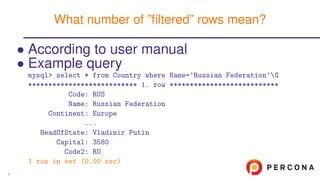
• According to user manual
• Example query
mysql> select * from Country where Name=’Russian Federation’G
*************************** 1. row ***************************
Code: RUS
Name: Russian Federation
Continent: Europe
...
HeadOfState: Vladimir Putin
Capital: 3580
Code2: RU
1 row in set (0.00 sec)
What number of ”filtered” rows mean?
6
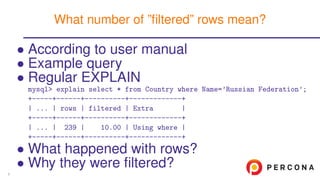
• According to user manual
• Example query
• Regular EXPLAIN
mysql> explain select * from Country where Name=’Russian Federation’;
+-----+------+----------+-------------+
| ... | rows | filtered | Extra |
+-----+------+----------+-------------+
| ... | 239 | 10.00 | Using where |
+-----+------+----------+-------------+
• What happened with rows?
• Why they were filtered?
What number of ”filtered” rows mean?
6
• According to user manual
• Example query
• Regular EXPLAIN
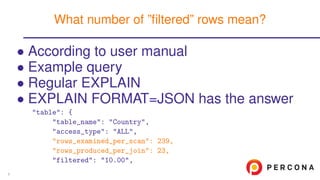
• EXPLAIN FORMAT=JSON has the answer
"table": {
"table_name": "Country",
"access_type": "ALL",
"rows_examined_per_scan": 239,
"rows_produced_per_join": 23,
"filtered": "10.00",
What number of ”filtered” rows mean?
6
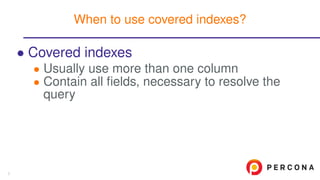
• Covered indexes
• Usually use more than one column
• Contain all fields, necessary to resolve the
query
When to use covered indexes?
7
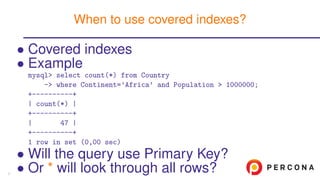
• Covered indexes
• Example
mysql> select count(*) from Country
-> where Continent=’Africa’ and Population > 1000000;
+----------+
| count(*) |
+----------+
| 47 |
+----------+
1 row in set (0,00 sec)
• Will the query use Primary Key?
• Or * will look through all rows?
When to use covered indexes?
7
• Covered indexes
• Example
• EXPLAIN FORMAT=JSON has the answer
mysql> explain format=json select count(*) from Country
-> where Continent=’Africa’ and Population > 1000000G
*************************** 1. row ***************************
...
"used_columns": [
"Continent",
"Population"
],
...
When to use covered indexes?
7
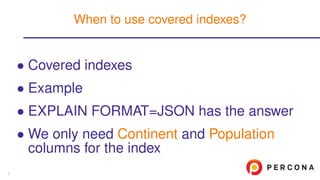
• Covered indexes
• Example
• EXPLAIN FORMAT=JSON has the answer
• We only need Continent and Population
columns for the index
When to use covered indexes?
7
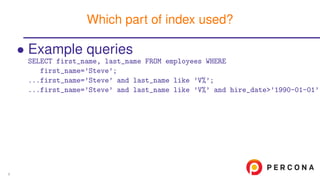
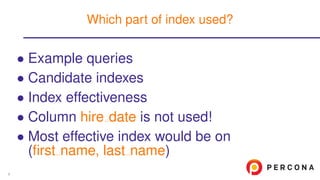
• Example queries
SELECT first_name, last_name FROM employees WHERE
first_name=’Steve’;
...first_name=’Steve’ and last_name like ’V%’;
...first_name=’Steve’ and last_name like ’V%’ and hire_date>’1990-01-01’;
Which part of index used?
8
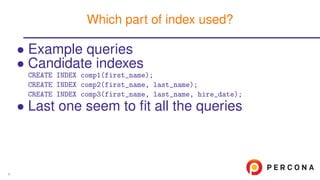
• Example queries
• Candidate indexes
CREATE INDEX comp1(first_name);
CREATE INDEX comp2(first_name, last_name);
CREATE INDEX comp3(first_name, last_name, hire_date);
• Last one seem to fit all the queries
Which part of index used?
8
• Example queries
• Candidate indexes
• Index effectiveness
mysql> explain format=json SELECT first_name, last_name FROM employees
-> WHERE first_name=’Steve’ and last_name like ’V%’
-> and hire_date > ’1990-01-01’G
*************************** 1. row ***************************
EXPLAIN: {
...
"used_key_parts": [
"first_name",
"last_name"
],
Which part of index used?
8
• Example queries
• Candidate indexes
• Index effectiveness
• Column hire date is not used!
• Most effective index would be on
(first name, last name)
Which part of index used?
8
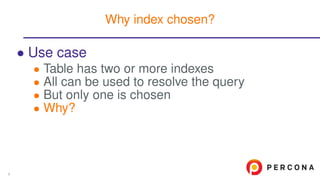
• Use case
• Table has two or more indexes
• All can be used to resolve the query
• But only one is chosen
• Why?
Why index chosen?
9
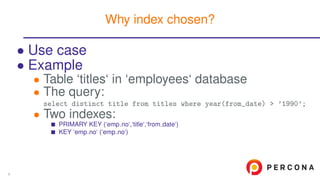
• Use case
• Example
• Table ‘titles‘ in ‘employees‘ database
• The query:
select distinct title from titles where year(from_date) > ’1990’;
• Two indexes:
PRIMARY KEY (‘emp no‘,‘title‘,‘from date‘)
KEY ‘emp no‘ (‘emp no‘)
Why index chosen?
9
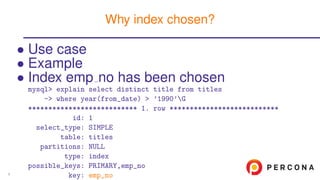
• Use case
• Example
• Index emp no has been chosen
mysql> explain select distinct title from titles
-> where year(from_date) > ’1990’G
*************************** 1. row ***************************
id: 1
select_type: SIMPLE
table: titles
partitions: NULL
type: index
possible_keys: PRIMARY,emp_no
key: emp_no
Why index chosen?
9
• Use case
• Example
• Index emp no has been chosen
• The reason
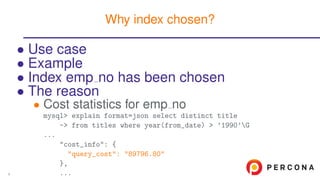
• Cost statistics for emp no
mysql> explain format=json select distinct title
-> from titles where year(from_date) > ’1990’G
...
"cost_info": {
"query_cost": "89796.80"
},
...
Why index chosen?
9
• Use case
• Example
• Index emp no has been chosen
• The reason
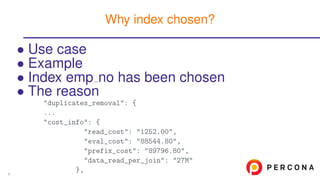
"duplicates_removal": {
...
"cost_info": {
"read_cost": "1252.00",
"eval_cost": "88544.80",
"prefix_cost": "89796.80",
"data_read_per_join": "27M"
},
Why index chosen?
9
• Use case
• Example
• Index emp no has been chosen
• The reason
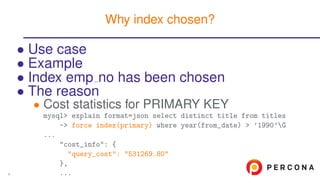
• Cost statistics for PRIMARY KEY
mysql> explain format=json select distinct title from titles
-> force index(primary) where year(from_date) > ’1990’G
...
"cost_info": {
"query_cost": "531269.80"
},
...
Why index chosen?
9
• Use case
• Example
• Index emp no has been chosen
• The reason
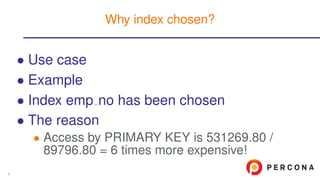
• Access by PRIMARY KEY is 531269.80 /
89796.80 = 6 times more expensive!
Why index chosen?
9
Grouping and ordering
10
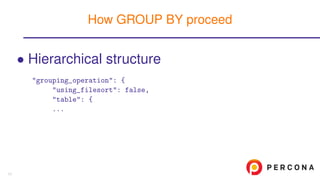
• Hierarchical structure
"grouping_operation": {
"using_filesort": false,
"table": {
...
How GROUP BY proceed
11
• Hierarchical structure
• Allows to distinguish operations
"grouping_operation": {
"using_temporary_table": true,
"using_filesort": true,
"cost_info": {
"sort_cost": "26.41"
},
"nested_loop": [
{
...
How GROUP BY proceed
11
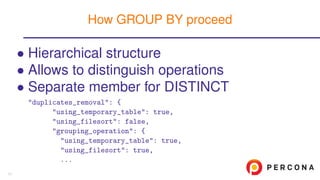
• Hierarchical structure
• Allows to distinguish operations
• Separate member for DISTINCT
"duplicates_removal": {
"using_temporary_table": true,
"using_filesort": false,
"grouping_operation": {
"using_temporary_table": true,
"using_filesort": true,
...
How GROUP BY proceed
11
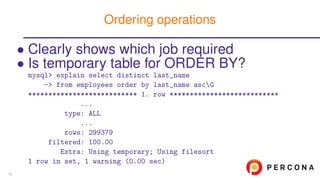
• Clearly shows which job required
• Is temporary table for ORDER BY?
mysql> explain select distinct last_name
-> from employees order by last_name ascG
*************************** 1. row ***************************
...
type: ALL
...
rows: 299379
filtered: 100.00
Extra: Using temporary; Using filesort
1 row in set, 1 warning (0.00 sec)
Ordering operations
12
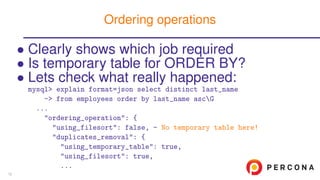
• Clearly shows which job required
• Is temporary table for ORDER BY?
• Lets check what really happened:
mysql> explain format=json select distinct last_name
-> from employees order by last_name ascG
...
"ordering_operation": {
"using_filesort": false, - No temporary table here!
"duplicates_removal": {
"using_temporary_table": true,
"using_filesort": true,
...
Ordering operations
12
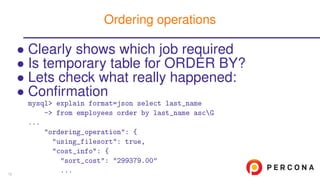
• Clearly shows which job required
• Is temporary table for ORDER BY?
• Lets check what really happened:
• Confirmation
mysql> explain format=json select last_name
-> from employees order by last_name ascG
...
"ordering_operation": {
"using_filesort": true,
"cost_info": {
"sort_cost": "299379.00"
...
Ordering operations
12
Subqueries and unions
13
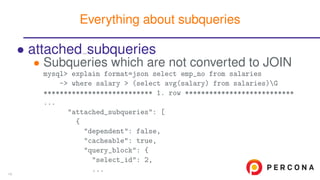
• attached subqueries
• Subqueries which are not converted to JOIN
mysql> explain format=json select emp_no from salaries
-> where salary > (select avg(salary) from salaries)G
*************************** 1. row ***************************
...
"attached_subqueries": [
{
"dependent": false,
"cacheable": true,
"query_block": {
"select_id": 2,
...
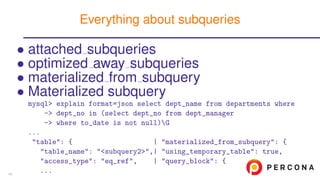
Everything about subqueries
14
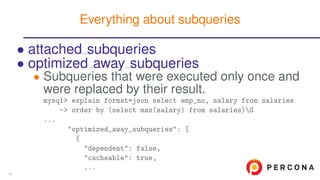
• attached subqueries
• optimized away subqueries
• Subqueries that were executed only once and
were replaced by their result.
mysql> explain format=json select emp_no, salary from salaries
-> order by (select max(salary) from salaries)G
...
"optimized_away_subqueries": [
{
"dependent": false,
"cacheable": true,
...
Everything about subqueries
14
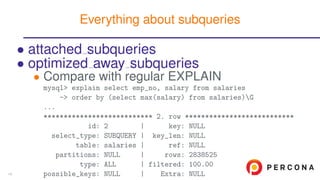
• attached subqueries
• optimized away subqueries
• Compare with regular EXPLAIN
mysql> explain select emp_no, salary from salaries
-> order by (select max(salary) from salaries)G
...
*************************** 2. row ***************************
id: 2 | key: NULL
select_type: SUBQUERY | key_len: NULL
table: salaries | ref: NULL
partitions: NULL | rows: 2838525
type: ALL | filtered: 100.00
possible_keys: NULL | Extra: NULL
Everything about subqueries
14
• attached subqueries
• optimized away subqueries
• materialized from subquery
• Materialized subquery
mysql> explain format=json select dept_name from departments where
-> dept_no in (select dept_no from dept_manager
-> where to_date is not null)G
...
"table": { | "materialized_from_subquery": {
"table_name": "<subquery2>",| "using_temporary_table": true,
"access_type": "eq_ref", | "query_block": {
...
Everything about subqueries
14
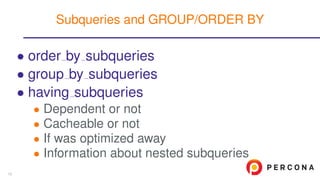
• order by subqueries
• group by subqueries
• having subqueries
• Dependent or not
• Cacheable or not
• If was optimized away
• Information about nested subqueries
Subqueries and GROUP/ORDER BY
15
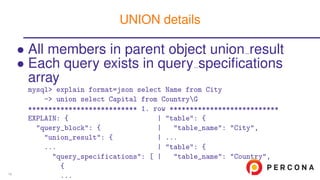
• All members in parent object union result
• Each query exists in query specifications
array
mysql> explain format=json select Name from City
-> union select Capital from CountryG
*************************** 1. row ***************************
EXPLAIN: { | "table": {
"query_block": { | "table_name": "City",
"union_result": { | ...
... | "table": {
"query_specifications": [ | "table_name": "Country",
{
...
UNION details
16
Troubleshooting sugar
17
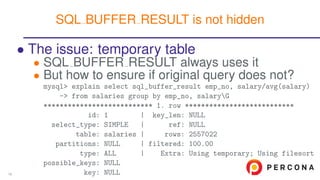
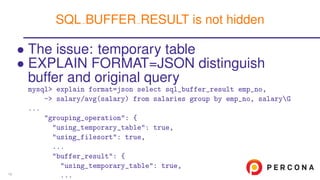
• The issue: temporary table
• SQL BUFFER RESULT always uses it
• But how to ensure if original query does not?
mysql> explain select sql_buffer_result emp_no, salary/avg(salary)
-> from salaries group by emp_no, salaryG
*************************** 1. row ***************************
id: 1 | key_len: NULL
select_type: SIMPLE | ref: NULL
table: salaries | rows: 2557022
partitions: NULL | filtered: 100.00
type: ALL | Extra: Using temporary; Using filesort
possible_keys: NULL
key: NULL
SQL BUFFER RESULT is not hidden
18
• The issue: temporary table
• EXPLAIN FORMAT=JSON distinguish
buffer and original query
mysql> explain format=json select sql_buffer_result emp_no,
-> salary/avg(salary) from salaries group by emp_no, salaryG
...
"grouping_operation": {
"using_temporary_table": true,
"using_filesort": true,
...
"buffer_result": {
"using_temporary_table": true,
...
SQL BUFFER RESULT is not hidden
18
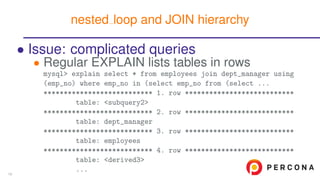
• Issue: complicated queries
• Regular EXPLAIN lists tables in rows
mysql> explain select * from employees join dept_manager using
(emp_no) where emp_no in (select emp_no from (select ...
*************************** 1. row ***************************
table: <subquery2>
*************************** 2. row ***************************
table: dept_manager
*************************** 3. row ***************************
table: employees
*************************** 4. row ***************************
table: <derived3>
...
nested loop and JOIN hierarchy
19
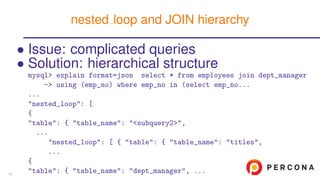
• Issue: complicated queries
• Solution: hierarchical structure
mysql> explain format=json select * from employees join dept_manager
-> using (emp_no) where emp_no in (select emp_no...
...
"nested_loop": [
{
"table": { "table_name": "<subquery2>",
...
"nested_loop": [ { "table": { "table_name": "titles",
...
{
"table": { "table_name": "dept_manager", ...
nested loop and JOIN hierarchy
19
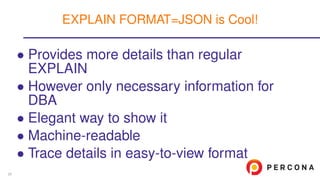
• Provides more details than regular
EXPLAIN
• However only necessary information for
DBA
• Elegant way to show it
• Machine-readable
• Trace details in easy-to-view format
EXPLAIN FORMAT=JSON is Cool!
20
• EXPLAIN in the official user manual
• EXPLAIN FORMAT=JSON is Cool! series
More information
21
???
Place for your questions
22
http://www.slideshare.net/SvetaSmirnova
https://twitter.com/svetsmirnova
Thank you!
23

Why Use EXPLAIN FORMAT=JSON?

  • 1.
    EXPLAIN FORMAT=JSON Why touse? April, 19, 2016 Sveta Smirnova
  • 2.
    •The appearance •Innovations •Grouping andordering •Subqueries and unions •Troubleshooting sugar Table of Contents 2
  • 3.
    • Has nicestructured view • Easily machine-readable • Allows MySQL Workbench draw nice graphs EXPLAIN FORMAT=JSON was introduced in 5.6 3
  • 4.
    • It hasmore information than regular EXPLAIN • Can replace OPTIMIZER TRACE for some cases Trendy? - Not only! 4
  • 5.
  • 6.
    • According touser manual • The percentage of rows that were actually needed, against the equal or bigger number of resolved rows. • Is this good or bad? What number of ”filtered” rows mean? 6
  • 7.
    • According touser manual • Example query mysql> select * from Country where Name=’Russian Federation’G *************************** 1. row *************************** Code: RUS Name: Russian Federation Continent: Europe ... HeadOfState: Vladimir Putin Capital: 3580 Code2: RU 1 row in set (0.00 sec) What number of ”filtered” rows mean? 6
  • 8.
    • According touser manual • Example query • Regular EXPLAIN mysql> explain select * from Country where Name=’Russian Federation’; +-----+------+----------+-------------+ | ... | rows | filtered | Extra | +-----+------+----------+-------------+ | ... | 239 | 10.00 | Using where | +-----+------+----------+-------------+ • What happened with rows? • Why they were filtered? What number of ”filtered” rows mean? 6
  • 9.
    • According touser manual • Example query • Regular EXPLAIN • EXPLAIN FORMAT=JSON has the answer "table": { "table_name": "Country", "access_type": "ALL", "rows_examined_per_scan": 239, "rows_produced_per_join": 23, "filtered": "10.00", What number of ”filtered” rows mean? 6
  • 10.
    • Covered indexes •Usually use more than one column • Contain all fields, necessary to resolve the query When to use covered indexes? 7
  • 11.
    • Covered indexes •Example mysql> select count(*) from Country -> where Continent=’Africa’ and Population > 1000000; +----------+ | count(*) | +----------+ | 47 | +----------+ 1 row in set (0,00 sec) • Will the query use Primary Key? • Or * will look through all rows? When to use covered indexes? 7
  • 12.
    • Covered indexes •Example • EXPLAIN FORMAT=JSON has the answer mysql> explain format=json select count(*) from Country -> where Continent=’Africa’ and Population > 1000000G *************************** 1. row *************************** ... "used_columns": [ "Continent", "Population" ], ... When to use covered indexes? 7
  • 13.
    • Covered indexes •Example • EXPLAIN FORMAT=JSON has the answer • We only need Continent and Population columns for the index When to use covered indexes? 7
  • 14.
    • Example queries SELECTfirst_name, last_name FROM employees WHERE first_name=’Steve’; ...first_name=’Steve’ and last_name like ’V%’; ...first_name=’Steve’ and last_name like ’V%’ and hire_date>’1990-01-01’; Which part of index used? 8
  • 15.
    • Example queries •Candidate indexes CREATE INDEX comp1(first_name); CREATE INDEX comp2(first_name, last_name); CREATE INDEX comp3(first_name, last_name, hire_date); • Last one seem to fit all the queries Which part of index used? 8
  • 16.
    • Example queries •Candidate indexes • Index effectiveness mysql> explain format=json SELECT first_name, last_name FROM employees -> WHERE first_name=’Steve’ and last_name like ’V%’ -> and hire_date > ’1990-01-01’G *************************** 1. row *************************** EXPLAIN: { ... "used_key_parts": [ "first_name", "last_name" ], Which part of index used? 8
  • 17.
    • Example queries •Candidate indexes • Index effectiveness • Column hire date is not used! • Most effective index would be on (first name, last name) Which part of index used? 8
  • 18.
    • Use case •Table has two or more indexes • All can be used to resolve the query • But only one is chosen • Why? Why index chosen? 9
  • 19.
    • Use case •Example • Table ‘titles‘ in ‘employees‘ database • The query: select distinct title from titles where year(from_date) > ’1990’; • Two indexes: PRIMARY KEY (‘emp no‘,‘title‘,‘from date‘) KEY ‘emp no‘ (‘emp no‘) Why index chosen? 9
  • 20.
    • Use case •Example • Index emp no has been chosen mysql> explain select distinct title from titles -> where year(from_date) > ’1990’G *************************** 1. row *************************** id: 1 select_type: SIMPLE table: titles partitions: NULL type: index possible_keys: PRIMARY,emp_no key: emp_no Why index chosen? 9
  • 21.
    • Use case •Example • Index emp no has been chosen • The reason • Cost statistics for emp no mysql> explain format=json select distinct title -> from titles where year(from_date) > ’1990’G ... "cost_info": { "query_cost": "89796.80" }, ... Why index chosen? 9
  • 22.
    • Use case •Example • Index emp no has been chosen • The reason "duplicates_removal": { ... "cost_info": { "read_cost": "1252.00", "eval_cost": "88544.80", "prefix_cost": "89796.80", "data_read_per_join": "27M" }, Why index chosen? 9
  • 23.
    • Use case •Example • Index emp no has been chosen • The reason • Cost statistics for PRIMARY KEY mysql> explain format=json select distinct title from titles -> force index(primary) where year(from_date) > ’1990’G ... "cost_info": { "query_cost": "531269.80" }, ... Why index chosen? 9
  • 24.
    • Use case •Example • Index emp no has been chosen • The reason • Access by PRIMARY KEY is 531269.80 / 89796.80 = 6 times more expensive! Why index chosen? 9
  • 25.
  • 26.
    • Hierarchical structure "grouping_operation":{ "using_filesort": false, "table": { ... How GROUP BY proceed 11
  • 27.
    • Hierarchical structure •Allows to distinguish operations "grouping_operation": { "using_temporary_table": true, "using_filesort": true, "cost_info": { "sort_cost": "26.41" }, "nested_loop": [ { ... How GROUP BY proceed 11
  • 28.
    • Hierarchical structure •Allows to distinguish operations • Separate member for DISTINCT "duplicates_removal": { "using_temporary_table": true, "using_filesort": false, "grouping_operation": { "using_temporary_table": true, "using_filesort": true, ... How GROUP BY proceed 11
  • 29.
    • Clearly showswhich job required • Is temporary table for ORDER BY? mysql> explain select distinct last_name -> from employees order by last_name ascG *************************** 1. row *************************** ... type: ALL ... rows: 299379 filtered: 100.00 Extra: Using temporary; Using filesort 1 row in set, 1 warning (0.00 sec) Ordering operations 12
  • 30.
    • Clearly showswhich job required • Is temporary table for ORDER BY? • Lets check what really happened: mysql> explain format=json select distinct last_name -> from employees order by last_name ascG ... "ordering_operation": { "using_filesort": false, - No temporary table here! "duplicates_removal": { "using_temporary_table": true, "using_filesort": true, ... Ordering operations 12
  • 31.
    • Clearly showswhich job required • Is temporary table for ORDER BY? • Lets check what really happened: • Confirmation mysql> explain format=json select last_name -> from employees order by last_name ascG ... "ordering_operation": { "using_filesort": true, "cost_info": { "sort_cost": "299379.00" ... Ordering operations 12
  • 32.
  • 33.
    • attached subqueries •Subqueries which are not converted to JOIN mysql> explain format=json select emp_no from salaries -> where salary > (select avg(salary) from salaries)G *************************** 1. row *************************** ... "attached_subqueries": [ { "dependent": false, "cacheable": true, "query_block": { "select_id": 2, ... Everything about subqueries 14
  • 34.
    • attached subqueries •optimized away subqueries • Subqueries that were executed only once and were replaced by their result. mysql> explain format=json select emp_no, salary from salaries -> order by (select max(salary) from salaries)G ... "optimized_away_subqueries": [ { "dependent": false, "cacheable": true, ... Everything about subqueries 14
  • 35.
    • attached subqueries •optimized away subqueries • Compare with regular EXPLAIN mysql> explain select emp_no, salary from salaries -> order by (select max(salary) from salaries)G ... *************************** 2. row *************************** id: 2 | key: NULL select_type: SUBQUERY | key_len: NULL table: salaries | ref: NULL partitions: NULL | rows: 2838525 type: ALL | filtered: 100.00 possible_keys: NULL | Extra: NULL Everything about subqueries 14
  • 36.
    • attached subqueries •optimized away subqueries • materialized from subquery • Materialized subquery mysql> explain format=json select dept_name from departments where -> dept_no in (select dept_no from dept_manager -> where to_date is not null)G ... "table": { | "materialized_from_subquery": { "table_name": "<subquery2>",| "using_temporary_table": true, "access_type": "eq_ref", | "query_block": { ... Everything about subqueries 14
  • 37.
    • order bysubqueries • group by subqueries • having subqueries • Dependent or not • Cacheable or not • If was optimized away • Information about nested subqueries Subqueries and GROUP/ORDER BY 15
  • 38.
    • All membersin parent object union result • Each query exists in query specifications array mysql> explain format=json select Name from City -> union select Capital from CountryG *************************** 1. row *************************** EXPLAIN: { | "table": { "query_block": { | "table_name": "City", "union_result": { | ... ... | "table": { "query_specifications": [ | "table_name": "Country", { ... UNION details 16
  • 39.
  • 40.
    • The issue:temporary table • SQL BUFFER RESULT always uses it • But how to ensure if original query does not? mysql> explain select sql_buffer_result emp_no, salary/avg(salary) -> from salaries group by emp_no, salaryG *************************** 1. row *************************** id: 1 | key_len: NULL select_type: SIMPLE | ref: NULL table: salaries | rows: 2557022 partitions: NULL | filtered: 100.00 type: ALL | Extra: Using temporary; Using filesort possible_keys: NULL key: NULL SQL BUFFER RESULT is not hidden 18
  • 41.
    • The issue:temporary table • EXPLAIN FORMAT=JSON distinguish buffer and original query mysql> explain format=json select sql_buffer_result emp_no, -> salary/avg(salary) from salaries group by emp_no, salaryG ... "grouping_operation": { "using_temporary_table": true, "using_filesort": true, ... "buffer_result": { "using_temporary_table": true, ... SQL BUFFER RESULT is not hidden 18
  • 42.
    • Issue: complicatedqueries • Regular EXPLAIN lists tables in rows mysql> explain select * from employees join dept_manager using (emp_no) where emp_no in (select emp_no from (select ... *************************** 1. row *************************** table: <subquery2> *************************** 2. row *************************** table: dept_manager *************************** 3. row *************************** table: employees *************************** 4. row *************************** table: <derived3> ... nested loop and JOIN hierarchy 19
  • 43.
    • Issue: complicatedqueries • Solution: hierarchical structure mysql> explain format=json select * from employees join dept_manager -> using (emp_no) where emp_no in (select emp_no... ... "nested_loop": [ { "table": { "table_name": "<subquery2>", ... "nested_loop": [ { "table": { "table_name": "titles", ... { "table": { "table_name": "dept_manager", ... nested loop and JOIN hierarchy 19
  • 44.
    • Provides moredetails than regular EXPLAIN • However only necessary information for DBA • Elegant way to show it • Machine-readable • Trace details in easy-to-view format EXPLAIN FORMAT=JSON is Cool! 20
  • 45.
    • EXPLAIN inthe official user manual • EXPLAIN FORMAT=JSON is Cool! series More information 21
  • 46.
    ??? Place for yourquestions 22
  • 47.