Performance Tuning MySQL

    Highload++, 11 October 2009

        Morgan Tocker, firstname at percona dot com
              Director of Training, Percona Inc.
Introduction
• So you’ve written/inherited an application.
• Usage has gone crazy.
• And you’ve diagnosed that the database is the
  bottleneck.
• So how do we fix it......
What this talk is about.
• We’re going to be talking about tuning a system
  that’s never been shown love.
  – There’s more than one strategy to do this.
  – I’m going to show you the three common paths people
    take.
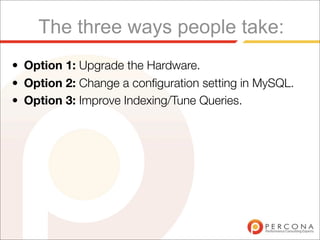
The three ways people take:
• Option 1: Upgrade the Hardware.
• Option 2: Change a configuration setting in MySQL.
• Option 3: Improve Indexing/Tune Queries.
Option 1: Add Hardware
• This “Kind of” works... but for how long?
• There’s a price point where big machines get
  exponentially more expensive.
Add Hardware (cont.)
• If you are going to do this, beware:
   – Bigger Machines will have the same speed drives.
   – Check what your bottleneck is first!
Add Hardware (cont.)
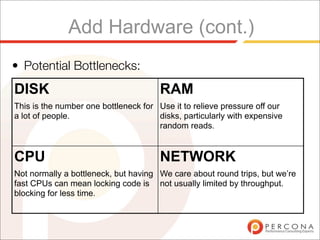
• Potential Bottlenecks:
DISK                                   RAM
This is the number one bottleneck for Use it to relieve pressure off our
a lot of people.                      disks, particularly with expensive
                                      random reads.


CPU                                    NETWORK
Not normally a bottleneck, but having We care about round trips, but we’re
fast CPUs can mean locking code is not usually limited by throughput.
blocking for less time.
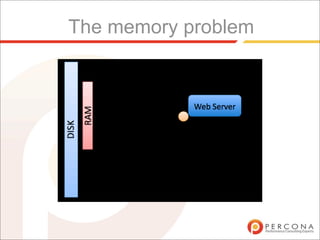
The memory problem
When this technique really works:
• You had good performance when all of your working
  set[1] of data fitted in main memory.
• As your working set increases, you just increase the
  size of memory[2].


[1] Working set can be between 1% and 100% of database size. On poorly
indexed systems it is often a higher percentage - but the real value depends on
what hotspots your data has.

[2] The economical maximum for main memory is currently 128GB. This can be
done for less than $10K with a Dell server.
Add Hardware (cont.)
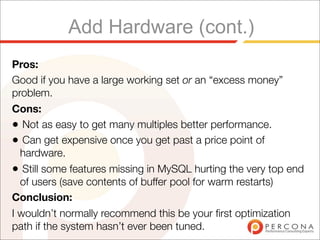
Pros:
Good if you have a large working set or an “excess money”
problem.
Cons:
• Not as easy to get many multiples better performance.
• Can get expensive once you get past a price point of
  hardware.
• Still some features missing in MySQL hurting the very top end
  of users (save contents of buffer pool for warm restarts)
Conclusion:
I wouldn’t normally recommend this be your first optimization
path if the system hasn’t ever been tuned.
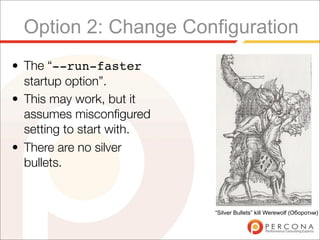
Option 2: Change Configuration
• The “--run-faster
  startup option”.
• This may work, but it
  assumes misconfigured
  setting to start with.
• There are no silver
  bullets.


                           “Silver Bullets” kill Werewolf (Оборотни)
Changing Configuration
★    Most of this is based off running the command SHOW
     GLOBAL STATUS first, then analyzing the result.
★    Be careful when running this - the period of time it
     aggregates data for may cause skew.
     ✦
         A very simple utility called ‘mext’ solves this - http://
         www.xaprb.com/mext


12
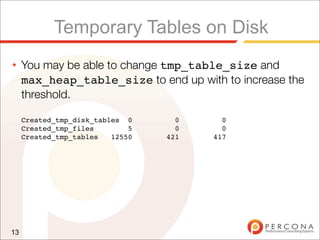
Temporary Tables on Disk
★    You may be able to change tmp_table_size and
     max_heap_table_size to end up with to increase the
     threshold.

     Created_tmp_disk_tables 0      0     0
     Created_tmp_files        5     0     0
     Created_tmp_tables   12550   421   417


13
Temporary Tables on Disk (cont.)
★    These are often caused by some internal GROUP BYs
     and complex joins with an ORDER BY that can’t use an
     index.
★    They default to memory unless they grow too big, but...
★    All temporary tables with text/blob columns will be
     created on disk regardless!


14
Binary Log cache
★    Updates are buffered before being written to the binary
     log. If they’re too big, the buffer creates a temporary file
     on disk:
★    mysql> show global status like 'binlog%';
     +-----------------------+-------+
     | Variable_name          | Value |
     +-----------------------+-------+
     | Binlog_cache_disk_use | 1082 |
     | Binlog_cache_use       | 78328 |
     +-----------------------+-------+
     2 rows in set (0.00 sec)
★    Corresponding Session Variable:
     binlog_cache_size


15
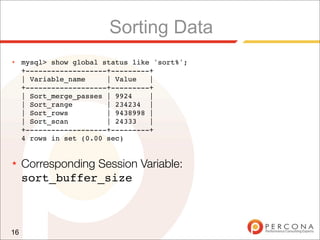
Sorting Data
★    mysql> show global status like 'sort%';
     +-------------------+---------+
     | Variable_name     | Value   |
     +-------------------+---------+
     | Sort_merge_passes | 9924    |
     | Sort_range        | 234234 |
     | Sort_rows         | 9438998 |
     | Sort_scan         | 24333   |
     +-------------------+---------+
     4 rows in set (0.00 sec)


★    Corresponding Session Variable:
     sort_buffer_size


16
Sorting Data (cont.)
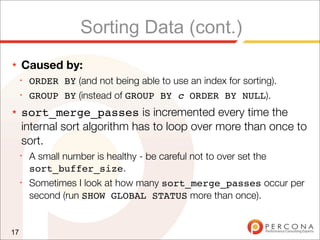
★    Caused by:
     ✦
         ORDER BY (and not being able to use an index for sorting).
     ✦
         GROUP BY (instead of GROUP BY c ORDER BY NULL).
★    sort_merge_passes is incremented every time the
     internal sort algorithm has to loop over more than once to
     sort.
     ✦
         A small number is healthy - be careful not to over set the
         sort_buffer_size.
     ✦
         Sometimes I look at how many sort_merge_passes occur per
         second (run SHOW GLOBAL STATUS more than once).


17
Query Cache
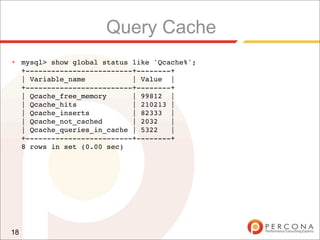
★    mysql> show global status like 'Qcache%';
     +-------------------------+--------+
     | Variable_name           | Value |
     +-------------------------+--------+
     | Qcache_free_memory      | 99812 |
     | Qcache_hits             | 210213 |
     | Qcache_inserts          | 82333 |
     | Qcache_not_cached       | 2032   |
     | Qcache_queries_in_cache | 5322   |
     +-------------------------+--------+
     8 rows in set (0.00 sec)


18
Query Cache (cont.)
★    You really need to have at least as many hits as inserts,
     but query cache discussion is not-that-simple a
     discussion.
★    The query cache does not scale well on SMP machines.
     ✦
         Unless you get large multiples of hits over inserts you may choose
         to disable it with query_cache_type = 0


19
Table Locks
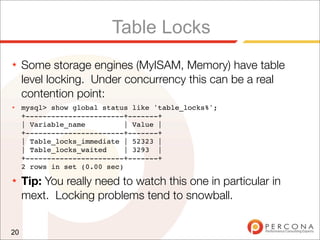
★    Some storage engines (MyISAM, Memory) have table
     level locking. Under concurrency this can be a real
     contention point:
★    mysql> show global status like 'table_locks%';
     +-----------------------+-------+
     | Variable_name          | Value |
     +-----------------------+-------+
     | Table_locks_immediate | 52323 |
     | Table_locks_waited     | 3293 |
     +-----------------------+-------+
     2 rows in set (0.00 sec)
★    Tip: You really need to watch this one in particular in
     mext. Locking problems tend to snowball.


20
Table Cache
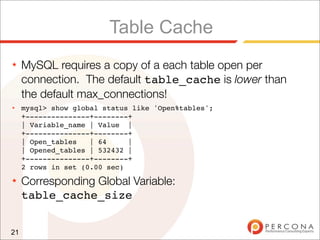
★    MySQL requires a copy of a each table open per
     connection. The default table_cache is lower than
     the default max_connections!
★    mysql> show global status like 'Open%tables';
     +---------------+--------+
     | Variable_name | Value |
     +---------------+--------+
     | Open_tables   | 64     |
     | Opened_tables | 532432 |
     +---------------+--------+
     2 rows in set (0.00 sec)
★    Corresponding Global Variable:
     table_cache_size


21
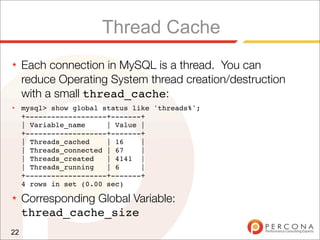
Thread Cache
★    Each connection in MySQL is a thread. You can
     reduce Operating System thread creation/destruction
     with a small thread_cache:
★    mysql> show global status like 'threads%';
     +-------------------+-------+
     | Variable_name     | Value |
     +-------------------+-------+
     | Threads_cached    | 16    |
     | Threads_connected | 67    |
     | Threads_created   | 4141 |
     | Threads_running   | 6     |
     +-------------------+-------+
     4 rows in set (0.00 sec)
★    Corresponding Global Variable:
     thread_cache_size
22
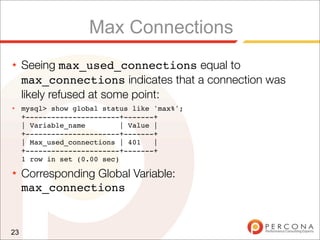
Max Connections
★    Seeing max_used_connections equal to
     max_connections indicates that a connection was
     likely refused at some point:
★    mysql> show global status like 'max%';
     +----------------------+-------+
     | Variable_name         | Value |
     +----------------------+-------+
     | Max_used_connections | 401    |
     +----------------------+-------+
     1 row in set (0.00 sec)
★    Corresponding Global Variable:
     max_connections


23
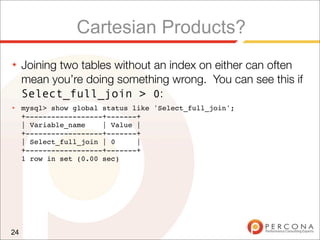
Cartesian Products?
★    Joining two tables without an index on either can often
     mean you’re doing something wrong. You can see this if
     Select_full_join > 0:
★    mysql> show global status like 'Select_full_join';
     +------------------+-------+
     | Variable_name    | Value |
     +------------------+-------+
     | Select_full_join | 0     |
     +------------------+-------+
     1 row in set (0.00 sec)


24
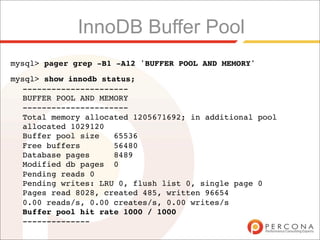
InnoDB Buffer Pool
mysql> pager grep -B1 -A12 'BUFFER POOL AND MEMORY'
mysql> show innodb status;
  ----------------------
  BUFFER POOL AND MEMORY
  ----------------------
  Total memory allocated 1205671692; in additional pool
  allocated 1029120
  Buffer pool size   65536
  Free buffers       56480
  Database pages     8489
  Modified db pages 0
  Pending reads 0
  Pending writes: LRU 0, flush list 0, single page 0
  Pages read 8028, created 485, written 96654
  0.00 reads/s, 0.00 creates/s, 0.00 writes/s
  Buffer pool hit rate 1000 / 1000
  --------------
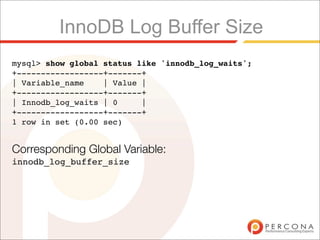
InnoDB Log Buffer Size
mysql> show global status like 'innodb_log_waits';
+------------------+-------+
| Variable_name    | Value |
+------------------+-------+
| Innodb_log_waits | 0     |
+------------------+-------+
1 row in set (0.00 sec)


Corresponding Global Variable:
innodb_log_buffer_size
Best way to review global status?
★    Trained Eye helps, but you still miss things sometimes.
★    Most of this can be automated. The tool I like the most
     (for simplicity) is this one:
     ✦
         Matthew Montgomery’s Tuning Primer:
         http://forge.mysql.com/projects/project.php?id=44


27
Every setting has a range!
★    You really can have too much of a good thing.
★    It takes more resources to allocate larger chunks of
     memory, and in some cases you’ll miss valuable CPU
     caches.
★    We’ve blogged about this with sort_buffer_size
     here:
     ✦
         http://www.mysqlperformanceblog.com/2007/08/18/how-fast-
         can-you-sort-data-with-mysql/


28
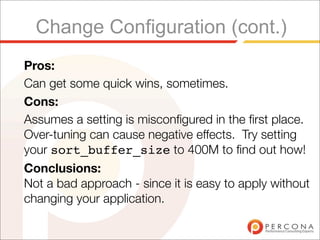
Change Configuration (cont.)
Pros:
Can get some quick wins, sometimes.
Cons:
Assumes a setting is misconfigured in the first place.
Over-tuning can cause negative effects. Try setting
your sort_buffer_size to 400M to find out how!
Conclusions:
Not a bad approach - since it is easy to apply without
changing your application.
Option 3: Add an index
• Should really be called “Add an index, or slightly
  rewrite a query”.
• This is the least “fun” approach.
• It delivers the most value for money though!
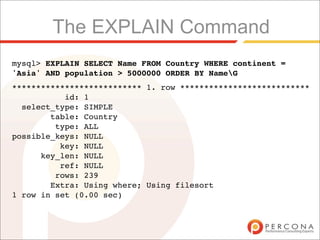
The EXPLAIN Command
mysql> EXPLAIN SELECT Name FROM Country WHERE continent =
'Asia' AND population > 5000000 ORDER BY NameG
*************************** 1. row ***************************
           id: 1
  select_type: SIMPLE
        table: Country
         type: ALL
possible_keys: NULL
          key: NULL
      key_len: NULL
          ref: NULL
         rows: 239
        Extra: Using where; Using filesort
1 row in set (0.00 sec)
Explain (cont.)
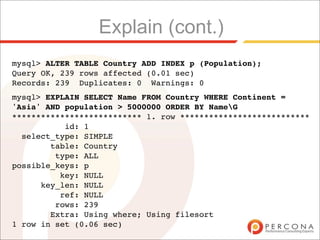
mysql> ALTER TABLE Country ADD INDEX p (Population);
Query OK, 239 rows affected (0.01 sec)
Records: 239 Duplicates: 0 Warnings: 0
mysql> EXPLAIN SELECT Name FROM Country WHERE Continent =
'Asia' AND population > 5000000 ORDER BY NameG
*************************** 1. row ***************************
           id: 1
  select_type: SIMPLE
        table: Country
         type: ALL
possible_keys: p
          key: NULL
      key_len: NULL
          ref: NULL
         rows: 239
        Extra: Using where; Using filesort
1 row in set (0.06 sec)
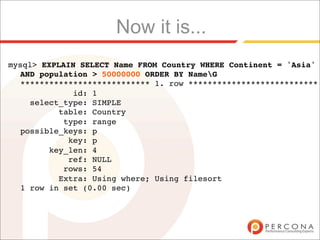
Now it is...
mysql> EXPLAIN SELECT Name FROM Country WHERE Continent = 'Asia'
  AND population > 50000000 ORDER BY NameG
  *************************** 1. row ***************************
             id: 1
    select_type: SIMPLE
          table: Country
           type: range
  possible_keys: p
            key: p
        key_len: 4
            ref: NULL
           rows: 54
          Extra: Using where; Using filesort
  1 row in set (0.00 sec)
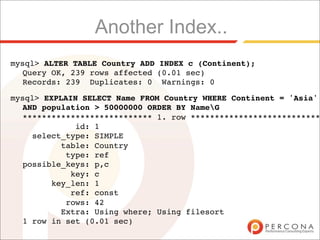
Another Index..
mysql> ALTER TABLE Country ADD INDEX c (Continent);
  Query OK, 239 rows affected (0.01 sec)
  Records: 239 Duplicates: 0 Warnings: 0

mysql> EXPLAIN SELECT Name FROM Country WHERE Continent = 'Asia'
  AND population > 50000000 ORDER BY NameG
  *************************** 1. row ***************************
             id: 1
    select_type: SIMPLE
          table: Country
           type: ref
  possible_keys: p,c
            key: c
        key_len: 1
            ref: const
           rows: 42
          Extra: Using where; Using filesort
  1 row in set (0.01 sec)
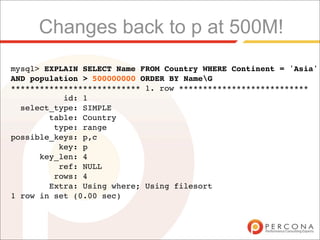
Changes back to p at 500M!
mysql> EXPLAIN SELECT Name FROM Country WHERE Continent = 'Asia'
AND population > 500000000 ORDER BY NameG
*************************** 1. row ***************************
           id: 1
  select_type: SIMPLE
        table: Country
         type: range
possible_keys: p,c
          key: p
      key_len: 4
          ref: NULL
         rows: 4
        Extra: Using where; Using filesort
1 row in set (0.00 sec)
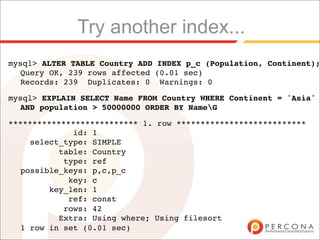
Try another index...
mysql> ALTER TABLE Country ADD INDEX p_c (Population, Continent);
  Query OK, 239 rows affected (0.01 sec)
  Records: 239 Duplicates: 0 Warnings: 0

mysql> EXPLAIN SELECT Name FROM Country WHERE Continent = 'Asia'
  AND population > 50000000 ORDER BY NameG

*************************** 1. row ***************************
             id: 1
    select_type: SIMPLE
          table: Country
           type: ref
  possible_keys: p,c,p_c
            key: c
        key_len: 1
            ref: const
           rows: 42
          Extra: Using where; Using filesort
  1 row in set (0.01 sec)
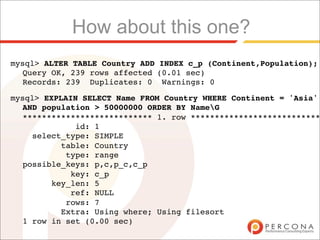
How about this one?
mysql> ALTER TABLE Country ADD INDEX c_p (Continent,Population);
  Query OK, 239 rows affected (0.01 sec)
  Records: 239 Duplicates: 0 Warnings: 0

mysql> EXPLAIN SELECT Name FROM Country WHERE Continent = 'Asia'
  AND population > 50000000 ORDER BY NameG
  *************************** 1. row ***************************
             id: 1
    select_type: SIMPLE
          table: Country
           type: range
  possible_keys: p,c,p_c,c_p
            key: c_p
        key_len: 5
            ref: NULL
           rows: 7
          Extra: Using where; Using filesort
  1 row in set (0.00 sec)
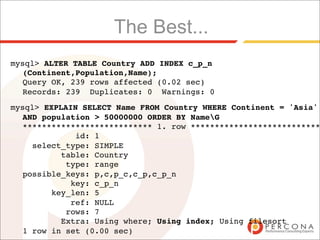
The Best...
mysql> ALTER TABLE Country ADD INDEX c_p_n
  (Continent,Population,Name);
  Query OK, 239 rows affected (0.02 sec)
  Records: 239 Duplicates: 0 Warnings: 0
mysql> EXPLAIN SELECT Name FROM Country WHERE Continent = 'Asia'
  AND population > 50000000 ORDER BY NameG
  *************************** 1. row ***************************
             id: 1
    select_type: SIMPLE
          table: Country
           type: range
  possible_keys: p,c,p_c,c_p,c_p_n
            key: c_p_n
        key_len: 5
            ref: NULL
           rows: 7
          Extra: Using where; Using index; Using filesort
  1 row in set (0.00 sec)
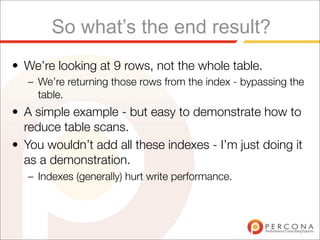
So what’s the end result?
• We’re looking at 9 rows, not the whole table.
   – We’re returning those rows from the index - bypassing the
     table.
• A simple example - but easy to demonstrate how to
  reduce table scans.
• You wouldn’t add all these indexes - I’m just doing it
  as a demonstration.
   – Indexes (generally) hurt write performance.
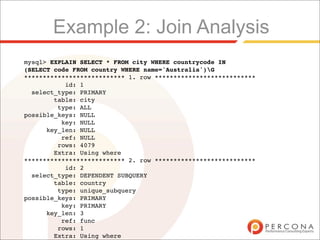
Example 2: Join Analysis
mysql> EXPLAIN SELECT * FROM city WHERE countrycode IN
(SELECT code FROM country WHERE name='Australia')G
*************************** 1. row ***************************
           id: 1
  select_type: PRIMARY
        table: city
         type: ALL
possible_keys: NULL
          key: NULL
      key_len: NULL
          ref: NULL
         rows: 4079
        Extra: Using where
*************************** 2. row ***************************
           id: 2
  select_type: DEPENDENT SUBQUERY
        table: country
         type: unique_subquery
possible_keys: PRIMARY
          key: PRIMARY
      key_len: 3
          ref: func
         rows: 1
        Extra: Using where
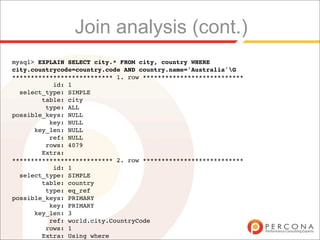
Join analysis (cont.)
mysql> EXPLAIN SELECT city.* FROM city, country WHERE
city.countrycode=country.code AND country.name='Australia'G
*************************** 1. row ***************************
           id: 1
  select_type: SIMPLE
        table: city
         type: ALL
possible_keys: NULL
          key: NULL
      key_len: NULL
          ref: NULL
         rows: 4079
        Extra:
*************************** 2. row ***************************
           id: 1
  select_type: SIMPLE
        table: country
         type: eq_ref
possible_keys: PRIMARY
          key: PRIMARY
      key_len: 3
          ref: world.city.CountryCode
         rows: 1
        Extra: Using where
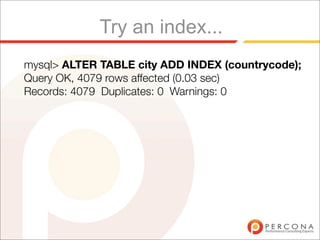
Try an index...
mysql> ALTER TABLE city ADD INDEX (countrycode);
Query OK, 4079 rows affected (0.03 sec)
Records: 4079 Duplicates: 0 Warnings: 0
Is that any better?
mysql> EXPLAIN SELECT city.* FROM city, country WHERE
city.countrycode=country.code AND country.name='Australia'G
*************************** 1. row ***************************
           id: 1
  select_type: SIMPLE
        table: city
         type: ALL
possible_keys: CountryCode
          key: NULL
      key_len: NULL
          ref: NULL
         rows: 4079
        Extra:
*************************** 2. row ***************************
           id: 1
  select_type: SIMPLE
        table: country
         type: eq_ref
possible_keys: PRIMARY
          key: PRIMARY
      key_len: 3
          ref: world.city.CountryCode
         rows: 1
        Extra: Using where
2 rows in set (0.01 sec)
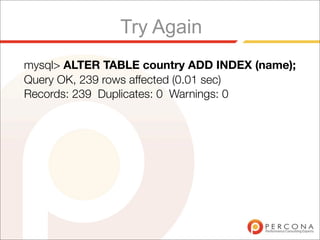
Try Again
mysql> ALTER TABLE country ADD INDEX (name);
Query OK, 239 rows affected (0.01 sec)
Records: 239 Duplicates: 0 Warnings: 0
Looking good...
mysql> EXPLAIN SELECT city.* FROM city, country WHERE
city.countrycode=country.code AND country.name='Australia'G
*************************** 1. row ***************************
           id: 1
  select_type: SIMPLE
        table: country
         type: ref
possible_keys: PRIMARY,Name
          key: Name
      key_len: 52
          ref: const
         rows: 1
        Extra: Using where
*************************** 2. row ***************************
           id: 1
  select_type: SIMPLE
        table: city
         type: ref
possible_keys: CountryCode
          key: CountryCode
      key_len: 3
          ref: world.country.Code
         rows: 18
        Extra:
2 rows in set (0.00 sec)
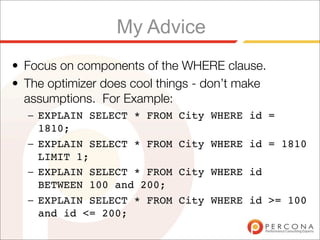
My Advice
• Focus on components of the WHERE clause.
• The optimizer does cool things - don’t make
  assumptions. For Example:
  – EXPLAIN SELECT * FROM    City WHERE id =
    1810;
  – EXPLAIN SELECT * FROM    City WHERE id = 1810
    LIMIT 1;
  – EXPLAIN SELECT * FROM    City WHERE id
    BETWEEN 100 and 200;
  – EXPLAIN SELECT * FROM    City WHERE id >= 100
    and id <= 200;
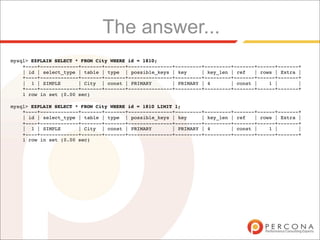
The answer...
mysql> EXPLAIN SELECT * FROM City WHERE id = 1810;
    +----+-------------+-------+-------+---------------+---------+---------+-------+------+-------+
    | id | select_type | table | type | possible_keys | key      | key_len | ref   | rows | Extra |
    +----+-------------+-------+-------+---------------+---------+---------+-------+------+-------+
    | 1 | SIMPLE       | City | const | PRIMARY        | PRIMARY | 4       | const |    1 |       |
    +----+-------------+-------+-------+---------------+---------+---------+-------+------+-------+
    1 row in set (0.00 sec)

mysql> EXPLAIN SELECT * FROM City WHERE id = 1810 LIMIT 1;
    +----+-------------+-------+-------+---------------+---------+---------+-------+------+-------+
    | id | select_type | table | type | possible_keys | key      | key_len | ref   | rows | Extra |
    +----+-------------+-------+-------+---------------+---------+---------+-------+------+-------+
    | 1 | SIMPLE       | City | const | PRIMARY        | PRIMARY | 4       | const |    1 |       |
    +----+-------------+-------+-------+---------------+---------+---------+-------+------+-------+
    1 row in set (0.00 sec)
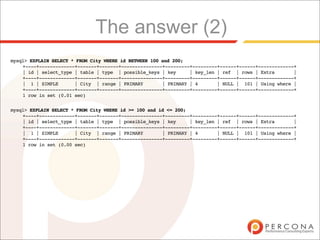
The answer (2)
mysql> EXPLAIN SELECT * FROM City WHERE id BETWEEN 100 and 200;
    +----+-------------+-------+-------+---------------+---------+---------+------+------+-------------+
    | id | select_type | table | type | possible_keys | key      | key_len | ref | rows | Extra        |
    +----+-------------+-------+-------+---------------+---------+---------+------+------+-------------+
    | 1 | SIMPLE       | City | range | PRIMARY        | PRIMARY | 4       | NULL | 101 | Using where |
    +----+-------------+-------+-------+---------------+---------+---------+------+------+-------------+
    1 row in set (0.01 sec)


mysql> EXPLAIN SELECT * FROM City WHERE id >= 100 and id <= 200;
    +----+-------------+-------+-------+---------------+---------+---------+------+------+-------------+
    | id | select_type | table | type | possible_keys | key      | key_len | ref | rows | Extra        |
    +----+-------------+-------+-------+---------------+---------+---------+------+------+-------------+
    | 1 | SIMPLE       | City | range | PRIMARY        | PRIMARY | 4       | NULL | 101 | Using where |
    +----+-------------+-------+-------+---------------+---------+---------+------+------+-------------+
    1 row in set (0.00 sec)
More information
• http://dev.mysql.com/
  EXPLAIN
• Some very good examples are also
  in “High Performance MySQL” 2nd
  Ed.
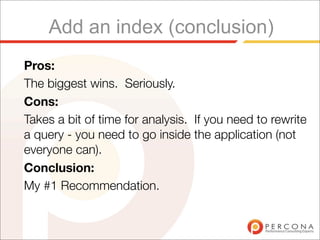
Add an index (conclusion)
Pros:
The biggest wins. Seriously.
Cons:
Takes a bit of time for analysis. If you need to rewrite
a query - you need to go inside the application (not
everyone can).
Conclusion:
My #1 Recommendation.
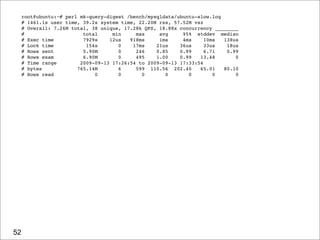
Finding bad queries
• MySQL has a feature called the slow query log.
• We can enable it, and then set the long_query_time
  to zero[1] seconds to find a selection of our queries.


[1] Requires MySQL 5.1 or patches MySQL 5.0 release.
root@ubuntu:~# perl mk-query-digest /bench/mysqldata/ubuntu-slow.log
     # 1461.1s user time, 39.2s system time, 22.20M rss, 57.52M vsz
     # Overall: 7.26M total, 38 unique, 17.28k QPS, 18.88x concurrency ________
     #                    total     min     max     avg     95% stddev median
     # Exec time          7929s    12us   918ms     1ms     4ms     10ms  138us
     # Lock time           154s       0    17ms    21us    36us     33us   18us
     # Rows sent          5.90M       0     246    0.85    0.99     6.71   0.99
     # Rows exam          6.90M       0     495    1.00    0.99   13.48       0
     # Time range        2009-09-13 17:26:54 to 2009-09-13 17:33:54
     # bytes            765.14M       6     599 110.56 202.40     65.01   80.10
     # Rows read              0       0       0       0       0        0      0


52
..
     # Query 1: 655.60 QPS, 4.28x concurrency, ID 0x813031B8BBC3B329 at byte 518466
     # This item is included in the report because it matches --limit.
     #              pct   total      min     max    avg      95% stddev median
     # Count          3 274698
     # Exec time     22   1794s     12us   918ms    7ms      2ms   43ms   332us
     # Lock time      0        0       0       0      0        0       0      0
     # Rows sent      0        0       0       0      0        0       0      0
     # Rows exam      0        0       0       0      0        0       0      0
     # Users                   1 [root]
     # Hosts                   1 localhost
     # Databases               1    tpcc
     # Time range 2009-09-13 17:26:55 to 2009-09-13 17:33:54
     # bytes          0   1.57M        6       6      6        6       0      6
     # Query_time distribution
     #   1us
     # 10us ###
     # 100us ################################################################
     #   1ms ##
     # 10ms ##
     # 100ms #
     #    1s
     # 10s+
     commitG


53
..
     # Query 2: 2.05k QPS, 4.20x concurrency, ID 0x10BEBFE721A275F6 at byte 17398977
     # This item is included in the report because it matches --limit.
     #              pct   total      min     max    avg      95% stddev median
     # Count         11 859757
     # Exec time     22   1758s     64us   812ms    2ms      9ms    9ms   224us
     # Lock time     17     27s     13us     9ms   31us     44us   26us    28us
     # Rows sent      0        0       0       0      0        0       0      0
     # Rows exam      0        0       0       0      0        0       0      0
     # Users                   1 [root]
     # Hosts                   1 localhost
     # Databases               1    tpcc
     # Time range 2009-09-13 17:26:55 to 2009-09-13 17:33:54
     # bytes         22 170.52M      192     213 207.97 202.40     0.58 202.40
     # Query_time distribution
     #   1us
     # 10us #
     # 100us ################################################################
     #   1ms ############
     # 10ms ###
     # 100ms #
     #    1s
     # 10s+
     # Tables
     #    SHOW TABLE STATUS FROM `tpcc` LIKE 'order_line'G
     #    SHOW CREATE TABLE `tpcc`.`order_line`G
     INSERT INTO order_line (ol_o_id, ol_d_id, ol_w_id, ol_number, ol_i_id, ol_supply_w_id,
     ol_quantity, ol_amount, ol_dist_info) VALUES (3669, 4, 65, 1, 6144, 38, 5, 286.943756103516,
     'sRgq28BFdht7nemW14opejRj')G


54
..
     # Query 4: 2.05k QPS, 1.42x concurrency, ID 0x6E70441DF63ACD21 at byte 192769443
     # This item is included in the report because it matches --limit.
     #              pct   total      min     max    avg      95% stddev median
     # Count         11 859769
     # Exec time      7    597s     67us   794ms  693us   467us     6ms   159us
     # Lock time     12      19s     9us    10ms   21us    31us    25us    19us
     # Rows sent      0        0       0       0       0       0       0      0
     # Rows exam      0        0       0       0       0       0       0      0
     # Users                   1 [root]
     # Hosts                   1 localhost
     # Databases               1    tpcc
     # Time range 2009-09-13 17:26:55 to 2009-09-13 17:33:54
     # bytes          7 56.36M        64      70  68.73   65.89    0.30   65.89
     # Query_time distribution
     #   1us
     # 10us #
     # 100us ################################################################
     #   1ms #
     # 10ms #
     # 100ms #
     #    1s
     # 10s+
     # Tables
     #    SHOW TABLE STATUS FROM `tpcc` LIKE 'stock'G
     #    SHOW CREATE TABLE `tpcc`.`stock`G
     UPDATE stock SET s_quantity = 79 WHERE s_i_id = 89277 AND s_w_id = 51G
     # Converted for EXPLAIN
     # EXPLAIN
     select s_quantity = 79 from stock where s_i_id = 89277 AND s_w_id = 51G


55
..
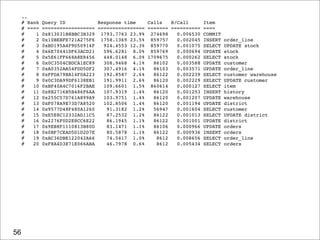
     # Rank   Query ID           Response time    Calls   R/Call       Item
     # ====   ================== ================ ======= ==========   ====
     #    1   0x813031B8BBC3B329 1793.7763 23.9% 274698     0.006530   COMMIT
     #    2   0x10BEBFE721A275F6 1758.1369 23.5% 859757     0.002045   INSERT   order_line
     #    3   0xBD195A4F9D50914F   924.4553 12.3% 859770    0.001075   SELECT   UPDATE stock
     #    4   0x6E70441DF63ACD21   596.6281 8.0% 859769     0.000694   UPDATE   stock
     #    5   0x5E61FF668A8E8456   448.0148 6.0% 1709675    0.000262   SELECT   stock
     #    6   0x0C3504CBDCA1EC89   308.9468 4.1%    86102   0.003588   UPDATE   customer
     #    7   0xA0352AA54FDD5DF2   307.4916 4.1%    86103   0.003571   UPDATE   order_line
     #    8   0xFFDA79BA14F0A223   192.8587 2.6%    86122   0.002239   SELECT   customer warehouse
     #    9   0x0C3DA99DF6138EB1   191.9911 2.6%    86120   0.002229   SELECT   UPDATE customer
     #   10   0xBF40A4C7016F2BAE   109.6601 1.5% 860614     0.000127   SELECT   item
     #   11   0x8B2716B5B486F6AA   107.9319 1.4%    86120   0.001253   INSERT   history
     #   12   0x255C57D761A899A9   103.9751 1.4%    86120   0.001207   UPDATE   warehouse
     #   13   0xF078A9E73D7A8520   102.8506 1.4%    86120   0.001194   UPDATE   district
     #   14   0x9577D48F480A1260    91.3182 1.2%    56947   0.001604   SELECT   customer
     #   15   0xE5E8C12332AD11C5    87.2532 1.2%    86122   0.001013   SELECT   UPDATE district
     #   16   0x2276F0D2E8CC6E22    86.1945 1.1%    86122   0.001001   UPDATE   district
     #   17   0x9EB8F1110813B80D    83.1471 1.1%    86106   0.000966   UPDATE   orders
     #   18   0x0BF7CEAD5D1D2D7E    80.5878 1.1%    86122   0.000936   INSERT   orders
     #   19   0xAC36DBE122042A66    74.5417 1.0%     8612   0.008656   SELECT   order_line
     #   20   0xF8A4D3E71E066ABA    46.7978 0.6%     8612   0.005434   SELECT   orders


56
Advanced mk-query-digest
• Query Review - the best feature ever.
• Saves the fingerprint of your slow query, and only
  shows you what you haven’t already looked at:

  $ mk-query-digest --review h=host1,D=test,t=query_review 
    /path/to/slow.log
Audience Question:
• How do you find unused indexes in MySQL?
Finding unused indexes (cont.)
• You have to come to my talk tomorrow for
  the answer:
  – 11 AM - Quick Wins with Third Party Patches
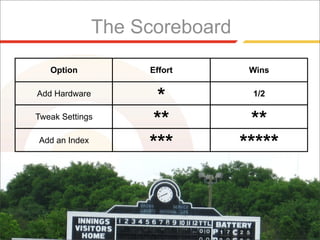
The Scoreboard

   Option           Effort       Wins

Add Hardware
                     *           1/2

Tweak Settings
                    **           **
Add an Index
                    ***         *****
The End.
  • Questions?


Photo Credits:
http://www.flickr.com/photos/7954439@N06/2535687572/

Highload Perf Tuning

  • 1.
    Performance Tuning MySQL Highload++, 11 October 2009 Morgan Tocker, firstname at percona dot com Director of Training, Percona Inc.
  • 2.
    Introduction • So you’vewritten/inherited an application. • Usage has gone crazy. • And you’ve diagnosed that the database is the bottleneck. • So how do we fix it......
  • 3.
    What this talkis about. • We’re going to be talking about tuning a system that’s never been shown love. – There’s more than one strategy to do this. – I’m going to show you the three common paths people take.
  • 4.
    The three wayspeople take: • Option 1: Upgrade the Hardware. • Option 2: Change a configuration setting in MySQL. • Option 3: Improve Indexing/Tune Queries.
  • 5.
    Option 1: AddHardware • This “Kind of” works... but for how long? • There’s a price point where big machines get exponentially more expensive.
  • 6.
    Add Hardware (cont.) •If you are going to do this, beware: – Bigger Machines will have the same speed drives. – Check what your bottleneck is first!
  • 7.
    Add Hardware (cont.) •Potential Bottlenecks: DISK RAM This is the number one bottleneck for Use it to relieve pressure off our a lot of people. disks, particularly with expensive random reads. CPU NETWORK Not normally a bottleneck, but having We care about round trips, but we’re fast CPUs can mean locking code is not usually limited by throughput. blocking for less time.
  • 8.
  • 9.
    When this techniquereally works: • You had good performance when all of your working set[1] of data fitted in main memory. • As your working set increases, you just increase the size of memory[2]. [1] Working set can be between 1% and 100% of database size. On poorly indexed systems it is often a higher percentage - but the real value depends on what hotspots your data has. [2] The economical maximum for main memory is currently 128GB. This can be done for less than $10K with a Dell server.
  • 10.
    Add Hardware (cont.) Pros: Goodif you have a large working set or an “excess money” problem. Cons: • Not as easy to get many multiples better performance. • Can get expensive once you get past a price point of hardware. • Still some features missing in MySQL hurting the very top end of users (save contents of buffer pool for warm restarts) Conclusion: I wouldn’t normally recommend this be your first optimization path if the system hasn’t ever been tuned.
  • 11.
    Option 2: ChangeConfiguration • The “--run-faster startup option”. • This may work, but it assumes misconfigured setting to start with. • There are no silver bullets. “Silver Bullets” kill Werewolf (Оборотни)
  • 12.
    Changing Configuration ★ Most of this is based off running the command SHOW GLOBAL STATUS first, then analyzing the result. ★ Be careful when running this - the period of time it aggregates data for may cause skew. ✦ A very simple utility called ‘mext’ solves this - http:// www.xaprb.com/mext 12
  • 13.
    Temporary Tables onDisk ★ You may be able to change tmp_table_size and max_heap_table_size to end up with to increase the threshold. Created_tmp_disk_tables 0 0 0 Created_tmp_files 5 0 0 Created_tmp_tables 12550 421 417 13
  • 14.
    Temporary Tables onDisk (cont.) ★ These are often caused by some internal GROUP BYs and complex joins with an ORDER BY that can’t use an index. ★ They default to memory unless they grow too big, but... ★ All temporary tables with text/blob columns will be created on disk regardless! 14
  • 15.
    Binary Log cache ★ Updates are buffered before being written to the binary log. If they’re too big, the buffer creates a temporary file on disk: ★ mysql> show global status like 'binlog%'; +-----------------------+-------+ | Variable_name | Value | +-----------------------+-------+ | Binlog_cache_disk_use | 1082 | | Binlog_cache_use | 78328 | +-----------------------+-------+ 2 rows in set (0.00 sec) ★ Corresponding Session Variable: binlog_cache_size 15
  • 16.
    Sorting Data ★ mysql> show global status like 'sort%'; +-------------------+---------+ | Variable_name | Value | +-------------------+---------+ | Sort_merge_passes | 9924 | | Sort_range | 234234 | | Sort_rows | 9438998 | | Sort_scan | 24333 | +-------------------+---------+ 4 rows in set (0.00 sec) ★ Corresponding Session Variable: sort_buffer_size 16
  • 17.
    Sorting Data (cont.) ★ Caused by: ✦ ORDER BY (and not being able to use an index for sorting). ✦ GROUP BY (instead of GROUP BY c ORDER BY NULL). ★ sort_merge_passes is incremented every time the internal sort algorithm has to loop over more than once to sort. ✦ A small number is healthy - be careful not to over set the sort_buffer_size. ✦ Sometimes I look at how many sort_merge_passes occur per second (run SHOW GLOBAL STATUS more than once). 17
  • 18.
    Query Cache ★ mysql> show global status like 'Qcache%'; +-------------------------+--------+ | Variable_name | Value | +-------------------------+--------+ | Qcache_free_memory | 99812 | | Qcache_hits | 210213 | | Qcache_inserts | 82333 | | Qcache_not_cached | 2032 | | Qcache_queries_in_cache | 5322 | +-------------------------+--------+ 8 rows in set (0.00 sec) 18
  • 19.
    Query Cache (cont.) ★ You really need to have at least as many hits as inserts, but query cache discussion is not-that-simple a discussion. ★ The query cache does not scale well on SMP machines. ✦ Unless you get large multiples of hits over inserts you may choose to disable it with query_cache_type = 0 19
  • 20.
    Table Locks ★ Some storage engines (MyISAM, Memory) have table level locking. Under concurrency this can be a real contention point: ★ mysql> show global status like 'table_locks%'; +-----------------------+-------+ | Variable_name | Value | +-----------------------+-------+ | Table_locks_immediate | 52323 | | Table_locks_waited | 3293 | +-----------------------+-------+ 2 rows in set (0.00 sec) ★ Tip: You really need to watch this one in particular in mext. Locking problems tend to snowball. 20
  • 21.
    Table Cache ★ MySQL requires a copy of a each table open per connection. The default table_cache is lower than the default max_connections! ★ mysql> show global status like 'Open%tables'; +---------------+--------+ | Variable_name | Value | +---------------+--------+ | Open_tables | 64 | | Opened_tables | 532432 | +---------------+--------+ 2 rows in set (0.00 sec) ★ Corresponding Global Variable: table_cache_size 21
  • 22.
    Thread Cache ★ Each connection in MySQL is a thread. You can reduce Operating System thread creation/destruction with a small thread_cache: ★ mysql> show global status like 'threads%'; +-------------------+-------+ | Variable_name | Value | +-------------------+-------+ | Threads_cached | 16 | | Threads_connected | 67 | | Threads_created | 4141 | | Threads_running | 6 | +-------------------+-------+ 4 rows in set (0.00 sec) ★ Corresponding Global Variable: thread_cache_size 22
  • 23.
    Max Connections ★ Seeing max_used_connections equal to max_connections indicates that a connection was likely refused at some point: ★ mysql> show global status like 'max%'; +----------------------+-------+ | Variable_name | Value | +----------------------+-------+ | Max_used_connections | 401 | +----------------------+-------+ 1 row in set (0.00 sec) ★ Corresponding Global Variable: max_connections 23
  • 24.
    Cartesian Products? ★ Joining two tables without an index on either can often mean you’re doing something wrong. You can see this if Select_full_join > 0: ★ mysql> show global status like 'Select_full_join'; +------------------+-------+ | Variable_name | Value | +------------------+-------+ | Select_full_join | 0 | +------------------+-------+ 1 row in set (0.00 sec) 24
  • 25.
    InnoDB Buffer Pool mysql>pager grep -B1 -A12 'BUFFER POOL AND MEMORY' mysql> show innodb status; ---------------------- BUFFER POOL AND MEMORY ---------------------- Total memory allocated 1205671692; in additional pool allocated 1029120 Buffer pool size 65536 Free buffers 56480 Database pages 8489 Modified db pages 0 Pending reads 0 Pending writes: LRU 0, flush list 0, single page 0 Pages read 8028, created 485, written 96654 0.00 reads/s, 0.00 creates/s, 0.00 writes/s Buffer pool hit rate 1000 / 1000 --------------
  • 26.
    InnoDB Log BufferSize mysql> show global status like 'innodb_log_waits'; +------------------+-------+ | Variable_name | Value | +------------------+-------+ | Innodb_log_waits | 0 | +------------------+-------+ 1 row in set (0.00 sec) Corresponding Global Variable: innodb_log_buffer_size
  • 27.
    Best way toreview global status? ★ Trained Eye helps, but you still miss things sometimes. ★ Most of this can be automated. The tool I like the most (for simplicity) is this one: ✦ Matthew Montgomery’s Tuning Primer: http://forge.mysql.com/projects/project.php?id=44 27
  • 28.
    Every setting hasa range! ★ You really can have too much of a good thing. ★ It takes more resources to allocate larger chunks of memory, and in some cases you’ll miss valuable CPU caches. ★ We’ve blogged about this with sort_buffer_size here: ✦ http://www.mysqlperformanceblog.com/2007/08/18/how-fast- can-you-sort-data-with-mysql/ 28
  • 29.
    Change Configuration (cont.) Pros: Canget some quick wins, sometimes. Cons: Assumes a setting is misconfigured in the first place. Over-tuning can cause negative effects. Try setting your sort_buffer_size to 400M to find out how! Conclusions: Not a bad approach - since it is easy to apply without changing your application.
  • 30.
    Option 3: Addan index • Should really be called “Add an index, or slightly rewrite a query”. • This is the least “fun” approach. • It delivers the most value for money though!
  • 31.
    The EXPLAIN Command mysql>EXPLAIN SELECT Name FROM Country WHERE continent = 'Asia' AND population > 5000000 ORDER BY NameG *************************** 1. row *************************** id: 1 select_type: SIMPLE table: Country type: ALL possible_keys: NULL key: NULL key_len: NULL ref: NULL rows: 239 Extra: Using where; Using filesort 1 row in set (0.00 sec)
  • 32.
    Explain (cont.) mysql> ALTERTABLE Country ADD INDEX p (Population); Query OK, 239 rows affected (0.01 sec) Records: 239 Duplicates: 0 Warnings: 0 mysql> EXPLAIN SELECT Name FROM Country WHERE Continent = 'Asia' AND population > 5000000 ORDER BY NameG *************************** 1. row *************************** id: 1 select_type: SIMPLE table: Country type: ALL possible_keys: p key: NULL key_len: NULL ref: NULL rows: 239 Extra: Using where; Using filesort 1 row in set (0.06 sec)
  • 33.
    Now it is... mysql>EXPLAIN SELECT Name FROM Country WHERE Continent = 'Asia' AND population > 50000000 ORDER BY NameG *************************** 1. row *************************** id: 1 select_type: SIMPLE table: Country type: range possible_keys: p key: p key_len: 4 ref: NULL rows: 54 Extra: Using where; Using filesort 1 row in set (0.00 sec)
  • 34.
    Another Index.. mysql> ALTERTABLE Country ADD INDEX c (Continent); Query OK, 239 rows affected (0.01 sec) Records: 239 Duplicates: 0 Warnings: 0 mysql> EXPLAIN SELECT Name FROM Country WHERE Continent = 'Asia' AND population > 50000000 ORDER BY NameG *************************** 1. row *************************** id: 1 select_type: SIMPLE table: Country type: ref possible_keys: p,c key: c key_len: 1 ref: const rows: 42 Extra: Using where; Using filesort 1 row in set (0.01 sec)
  • 35.
    Changes back top at 500M! mysql> EXPLAIN SELECT Name FROM Country WHERE Continent = 'Asia' AND population > 500000000 ORDER BY NameG *************************** 1. row *************************** id: 1 select_type: SIMPLE table: Country type: range possible_keys: p,c key: p key_len: 4 ref: NULL rows: 4 Extra: Using where; Using filesort 1 row in set (0.00 sec)
  • 36.
    Try another index... mysql>ALTER TABLE Country ADD INDEX p_c (Population, Continent); Query OK, 239 rows affected (0.01 sec) Records: 239 Duplicates: 0 Warnings: 0 mysql> EXPLAIN SELECT Name FROM Country WHERE Continent = 'Asia' AND population > 50000000 ORDER BY NameG *************************** 1. row *************************** id: 1 select_type: SIMPLE table: Country type: ref possible_keys: p,c,p_c key: c key_len: 1 ref: const rows: 42 Extra: Using where; Using filesort 1 row in set (0.01 sec)
  • 37.
    How about thisone? mysql> ALTER TABLE Country ADD INDEX c_p (Continent,Population); Query OK, 239 rows affected (0.01 sec) Records: 239 Duplicates: 0 Warnings: 0 mysql> EXPLAIN SELECT Name FROM Country WHERE Continent = 'Asia' AND population > 50000000 ORDER BY NameG *************************** 1. row *************************** id: 1 select_type: SIMPLE table: Country type: range possible_keys: p,c,p_c,c_p key: c_p key_len: 5 ref: NULL rows: 7 Extra: Using where; Using filesort 1 row in set (0.00 sec)
  • 38.
    The Best... mysql> ALTERTABLE Country ADD INDEX c_p_n (Continent,Population,Name); Query OK, 239 rows affected (0.02 sec) Records: 239 Duplicates: 0 Warnings: 0 mysql> EXPLAIN SELECT Name FROM Country WHERE Continent = 'Asia' AND population > 50000000 ORDER BY NameG *************************** 1. row *************************** id: 1 select_type: SIMPLE table: Country type: range possible_keys: p,c,p_c,c_p,c_p_n key: c_p_n key_len: 5 ref: NULL rows: 7 Extra: Using where; Using index; Using filesort 1 row in set (0.00 sec)
  • 39.
    So what’s theend result? • We’re looking at 9 rows, not the whole table. – We’re returning those rows from the index - bypassing the table. • A simple example - but easy to demonstrate how to reduce table scans. • You wouldn’t add all these indexes - I’m just doing it as a demonstration. – Indexes (generally) hurt write performance.
  • 40.
    Example 2: JoinAnalysis mysql> EXPLAIN SELECT * FROM city WHERE countrycode IN (SELECT code FROM country WHERE name='Australia')G *************************** 1. row *************************** id: 1 select_type: PRIMARY table: city type: ALL possible_keys: NULL key: NULL key_len: NULL ref: NULL rows: 4079 Extra: Using where *************************** 2. row *************************** id: 2 select_type: DEPENDENT SUBQUERY table: country type: unique_subquery possible_keys: PRIMARY key: PRIMARY key_len: 3 ref: func rows: 1 Extra: Using where
  • 41.
    Join analysis (cont.) mysql>EXPLAIN SELECT city.* FROM city, country WHERE city.countrycode=country.code AND country.name='Australia'G *************************** 1. row *************************** id: 1 select_type: SIMPLE table: city type: ALL possible_keys: NULL key: NULL key_len: NULL ref: NULL rows: 4079 Extra: *************************** 2. row *************************** id: 1 select_type: SIMPLE table: country type: eq_ref possible_keys: PRIMARY key: PRIMARY key_len: 3 ref: world.city.CountryCode rows: 1 Extra: Using where
  • 42.
    Try an index... mysql>ALTER TABLE city ADD INDEX (countrycode); Query OK, 4079 rows affected (0.03 sec) Records: 4079 Duplicates: 0 Warnings: 0
  • 43.
    Is that anybetter? mysql> EXPLAIN SELECT city.* FROM city, country WHERE city.countrycode=country.code AND country.name='Australia'G *************************** 1. row *************************** id: 1 select_type: SIMPLE table: city type: ALL possible_keys: CountryCode key: NULL key_len: NULL ref: NULL rows: 4079 Extra: *************************** 2. row *************************** id: 1 select_type: SIMPLE table: country type: eq_ref possible_keys: PRIMARY key: PRIMARY key_len: 3 ref: world.city.CountryCode rows: 1 Extra: Using where 2 rows in set (0.01 sec)
  • 44.
    Try Again mysql> ALTERTABLE country ADD INDEX (name); Query OK, 239 rows affected (0.01 sec) Records: 239 Duplicates: 0 Warnings: 0
  • 45.
    Looking good... mysql> EXPLAINSELECT city.* FROM city, country WHERE city.countrycode=country.code AND country.name='Australia'G *************************** 1. row *************************** id: 1 select_type: SIMPLE table: country type: ref possible_keys: PRIMARY,Name key: Name key_len: 52 ref: const rows: 1 Extra: Using where *************************** 2. row *************************** id: 1 select_type: SIMPLE table: city type: ref possible_keys: CountryCode key: CountryCode key_len: 3 ref: world.country.Code rows: 18 Extra: 2 rows in set (0.00 sec)
  • 46.
    My Advice • Focuson components of the WHERE clause. • The optimizer does cool things - don’t make assumptions. For Example: – EXPLAIN SELECT * FROM City WHERE id = 1810; – EXPLAIN SELECT * FROM City WHERE id = 1810 LIMIT 1; – EXPLAIN SELECT * FROM City WHERE id BETWEEN 100 and 200; – EXPLAIN SELECT * FROM City WHERE id >= 100 and id <= 200;
  • 47.
    The answer... mysql> EXPLAINSELECT * FROM City WHERE id = 1810; +----+-------------+-------+-------+---------------+---------+---------+-------+------+-------+ | id | select_type | table | type | possible_keys | key | key_len | ref | rows | Extra | +----+-------------+-------+-------+---------------+---------+---------+-------+------+-------+ | 1 | SIMPLE | City | const | PRIMARY | PRIMARY | 4 | const | 1 | | +----+-------------+-------+-------+---------------+---------+---------+-------+------+-------+ 1 row in set (0.00 sec) mysql> EXPLAIN SELECT * FROM City WHERE id = 1810 LIMIT 1; +----+-------------+-------+-------+---------------+---------+---------+-------+------+-------+ | id | select_type | table | type | possible_keys | key | key_len | ref | rows | Extra | +----+-------------+-------+-------+---------------+---------+---------+-------+------+-------+ | 1 | SIMPLE | City | const | PRIMARY | PRIMARY | 4 | const | 1 | | +----+-------------+-------+-------+---------------+---------+---------+-------+------+-------+ 1 row in set (0.00 sec)
  • 48.
    The answer (2) mysql>EXPLAIN SELECT * FROM City WHERE id BETWEEN 100 and 200; +----+-------------+-------+-------+---------------+---------+---------+------+------+-------------+ | id | select_type | table | type | possible_keys | key | key_len | ref | rows | Extra | +----+-------------+-------+-------+---------------+---------+---------+------+------+-------------+ | 1 | SIMPLE | City | range | PRIMARY | PRIMARY | 4 | NULL | 101 | Using where | +----+-------------+-------+-------+---------------+---------+---------+------+------+-------------+ 1 row in set (0.01 sec) mysql> EXPLAIN SELECT * FROM City WHERE id >= 100 and id <= 200; +----+-------------+-------+-------+---------------+---------+---------+------+------+-------------+ | id | select_type | table | type | possible_keys | key | key_len | ref | rows | Extra | +----+-------------+-------+-------+---------------+---------+---------+------+------+-------------+ | 1 | SIMPLE | City | range | PRIMARY | PRIMARY | 4 | NULL | 101 | Using where | +----+-------------+-------+-------+---------------+---------+---------+------+------+-------------+ 1 row in set (0.00 sec)
  • 49.
    More information • http://dev.mysql.com/ EXPLAIN • Some very good examples are also in “High Performance MySQL” 2nd Ed.
  • 50.
    Add an index(conclusion) Pros: The biggest wins. Seriously. Cons: Takes a bit of time for analysis. If you need to rewrite a query - you need to go inside the application (not everyone can). Conclusion: My #1 Recommendation.
  • 51.
    Finding bad queries •MySQL has a feature called the slow query log. • We can enable it, and then set the long_query_time to zero[1] seconds to find a selection of our queries. [1] Requires MySQL 5.1 or patches MySQL 5.0 release.
  • 52.
    root@ubuntu:~# perl mk-query-digest/bench/mysqldata/ubuntu-slow.log # 1461.1s user time, 39.2s system time, 22.20M rss, 57.52M vsz # Overall: 7.26M total, 38 unique, 17.28k QPS, 18.88x concurrency ________ # total min max avg 95% stddev median # Exec time 7929s 12us 918ms 1ms 4ms 10ms 138us # Lock time 154s 0 17ms 21us 36us 33us 18us # Rows sent 5.90M 0 246 0.85 0.99 6.71 0.99 # Rows exam 6.90M 0 495 1.00 0.99 13.48 0 # Time range 2009-09-13 17:26:54 to 2009-09-13 17:33:54 # bytes 765.14M 6 599 110.56 202.40 65.01 80.10 # Rows read 0 0 0 0 0 0 0 52
  • 53.
    .. # Query 1: 655.60 QPS, 4.28x concurrency, ID 0x813031B8BBC3B329 at byte 518466 # This item is included in the report because it matches --limit. # pct total min max avg 95% stddev median # Count 3 274698 # Exec time 22 1794s 12us 918ms 7ms 2ms 43ms 332us # Lock time 0 0 0 0 0 0 0 0 # Rows sent 0 0 0 0 0 0 0 0 # Rows exam 0 0 0 0 0 0 0 0 # Users 1 [root] # Hosts 1 localhost # Databases 1 tpcc # Time range 2009-09-13 17:26:55 to 2009-09-13 17:33:54 # bytes 0 1.57M 6 6 6 6 0 6 # Query_time distribution # 1us # 10us ### # 100us ################################################################ # 1ms ## # 10ms ## # 100ms # # 1s # 10s+ commitG 53
  • 54.
    .. # Query 2: 2.05k QPS, 4.20x concurrency, ID 0x10BEBFE721A275F6 at byte 17398977 # This item is included in the report because it matches --limit. # pct total min max avg 95% stddev median # Count 11 859757 # Exec time 22 1758s 64us 812ms 2ms 9ms 9ms 224us # Lock time 17 27s 13us 9ms 31us 44us 26us 28us # Rows sent 0 0 0 0 0 0 0 0 # Rows exam 0 0 0 0 0 0 0 0 # Users 1 [root] # Hosts 1 localhost # Databases 1 tpcc # Time range 2009-09-13 17:26:55 to 2009-09-13 17:33:54 # bytes 22 170.52M 192 213 207.97 202.40 0.58 202.40 # Query_time distribution # 1us # 10us # # 100us ################################################################ # 1ms ############ # 10ms ### # 100ms # # 1s # 10s+ # Tables # SHOW TABLE STATUS FROM `tpcc` LIKE 'order_line'G # SHOW CREATE TABLE `tpcc`.`order_line`G INSERT INTO order_line (ol_o_id, ol_d_id, ol_w_id, ol_number, ol_i_id, ol_supply_w_id, ol_quantity, ol_amount, ol_dist_info) VALUES (3669, 4, 65, 1, 6144, 38, 5, 286.943756103516, 'sRgq28BFdht7nemW14opejRj')G 54
  • 55.
    .. # Query 4: 2.05k QPS, 1.42x concurrency, ID 0x6E70441DF63ACD21 at byte 192769443 # This item is included in the report because it matches --limit. # pct total min max avg 95% stddev median # Count 11 859769 # Exec time 7 597s 67us 794ms 693us 467us 6ms 159us # Lock time 12 19s 9us 10ms 21us 31us 25us 19us # Rows sent 0 0 0 0 0 0 0 0 # Rows exam 0 0 0 0 0 0 0 0 # Users 1 [root] # Hosts 1 localhost # Databases 1 tpcc # Time range 2009-09-13 17:26:55 to 2009-09-13 17:33:54 # bytes 7 56.36M 64 70 68.73 65.89 0.30 65.89 # Query_time distribution # 1us # 10us # # 100us ################################################################ # 1ms # # 10ms # # 100ms # # 1s # 10s+ # Tables # SHOW TABLE STATUS FROM `tpcc` LIKE 'stock'G # SHOW CREATE TABLE `tpcc`.`stock`G UPDATE stock SET s_quantity = 79 WHERE s_i_id = 89277 AND s_w_id = 51G # Converted for EXPLAIN # EXPLAIN select s_quantity = 79 from stock where s_i_id = 89277 AND s_w_id = 51G 55
  • 56.
    .. # Rank Query ID Response time Calls R/Call Item # ==== ================== ================ ======= ========== ==== # 1 0x813031B8BBC3B329 1793.7763 23.9% 274698 0.006530 COMMIT # 2 0x10BEBFE721A275F6 1758.1369 23.5% 859757 0.002045 INSERT order_line # 3 0xBD195A4F9D50914F 924.4553 12.3% 859770 0.001075 SELECT UPDATE stock # 4 0x6E70441DF63ACD21 596.6281 8.0% 859769 0.000694 UPDATE stock # 5 0x5E61FF668A8E8456 448.0148 6.0% 1709675 0.000262 SELECT stock # 6 0x0C3504CBDCA1EC89 308.9468 4.1% 86102 0.003588 UPDATE customer # 7 0xA0352AA54FDD5DF2 307.4916 4.1% 86103 0.003571 UPDATE order_line # 8 0xFFDA79BA14F0A223 192.8587 2.6% 86122 0.002239 SELECT customer warehouse # 9 0x0C3DA99DF6138EB1 191.9911 2.6% 86120 0.002229 SELECT UPDATE customer # 10 0xBF40A4C7016F2BAE 109.6601 1.5% 860614 0.000127 SELECT item # 11 0x8B2716B5B486F6AA 107.9319 1.4% 86120 0.001253 INSERT history # 12 0x255C57D761A899A9 103.9751 1.4% 86120 0.001207 UPDATE warehouse # 13 0xF078A9E73D7A8520 102.8506 1.4% 86120 0.001194 UPDATE district # 14 0x9577D48F480A1260 91.3182 1.2% 56947 0.001604 SELECT customer # 15 0xE5E8C12332AD11C5 87.2532 1.2% 86122 0.001013 SELECT UPDATE district # 16 0x2276F0D2E8CC6E22 86.1945 1.1% 86122 0.001001 UPDATE district # 17 0x9EB8F1110813B80D 83.1471 1.1% 86106 0.000966 UPDATE orders # 18 0x0BF7CEAD5D1D2D7E 80.5878 1.1% 86122 0.000936 INSERT orders # 19 0xAC36DBE122042A66 74.5417 1.0% 8612 0.008656 SELECT order_line # 20 0xF8A4D3E71E066ABA 46.7978 0.6% 8612 0.005434 SELECT orders 56
  • 57.
    Advanced mk-query-digest • QueryReview - the best feature ever. • Saves the fingerprint of your slow query, and only shows you what you haven’t already looked at: $ mk-query-digest --review h=host1,D=test,t=query_review /path/to/slow.log
  • 58.
    Audience Question: • Howdo you find unused indexes in MySQL?
  • 59.
    Finding unused indexes(cont.) • You have to come to my talk tomorrow for the answer: – 11 AM - Quick Wins with Third Party Patches
  • 60.
    The Scoreboard Option Effort Wins Add Hardware * 1/2 Tweak Settings ** ** Add an Index *** *****
  • 61.
    The End. • Questions? Photo Credits: http://www.flickr.com/photos/7954439@N06/2535687572/