New features
in Performance Schema 5.7 in action
April, 24, 2017
Sveta Smirnova, Alexander Rubin
•Performance Schema Configuration
•Locks Diagnostic: MDL, Table, Record
•Memory Usage
•Stored Routines Instrumentation
•Prepared Statements
•Replication: New Tables, Slave Diagnostic, GTID
•Variables
•Errors Summary
Table of Contents
2
Performance Schema Configuration
3
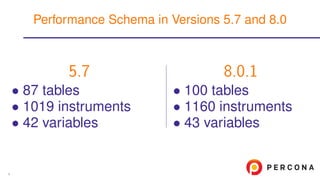
5.7
• 87 tables
• 1019 instruments
• 42 variables
8.0.1
• 100 tables
• 1160 instruments
• 43 variables
Performance Schema in Versions 5.7 and 8.0
4
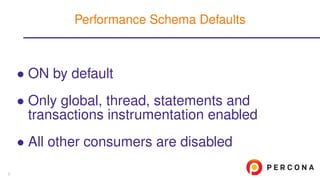
• ON by default
• Only global, thread, statements and
transactions instrumentation enabled
• All other consumers are disabled
Performance Schema Defaults
5
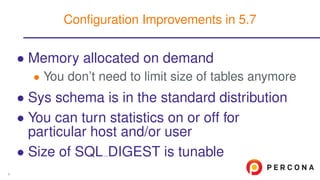
• Memory allocated on demand
• You don’t need to limit size of tables anymore
• Sys schema is in the standard distribution
• You can turn statistics on or off for
particular host and/or user
• Size of SQL DIGEST is tunable
Configuration Improvements in 5.7
6
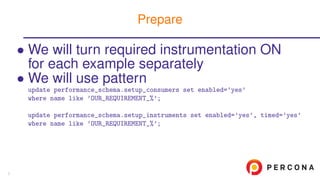
• We will turn required instrumentation ON
for each example separately
• We will use pattern
update performance_schema.setup_consumers set enabled=’yes’
where name like ’OUR_REQUIREMENT_%’;
update performance_schema.setup_instruments set enabled=’yes’, timed=’yes’
where name like ’OUR_REQUIREMENT_%’;
Prepare
7
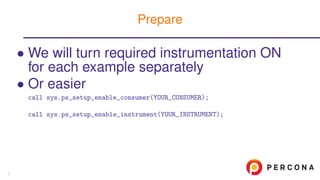
• We will turn required instrumentation ON
for each example separately
• Or easier
call sys.ps_setup_enable_consumer(YOUR_CONSUMER);
call sys.ps_setup_enable_instrument(YOUR_INSTRUMENT);
Prepare
7
• We will turn required instrumentation ON
for each example separately
• Be careful!
• They are memory and CPU intensive
• Do not turn them all ON until needed
Prepare
7
Locks diagnostic
8
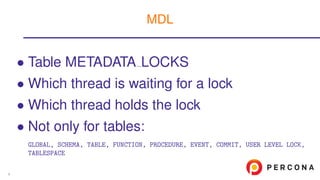
• Table METADATA LOCKS
• Which thread is waiting for a lock
• Which thread holds the lock
• Not only for tables:
GLOBAL, SCHEMA, TABLE, FUNCTION, PROCEDURE, EVENT, COMMIT, USER LEVEL LOCK,
TABLESPACE
MDL
9
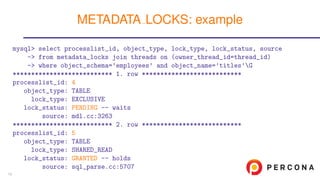
mysql> select processlist_id, object_type, lock_type, lock_status, source
-> from metadata_locks join threads on (owner_thread_id=thread_id)
-> where object_schema=’employees’ and object_name=’titles’G
*************************** 1. row ***************************
processlist_id: 4
object_type: TABLE
lock_type: EXCLUSIVE
lock_status: PENDING -- waits
source: mdl.cc:3263
*************************** 2. row ***************************
processlist_id: 5
object_type: TABLE
lock_type: SHARED_READ
lock_status: GRANTED -- holds
source: sql_parse.cc:5707
METADATA LOCKS: example
10
• Login into EC2 instance
• Login: see your card
• Password: see your card
• Run load
./test1.sh
CALL help_task()G
CALL help_solve()G
CALL task_prepare();
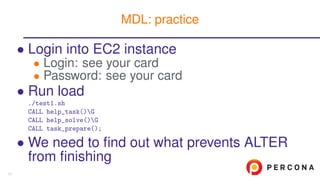
• We need to find out what prevents ALTER
from finishing
MDL: practice
11
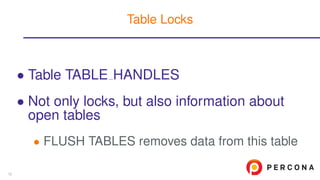
• Table TABLE HANDLES
• Not only locks, but also information about
open tables
• FLUSH TABLES removes data from this table
Table Locks
12
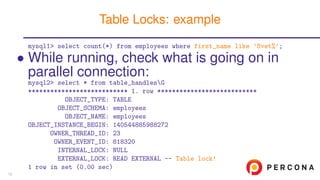
mysql1> select count(*) from employees where first_name like ’Svet%’;
• While running, check what is going on in
parallel connection:
mysql2> select * from table_handlesG
*************************** 1. row ***************************
OBJECT_TYPE: TABLE
OBJECT_SCHEMA: employees
OBJECT_NAME: employees
OBJECT_INSTANCE_BEGIN: 140544885988272
OWNER_THREAD_ID: 23
OWNER_EVENT_ID: 818320
INTERNAL_LOCK: NULL
EXTERNAL_LOCK: READ EXTERNAL -- Table lock!
1 row in set (0.00 sec)
Table Locks: example
13
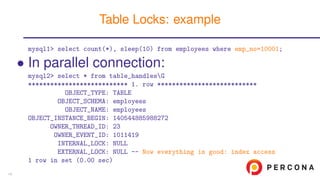
mysql1> select count(*), sleep(10) from employees where emp_no=10001;
• In parallel connection:
mysql2> select * from table_handlesG
*************************** 1. row ***************************
OBJECT_TYPE: TABLE
OBJECT_SCHEMA: employees
OBJECT_NAME: employees
OBJECT_INSTANCE_BEGIN: 140544885988272
OWNER_THREAD_ID: 23
OWNER_EVENT_ID: 1011419
INTERNAL_LOCK: NULL
EXTERNAL_LOCK: NULL -- Now everything is good: index access
1 row in set (0.00 sec)
Table Locks: example
14
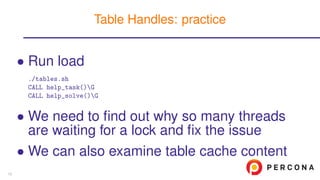
• Run load
./tables.sh
CALL help_task()G
CALL help_solve()G
• We need to find out why so many threads
are waiting for a lock and fix the issue
• We can also examine table cache content
Table Handles: practice
15
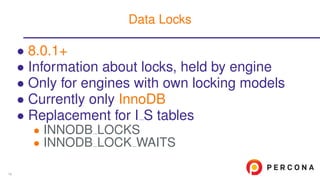
• 8.0.1+
• Information about locks, held by engine
• Only for engines with own locking models
• Currently only InnoDB
• Replacement for I S tables
• INNODB LOCKS
• INNODB LOCK WAITS
Data Locks
16
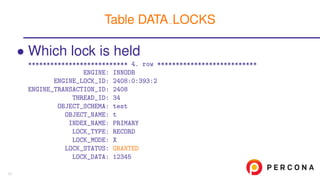
• Which lock is held
*************************** 4. row ***************************
ENGINE: INNODB
ENGINE_LOCK_ID: 2408:0:393:2
ENGINE_TRANSACTION_ID: 2408
THREAD_ID: 34
OBJECT_SCHEMA: test
OBJECT_NAME: t
INDEX_NAME: PRIMARY
LOCK_TYPE: RECORD
LOCK_MODE: X
LOCK_STATUS: GRANTED
LOCK_DATA: 12345
Table DATA LOCKS
17
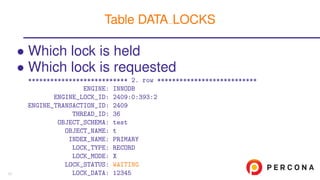
• Which lock is held
• Which lock is requested
*************************** 2. row ***************************
ENGINE: INNODB
ENGINE_LOCK_ID: 2409:0:393:2
ENGINE_TRANSACTION_ID: 2409
THREAD_ID: 36
OBJECT_SCHEMA: test
OBJECT_NAME: t
INDEX_NAME: PRIMARY
LOCK_TYPE: RECORD
LOCK_MODE: X
LOCK_STATUS: WAITING
LOCK_DATA: 12345
Table DATA LOCKS
17
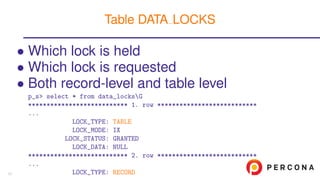
• Which lock is held
• Which lock is requested
• Both record-level and table level
p_s> select * from data_locksG
*************************** 1. row ***************************
...
LOCK_TYPE: TABLE
LOCK_MODE: IX
LOCK_STATUS: GRANTED
LOCK_DATA: NULL
*************************** 2. row ***************************
...
LOCK_TYPE: RECORD
Table DATA LOCKS
17
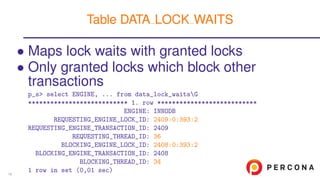
• Maps lock waits with granted locks
• Only granted locks which block other
transactions
p_s> select ENGINE, ... from data_lock_waitsG
*************************** 1. row ***************************
ENGINE: INNODB
REQUESTING_ENGINE_LOCK_ID: 2409:0:393:2
REQUESTING_ENGINE_TRANSACTION_ID: 2409
REQUESTING_THREAD_ID: 36
BLOCKING_ENGINE_LOCK_ID: 2408:0:393:2
BLOCKING_ENGINE_TRANSACTION_ID: 2408
BLOCKING_THREAD_ID: 34
1 row in set (0,01 sec)
Table DATA LOCK WAITS
18
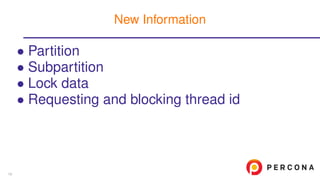
• Partition
• Subpartition
• Lock data
• Requesting and blocking thread id
New Information
19
• View innodb lock waits
In sys Schema
20
• View innodb lock waits
• Takes additional information from
INFORMATION SCHEMA.INNODB TRX
In sys Schema
20
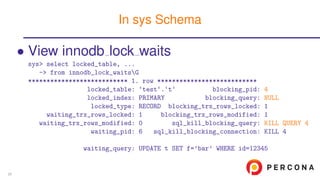
• View innodb lock waits
sys> select locked_table, ...
-> from innodb_lock_waitsG
*************************** 1. row ***************************
locked_table: ‘test‘.‘t‘ blocking_pid: 4
locked_index: PRIMARY blocking_query: NULL
locked_type: RECORD blocking_trx_rows_locked: 1
waiting_trx_rows_locked: 1 blocking_trx_rows_modified: 1
waiting_trx_rows_modified: 0 sql_kill_blocking_query: KILL QUERY 4
waiting_pid: 6 sql_kill_blocking_connection: KILL 4
waiting_query: UPDATE t SET f=’bar’ WHERE id=12345
In sys Schema
20
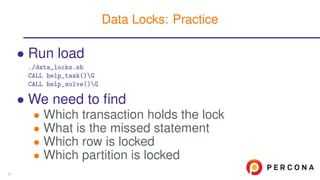
• Run load
./data_locks.sh
CALL help_task()G
CALL help_solve()G
• We need to find
• Which transaction holds the lock
• What is the missed statement
• Which row is locked
• Which partition is locked
Data Locks: Practice
21
Memory Diagnostic
22
• You could not diagnose where was memory
gone before version 5.7
• Buffers?
• Temporary tables?
• Internal structures out of user control?
• OS did not show memory as freed yet?
There is no leak really
Why These are Our Favorite Improvements?
23
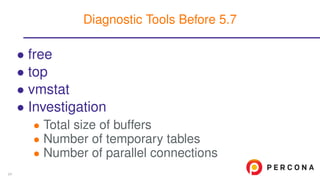
• free
• top
• vmstat
• Investigation
• There was no way to know how exactly
memory was allocated
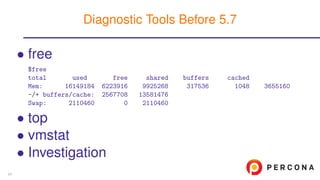
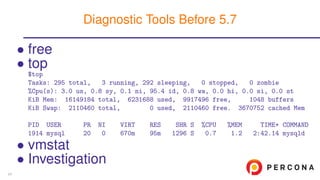
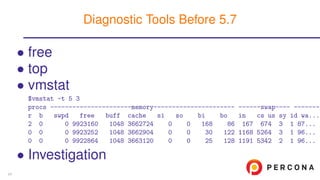
Diagnostic Tools Before 5.7
24
• free
$free
total used free shared buffers cached
Mem: 16149184 6223916 9925268 317536 1048 3655160
-/+ buffers/cache: 2567708 13581476
Swap: 2110460 0 2110460
• top
• vmstat
• Investigation
Diagnostic Tools Before 5.7
24
• free
• top
$top
Tasks: 295 total, 3 running, 292 sleeping, 0 stopped, 0 zombie
%Cpu(s): 3.0 us, 0.8 sy, 0.1 ni, 95.4 id, 0.8 wa, 0.0 hi, 0.0 si, 0.0 st
KiB Mem: 16149184 total, 6231688 used, 9917496 free, 1048 buffers
KiB Swap: 2110460 total, 0 used, 2110460 free. 3670752 cached Mem
PID USER PR NI VIRT RES SHR S %CPU %MEM TIME+ COMMAND
1914 mysql 20 0 670m 95m 1296 S 0.7 1.2 2:42.14 mysqld
• vmstat
• Investigation
Diagnostic Tools Before 5.7
24
• free
• top
• vmstat
$vmstat -t 5 3
procs ----------------------memory---------------------- ------swap---- --------
r b swpd free buff cache si so bi bo in cs us sy id wa...
2 0 0 9923160 1048 3662724 0 0 168 86 167 674 3 1 87...
0 0 0 9923252 1048 3662904 0 0 30 122 1168 5264 3 1 96...
0 0 0 9922864 1048 3663120 0 0 25 128 1191 5342 2 1 96...
• Investigation
Diagnostic Tools Before 5.7
24
• free
• top
• vmstat
• Investigation
• Total size of buffers
• Number of temporary tables
• Number of parallel connections
Diagnostic Tools Before 5.7
24
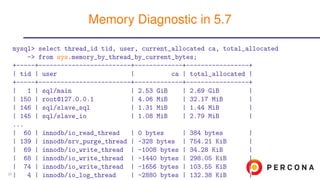
mysql> select thread_id tid, user, current_allocated ca, total_allocated
-> from sys.memory_by_thread_by_current_bytes;
+-----+-------------------------+-------------+-----------------+
| tid | user | ca | total_allocated |
+-----+-------------------------+-------------+-----------------+
| 1 | sql/main | 2.53 GiB | 2.69 GiB |
| 150 | root@127.0.0.1 | 4.06 MiB | 32.17 MiB |
| 146 | sql/slave_sql | 1.31 MiB | 1.44 MiB |
| 145 | sql/slave_io | 1.08 MiB | 2.79 MiB |
...
| 60 | innodb/io_read_thread | 0 bytes | 384 bytes |
| 139 | innodb/srv_purge_thread | -328 bytes | 754.21 KiB |
| 69 | innodb/io_write_thread | -1008 bytes | 34.28 KiB |
| 68 | innodb/io_write_thread | -1440 bytes | 298.05 KiB |
| 74 | innodb/io_write_thread | -1656 bytes | 103.55 KiB |
| 4 | innodb/io_log_thread | -2880 bytes | 132.38 KiB |
Memory Diagnostic in 5.7
25
mysql> select * from sys.memory_by_thread_by_current_bytes
-> order by current_allocated descG
*************************** 1. row ***************************
thread_id: 152
user: lj@127.0.0.1
current_count_used: 325
current_allocated: 36.00 GiB
current_avg_alloc: 113.43 MiB
current_max_alloc: 36.00 GiB
total_allocated: 37.95 GiB
...
• Finding connections, using too much
memory, now is matter of seconds!
Threads Statistics
26
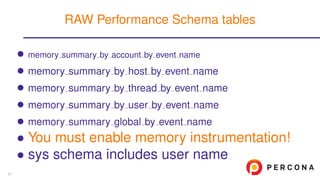
• memory summary by account by event name
• memory summary by host by event name
• memory summary by thread by event name
• memory summary by user by event name
• memory summary global by event name
• You must enable memory instrumentation!
• sys schema includes user name
RAW Performance Schema tables
27
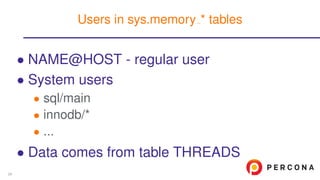
• NAME@HOST - regular user
• System users
• sql/main
• innodb/*
• ...
• Data comes from table THREADS
Users in sys.memory * tables
28
• Run load
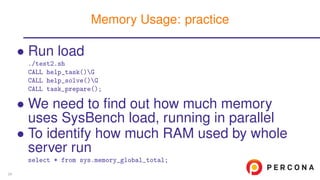
./test2.sh
CALL help_task()G
CALL help_solve()G
CALL task_prepare();
• We need to find out how much memory
uses SysBench load, running in parallel
• To identify how much RAM used by whole
server run
select * from sys.memory_global_total;
Memory Usage: practice
29
Stored Routines Instrumentation
30
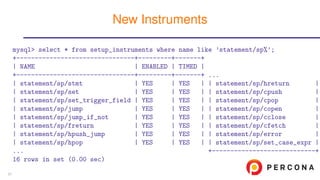
mysql> select * from setup_instruments where name like ’statement/sp%’;
+--------------------------------+---------+-------+
| NAME | ENABLED | TIMED |
+--------------------------------+---------+-------+ ...
| statement/sp/stmt | YES | YES | | statement/sp/hreturn |
| statement/sp/set | YES | YES | | statement/sp/cpush |
| statement/sp/set_trigger_field | YES | YES | | statement/sp/cpop |
| statement/sp/jump | YES | YES | | statement/sp/copen |
| statement/sp/jump_if_not | YES | YES | | statement/sp/cclose |
| statement/sp/freturn | YES | YES | | statement/sp/cfetch |
| statement/sp/hpush_jump | YES | YES | | statement/sp/error |
| statement/sp/hpop | YES | YES | | statement/sp/set_case_expr |
... +----------------------------+
16 rows in set (0.00 sec)
New Instruments
31
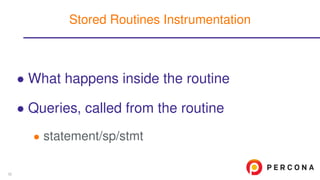
• What happens inside the routine
• Queries, called from the routine
• statement/sp/stmt
Stored Routines Instrumentation
32
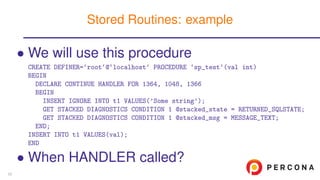
• We will use this procedure
CREATE DEFINER=‘root‘@‘localhost‘ PROCEDURE ‘sp_test‘(val int)
BEGIN
DECLARE CONTINUE HANDLER FOR 1364, 1048, 1366
BEGIN
INSERT IGNORE INTO t1 VALUES(’Some string’);
GET STACKED DIAGNOSTICS CONDITION 1 @stacked_state = RETURNED_SQLSTATE;
GET STACKED DIAGNOSTICS CONDITION 1 @stacked_msg = MESSAGE_TEXT;
END;
INSERT INTO t1 VALUES(val);
END
• When HANDLER called?
Stored Routines: example
33
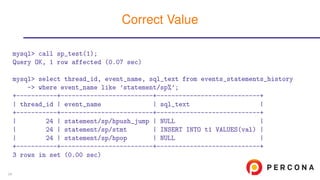
mysql> call sp_test(1);
Query OK, 1 row affected (0.07 sec)
mysql> select thread_id, event_name, sql_text from events_statements_history
-> where event_name like ’statement/sp%’;
+-----------+-------------------------+----------------------------+
| thread_id | event_name | sql_text |
+-----------+-------------------------+----------------------------+
| 24 | statement/sp/hpush_jump | NULL |
| 24 | statement/sp/stmt | INSERT INTO t1 VALUES(val) |
| 24 | statement/sp/hpop | NULL |
+-----------+-------------------------+----------------------------+
3 rows in set (0.00 sec)
Correct Value
34
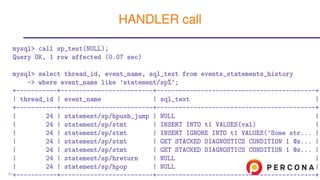
mysql> call sp_test(NULL);
Query OK, 1 row affected (0.07 sec)
mysql> select thread_id, event_name, sql_text from events_statements_history
-> where event_name like ’statement/sp%’;
+-----------+-------------------------+-------------------------------------------+
| thread_id | event_name | sql_text |
+-----------+-------------------------+-------------------------------------------+
| 24 | statement/sp/hpush_jump | NULL |
| 24 | statement/sp/stmt | INSERT INTO t1 VALUES(val) |
| 24 | statement/sp/stmt | INSERT IGNORE INTO t1 VALUES(’Some str... |
| 24 | statement/sp/stmt | GET STACKED DIAGNOSTICS CONDITION 1 @s... |
| 24 | statement/sp/stmt | GET STACKED DIAGNOSTICS CONDITION 1 @s... |
| 24 | statement/sp/hreturn | NULL |
| 24 | statement/sp/hpop | NULL |
+-----------+-------------------------+-------------------------------------------+
HANDLER call
35
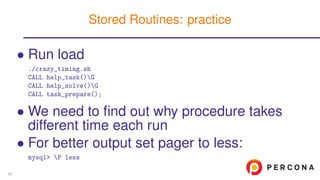
• Run load
./crazy_timing.sh
CALL help_task()G
CALL help_solve()G
CALL task_prepare();
• We need to find out why procedure takes
different time each run
• For better output set pager to less:
mysql> P less
Stored Routines: practice
36
Prepared Statements Diagnostics
37
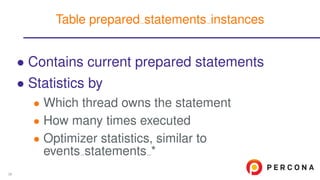
• Contains current prepared statements
• Statistics by
• Which thread owns the statement
• How many times executed
• Optimizer statistics, similar to
events statements *
Table prepared statements instances
38
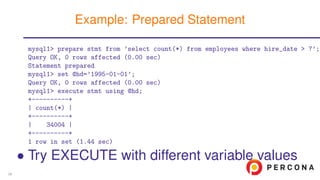
mysql1> prepare stmt from ’select count(*) from employees where hire_date > ?’;
Query OK, 0 rows affected (0.00 sec)
Statement prepared
mysql1> set @hd=’1995-01-01’;
Query OK, 0 rows affected (0.00 sec)
mysql1> execute stmt using @hd;
+----------+
| count(*) |
+----------+
| 34004 |
+----------+
1 row in set (1.44 sec)
• Try EXECUTE with different variable values
Example: Prepared Statement
39
mysql2> select statement_name, sql_text, owner_thread_id, count_reprepare,
-> count_execute, sum_timer_execute from prepared_statements_instancesG
*************************** 1. row ***************************
statement_name: stmt
sql_text: select count(*) from employees where hire_date > ?
owner_thread_id: 22
count_reprepare: 0
count_execute: 3
sum_timer_execute: 4156561368000
1 row in set (0.00 sec)
mysql1> drop prepare stmt;
Query OK, 0 rows affected (0.00 sec)
mysql2> select * from prepared_statements_instancesG
Empty set (0.00 sec)
Example: diagnosis
40
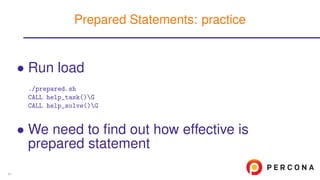
• Run load
./prepared.sh
CALL help_task()G
CALL help_solve()G
• We need to find out how effective is
prepared statement
Prepared Statements: practice
41
Replication
42
• Data from SHOW SLAVE STATUS available
in replication * tables
• Support of Replication Channels
(Multi-master slave)
• More instruments for GTID
Major Improvements
43
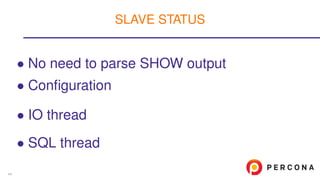
• No need to parse SHOW output
• Configuration
• IO thread
• SQL thread
SLAVE STATUS
44
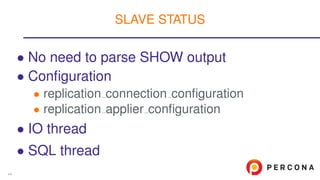
• No need to parse SHOW output
• Configuration
• replication connection configuration
• replication applier configuration
• IO thread
• SQL thread
SLAVE STATUS
44
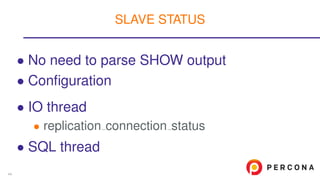
• No need to parse SHOW output
• Configuration
• IO thread
• replication connection status
• SQL thread
SLAVE STATUS
44
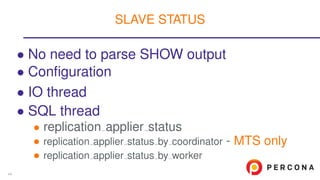
• No need to parse SHOW output
• Configuration
• IO thread
• SQL thread
• replication applier status
• replication applier status by coordinator - MTS only
• replication applier status by worker
SLAVE STATUS
44
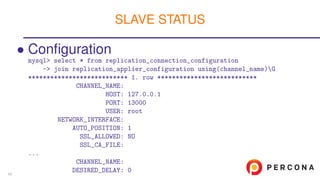
• Configuration
mysql> select * from replication_connection_configuration
-> join replication_applier_configuration using(channel_name)G
*************************** 1. row ***************************
CHANNEL_NAME:
HOST: 127.0.0.1
PORT: 13000
USER: root
NETWORK_INTERFACE:
AUTO_POSITION: 1
SSL_ALLOWED: NO
SSL_CA_FILE:
...
CHANNEL_NAME:
DESIRED_DELAY: 0
SLAVE STATUS
45
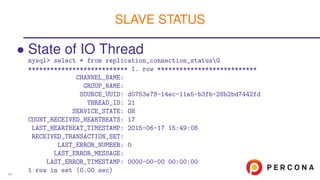
• State of IO Thread
mysql> select * from replication_connection_statusG
*************************** 1. row ***************************
CHANNEL_NAME:
GROUP_NAME:
SOURCE_UUID: d0753e78-14ec-11e5-b3fb-28b2bd7442fd
THREAD_ID: 21
SERVICE_STATE: ON
COUNT_RECEIVED_HEARTBEATS: 17
LAST_HEARTBEAT_TIMESTAMP: 2015-06-17 15:49:08
RECEIVED_TRANSACTION_SET:
LAST_ERROR_NUMBER: 0
LAST_ERROR_MESSAGE:
LAST_ERROR_TIMESTAMP: 0000-00-00 00:00:00
1 row in set (0.00 sec)
SLAVE STATUS
46
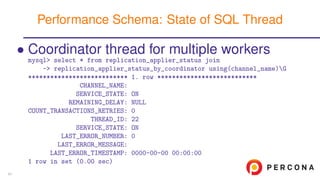
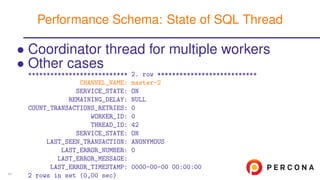
• Coordinator thread for multiple workers
mysql> select * from replication_applier_status join
-> replication_applier_status_by_coordinator using(channel_name)G
*************************** 1. row ***************************
CHANNEL_NAME:
SERVICE_STATE: ON
REMAINING_DELAY: NULL
COUNT_TRANSACTIONS_RETRIES: 0
THREAD_ID: 22
SERVICE_STATE: ON
LAST_ERROR_NUMBER: 0
LAST_ERROR_MESSAGE:
LAST_ERROR_TIMESTAMP: 0000-00-00 00:00:00
1 row in set (0.00 sec)
Performance Schema: State of SQL Thread
47
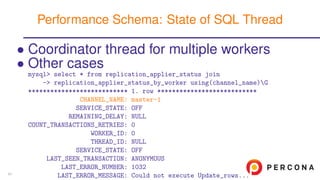
• Coordinator thread for multiple workers
• Other cases
mysql> select * from replication_applier_status join
-> replication_applier_status_by_worker using(channel_name)G
*************************** 1. row ***************************
CHANNEL_NAME: master-1
SERVICE_STATE: OFF
REMAINING_DELAY: NULL
COUNT_TRANSACTIONS_RETRIES: 0
WORKER_ID: 0
THREAD_ID: NULL
SERVICE_STATE: OFF
LAST_SEEN_TRANSACTION: ANONYMOUS
LAST_ERROR_NUMBER: 1032
LAST_ERROR_MESSAGE: Could not execute Update_rows...
Performance Schema: State of SQL Thread
47
• Coordinator thread for multiple workers
• Other cases
*************************** 2. row ***************************
CHANNEL_NAME: master-2
SERVICE_STATE: ON
REMAINING_DELAY: NULL
COUNT_TRANSACTIONS_RETRIES: 0
WORKER_ID: 0
THREAD_ID: 42
SERVICE_STATE: ON
LAST_SEEN_TRANSACTION: ANONYMOUS
LAST_ERROR_NUMBER: 0
LAST_ERROR_MESSAGE:
LAST_ERROR_TIMESTAMP: 0000-00-00 00:00:00
2 rows in set (0,00 sec)
Performance Schema: State of SQL Thread
47
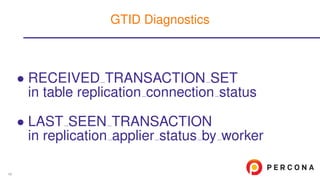
• RECEIVED TRANSACTION SET
in table replication connection status
• LAST SEEN TRANSACTION
in replication applier status by worker
GTID Diagnostics
48
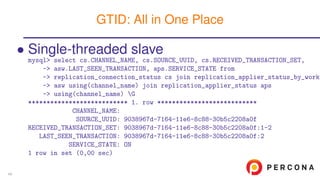
• Single-threaded slave
mysql> select cs.CHANNEL_NAME, cs.SOURCE_UUID, cs.RECEIVED_TRANSACTION_SET,
-> asw.LAST_SEEN_TRANSACTION, aps.SERVICE_STATE from
-> replication_connection_status cs join replication_applier_status_by_worke
-> asw using(channel_name) join replication_applier_status aps
-> using(channel_name) G
*************************** 1. row ***************************
CHANNEL_NAME:
SOURCE_UUID: 9038967d-7164-11e6-8c88-30b5c2208a0f
RECEIVED_TRANSACTION_SET: 9038967d-7164-11e6-8c88-30b5c2208a0f:1-2
LAST_SEEN_TRANSACTION: 9038967d-7164-11e6-8c88-30b5c2208a0f:2
SERVICE_STATE: ON
1 row in set (0,00 sec)
GTID: All in One Place
49
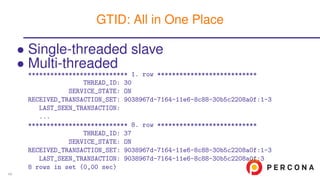
• Single-threaded slave
• Multi-threaded
*************************** 1. row ***************************
THREAD_ID: 30
SERVICE_STATE: ON
RECEIVED_TRANSACTION_SET: 9038967d-7164-11e6-8c88-30b5c2208a0f:1-3
LAST_SEEN_TRANSACTION:
...
*************************** 8. row ***************************
THREAD_ID: 37
SERVICE_STATE: ON
RECEIVED_TRANSACTION_SET: 9038967d-7164-11e6-8c88-30b5c2208a0f:1-3
LAST_SEEN_TRANSACTION: 9038967d-7164-11e6-8c88-30b5c2208a0f:3
8 rows in set (0,00 sec)
GTID: All in One Place
49
• Tables in mysql schema
• slave master info
• slave relay log info
• slave worker info
• Join with Performance Schema tables
• New instruments
• memory
• wait
• stage
More Diagnostic
50
• Run load
./repl.sh
CALL help_task()G
CALL help_solve()G
• We need to find out why replication is
broken and fix it
Replication: practice
51
Variables in P S
52
• Variables
• Status variables
• show compatibility 56 = 0
Variables Instrumentation
53
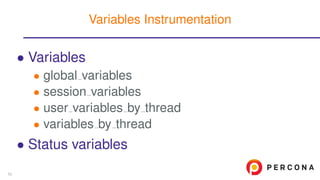
• Variables
• global variables
• session variables
• user variables by thread
• variables by thread
• Status variables
Variables Instrumentation
53
• Variables
• Status variables
• global status
• session status
• status by [account|host|thread|user]
Variables Instrumentation
53
• Same information which is in
• SHOW [GLOBAL] STATUS
• I S.GLOBAL VARIABLES
Deprecated in 5.7
Removed in 8.0.1
• I S.SESSION VARIABLES
Deprecated in 5.7
Removed in 8.0.1
• Helps to watch session variables changes
Global and Session Variables
54
• Same information which is in
• SHOW [GLOBAL] STATUS
• I S.GLOBAL STATUS
Deprecated in 5.7
Removed in 8.0.1
• I S.SESSION STATUS
Deprecated in 5.7
Removed in 8.0.1
Status Variables
55
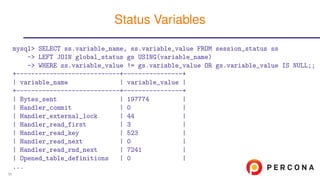
mysql> SELECT ss.variable_name, ss.variable_value FROM session_status ss
-> LEFT JOIN global_status gs USING(variable_name)
-> WHERE ss.variable_value != gs.variable_value OR gs.variable_value IS NULL;;
+----------------------------+----------------+
| variable_name | variable_value |
+----------------------------+----------------+
| Bytes_sent | 197774 |
| Handler_commit | 0 |
| Handler_external_lock | 44 |
| Handler_read_first | 3 |
| Handler_read_key | 523 |
| Handler_read_next | 0 |
| Handler_read_rnd_next | 7241 |
| Opened_table_definitions | 0 |
...
Status Variables
56
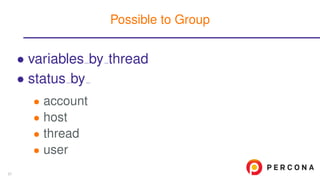
• variables by thread
• status by
• account
• host
• thread
• user
Possible to Group
57
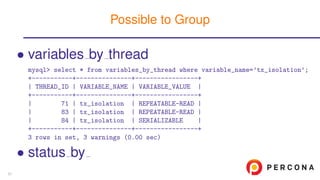
• variables by thread
mysql> select * from variables_by_thread where variable_name=’tx_isolation’;
+-----------+---------------+-----------------+
| THREAD_ID | VARIABLE_NAME | VARIABLE_VALUE |
+-----------+---------------+-----------------+
| 71 | tx_isolation | REPEATABLE-READ |
| 83 | tx_isolation | REPEATABLE-READ |
| 84 | tx_isolation | SERIALIZABLE |
+-----------+---------------+-----------------+
3 rows in set, 3 warnings (0.00 sec)
• status by
Possible to Group
57
• variables by thread
• status by
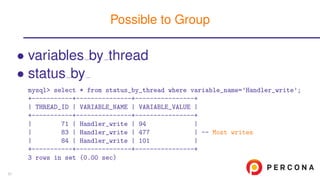
mysql> select * from status_by_thread where variable_name=’Handler_write’;
+-----------+---------------+----------------+
| THREAD_ID | VARIABLE_NAME | VARIABLE_VALUE |
+-----------+---------------+----------------+
| 71 | Handler_write | 94 |
| 83 | Handler_write | 477 | -- Most writes
| 84 | Handler_write | 101 |
+-----------+---------------+----------------+
3 rows in set (0.00 sec)
Possible to Group
57
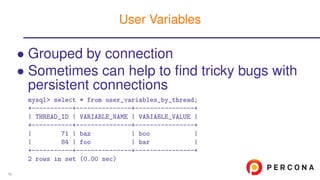
• Grouped by connection
• Sometimes can help to find tricky bugs with
persistent connections
mysql> select * from user_variables_by_thread;
+-----------+---------------+----------------+
| THREAD_ID | VARIABLE_NAME | VARIABLE_VALUE |
+-----------+---------------+----------------+
| 71 | baz | boo |
| 84 | foo | bar |
+-----------+---------------+----------------+
2 rows in set (0.00 sec)
User Variables
58
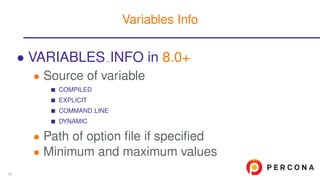
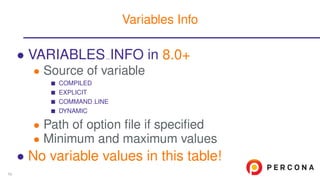
• VARIABLES INFO in 8.0+
• Source of variable
COMPILED
EXPLICIT
COMMAND LINE
DYNAMIC
• Path of option file if specified
• Minimum and maximum values
Variables Info
59
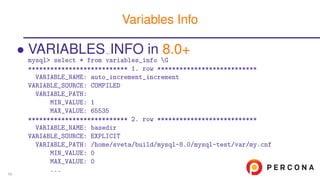
• VARIABLES INFO in 8.0+
mysql> select * from variables_info G
*************************** 1. row ***************************
VARIABLE_NAME: auto_increment_increment
VARIABLE_SOURCE: COMPILED
VARIABLE_PATH:
MIN_VALUE: 1
MAX_VALUE: 65535
*************************** 2. row ***************************
VARIABLE_NAME: basedir
VARIABLE_SOURCE: EXPLICIT
VARIABLE_PATH: /home/sveta/build/mysql-8.0/mysql-test/var/my.cnf
MIN_VALUE: 0
MAX_VALUE: 0
...
Variables Info
59
• VARIABLES INFO in 8.0+
• Source of variable
COMPILED
EXPLICIT
COMMAND LINE
DYNAMIC
• Path of option file if specified
• Minimum and maximum values
• No variable values in this table!
Variables Info
59
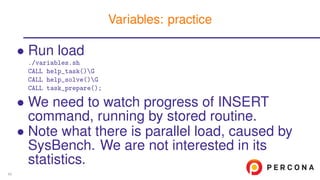
• Run load
./variables.sh
CALL help_task()G
CALL help_solve()G
CALL task_prepare();
• We need to watch progress of INSERT
command, running by stored routine.
• Note what there is parallel load, caused by
SysBench. We are not interested in its
statistics.
Variables: practice
60
Errors Summary
61
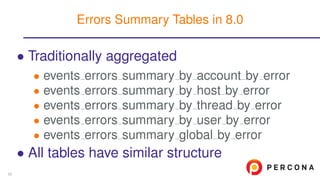
• Traditionally aggregated
• events errors summary by account by error
• events errors summary by host by error
• events errors summary by thread by error
• events errors summary by user by error
• events errors summary global by error
• All tables have similar structure
Errors Summary Tables in 8.0
62
• Traditionally aggregated
• All tables have similar structure
mysql> DESC events_errors_summary_global_by_error;
+-------------------+---------------------+------+-----+---------------------+
| Field | Type | Null | Key | Default |
+-------------------+---------------------+------+-----+---------------------+
| ERROR_NUMBER | int(11) | YES | UNI | NULL |
| ERROR_NAME | varchar(64) | YES | | NULL |
| SQL_STATE | varchar(5) | YES | | NULL |
| SUM_ERROR_RAISED | bigint(20) unsigned | NO | | NULL |
| SUM_ERROR_HANDLED | bigint(20) unsigned | NO | | NULL |
| FIRST_SEEN | timestamp | YES | | 0000-00-00 00:00:00 |
| LAST_SEEN | timestamp | YES | | 0000-00-00 00:00:00 |
+-------------------+---------------------+------+-----+
7 rows in set (0,03 sec)
Errors Summary Tables in 8.0
62
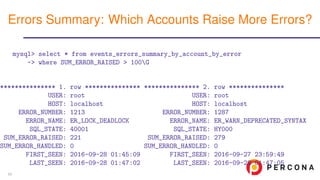
mysql> select * from events_errors_summary_by_account_by_error
-> where SUM_ERROR_RAISED > 100G
*************** 1. row ***************
USER: root
HOST: localhost
ERROR_NUMBER: 1213
ERROR_NAME: ER_LOCK_DEADLOCK
SQL_STATE: 40001
SUM_ERROR_RAISED: 221
SUM_ERROR_HANDLED: 0
FIRST_SEEN: 2016-09-28 01:45:09
LAST_SEEN: 2016-09-28 01:47:02
*************** 2. row ***************
USER: root
HOST: localhost
ERROR_NUMBER: 1287
ERROR_NAME: ER_WARN_DEPRECATED_SYNTAX
SQL_STATE: HY000
SUM_ERROR_RAISED: 279
SUM_ERROR_HANDLED: 0
FIRST_SEEN: 2016-09-27 23:59:49
LAST_SEEN: 2016-09-28 01:47:05
Errors Summary: Which Accounts Raise More Errors?
63
• Nickolay Ihalainen for practice setup idea
and 5.7 examples
Special thanks
64
• Blog of developers team
• Blog of Mark Leith: author of sys schema
• Official reference manual
More informaiton
65
???
Time For Questions
66
http://www.slideshare.net/SvetaSmirnova
https://twitter.com/svetsmirnova
https://www.linkedin.com/in/alexanderrubin
Thank you!
67

MySQL Performance Schema in Action

  • 1.
    New features in PerformanceSchema 5.7 in action April, 24, 2017 Sveta Smirnova, Alexander Rubin
  • 2.
    •Performance Schema Configuration •LocksDiagnostic: MDL, Table, Record •Memory Usage •Stored Routines Instrumentation •Prepared Statements •Replication: New Tables, Slave Diagnostic, GTID •Variables •Errors Summary Table of Contents 2
  • 3.
  • 4.
    5.7 • 87 tables •1019 instruments • 42 variables 8.0.1 • 100 tables • 1160 instruments • 43 variables Performance Schema in Versions 5.7 and 8.0 4
  • 5.
    • ON bydefault • Only global, thread, statements and transactions instrumentation enabled • All other consumers are disabled Performance Schema Defaults 5
  • 6.
    • Memory allocatedon demand • You don’t need to limit size of tables anymore • Sys schema is in the standard distribution • You can turn statistics on or off for particular host and/or user • Size of SQL DIGEST is tunable Configuration Improvements in 5.7 6
  • 7.
    • We willturn required instrumentation ON for each example separately • We will use pattern update performance_schema.setup_consumers set enabled=’yes’ where name like ’OUR_REQUIREMENT_%’; update performance_schema.setup_instruments set enabled=’yes’, timed=’yes’ where name like ’OUR_REQUIREMENT_%’; Prepare 7
  • 8.
    • We willturn required instrumentation ON for each example separately • Or easier call sys.ps_setup_enable_consumer(YOUR_CONSUMER); call sys.ps_setup_enable_instrument(YOUR_INSTRUMENT); Prepare 7
  • 9.
    • We willturn required instrumentation ON for each example separately • Be careful! • They are memory and CPU intensive • Do not turn them all ON until needed Prepare 7
  • 10.
  • 11.
    • Table METADATALOCKS • Which thread is waiting for a lock • Which thread holds the lock • Not only for tables: GLOBAL, SCHEMA, TABLE, FUNCTION, PROCEDURE, EVENT, COMMIT, USER LEVEL LOCK, TABLESPACE MDL 9
  • 12.
    mysql> select processlist_id,object_type, lock_type, lock_status, source -> from metadata_locks join threads on (owner_thread_id=thread_id) -> where object_schema=’employees’ and object_name=’titles’G *************************** 1. row *************************** processlist_id: 4 object_type: TABLE lock_type: EXCLUSIVE lock_status: PENDING -- waits source: mdl.cc:3263 *************************** 2. row *************************** processlist_id: 5 object_type: TABLE lock_type: SHARED_READ lock_status: GRANTED -- holds source: sql_parse.cc:5707 METADATA LOCKS: example 10
  • 13.
    • Login intoEC2 instance • Login: see your card • Password: see your card • Run load ./test1.sh CALL help_task()G CALL help_solve()G CALL task_prepare(); • We need to find out what prevents ALTER from finishing MDL: practice 11
  • 14.
    • Table TABLEHANDLES • Not only locks, but also information about open tables • FLUSH TABLES removes data from this table Table Locks 12
  • 15.
    mysql1> select count(*)from employees where first_name like ’Svet%’; • While running, check what is going on in parallel connection: mysql2> select * from table_handlesG *************************** 1. row *************************** OBJECT_TYPE: TABLE OBJECT_SCHEMA: employees OBJECT_NAME: employees OBJECT_INSTANCE_BEGIN: 140544885988272 OWNER_THREAD_ID: 23 OWNER_EVENT_ID: 818320 INTERNAL_LOCK: NULL EXTERNAL_LOCK: READ EXTERNAL -- Table lock! 1 row in set (0.00 sec) Table Locks: example 13
  • 16.
    mysql1> select count(*),sleep(10) from employees where emp_no=10001; • In parallel connection: mysql2> select * from table_handlesG *************************** 1. row *************************** OBJECT_TYPE: TABLE OBJECT_SCHEMA: employees OBJECT_NAME: employees OBJECT_INSTANCE_BEGIN: 140544885988272 OWNER_THREAD_ID: 23 OWNER_EVENT_ID: 1011419 INTERNAL_LOCK: NULL EXTERNAL_LOCK: NULL -- Now everything is good: index access 1 row in set (0.00 sec) Table Locks: example 14
  • 17.
    • Run load ./tables.sh CALLhelp_task()G CALL help_solve()G • We need to find out why so many threads are waiting for a lock and fix the issue • We can also examine table cache content Table Handles: practice 15
  • 18.
    • 8.0.1+ • Informationabout locks, held by engine • Only for engines with own locking models • Currently only InnoDB • Replacement for I S tables • INNODB LOCKS • INNODB LOCK WAITS Data Locks 16
  • 19.
    • Which lockis held *************************** 4. row *************************** ENGINE: INNODB ENGINE_LOCK_ID: 2408:0:393:2 ENGINE_TRANSACTION_ID: 2408 THREAD_ID: 34 OBJECT_SCHEMA: test OBJECT_NAME: t INDEX_NAME: PRIMARY LOCK_TYPE: RECORD LOCK_MODE: X LOCK_STATUS: GRANTED LOCK_DATA: 12345 Table DATA LOCKS 17
  • 20.
    • Which lockis held • Which lock is requested *************************** 2. row *************************** ENGINE: INNODB ENGINE_LOCK_ID: 2409:0:393:2 ENGINE_TRANSACTION_ID: 2409 THREAD_ID: 36 OBJECT_SCHEMA: test OBJECT_NAME: t INDEX_NAME: PRIMARY LOCK_TYPE: RECORD LOCK_MODE: X LOCK_STATUS: WAITING LOCK_DATA: 12345 Table DATA LOCKS 17
  • 21.
    • Which lockis held • Which lock is requested • Both record-level and table level p_s> select * from data_locksG *************************** 1. row *************************** ... LOCK_TYPE: TABLE LOCK_MODE: IX LOCK_STATUS: GRANTED LOCK_DATA: NULL *************************** 2. row *************************** ... LOCK_TYPE: RECORD Table DATA LOCKS 17
  • 22.
    • Maps lockwaits with granted locks • Only granted locks which block other transactions p_s> select ENGINE, ... from data_lock_waitsG *************************** 1. row *************************** ENGINE: INNODB REQUESTING_ENGINE_LOCK_ID: 2409:0:393:2 REQUESTING_ENGINE_TRANSACTION_ID: 2409 REQUESTING_THREAD_ID: 36 BLOCKING_ENGINE_LOCK_ID: 2408:0:393:2 BLOCKING_ENGINE_TRANSACTION_ID: 2408 BLOCKING_THREAD_ID: 34 1 row in set (0,01 sec) Table DATA LOCK WAITS 18
  • 23.
    • Partition • Subpartition •Lock data • Requesting and blocking thread id New Information 19
  • 24.
    • View innodblock waits In sys Schema 20
  • 25.
    • View innodblock waits • Takes additional information from INFORMATION SCHEMA.INNODB TRX In sys Schema 20
  • 26.
    • View innodblock waits sys> select locked_table, ... -> from innodb_lock_waitsG *************************** 1. row *************************** locked_table: ‘test‘.‘t‘ blocking_pid: 4 locked_index: PRIMARY blocking_query: NULL locked_type: RECORD blocking_trx_rows_locked: 1 waiting_trx_rows_locked: 1 blocking_trx_rows_modified: 1 waiting_trx_rows_modified: 0 sql_kill_blocking_query: KILL QUERY 4 waiting_pid: 6 sql_kill_blocking_connection: KILL 4 waiting_query: UPDATE t SET f=’bar’ WHERE id=12345 In sys Schema 20
  • 27.
    • Run load ./data_locks.sh CALLhelp_task()G CALL help_solve()G • We need to find • Which transaction holds the lock • What is the missed statement • Which row is locked • Which partition is locked Data Locks: Practice 21
  • 28.
  • 29.
    • You couldnot diagnose where was memory gone before version 5.7 • Buffers? • Temporary tables? • Internal structures out of user control? • OS did not show memory as freed yet? There is no leak really Why These are Our Favorite Improvements? 23
  • 30.
    • free • top •vmstat • Investigation • There was no way to know how exactly memory was allocated Diagnostic Tools Before 5.7 24
  • 31.
    • free $free total usedfree shared buffers cached Mem: 16149184 6223916 9925268 317536 1048 3655160 -/+ buffers/cache: 2567708 13581476 Swap: 2110460 0 2110460 • top • vmstat • Investigation Diagnostic Tools Before 5.7 24
  • 32.
    • free • top $top Tasks:295 total, 3 running, 292 sleeping, 0 stopped, 0 zombie %Cpu(s): 3.0 us, 0.8 sy, 0.1 ni, 95.4 id, 0.8 wa, 0.0 hi, 0.0 si, 0.0 st KiB Mem: 16149184 total, 6231688 used, 9917496 free, 1048 buffers KiB Swap: 2110460 total, 0 used, 2110460 free. 3670752 cached Mem PID USER PR NI VIRT RES SHR S %CPU %MEM TIME+ COMMAND 1914 mysql 20 0 670m 95m 1296 S 0.7 1.2 2:42.14 mysqld • vmstat • Investigation Diagnostic Tools Before 5.7 24
  • 33.
    • free • top •vmstat $vmstat -t 5 3 procs ----------------------memory---------------------- ------swap---- -------- r b swpd free buff cache si so bi bo in cs us sy id wa... 2 0 0 9923160 1048 3662724 0 0 168 86 167 674 3 1 87... 0 0 0 9923252 1048 3662904 0 0 30 122 1168 5264 3 1 96... 0 0 0 9922864 1048 3663120 0 0 25 128 1191 5342 2 1 96... • Investigation Diagnostic Tools Before 5.7 24
  • 34.
    • free • top •vmstat • Investigation • Total size of buffers • Number of temporary tables • Number of parallel connections Diagnostic Tools Before 5.7 24
  • 35.
    mysql> select thread_idtid, user, current_allocated ca, total_allocated -> from sys.memory_by_thread_by_current_bytes; +-----+-------------------------+-------------+-----------------+ | tid | user | ca | total_allocated | +-----+-------------------------+-------------+-----------------+ | 1 | sql/main | 2.53 GiB | 2.69 GiB | | 150 | root@127.0.0.1 | 4.06 MiB | 32.17 MiB | | 146 | sql/slave_sql | 1.31 MiB | 1.44 MiB | | 145 | sql/slave_io | 1.08 MiB | 2.79 MiB | ... | 60 | innodb/io_read_thread | 0 bytes | 384 bytes | | 139 | innodb/srv_purge_thread | -328 bytes | 754.21 KiB | | 69 | innodb/io_write_thread | -1008 bytes | 34.28 KiB | | 68 | innodb/io_write_thread | -1440 bytes | 298.05 KiB | | 74 | innodb/io_write_thread | -1656 bytes | 103.55 KiB | | 4 | innodb/io_log_thread | -2880 bytes | 132.38 KiB | Memory Diagnostic in 5.7 25
  • 36.
    mysql> select *from sys.memory_by_thread_by_current_bytes -> order by current_allocated descG *************************** 1. row *************************** thread_id: 152 user: lj@127.0.0.1 current_count_used: 325 current_allocated: 36.00 GiB current_avg_alloc: 113.43 MiB current_max_alloc: 36.00 GiB total_allocated: 37.95 GiB ... • Finding connections, using too much memory, now is matter of seconds! Threads Statistics 26
  • 37.
    • memory summaryby account by event name • memory summary by host by event name • memory summary by thread by event name • memory summary by user by event name • memory summary global by event name • You must enable memory instrumentation! • sys schema includes user name RAW Performance Schema tables 27
  • 38.
    • NAME@HOST -regular user • System users • sql/main • innodb/* • ... • Data comes from table THREADS Users in sys.memory * tables 28
  • 39.
    • Run load ./test2.sh CALLhelp_task()G CALL help_solve()G CALL task_prepare(); • We need to find out how much memory uses SysBench load, running in parallel • To identify how much RAM used by whole server run select * from sys.memory_global_total; Memory Usage: practice 29
  • 40.
  • 41.
    mysql> select *from setup_instruments where name like ’statement/sp%’; +--------------------------------+---------+-------+ | NAME | ENABLED | TIMED | +--------------------------------+---------+-------+ ... | statement/sp/stmt | YES | YES | | statement/sp/hreturn | | statement/sp/set | YES | YES | | statement/sp/cpush | | statement/sp/set_trigger_field | YES | YES | | statement/sp/cpop | | statement/sp/jump | YES | YES | | statement/sp/copen | | statement/sp/jump_if_not | YES | YES | | statement/sp/cclose | | statement/sp/freturn | YES | YES | | statement/sp/cfetch | | statement/sp/hpush_jump | YES | YES | | statement/sp/error | | statement/sp/hpop | YES | YES | | statement/sp/set_case_expr | ... +----------------------------+ 16 rows in set (0.00 sec) New Instruments 31
  • 42.
    • What happensinside the routine • Queries, called from the routine • statement/sp/stmt Stored Routines Instrumentation 32
  • 43.
    • We willuse this procedure CREATE DEFINER=‘root‘@‘localhost‘ PROCEDURE ‘sp_test‘(val int) BEGIN DECLARE CONTINUE HANDLER FOR 1364, 1048, 1366 BEGIN INSERT IGNORE INTO t1 VALUES(’Some string’); GET STACKED DIAGNOSTICS CONDITION 1 @stacked_state = RETURNED_SQLSTATE; GET STACKED DIAGNOSTICS CONDITION 1 @stacked_msg = MESSAGE_TEXT; END; INSERT INTO t1 VALUES(val); END • When HANDLER called? Stored Routines: example 33
  • 44.
    mysql> call sp_test(1); QueryOK, 1 row affected (0.07 sec) mysql> select thread_id, event_name, sql_text from events_statements_history -> where event_name like ’statement/sp%’; +-----------+-------------------------+----------------------------+ | thread_id | event_name | sql_text | +-----------+-------------------------+----------------------------+ | 24 | statement/sp/hpush_jump | NULL | | 24 | statement/sp/stmt | INSERT INTO t1 VALUES(val) | | 24 | statement/sp/hpop | NULL | +-----------+-------------------------+----------------------------+ 3 rows in set (0.00 sec) Correct Value 34
  • 45.
    mysql> call sp_test(NULL); QueryOK, 1 row affected (0.07 sec) mysql> select thread_id, event_name, sql_text from events_statements_history -> where event_name like ’statement/sp%’; +-----------+-------------------------+-------------------------------------------+ | thread_id | event_name | sql_text | +-----------+-------------------------+-------------------------------------------+ | 24 | statement/sp/hpush_jump | NULL | | 24 | statement/sp/stmt | INSERT INTO t1 VALUES(val) | | 24 | statement/sp/stmt | INSERT IGNORE INTO t1 VALUES(’Some str... | | 24 | statement/sp/stmt | GET STACKED DIAGNOSTICS CONDITION 1 @s... | | 24 | statement/sp/stmt | GET STACKED DIAGNOSTICS CONDITION 1 @s... | | 24 | statement/sp/hreturn | NULL | | 24 | statement/sp/hpop | NULL | +-----------+-------------------------+-------------------------------------------+ HANDLER call 35
  • 46.
    • Run load ./crazy_timing.sh CALLhelp_task()G CALL help_solve()G CALL task_prepare(); • We need to find out why procedure takes different time each run • For better output set pager to less: mysql> P less Stored Routines: practice 36
  • 47.
  • 48.
    • Contains currentprepared statements • Statistics by • Which thread owns the statement • How many times executed • Optimizer statistics, similar to events statements * Table prepared statements instances 38
  • 49.
    mysql1> prepare stmtfrom ’select count(*) from employees where hire_date > ?’; Query OK, 0 rows affected (0.00 sec) Statement prepared mysql1> set @hd=’1995-01-01’; Query OK, 0 rows affected (0.00 sec) mysql1> execute stmt using @hd; +----------+ | count(*) | +----------+ | 34004 | +----------+ 1 row in set (1.44 sec) • Try EXECUTE with different variable values Example: Prepared Statement 39
  • 50.
    mysql2> select statement_name,sql_text, owner_thread_id, count_reprepare, -> count_execute, sum_timer_execute from prepared_statements_instancesG *************************** 1. row *************************** statement_name: stmt sql_text: select count(*) from employees where hire_date > ? owner_thread_id: 22 count_reprepare: 0 count_execute: 3 sum_timer_execute: 4156561368000 1 row in set (0.00 sec) mysql1> drop prepare stmt; Query OK, 0 rows affected (0.00 sec) mysql2> select * from prepared_statements_instancesG Empty set (0.00 sec) Example: diagnosis 40
  • 51.
    • Run load ./prepared.sh CALLhelp_task()G CALL help_solve()G • We need to find out how effective is prepared statement Prepared Statements: practice 41
  • 52.
  • 53.
    • Data fromSHOW SLAVE STATUS available in replication * tables • Support of Replication Channels (Multi-master slave) • More instruments for GTID Major Improvements 43
  • 54.
    • No needto parse SHOW output • Configuration • IO thread • SQL thread SLAVE STATUS 44
  • 55.
    • No needto parse SHOW output • Configuration • replication connection configuration • replication applier configuration • IO thread • SQL thread SLAVE STATUS 44
  • 56.
    • No needto parse SHOW output • Configuration • IO thread • replication connection status • SQL thread SLAVE STATUS 44
  • 57.
    • No needto parse SHOW output • Configuration • IO thread • SQL thread • replication applier status • replication applier status by coordinator - MTS only • replication applier status by worker SLAVE STATUS 44
  • 58.
    • Configuration mysql> select* from replication_connection_configuration -> join replication_applier_configuration using(channel_name)G *************************** 1. row *************************** CHANNEL_NAME: HOST: 127.0.0.1 PORT: 13000 USER: root NETWORK_INTERFACE: AUTO_POSITION: 1 SSL_ALLOWED: NO SSL_CA_FILE: ... CHANNEL_NAME: DESIRED_DELAY: 0 SLAVE STATUS 45
  • 59.
    • State ofIO Thread mysql> select * from replication_connection_statusG *************************** 1. row *************************** CHANNEL_NAME: GROUP_NAME: SOURCE_UUID: d0753e78-14ec-11e5-b3fb-28b2bd7442fd THREAD_ID: 21 SERVICE_STATE: ON COUNT_RECEIVED_HEARTBEATS: 17 LAST_HEARTBEAT_TIMESTAMP: 2015-06-17 15:49:08 RECEIVED_TRANSACTION_SET: LAST_ERROR_NUMBER: 0 LAST_ERROR_MESSAGE: LAST_ERROR_TIMESTAMP: 0000-00-00 00:00:00 1 row in set (0.00 sec) SLAVE STATUS 46
  • 60.
    • Coordinator threadfor multiple workers mysql> select * from replication_applier_status join -> replication_applier_status_by_coordinator using(channel_name)G *************************** 1. row *************************** CHANNEL_NAME: SERVICE_STATE: ON REMAINING_DELAY: NULL COUNT_TRANSACTIONS_RETRIES: 0 THREAD_ID: 22 SERVICE_STATE: ON LAST_ERROR_NUMBER: 0 LAST_ERROR_MESSAGE: LAST_ERROR_TIMESTAMP: 0000-00-00 00:00:00 1 row in set (0.00 sec) Performance Schema: State of SQL Thread 47
  • 61.
    • Coordinator threadfor multiple workers • Other cases mysql> select * from replication_applier_status join -> replication_applier_status_by_worker using(channel_name)G *************************** 1. row *************************** CHANNEL_NAME: master-1 SERVICE_STATE: OFF REMAINING_DELAY: NULL COUNT_TRANSACTIONS_RETRIES: 0 WORKER_ID: 0 THREAD_ID: NULL SERVICE_STATE: OFF LAST_SEEN_TRANSACTION: ANONYMOUS LAST_ERROR_NUMBER: 1032 LAST_ERROR_MESSAGE: Could not execute Update_rows... Performance Schema: State of SQL Thread 47
  • 62.
    • Coordinator threadfor multiple workers • Other cases *************************** 2. row *************************** CHANNEL_NAME: master-2 SERVICE_STATE: ON REMAINING_DELAY: NULL COUNT_TRANSACTIONS_RETRIES: 0 WORKER_ID: 0 THREAD_ID: 42 SERVICE_STATE: ON LAST_SEEN_TRANSACTION: ANONYMOUS LAST_ERROR_NUMBER: 0 LAST_ERROR_MESSAGE: LAST_ERROR_TIMESTAMP: 0000-00-00 00:00:00 2 rows in set (0,00 sec) Performance Schema: State of SQL Thread 47
  • 63.
    • RECEIVED TRANSACTIONSET in table replication connection status • LAST SEEN TRANSACTION in replication applier status by worker GTID Diagnostics 48
  • 64.
    • Single-threaded slave mysql>select cs.CHANNEL_NAME, cs.SOURCE_UUID, cs.RECEIVED_TRANSACTION_SET, -> asw.LAST_SEEN_TRANSACTION, aps.SERVICE_STATE from -> replication_connection_status cs join replication_applier_status_by_worke -> asw using(channel_name) join replication_applier_status aps -> using(channel_name) G *************************** 1. row *************************** CHANNEL_NAME: SOURCE_UUID: 9038967d-7164-11e6-8c88-30b5c2208a0f RECEIVED_TRANSACTION_SET: 9038967d-7164-11e6-8c88-30b5c2208a0f:1-2 LAST_SEEN_TRANSACTION: 9038967d-7164-11e6-8c88-30b5c2208a0f:2 SERVICE_STATE: ON 1 row in set (0,00 sec) GTID: All in One Place 49
  • 65.
    • Single-threaded slave •Multi-threaded *************************** 1. row *************************** THREAD_ID: 30 SERVICE_STATE: ON RECEIVED_TRANSACTION_SET: 9038967d-7164-11e6-8c88-30b5c2208a0f:1-3 LAST_SEEN_TRANSACTION: ... *************************** 8. row *************************** THREAD_ID: 37 SERVICE_STATE: ON RECEIVED_TRANSACTION_SET: 9038967d-7164-11e6-8c88-30b5c2208a0f:1-3 LAST_SEEN_TRANSACTION: 9038967d-7164-11e6-8c88-30b5c2208a0f:3 8 rows in set (0,00 sec) GTID: All in One Place 49
  • 66.
    • Tables inmysql schema • slave master info • slave relay log info • slave worker info • Join with Performance Schema tables • New instruments • memory • wait • stage More Diagnostic 50
  • 67.
    • Run load ./repl.sh CALLhelp_task()G CALL help_solve()G • We need to find out why replication is broken and fix it Replication: practice 51
  • 68.
  • 69.
    • Variables • Statusvariables • show compatibility 56 = 0 Variables Instrumentation 53
  • 70.
    • Variables • globalvariables • session variables • user variables by thread • variables by thread • Status variables Variables Instrumentation 53
  • 71.
    • Variables • Statusvariables • global status • session status • status by [account|host|thread|user] Variables Instrumentation 53
  • 72.
    • Same informationwhich is in • SHOW [GLOBAL] STATUS • I S.GLOBAL VARIABLES Deprecated in 5.7 Removed in 8.0.1 • I S.SESSION VARIABLES Deprecated in 5.7 Removed in 8.0.1 • Helps to watch session variables changes Global and Session Variables 54
  • 73.
    • Same informationwhich is in • SHOW [GLOBAL] STATUS • I S.GLOBAL STATUS Deprecated in 5.7 Removed in 8.0.1 • I S.SESSION STATUS Deprecated in 5.7 Removed in 8.0.1 Status Variables 55
  • 74.
    mysql> SELECT ss.variable_name,ss.variable_value FROM session_status ss -> LEFT JOIN global_status gs USING(variable_name) -> WHERE ss.variable_value != gs.variable_value OR gs.variable_value IS NULL;; +----------------------------+----------------+ | variable_name | variable_value | +----------------------------+----------------+ | Bytes_sent | 197774 | | Handler_commit | 0 | | Handler_external_lock | 44 | | Handler_read_first | 3 | | Handler_read_key | 523 | | Handler_read_next | 0 | | Handler_read_rnd_next | 7241 | | Opened_table_definitions | 0 | ... Status Variables 56
  • 75.
    • variables bythread • status by • account • host • thread • user Possible to Group 57
  • 76.
    • variables bythread mysql> select * from variables_by_thread where variable_name=’tx_isolation’; +-----------+---------------+-----------------+ | THREAD_ID | VARIABLE_NAME | VARIABLE_VALUE | +-----------+---------------+-----------------+ | 71 | tx_isolation | REPEATABLE-READ | | 83 | tx_isolation | REPEATABLE-READ | | 84 | tx_isolation | SERIALIZABLE | +-----------+---------------+-----------------+ 3 rows in set, 3 warnings (0.00 sec) • status by Possible to Group 57
  • 77.
    • variables bythread • status by mysql> select * from status_by_thread where variable_name=’Handler_write’; +-----------+---------------+----------------+ | THREAD_ID | VARIABLE_NAME | VARIABLE_VALUE | +-----------+---------------+----------------+ | 71 | Handler_write | 94 | | 83 | Handler_write | 477 | -- Most writes | 84 | Handler_write | 101 | +-----------+---------------+----------------+ 3 rows in set (0.00 sec) Possible to Group 57
  • 78.
    • Grouped byconnection • Sometimes can help to find tricky bugs with persistent connections mysql> select * from user_variables_by_thread; +-----------+---------------+----------------+ | THREAD_ID | VARIABLE_NAME | VARIABLE_VALUE | +-----------+---------------+----------------+ | 71 | baz | boo | | 84 | foo | bar | +-----------+---------------+----------------+ 2 rows in set (0.00 sec) User Variables 58
  • 79.
    • VARIABLES INFOin 8.0+ • Source of variable COMPILED EXPLICIT COMMAND LINE DYNAMIC • Path of option file if specified • Minimum and maximum values Variables Info 59
  • 80.
    • VARIABLES INFOin 8.0+ mysql> select * from variables_info G *************************** 1. row *************************** VARIABLE_NAME: auto_increment_increment VARIABLE_SOURCE: COMPILED VARIABLE_PATH: MIN_VALUE: 1 MAX_VALUE: 65535 *************************** 2. row *************************** VARIABLE_NAME: basedir VARIABLE_SOURCE: EXPLICIT VARIABLE_PATH: /home/sveta/build/mysql-8.0/mysql-test/var/my.cnf MIN_VALUE: 0 MAX_VALUE: 0 ... Variables Info 59
  • 81.
    • VARIABLES INFOin 8.0+ • Source of variable COMPILED EXPLICIT COMMAND LINE DYNAMIC • Path of option file if specified • Minimum and maximum values • No variable values in this table! Variables Info 59
  • 82.
    • Run load ./variables.sh CALLhelp_task()G CALL help_solve()G CALL task_prepare(); • We need to watch progress of INSERT command, running by stored routine. • Note what there is parallel load, caused by SysBench. We are not interested in its statistics. Variables: practice 60
  • 83.
  • 84.
    • Traditionally aggregated •events errors summary by account by error • events errors summary by host by error • events errors summary by thread by error • events errors summary by user by error • events errors summary global by error • All tables have similar structure Errors Summary Tables in 8.0 62
  • 85.
    • Traditionally aggregated •All tables have similar structure mysql> DESC events_errors_summary_global_by_error; +-------------------+---------------------+------+-----+---------------------+ | Field | Type | Null | Key | Default | +-------------------+---------------------+------+-----+---------------------+ | ERROR_NUMBER | int(11) | YES | UNI | NULL | | ERROR_NAME | varchar(64) | YES | | NULL | | SQL_STATE | varchar(5) | YES | | NULL | | SUM_ERROR_RAISED | bigint(20) unsigned | NO | | NULL | | SUM_ERROR_HANDLED | bigint(20) unsigned | NO | | NULL | | FIRST_SEEN | timestamp | YES | | 0000-00-00 00:00:00 | | LAST_SEEN | timestamp | YES | | 0000-00-00 00:00:00 | +-------------------+---------------------+------+-----+ 7 rows in set (0,03 sec) Errors Summary Tables in 8.0 62
  • 86.
    mysql> select *from events_errors_summary_by_account_by_error -> where SUM_ERROR_RAISED > 100G *************** 1. row *************** USER: root HOST: localhost ERROR_NUMBER: 1213 ERROR_NAME: ER_LOCK_DEADLOCK SQL_STATE: 40001 SUM_ERROR_RAISED: 221 SUM_ERROR_HANDLED: 0 FIRST_SEEN: 2016-09-28 01:45:09 LAST_SEEN: 2016-09-28 01:47:02 *************** 2. row *************** USER: root HOST: localhost ERROR_NUMBER: 1287 ERROR_NAME: ER_WARN_DEPRECATED_SYNTAX SQL_STATE: HY000 SUM_ERROR_RAISED: 279 SUM_ERROR_HANDLED: 0 FIRST_SEEN: 2016-09-27 23:59:49 LAST_SEEN: 2016-09-28 01:47:05 Errors Summary: Which Accounts Raise More Errors? 63
  • 87.
    • Nickolay Ihalainenfor practice setup idea and 5.7 examples Special thanks 64
  • 88.
    • Blog ofdevelopers team • Blog of Mark Leith: author of sys schema • Official reference manual More informaiton 65
  • 89.
  • 90.