Performance Schema
for MySQL Troubleshooting
April, 25, 2017
Sveta Smirnova
• MySQL Support engineer
• Author of
• MySQL Troubleshooting
• JSON UDF functions
• FILTER clause for MySQL
• Speaker
• Percona Live, OOW, Fosdem,
DevConf, HighLoad...
Sveta Smirnova
2
•Overview and Configuration
•Statements
•Memory Usage
•Locks Diagnostics
•Variables and Status
•Connection Diagnostics
•Replication
•Server Internals
Table of Contents
3
Overview and Configuration
4
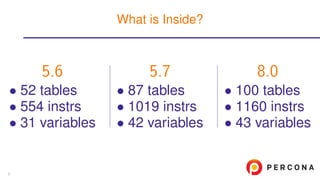
5.6
• 52 tables
• 554 instrs
• 31 variables
5.7
• 87 tables
• 1019 instrs
• 42 variables
8.0
• 100 tables
• 1160 instrs
• 43 variables
What is Inside?
5
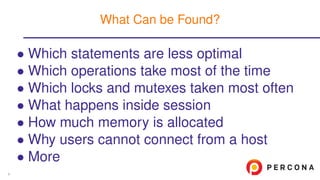
• Which statements are less optimal
• Which operations take most of the time
• Which locks and mutexes taken most often
• What happens inside session
• How much memory is allocated
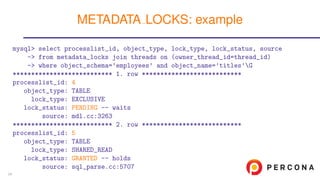
• Why users cannot connect from a host
• More
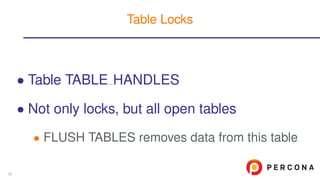
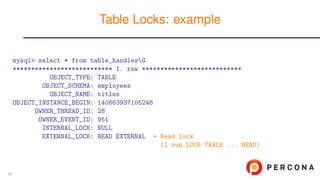
What Can be Found?
6
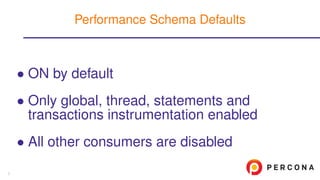
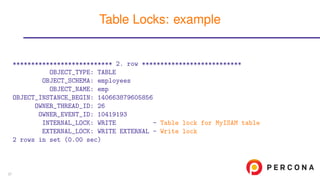
• ON by default
• Only global, thread, statements and
transactions instrumentation enabled
• All other consumers are disabled
Performance Schema Defaults
7
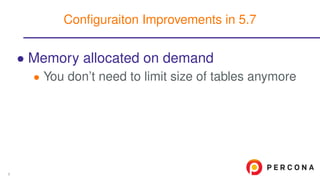
• Memory allocated on demand
• You don’t need to limit size of tables anymore
Configuraiton Improvements in 5.7
8
• Memory allocated on demand
• You don’t need to limit size of tables anymore
• Sys schema is in the standard distribution
Configuraiton Improvements in 5.7
8
• Memory allocated on demand
• You don’t need to limit size of tables anymore
• Sys schema is in the standard distribution
• You can turn statistics ON or OFF for
particular host and/or user
Configuraiton Improvements in 5.7
8
• Memory allocated on demand
• You don’t need to limit size of tables anymore
• Sys schema is in the standard distribution
• You can turn statistics ON or OFF for
particular host and/or user
• Size of SQL DIGEST is tunable
Configuraiton Improvements in 5.7
8
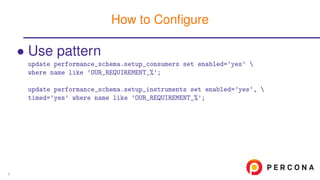
• Use pattern
update performance_schema.setup_consumers set enabled=’yes’ 
where name like ’OUR_REQUIREMENT_%’;
update performance_schema.setup_instruments set enabled=’yes’, 
timed=’yes’ where name like ’OUR_REQUIREMENT_%’;
How to Configure
9
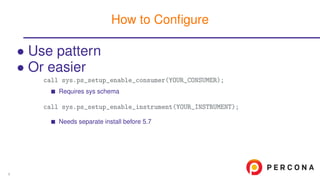
• Use pattern
• Or easier
call sys.ps_setup_enable_consumer(YOUR_CONSUMER);
Requires sys schema
call sys.ps_setup_enable_instrument(YOUR_INSTRUMENT);
Needs separate install before 5.7
How to Configure
9
• Use pattern
• Or easier
• Be careful!
• They are memory and CPU intensive
• Do not turn them all ON until needed
How to Configure
9
Statements
10
• For regular SQL statements
• Prepared statements
• Stored routines
• Stages of statements execution
Statements Instrumentation
11
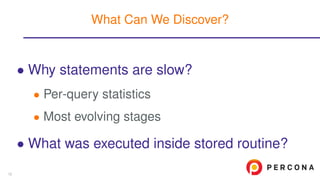
• Why statements are slow?
• Per-query statistics
• Most evolving stages
What Can We Discover?
12
• Why statements are slow?
• Per-query statistics
• Most evolving stages
• What was executed inside stored routine?
What Can We Discover?
12
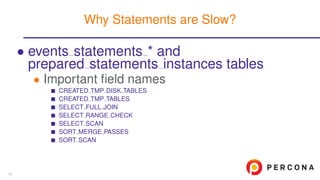
• events statements * and
prepared statements instances tables
• Important field names
CREATED TMP DISK TABLES
CREATED TMP TABLES
SELECT FULL JOIN
SELECT RANGE CHECK
SELECT SCAN
SORT MERGE PASSES
SORT SCAN
Why Statements are Slow?
13
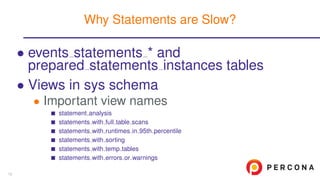
• events statements * and
prepared statements instances tables
• Views in sys schema
• Important view names
statement analysis
statements with full table scans
statements with runtimes in 95th percentile
statements with sorting
statements with temp tables
statements with errors or warnings
Why Statements are Slow?
13
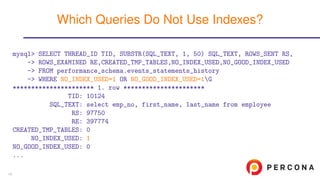
mysql> SELECT THREAD_ID TID, SUBSTR(SQL_TEXT, 1, 50) SQL_TEXT, ROWS_SENT RS,
-> ROWS_EXAMINED RE,CREATED_TMP_TABLES,NO_INDEX_USED,NO_GOOD_INDEX_USED
-> FROM performance_schema.events_statements_history
-> WHERE NO_INDEX_USED=1 OR NO_GOOD_INDEX_USED=1G
********************** 1. row **********************
TID: 10124
SQL_TEXT: select emp_no, first_name, last_name from employee
RS: 97750
RE: 397774
CREATED_TMP_TABLES: 0
NO_INDEX_USED: 1
NO_GOOD_INDEX_USED: 0
...
Which Queries Do Not Use Indexes?
14
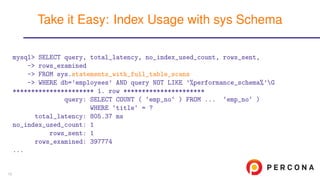
mysql> SELECT query, total_latency, no_index_used_count, rows_sent,
-> rows_examined
-> FROM sys.statements_with_full_table_scans
-> WHERE db=’employees’ AND query NOT LIKE ’%performance_schema%’G
********************** 1. row **********************
query: SELECT COUNT ( ‘emp_no‘ ) FROM ... ‘emp_no‘ )
WHERE ‘title‘ = ?
total_latency: 805.37 ms
no_index_used_count: 1
rows_sent: 1
rows_examined: 397774
...
Take it Easy: Index Usage with sys Schema
15
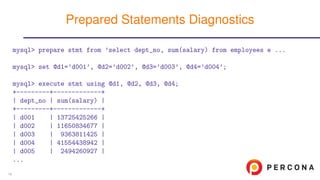
mysql> prepare stmt from ’select dept_no, sum(salary) from employees e ...
mysql> set @d1=’d001’, @d2=’d002’, @d3=’d003’, @d4=’d004’;
mysql> execute stmt using @d1, @d2, @d3, @d4;
+---------+-------------+
| dept_no | sum(salary) |
+---------+-------------+
| d001 | 13725425266 |
| d002 | 11650834677 |
| d003 | 9363811425 |
| d004 | 41554438942 |
| d005 | 2494260927 |
...
Prepared Statements Diagnostics
16
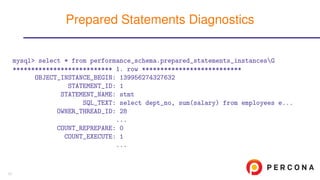
mysql> select * from performance_schema.prepared_statements_instancesG
*************************** 1. row ***************************
OBJECT_INSTANCE_BEGIN: 139956274327632
STATEMENT_ID: 1
STATEMENT_NAME: stmt
SQL_TEXT: select dept_no, sum(salary) from employees e...
OWNER_THREAD_ID: 28
...
COUNT_REPREPARE: 0
COUNT_EXECUTE: 1
...
Prepared Statements Diagnostics
17
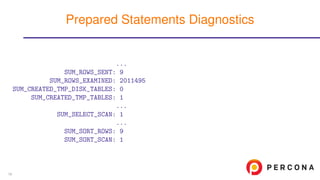
...
SUM_ROWS_SENT: 9
SUM_ROWS_EXAMINED: 2011495
SUM_CREATED_TMP_DISK_TABLES: 0
SUM_CREATED_TMP_TABLES: 1
...
SUM_SELECT_SCAN: 1
...
SUM_SORT_ROWS: 9
SUM_SORT_SCAN: 1
Prepared Statements Diagnostics
18
• What happens inside a routine
• Queries, called from the routine
• statement/sp/statement
Stored Routines Instrumentation
19
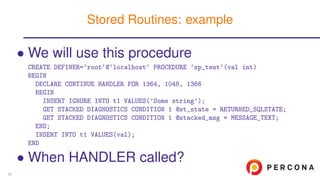
• We will use this procedure
CREATE DEFINER=‘root‘@‘localhost‘ PROCEDURE ‘sp_test‘(val int)
BEGIN
DECLARE CONTINUE HANDLER FOR 1364, 1048, 1366
BEGIN
INSERT IGNORE INTO t1 VALUES(’Some string’);
GET STACKED DIAGNOSTICS CONDITION 1 @st_state = RETURNED_SQLSTATE;
GET STACKED DIAGNOSTICS CONDITION 1 @stacked_msg = MESSAGE_TEXT;
END;
INSERT INTO t1 VALUES(val);
END
• When HANDLER called?
Stored Routines: example
20
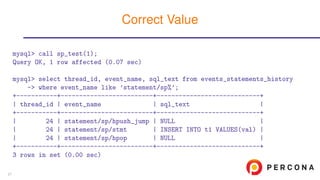
mysql> call sp_test(1);
Query OK, 1 row affected (0.07 sec)
mysql> select thread_id, event_name, sql_text from events_statements_history
-> where event_name like ’statement/sp%’;
+-----------+-------------------------+----------------------------+
| thread_id | event_name | sql_text |
+-----------+-------------------------+----------------------------+
| 24 | statement/sp/hpush_jump | NULL |
| 24 | statement/sp/stmt | INSERT INTO t1 VALUES(val) |
| 24 | statement/sp/hpop | NULL |
+-----------+-------------------------+----------------------------+
3 rows in set (0.00 sec)
Correct Value
21
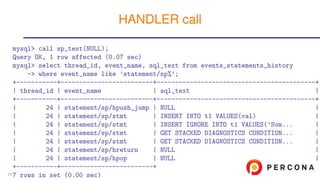
mysql> call sp_test(NULL);
Query OK, 1 row affected (0.07 sec)
mysql> select thread_id, event_name, sql_text from events_statements_history
-> where event_name like ’statement/sp%’;
+-----------+-------------------------+-------------------------------------------+
| thread_id | event_name | sql_text |
+-----------+-------------------------+-------------------------------------------+
| 24 | statement/sp/hpush_jump | NULL |
| 24 | statement/sp/stmt | INSERT INTO t1 VALUES(val) |
| 24 | statement/sp/stmt | INSERT IGNORE INTO t1 VALUES(’Som... |
| 24 | statement/sp/stmt | GET STACKED DIAGNOSTICS CONDITION... |
| 24 | statement/sp/stmt | GET STACKED DIAGNOSTICS CONDITION... |
| 24 | statement/sp/hreturn | NULL |
| 24 | statement/sp/hpop | NULL |
+-----------+-------------------------+
7 rows in set (0.00 sec)
HANDLER call
22
• events stages * tables
Statements Deep Dive
23
• events stages * tables
• Same information as in table
INFORMATION SCHEMA.PROCESSLIST
or SHOW PROCESSLIST output
• init
• executing
• Opening tables
Statements Deep Dive
23
• events stages * tables
• Same information as in table
INFORMATION SCHEMA.PROCESSLIST
or SHOW PROCESSLIST output
• init
• executing
• Opening tables
• Replacement for SHOW PROFILE
Statements Deep Dive
23
• events stages * tables
• Same information as in table
INFORMATION SCHEMA.PROCESSLIST
or SHOW PROCESSLIST output
• init
• executing
• Opening tables
• Replacement for SHOW PROFILE
• Only server-level
• No storage engine information!
Statements Deep Dive
23
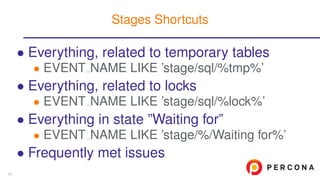
• Everything, related to temporary tables
• EVENT NAME LIKE ’stage/sql/%tmp%’
• Everything, related to locks
• EVENT NAME LIKE ’stage/sql/%lock%’
• Everything in state ”Waiting for”
• EVENT NAME LIKE ’stage/%/Waiting for%’
• Frequently met issues
Stages Shortcuts
24
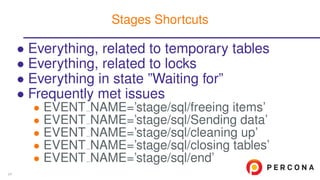
• Everything, related to temporary tables
• Everything, related to locks
• Everything in state ”Waiting for”
• Frequently met issues
• EVENT NAME=’stage/sql/freeing items’
• EVENT NAME=’stage/sql/Sending data’
• EVENT NAME=’stage/sql/cleaning up’
• EVENT NAME=’stage/sql/closing tables’
• EVENT NAME=’stage/sql/end’
Stages Shortcuts
24
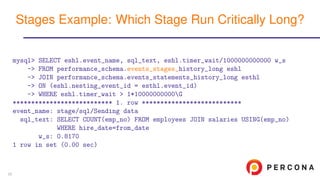
mysql> SELECT eshl.event_name, sql_text, eshl.timer_wait/1000000000000 w_s
-> FROM performance_schema.events_stages_history_long eshl
-> JOIN performance_schema.events_statements_history_long esthl
-> ON (eshl.nesting_event_id = esthl.event_id)
-> WHERE eshl.timer_wait > 1*10000000000G
*************************** 1. row ***************************
event_name: stage/sql/Sending data
sql_text: SELECT COUNT(emp_no) FROM employees JOIN salaries USING(emp_no)
WHERE hire_date=from_date
w_s: 0.8170
1 row in set (0.00 sec)
Stages Example: Which Stage Run Critically Long?
25
Memory Usage Analysis
26
• Since version 5.7
• Answers on question: how memory used?
• Overall and detailed statistics
Memory Instrumentation
27
• Since version 5.7
• Answers on question: how memory used?
• Overall and detailed statistics
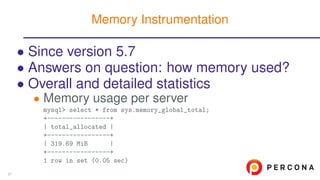
• Memory usage per server
mysql> select * from sys.memory_global_total;
+-----------------+
| total_allocated |
+-----------------+
| 319.69 MiB |
+-----------------+
1 row in set (0.05 sec)
Memory Instrumentation
27
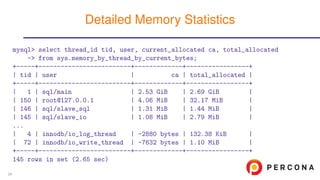
mysql> select thread_id tid, user, current_allocated ca, total_allocated
-> from sys.memory_by_thread_by_current_bytes;
+-----+-------------------------+-------------+-----------------+
| tid | user | ca | total_allocated |
+-----+-------------------------+-------------+-----------------+
| 1 | sql/main | 2.53 GiB | 2.69 GiB |
| 150 | root@127.0.0.1 | 4.06 MiB | 32.17 MiB |
| 146 | sql/slave_sql | 1.31 MiB | 1.44 MiB |
| 145 | sql/slave_io | 1.08 MiB | 2.79 MiB |
...
| 4 | innodb/io_log_thread | -2880 bytes | 132.38 KiB |
| 72 | innodb/io_write_thread | -7632 bytes | 1.10 MiB |
+-----+-------------------------+-------------+-----------------+
145 rows in set (2.65 sec)
Detailed Memory Statistics
28
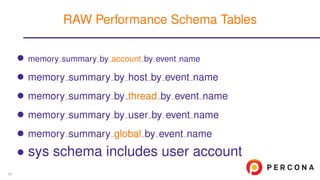
• memory summary by account by event name
• memory summary by host by event name
• memory summary by thread by event name
• memory summary by user by event name
• memory summary global by event name
• sys schema includes user account
RAW Performance Schema Tables
29
• NAME@HOST - regular user
• System users
• sql/main
• innodb/*
• ...
• Data comes from table THREADS
Users in sys.memory * Tables
30
Locks Diagnostics
31
• Metadata locks
• Table METADATA LOCKS
• Table-level locks
• Table TABLE HANDLES
• Engine-dependent locks, transactions
• Tables EVENTS TRANSACTIONS *
• This is not exactly lock information!
What can Block Your Queries?
32
• Table METADATA LOCKS
• Which thread is waiting for a lock
• Which thread holds the lock
• Not only for tables:
GLOBAL, SCHEMA, TABLE, FUNCTION, PROCEDURE, EVENT, COMMIT, USER LEVEL LOCK,
TABLESPACE
Metadata Locks
33
mysql> select processlist_id, object_type, lock_type, lock_status, source
-> from metadata_locks join threads on (owner_thread_id=thread_id)
-> where object_schema=’employees’ and object_name=’titles’G
*************************** 1. row ***************************
processlist_id: 4
object_type: TABLE
lock_type: EXCLUSIVE
lock_status: PENDING -- waits
source: mdl.cc:3263
*************************** 2. row ***************************
processlist_id: 5
object_type: TABLE
lock_type: SHARED_READ
lock_status: GRANTED -- holds
source: sql_parse.cc:5707
METADATA LOCKS: example
34
• Table TABLE HANDLES
• Not only locks, but all open tables
• FLUSH TABLES removes data from this table
Table Locks
35
mysql> select * from table_handlesG
*************************** 1. row ***************************
OBJECT_TYPE: TABLE
OBJECT_SCHEMA: employees
OBJECT_NAME: titles
OBJECT_INSTANCE_BEGIN: 140663937105248
OWNER_THREAD_ID: 28
OWNER_EVENT_ID: 951
INTERNAL_LOCK: NULL
EXTERNAL_LOCK: READ EXTERNAL - Read lock
(I run LOCK TABLE ... READ)
Table Locks: example
36
*************************** 2. row ***************************
OBJECT_TYPE: TABLE
OBJECT_SCHEMA: employees
OBJECT_NAME: emp
OBJECT_INSTANCE_BEGIN: 140663879605856
OWNER_THREAD_ID: 26
OWNER_EVENT_ID: 10419193
INTERNAL_LOCK: WRITE - Table lock for MyISAM table
EXTERNAL_LOCK: WRITE EXTERNAL - Write lock
2 rows in set (0.00 sec)
Table Locks: example
37
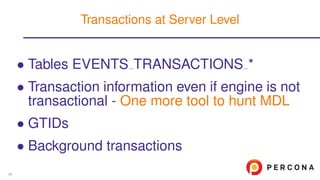
• Tables EVENTS TRANSACTIONS *
• Transaction information even if engine is not
transactional - One more tool to hunt MDL
• GTIDs
• Background transactions
Transactions at Server Level
38
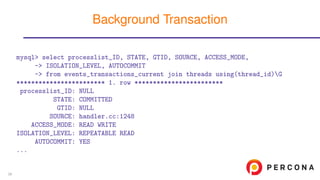
mysql> select processlist_ID, STATE, GTID, SOURCE, ACCESS_MODE,
-> ISOLATION_LEVEL, AUTOCOMMIT
-> from events_transactions_current join threads using(thread_id)G
************************ 1. row ************************
processlist_ID: NULL
STATE: COMMITTED
GTID: NULL
SOURCE: handler.cc:1248
ACCESS_MODE: READ WRITE
ISOLATION_LEVEL: REPEATABLE READ
AUTOCOMMIT: YES
...
Background Transaction
39
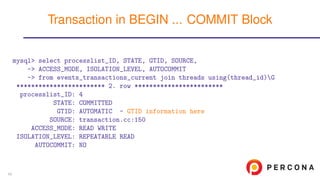
mysql> select processlist_ID, STATE, GTID, SOURCE,
-> ACCESS_MODE, ISOLATION_LEVEL, AUTOCOMMIT
-> from events_transactions_current join threads using(thread_id)G
************************ 2. row ************************
processlist_ID: 4
STATE: COMMITTED
GTID: AUTOMATIC - GTID information here
SOURCE: transaction.cc:150
ACCESS_MODE: READ WRITE
ISOLATION_LEVEL: REPEATABLE READ
AUTOCOMMIT: NO
Transaction in BEGIN ... COMMIT Block
40
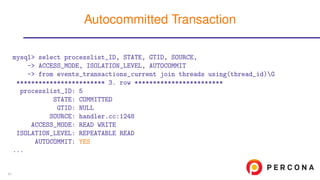
mysql> select processlist_ID, STATE, GTID, SOURCE,
-> ACCESS_MODE, ISOLATION_LEVEL, AUTOCOMMIT
-> from events_transactions_current join threads using(thread_id)G
************************ 3. row ************************
processlist_ID: 5
STATE: COMMITTED
GTID: NULL
SOURCE: handler.cc:1248
ACCESS_MODE: READ WRITE
ISOLATION_LEVEL: REPEATABLE READ
AUTOCOMMIT: YES
...
Autocommitted Transaction
41
Variables and Status
42
• Now in Performance Schema
• Global
• Session
• User-defined - First time ever!
Variables and Status
43
• Now in Performance Schema
• Global
• Session
• User-defined - First time ever!
• Tables in Information Schema
• Deprecated in 5.7
• Removed in 8.0.1
Variables and Status
43
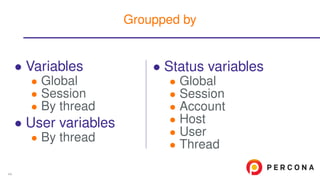
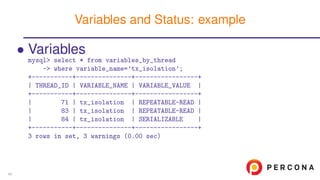
• Variables
• Global
• Session
• By thread
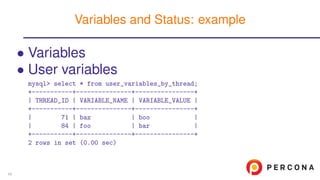
• User variables
• By thread
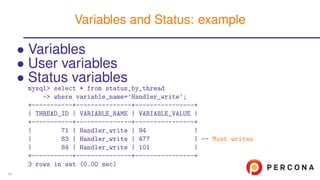
• Status variables
• Global
• Session
• Account
• Host
• User
• Thread
Groupped by
44
• Variables
mysql> select * from variables_by_thread
-> where variable_name=’tx_isolation’;
+-----------+---------------+-----------------+
| THREAD_ID | VARIABLE_NAME | VARIABLE_VALUE |
+-----------+---------------+-----------------+
| 71 | tx_isolation | REPEATABLE-READ |
| 83 | tx_isolation | REPEATABLE-READ |
| 84 | tx_isolation | SERIALIZABLE |
+-----------+---------------+-----------------+
3 rows in set, 3 warnings (0.00 sec)
Variables and Status: example
45
• Variables
• User variables
mysql> select * from user_variables_by_thread;
+-----------+---------------+----------------+
| THREAD_ID | VARIABLE_NAME | VARIABLE_VALUE |
+-----------+---------------+----------------+
| 71 | baz | boo |
| 84 | foo | bar |
+-----------+---------------+----------------+
2 rows in set (0.00 sec)
Variables and Status: example
45
• Variables
• User variables
• Status variables
mysql> select * from status_by_thread
-> where variable_name=’Handler_write’;
+-----------+---------------+----------------+
| THREAD_ID | VARIABLE_NAME | VARIABLE_VALUE |
+-----------+---------------+----------------+
| 71 | Handler_write | 94 |
| 83 | Handler_write | 477 | -- Most writes
| 84 | Handler_write | 101 |
+-----------+---------------+----------------+
3 rows in set (0.00 sec)
Variables and Status: example
45
Connection Diagnostics
46
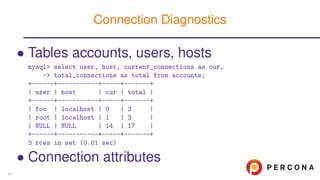
• Tables accounts, users, hosts
mysql> select user, host, current_connections as cur,
-> total_connections as total from accounts;
+------+-----------+-----+-------+
| user | host | cur | total |
+------+-----------+-----+-------+
| foo | localhost | 0 | 3 |
| root | localhost | 1 | 3 |
| NULL | NULL | 14 | 17 |
+------+-----------+-----+-------+
3 rows in set (0.01 sec)
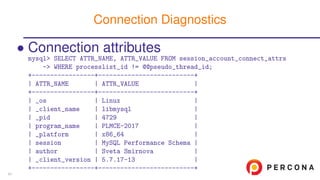
• Connection attributes
Connection Diagnostics
47
• Connection attributes
mysql> SELECT ATTR_NAME, ATTR_VALUE FROM session_account_connect_attrs
-> WHERE processlist_id != @@pseudo_thread_id;
+-----------------+--------------------------+
| ATTR_NAME | ATTR_VALUE |
+-----------------+--------------------------+
| _os | Linux |
| _client_name | libmysql |
| _pid | 4729 |
| program_name | PLMCE-2017 |
| _platform | x86_64 |
| session | MySQL Performance Schema |
| author | Sveta Smirnova |
| _client_version | 5.7.17-13 |
+-----------------+--------------------------+
Connection Diagnostics
47
• Content of DNS cache
• Errors from:
• Name Server
• Connection
• Authentication
• max connect errors, max user errors, etc.
• Your first assistant in case of connection
issue
Host Cache
48
Replication
49
• Data from SHOW SLAVE STATUS available
in replication * tables
• Not full replacement
• Binary, relay log names and positions are in
mysql.slave * tables
• GTID information for single-threaded slave is
in gtid executed variable
Replication Diagnostics
50
• Data from SHOW SLAVE STATUS available
in replication * tables
• Not full replacement
• Binary, relay log names and positions are in
mysql.slave * tables
• GTID information for single-threaded slave is
in gtid executed variable
• Support of Replication Channels
(Multi-threaded slave)
Replication Diagnostics
50
• Data from SHOW SLAVE STATUS available
in replication * tables
• Not full replacement
• Binary, relay log names and positions are in
mysql.slave * tables
• GTID information for single-threaded slave is
in gtid executed variable
• Support of Replication Channels
(Multi-threaded slave)
• GTID instrumentation
Replication Diagnostics
50
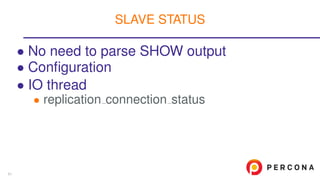
• No need to parse SHOW output
SLAVE STATUS
51
• No need to parse SHOW output
• Configuration
• replication connection configuration
• replication applier configuration
SLAVE STATUS
51
• No need to parse SHOW output
• Configuration
• IO thread
• replication connection status
SLAVE STATUS
51
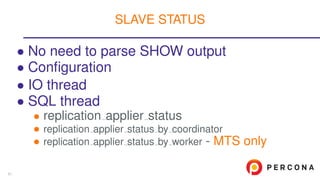
• No need to parse SHOW output
• Configuration
• IO thread
• SQL thread
• replication applier status
• replication applier status by coordinator
• replication applier status by worker - MTS only
SLAVE STATUS
51
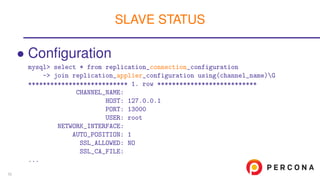
• Configuration
mysql> select * from replication_connection_configuration
-> join replication_applier_configuration using(channel_name)G
*************************** 1. row ***************************
CHANNEL_NAME:
HOST: 127.0.0.1
PORT: 13000
USER: root
NETWORK_INTERFACE:
AUTO_POSITION: 1
SSL_ALLOWED: NO
SSL_CA_FILE:
...
SLAVE STATUS
52
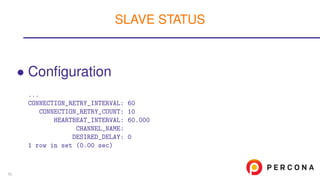
• Configuration
...
CONNECTION_RETRY_INTERVAL: 60
CONNECTION_RETRY_COUNT: 10
HEARTBEAT_INTERVAL: 60.000
CHANNEL_NAME:
DESIRED_DELAY: 0
1 row in set (0.00 sec)
SLAVE STATUS
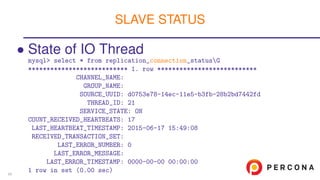
53
• State of IO Thread
mysql> select * from replication_connection_statusG
*************************** 1. row ***************************
CHANNEL_NAME:
GROUP_NAME:
SOURCE_UUID: d0753e78-14ec-11e5-b3fb-28b2bd7442fd
THREAD_ID: 21
SERVICE_STATE: ON
COUNT_RECEIVED_HEARTBEATS: 17
LAST_HEARTBEAT_TIMESTAMP: 2015-06-17 15:49:08
RECEIVED_TRANSACTION_SET:
LAST_ERROR_NUMBER: 0
LAST_ERROR_MESSAGE:
LAST_ERROR_TIMESTAMP: 0000-00-00 00:00:00
1 row in set (0.00 sec)
SLAVE STATUS
54
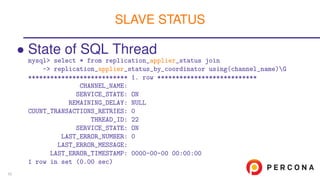
• State of SQL Thread
mysql> select * from replication_applier_status join
-> replication_applier_status_by_coordinator using(channel_name)G
*************************** 1. row ***************************
CHANNEL_NAME:
SERVICE_STATE: ON
REMAINING_DELAY: NULL
COUNT_TRANSACTIONS_RETRIES: 0
THREAD_ID: 22
SERVICE_STATE: ON
LAST_ERROR_NUMBER: 0
LAST_ERROR_MESSAGE:
LAST_ERROR_TIMESTAMP: 0000-00-00 00:00:00
1 row in set (0.00 sec)
SLAVE STATUS
55
Server Internals
56
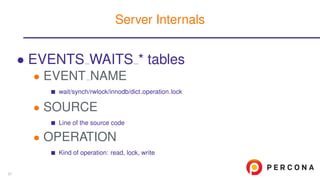
• EVENTS WAITS * tables
• EVENT NAME
wait/synch/rwlock/innodb/dict operation lock
• SOURCE
Line of the source code
• OPERATION
Kind of operation: read, lock, write
Server Internals
57
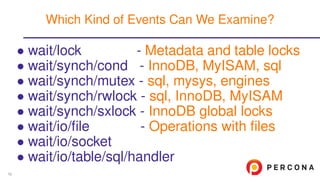
• wait/lock - Metadata and table locks
• wait/synch/cond - InnoDB, MyISAM, sql
• wait/synch/mutex - sql, mysys, engines
• wait/synch/rwlock - sql, InnoDB, MyISAM
• wait/synch/sxlock - InnoDB global locks
• wait/io/file - Operations with files
• wait/io/socket
• wait/io/table/sql/handler
Which Kind of Events Can We Examine?
58
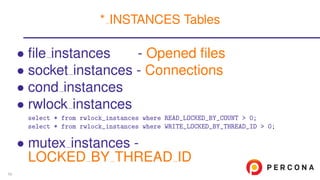
• file instances - Opened files
• socket instances - Connections
• cond instances
• rwlock instances
select * from rwlock_instances where READ_LOCKED_BY_COUNT > 0;
select * from rwlock_instances where WRITE_LOCKED_BY_THREAD_ID > 0;
• mutex instances -
LOCKED BY THREAD ID
* INSTANCES Tables
59
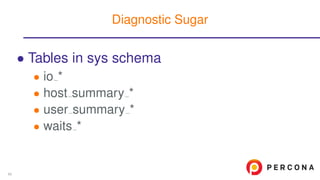
• Tables in sys schema
• io *
• host summary *
• user summary *
• waits *
Diagnostic Sugar
60
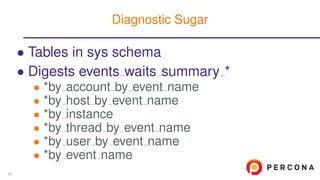
• Tables in sys schema
• Digests events waits summary *
• *by account by event name
• *by host by event name
• *by instance
• *by thread by event name
• *by user by event name
• *by event name
Diagnostic Sugar
60
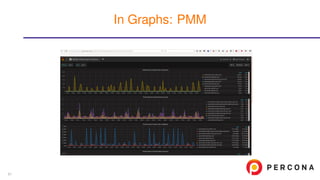
In Graphs: PMM
61
• Blog of developers team
• Blog of Mark Leith: author of sys schema
• Official reference manual
• PMM Demo
More informaiton
62
???
Time For Questions
63
http://www.slideshare.net/SvetaSmirnova
https://twitter.com/svetsmirnova
Thank you!
64

Performance Schema for MySQL Troubleshooting

  • 1.
    Performance Schema for MySQLTroubleshooting April, 25, 2017 Sveta Smirnova
  • 2.
    • MySQL Supportengineer • Author of • MySQL Troubleshooting • JSON UDF functions • FILTER clause for MySQL • Speaker • Percona Live, OOW, Fosdem, DevConf, HighLoad... Sveta Smirnova 2
  • 3.
    •Overview and Configuration •Statements •MemoryUsage •Locks Diagnostics •Variables and Status •Connection Diagnostics •Replication •Server Internals Table of Contents 3
  • 4.
  • 5.
    5.6 • 52 tables •554 instrs • 31 variables 5.7 • 87 tables • 1019 instrs • 42 variables 8.0 • 100 tables • 1160 instrs • 43 variables What is Inside? 5
  • 6.
    • Which statementsare less optimal • Which operations take most of the time • Which locks and mutexes taken most often • What happens inside session • How much memory is allocated • Why users cannot connect from a host • More What Can be Found? 6
  • 7.
    • ON bydefault • Only global, thread, statements and transactions instrumentation enabled • All other consumers are disabled Performance Schema Defaults 7
  • 8.
    • Memory allocatedon demand • You don’t need to limit size of tables anymore Configuraiton Improvements in 5.7 8
  • 9.
    • Memory allocatedon demand • You don’t need to limit size of tables anymore • Sys schema is in the standard distribution Configuraiton Improvements in 5.7 8
  • 10.
    • Memory allocatedon demand • You don’t need to limit size of tables anymore • Sys schema is in the standard distribution • You can turn statistics ON or OFF for particular host and/or user Configuraiton Improvements in 5.7 8
  • 11.
    • Memory allocatedon demand • You don’t need to limit size of tables anymore • Sys schema is in the standard distribution • You can turn statistics ON or OFF for particular host and/or user • Size of SQL DIGEST is tunable Configuraiton Improvements in 5.7 8
  • 12.
    • Use pattern updateperformance_schema.setup_consumers set enabled=’yes’ where name like ’OUR_REQUIREMENT_%’; update performance_schema.setup_instruments set enabled=’yes’, timed=’yes’ where name like ’OUR_REQUIREMENT_%’; How to Configure 9
  • 13.
    • Use pattern •Or easier call sys.ps_setup_enable_consumer(YOUR_CONSUMER); Requires sys schema call sys.ps_setup_enable_instrument(YOUR_INSTRUMENT); Needs separate install before 5.7 How to Configure 9
  • 14.
    • Use pattern •Or easier • Be careful! • They are memory and CPU intensive • Do not turn them all ON until needed How to Configure 9
  • 15.
  • 16.
    • For regularSQL statements • Prepared statements • Stored routines • Stages of statements execution Statements Instrumentation 11
  • 17.
    • Why statementsare slow? • Per-query statistics • Most evolving stages What Can We Discover? 12
  • 18.
    • Why statementsare slow? • Per-query statistics • Most evolving stages • What was executed inside stored routine? What Can We Discover? 12
  • 19.
    • events statements* and prepared statements instances tables • Important field names CREATED TMP DISK TABLES CREATED TMP TABLES SELECT FULL JOIN SELECT RANGE CHECK SELECT SCAN SORT MERGE PASSES SORT SCAN Why Statements are Slow? 13
  • 20.
    • events statements* and prepared statements instances tables • Views in sys schema • Important view names statement analysis statements with full table scans statements with runtimes in 95th percentile statements with sorting statements with temp tables statements with errors or warnings Why Statements are Slow? 13
  • 21.
    mysql> SELECT THREAD_IDTID, SUBSTR(SQL_TEXT, 1, 50) SQL_TEXT, ROWS_SENT RS, -> ROWS_EXAMINED RE,CREATED_TMP_TABLES,NO_INDEX_USED,NO_GOOD_INDEX_USED -> FROM performance_schema.events_statements_history -> WHERE NO_INDEX_USED=1 OR NO_GOOD_INDEX_USED=1G ********************** 1. row ********************** TID: 10124 SQL_TEXT: select emp_no, first_name, last_name from employee RS: 97750 RE: 397774 CREATED_TMP_TABLES: 0 NO_INDEX_USED: 1 NO_GOOD_INDEX_USED: 0 ... Which Queries Do Not Use Indexes? 14
  • 22.
    mysql> SELECT query,total_latency, no_index_used_count, rows_sent, -> rows_examined -> FROM sys.statements_with_full_table_scans -> WHERE db=’employees’ AND query NOT LIKE ’%performance_schema%’G ********************** 1. row ********************** query: SELECT COUNT ( ‘emp_no‘ ) FROM ... ‘emp_no‘ ) WHERE ‘title‘ = ? total_latency: 805.37 ms no_index_used_count: 1 rows_sent: 1 rows_examined: 397774 ... Take it Easy: Index Usage with sys Schema 15
  • 23.
    mysql> prepare stmtfrom ’select dept_no, sum(salary) from employees e ... mysql> set @d1=’d001’, @d2=’d002’, @d3=’d003’, @d4=’d004’; mysql> execute stmt using @d1, @d2, @d3, @d4; +---------+-------------+ | dept_no | sum(salary) | +---------+-------------+ | d001 | 13725425266 | | d002 | 11650834677 | | d003 | 9363811425 | | d004 | 41554438942 | | d005 | 2494260927 | ... Prepared Statements Diagnostics 16
  • 24.
    mysql> select *from performance_schema.prepared_statements_instancesG *************************** 1. row *************************** OBJECT_INSTANCE_BEGIN: 139956274327632 STATEMENT_ID: 1 STATEMENT_NAME: stmt SQL_TEXT: select dept_no, sum(salary) from employees e... OWNER_THREAD_ID: 28 ... COUNT_REPREPARE: 0 COUNT_EXECUTE: 1 ... Prepared Statements Diagnostics 17
  • 25.
    ... SUM_ROWS_SENT: 9 SUM_ROWS_EXAMINED: 2011495 SUM_CREATED_TMP_DISK_TABLES:0 SUM_CREATED_TMP_TABLES: 1 ... SUM_SELECT_SCAN: 1 ... SUM_SORT_ROWS: 9 SUM_SORT_SCAN: 1 Prepared Statements Diagnostics 18
  • 26.
    • What happensinside a routine • Queries, called from the routine • statement/sp/statement Stored Routines Instrumentation 19
  • 27.
    • We willuse this procedure CREATE DEFINER=‘root‘@‘localhost‘ PROCEDURE ‘sp_test‘(val int) BEGIN DECLARE CONTINUE HANDLER FOR 1364, 1048, 1366 BEGIN INSERT IGNORE INTO t1 VALUES(’Some string’); GET STACKED DIAGNOSTICS CONDITION 1 @st_state = RETURNED_SQLSTATE; GET STACKED DIAGNOSTICS CONDITION 1 @stacked_msg = MESSAGE_TEXT; END; INSERT INTO t1 VALUES(val); END • When HANDLER called? Stored Routines: example 20
  • 28.
    mysql> call sp_test(1); QueryOK, 1 row affected (0.07 sec) mysql> select thread_id, event_name, sql_text from events_statements_history -> where event_name like ’statement/sp%’; +-----------+-------------------------+----------------------------+ | thread_id | event_name | sql_text | +-----------+-------------------------+----------------------------+ | 24 | statement/sp/hpush_jump | NULL | | 24 | statement/sp/stmt | INSERT INTO t1 VALUES(val) | | 24 | statement/sp/hpop | NULL | +-----------+-------------------------+----------------------------+ 3 rows in set (0.00 sec) Correct Value 21
  • 29.
    mysql> call sp_test(NULL); QueryOK, 1 row affected (0.07 sec) mysql> select thread_id, event_name, sql_text from events_statements_history -> where event_name like ’statement/sp%’; +-----------+-------------------------+-------------------------------------------+ | thread_id | event_name | sql_text | +-----------+-------------------------+-------------------------------------------+ | 24 | statement/sp/hpush_jump | NULL | | 24 | statement/sp/stmt | INSERT INTO t1 VALUES(val) | | 24 | statement/sp/stmt | INSERT IGNORE INTO t1 VALUES(’Som... | | 24 | statement/sp/stmt | GET STACKED DIAGNOSTICS CONDITION... | | 24 | statement/sp/stmt | GET STACKED DIAGNOSTICS CONDITION... | | 24 | statement/sp/hreturn | NULL | | 24 | statement/sp/hpop | NULL | +-----------+-------------------------+ 7 rows in set (0.00 sec) HANDLER call 22
  • 30.
    • events stages* tables Statements Deep Dive 23
  • 31.
    • events stages* tables • Same information as in table INFORMATION SCHEMA.PROCESSLIST or SHOW PROCESSLIST output • init • executing • Opening tables Statements Deep Dive 23
  • 32.
    • events stages* tables • Same information as in table INFORMATION SCHEMA.PROCESSLIST or SHOW PROCESSLIST output • init • executing • Opening tables • Replacement for SHOW PROFILE Statements Deep Dive 23
  • 33.
    • events stages* tables • Same information as in table INFORMATION SCHEMA.PROCESSLIST or SHOW PROCESSLIST output • init • executing • Opening tables • Replacement for SHOW PROFILE • Only server-level • No storage engine information! Statements Deep Dive 23
  • 34.
    • Everything, relatedto temporary tables • EVENT NAME LIKE ’stage/sql/%tmp%’ • Everything, related to locks • EVENT NAME LIKE ’stage/sql/%lock%’ • Everything in state ”Waiting for” • EVENT NAME LIKE ’stage/%/Waiting for%’ • Frequently met issues Stages Shortcuts 24
  • 35.
    • Everything, relatedto temporary tables • Everything, related to locks • Everything in state ”Waiting for” • Frequently met issues • EVENT NAME=’stage/sql/freeing items’ • EVENT NAME=’stage/sql/Sending data’ • EVENT NAME=’stage/sql/cleaning up’ • EVENT NAME=’stage/sql/closing tables’ • EVENT NAME=’stage/sql/end’ Stages Shortcuts 24
  • 36.
    mysql> SELECT eshl.event_name,sql_text, eshl.timer_wait/1000000000000 w_s -> FROM performance_schema.events_stages_history_long eshl -> JOIN performance_schema.events_statements_history_long esthl -> ON (eshl.nesting_event_id = esthl.event_id) -> WHERE eshl.timer_wait > 1*10000000000G *************************** 1. row *************************** event_name: stage/sql/Sending data sql_text: SELECT COUNT(emp_no) FROM employees JOIN salaries USING(emp_no) WHERE hire_date=from_date w_s: 0.8170 1 row in set (0.00 sec) Stages Example: Which Stage Run Critically Long? 25
  • 37.
  • 38.
    • Since version5.7 • Answers on question: how memory used? • Overall and detailed statistics Memory Instrumentation 27
  • 39.
    • Since version5.7 • Answers on question: how memory used? • Overall and detailed statistics • Memory usage per server mysql> select * from sys.memory_global_total; +-----------------+ | total_allocated | +-----------------+ | 319.69 MiB | +-----------------+ 1 row in set (0.05 sec) Memory Instrumentation 27
  • 40.
    mysql> select thread_idtid, user, current_allocated ca, total_allocated -> from sys.memory_by_thread_by_current_bytes; +-----+-------------------------+-------------+-----------------+ | tid | user | ca | total_allocated | +-----+-------------------------+-------------+-----------------+ | 1 | sql/main | 2.53 GiB | 2.69 GiB | | 150 | root@127.0.0.1 | 4.06 MiB | 32.17 MiB | | 146 | sql/slave_sql | 1.31 MiB | 1.44 MiB | | 145 | sql/slave_io | 1.08 MiB | 2.79 MiB | ... | 4 | innodb/io_log_thread | -2880 bytes | 132.38 KiB | | 72 | innodb/io_write_thread | -7632 bytes | 1.10 MiB | +-----+-------------------------+-------------+-----------------+ 145 rows in set (2.65 sec) Detailed Memory Statistics 28
  • 41.
    • memory summaryby account by event name • memory summary by host by event name • memory summary by thread by event name • memory summary by user by event name • memory summary global by event name • sys schema includes user account RAW Performance Schema Tables 29
  • 42.
    • NAME@HOST -regular user • System users • sql/main • innodb/* • ... • Data comes from table THREADS Users in sys.memory * Tables 30
  • 43.
  • 44.
    • Metadata locks •Table METADATA LOCKS • Table-level locks • Table TABLE HANDLES • Engine-dependent locks, transactions • Tables EVENTS TRANSACTIONS * • This is not exactly lock information! What can Block Your Queries? 32
  • 45.
    • Table METADATALOCKS • Which thread is waiting for a lock • Which thread holds the lock • Not only for tables: GLOBAL, SCHEMA, TABLE, FUNCTION, PROCEDURE, EVENT, COMMIT, USER LEVEL LOCK, TABLESPACE Metadata Locks 33
  • 46.
    mysql> select processlist_id,object_type, lock_type, lock_status, source -> from metadata_locks join threads on (owner_thread_id=thread_id) -> where object_schema=’employees’ and object_name=’titles’G *************************** 1. row *************************** processlist_id: 4 object_type: TABLE lock_type: EXCLUSIVE lock_status: PENDING -- waits source: mdl.cc:3263 *************************** 2. row *************************** processlist_id: 5 object_type: TABLE lock_type: SHARED_READ lock_status: GRANTED -- holds source: sql_parse.cc:5707 METADATA LOCKS: example 34
  • 47.
    • Table TABLEHANDLES • Not only locks, but all open tables • FLUSH TABLES removes data from this table Table Locks 35
  • 48.
    mysql> select *from table_handlesG *************************** 1. row *************************** OBJECT_TYPE: TABLE OBJECT_SCHEMA: employees OBJECT_NAME: titles OBJECT_INSTANCE_BEGIN: 140663937105248 OWNER_THREAD_ID: 28 OWNER_EVENT_ID: 951 INTERNAL_LOCK: NULL EXTERNAL_LOCK: READ EXTERNAL - Read lock (I run LOCK TABLE ... READ) Table Locks: example 36
  • 49.
    *************************** 2. row*************************** OBJECT_TYPE: TABLE OBJECT_SCHEMA: employees OBJECT_NAME: emp OBJECT_INSTANCE_BEGIN: 140663879605856 OWNER_THREAD_ID: 26 OWNER_EVENT_ID: 10419193 INTERNAL_LOCK: WRITE - Table lock for MyISAM table EXTERNAL_LOCK: WRITE EXTERNAL - Write lock 2 rows in set (0.00 sec) Table Locks: example 37
  • 50.
    • Tables EVENTSTRANSACTIONS * • Transaction information even if engine is not transactional - One more tool to hunt MDL • GTIDs • Background transactions Transactions at Server Level 38
  • 51.
    mysql> select processlist_ID,STATE, GTID, SOURCE, ACCESS_MODE, -> ISOLATION_LEVEL, AUTOCOMMIT -> from events_transactions_current join threads using(thread_id)G ************************ 1. row ************************ processlist_ID: NULL STATE: COMMITTED GTID: NULL SOURCE: handler.cc:1248 ACCESS_MODE: READ WRITE ISOLATION_LEVEL: REPEATABLE READ AUTOCOMMIT: YES ... Background Transaction 39
  • 52.
    mysql> select processlist_ID,STATE, GTID, SOURCE, -> ACCESS_MODE, ISOLATION_LEVEL, AUTOCOMMIT -> from events_transactions_current join threads using(thread_id)G ************************ 2. row ************************ processlist_ID: 4 STATE: COMMITTED GTID: AUTOMATIC - GTID information here SOURCE: transaction.cc:150 ACCESS_MODE: READ WRITE ISOLATION_LEVEL: REPEATABLE READ AUTOCOMMIT: NO Transaction in BEGIN ... COMMIT Block 40
  • 53.
    mysql> select processlist_ID,STATE, GTID, SOURCE, -> ACCESS_MODE, ISOLATION_LEVEL, AUTOCOMMIT -> from events_transactions_current join threads using(thread_id)G ************************ 3. row ************************ processlist_ID: 5 STATE: COMMITTED GTID: NULL SOURCE: handler.cc:1248 ACCESS_MODE: READ WRITE ISOLATION_LEVEL: REPEATABLE READ AUTOCOMMIT: YES ... Autocommitted Transaction 41
  • 54.
  • 55.
    • Now inPerformance Schema • Global • Session • User-defined - First time ever! Variables and Status 43
  • 56.
    • Now inPerformance Schema • Global • Session • User-defined - First time ever! • Tables in Information Schema • Deprecated in 5.7 • Removed in 8.0.1 Variables and Status 43
  • 57.
    • Variables • Global •Session • By thread • User variables • By thread • Status variables • Global • Session • Account • Host • User • Thread Groupped by 44
  • 58.
    • Variables mysql> select* from variables_by_thread -> where variable_name=’tx_isolation’; +-----------+---------------+-----------------+ | THREAD_ID | VARIABLE_NAME | VARIABLE_VALUE | +-----------+---------------+-----------------+ | 71 | tx_isolation | REPEATABLE-READ | | 83 | tx_isolation | REPEATABLE-READ | | 84 | tx_isolation | SERIALIZABLE | +-----------+---------------+-----------------+ 3 rows in set, 3 warnings (0.00 sec) Variables and Status: example 45
  • 59.
    • Variables • Uservariables mysql> select * from user_variables_by_thread; +-----------+---------------+----------------+ | THREAD_ID | VARIABLE_NAME | VARIABLE_VALUE | +-----------+---------------+----------------+ | 71 | baz | boo | | 84 | foo | bar | +-----------+---------------+----------------+ 2 rows in set (0.00 sec) Variables and Status: example 45
  • 60.
    • Variables • Uservariables • Status variables mysql> select * from status_by_thread -> where variable_name=’Handler_write’; +-----------+---------------+----------------+ | THREAD_ID | VARIABLE_NAME | VARIABLE_VALUE | +-----------+---------------+----------------+ | 71 | Handler_write | 94 | | 83 | Handler_write | 477 | -- Most writes | 84 | Handler_write | 101 | +-----------+---------------+----------------+ 3 rows in set (0.00 sec) Variables and Status: example 45
  • 61.
  • 62.
    • Tables accounts,users, hosts mysql> select user, host, current_connections as cur, -> total_connections as total from accounts; +------+-----------+-----+-------+ | user | host | cur | total | +------+-----------+-----+-------+ | foo | localhost | 0 | 3 | | root | localhost | 1 | 3 | | NULL | NULL | 14 | 17 | +------+-----------+-----+-------+ 3 rows in set (0.01 sec) • Connection attributes Connection Diagnostics 47
  • 63.
    • Connection attributes mysql>SELECT ATTR_NAME, ATTR_VALUE FROM session_account_connect_attrs -> WHERE processlist_id != @@pseudo_thread_id; +-----------------+--------------------------+ | ATTR_NAME | ATTR_VALUE | +-----------------+--------------------------+ | _os | Linux | | _client_name | libmysql | | _pid | 4729 | | program_name | PLMCE-2017 | | _platform | x86_64 | | session | MySQL Performance Schema | | author | Sveta Smirnova | | _client_version | 5.7.17-13 | +-----------------+--------------------------+ Connection Diagnostics 47
  • 64.
    • Content ofDNS cache • Errors from: • Name Server • Connection • Authentication • max connect errors, max user errors, etc. • Your first assistant in case of connection issue Host Cache 48
  • 65.
  • 66.
    • Data fromSHOW SLAVE STATUS available in replication * tables • Not full replacement • Binary, relay log names and positions are in mysql.slave * tables • GTID information for single-threaded slave is in gtid executed variable Replication Diagnostics 50
  • 67.
    • Data fromSHOW SLAVE STATUS available in replication * tables • Not full replacement • Binary, relay log names and positions are in mysql.slave * tables • GTID information for single-threaded slave is in gtid executed variable • Support of Replication Channels (Multi-threaded slave) Replication Diagnostics 50
  • 68.
    • Data fromSHOW SLAVE STATUS available in replication * tables • Not full replacement • Binary, relay log names and positions are in mysql.slave * tables • GTID information for single-threaded slave is in gtid executed variable • Support of Replication Channels (Multi-threaded slave) • GTID instrumentation Replication Diagnostics 50
  • 69.
    • No needto parse SHOW output SLAVE STATUS 51
  • 70.
    • No needto parse SHOW output • Configuration • replication connection configuration • replication applier configuration SLAVE STATUS 51
  • 71.
    • No needto parse SHOW output • Configuration • IO thread • replication connection status SLAVE STATUS 51
  • 72.
    • No needto parse SHOW output • Configuration • IO thread • SQL thread • replication applier status • replication applier status by coordinator • replication applier status by worker - MTS only SLAVE STATUS 51
  • 73.
    • Configuration mysql> select* from replication_connection_configuration -> join replication_applier_configuration using(channel_name)G *************************** 1. row *************************** CHANNEL_NAME: HOST: 127.0.0.1 PORT: 13000 USER: root NETWORK_INTERFACE: AUTO_POSITION: 1 SSL_ALLOWED: NO SSL_CA_FILE: ... SLAVE STATUS 52
  • 74.
    • Configuration ... CONNECTION_RETRY_INTERVAL: 60 CONNECTION_RETRY_COUNT:10 HEARTBEAT_INTERVAL: 60.000 CHANNEL_NAME: DESIRED_DELAY: 0 1 row in set (0.00 sec) SLAVE STATUS 53
  • 75.
    • State ofIO Thread mysql> select * from replication_connection_statusG *************************** 1. row *************************** CHANNEL_NAME: GROUP_NAME: SOURCE_UUID: d0753e78-14ec-11e5-b3fb-28b2bd7442fd THREAD_ID: 21 SERVICE_STATE: ON COUNT_RECEIVED_HEARTBEATS: 17 LAST_HEARTBEAT_TIMESTAMP: 2015-06-17 15:49:08 RECEIVED_TRANSACTION_SET: LAST_ERROR_NUMBER: 0 LAST_ERROR_MESSAGE: LAST_ERROR_TIMESTAMP: 0000-00-00 00:00:00 1 row in set (0.00 sec) SLAVE STATUS 54
  • 76.
    • State ofSQL Thread mysql> select * from replication_applier_status join -> replication_applier_status_by_coordinator using(channel_name)G *************************** 1. row *************************** CHANNEL_NAME: SERVICE_STATE: ON REMAINING_DELAY: NULL COUNT_TRANSACTIONS_RETRIES: 0 THREAD_ID: 22 SERVICE_STATE: ON LAST_ERROR_NUMBER: 0 LAST_ERROR_MESSAGE: LAST_ERROR_TIMESTAMP: 0000-00-00 00:00:00 1 row in set (0.00 sec) SLAVE STATUS 55
  • 77.
  • 78.
    • EVENTS WAITS* tables • EVENT NAME wait/synch/rwlock/innodb/dict operation lock • SOURCE Line of the source code • OPERATION Kind of operation: read, lock, write Server Internals 57
  • 79.
    • wait/lock -Metadata and table locks • wait/synch/cond - InnoDB, MyISAM, sql • wait/synch/mutex - sql, mysys, engines • wait/synch/rwlock - sql, InnoDB, MyISAM • wait/synch/sxlock - InnoDB global locks • wait/io/file - Operations with files • wait/io/socket • wait/io/table/sql/handler Which Kind of Events Can We Examine? 58
  • 80.
    • file instances- Opened files • socket instances - Connections • cond instances • rwlock instances select * from rwlock_instances where READ_LOCKED_BY_COUNT > 0; select * from rwlock_instances where WRITE_LOCKED_BY_THREAD_ID > 0; • mutex instances - LOCKED BY THREAD ID * INSTANCES Tables 59
  • 81.
    • Tables insys schema • io * • host summary * • user summary * • waits * Diagnostic Sugar 60
  • 82.
    • Tables insys schema • Digests events waits summary * • *by account by event name • *by host by event name • *by instance • *by thread by event name • *by user by event name • *by event name Diagnostic Sugar 60
  • 83.
  • 84.
    • Blog ofdevelopers team • Blog of Mark Leith: author of sys schema • Official reference manual • PMM Demo More informaiton 62
  • 85.
  • 86.