What’s New?
Executive Briefing Service
22-Feb-2018
NEW “Key Metrics” reports
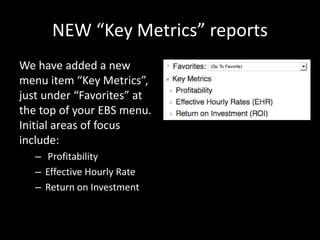
We have added a new
menu item “Key Metrics”,
just under “Favorites” at
the top of your EBS menu.
Initial areas of focus
include:
– Profitability
– Effective Hourly Rate
– Return on Investment
KEY METRICS > PROFITABILITY
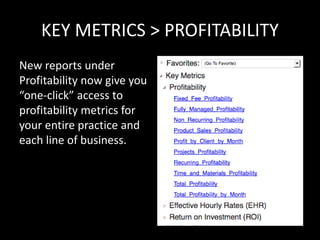
New reports under
Profitability now give you
“one-click” access to
profitability metrics for
your entire practice and
each line of business.
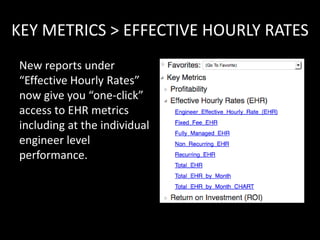
KEY METRICS > EFFECTIVE HOURLY RATES
New reports under
“Effective Hourly Rates”
now give you “one-click”
access to EHR metrics
including at the individual
engineer level
performance.
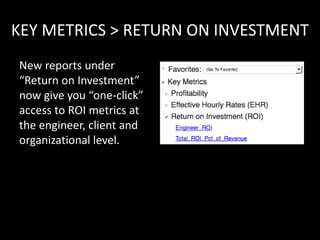
KEY METRICS > RETURN ON INVESTMENT
New reports under
“Return on Investment”
now give you “one-click”
access to ROI metrics at
the engineer, client and
organizational level.
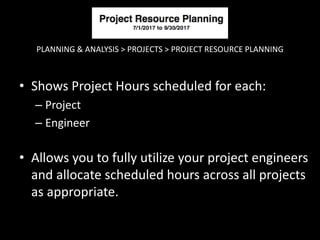
PLANNING & ANALYSIS > PROJECTS > PROJECT RESOURCE PLANNING
• Shows Project Hours scheduled for each:
– Project
– Engineer
• Allows you to fully utilize your project engineers
and allocate scheduled hours across all projects
as appropriate.
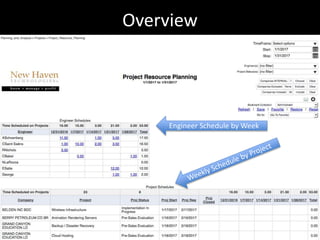
Overview
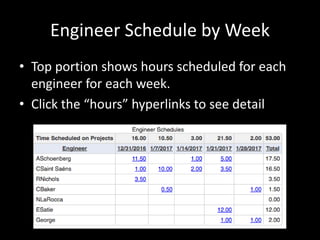
Engineer Schedule by Week
• Top portion shows hours scheduled for each
engineer for each week.
• Click the “hours” hyperlinks to see detail
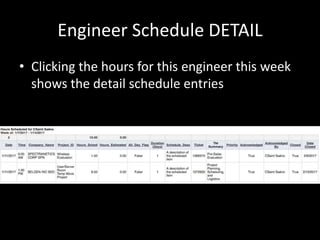
Engineer Schedule DETAIL
• Clicking the hours for this engineer this week
shows the detail schedule entries
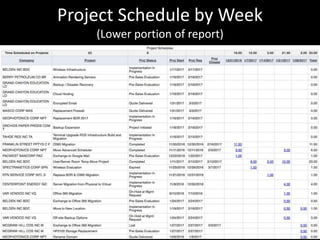
Project Schedule by Week
(Lower portion of report)
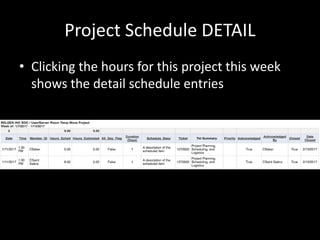
Project Schedule DETAIL
• Clicking the hours for this project this week
shows the detail schedule entries
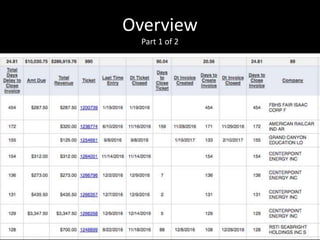
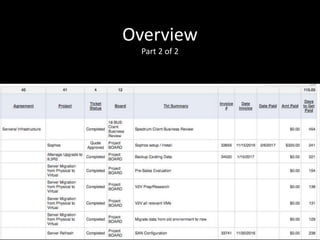
Time Delay on Invoicing Tickets
Speeding up Cash Flow
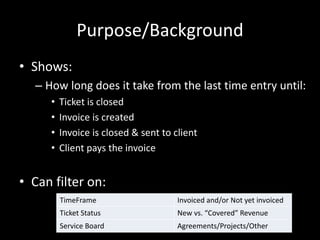
Purpose/Background
• Shows:
– How long does it take from the last time entry until:
• Ticket is closed
• Invoice is created
• Invoice is closed & sent to client
• Client pays the invoice
• Can filter on:
TimeFrame Invoiced and/or Not yet invoiced
Ticket Status New vs. “Covered” Revenue
Service Board Agreements/Projects/Other
Overview
Part 1 of 2
Overview
Part 2 of 2
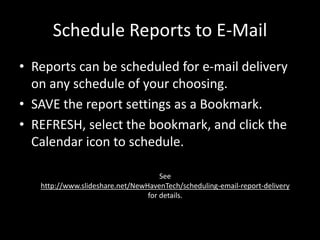
Schedule Reports to E-Mail
• Reports can be scheduled for e-mail delivery
on any schedule of your choosing.
• SAVE the report settings as a Bookmark.
• REFRESH, select the bookmark, and click the
Calendar icon to schedule.
See
http://www.slideshare.net/NewHavenTech/scheduling-email-report-delivery
for details.
Executive Briefing Service
Other Resources
www.NewHavenTech.com
Support@NewHavenTech.com
www.YouTube.com/NewHavenTech
www.linkedin.com/company/new-haven-technologies-llc
www.FaceBook.com/NewHavenTech
@NewHavenTech
www.SlideShare.net/NewHavenTech
https://marketplace.connectwise.com/p/177/executive-
briefing-service-for-connectwise

Whats new

  • 1.
    What’s New? Executive BriefingService 22-Feb-2018 NEW “Key Metrics” reports
  • 2.
    NEW “Key Metrics”reports We have added a new menu item “Key Metrics”, just under “Favorites” at the top of your EBS menu. Initial areas of focus include: – Profitability – Effective Hourly Rate – Return on Investment
  • 3.
    KEY METRICS >PROFITABILITY New reports under Profitability now give you “one-click” access to profitability metrics for your entire practice and each line of business.
  • 4.
    KEY METRICS >EFFECTIVE HOURLY RATES New reports under “Effective Hourly Rates” now give you “one-click” access to EHR metrics including at the individual engineer level performance.
  • 5.
    KEY METRICS >RETURN ON INVESTMENT New reports under “Return on Investment” now give you “one-click” access to ROI metrics at the engineer, client and organizational level.
  • 6.
    PLANNING & ANALYSIS> PROJECTS > PROJECT RESOURCE PLANNING • Shows Project Hours scheduled for each: – Project – Engineer • Allows you to fully utilize your project engineers and allocate scheduled hours across all projects as appropriate.
  • 7.
  • 8.
    Engineer Schedule byWeek • Top portion shows hours scheduled for each engineer for each week. • Click the “hours” hyperlinks to see detail
  • 9.
    Engineer Schedule DETAIL •Clicking the hours for this engineer this week shows the detail schedule entries
  • 10.
    Project Schedule byWeek (Lower portion of report)
  • 11.
    Project Schedule DETAIL •Clicking the hours for this project this week shows the detail schedule entries
  • 12.
    Time Delay onInvoicing Tickets Speeding up Cash Flow
  • 13.
    Purpose/Background • Shows: – Howlong does it take from the last time entry until: • Ticket is closed • Invoice is created • Invoice is closed & sent to client • Client pays the invoice • Can filter on: TimeFrame Invoiced and/or Not yet invoiced Ticket Status New vs. “Covered” Revenue Service Board Agreements/Projects/Other
  • 14.
  • 15.
  • 16.
    Schedule Reports toE-Mail • Reports can be scheduled for e-mail delivery on any schedule of your choosing. • SAVE the report settings as a Bookmark. • REFRESH, select the bookmark, and click the Calendar icon to schedule. See http://www.slideshare.net/NewHavenTech/scheduling-email-report-delivery for details.
  • 17.
    Executive Briefing Service OtherResources www.NewHavenTech.com Support@NewHavenTech.com www.YouTube.com/NewHavenTech www.linkedin.com/company/new-haven-technologies-llc www.FaceBook.com/NewHavenTech @NewHavenTech www.SlideShare.net/NewHavenTech https://marketplace.connectwise.com/p/177/executive- briefing-service-for-connectwise