Sage 100 Contractor
Version 19.2 Overview
Insert Product
Photograph Here
TEAMTAG.NET
Beyond the Numbers
TAG specializes in outsourced accounting and
software for the construction industry.
TAG supports and strengthens your company’s accounting
department and management with outsourced bookkeeping,
controller, and CFO services.
Whether you are a CFO who could use a quality controller once a
week, a controller who needs bookkeeping assistance, or an office
manager looking for higher level finance and accounting oversight,
TAG can fill the need.
From sales to implementation, training to consulting, TAG’s team of
certified consultants work to improve your efficiency and reporting
capabilities with the best accounting software for the building
industry. TAG is a an Authorized Reseller with a team of Certified
Consultants for:
•Sage 300 Construction and Real Estate (Timberline)
•Sage 100 Contractor (Master Builder)
•Sage Estimating
•Contractor V
Overview – Sage 100 Contractor
• Multiyear General Ledger &
Improved Year-End Process
• State Certified Reporting (10 States)
• Sage Advisor Update
• Web Help
Multiyear General Ledger &
Improved Year-End Process
• No more rushing to close the year
before posting to the new fiscal year
• You will have more time to focus on the
year-end process, generate financial
statements and enter adjusting entries.
• You no longer need to archive your
data at the end of the year! You can
create an archive at any time when you
are ready.
Begin posting to fiscal period 1 of
the new year while finishing up
transactions in fiscal period 12 of
the previous year
• If you are on period 12 of your current
fiscal year, you can begin entering
transactions for period 1 of the new
fiscal year by selecting Period 1 from the
Posting Period window or by changing
the company period in 1-6 Change
Period.
Archiving
• Sage 100 Contractor does not archive
your data automatically when you
advance the fiscal year. You can
archive your data after advancing the
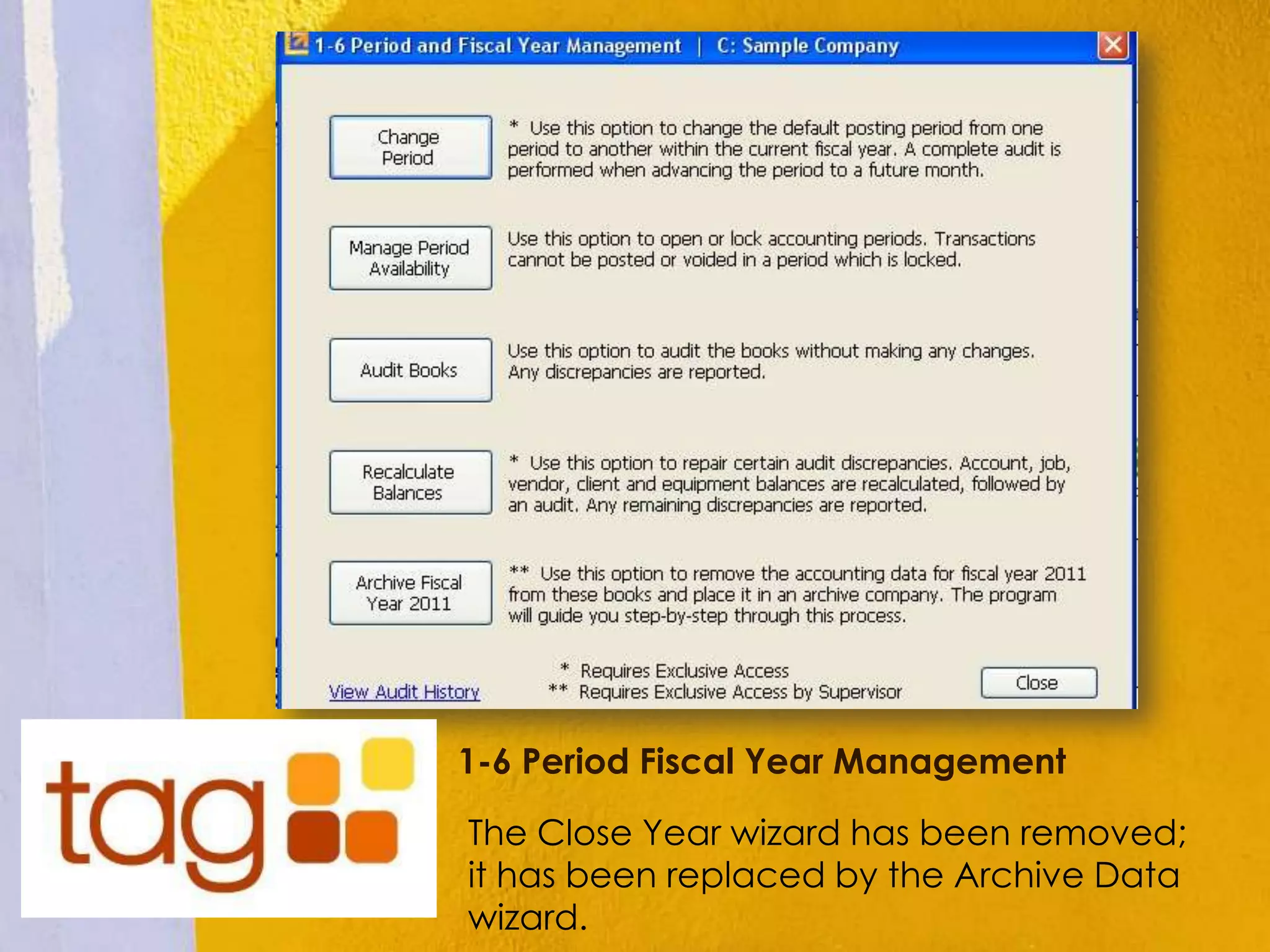
fiscal year by clicking [Archive Fiscal
Year] from within the 1-6 Period and
Fiscal Year Management window.
1-6 Period Fiscal Year Management
The Close Year wizard has been removed;
it has been replaced by the Archive Data
wizard.
State Certified Reporting
(10 States)
• Sage 100 will now offer state-certified reports for
ten states. More states will be offered in the
future
• If you work on government or public works
projects in
Alaska, California, Colorado, Georgia, Illinois, Mi
chigan, New Jersey, New York, North Carolina, or
Pennsylvania (where the federal DOL WH347 is
not accepted) you can quickly generate
and submit electronic certified payroll
reports using Sage 100 Contractor and
Aatrix® eFiling Services.
Sage Advisor Update
• Sage Advisor Update notifies you automatically when
an update is available for Sage 100 Contractor.
• You currently receive an email when an update for
Sage 100 Contractor is available. Now a notification in
your system tray alerts you when an update is
available for download. The application appears in
the system tray of your Windows taskbar.
• Access it by selecting Start > Programs > Sage > Sage
Advisor Update.
• *Important! You must have internet access to receive
notifications and updates.
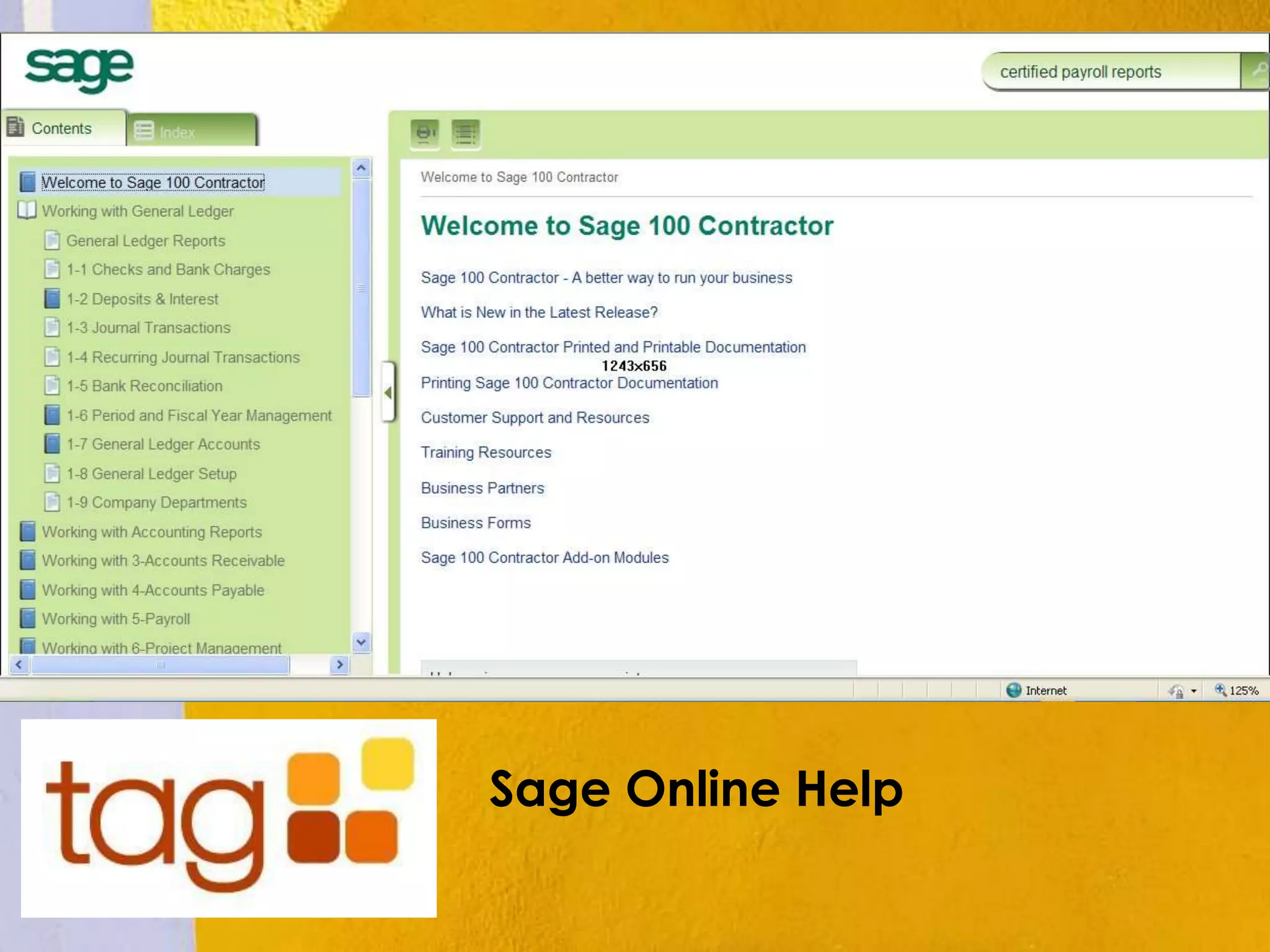
Sage Help Has Moved to the Web
• The help menu has moved to the
web. This means you do not have to
wait for software updates to get the
latest help topics. They will have
instant access as Sage continually
improves Sage 100 Help throughout
the year with what they learn as they
learn it!
Sage Online Help
Sage Construction Anywhere
• Sage Construction Anywhere makes it
possible for your project teams to access
and share accurate and timely project
information where ever they work.
Through secure mobile access and
seamless integration with Sage
Construction Anywhere. Communications
between your office and field is
streamlined, and collaboration is
strengthened so that projects keep
moving forward.
Features
• Mobile Time App- No more shuffling paper timesheets
between the jobsite and the office. Using a mobile
device, time can be collected and approved for one
or multiple employees, giving quicker visibility into
project labor costs and streamlining the field-to-office
payroll process.
• Web Based Centralized Management of Project Files-
With Project Files, team members can instantly share
the latest and most accurate project information on a
secured centralized hub - documents, drawings and
photos - so that decisions are solid and projects move
forward. Each team member, employees or
subcontractors, see only those documents they need
for their job.
Project Files
• With Project Files, team members can
instantly share the latest and most
accurate project information on a
secured centralized hub -
documents, drawings and photos - so
that decisions are solid and projects
move forward. Each team
member, employees or
subcontractors, see only those
documents they need for their job.
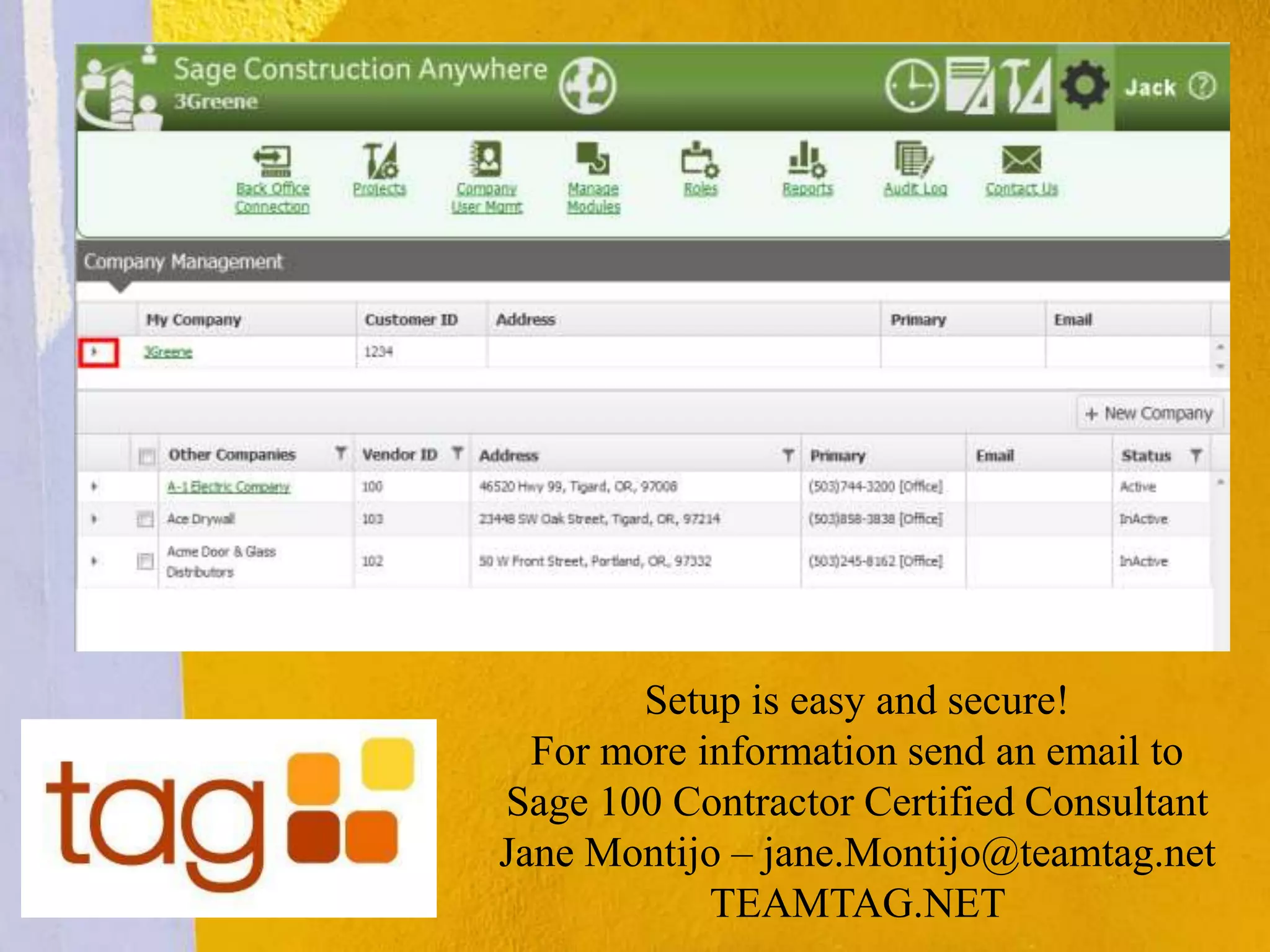
Setup is easy and secure!
For more information send an email to
Sage 100 Contractor Certified Consultant
Jane Montijo – jane.Montijo@teamtag.net
TEAMTAG.NET

Sage 100 Contractor | Version 19.2 | Overview with TAG - teamtag.net

  • 1.
    Sage 100 Contractor Version19.2 Overview Insert Product Photograph Here TEAMTAG.NET
  • 2.
    Beyond the Numbers TAGspecializes in outsourced accounting and software for the construction industry. TAG supports and strengthens your company’s accounting department and management with outsourced bookkeeping, controller, and CFO services. Whether you are a CFO who could use a quality controller once a week, a controller who needs bookkeeping assistance, or an office manager looking for higher level finance and accounting oversight, TAG can fill the need. From sales to implementation, training to consulting, TAG’s team of certified consultants work to improve your efficiency and reporting capabilities with the best accounting software for the building industry. TAG is a an Authorized Reseller with a team of Certified Consultants for: •Sage 300 Construction and Real Estate (Timberline) •Sage 100 Contractor (Master Builder) •Sage Estimating •Contractor V
  • 3.
    Overview – Sage100 Contractor • Multiyear General Ledger & Improved Year-End Process • State Certified Reporting (10 States) • Sage Advisor Update • Web Help
  • 4.
    Multiyear General Ledger& Improved Year-End Process • No more rushing to close the year before posting to the new fiscal year • You will have more time to focus on the year-end process, generate financial statements and enter adjusting entries. • You no longer need to archive your data at the end of the year! You can create an archive at any time when you are ready.
  • 5.
    Begin posting tofiscal period 1 of the new year while finishing up transactions in fiscal period 12 of the previous year • If you are on period 12 of your current fiscal year, you can begin entering transactions for period 1 of the new fiscal year by selecting Period 1 from the Posting Period window or by changing the company period in 1-6 Change Period.
  • 6.
    Archiving • Sage 100Contractor does not archive your data automatically when you advance the fiscal year. You can archive your data after advancing the fiscal year by clicking [Archive Fiscal Year] from within the 1-6 Period and Fiscal Year Management window.
  • 7.
    1-6 Period FiscalYear Management The Close Year wizard has been removed; it has been replaced by the Archive Data wizard.
  • 8.
    State Certified Reporting (10States) • Sage 100 will now offer state-certified reports for ten states. More states will be offered in the future • If you work on government or public works projects in Alaska, California, Colorado, Georgia, Illinois, Mi chigan, New Jersey, New York, North Carolina, or Pennsylvania (where the federal DOL WH347 is not accepted) you can quickly generate and submit electronic certified payroll reports using Sage 100 Contractor and Aatrix® eFiling Services.
  • 9.
    Sage Advisor Update •Sage Advisor Update notifies you automatically when an update is available for Sage 100 Contractor. • You currently receive an email when an update for Sage 100 Contractor is available. Now a notification in your system tray alerts you when an update is available for download. The application appears in the system tray of your Windows taskbar. • Access it by selecting Start > Programs > Sage > Sage Advisor Update. • *Important! You must have internet access to receive notifications and updates.
  • 10.
    Sage Help HasMoved to the Web • The help menu has moved to the web. This means you do not have to wait for software updates to get the latest help topics. They will have instant access as Sage continually improves Sage 100 Help throughout the year with what they learn as they learn it!
  • 11.
  • 12.
    Sage Construction Anywhere •Sage Construction Anywhere makes it possible for your project teams to access and share accurate and timely project information where ever they work. Through secure mobile access and seamless integration with Sage Construction Anywhere. Communications between your office and field is streamlined, and collaboration is strengthened so that projects keep moving forward.
  • 13.
    Features • Mobile TimeApp- No more shuffling paper timesheets between the jobsite and the office. Using a mobile device, time can be collected and approved for one or multiple employees, giving quicker visibility into project labor costs and streamlining the field-to-office payroll process. • Web Based Centralized Management of Project Files- With Project Files, team members can instantly share the latest and most accurate project information on a secured centralized hub - documents, drawings and photos - so that decisions are solid and projects move forward. Each team member, employees or subcontractors, see only those documents they need for their job.
  • 14.
    Project Files • WithProject Files, team members can instantly share the latest and most accurate project information on a secured centralized hub - documents, drawings and photos - so that decisions are solid and projects move forward. Each team member, employees or subcontractors, see only those documents they need for their job.
  • 15.
    Setup is easyand secure! For more information send an email to Sage 100 Contractor Certified Consultant Jane Montijo – jane.Montijo@teamtag.net TEAMTAG.NET