Project Resource Planning
Enhancing Project Delivery
Background Tour
Purpose/Background
• Shows Project Hours scheduled for each:
– Project
– Engineer
• Allows you to fully utilize your project engineers
and allocate scheduled hours across all projects
as appropriate.
Notes
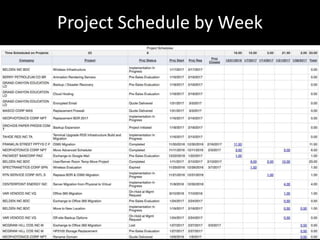
• This report shows ALL projects that are
“active” (i.e. have been opened but not yet
closed) during the selected timeframe.
• Projects with NO time scheduled during the
selected timeframe appear at the top of the
list.
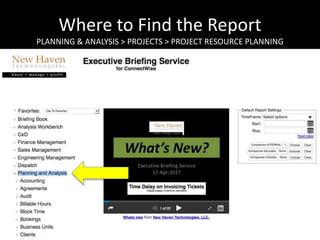
Where to Find the Report
PLANNING & ANALYSIS > PROJECTS > PROJECT RESOURCE PLANNING
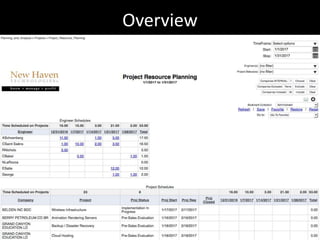
Overview
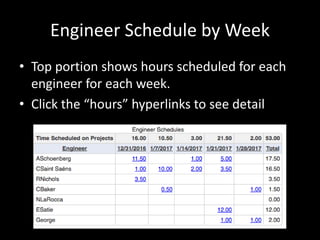
Engineer Schedule by Week
• Top portion shows hours scheduled for each
engineer for each week.
• Click the “hours” hyperlinks to see detail
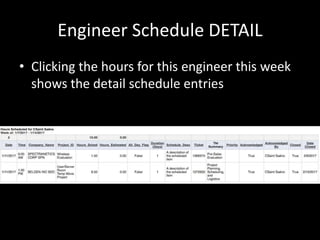
Engineer Schedule DETAIL
• Clicking the hours for this engineer this week
shows the detail schedule entries
Project Schedule by Week
Project Schedule DETAIL
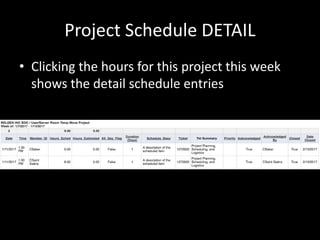
• Clicking the hours for this project this week
shows the detail schedule entries
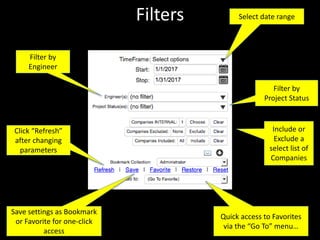
Filters
Click “Refresh”
after changing
parameters
Select date range
Filter by
Engineer
Include or
Exclude a
select list of
Companies
Save settings as Bookmark
or Favorite for one-click
access
Quick access to Favorites
via the “Go To” menu…
Filter by
Project Status
Executive Briefing Service
Other Resources
www.NewHavenTech.com
Support@NewHavenTech.com
www.YouTube.com/NewHavenTech
www.linkedin.com/company/new-haven-technologies-llc
www.FaceBook.com/NewHavenTech
@NewHavenTech
www.SlideShare.net/NewHavenTech
www.ConnectWise.com/Marketplace

Project resource planning

  • 1.
    Project Resource Planning EnhancingProject Delivery Background Tour
  • 2.
    Purpose/Background • Shows ProjectHours scheduled for each: – Project – Engineer • Allows you to fully utilize your project engineers and allocate scheduled hours across all projects as appropriate.
  • 3.
    Notes • This reportshows ALL projects that are “active” (i.e. have been opened but not yet closed) during the selected timeframe. • Projects with NO time scheduled during the selected timeframe appear at the top of the list.
  • 4.
    Where to Findthe Report PLANNING & ANALYSIS > PROJECTS > PROJECT RESOURCE PLANNING
  • 5.
  • 6.
    Engineer Schedule byWeek • Top portion shows hours scheduled for each engineer for each week. • Click the “hours” hyperlinks to see detail
  • 7.
    Engineer Schedule DETAIL •Clicking the hours for this engineer this week shows the detail schedule entries
  • 8.
  • 9.
    Project Schedule DETAIL •Clicking the hours for this project this week shows the detail schedule entries
  • 10.
    Filters Click “Refresh” after changing parameters Selectdate range Filter by Engineer Include or Exclude a select list of Companies Save settings as Bookmark or Favorite for one-click access Quick access to Favorites via the “Go To” menu… Filter by Project Status
  • 11.
    Executive Briefing Service OtherResources www.NewHavenTech.com Support@NewHavenTech.com www.YouTube.com/NewHavenTech www.linkedin.com/company/new-haven-technologies-llc www.FaceBook.com/NewHavenTech @NewHavenTech www.SlideShare.net/NewHavenTech www.ConnectWise.com/Marketplace