Bookings Summary
Background Tour
Purpose/Background
• Show deals and projects expected in the
selected time frame
• Anticipate
– Cash requirements for Product sales
– Engineering resources for Service and Managed
Services deals
Notes and Notices
• Select to view this report by “Date Close
Expected” (upper-right of the screen) to have
it match the ConnectWise Sales Dashboard
screen exactly.
• Select to view by “Date Closed” to use the
actual date the deal closed for the report.
Where to Find the Report
Planning & Analysis > Bookings > Bookings Summary
Total Bookings
Revenue from
“Service” products
associated with
this Opportunity
Sales Forecasts
Bookings by Month
Click “Months” Button
“Months”button
• Expected Revenue by Product, Service or Managed Services
• Based on “Expected” or “Actual” Close Date
Bookings by Month
Drill-down to see Opportunities
Click Month to drill-down
Bookings by Month
Drill-down to see Opportunity Detail
ClickOpportunitytodrill-down
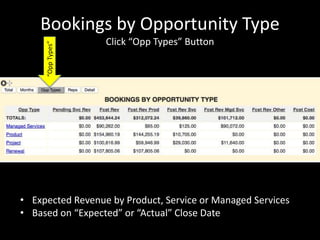
Bookings by Opportunity Type
Click “Opp Types” Button
“OppTypes”
• Expected Revenue by Product, Service or Managed Services
• Based on “Expected” or “Actual” Close Date
Bookings by Opportunity Type
Drill-down to see Opportunities and Opp Details
Click Opp Type to drill-down
Bookings by Rep
Click “Reps” Button
“Reps”button
• Expected Revenue by Product, Service or Managed Services
• Based on “Expected” or “Actual” Close Date
Bookings by Rep
Drill-down to see Opportunities and Opp Details
Click Rep to drill-down
Bookings Detail
Click “Detail” Button
“Detail” button
Settings
Select the
Opportunity Types
to ViewClick “Refresh” after
changing parameters
Select date range
Run the Report
based on
“Expected Close Date”
or “Actual Close Date”
Executive Briefing Service
Other Resources
www.NewHavenTech.com
Support@NewHavenTech.com
www.YouTube.com/NewHavenTech
www.LinkedIn.com/NewHavenTech
www.FaceBook.com/NewHavenTech
@NewHavenTech
www.SlideShare.net/NewHavenTech
www.ConnectWise.com/Marketplace

Bookings summary

  • 1.
  • 2.
    Purpose/Background • Show dealsand projects expected in the selected time frame • Anticipate – Cash requirements for Product sales – Engineering resources for Service and Managed Services deals
  • 3.
    Notes and Notices •Select to view this report by “Date Close Expected” (upper-right of the screen) to have it match the ConnectWise Sales Dashboard screen exactly. • Select to view by “Date Closed” to use the actual date the deal closed for the report.
  • 4.
    Where to Findthe Report Planning & Analysis > Bookings > Bookings Summary
  • 5.
    Total Bookings Revenue from “Service”products associated with this Opportunity Sales Forecasts
  • 6.
    Bookings by Month Click“Months” Button “Months”button • Expected Revenue by Product, Service or Managed Services • Based on “Expected” or “Actual” Close Date
  • 7.
    Bookings by Month Drill-downto see Opportunities Click Month to drill-down
  • 8.
    Bookings by Month Drill-downto see Opportunity Detail ClickOpportunitytodrill-down
  • 9.
    Bookings by OpportunityType Click “Opp Types” Button “OppTypes” • Expected Revenue by Product, Service or Managed Services • Based on “Expected” or “Actual” Close Date
  • 10.
    Bookings by OpportunityType Drill-down to see Opportunities and Opp Details Click Opp Type to drill-down
  • 11.
    Bookings by Rep Click“Reps” Button “Reps”button • Expected Revenue by Product, Service or Managed Services • Based on “Expected” or “Actual” Close Date
  • 12.
    Bookings by Rep Drill-downto see Opportunities and Opp Details Click Rep to drill-down
  • 13.
    Bookings Detail Click “Detail”Button “Detail” button
  • 14.
    Settings Select the Opportunity Types toViewClick “Refresh” after changing parameters Select date range Run the Report based on “Expected Close Date” or “Actual Close Date”
  • 15.
    Executive Briefing Service OtherResources www.NewHavenTech.com Support@NewHavenTech.com www.YouTube.com/NewHavenTech www.LinkedIn.com/NewHavenTech www.FaceBook.com/NewHavenTech @NewHavenTech www.SlideShare.net/NewHavenTech www.ConnectWise.com/Marketplace