Flipping your class 
Christine Wells
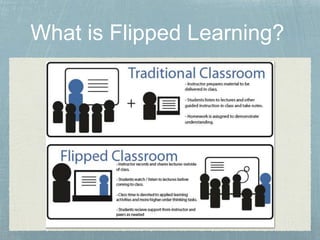
What is Flipped Learning?
http://youtu.be/2H4RkudFzlc 
BUT... 
It is not just about watching videos at home 
Content is made available on the LMS so that: 
• Students can learn at their own pace 
• Teacher can be the 'guide on the side'
Students learn more deeply. 
Students can consume content and engage with it more deeply because they can work at their own pace. 
Students are more active participants in learning. 
The teacher does not spend the majority of the lesson lecturing because the content is available through 
pre-created media. This frees the teacher up to work alongside students as they engage with concepts. 
Interaction increases and students learn from one another. 
Students can learn socially by discussing concepts together. 
Teachers and students get more feedback. 
The teacher is able to give immediate feedback and help to students which would not happen if the tasks 
were given for homework.
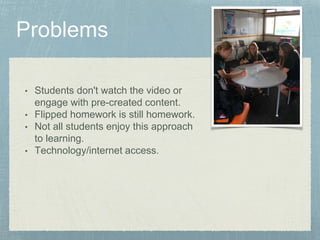
• Students don't watch the video or 
engage with pre-created content. 
• Flipped homework is still homework. 
• Not all students enjoy this approach 
to learning. 
• Technology/internet access.
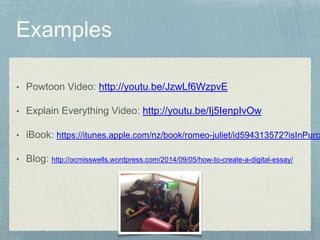
• Powtoon Video: http://youtu.be/JzwLf6WzpvE 
• Explain Everything Video: http://youtu.be/Ij5IenpIvOw 
• iBook: https://itunes.apple.com/nz/book/romeo-juliet/id594313572?isInPurchasedView=• Blog: http://ocmisswells.wordpress.com/2014/09/05/how-to-create-a-digital-essay/
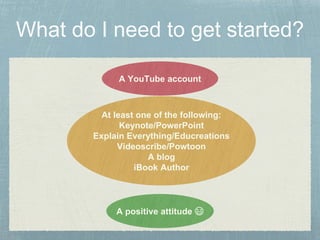
A YouTube account 
At least one of the following: 
Keynote/PowerPoint 
Explain Everything/Educreations 
Videoscribe/Powtoon 
A blog 
iBook Author 
A positive attitude 
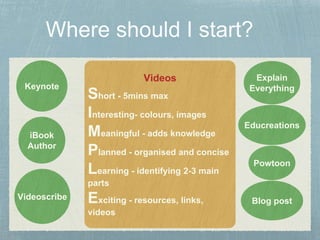
Videos 
Short - 5mins max 
Interesting- colours, images 
Meaningful - adds knowledge 
Planned - organised and concise 
Learning - identifying 2-3 main 
parts 
Exciting - resources, links, 
videos 
Keynote 
iBook 
Author 
Explain 
Everything 
Educreations 
Powtoon 
Videoscribe 
Blog post
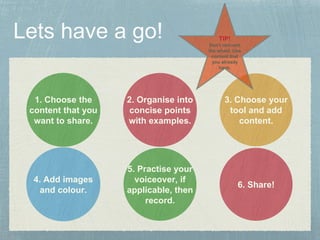
2. Organise into 
concise points 
with examples. 
3. Choose your 
tool and add 
content. 
6. Share! 
1. Choose the 
content that you 
want to share. 
4. Add images 
and colour. 
5. Practise your 
voiceover, if 
applicable, then 
record. 
TIP! 
Don't reinvent 
the wheel. Use 
content that 
you already 
have.
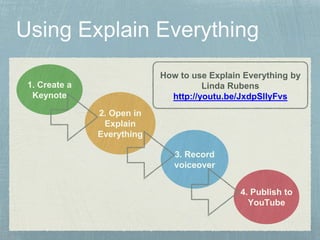
1. Create a 
Keynote 
2. Open in 
Explain 
Everything 
How to use Explain Everything by 
Linda Rubens 
http://youtu.be/JxdpSllyFvs 
3. Record 
voiceover 
4. Publish to 
YouTube
http://ctl.utexas.edu/teaching/flipping-a-class/ 
http://loretolearning.wordpress.com/2014/04/28/what-is-flipped- 
learning/ 
Linda Rubens

Flipping Your Class

  • 1.
    Flipping your class Christine Wells
  • 2.
    What is FlippedLearning?
  • 3.
    http://youtu.be/2H4RkudFzlc BUT... Itis not just about watching videos at home Content is made available on the LMS so that: • Students can learn at their own pace • Teacher can be the 'guide on the side'
  • 4.
    Students learn moredeeply. Students can consume content and engage with it more deeply because they can work at their own pace. Students are more active participants in learning. The teacher does not spend the majority of the lesson lecturing because the content is available through pre-created media. This frees the teacher up to work alongside students as they engage with concepts. Interaction increases and students learn from one another. Students can learn socially by discussing concepts together. Teachers and students get more feedback. The teacher is able to give immediate feedback and help to students which would not happen if the tasks were given for homework.
  • 5.
    • Students don'twatch the video or engage with pre-created content. • Flipped homework is still homework. • Not all students enjoy this approach to learning. • Technology/internet access.
  • 6.
    • Powtoon Video:http://youtu.be/JzwLf6WzpvE • Explain Everything Video: http://youtu.be/Ij5IenpIvOw • iBook: https://itunes.apple.com/nz/book/romeo-juliet/id594313572?isInPurchasedView=• Blog: http://ocmisswells.wordpress.com/2014/09/05/how-to-create-a-digital-essay/
  • 7.
    A YouTube account At least one of the following: Keynote/PowerPoint Explain Everything/Educreations Videoscribe/Powtoon A blog iBook Author A positive attitude 
  • 8.
    Videos Short -5mins max Interesting- colours, images Meaningful - adds knowledge Planned - organised and concise Learning - identifying 2-3 main parts Exciting - resources, links, videos Keynote iBook Author Explain Everything Educreations Powtoon Videoscribe Blog post
  • 9.
    2. Organise into concise points with examples. 3. Choose your tool and add content. 6. Share! 1. Choose the content that you want to share. 4. Add images and colour. 5. Practise your voiceover, if applicable, then record. TIP! Don't reinvent the wheel. Use content that you already have.
  • 10.
    1. Create a Keynote 2. Open in Explain Everything How to use Explain Everything by Linda Rubens http://youtu.be/JxdpSllyFvs 3. Record voiceover 4. Publish to YouTube
  • 11.