Last Modified: 12 December 2022
© Copyright Fortinet Inc. All rights reserved.
FortiOS 6.2
FortiGate Security
Security Fabric
Lesson Overview
Introduction to the Fortinet Security Fabric
Deploying the Security Fabric
Extending the Security Fabric and Features
Security Fabric Rating and Topology View
Objectives
• Define the Fortinet Security Fabric
• Identify why the Security Fabric is required
• Identify the Fortinet devices that participate in the Security Fabric,
especially the essential ones
Introduction to the Fortinet Security Fabric
4
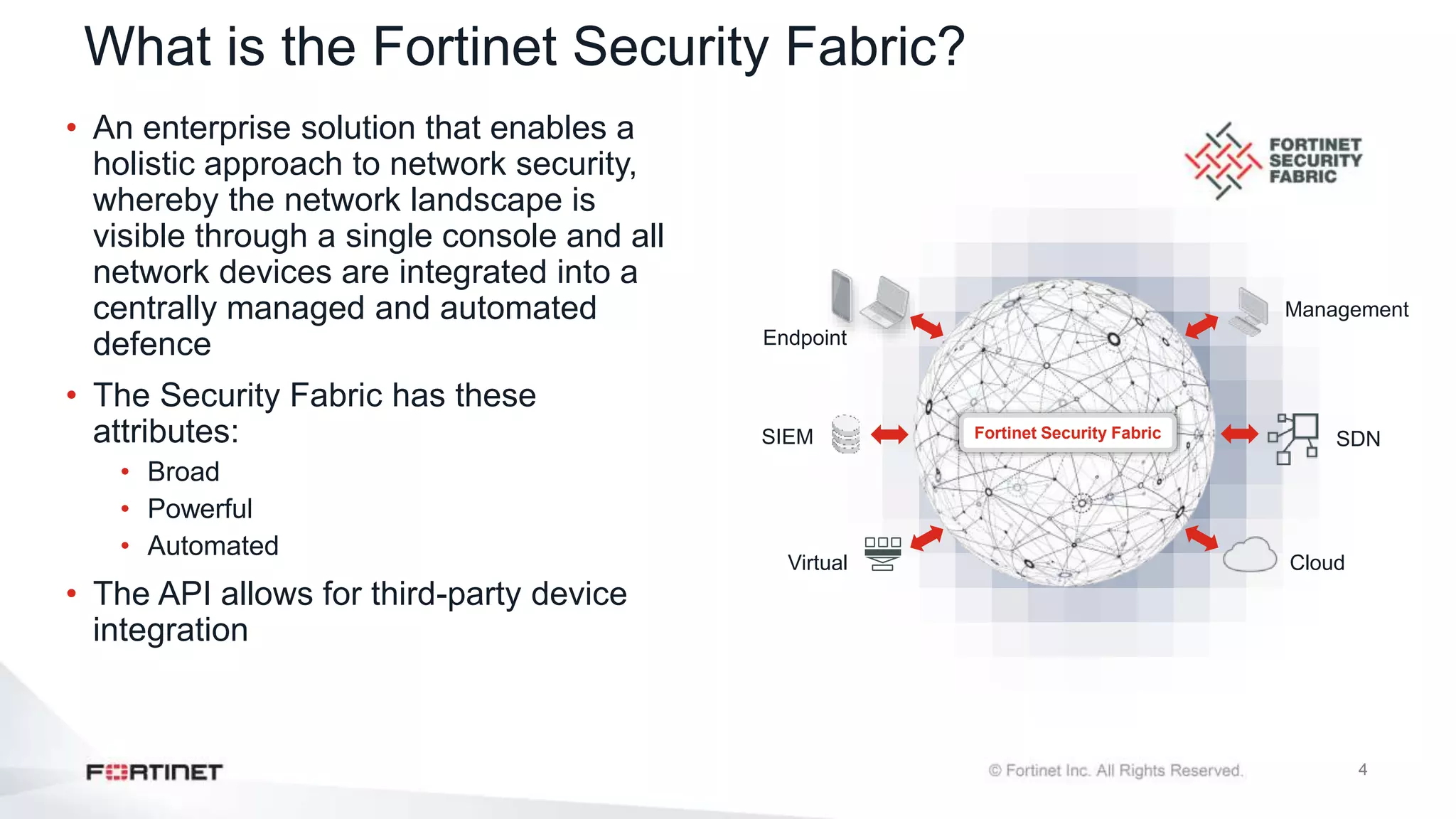
What is the Fortinet Security Fabric?
• An enterprise solution that enables a
holistic approach to network security,
whereby the network landscape is
visible through a single console and all
network devices are integrated into a
centrally managed and automated
defence
• The Security Fabric has these
attributes:
• Broad
• Powerful
• Automated
• The API allows for third-party device
integration
Fortinet Security Fabric SDN
Cloud
Virtual
Management
Endpoint
SIEM
5
Why a Security Fabric?
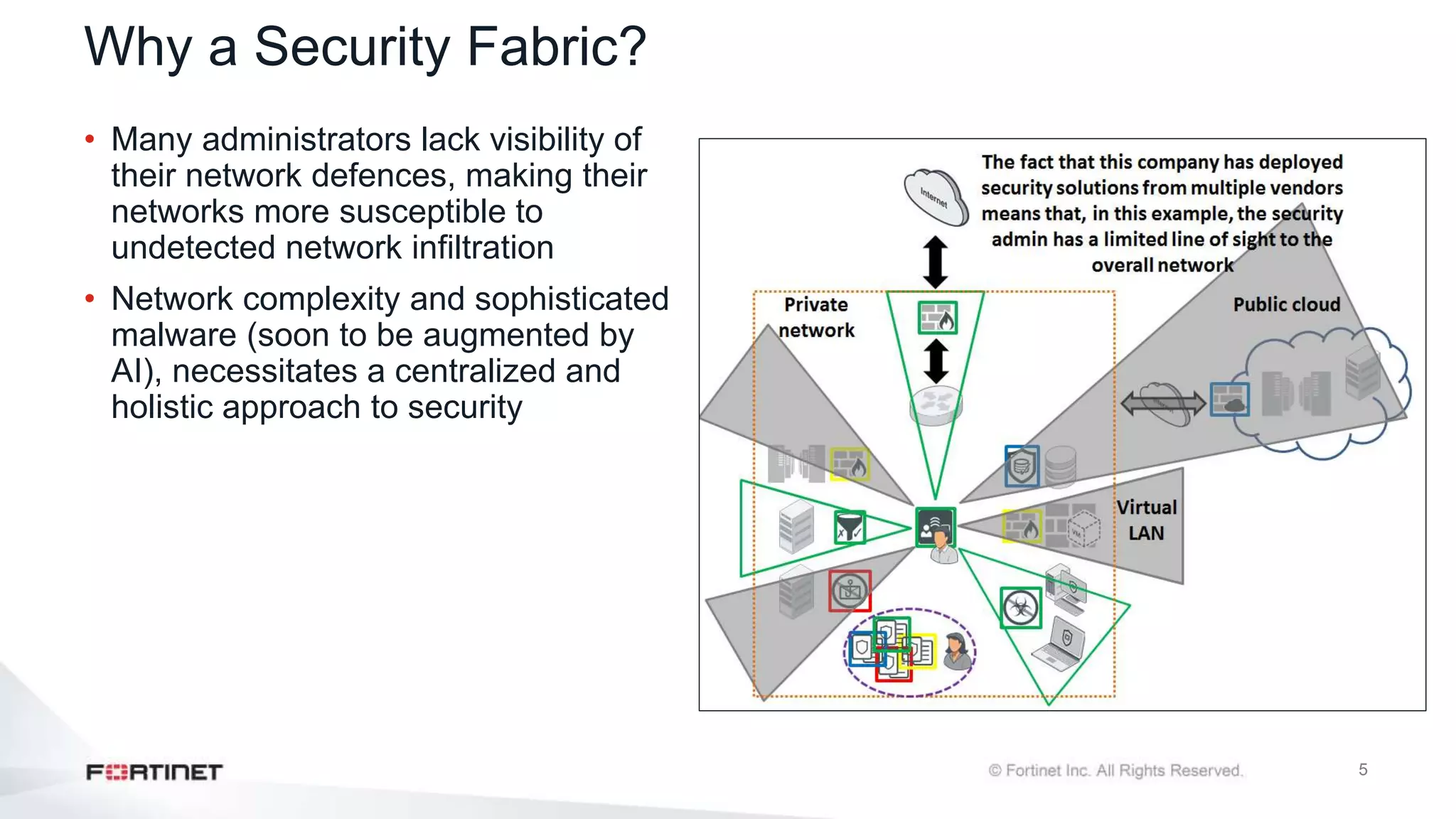
• Many administrators lack visibility of
their network defences, making their
networks more susceptible to
undetected network infiltration
• Network complexity and sophisticated
malware (soon to be augmented by
AI), necessitates a centralized and
holistic approach to security
6
Fortinet End-to-End Solution
Network
Security
Multi-Cloud
Security
Endpoint
Security
Email
Security
Web Application
Security
Secure
Unified Access
Advanced
Threat Protection
Management
& Analytics
FortiGate
Enterprise Firewall
FortiGate
Cloud Firewall
Network Security
FortiClient
EPP FortiWeb
Web Application
Firewall
FortiMail
Secure Email
Gateway
FortiSandbox
Advanced Threat
Protection
FortiAnalyzer
Central Logging /Reporting
FortiManager
Central Security Management
FortiSIEM
Security Information &
Event Management
FortiGate
Virtual Firewall
Network Security
FortiAP
Wireless
Infrastructure
FortiSwitch
Switching
Infrastructure
Endpoint
IoT
Multi
Cloud Applications
Web Unified
Access
Email Threat
Protection
Advanced
Management
Analytics
FortiCASB
IPS
SWG
SD-WAN
VPN
7
Devices That Comprise the Security Fabric
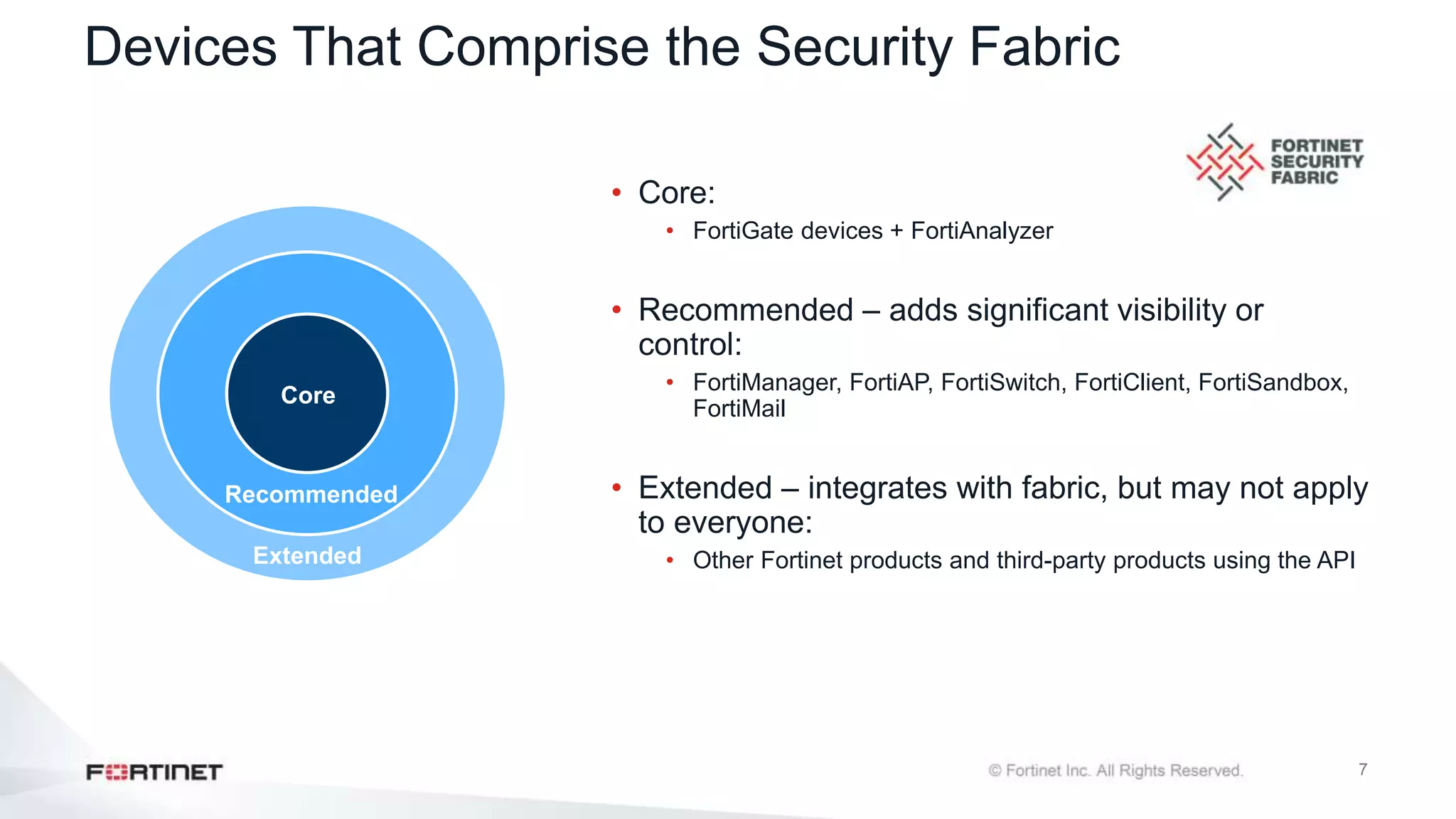
• Core:
• FortiGate devices + FortiAnalyzer
• Recommended – adds significant visibility or
control:
• FortiManager, FortiAP, FortiSwitch, FortiClient, FortiSandbox,
FortiMail
• Extended – integrates with fabric, but may not apply
to everyone:
• Other Fortinet products and third-party products using the API
Core
Recommended
Extended
8
Knowledge Check
1. What is the Fortinet Security Fabric?
A. A Fortinet solution that enables the communication and visibility between devices of your network
B. A device that can manage all your Firewalls
2. What combination of devices must participate in the Security Fabric?
A. A FortiAnalyzer and one or more FortiGate devices
B. A FortiMail and two or more FortiGate devices
Lesson Progress
Introduction to the Fortinet Security Fabric
Deploying the Security Fabric
Extending the Security Fabric and Features
Security Fabric Rating and Topology View
Objectives
• Understand how to implement the Security Fabric
• Configure the Security Fabric on root and downstream FortiGate
• Understand how the device detection works
• Understand how to extend your existing Security Fabric
Deploying the Security Fabric
11
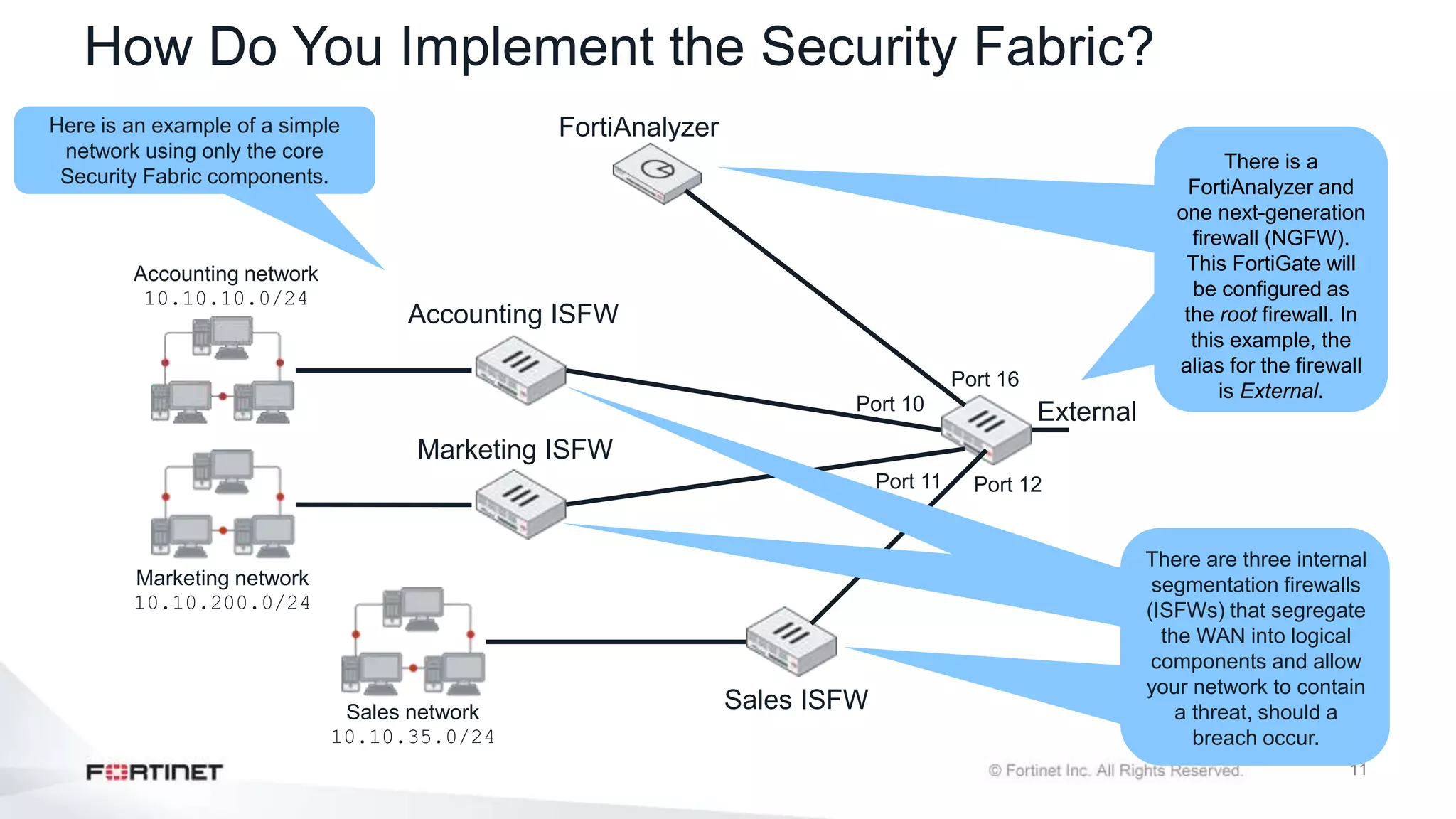
How Do You Implement the Security Fabric?
FortiAnalyzer
Accounting ISFW
Marketing ISFW
Sales ISFW
External
Port 12
Port 16
Port 10
Port 11
Sales network
10.10.35.0/24
Marketing network
10.10.200.0/24
Accounting network
10.10.10.0/24
Here is an example of a simple
network using only the core
Security Fabric components.
There is a
FortiAnalyzer and
one next-generation
firewall (NGFW).
This FortiGate will
be configured as
the root firewall. In
this example, the
alias for the firewall
is External.
There are three internal
segmentation firewalls
(ISFWs) that segregate
the WAN into logical
components and allow
your network to contain
a threat, should a
breach occur.
12
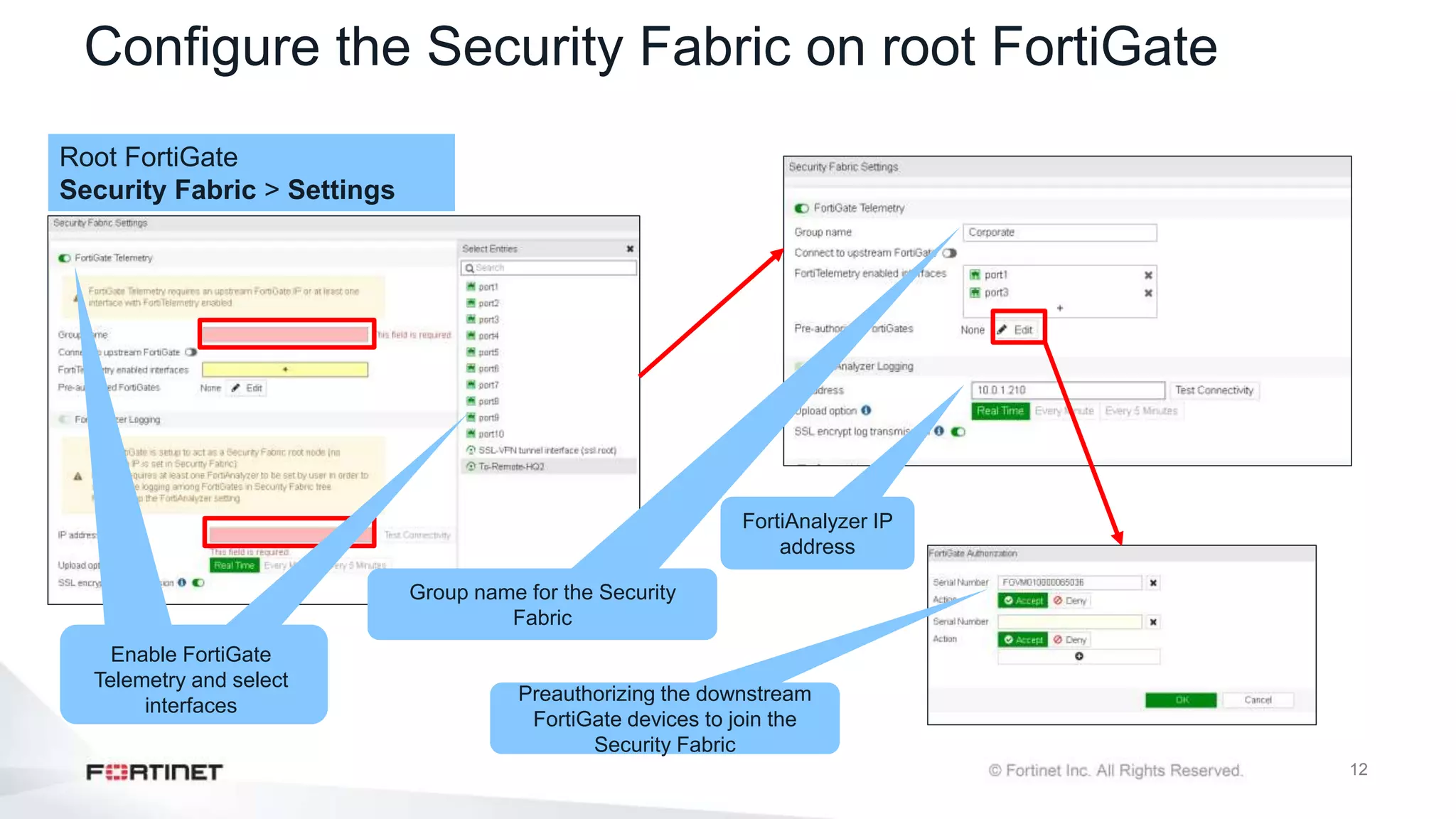
Configure the Security Fabric on root FortiGate
Root FortiGate
Security Fabric > Settings
Group name for the Security
Fabric
FortiAnalyzer IP
address
Preauthorizing the downstream
FortiGate devices to join the
Security Fabric
Enable FortiGate
Telemetry and select
interfaces
13
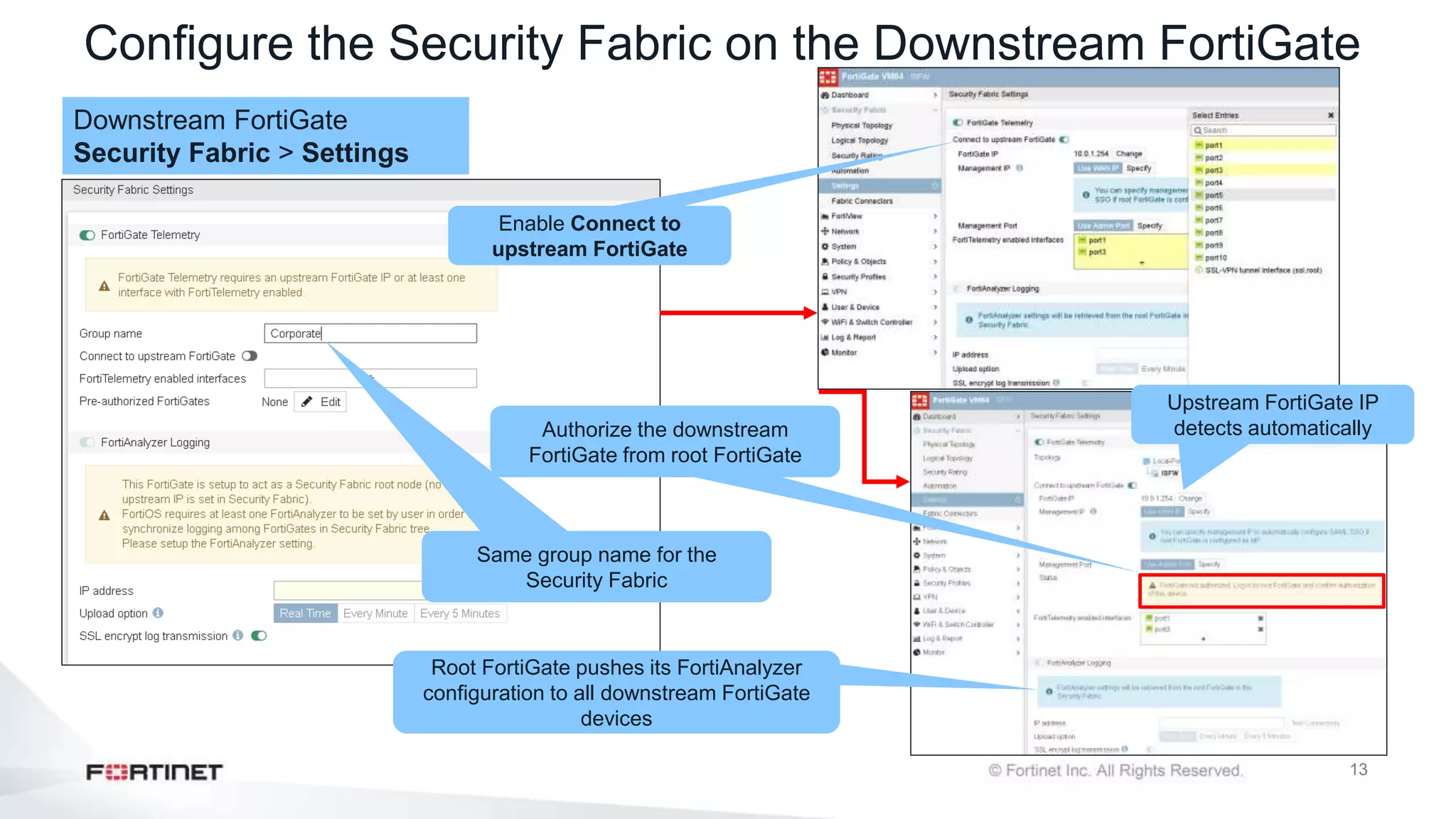
Configure the Security Fabric on the Downstream FortiGate
Downstream FortiGate
Security Fabric > Settings
Same group name for the
Security Fabric
Enable Connect to
upstream FortiGate
Upstream FortiGate IP
detects automatically
Root FortiGate pushes its FortiAnalyzer
configuration to all downstream FortiGate
devices
Authorize the downstream
FortiGate from root FortiGate
14
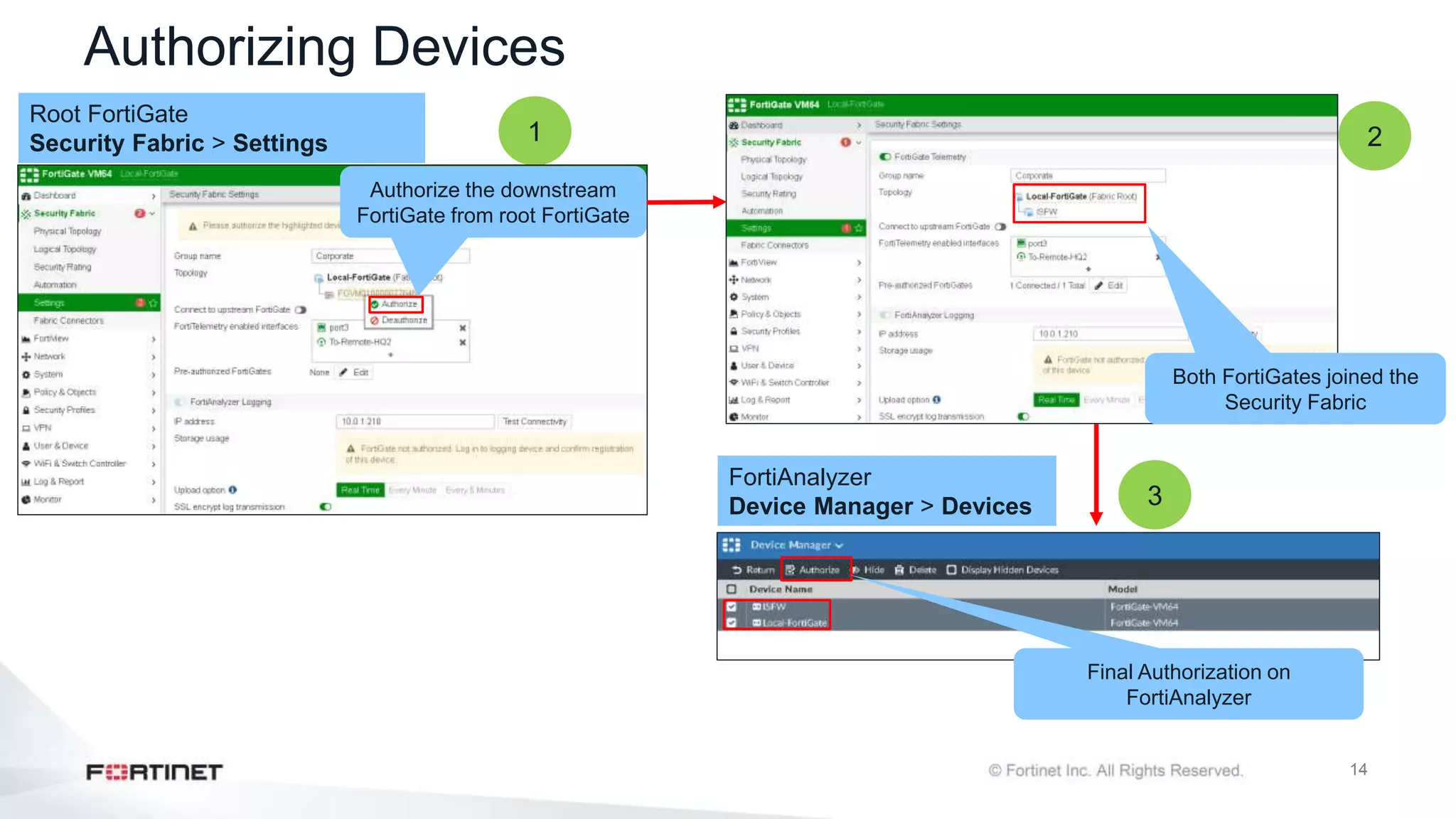
Authorizing Devices
Root FortiGate
Security Fabric > Settings
FortiAnalyzer
Device Manager > Devices
Final Authorization on
FortiAnalyzer
1
3
Authorize the downstream
FortiGate from root FortiGate
Both FortiGates joined the
Security Fabric
2
15
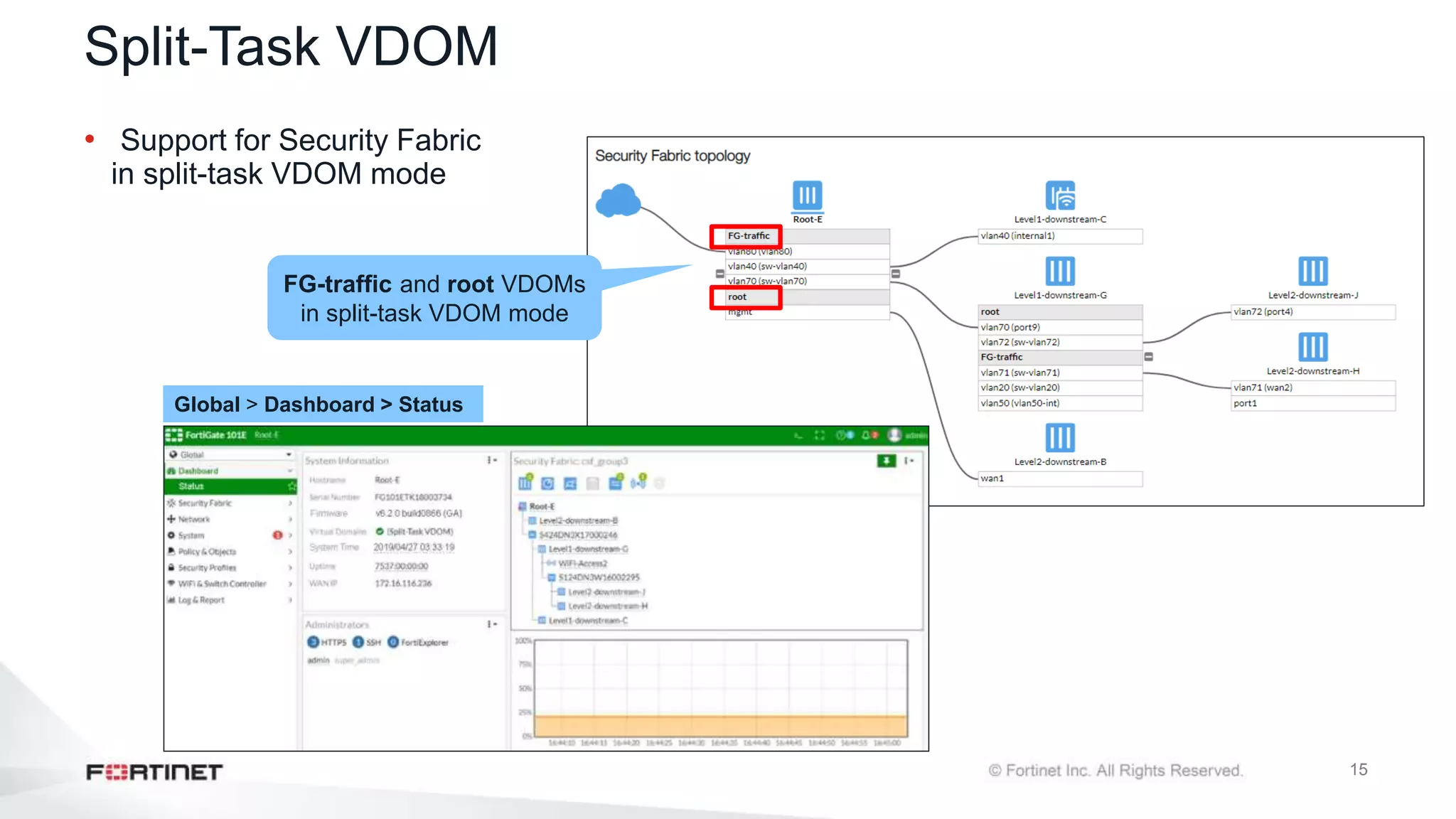
Split-Task VDOM
• Support for Security Fabric
in split-task VDOM mode
FG-traffic and root VDOMs
in split-task VDOM mode
Global > Dashboard > Status
16
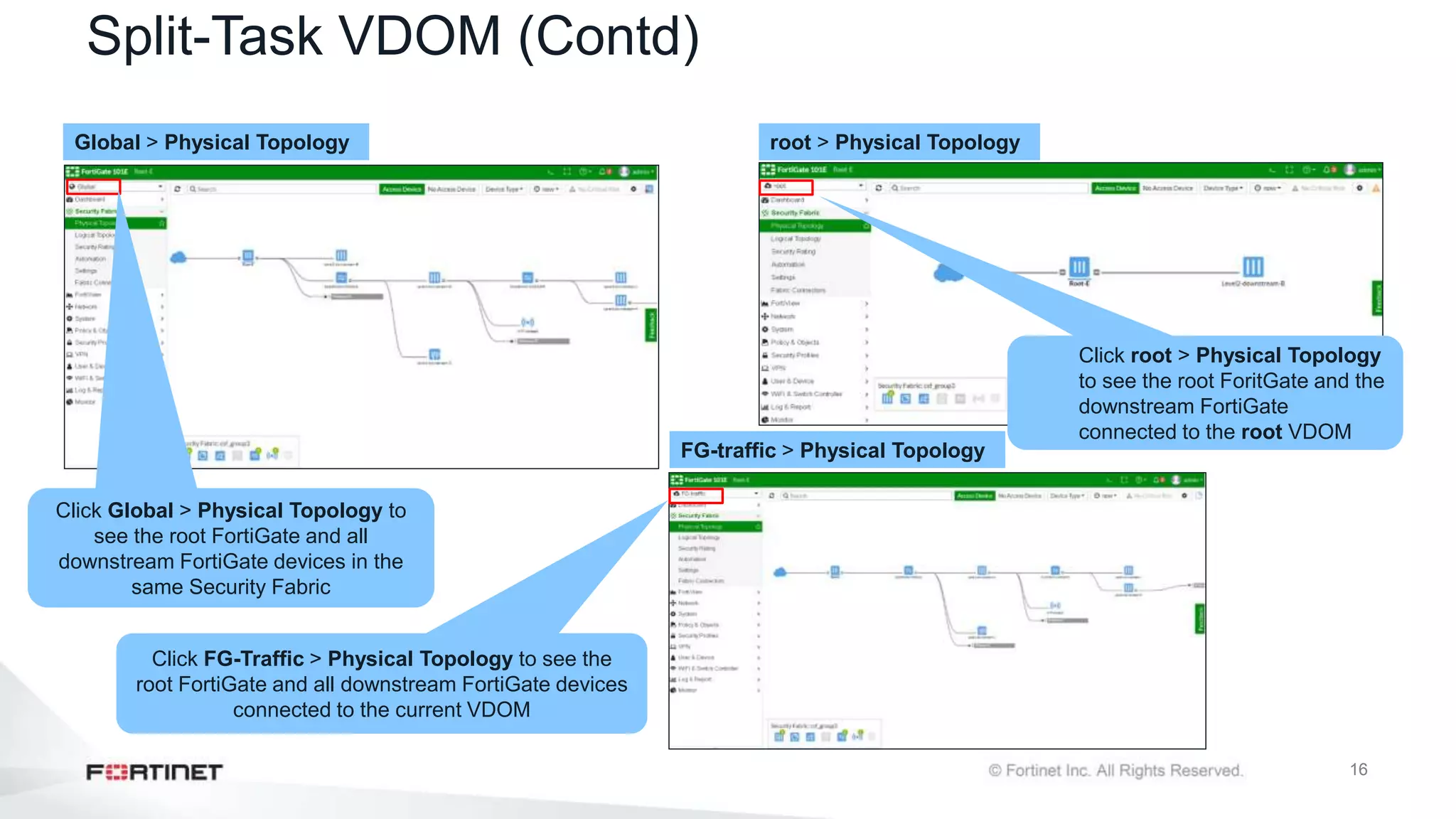
Split-Task VDOM (Contd)
Global > Physical Topology root > Physical Topology
Click Global > Physical Topology to
see the root FortiGate and all
downstream FortiGate devices in the
same Security Fabric
Click root > Physical Topology
to see the root ForitGate and the
downstream FortiGate
connected to the root VDOM
FG-traffic > Physical Topology
Click FG-Traffic > Physical Topology to see the
root FortiGate and all downstream FortiGate devices
connected to the current VDOM
17
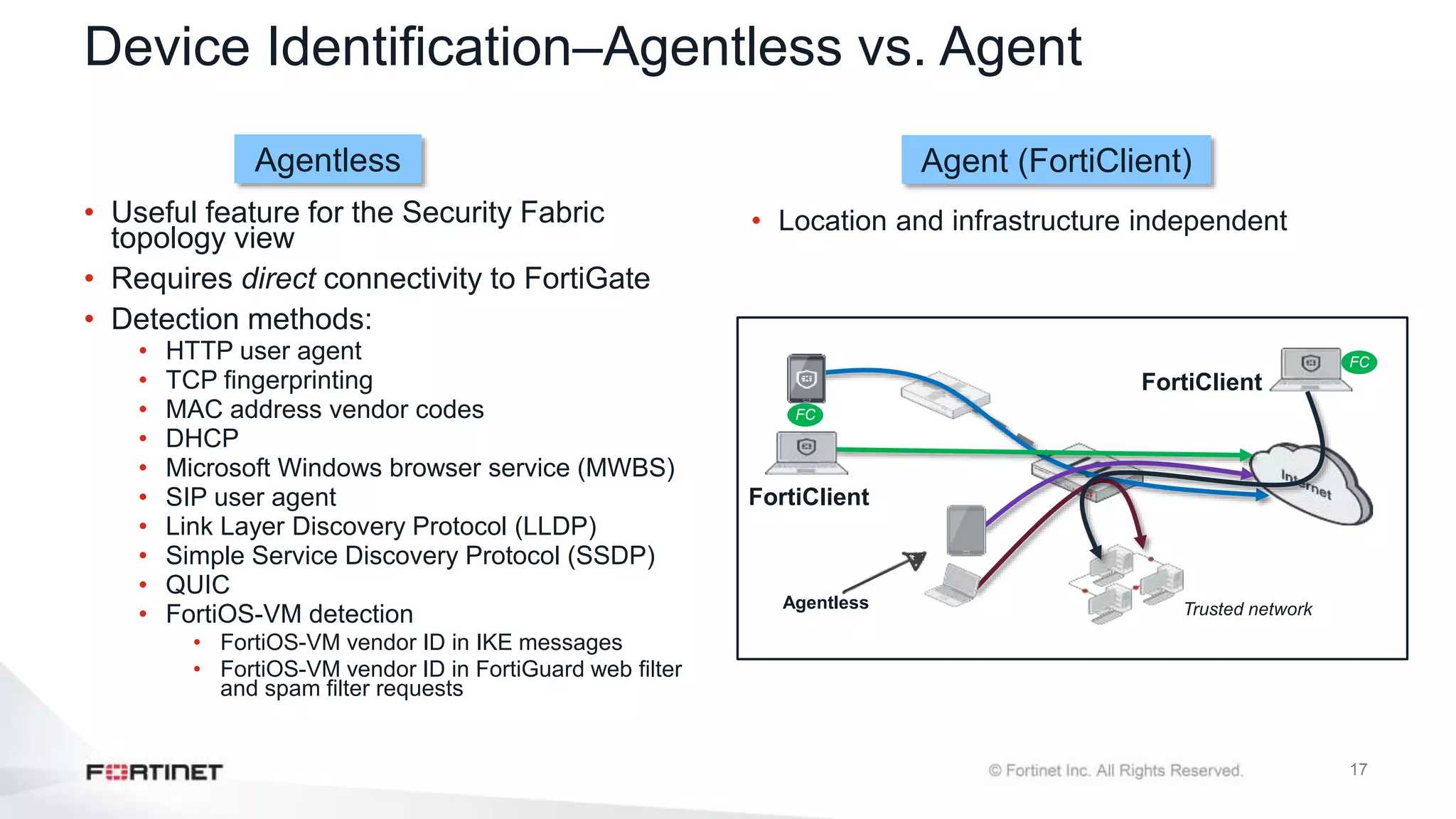
Device Identification–Agentless vs. Agent
• Location and infrastructure independent
.
• Useful feature for the Security Fabric
topology view
• Requires direct connectivity to FortiGate
• Detection methods:
• HTTP user agent
• TCP fingerprinting
• MAC address vendor codes
• DHCP
• Microsoft Windows browser service (MWBS)
• SIP user agent
• Link Layer Discovery Protocol (LLDP)
• Simple Service Discovery Protocol (SSDP)
• QUIC
• FortiOS-VM detection
• FortiOS-VM vendor ID in IKE messages
• FortiOS-VM vendor ID in FortiGuard web filter
and spam filter requests
FC
Trusted network
FC
Agentless
FortiClient
FortiClient
Agentless Agent (FortiClient)
18
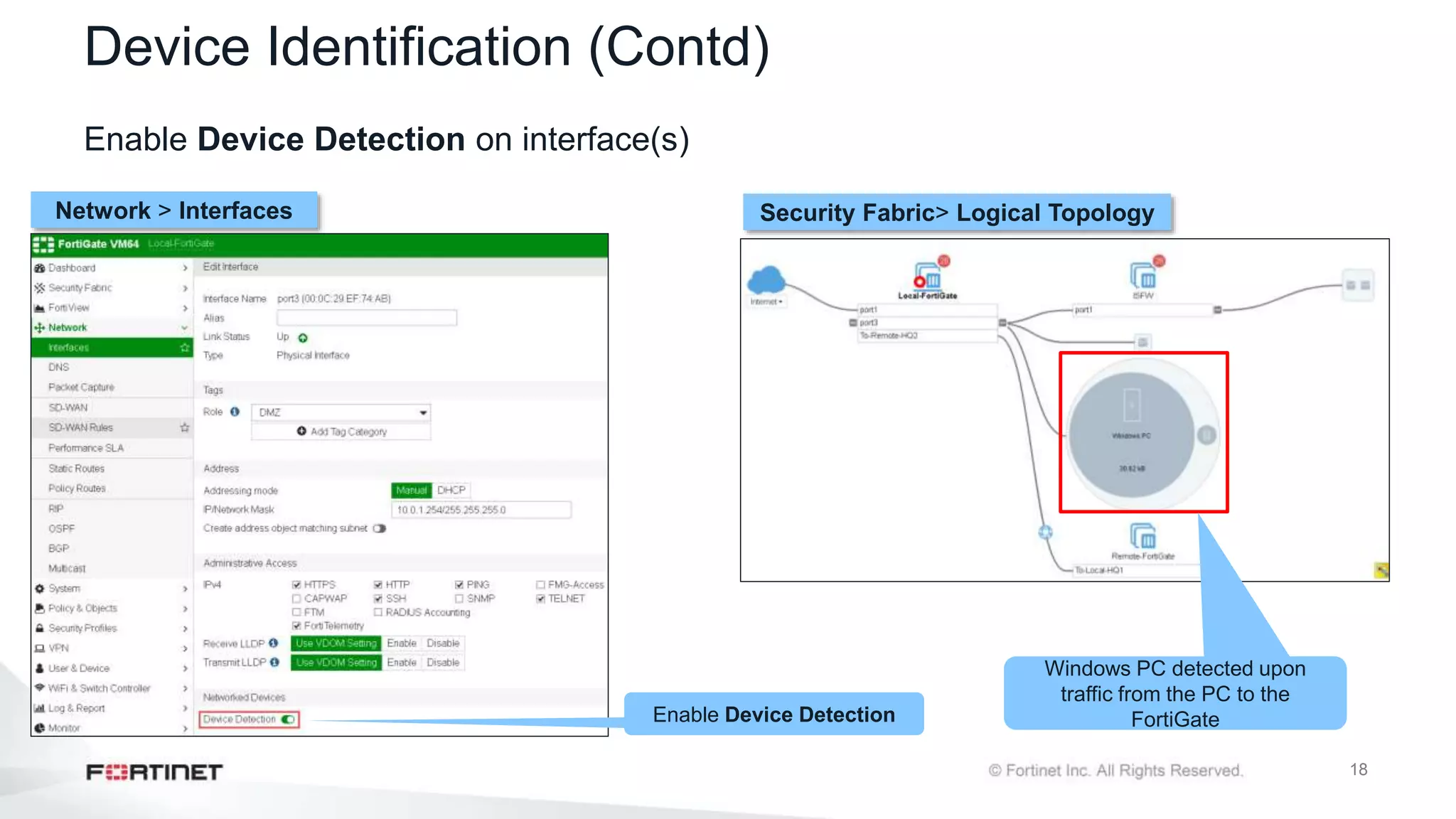
Device Identification (Contd)
Enable Device Detection on interface(s)
Network > Interfaces Security Fabric> Logical Topology
Windows PC detected upon
traffic from the PC to the
FortiGate
Enable Device Detection
19
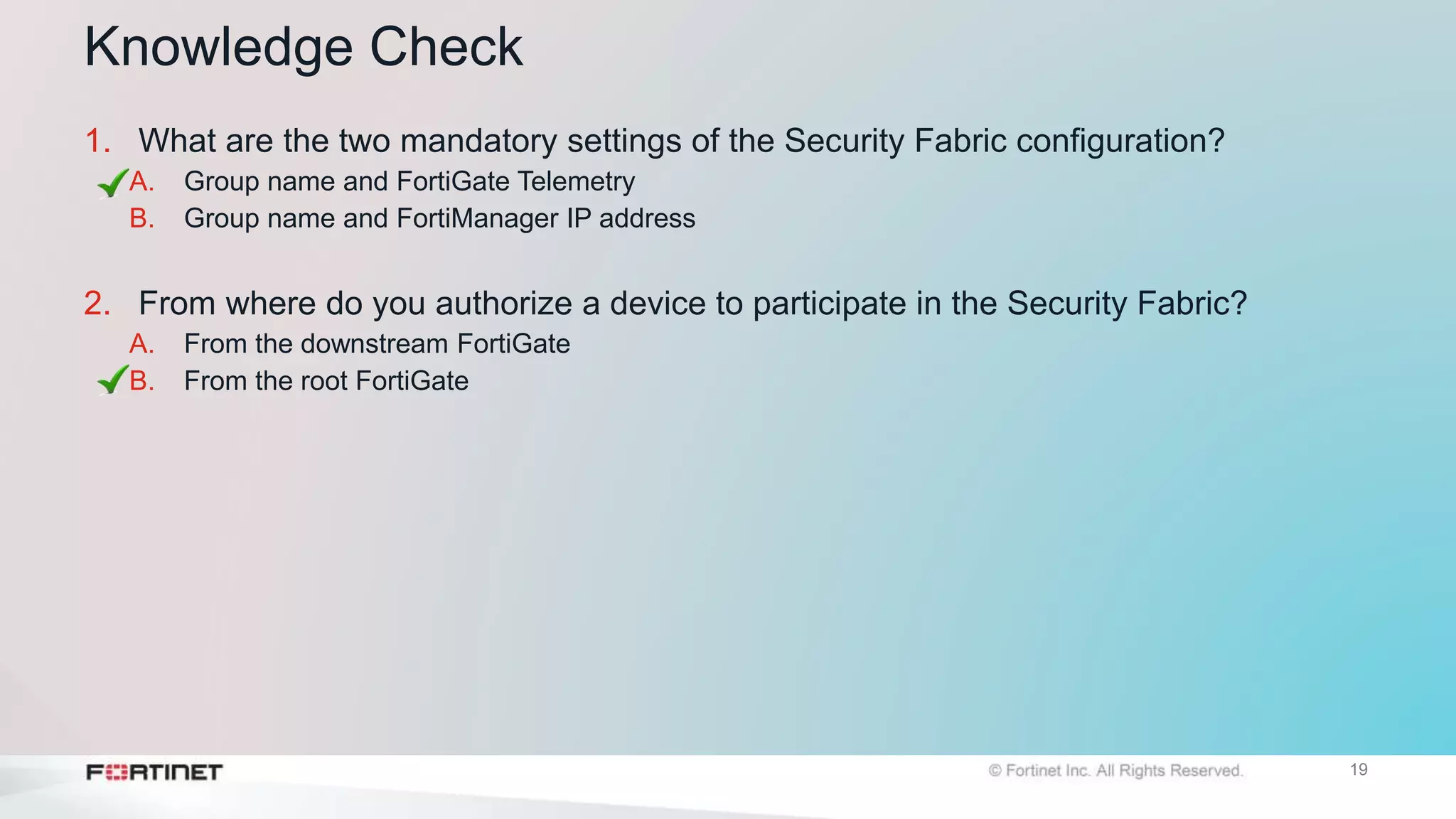
Knowledge Check
1. What are the two mandatory settings of the Security Fabric configuration?
A. Group name and FortiGate Telemetry
B. Group name and FortiManager IP address
2. From where do you authorize a device to participate in the Security Fabric?
A. From the downstream FortiGate
B. From the root FortiGate
Lesson Progress
Introduction to the Fortinet Security Fabric
Deploying the Security Fabric
Extending the Security Fabric and Features
Security Fabric Rating and Topology View
Objectives
• Extend the Security Fabric across your network
• Understand automation stitches and threat responses
• Configure fabric connectors
• Understand the Security Fabric status widgets
Extending the Fabric and Features
22
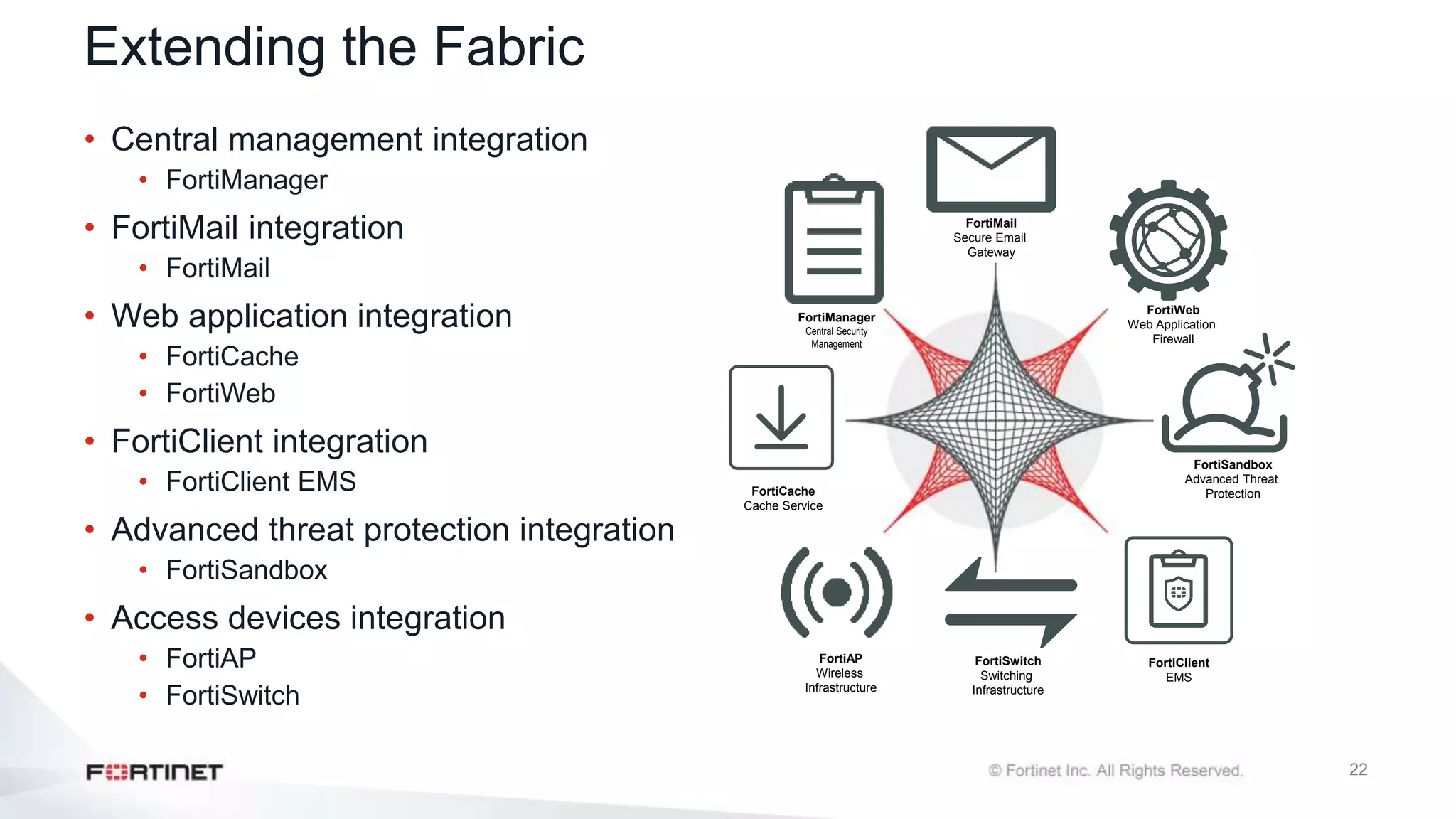
Extending the Fabric
• Central management integration
• FortiManager
• FortiMail integration
• FortiMail
• Web application integration
• FortiCache
• FortiWeb
• FortiClient integration
• FortiClient EMS
• Advanced threat protection integration
• FortiSandbox
• Access devices integration
• FortiAP
• FortiSwitch
FortiClient
EMS
FortiWeb
Web Application
Firewall
FortiMail
Secure Email
Gateway
FortiSandbox
Advanced Threat
Protection
FortiManager
Central Security
Management
FortiAP
Wireless
Infrastructure
FortiSwitch
Switching
Infrastructure
FortiCache
Cache Service
23
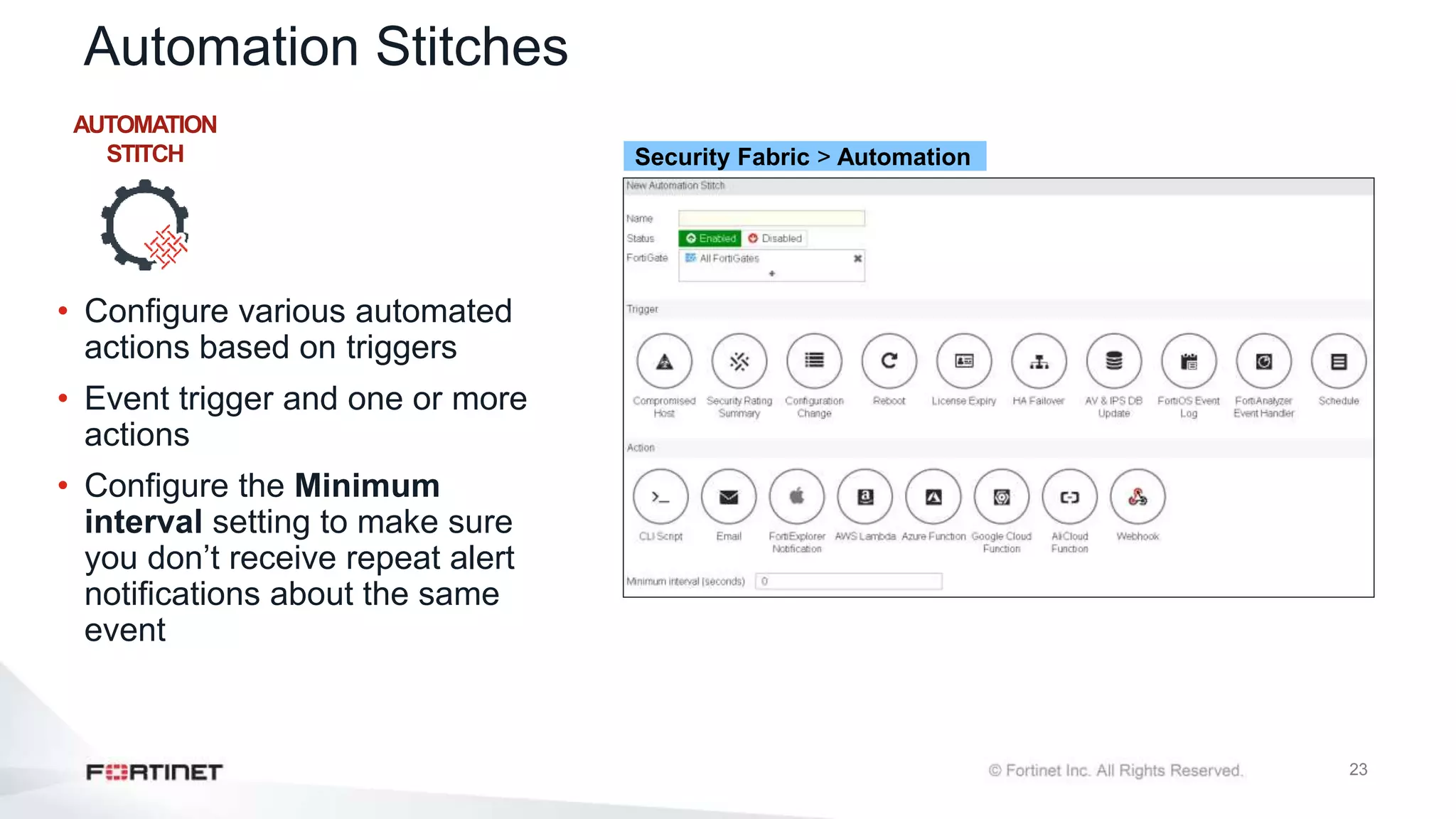
Automation Stitches
• Configure various automated
actions based on triggers
• Event trigger and one or more
actions
• Configure the Minimum
interval setting to make sure
you don’t receive repeat alert
notifications about the same
event
AUTOMATION
STITCH Security Fabric > Automation
24
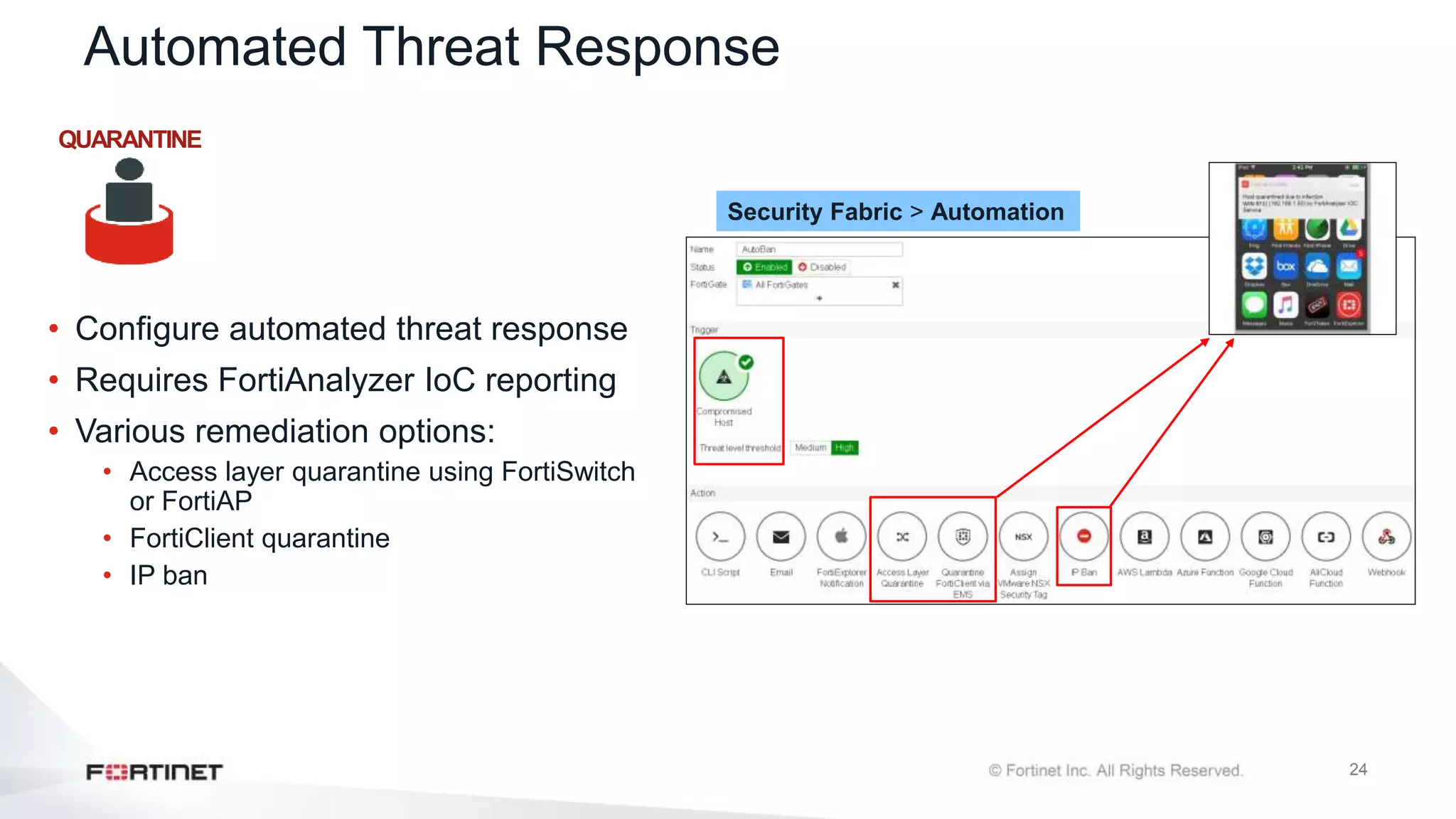
Automated Threat Response
• Configure automated threat response
• Requires FortiAnalyzer IoC reporting
• Various remediation options:
• Access layer quarantine using FortiSwitch
or FortiAP
• FortiClient quarantine
• IP ban
Security Fabric > Automation
QUARANTINE
25
Automated Threat Response (Contd)
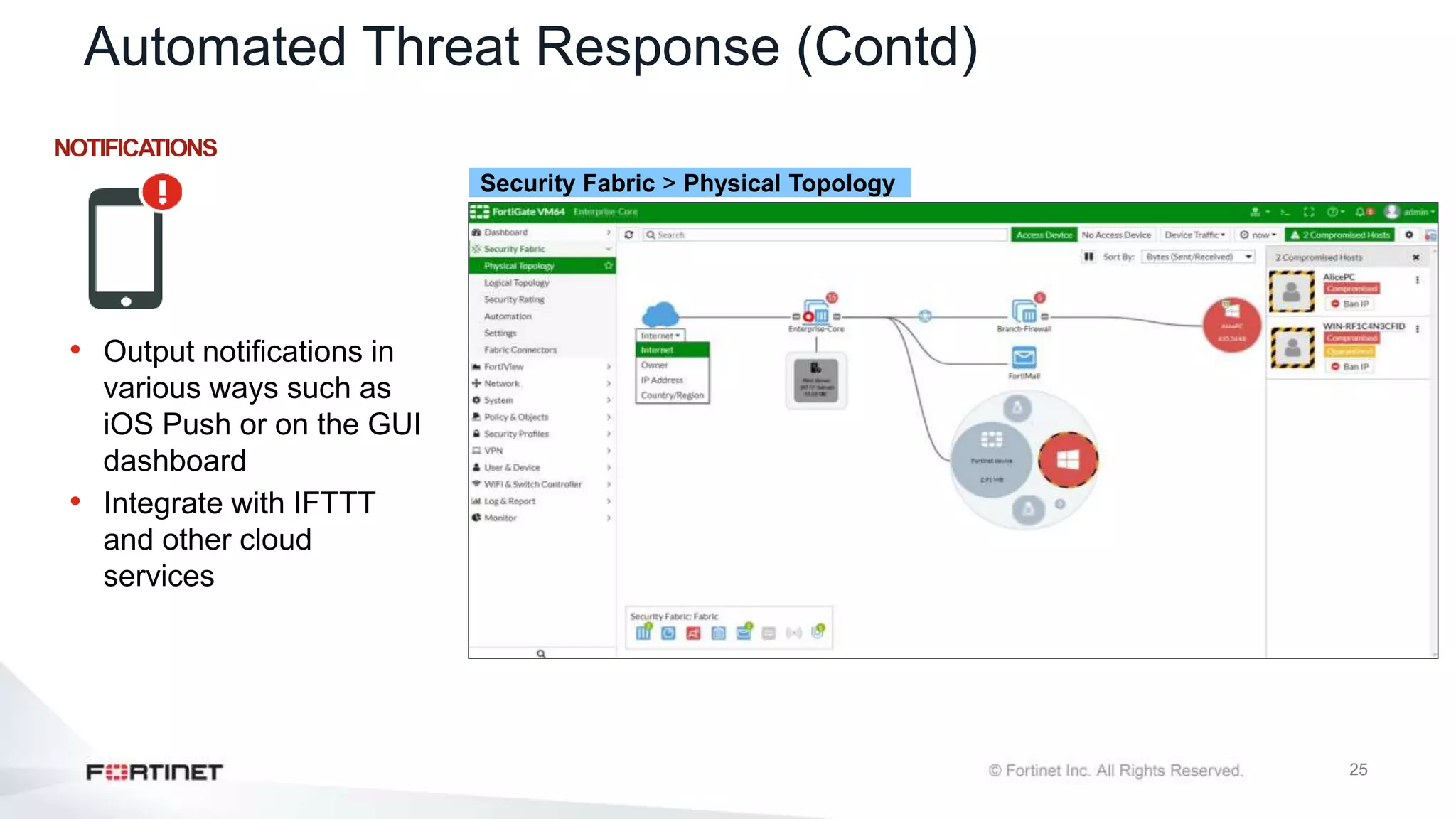
NOTIFICATIONS
• Output notifications in
various ways such as
iOS Push or on the GUI
dashboard
• Integrate with IFTTT
and other cloud
services
Security Fabric > Physical Topology
26
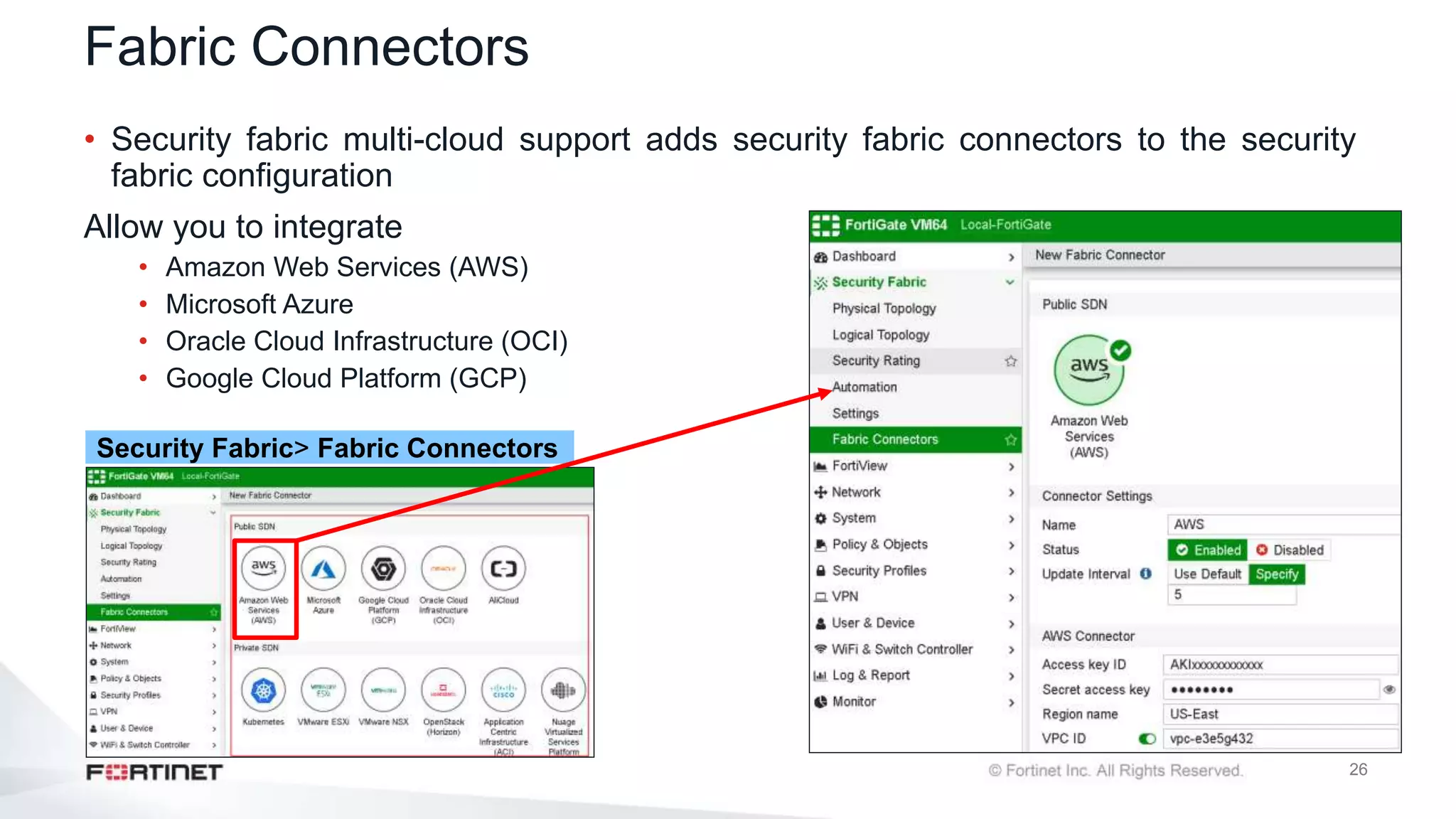
Fabric Connectors
• Security fabric multi-cloud support adds security fabric connectors to the security
fabric configuration
Allow you to integrate
• Amazon Web Services (AWS)
• Microsoft Azure
• Oracle Cloud Infrastructure (OCI)
• Google Cloud Platform (GCP)
Security Fabric> Fabric Connectors
27
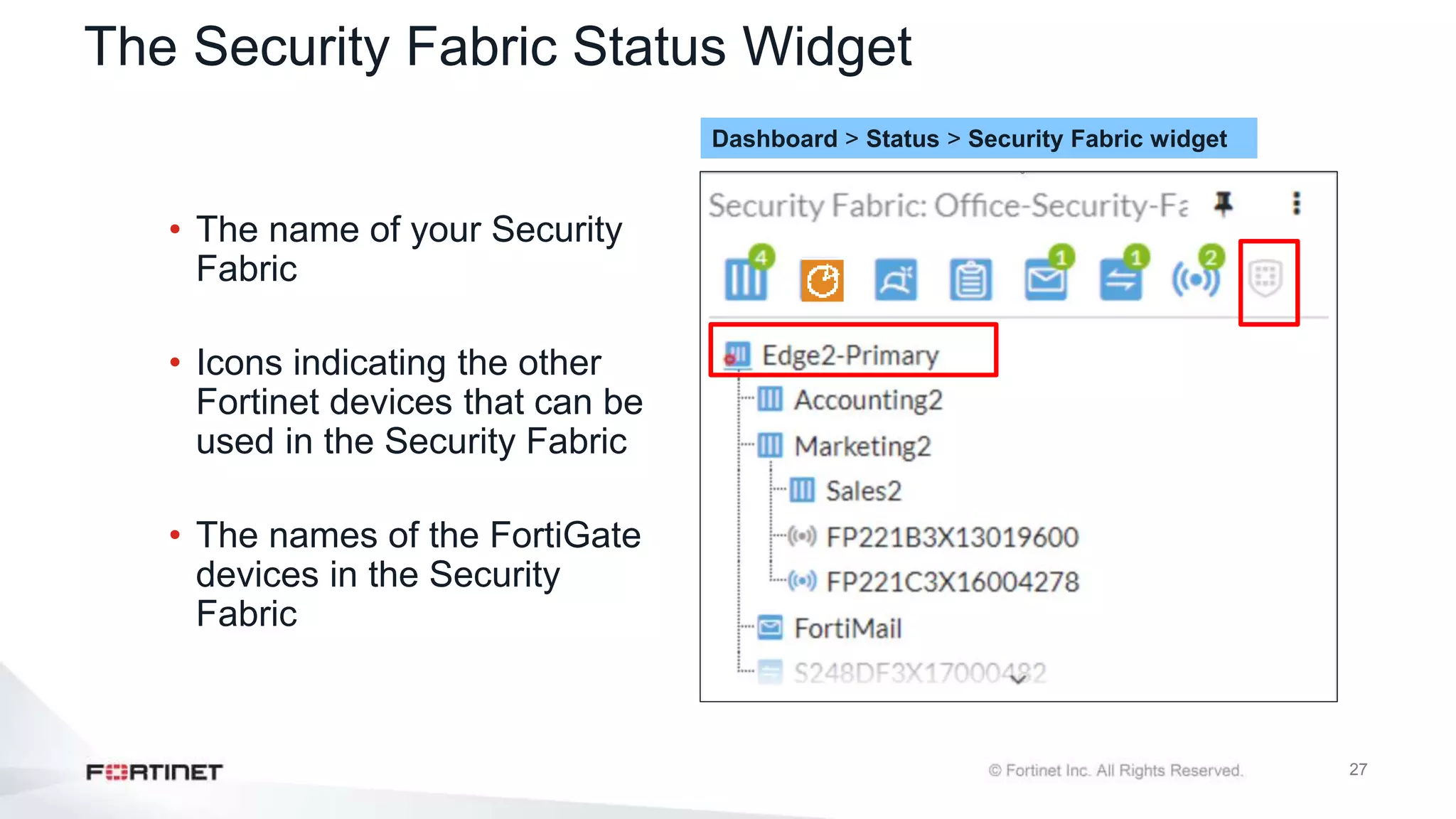
The Security Fabric Status Widget
• The name of your Security
Fabric
• Icons indicating the other
Fortinet devices that can be
used in the Security Fabric
• The names of the FortiGate
devices in the Security
Fabric
Dashboard > Status > Security Fabric widget
28
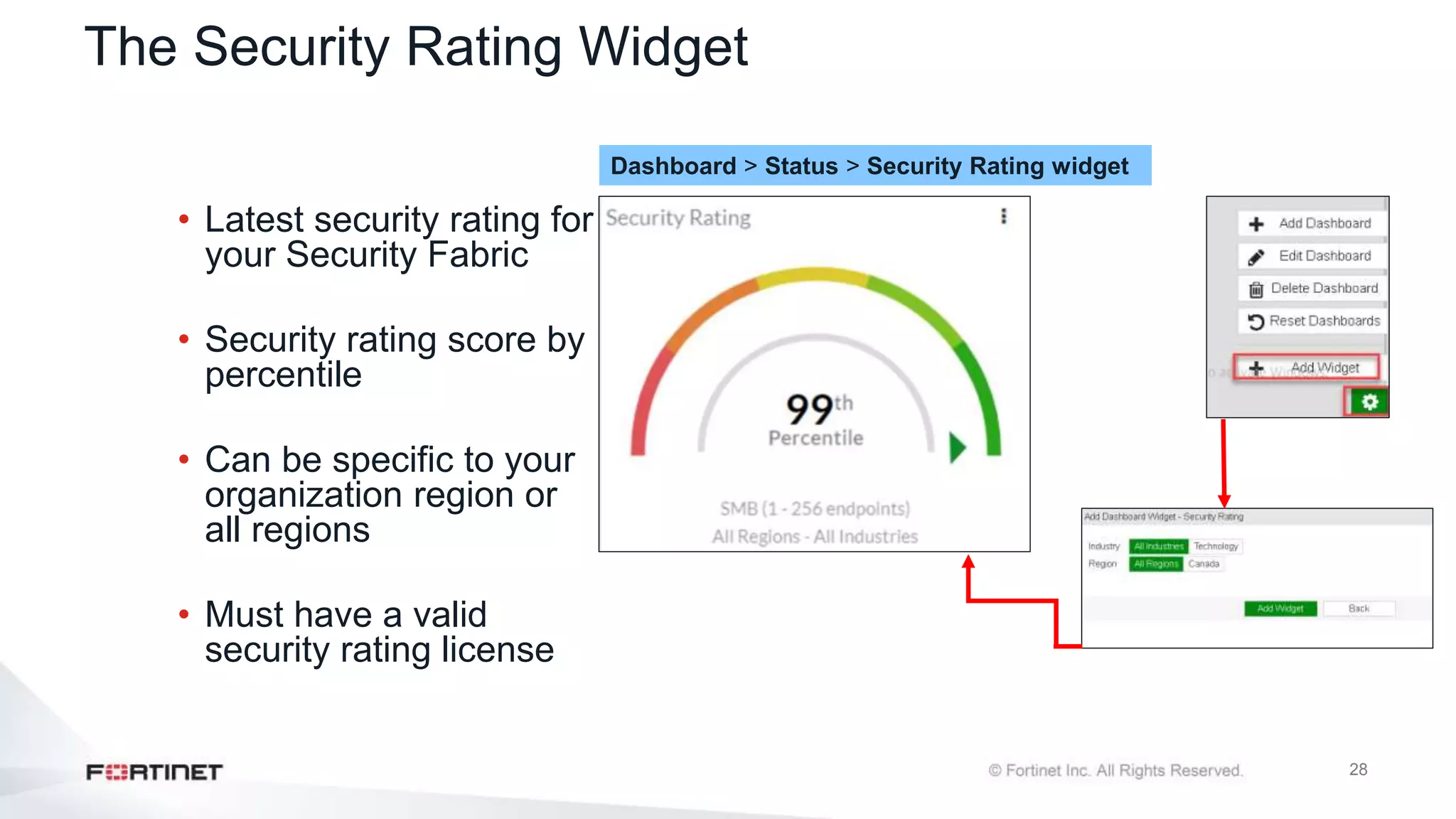
The Security Rating Widget
• Latest security rating for
your Security Fabric
• Security rating score by
percentile
• Can be specific to your
organization region or
all regions
• Must have a valid
security rating license
Dashboard > Status > Security Rating widget
29
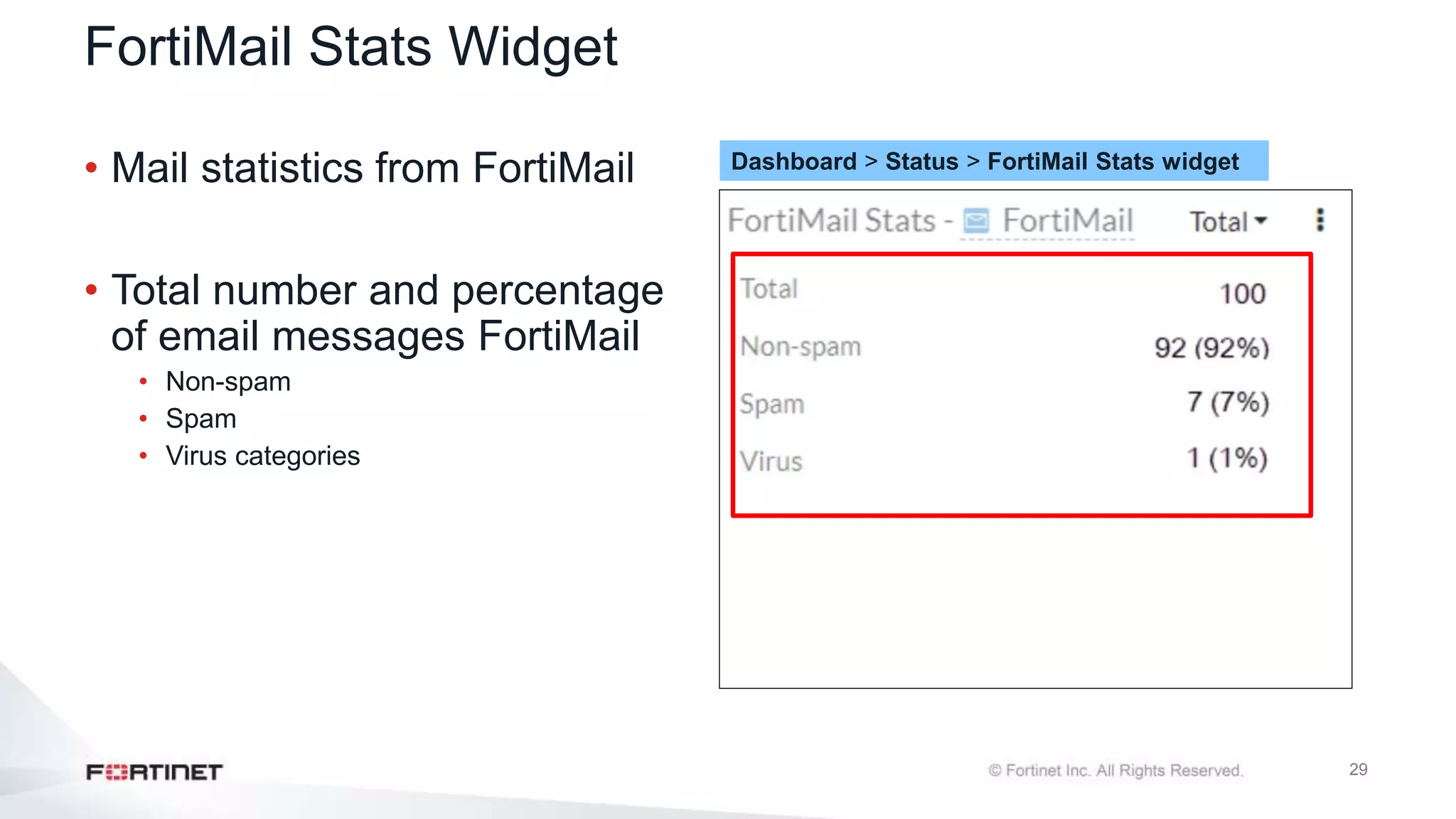
FortiMail Stats Widget
• Mail statistics from FortiMail
• Total number and percentage
of email messages FortiMail
• Non-spam
• Spam
• Virus categories
Dashboard > Status > FortiMail Stats widget
30
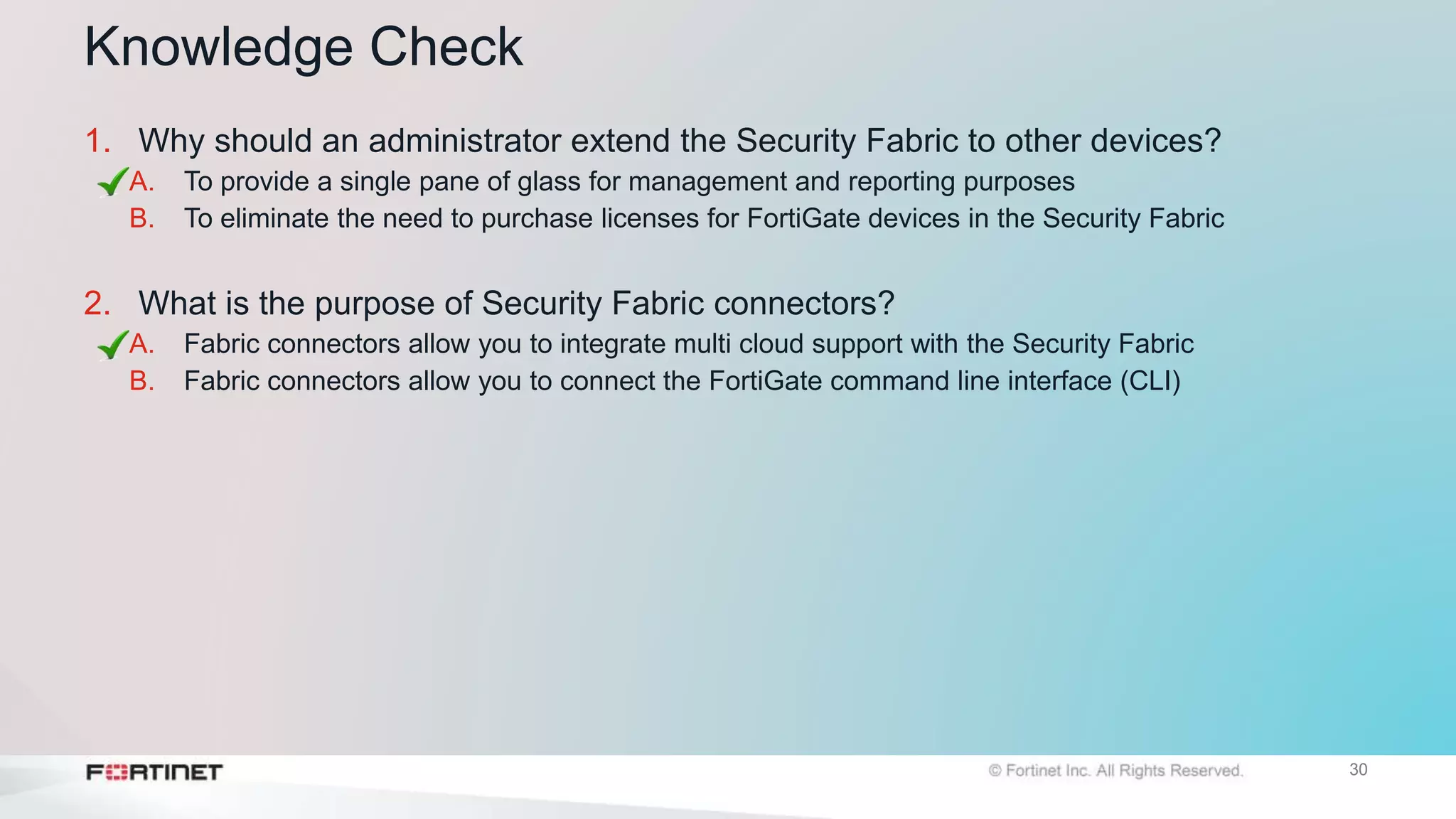
Knowledge Check
1. Why should an administrator extend the Security Fabric to other devices?
A. To provide a single pane of glass for management and reporting purposes
B. To eliminate the need to purchase licenses for FortiGate devices in the Security Fabric
2. What is the purpose of Security Fabric connectors?
A. Fabric connectors allow you to integrate multi cloud support with the Security Fabric
B. Fabric connectors allow you to connect the FortiGate command line interface (CLI)
Lesson Progress
Introduction to the Fortinet Security Fabric
Deploying the Security Fabric
Extending the Security Fabric and Features
Rating Service and Topology View
Objectives
• Understand the Security Fabric rating service
• View and run the Security rating service
• Understand difference between physical and logical topology
views
Rating Service and Topology View
33
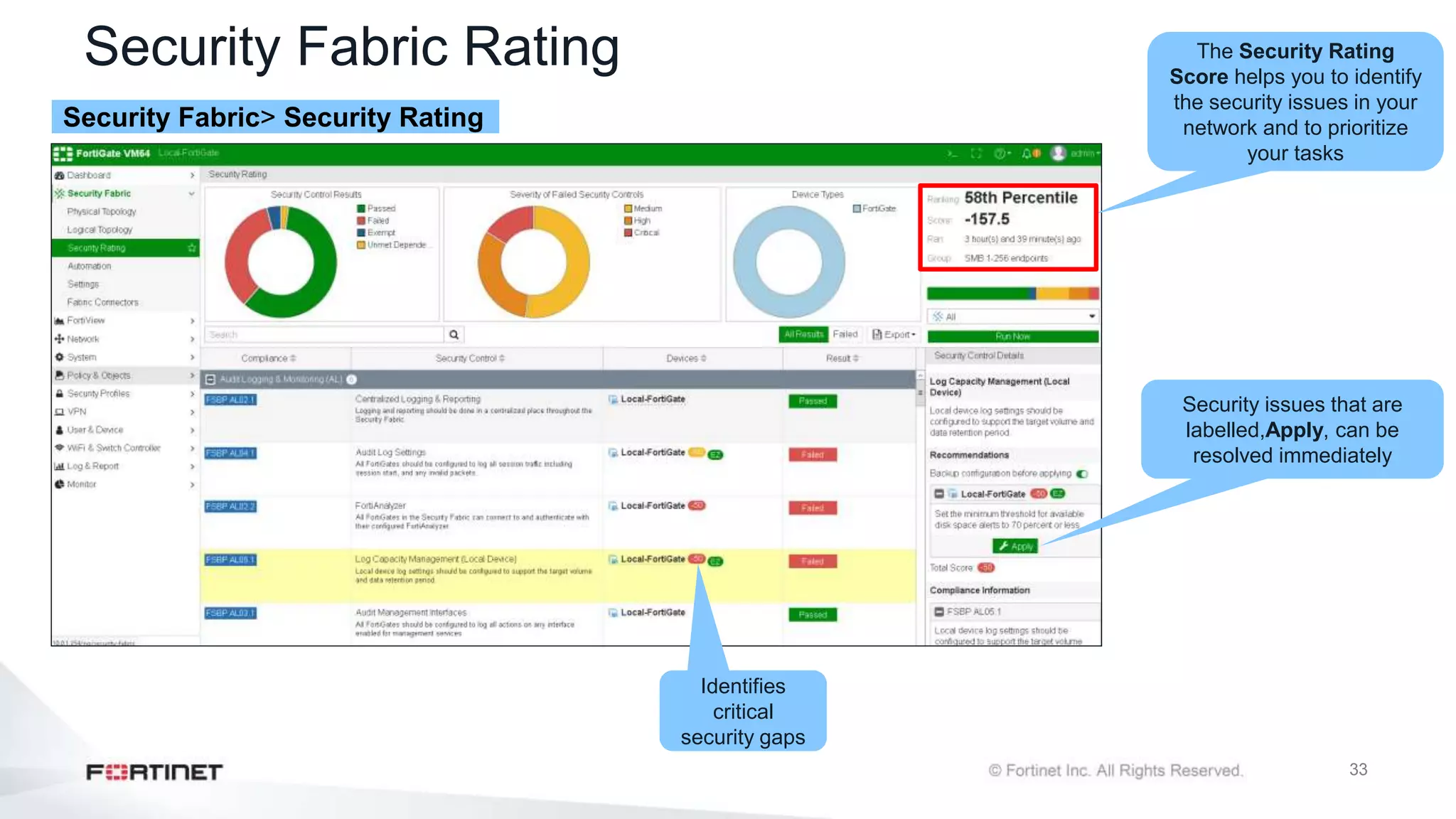
Security Fabric Rating
Security Fabric> Security Rating
The Security Rating
Score helps you to identify
the security issues in your
network and to prioritize
your tasks
Security issues that are
labelled,Apply, can be
resolved immediately
Identifies
critical
security gaps
34
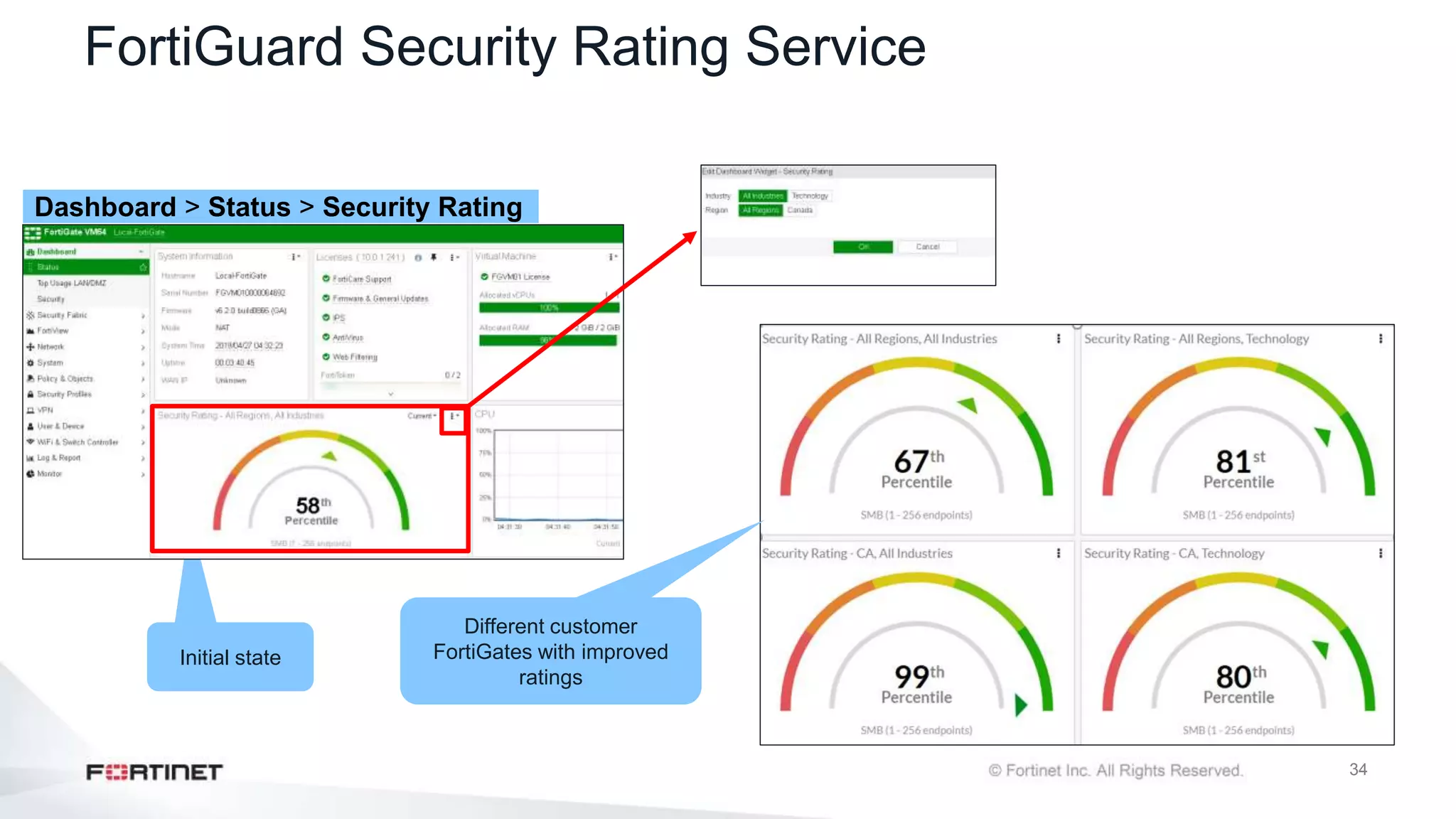
FortiGuard Security Rating Service
Dashboard > Status > Security Rating
Initial state
Different customer
FortiGates with improved
ratings
35
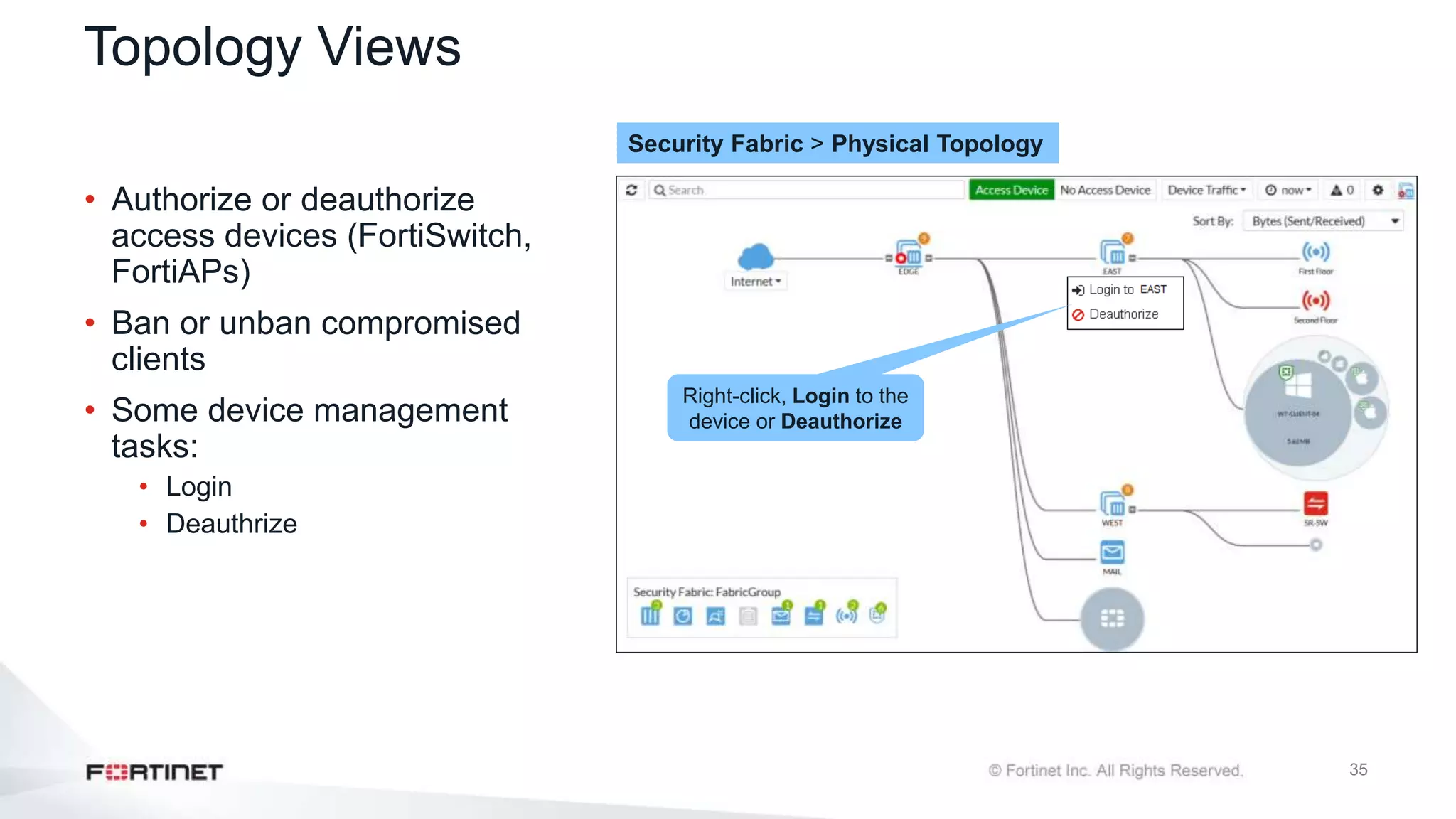
Topology Views
• Authorize or deauthorize
access devices (FortiSwitch,
FortiAPs)
• Ban or unban compromised
clients
• Some device management
tasks:
• Login
• Deauthrize
Security Fabric > Physical Topology
Right-click, Login to the
device or Deauthorize
36
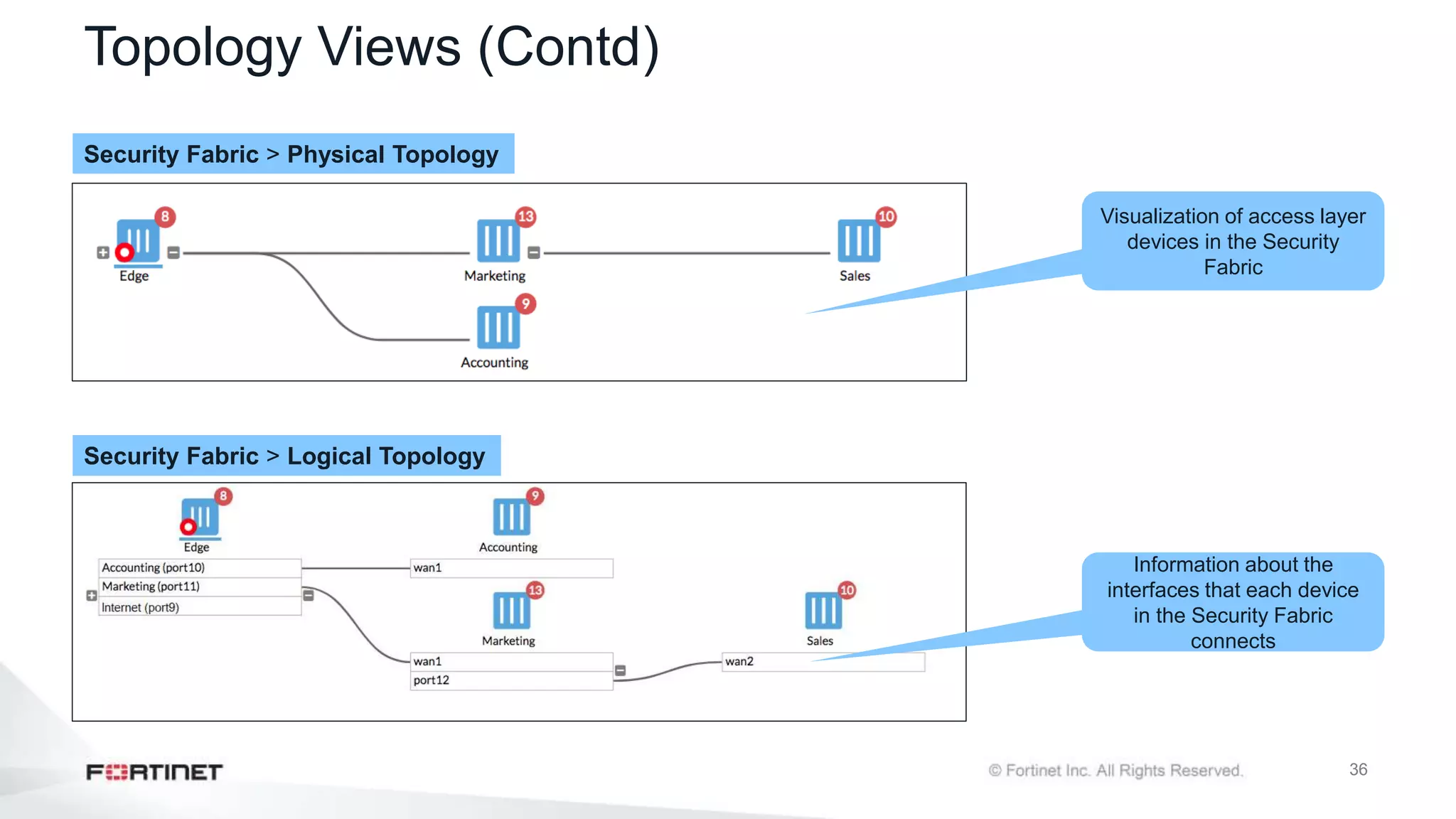
Topology Views (Contd)
Security Fabric > Physical Topology
Security Fabric > Logical Topology
Visualization of access layer
devices in the Security
Fabric
Information about the
interfaces that each device
in the Security Fabric
connects
37
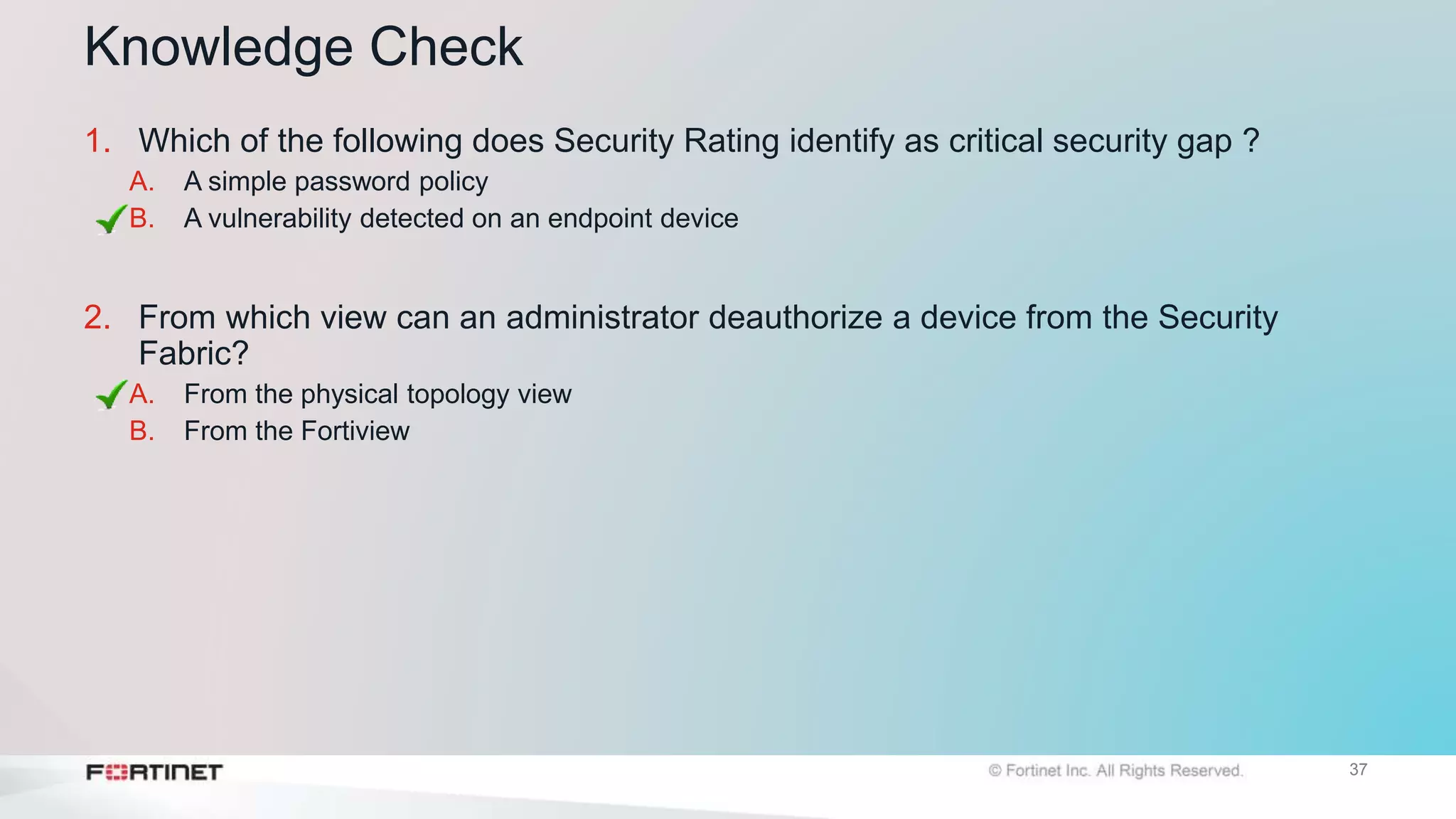
Knowledge Check
1. Which of the following does Security Rating identify as critical security gap ?
A. A simple password policy
B. A vulnerability detected on an endpoint device
2. From which view can an administrator deauthorize a device from the Security
Fabric?
A. From the physical topology view
B. From the Fortiview
Lesson Progress
Introduction to the Fortinet Security Fabric
Deploying the Security Fabric
Extending the Security Fabric and Features
Rating Service and Topology View
Review
 Define the Fortinet Security Fabric
 Identify why the Security Fabric is required
 Identify the Fortinet devices that participate in the fabric, especially the essential ones
 Understand how to implement the Security Fabric
 Configure the Security Fabric on root and downstream FortiGate
 Understand how the device detection works
 Understand how to extended your existing Security Fabric
 Extend the Security Fabric across your network
 Understand automation stiches and threat responses
 Configure fabric connectors
 Understand the Security Fabric status widgets
 Understand Security Fabric Rating service
 View and run Security Rating service
 Understand difference between Physical and Logical topology view

FortiGate_Sec_02_Security Fabric (1).pptx

  • 1.
    Last Modified: 12December 2022 © Copyright Fortinet Inc. All rights reserved. FortiOS 6.2 FortiGate Security Security Fabric
  • 2.
    Lesson Overview Introduction tothe Fortinet Security Fabric Deploying the Security Fabric Extending the Security Fabric and Features Security Fabric Rating and Topology View
  • 3.
    Objectives • Define theFortinet Security Fabric • Identify why the Security Fabric is required • Identify the Fortinet devices that participate in the Security Fabric, especially the essential ones Introduction to the Fortinet Security Fabric
  • 4.
    4 What is theFortinet Security Fabric? • An enterprise solution that enables a holistic approach to network security, whereby the network landscape is visible through a single console and all network devices are integrated into a centrally managed and automated defence • The Security Fabric has these attributes: • Broad • Powerful • Automated • The API allows for third-party device integration Fortinet Security Fabric SDN Cloud Virtual Management Endpoint SIEM
  • 5.
    5 Why a SecurityFabric? • Many administrators lack visibility of their network defences, making their networks more susceptible to undetected network infiltration • Network complexity and sophisticated malware (soon to be augmented by AI), necessitates a centralized and holistic approach to security
  • 6.
    6 Fortinet End-to-End Solution Network Security Multi-Cloud Security Endpoint Security Email Security WebApplication Security Secure Unified Access Advanced Threat Protection Management & Analytics FortiGate Enterprise Firewall FortiGate Cloud Firewall Network Security FortiClient EPP FortiWeb Web Application Firewall FortiMail Secure Email Gateway FortiSandbox Advanced Threat Protection FortiAnalyzer Central Logging /Reporting FortiManager Central Security Management FortiSIEM Security Information & Event Management FortiGate Virtual Firewall Network Security FortiAP Wireless Infrastructure FortiSwitch Switching Infrastructure Endpoint IoT Multi Cloud Applications Web Unified Access Email Threat Protection Advanced Management Analytics FortiCASB IPS SWG SD-WAN VPN
  • 7.
    7 Devices That Comprisethe Security Fabric • Core: • FortiGate devices + FortiAnalyzer • Recommended – adds significant visibility or control: • FortiManager, FortiAP, FortiSwitch, FortiClient, FortiSandbox, FortiMail • Extended – integrates with fabric, but may not apply to everyone: • Other Fortinet products and third-party products using the API Core Recommended Extended
  • 8.
    8 Knowledge Check 1. Whatis the Fortinet Security Fabric? A. A Fortinet solution that enables the communication and visibility between devices of your network B. A device that can manage all your Firewalls 2. What combination of devices must participate in the Security Fabric? A. A FortiAnalyzer and one or more FortiGate devices B. A FortiMail and two or more FortiGate devices
  • 9.
    Lesson Progress Introduction tothe Fortinet Security Fabric Deploying the Security Fabric Extending the Security Fabric and Features Security Fabric Rating and Topology View
  • 10.
    Objectives • Understand howto implement the Security Fabric • Configure the Security Fabric on root and downstream FortiGate • Understand how the device detection works • Understand how to extend your existing Security Fabric Deploying the Security Fabric
  • 11.
    11 How Do YouImplement the Security Fabric? FortiAnalyzer Accounting ISFW Marketing ISFW Sales ISFW External Port 12 Port 16 Port 10 Port 11 Sales network 10.10.35.0/24 Marketing network 10.10.200.0/24 Accounting network 10.10.10.0/24 Here is an example of a simple network using only the core Security Fabric components. There is a FortiAnalyzer and one next-generation firewall (NGFW). This FortiGate will be configured as the root firewall. In this example, the alias for the firewall is External. There are three internal segmentation firewalls (ISFWs) that segregate the WAN into logical components and allow your network to contain a threat, should a breach occur.
  • 12.
    12 Configure the SecurityFabric on root FortiGate Root FortiGate Security Fabric > Settings Group name for the Security Fabric FortiAnalyzer IP address Preauthorizing the downstream FortiGate devices to join the Security Fabric Enable FortiGate Telemetry and select interfaces
  • 13.
    13 Configure the SecurityFabric on the Downstream FortiGate Downstream FortiGate Security Fabric > Settings Same group name for the Security Fabric Enable Connect to upstream FortiGate Upstream FortiGate IP detects automatically Root FortiGate pushes its FortiAnalyzer configuration to all downstream FortiGate devices Authorize the downstream FortiGate from root FortiGate
  • 14.
    14 Authorizing Devices Root FortiGate SecurityFabric > Settings FortiAnalyzer Device Manager > Devices Final Authorization on FortiAnalyzer 1 3 Authorize the downstream FortiGate from root FortiGate Both FortiGates joined the Security Fabric 2
  • 15.
    15 Split-Task VDOM • Supportfor Security Fabric in split-task VDOM mode FG-traffic and root VDOMs in split-task VDOM mode Global > Dashboard > Status
  • 16.
    16 Split-Task VDOM (Contd) Global> Physical Topology root > Physical Topology Click Global > Physical Topology to see the root FortiGate and all downstream FortiGate devices in the same Security Fabric Click root > Physical Topology to see the root ForitGate and the downstream FortiGate connected to the root VDOM FG-traffic > Physical Topology Click FG-Traffic > Physical Topology to see the root FortiGate and all downstream FortiGate devices connected to the current VDOM
  • 17.
    17 Device Identification–Agentless vs.Agent • Location and infrastructure independent . • Useful feature for the Security Fabric topology view • Requires direct connectivity to FortiGate • Detection methods: • HTTP user agent • TCP fingerprinting • MAC address vendor codes • DHCP • Microsoft Windows browser service (MWBS) • SIP user agent • Link Layer Discovery Protocol (LLDP) • Simple Service Discovery Protocol (SSDP) • QUIC • FortiOS-VM detection • FortiOS-VM vendor ID in IKE messages • FortiOS-VM vendor ID in FortiGuard web filter and spam filter requests FC Trusted network FC Agentless FortiClient FortiClient Agentless Agent (FortiClient)
  • 18.
    18 Device Identification (Contd) EnableDevice Detection on interface(s) Network > Interfaces Security Fabric> Logical Topology Windows PC detected upon traffic from the PC to the FortiGate Enable Device Detection
  • 19.
    19 Knowledge Check 1. Whatare the two mandatory settings of the Security Fabric configuration? A. Group name and FortiGate Telemetry B. Group name and FortiManager IP address 2. From where do you authorize a device to participate in the Security Fabric? A. From the downstream FortiGate B. From the root FortiGate
  • 20.
    Lesson Progress Introduction tothe Fortinet Security Fabric Deploying the Security Fabric Extending the Security Fabric and Features Security Fabric Rating and Topology View
  • 21.
    Objectives • Extend theSecurity Fabric across your network • Understand automation stitches and threat responses • Configure fabric connectors • Understand the Security Fabric status widgets Extending the Fabric and Features
  • 22.
    22 Extending the Fabric •Central management integration • FortiManager • FortiMail integration • FortiMail • Web application integration • FortiCache • FortiWeb • FortiClient integration • FortiClient EMS • Advanced threat protection integration • FortiSandbox • Access devices integration • FortiAP • FortiSwitch FortiClient EMS FortiWeb Web Application Firewall FortiMail Secure Email Gateway FortiSandbox Advanced Threat Protection FortiManager Central Security Management FortiAP Wireless Infrastructure FortiSwitch Switching Infrastructure FortiCache Cache Service
  • 23.
    23 Automation Stitches • Configurevarious automated actions based on triggers • Event trigger and one or more actions • Configure the Minimum interval setting to make sure you don’t receive repeat alert notifications about the same event AUTOMATION STITCH Security Fabric > Automation
  • 24.
    24 Automated Threat Response •Configure automated threat response • Requires FortiAnalyzer IoC reporting • Various remediation options: • Access layer quarantine using FortiSwitch or FortiAP • FortiClient quarantine • IP ban Security Fabric > Automation QUARANTINE
  • 25.
    25 Automated Threat Response(Contd) NOTIFICATIONS • Output notifications in various ways such as iOS Push or on the GUI dashboard • Integrate with IFTTT and other cloud services Security Fabric > Physical Topology
  • 26.
    26 Fabric Connectors • Securityfabric multi-cloud support adds security fabric connectors to the security fabric configuration Allow you to integrate • Amazon Web Services (AWS) • Microsoft Azure • Oracle Cloud Infrastructure (OCI) • Google Cloud Platform (GCP) Security Fabric> Fabric Connectors
  • 27.
    27 The Security FabricStatus Widget • The name of your Security Fabric • Icons indicating the other Fortinet devices that can be used in the Security Fabric • The names of the FortiGate devices in the Security Fabric Dashboard > Status > Security Fabric widget
  • 28.
    28 The Security RatingWidget • Latest security rating for your Security Fabric • Security rating score by percentile • Can be specific to your organization region or all regions • Must have a valid security rating license Dashboard > Status > Security Rating widget
  • 29.
    29 FortiMail Stats Widget •Mail statistics from FortiMail • Total number and percentage of email messages FortiMail • Non-spam • Spam • Virus categories Dashboard > Status > FortiMail Stats widget
  • 30.
    30 Knowledge Check 1. Whyshould an administrator extend the Security Fabric to other devices? A. To provide a single pane of glass for management and reporting purposes B. To eliminate the need to purchase licenses for FortiGate devices in the Security Fabric 2. What is the purpose of Security Fabric connectors? A. Fabric connectors allow you to integrate multi cloud support with the Security Fabric B. Fabric connectors allow you to connect the FortiGate command line interface (CLI)
  • 31.
    Lesson Progress Introduction tothe Fortinet Security Fabric Deploying the Security Fabric Extending the Security Fabric and Features Rating Service and Topology View
  • 32.
    Objectives • Understand theSecurity Fabric rating service • View and run the Security rating service • Understand difference between physical and logical topology views Rating Service and Topology View
  • 33.
    33 Security Fabric Rating SecurityFabric> Security Rating The Security Rating Score helps you to identify the security issues in your network and to prioritize your tasks Security issues that are labelled,Apply, can be resolved immediately Identifies critical security gaps
  • 34.
    34 FortiGuard Security RatingService Dashboard > Status > Security Rating Initial state Different customer FortiGates with improved ratings
  • 35.
    35 Topology Views • Authorizeor deauthorize access devices (FortiSwitch, FortiAPs) • Ban or unban compromised clients • Some device management tasks: • Login • Deauthrize Security Fabric > Physical Topology Right-click, Login to the device or Deauthorize
  • 36.
    36 Topology Views (Contd) SecurityFabric > Physical Topology Security Fabric > Logical Topology Visualization of access layer devices in the Security Fabric Information about the interfaces that each device in the Security Fabric connects
  • 37.
    37 Knowledge Check 1. Whichof the following does Security Rating identify as critical security gap ? A. A simple password policy B. A vulnerability detected on an endpoint device 2. From which view can an administrator deauthorize a device from the Security Fabric? A. From the physical topology view B. From the Fortiview
  • 38.
    Lesson Progress Introduction tothe Fortinet Security Fabric Deploying the Security Fabric Extending the Security Fabric and Features Rating Service and Topology View
  • 39.
    Review  Define theFortinet Security Fabric  Identify why the Security Fabric is required  Identify the Fortinet devices that participate in the fabric, especially the essential ones  Understand how to implement the Security Fabric  Configure the Security Fabric on root and downstream FortiGate  Understand how the device detection works  Understand how to extended your existing Security Fabric  Extend the Security Fabric across your network  Understand automation stiches and threat responses  Configure fabric connectors  Understand the Security Fabric status widgets  Understand Security Fabric Rating service  View and run Security Rating service  Understand difference between Physical and Logical topology view

Editor's Notes

  • #2 In this lesson, you will learn about the Fortinet Security Fabric.
  • #3 In this lesson, you will lean about the topics shown on this slide. By demonstrating competence in deploying the Fortinet Security Fabric, using and extending the Security Fabric features, and understanding its topology, you will be able to use the Fortinet Security Fabric effectively in your network.
  • #4 After completing this section, you should be able to achieve the objectives shown on this slide. By demonstrating competence in understanding key concepts of the Fortinet Security Fabric, you will better understand the value of the Security Fabric, the servers that comprise it, and how to deploy it.
  • #5 What is the Fortinet Security Fabric? It is a Fortinet enterprise solution that enables a holistic approach to network security, whereby the network landscape is visible through a single console and all network devices are integrated into a centrally managed and automated defence. The network devices include all components, from physical end points to virtual devices in the cloud. Because devices are centrally managed and are sharing threat intelligence with one another in real time, and are receiving updates from Fortinet at the macro level, your network can quickly identify, isolate, and neutralize threats as they appear. The Security Fabric has the following attributes: Broad: It covers the entire attack surface from the IoT to the cloud. Powerful: Security processors are deployed to ensure high network performance while delivering comprehensive security. Automated: Threat intelligence is exchanged between network components in real time allowing for automated response to threats. A fourth attribute could be added to this description of the Security Fabric: open. The API and protocol are available for other vendors to join and for partner integration. This allows for communication between Fortinet and third-party devices.
  • #6 Why has Fortinet deemed the Security Fabric an essential solution for a robust network defence? As networks evolved and various new types of threats surfaced, point security products were deployed to address these emerging threats. Oftentimes, these piecemeal solutions were effective, but deploying products using different standards and protocols often meant that defence assets could not be effectively coordinated. The illustration on the right side of the slide tells a story of a network that has deployed security solutions from four different vendors. The administrator at the centre, working from the security console, has visibility into only some of the security solutions. This lack of visibility of the entire network defence is a serious flaw, and could allow a foreign infiltrator to breach network defences undetected. The sheer complexity of today’s networks compounds this problem. In addition, increasingly sophisticated malware has an expanding attack surface on which to exploit, because networks have broken out of the confines of a traditional network perimeter and have expanded to virtualized networks and public clouds. Add to this mix, the ever growing numbers of unmanaged devices, as a result of bring-your-own-device(BYOD) programs, and you have the perfect security storm. The most feasible solution is to build a centrally managed, holistic approach to security, whereby you have a clear line of sight to all potential infiltration points and can coordinate defences to contain and neutralize network breaches.
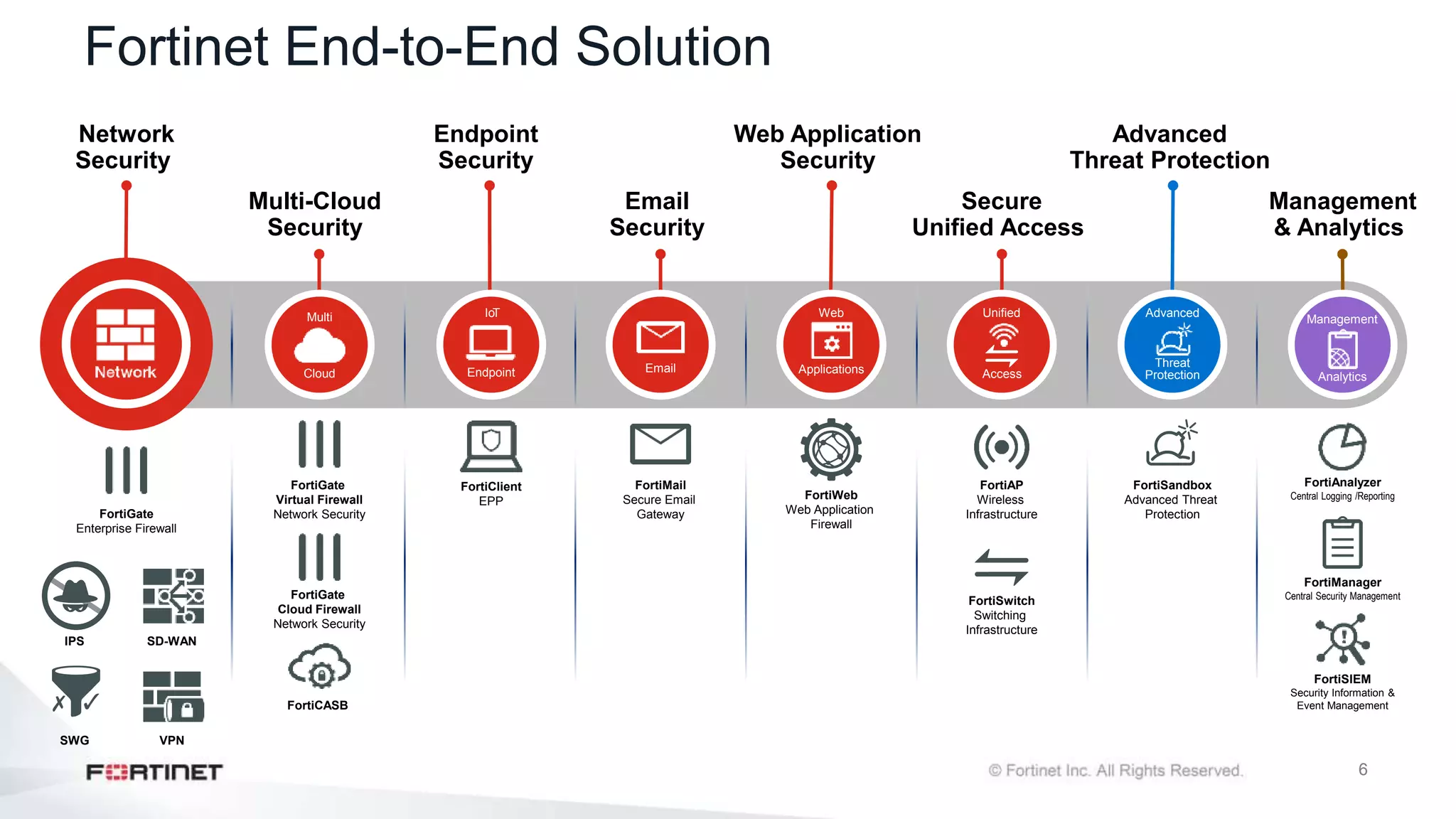
  • #7 As shown on this slide, the Fortinet Security Fabric offers eight solutions: network security, multi-cloud security, endpoint, email, web application, secure unified access, advanced threat protection, management, and analytics. Each of these solutions are based on specific use cases and involve the integration of specific Fortinet products. Network security with FortiGate, IPS, VPN, SDWAN. Multicloud strategy across public, private, and hybrid cloud, SaaS. Quite a sophisticated endpoint offering ranging from the Fabric Agent all the way up to full endpoint protection, email security, web application security, which is growing very fast in the cloud, secure access across more distributed enterprises and SD-WAN environments, advanced threat protection, management and analytics, and SIEM
  • #8 FortiGate and FortiAnalyzer creates the core of the security fabric. To add more visibility and control, Fortinet recommends adding FortiManager, FortiAP, FortiClient, FortiSandbox, FortiMail, and FortiSwitch. The solution can be extended by adding other network security devices.
  • #10 Good job! You now understand the basics of the Fortinet Security Fabric. Next, you’ll learn how to deploy the Security Fabric in your network environment.
  • #11 After completing this section, you should be able to achieve the objectives shown on this slide. By demonstrating competence in the deployment of the Fortinet Security Fabric, you will better understand the value of the Security Fabric and how it helps to manage all your network devices more efficiently.
  • #12 In this simple network that comprises only the core devices of a Security Fabric, there is one FortiAnalyzer and one next-generation firewall (NGFW) FortiGate. This implementation example is intended to be a high-level view only. For more detail, see docs.fortinet.com. The FortiGate named External is acting as the edge firewall and will also be configured as the root firewall within the Security Fabric. Downstream from the root firewall we have three internal segmentation firewalls that compartmentalize the WAN in order to contain a breach and control access to various LANs. In this example, we have Accounting, Marketing, and Sales LANs.
  • #13 First, on the root FortiGate, you must enable FortiTelemetry in the interfaces facing any downstream FortiGate. Then, you need to configure a group name for the Security Fabric. You also need to configure the FortiAnalyzer IP address. This FortiAnalyzer configuration will be pushed to all the downstream FortiGate devices. All downstream FortiGates send logs directly to FortiAnalyzer device. You can also preauthorize your downstream devices by adding the serial number of the device. When you add the serial number of a Fortinet device to the trusted list on the root FortiGate, the device can join the Security Fabric as soon as it connects. After you authorize the new FortiGate, additional connected FortiAP and FortiSwitch devices automatically appear in the topology tree. From the topology tree, it's easier for you to authorize them with one click.
  • #14 The second step in implementing the Security Fabric is configuring the downstream Fortinet devices. In the downstream FortiGate devices, you must enable FortiTelemetry, Connect to upstream FortiGate, and Device Detection on the interfaces facing downstream FortiGate devices. Then, you need to configure the same group name and IP address of the upstream FortiGate in the Security Fabric > Settings section. The upstream FortiGate IP address is filled automatically with the default static route already configured on the FortiGate. Also, you can change the IP address manually.
  • #15 The third step in implementing the Security Fabric is to authorizing the downstream FortiGate on the both root FortiGate and the FortiAnalyzer. Click on the serial number of the highlighted downstream FortiGate and select Authorize. After few seconds, the downstream FortiGate will join the Security Fabric. In order complete the full Security Fabric process, you will need to authorize all your devices on the FortiAnalyzer. From the FortiAnalyzer Device Manager section, select all your devices in the Security Fabric and click Authorize. After few seconds, you will notice all your authorized devices will join the Security Fabric.
  • #16 Starting with FortiOS 6.2, you can now enable FortiGate telemetry in split-task VDOM mode. You can access FortiGate telemetry settings by clicking  Security Fabric > Settings. If you enable split-task VDOM mode on the upstream FortiGate, it can allow downstream FortiGate devices to join the Security Fabric in the root and FG-traffic VDOMs. If  split-task VDOM mode is enabled on the downstream FortiGate, it can only connect to the upstream FortiGate through the downstream FortiGate interface on the root VDOM. Telemetry settings are shown in both global and VDOM contexts, but in VDOM context, only the topology and FortiTelemetry-enabled interface fields are shown.
  • #17 You can click Global > Physical Topology to see the root FortiGate and all downstream FortiFate devices that are in the same Security Fabric as the root FortiGate. You can click root > Physical Topology or FG-Traffic > Physical Topology  to see the root FortiGate and only the downstream FortiGate devices that are connected to the current selected VDOM on the root FortiGate.
  • #18 Device identification is an important component in the Security Fabric. FortiGate detects most of the third-party devices in your network and added into the topology view in the Security Fabric. There are two device identification techniques: with an agent and without an agent (agentless). Agentless identification uses traffic from the device. Devices are indexed by their MAC address and there are various ways to identify devices, such as HTTP user-Agent header, TCP fingerprint, MAC address OUI, and FortiOS-VM detection methods, to name a few. Agentless device identification is only effective if FortiGate and the workstations are directly connected network segments, where traffic is sent directly to FortiGate, and there is no intermediate router or Layer 3 device between FortiGate and the workstations. Note that FortiGate uses a first come, first served approach to determine the device identity. For example, if a device is detected by the HTTP user agent, FortiGate updates its device table with the detected MAC address and scanning stops as soon as the type has been determined for that MAC address. Agent-based device identification uses FortiClient. FortiClient sends information to FortiGate, and the device is tracked by its unique FortiClient user ID (UID).
  • #19 By default, FortiGate uses device detection (passive scanning) which runs scans based on the arrival of traffic. If passive detection fails to detect the device type for more than the configured threshold (default 90 seconds), active scanning is triggered and scans. You can delay the active scan trigger using the set device-identification-active-scan-delay <int> command. The command indicates how many seconds to passively scan a device before performing an active scan. The allow range is 20 to 3600 seconds (20 seconds to 1 hour). The default is 90. Active scanning scans for device type, OS, and OS version.
  • #21 Good job! You now know how to deploy the Security Fabric. Next, you’ll learn about the Security Fabric features and how to extend it in your network environment.
  • #22 After completing this section, you should be able to achieve the objectives shown on this slide. By demonstrating competence in the extending the Fortinet Security Fabric, you will better understand the value of the Security Fabric and how it helps to manage all your network devices from a single point of device.
  • #23 Fortinet recommends using a FortiManager for centralized management of all ForitGate devices, and access devices in the security fabric. You can integrate FortiSwitch devices, and FortiAP devices to extend the security fabric down to the access layer. You can also extend the fabric by integrating FortiMail, FortiWeb, FortiCache, FortiSandbox, and FortiClient EMS.
  • #24 Administrator-defined automated work flows (called stitches) use if/ then statements to cause FortiOS to automatically respond to an event in a preprogrammed way. Because this workflow is part of the Security Fabric, you can set up if/then statements for any device in the Security Fabric. However, security fabric is not a requirement to use stiches. Each Automation pairs an event trigger and one or more actions, which allows you to monitor your network and take appropriate action when the Security Fabric detects a threat. You can use Automation stitches to detect events from any source in the Security Fabric and apply actions to any destination. You can configure the Minimum internal (seconds) setting to make sure you don’t receive repeat notifications about the same event.
  • #25 You can configure the Compromised Host trigger to create an automated threat response stitch. This trigger uses indicator of compromise (IoC) event reporting from FortiAnalyzer. Based on the Threat level threshold setting, you can configure the stitch to take different remediation steps: Quarantine the compromised host at the FortiSwitch or FortiAP Quarantine FortiClient on the compromised host using FortiClient EMS Ban the IP You can also click Monitor > Quarantine Monitor to view quarantined and banned IP addresses. Quarantined addresses are automatically removed from quarantine after a configurable period of time. Banned IP addresses can be removed from the list only by administrator intervention.
  • #26 You can also view compromised hosts on the FortiGate GUI and get output notifications in various ways such as iOS push. This feature is integrated with IFTT.
  • #27 Fabric connectors allow you to integrate multi-cloud support, such as ACI and AWS, to name a few. In an application centric infrastructure (ACI), the SDN connector serves as a gateway bridging SDN controllers and FortiGate devices.  The SDN Connector registers itself to APIC in the Cisco ACI fabric, polls interested objects, and translates them into address objects. The translated address objects and associated endpoints populate on FortiGate. FortiGate VM for Microsoft Azure also supports cloud-init and bootstrapping.
  • #28 The Security Fabric Status widget shows a visual summary of many of the devices in the Security Fabric. You can hover over the icons at the top of the widget to get a quick view of the status of the Security Fabric, including the status of FortiTelemetry and devices in the Security Fabric. You can click to authorize FortiAP and FortiSwitch devices that are connected to an authorized FortiGate. Icons represent the other Fortinet devices that can be used in the Security Fabric: Devices in blue are connected in your network. Devices in gray are unauthorized devices that are connected in your network. Devices in red are not detected in your network, but are recommended for the Security Fabric. An attention icon indicates a FortiGate or FortiWiFi waiting for authorization.
  • #29 The Security Rating widget shows the latest security rating for your Security Fabric. You can configure the widget to show either how your organization’s Security Fabric rating compares to the ratings of other organizations in the same industry, or to organization in all industries. Your organization's industry is determined from your FortiCare account. You can also configure the widget to show scores that are specific to your organization’s region or all regions. The widget shows the security rating score by percentile. To receive a security rating score, all FortiGate devices in the Security Fabric must have a valid security rating license. The security rating license is a FortiGuard service. You must purchase a license to access to all the latest features. Security audit checks from FortiOS 5.6 will continue to run, but the following upgrades are available only when you purchase a security rating license: FortiGuard updates The ability to run security rating checks across each licensed device or all FortiGates in the Security Fabric from the root FortiGate New 6.0 rating checks The ability to submit rating scores to FortiGuard and receive security rating scores from FortiGuard for ranking customers by percentile
  • #30 The FortiMail Stats widget shows mail detection statistics from FortiMail. You can configure the widget to show statistics from a FortiMail in your Security Fabric. If you have more than one FortiMail in your Security Fabric, you can add additional FortiMail Stats widgets to the dashboard. This widget shows both the total number and percentage of email messages that the FortiMail identifies as belonging to non-spam, spam, and virus categories. You can filter the statistics by time period, such as the number of messages per year, per month, and per hour.
  • #32 Good job! You now know how to extend the Security Fabric and it`s features. Next, you’ll learn about the Security Fabric Rating service and topology view.
  • #33 After completing this section, you should be able to achieve the objectives shown on this slide. By demonstrating competence in the Fortinet Security rating service and topology views, you should be able to have clear visibility of your network devices.
  • #34 Security rating is a subscription service which requires a security rating license. This service now provides the ability to perform many best practices, including password checks, to audit and strengthen your network security. The security rating service now supports the following: Ranks Customer percentile using security audit (FortiGuard data): security rating now supports sending results to FortiGuard, and receiving statistics from FortiGuard. Displayed to customer in the form of percentile. Security audits running in the background, not just on demand, when an administrator is logged into the GUI. When you view the security audit page, the latest saved security audit data is loaded. From the GUI you can run audits on demand and view results for different devices in the Security Fabric. You can also view all results or just failed test results. New security checks that can help you make improvements to your organization’s network, such as enforcing password security, applying recommended login attempt thresholds, encouraging two factor authentication, and more.
  • #35 The Security rating service reports the security score per the Security Fabric group. FortiGuard Security Rating Service is a subscription-based service that takes the generated report and obtains analysis by FortiGuard. It compares security score results within the industry that the fabric group belongs to. All FortiGate devices in the group need to have FortiGuard Security Rating Service and the score can only be obtained on Security Fabric root node. The score can be obtained once security rating report is generated. The scores are presented as percentiles, and are based on the industry, the size of the organization, and the region.
  • #36 You can view the Security Fabric topology on the FortiGate GUI, from the Security Fabric menu. You can select the Physical Topology or Logical Topology view. To view the complete network, you must access the topology views on the root FortiGate in the Security Fabric. The Physical Topology view displays your network as a bubble chart of interconnected devices. These devices are grouped based on the upstream device they are connected to. The bubbles appear smaller or larger, based on their traffic volume. You can double-click any bubble to resize it and view more information about the device. The Logical Topology view is similar to the Physical Topology view, but it shows the network interfaces, logical or physical, that are used to connect devices in the Security Fabric.
  • #37 This slide shows the difference between Physical Topology view and Logical Topology view.
  • #39 Congratulations! You have completed this lesson. Now, you will review the objectives that you covered in the lesson.
  • #40 This slide shows the objectives covered in this lesson. By mastering the objectives covered in this lesson, you learned how to configure and use the Fortinet Security Fabric.