What is a wiki?
Wikiwiki means quick in
 Hawaiian. A wiki is a
 website in which
 users can easily edit
 any page. The
 website grows
 organically by linking
 existing pages
 together or by creating
 links to new pages.
Wait…is this like Wikipedia?
   Yes, wikipedia is a
    wiki page. Basically,
    anyone with access
    to the wiki page can
    add, edit and delete
    content.
But…that means anyone can type
anything on the page!
   Why in the world
    would I want to use
    something like that?
   A wiki is a powerful
    tool that when
    utilized correctly can
    be used for
    collaboration
    projects.
Hmm…could you show me an
example of this?
   Sure. Click on the         http://www.commonc
    video to see how            raft.com/video-wikis-
    wikis can be a              plain-english
    useful, collaboration
    tool.
Okay…tell me more about wikis?
 How do they work?
   Well, basically you set up a wiki page and assign
    members to join the group.
 “Teachers can assign one to an entire classroom or to
    small groups. Many wiki creation programs and websites
    have educational or classroom features that allow
    teachers to assign user names and passwords to their
    students without their students having to create
    accounts, give email addresses, or provide other
    personal information.”
- from:
http://curriculalessons.suite101.com/article.cfm/using_wikis
    _in_the_classroom
How do I create a wiki?
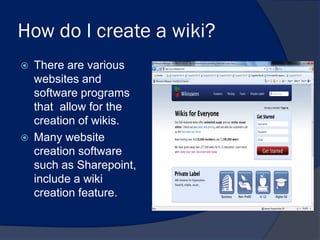
   There are various
    websites and
    software programs
    that allow for the
    creation of wikis.
   Many website
    creation software
    such as Sharepoint,
    include a wiki
    creation feature.
Okay, but I am not a techie. Is
there a simple way to create a
wiki?
   Yes! If you go to the
    following website:
    http://www.wikispaces.com/ ,
    you can set up an account
    and then a wiki page
    template will be created.
    Then you can just start
    creating your page.
All about Wikispaces.com
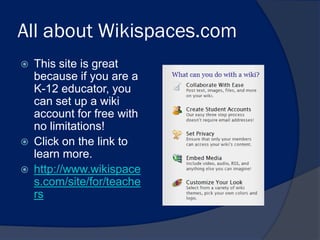
   This site is great
    because if you are a
    K-12 educator, you
    can set up a wiki
    account for free with
    no limitations!
   Click on the link to
    learn more.
   http://www.wikispace
    s.com/site/for/teache
    rs
Okay, let’s say I decide to use
wikispaces to create a wiki. What
do I do first?
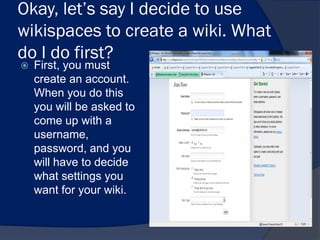
   First, you must
    create an account.
    When you do this
    you will be asked to
    come up with a
    username,
    password, and you
    will have to decide
    what settings you
    want for your wiki.
Settings? What does that mean?
   Basically, the settings detail how you want the wiki
    to be used:
   Will it be a private wiki?(members only)
    Will it be open to the public(meaning anyone can
    read it), if it is open to the public can anyone add,
    edit content to the page, etc?
Ok, so I created a wiki account
and picked my settings. Now
what?
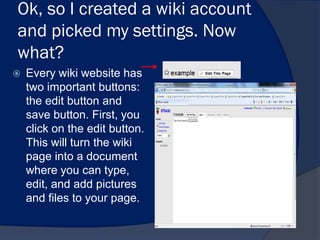
   Every wiki website has
    two important buttons:
    the edit button and
    save button. First, you
    click on the edit button.
    This will turn the wiki
    page into a document
    where you can type,
    edit, and add pictures
    and files to your page.
How do I add text, pictures or
files?
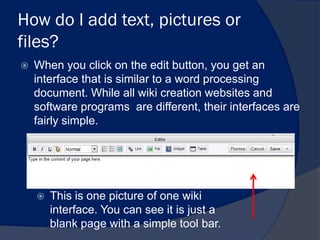
   When you click on the edit button, you get an
    interface that is similar to a word processing
    document. While all wiki creation websites and
    software programs are different, their interfaces are
    fairly simple.


       This is one picture of one wiki
        interface. You can see it is just a
        blank page with a simple tool bar.
Okay…I’ve added content to my
wiki page. Now what?
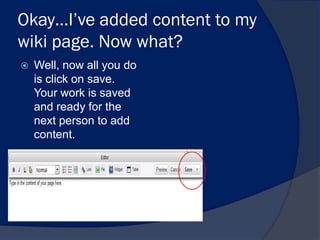
   Well, now all you do
    is click on save.
    Your work is saved
    and ready for the
    next person to add
    content.
How do I get my students to
access my wiki so they can add
content?
 Simply send them the
  url(web address) of the
  wiki in an e-mail.
 Then, depending on
  what settings you
  picked, they can start
  editing content.
 If you set up the wiki as
  private(members only),
  you must provide the
  students with the login
  information they will
  need to access the
  page.
What are some examples of wikis that
other teachers have created?
   When you create a wiki, you must remember that
    the essential purpose of such a page is to support
    collaboration.
   It is not meant to be a website that is changed
    occasionally. It should be a website that is
    accessed frequently and updated frequently.
Examples:

   Group projects: Group projects can be a hassle
    when it comes to dividing up the work load and
    checking up on each other’s progress.
   If the group sets up a wiki, the members can list all
    the requirements of the project and then everyone
    who accesses the wiki can have input as to what
    they are assigned.
   Example: Here’s what the assignment requires.
   Person #1: Would it be okay, if I do the rubric and
    opening explanation?
Group projects continued…
   Once the assignments are divided up, the group
    members will work on their assigned parts.
   Once they are done their part, they will then
    upload their part to the wiki so that everyone can
    see the content, and provide feedback.
   This assures that everyone has the same
    information and that the final project is something
    that the whole group has agreed to.
Brainstorming
   For projects like     Example:
                          “A wiki could be set up for middle or high
    science fair           school students to brainstorm ideas for and
    projects, a wiki       plan science fair projects. Initially it would
                           mostly be brainstorming, posting ideas and
    page can be used       information to back them up. As they begin to
    to help streamline     flesh out the ideas that they are interested in,
                           small groups might form to work on individual
    the brainstorming      projects, but could still contribute ideas to
    process.               other projects. The teacher can act as a
                           facilitator by offering suggestions and asking
                           probing questions to get students to consider
                           particular aspects in the planning of their
                           projects. The wiki could also be used to
                           record and organize data, and plan eventual
                           papers/presentations. “
                          -from
                           http://wik.ed.uiuc.edu/index.php/Wiki_in_a_K-
                           12_classroom
Portfolio and sharing of finished
project
   A wiki page can be set
    up for individual
    projects, as well.
   Let’s say each student
    has the same project.
    Instead of having
    each student submit
    their project
    individually(saving on
    a network drive, or
    sending it in an e-
    mail), the students
    can upload their work
    to a wiki page.
Portfolio and sharing of finished
projects continued…
   So, by everyone
    posting their work on
    the same site,
    everyone’s work can
    be shared and is
    easily accessible.
   Students can then
    see what other
    people have done
    and provide
    feedback on their
    work.
Where can I find information to
help me create a wiki?
   Excellent question!
    Here are some great
    resources you can
    use to learn more
    about wiki and
    education:
   http://www.teachersfir
    st.com/content/wiki/
   http://educationalwikis
    .wikispaces.com/Articl
    es+and+Resources

What is a wiki

  • 1.
    What is awiki? Wikiwiki means quick in Hawaiian. A wiki is a website in which users can easily edit any page. The website grows organically by linking existing pages together or by creating links to new pages.
  • 2.
    Wait…is this likeWikipedia?  Yes, wikipedia is a wiki page. Basically, anyone with access to the wiki page can add, edit and delete content.
  • 3.
    But…that means anyonecan type anything on the page!  Why in the world would I want to use something like that?  A wiki is a powerful tool that when utilized correctly can be used for collaboration projects.
  • 4.
    Hmm…could you showme an example of this?  Sure. Click on the  http://www.commonc video to see how raft.com/video-wikis- wikis can be a plain-english useful, collaboration tool.
  • 5.
    Okay…tell me moreabout wikis? How do they work?  Well, basically you set up a wiki page and assign members to join the group.  “Teachers can assign one to an entire classroom or to small groups. Many wiki creation programs and websites have educational or classroom features that allow teachers to assign user names and passwords to their students without their students having to create accounts, give email addresses, or provide other personal information.” - from: http://curriculalessons.suite101.com/article.cfm/using_wikis _in_the_classroom
  • 6.
    How do Icreate a wiki?  There are various websites and software programs that allow for the creation of wikis.  Many website creation software such as Sharepoint, include a wiki creation feature.
  • 7.
    Okay, but Iam not a techie. Is there a simple way to create a wiki?  Yes! If you go to the following website: http://www.wikispaces.com/ , you can set up an account and then a wiki page template will be created. Then you can just start creating your page.
  • 8.
    All about Wikispaces.com  This site is great because if you are a K-12 educator, you can set up a wiki account for free with no limitations!  Click on the link to learn more.  http://www.wikispace s.com/site/for/teache rs
  • 9.
    Okay, let’s sayI decide to use wikispaces to create a wiki. What do I do first?  First, you must create an account. When you do this you will be asked to come up with a username, password, and you will have to decide what settings you want for your wiki.
  • 10.
    Settings? What doesthat mean?  Basically, the settings detail how you want the wiki to be used:  Will it be a private wiki?(members only)  Will it be open to the public(meaning anyone can read it), if it is open to the public can anyone add, edit content to the page, etc?
  • 11.
    Ok, so Icreated a wiki account and picked my settings. Now what?  Every wiki website has two important buttons: the edit button and save button. First, you click on the edit button. This will turn the wiki page into a document where you can type, edit, and add pictures and files to your page.
  • 12.
    How do Iadd text, pictures or files?  When you click on the edit button, you get an interface that is similar to a word processing document. While all wiki creation websites and software programs are different, their interfaces are fairly simple.  This is one picture of one wiki interface. You can see it is just a blank page with a simple tool bar.
  • 13.
    Okay…I’ve added contentto my wiki page. Now what?  Well, now all you do is click on save. Your work is saved and ready for the next person to add content.
  • 14.
    How do Iget my students to access my wiki so they can add content?  Simply send them the url(web address) of the wiki in an e-mail.  Then, depending on what settings you picked, they can start editing content.  If you set up the wiki as private(members only), you must provide the students with the login information they will need to access the page.
  • 15.
    What are someexamples of wikis that other teachers have created?  When you create a wiki, you must remember that the essential purpose of such a page is to support collaboration.  It is not meant to be a website that is changed occasionally. It should be a website that is accessed frequently and updated frequently.
  • 16.
    Examples:  Group projects: Group projects can be a hassle when it comes to dividing up the work load and checking up on each other’s progress.  If the group sets up a wiki, the members can list all the requirements of the project and then everyone who accesses the wiki can have input as to what they are assigned.  Example: Here’s what the assignment requires.  Person #1: Would it be okay, if I do the rubric and opening explanation?
  • 17.
    Group projects continued…  Once the assignments are divided up, the group members will work on their assigned parts.  Once they are done their part, they will then upload their part to the wiki so that everyone can see the content, and provide feedback.  This assures that everyone has the same information and that the final project is something that the whole group has agreed to.
  • 18.
    Brainstorming  For projects like  Example:  “A wiki could be set up for middle or high science fair school students to brainstorm ideas for and projects, a wiki plan science fair projects. Initially it would mostly be brainstorming, posting ideas and page can be used information to back them up. As they begin to to help streamline flesh out the ideas that they are interested in, small groups might form to work on individual the brainstorming projects, but could still contribute ideas to process. other projects. The teacher can act as a facilitator by offering suggestions and asking probing questions to get students to consider particular aspects in the planning of their projects. The wiki could also be used to record and organize data, and plan eventual papers/presentations. “  -from http://wik.ed.uiuc.edu/index.php/Wiki_in_a_K- 12_classroom
  • 19.
    Portfolio and sharingof finished project  A wiki page can be set up for individual projects, as well.  Let’s say each student has the same project. Instead of having each student submit their project individually(saving on a network drive, or sending it in an e- mail), the students can upload their work to a wiki page.
  • 20.
    Portfolio and sharingof finished projects continued…  So, by everyone posting their work on the same site, everyone’s work can be shared and is easily accessible.  Students can then see what other people have done and provide feedback on their work.
  • 21.
    Where can Ifind information to help me create a wiki?  Excellent question! Here are some great resources you can use to learn more about wiki and education:  http://www.teachersfir st.com/content/wiki/  http://educationalwikis .wikispaces.com/Articl es+and+Resources