Storage…
Sumesh Koyon
Objectives Overview

Differentiate between storage
devices and storage media

Describe the characteristics of an
internal hard disk including
capacity, platters, read/write
heads, cylinders, sectors and
tracks, revolutions per minute,
transfer rate, and access time

Discuss the purpose of network
attached storage devices,
external and removable hard
disks, and hard disk controllers

Describe the various types of
flash memory storage

Support Organization With IT

2
Objectives Overview
Describe cloud storage
and explain its
advantages

Describe the
characteristics of optical
discs

Differentiate among
various types of optical
discs: CDs, archive discs
and Picture CDs, DVDs,
and Blu-ray Discs

Identify the uses of tape,
magnetic stripe cards,
smart cards, microfilm
and microfiche, and
enterprise storage

Support Organization With IT

3
Storage
Storage holds data, instructions, and
information for future use
A storage medium is the physical
material on which a computer keeps
data, instructions, and information
Support Organization With IT

4
Storage

Support Organization With IT

5
Storage
• Capacity is the number of bytes a storage medium
can hold

Support Organization With IT

6
Storage
• A storage device is the computer hardware that
records and/or retrieves items to and from
storage media
Reading is the process
of transferring items
from a storage medium
into memory

Writing is the process of
transferring items from
memory to a storage
medium
Support Organization With IT

7
Storage
• Access time measures:
– The amount of time it
takes a storage device to
locate an item on a
storage medium
– The time required to
deliver an item from
memory to the
processor

Support Organization With IT

8
Hard Disks
• A hard disk contains one or more inflexible, circular platters
that use magnetic particles to store data, instructions, and
information

Support Organization With IT

9
Hard Disks
• Hard disks can
store data using
longitudinal
recording or
perpendicular
recording

Support Organization With IT

10
Hard Disks
• Characteristics of a hard disk
include:
Capacity

Platters

Read/Write
Heads

Cylinders

Sectors and
Tracks

Revolutions
per Minute

Transfer
Rate

Access Time

Support Organization With IT

11
Hard Disks
• Formatting is the process of dividing the disk into tracks
and sectors so that the operating system can store and
locate data and information on the disk

Support Organization With IT

12
Hard Disks

Support Organization With IT

13
Hard Disks
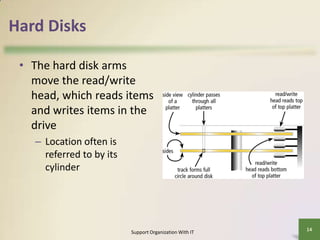
• The hard disk arms
move the read/write
head, which reads items
and writes items in the
drive
– Location often is
referred to by its
cylinder

Support Organization With IT

14
Hard Disks
• A head crash occurs when a read/write head
touches the surface of a platter
• Always keep a backup of your hard disk

Support Organization With IT

15
Hard Disks

Support Organization With IT

16
Hard Disks
• RAID (redundant array of independent disks) is a
group of two or more integrated hard disks

Support Organization With IT

17
Hard Disks
• A network attached storage (NAS) device is a
server connected to a network with the sole
purpose of providing storage

Support Organization With IT

18
Hard Disks
An external hard disk is a separate freestanding hard disk that connects to your
computer with a cable or wirelessly
A removable hard disk is a hard disk that
you insert and remove from a drive
Internal and external hard disks are available
in miniature sizes (miniature hard disks)
Support Organization With IT

19
Hard Disks
• A disk controller consists of a special-purpose chip and
electronic circuits that control the transfer of data,
instructions, and information from a disk to and from the
system bus and other components of the computer

SATA

EIDE

SCSI

SAS

Support Organization With IT

20
• SATA
– Serial ATA ( Serial Advanced Technology Attachment)

• EIDE
– Enhanced Integrated Drive Electronics

• SCSI
– Small Computer System Interface

• SAS
– Serial attached SCSI
Support Organization With IT

21
Flash Memory Storage
• Flash memory chips are a type of solid state
media and contain no moving parts
• Solid state drives (SSDs) have several advantages
over magnetic hard disks:

Faster access time

Faster transfer rates

Generate less heat and
consume less power

Support Organization With IT

Last longer

22
Flash Memory Storage

Support Organization With IT

23
Flash Memory Storage
• A memory card is a removable flash memory
device that you insert and remove from a slot in a
computer, mobile device, or card reader/writer
CompactFlash
(CF)

Secure Digital
(SD)

Secure Digital
High Capacity
(SDHC)

microSDHC

xD Picture
Card

Memory Stick

Support Organization With IT

microSD

Memory Stick
Micro (M2)
24
Flash Memory Storage

Support Organization With IT

25
Flash Memory Storage

Support Organization With IT

26
Flash Memory Storage
• USB flash drives plug into a USB port on a
computer or mobile device

Support Organization With IT

27
Flash Memory Storage
• An ExpressCard module
is a removable device
that fits in an
ExpressCard slot
• Developed by the
PCMCIA
• Commonly used in
notebook computers

Support Organization With IT

28
Cloud Storage
• Cloud storage is an Internet service that provides
storage to computer users

Support Organization With IT

29
Cloud Storage

Support Organization With IT

30
Cloud Storage
• Users subscribe to cloud storage for a variety of
reasons:
Access files from any computer

Store large files instantaneously

Allow others to access their files
View time-critical data and images immediately
Store offsite backups
Provide data center functions
Support Organization With IT

31
Optical Discs
• An optical disc consists of a flat, round, portable
disc made of metal, plastic, and lacquer that is
written and read by a laser
• Typically store software, data, digital photos,
movies, and music
• Read only vs. rewritable

Support Organization With IT

32
Optical Discs

Support Organization With IT

33
Optical Discs
• Optical discs commonly
store items in a single
track that spirals from
the center of the disc to
the edge
• Track is divided into
evenly sized sectors

Support Organization With IT

34
Optical Discs
• Care of optical discs

Support Organization With IT

35
Optical Discs
A CD-ROM can be read from but not written to
• Read from a CD-ROM drive or CD-ROM player

A CD-R is a multisession optical disc on which
users can write, but not erase
A CD-RW is an erasable multisession disc
• Must have a CD-RW drive

Support Organization With IT

36
Optical Discs
Archive disc

Picture CD

• Stores photos from an
online photo center
• Resolution usually is
7200 pixels per photo
• Cost is determined by
the number of photos
being stored

• Single-session CD-ROM
that stores digital
versions of film
• Typically uses a 1024 x
1536 resolution
• Many photo centers
offer Picture CD
services

Support Organization With IT

37
Optical Discs

Support Organization With IT

38
Optical Discs
A DVD-ROM is a high-capacity optical disc on
which users can read but not write or erase
• Requires a DVD-ROM drive

A Blu-ray Disc-ROM (BD-ROM) has a storage
capacity of 100 GB

DVD-RW, DVD+RW, and DVD+RAM are highcapacity rewritable DVD formats
Support Organization With IT

39
Other Types of Storage

Support Organization With IT

40
Other Types of Storage
• Tape is a magnetically coated ribbon of plastic capable of
storing large amounts of data and information
• A tape drive reads and writes data and information on a
tape

Support Organization With IT

41
Other Types of Storage
• A magnetic stripe card
contains a magnetic
stripe that stores
information
• A smart card stores
data on a thin
microprocessor
embedded in the card

Support Organization With IT

42
Other Types of Storage
• Microfilm and microfiche store microscopic
images of documents on a roll or sheet film

Support Organization With IT

43
Other Types of Storage

Support Organization With IT

44
Other Types of Storage
• Enterprise storage stores huge volumes of data
and information for large businesses
– Uses special hardware for heavy use, maximum
availability, and maximum efficiency

Support Organization With IT

45
Putting It All Together

Home user
• 500 GB hard disk

Small Office/Home Office
user

Mobile
• 250 GB hard disk

• Cloud storage

• 1 TB hard disk

• Cloud storage

• Optical disc drive

• Cloud storage

• Optical disc drive

• Card reader/writer

• Optical disc drive

• Card reader/writer

• USB flash drive

• External hard disk for
backup

• Portable hard disk for
backup

• USB flash drive

• USB flash drive

Support Organization With IT

46
Putting It All Together

Power User
• 2.5 TB hard disk

Enterprise User
(desktop computer)

Enterprise User
(server or mainframe)

• Cloud storage

• 1 TB hard disk

• Network storage server

• Optical disc drive

• Optical disc drive

• 40 TB hard disk system

• Portable hard disk for
backup

• Smart card reader

• Optical disc server

• Tape drive

• Microfilm or microfiche

• USB flash drive

• USB flash drive

Support Organization With IT

47
Summary

Various storage media and
storage devices

Internal hard disks, external and
removable hard disks, solid state
drives, memory cards, USB flash
drives, ExpressCard
modules, cloud
storage, CDs, DVDs, and Blu-ray
Discs, tape, smart cards, and
microfilm and microfiche

Support Organization With IT

48
Storage…
Sumesh Koyon

Week 5

  • 1.
  • 2.
    Objectives Overview Differentiate betweenstorage devices and storage media Describe the characteristics of an internal hard disk including capacity, platters, read/write heads, cylinders, sectors and tracks, revolutions per minute, transfer rate, and access time Discuss the purpose of network attached storage devices, external and removable hard disks, and hard disk controllers Describe the various types of flash memory storage Support Organization With IT 2
  • 3.
    Objectives Overview Describe cloudstorage and explain its advantages Describe the characteristics of optical discs Differentiate among various types of optical discs: CDs, archive discs and Picture CDs, DVDs, and Blu-ray Discs Identify the uses of tape, magnetic stripe cards, smart cards, microfilm and microfiche, and enterprise storage Support Organization With IT 3
  • 4.
    Storage Storage holds data,instructions, and information for future use A storage medium is the physical material on which a computer keeps data, instructions, and information Support Organization With IT 4
  • 5.
  • 6.
    Storage • Capacity isthe number of bytes a storage medium can hold Support Organization With IT 6
  • 7.
    Storage • A storagedevice is the computer hardware that records and/or retrieves items to and from storage media Reading is the process of transferring items from a storage medium into memory Writing is the process of transferring items from memory to a storage medium Support Organization With IT 7
  • 8.
    Storage • Access timemeasures: – The amount of time it takes a storage device to locate an item on a storage medium – The time required to deliver an item from memory to the processor Support Organization With IT 8
  • 9.
    Hard Disks • Ahard disk contains one or more inflexible, circular platters that use magnetic particles to store data, instructions, and information Support Organization With IT 9
  • 10.
    Hard Disks • Harddisks can store data using longitudinal recording or perpendicular recording Support Organization With IT 10
  • 11.
    Hard Disks • Characteristicsof a hard disk include: Capacity Platters Read/Write Heads Cylinders Sectors and Tracks Revolutions per Minute Transfer Rate Access Time Support Organization With IT 11
  • 12.
    Hard Disks • Formattingis the process of dividing the disk into tracks and sectors so that the operating system can store and locate data and information on the disk Support Organization With IT 12
  • 13.
  • 14.
    Hard Disks • Thehard disk arms move the read/write head, which reads items and writes items in the drive – Location often is referred to by its cylinder Support Organization With IT 14
  • 15.
    Hard Disks • Ahead crash occurs when a read/write head touches the surface of a platter • Always keep a backup of your hard disk Support Organization With IT 15
  • 16.
  • 17.
    Hard Disks • RAID(redundant array of independent disks) is a group of two or more integrated hard disks Support Organization With IT 17
  • 18.
    Hard Disks • Anetwork attached storage (NAS) device is a server connected to a network with the sole purpose of providing storage Support Organization With IT 18
  • 19.
    Hard Disks An externalhard disk is a separate freestanding hard disk that connects to your computer with a cable or wirelessly A removable hard disk is a hard disk that you insert and remove from a drive Internal and external hard disks are available in miniature sizes (miniature hard disks) Support Organization With IT 19
  • 20.
    Hard Disks • Adisk controller consists of a special-purpose chip and electronic circuits that control the transfer of data, instructions, and information from a disk to and from the system bus and other components of the computer SATA EIDE SCSI SAS Support Organization With IT 20
  • 21.
    • SATA – SerialATA ( Serial Advanced Technology Attachment) • EIDE – Enhanced Integrated Drive Electronics • SCSI – Small Computer System Interface • SAS – Serial attached SCSI Support Organization With IT 21
  • 22.
    Flash Memory Storage •Flash memory chips are a type of solid state media and contain no moving parts • Solid state drives (SSDs) have several advantages over magnetic hard disks: Faster access time Faster transfer rates Generate less heat and consume less power Support Organization With IT Last longer 22
  • 23.
    Flash Memory Storage SupportOrganization With IT 23
  • 24.
    Flash Memory Storage •A memory card is a removable flash memory device that you insert and remove from a slot in a computer, mobile device, or card reader/writer CompactFlash (CF) Secure Digital (SD) Secure Digital High Capacity (SDHC) microSDHC xD Picture Card Memory Stick Support Organization With IT microSD Memory Stick Micro (M2) 24
  • 25.
    Flash Memory Storage SupportOrganization With IT 25
  • 26.
    Flash Memory Storage SupportOrganization With IT 26
  • 27.
    Flash Memory Storage •USB flash drives plug into a USB port on a computer or mobile device Support Organization With IT 27
  • 28.
    Flash Memory Storage •An ExpressCard module is a removable device that fits in an ExpressCard slot • Developed by the PCMCIA • Commonly used in notebook computers Support Organization With IT 28
  • 29.
    Cloud Storage • Cloudstorage is an Internet service that provides storage to computer users Support Organization With IT 29
  • 30.
  • 31.
    Cloud Storage • Userssubscribe to cloud storage for a variety of reasons: Access files from any computer Store large files instantaneously Allow others to access their files View time-critical data and images immediately Store offsite backups Provide data center functions Support Organization With IT 31
  • 32.
    Optical Discs • Anoptical disc consists of a flat, round, portable disc made of metal, plastic, and lacquer that is written and read by a laser • Typically store software, data, digital photos, movies, and music • Read only vs. rewritable Support Organization With IT 32
  • 33.
  • 34.
    Optical Discs • Opticaldiscs commonly store items in a single track that spirals from the center of the disc to the edge • Track is divided into evenly sized sectors Support Organization With IT 34
  • 35.
    Optical Discs • Careof optical discs Support Organization With IT 35
  • 36.
    Optical Discs A CD-ROMcan be read from but not written to • Read from a CD-ROM drive or CD-ROM player A CD-R is a multisession optical disc on which users can write, but not erase A CD-RW is an erasable multisession disc • Must have a CD-RW drive Support Organization With IT 36
  • 37.
    Optical Discs Archive disc PictureCD • Stores photos from an online photo center • Resolution usually is 7200 pixels per photo • Cost is determined by the number of photos being stored • Single-session CD-ROM that stores digital versions of film • Typically uses a 1024 x 1536 resolution • Many photo centers offer Picture CD services Support Organization With IT 37
  • 38.
  • 39.
    Optical Discs A DVD-ROMis a high-capacity optical disc on which users can read but not write or erase • Requires a DVD-ROM drive A Blu-ray Disc-ROM (BD-ROM) has a storage capacity of 100 GB DVD-RW, DVD+RW, and DVD+RAM are highcapacity rewritable DVD formats Support Organization With IT 39
  • 40.
    Other Types ofStorage Support Organization With IT 40
  • 41.
    Other Types ofStorage • Tape is a magnetically coated ribbon of plastic capable of storing large amounts of data and information • A tape drive reads and writes data and information on a tape Support Organization With IT 41
  • 42.
    Other Types ofStorage • A magnetic stripe card contains a magnetic stripe that stores information • A smart card stores data on a thin microprocessor embedded in the card Support Organization With IT 42
  • 43.
    Other Types ofStorage • Microfilm and microfiche store microscopic images of documents on a roll or sheet film Support Organization With IT 43
  • 44.
    Other Types ofStorage Support Organization With IT 44
  • 45.
    Other Types ofStorage • Enterprise storage stores huge volumes of data and information for large businesses – Uses special hardware for heavy use, maximum availability, and maximum efficiency Support Organization With IT 45
  • 46.
    Putting It AllTogether Home user • 500 GB hard disk Small Office/Home Office user Mobile • 250 GB hard disk • Cloud storage • 1 TB hard disk • Cloud storage • Optical disc drive • Cloud storage • Optical disc drive • Card reader/writer • Optical disc drive • Card reader/writer • USB flash drive • External hard disk for backup • Portable hard disk for backup • USB flash drive • USB flash drive Support Organization With IT 46
  • 47.
    Putting It AllTogether Power User • 2.5 TB hard disk Enterprise User (desktop computer) Enterprise User (server or mainframe) • Cloud storage • 1 TB hard disk • Network storage server • Optical disc drive • Optical disc drive • 40 TB hard disk system • Portable hard disk for backup • Smart card reader • Optical disc server • Tape drive • Microfilm or microfiche • USB flash drive • USB flash drive Support Organization With IT 47
  • 48.
    Summary Various storage mediaand storage devices Internal hard disks, external and removable hard disks, solid state drives, memory cards, USB flash drives, ExpressCard modules, cloud storage, CDs, DVDs, and Blu-ray Discs, tape, smart cards, and microfilm and microfiche Support Organization With IT 48
  • 49.