Database Management

Sumesh Koyon
Objectives Overview

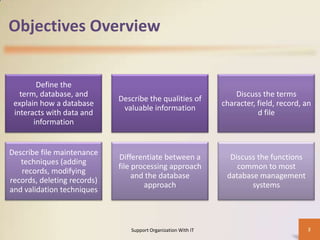
Define the
term, database, and
explain how a database
interacts with data and
information

Describe the qualities of
valuable information

Discuss the terms
character, field, record, an
d file

Describe file maintenance
techniques (adding
records, modifying
records, deleting records)
and validation techniques

Differentiate between a
file processing approach
and the database
approach

Discuss the functions
common to most
database management
systems

Support Organization With IT

2
Objectives Overview
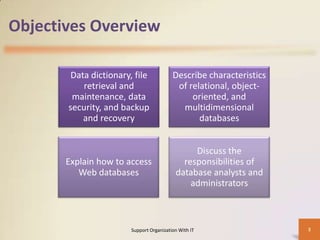
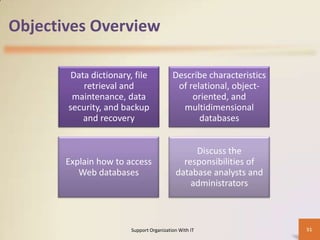
Data dictionary, file
retrieval and
maintenance, data
security, and backup
and recovery

Describe characteristics
of relational, objectoriented, and
multidimensional
databases

Explain how to access
Web databases

Discuss the
responsibilities of
database analysts and
administrators

Support Organization With IT

3
Databases, Data, and Information
• A database is a collection of data organized in a manner
that allows access, retrieval, and use of that data.
• Data is a collection of unprocessed items, which can
include text, numbers, images, audio, and video.
• Information is processed data; that is, it is
organized, meaningful, and useful.

Support Organization With IT

4
Databases, Data, and Information
• Computers process data in a database into information.
• A database at a school, for example, contains data about
students, e.g., student data, class data, etc.

Support Organization With IT

5
Database Management System (DBMS)
• With database software, often called a database
management system (DBMS), users create a
computerized database; add, modify, and delete data in
the database; sort and retrieve data from the database;
and create forms and reports from the data in the
database.

Support Organization With IT

6
Data Integrity
• Most organizations realize that data is one of their more
valuable assets — because data is used to generate
information.
• Many business transactions take less time when
employees have instant access to information.
• To ensure that data is accessible on demand, an
organization must manage and protect its data just as it
would any other resource.
• Thus, it is vital that the data has integrity and is kept
secure.
Support Organization With IT

7
Qualities of Valuable Information
• The information that data generates also is an important
asset.
• People make decisions daily using all types of information
such as receipts, bank statements, pension plan
summaries, stock analyses, transcripts, and credit
reports.
• At school, students use grade reports and degree audits
to make decisions.
• In a business, managers make decisions based on sales
trends, competitors’ products and services, production
processes, and even employee skills.
Support Organization With IT

8
Qualities of Valuable Information
• To assist with sound decision making, information must
have value.
• For it to be valuable, information should be accurate,
verifiable, timely, organized, accessible, useful, and costeffective.

Support Organization With IT

9
Qualities of Valuable Information
•
•
•
•

Accurate information is error free.
Verifiable information can be proven as correct or incorrect.
Timely information has an age suited to its use.
Organized information is arranged to suit the needs and
requirements of the decision maker.
• Accessible information is available when the decision maker
needs it.
• Useful information has meaning to the person who receives
it.
• Cost-effective information should give more value than it
costs to produce.
Support Organization With IT

10
The Hierarchy of Data
• Data is organized in layers. In the computer
profession, data is classified in a hierarchy.
• Each higher level of data consists of one or more items
from the lower level.
• For example, a student has an address, and an address
consists of letters and numbers.
• Depending on the application and the user, different
terms describe the various levels of the hierarchy.

Support Organization With IT

11
Records
• A record is a group of related fields. For example, a
student record includes a set of fields about one student.
• A primary key is a field that uniquely identifies each
record in a file.
• The data in a primary key is unique to a specific record.
• For example, the Student ID field uniquely identifies each
student because no two students can have the same
Student ID.

Support Organization With IT

12
Files
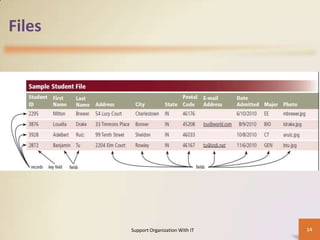
• A data file is a collection of related records stored on a
storage medium such as a hard disk or optical disc.
• A Student file at a school might consist of thousands of
individual student records.
• Each student record in the file contains the same fields.
Each field, however, contains different data.

Support Organization With IT

13
Files

Support Organization With IT

14
Maintaining Data
• File maintenance refers to the procedures that keep data
current.
• File maintenance procedures include adding records
to, modifying records in, and deleting records from a file.

Support Organization With IT

15
Adding Records
• Users add new records to a file when they obtain new
data.
• If a new student is admitted to the school, an admissions
department clerk adds a new record to the Student file.

Support Organization With IT

16
Deleting Records
• When a record no longer is needed, a user deletes it from
a file.

Support Organization With IT

17
Validating Data
• Validation is the process of comparing data with a set of
rules or values to find out if the data is correct.
• Many programs perform a validity check that analyzes
data, either as you enter it or after you enter it, to help
ensure that it is correct.
• For instance, when an admissions department clerk adds
or modifies data in a student record, the DBMS tests the
entered data.

Support Organization With IT

18
File Processing versus Databases
• Almost all application programs use the file processing
approach, the database approach, or a combination of
both approaches to store and manage data.

Support Organization With IT

19
File Processing Systems
• In the past, many organizations exclusively used file
processing systems to store and manage data.
• In a typical file processing system, each department or
area within an organization has its own set of files.
• The records in one file may not relate to the records in
any other file.

Support Organization With IT

20
File Processing Systems
• Data Redundancy — Each department or area in an
organization has its own files in a file processing system.
Thus, the same fields are stored in multiple files. If a file
processing system is used at a school, for example, the
Student file and the Student Schedule file both might
store the same students’ names and addresses.

Support Organization With IT

21
File Processing Systems
• Isolated Data — Often it is difficult to access data stored
in separate files in different departments. Sharing data
from multiple, separate files is a complicated procedure
and usually requires the experience of a computer
programmer.

Support Organization With IT

22
The Database Approach
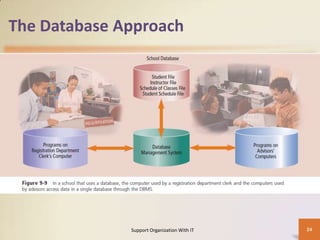
• When an organization uses the database
approach, many programs and users share the data in
the database.
• A school’s database most likely at a minimum contains
data about students, instructors, schedule of classes, and
student schedules.
• The database does secure its data, however, so that only
authorized users can access certain data items.
• While a user is working with the database, the DBMS
resides in the memory of the computer.
Support Organization With IT

23
The Database Approach

Support Organization With IT

24
Data Dictionary
• A data dictionary contains data about each file in the
database and each field within those files.
• For each file, it stores details such as the file
name, description, the file’s relationship to other
files, and the number of records in the file.
• For each field, it stores details such as the field
name, description, field type, field size, default
value, validation rules, and the field’s relationship to
other fields.
Support Organization With IT

25
File Retrieval and Maintenance
• A DBMS provides several tools that allow users and
programs to retrieve and maintain data in the database.
• To retrieve or select data in a database, you query it.
• A query is a request for specific data from the database.
• Users can instruct the DBMS to display, print, or store the
results of a query.
• The capability of querying a database is one of the more
powerful database features.

Support Organization With IT

26
Query Language
• A query language consists of simple, English-like
statements that allow users to specify the data to display,
print, or store.
• Users can retrieve actual data in a query or display the
results of calculations performed on the data.
• Each query language has its own grammar and
vocabulary.

Support Organization With IT

27
Data Security
• A DBMS provides means to ensure that only authorized
users access data at permitted times.
• In addition, most DBMSs allow different levels of access
privileges to be identified for each field in the database.
• These access privileges define the actions that a specific
user or group of users can perform.
• Access privileges for data involve establishing who can
enter new data, modify existing data, delete unwanted
data, and view data.
Support Organization With IT

28
Backup and Recovery
• Occasionally a database is damaged or destroyed
because of hardware failure, a problem with the
software, human error, or a catastrophe such as fire or
flood.
• A DBMS provides a variety of techniques to restore the
database to a usable form in case it is damaged or
destroyed.

Support Organization With IT

29
Backup and Recovery
• A backup, or copy, of the entire database should be
made on a regular basis. Some DBMSs have their own
built-in backup utilities. Others require users to purchase
a separate backup utility, or use one included with the
operating system.
• More complex DBMSs maintain a log, which is a listing of
activities that change the contents of the database.

Support Organization With IT

30
Backup and Recovery
• A DBMS that creates a log usually provides a recovery
utility. A recovery utility uses the logs and/or backups to
restore a database when it becomes damaged or
destroyed.
• Continuous backup is a backup plan in which all data is
backed up whenever a change is made. This backup
technique can cost more than other backup strategies
but is growing in popularity because of its benefits.

Support Organization With IT

31
Relational, Object-Oriented, and Multi
dimensional Databases
• A data model consists of rules and standards that define
how the database organizes data.
• A data model defines how users view the organization of
the data.
• It does not define how the operating system actually
arranges the data on the disk.
• Three popular data models in use today are
– relational
– object-oriented
– multidimensional
Support Organization With IT

32
Relational Databases
• A relational database is a database that stores data in
tables that consist of rows and columns.
• Each row has a primary key and each column has a
unique name.

Support Organization With IT

33
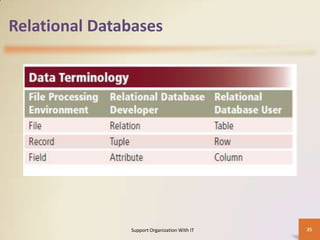
Relational Databases
• A relational database uses terms different from a file
processing system.
• A developer of a relational database refers to a file as a
relation, a record as a tuple, and a field as an attribute.
• A user of a relational database, by contrast, refers to a
file as a table, a record as a row, and a field as a column.

Support Organization With IT

34
Relational Databases

Support Organization With IT

35
SQL Structured Query Language (SQL)
• Structured Query Language (SQL) is a popular query
language that allows users to manage, update, and
retrieve data.
• SQL has special keywords and rules that users include in
SQL statements.
• Eg:
– Select * from table_name;

Support Organization With IT

36
Object-Oriented Databases
• An object-oriented database (OODB) stores data in
objects.
• An object is an item that contains data, as well as the
actions that read or process the data.
• A Student object, for example, might contain data about
a student such as Student ID, First Name, Last Name,
Address, and so on.

Support Organization With IT

37
Object-Oriented Databases
• Object-oriented databases have several advantages
compared with relational databases: they can store more
types of data, access this data faster, and allow
programmers to reuse objects.
• An object oriented database stores unstructured data
more efficiently than a relational database.

Support Organization With IT

38
Object Query Language
• Object-oriented databases often use a query language
called object query language (OQL) to manipulate and
retrieve data.
• OQL is similar to SQL.
• OQL and SQL use many of the same rules, grammar, and
keywords.
• Because OQL is a relatively new query language, not all
object databases support it.

Support Organization With IT

39
Multidimensional Databases
• A multidimensional database stores data in dimensions.
• Whereas a relational database is a two-dimensional
table, a multidimensional database can store more than
two dimensions of data.
• These multiple dimensions allow users to access and
analyse any view of the database data.
• No standard query language exists for multidimensional
databases.
• Each database uses its own language.
• Most are similar to SQL.
Support Organization With IT

40
Data Warehouses
• A data warehouse is a huge database that stores and
manages the data required to analyse historical and
current transactions.
• Through a data warehouse, managers and other users
access transactions and summaries of transactions
quickly and efficiently

Support Organization With IT

41
Web Databases
• One of the more profound features of the Web is the vast
amount of information it provides.
• The Web offers information about jobs, travel
destinations, television
programming, photos, movies, videos, local and national
weather, sporting events, and legislative information.

Support Organization With IT

42
Web Databases
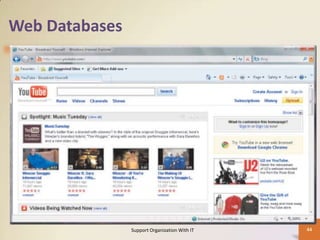
• Much of this and other information exists in databases
that are stored on the Web or are accessible through the
Web.
• Some Web databases are collaborative databases, where
users store and share photos, videos, recordings, and
other personal media with other registered users

Support Organization With IT

43
Web Databases

Support Organization With IT

44
Database Administration
• Managing a company’s database requires a great deal of
coordination.
• The role of coordinating the use of the database belongs
to the database analysts and administrators.
• To carry out their responsibilities, these IT (information
technology) professionals follow database design
guidelines and need cooperation from all database users.

Support Organization With IT

45
Database Design Guidelines
•
•
•
•

Determine the purpose of the database.
Design the tables or files.
Design the records and fields for each table or file.
Determine the relationships among the tables or files.

Support Organization With IT

46
Role of the Database Analysts and
Administrators
• The database analysts and administrators are
responsible for managing and coordinating all
database activities.
• The database analyst (DA) decides on the proper
placement of fields, defines the relationships
among data, and identifies users’ access
privileges.

Support Organization With IT

47
Role of the Database Analysts and
Administrators
• The database administrator (DBA) requires a
more technical inside view of the data.
• The DBA creates and maintains the data
dictionary, manages security of the
database, monitors the performance of the
database, and checks backup and recovery
procedures.

Support Organization With IT

48
Role of the Employee as a User
• Employees should learn how to use the data in
the database effectively.
• The amount of information available often
amazes first-time database users.
• Instant access to information helps employees
perform their jobs more effectively.
• Today, employees access databases from their
office desktop computers, notebook
computers, or even smart phones and other
mobile devices.
Support Organization With IT

49
Objectives Overview

Define the
term, database, and explain
how a database interacts
with data and information

Describe the qualities of
valuable information

Discuss the terms
character, field, record, and
file

Describe file maintenance
techniques (adding
records, modifying
records, deleting records)
and validation techniques

Differentiate between a file
processing approach and
the database approach

Discuss the functions
common to most database
management systems

Support Organization With IT

50
Objectives Overview
Data dictionary, file
retrieval and
maintenance, data
security, and backup
and recovery

Describe characteristics
of relational, objectoriented, and
multidimensional
databases

Explain how to access
Web databases

Discuss the
responsibilities of
database analysts and
administrators

Support Organization With IT

51
Database Management

Sumesh Koyon

Week 9

  • 1.
  • 2.
    Objectives Overview Define the term,database, and explain how a database interacts with data and information Describe the qualities of valuable information Discuss the terms character, field, record, an d file Describe file maintenance techniques (adding records, modifying records, deleting records) and validation techniques Differentiate between a file processing approach and the database approach Discuss the functions common to most database management systems Support Organization With IT 2
  • 3.
    Objectives Overview Data dictionary,file retrieval and maintenance, data security, and backup and recovery Describe characteristics of relational, objectoriented, and multidimensional databases Explain how to access Web databases Discuss the responsibilities of database analysts and administrators Support Organization With IT 3
  • 4.
    Databases, Data, andInformation • A database is a collection of data organized in a manner that allows access, retrieval, and use of that data. • Data is a collection of unprocessed items, which can include text, numbers, images, audio, and video. • Information is processed data; that is, it is organized, meaningful, and useful. Support Organization With IT 4
  • 5.
    Databases, Data, andInformation • Computers process data in a database into information. • A database at a school, for example, contains data about students, e.g., student data, class data, etc. Support Organization With IT 5
  • 6.
    Database Management System(DBMS) • With database software, often called a database management system (DBMS), users create a computerized database; add, modify, and delete data in the database; sort and retrieve data from the database; and create forms and reports from the data in the database. Support Organization With IT 6
  • 7.
    Data Integrity • Mostorganizations realize that data is one of their more valuable assets — because data is used to generate information. • Many business transactions take less time when employees have instant access to information. • To ensure that data is accessible on demand, an organization must manage and protect its data just as it would any other resource. • Thus, it is vital that the data has integrity and is kept secure. Support Organization With IT 7
  • 8.
    Qualities of ValuableInformation • The information that data generates also is an important asset. • People make decisions daily using all types of information such as receipts, bank statements, pension plan summaries, stock analyses, transcripts, and credit reports. • At school, students use grade reports and degree audits to make decisions. • In a business, managers make decisions based on sales trends, competitors’ products and services, production processes, and even employee skills. Support Organization With IT 8
  • 9.
    Qualities of ValuableInformation • To assist with sound decision making, information must have value. • For it to be valuable, information should be accurate, verifiable, timely, organized, accessible, useful, and costeffective. Support Organization With IT 9
  • 10.
    Qualities of ValuableInformation • • • • Accurate information is error free. Verifiable information can be proven as correct or incorrect. Timely information has an age suited to its use. Organized information is arranged to suit the needs and requirements of the decision maker. • Accessible information is available when the decision maker needs it. • Useful information has meaning to the person who receives it. • Cost-effective information should give more value than it costs to produce. Support Organization With IT 10
  • 11.
    The Hierarchy ofData • Data is organized in layers. In the computer profession, data is classified in a hierarchy. • Each higher level of data consists of one or more items from the lower level. • For example, a student has an address, and an address consists of letters and numbers. • Depending on the application and the user, different terms describe the various levels of the hierarchy. Support Organization With IT 11
  • 12.
    Records • A recordis a group of related fields. For example, a student record includes a set of fields about one student. • A primary key is a field that uniquely identifies each record in a file. • The data in a primary key is unique to a specific record. • For example, the Student ID field uniquely identifies each student because no two students can have the same Student ID. Support Organization With IT 12
  • 13.
    Files • A datafile is a collection of related records stored on a storage medium such as a hard disk or optical disc. • A Student file at a school might consist of thousands of individual student records. • Each student record in the file contains the same fields. Each field, however, contains different data. Support Organization With IT 13
  • 14.
  • 15.
    Maintaining Data • Filemaintenance refers to the procedures that keep data current. • File maintenance procedures include adding records to, modifying records in, and deleting records from a file. Support Organization With IT 15
  • 16.
    Adding Records • Usersadd new records to a file when they obtain new data. • If a new student is admitted to the school, an admissions department clerk adds a new record to the Student file. Support Organization With IT 16
  • 17.
    Deleting Records • Whena record no longer is needed, a user deletes it from a file. Support Organization With IT 17
  • 18.
    Validating Data • Validationis the process of comparing data with a set of rules or values to find out if the data is correct. • Many programs perform a validity check that analyzes data, either as you enter it or after you enter it, to help ensure that it is correct. • For instance, when an admissions department clerk adds or modifies data in a student record, the DBMS tests the entered data. Support Organization With IT 18
  • 19.
    File Processing versusDatabases • Almost all application programs use the file processing approach, the database approach, or a combination of both approaches to store and manage data. Support Organization With IT 19
  • 20.
    File Processing Systems •In the past, many organizations exclusively used file processing systems to store and manage data. • In a typical file processing system, each department or area within an organization has its own set of files. • The records in one file may not relate to the records in any other file. Support Organization With IT 20
  • 21.
    File Processing Systems •Data Redundancy — Each department or area in an organization has its own files in a file processing system. Thus, the same fields are stored in multiple files. If a file processing system is used at a school, for example, the Student file and the Student Schedule file both might store the same students’ names and addresses. Support Organization With IT 21
  • 22.
    File Processing Systems •Isolated Data — Often it is difficult to access data stored in separate files in different departments. Sharing data from multiple, separate files is a complicated procedure and usually requires the experience of a computer programmer. Support Organization With IT 22
  • 23.
    The Database Approach •When an organization uses the database approach, many programs and users share the data in the database. • A school’s database most likely at a minimum contains data about students, instructors, schedule of classes, and student schedules. • The database does secure its data, however, so that only authorized users can access certain data items. • While a user is working with the database, the DBMS resides in the memory of the computer. Support Organization With IT 23
  • 24.
    The Database Approach SupportOrganization With IT 24
  • 25.
    Data Dictionary • Adata dictionary contains data about each file in the database and each field within those files. • For each file, it stores details such as the file name, description, the file’s relationship to other files, and the number of records in the file. • For each field, it stores details such as the field name, description, field type, field size, default value, validation rules, and the field’s relationship to other fields. Support Organization With IT 25
  • 26.
    File Retrieval andMaintenance • A DBMS provides several tools that allow users and programs to retrieve and maintain data in the database. • To retrieve or select data in a database, you query it. • A query is a request for specific data from the database. • Users can instruct the DBMS to display, print, or store the results of a query. • The capability of querying a database is one of the more powerful database features. Support Organization With IT 26
  • 27.
    Query Language • Aquery language consists of simple, English-like statements that allow users to specify the data to display, print, or store. • Users can retrieve actual data in a query or display the results of calculations performed on the data. • Each query language has its own grammar and vocabulary. Support Organization With IT 27
  • 28.
    Data Security • ADBMS provides means to ensure that only authorized users access data at permitted times. • In addition, most DBMSs allow different levels of access privileges to be identified for each field in the database. • These access privileges define the actions that a specific user or group of users can perform. • Access privileges for data involve establishing who can enter new data, modify existing data, delete unwanted data, and view data. Support Organization With IT 28
  • 29.
    Backup and Recovery •Occasionally a database is damaged or destroyed because of hardware failure, a problem with the software, human error, or a catastrophe such as fire or flood. • A DBMS provides a variety of techniques to restore the database to a usable form in case it is damaged or destroyed. Support Organization With IT 29
  • 30.
    Backup and Recovery •A backup, or copy, of the entire database should be made on a regular basis. Some DBMSs have their own built-in backup utilities. Others require users to purchase a separate backup utility, or use one included with the operating system. • More complex DBMSs maintain a log, which is a listing of activities that change the contents of the database. Support Organization With IT 30
  • 31.
    Backup and Recovery •A DBMS that creates a log usually provides a recovery utility. A recovery utility uses the logs and/or backups to restore a database when it becomes damaged or destroyed. • Continuous backup is a backup plan in which all data is backed up whenever a change is made. This backup technique can cost more than other backup strategies but is growing in popularity because of its benefits. Support Organization With IT 31
  • 32.
    Relational, Object-Oriented, andMulti dimensional Databases • A data model consists of rules and standards that define how the database organizes data. • A data model defines how users view the organization of the data. • It does not define how the operating system actually arranges the data on the disk. • Three popular data models in use today are – relational – object-oriented – multidimensional Support Organization With IT 32
  • 33.
    Relational Databases • Arelational database is a database that stores data in tables that consist of rows and columns. • Each row has a primary key and each column has a unique name. Support Organization With IT 33
  • 34.
    Relational Databases • Arelational database uses terms different from a file processing system. • A developer of a relational database refers to a file as a relation, a record as a tuple, and a field as an attribute. • A user of a relational database, by contrast, refers to a file as a table, a record as a row, and a field as a column. Support Organization With IT 34
  • 35.
  • 36.
    SQL Structured QueryLanguage (SQL) • Structured Query Language (SQL) is a popular query language that allows users to manage, update, and retrieve data. • SQL has special keywords and rules that users include in SQL statements. • Eg: – Select * from table_name; Support Organization With IT 36
  • 37.
    Object-Oriented Databases • Anobject-oriented database (OODB) stores data in objects. • An object is an item that contains data, as well as the actions that read or process the data. • A Student object, for example, might contain data about a student such as Student ID, First Name, Last Name, Address, and so on. Support Organization With IT 37
  • 38.
    Object-Oriented Databases • Object-orienteddatabases have several advantages compared with relational databases: they can store more types of data, access this data faster, and allow programmers to reuse objects. • An object oriented database stores unstructured data more efficiently than a relational database. Support Organization With IT 38
  • 39.
    Object Query Language •Object-oriented databases often use a query language called object query language (OQL) to manipulate and retrieve data. • OQL is similar to SQL. • OQL and SQL use many of the same rules, grammar, and keywords. • Because OQL is a relatively new query language, not all object databases support it. Support Organization With IT 39
  • 40.
    Multidimensional Databases • Amultidimensional database stores data in dimensions. • Whereas a relational database is a two-dimensional table, a multidimensional database can store more than two dimensions of data. • These multiple dimensions allow users to access and analyse any view of the database data. • No standard query language exists for multidimensional databases. • Each database uses its own language. • Most are similar to SQL. Support Organization With IT 40
  • 41.
    Data Warehouses • Adata warehouse is a huge database that stores and manages the data required to analyse historical and current transactions. • Through a data warehouse, managers and other users access transactions and summaries of transactions quickly and efficiently Support Organization With IT 41
  • 42.
    Web Databases • Oneof the more profound features of the Web is the vast amount of information it provides. • The Web offers information about jobs, travel destinations, television programming, photos, movies, videos, local and national weather, sporting events, and legislative information. Support Organization With IT 42
  • 43.
    Web Databases • Muchof this and other information exists in databases that are stored on the Web or are accessible through the Web. • Some Web databases are collaborative databases, where users store and share photos, videos, recordings, and other personal media with other registered users Support Organization With IT 43
  • 44.
  • 45.
    Database Administration • Managinga company’s database requires a great deal of coordination. • The role of coordinating the use of the database belongs to the database analysts and administrators. • To carry out their responsibilities, these IT (information technology) professionals follow database design guidelines and need cooperation from all database users. Support Organization With IT 45
  • 46.
    Database Design Guidelines • • • • Determinethe purpose of the database. Design the tables or files. Design the records and fields for each table or file. Determine the relationships among the tables or files. Support Organization With IT 46
  • 47.
    Role of theDatabase Analysts and Administrators • The database analysts and administrators are responsible for managing and coordinating all database activities. • The database analyst (DA) decides on the proper placement of fields, defines the relationships among data, and identifies users’ access privileges. Support Organization With IT 47
  • 48.
    Role of theDatabase Analysts and Administrators • The database administrator (DBA) requires a more technical inside view of the data. • The DBA creates and maintains the data dictionary, manages security of the database, monitors the performance of the database, and checks backup and recovery procedures. Support Organization With IT 48
  • 49.
    Role of theEmployee as a User • Employees should learn how to use the data in the database effectively. • The amount of information available often amazes first-time database users. • Instant access to information helps employees perform their jobs more effectively. • Today, employees access databases from their office desktop computers, notebook computers, or even smart phones and other mobile devices. Support Organization With IT 49
  • 50.
    Objectives Overview Define the term,database, and explain how a database interacts with data and information Describe the qualities of valuable information Discuss the terms character, field, record, and file Describe file maintenance techniques (adding records, modifying records, deleting records) and validation techniques Differentiate between a file processing approach and the database approach Discuss the functions common to most database management systems Support Organization With IT 50
  • 51.
    Objectives Overview Data dictionary,file retrieval and maintenance, data security, and backup and recovery Describe characteristics of relational, objectoriented, and multidimensional databases Explain how to access Web databases Discuss the responsibilities of database analysts and administrators Support Organization With IT 51
  • 52.