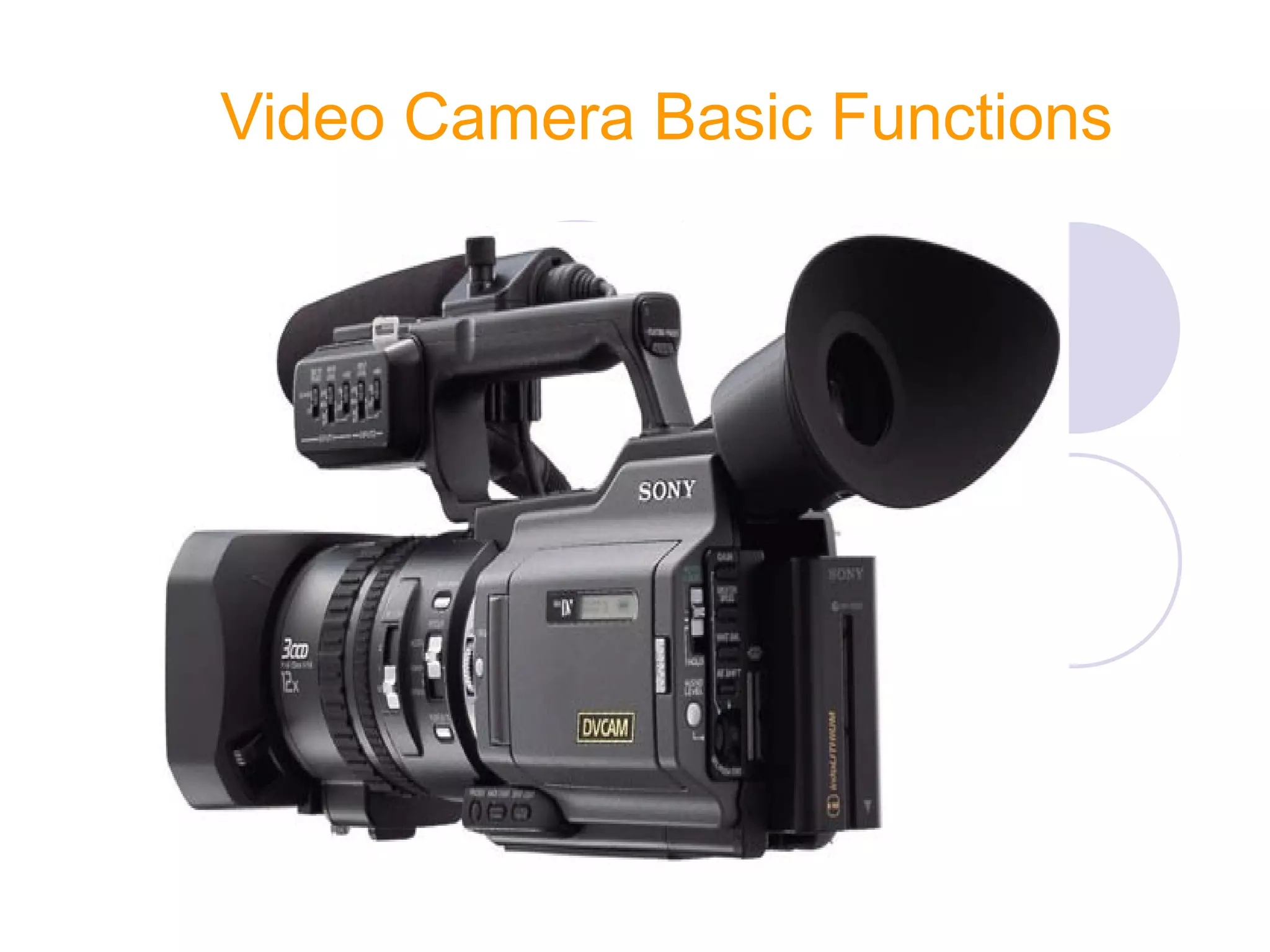
Video Camera Basic Functions
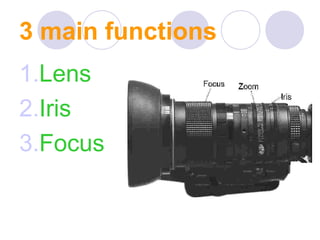
3 main functions
1.Lens
2.Iris
3.Focus
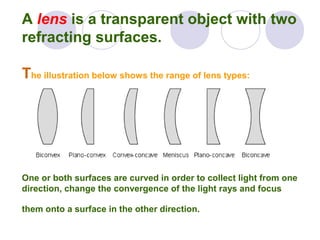
A lens is a transparent object with two
refracting surfaces.
The illustration below shows the range of lens types:
One or both surfaces are curved in order to collect light from one
direction, change the convergence of the light rays and focus
them onto a surface in the other direction.
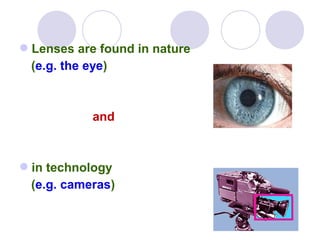
Lenses are found in nature
(e.g. the eye)
and
in technology
(e.g. cameras)
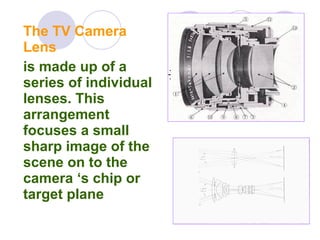
The TV Camera
Lens
is made up of a
series of individual
lenses. This
arrangement
focuses a small
sharp image of the
scene on to the
camera ‘s chip or
target plane
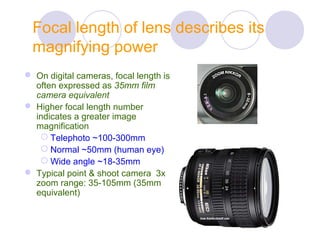
Focal length of lens describes its
magnifying power
 On digital cameras, focal length is
often expressed as 35mm film
camera equivalent
 Higher focal length number
indicates a greater image
magnification
 Telephoto ~100-300mm
 Normal ~50mm (human eye)
 Wide angle ~18-35mm
 Typical point & shoot camera 3x
zoom range: 35-105mm (35mm
equivalent)
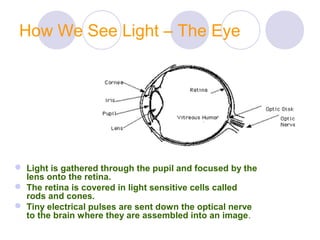
How We See Light – The Eye
 Light is gathered through the pupil and focused by the
lens onto the retina.
 The retina is covered in light sensitive cells called
rods and cones.
 Tiny electrical pulses are sent down the optical nerve
to the brain where they are assembled into an image.
How The Eye Deals Detects Light
95% of the retina is made of rods,
sensitive to luminance
(brightness/intensity/black or white info)
and work at low light levels only.
5% of the retina is made of cones that are
sensitive to chrominance (colour) and
work in only good light levels.
This is why in darkness we see black and
white and edges.
The Eye
There three cones are all sensitive to a different
wavelengths of light.
We have cones sensitive to red, green and blue light.
We are most sensitive to green, less to red and even
less to blue.
We actually see 60% green, 29% red and 11% blue
All video devices work on the same principles as the eye
and because we are least sensitive to colour. This is
where the most compression is used. This is explained
more further on in this presentation.
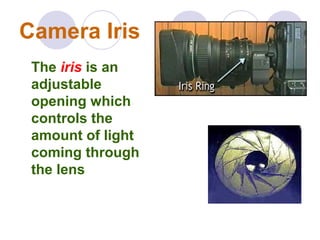
Camera Iris
The iris is an
adjustable
opening which
controls the
amount of light
coming through
the lens
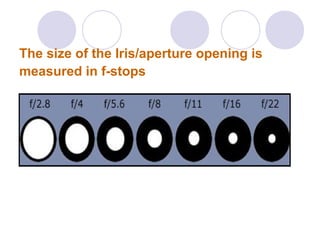
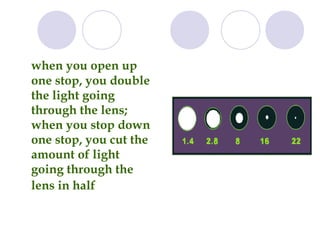
The size of the Iris/aperture opening is
measured in f-stops
when you open up
one stop, you double
the light going
through the lens;
when you stop down
one stop, you cut the
amount of light
going through the
lens in half
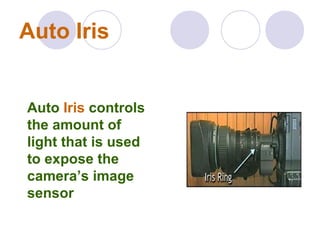
Auto Iris
Auto Iris controls
the amount of
light that is used
to expose the
camera’s image
sensor
The camera has a built in light meter
that evaluates the total amount of light
reflected from the subject. It then
averages this light and sets the correct
exposure.
Focus
To see the image
/Scene clearly is
called a proper focus
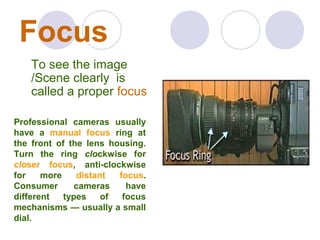
Professional cameras usually
have a manual focus ring at
the front of the lens housing.
Turn the ring clockwise for
closer focus, anti-clockwise
for more distant focus.
Consumer cameras have
different types of focus
mechanisms — usually a small
dial.
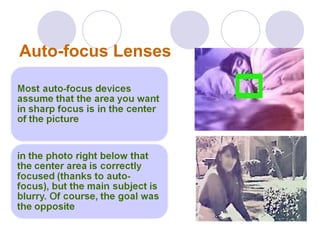
Auto-focus Lenses
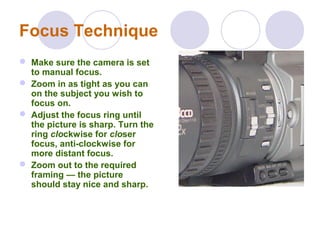
Focus Technique
 Make sure the camera is set
to manual focus.
 Zoom in as tight as you can
on the subject you wish to
focus on.
 Adjust the focus ring until
the picture is sharp. Turn the
ring clockwise for closer
focus, anti-clockwise for
more distant focus.
 Zoom out to the required
framing — the picture
should stay nice and sharp.
Camera White Balance
White balance adjustment In the light
of a particular color temperature, to
adjust the white levels of the R, G, and
B channels of a color video camera
so that any white object shot in that
light is reproduced as a truly white
image.
How White Balance Works
 All digital cameras have an auto white balance setting that allows the
camera to detect the color of the light and balance it correctly.
 When you look at a white object, it appears white to you regardless of
the light source. When lit by an ordinary household bulb, or a
fluorescent light, or outside in daylight it still looks white to your eye.
 But to the camera’s eye, each of these light sources is different and
each produces a tint of color on the white object. And unless the
camera makes some sort of adjustment for this variation in light color,
a white object will not appear white in your photos.
 In fact, everything in your photo will have a color cast to it… it is just
more obvious in the whites and near whites than in other colors. This
is the function of the white balance feature in digital cameras.
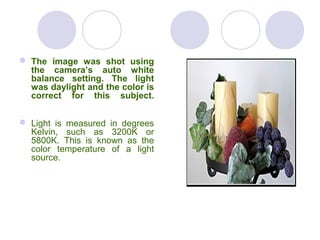
 The image was shot using
the camera’s auto white
balance setting. The light
was daylight and the color is
correct for this subject.
 Light is measured in degrees
Kelvin, such as 3200K or
5800K. This is known as the
color temperature of a light
source.
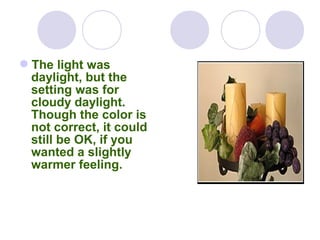
The light was
daylight, but the
setting was for
cloudy daylight.
Though the color is
not correct, it could
still be OK, if you
wanted a slightly
warmer feeling.
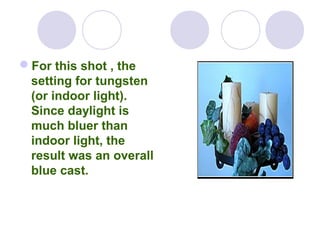
For this shot , the
setting for tungsten
(or indoor light).
Since daylight is
much bluer than
indoor light, the
result was an overall
blue cast.
Shot Types
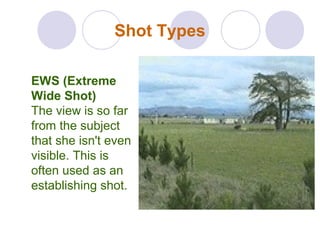
EWS (Extreme
Wide Shot)
The view is so far
from the subject
that she isn't even
visible. This is
often used as an
establishing shot.
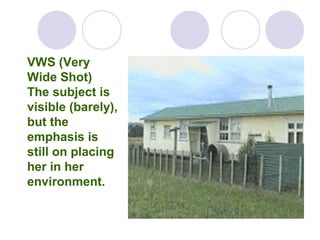
VWS (Very
Wide Shot)
The subject is
visible (barely),
but the
emphasis is
still on placing
her in her
environment.
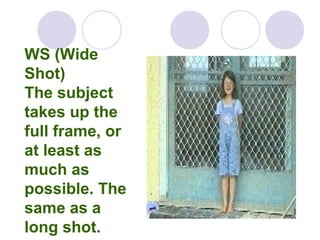
WS (Wide
Shot)
The subject
takes up the
full frame, or
at least as
much as
possible. The
same as a
long shot.
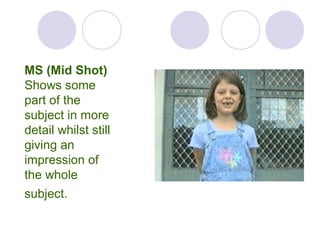
MS (Mid Shot)
Shows some
part of the
subject in more
detail whilst still
giving an
impression of
the whole
subject.
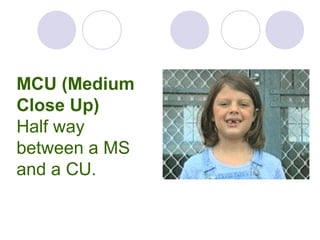
MCU (Medium
Close Up)
Half way
between a MS
and a CU.
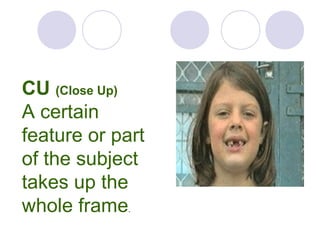
CU (Close Up)
A certain
feature or part
of the subject
takes up the
whole frame.
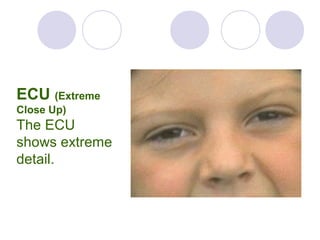
ECU (Extreme
Close Up)
The ECU
shows extreme
detail.
Aspect Ratio
The term Aspect Ratio refers to the width
of a picture (or screen) in relation to its
height.
Ratios are expressed in the form
"width x height".
Most Common Aspect Ratio
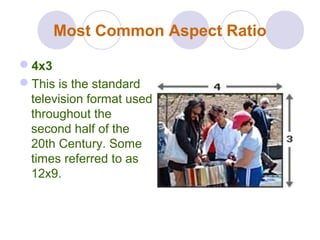
4x3
This is the standard
television format used
throughout the
second half of the
20th Century. Some
times referred to as
12x9.
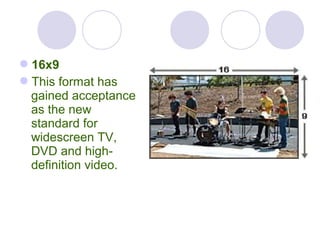
16x9
This format has
gained acceptance
as the new
standard for
widescreen TV,
DVD and high-
definition video.
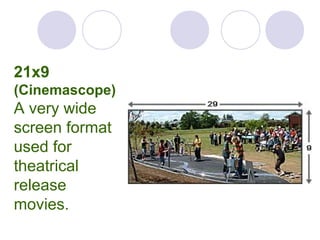
21x9
(Cinemascope)
A very wide
screen format
used for
theatrical
release
movies.
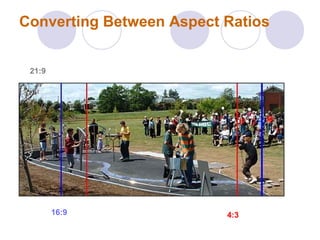
Converting Between Aspect Ratios
16:9 4:3
21:921:9

Video camera basic functions... shot types ..aspect ratio

  • 1.
  • 2.
  • 3.
    A lens isa transparent object with two refracting surfaces. The illustration below shows the range of lens types: One or both surfaces are curved in order to collect light from one direction, change the convergence of the light rays and focus them onto a surface in the other direction.
  • 4.
    Lenses are foundin nature (e.g. the eye) and in technology (e.g. cameras)
  • 5.
    The TV Camera Lens ismade up of a series of individual lenses. This arrangement focuses a small sharp image of the scene on to the camera ‘s chip or target plane
  • 6.
    Focal length oflens describes its magnifying power  On digital cameras, focal length is often expressed as 35mm film camera equivalent  Higher focal length number indicates a greater image magnification  Telephoto ~100-300mm  Normal ~50mm (human eye)  Wide angle ~18-35mm  Typical point & shoot camera 3x zoom range: 35-105mm (35mm equivalent)
  • 7.
    How We SeeLight – The Eye  Light is gathered through the pupil and focused by the lens onto the retina.  The retina is covered in light sensitive cells called rods and cones.  Tiny electrical pulses are sent down the optical nerve to the brain where they are assembled into an image.
  • 8.
    How The EyeDeals Detects Light 95% of the retina is made of rods, sensitive to luminance (brightness/intensity/black or white info) and work at low light levels only. 5% of the retina is made of cones that are sensitive to chrominance (colour) and work in only good light levels. This is why in darkness we see black and white and edges.
  • 9.
    The Eye There threecones are all sensitive to a different wavelengths of light. We have cones sensitive to red, green and blue light. We are most sensitive to green, less to red and even less to blue. We actually see 60% green, 29% red and 11% blue All video devices work on the same principles as the eye and because we are least sensitive to colour. This is where the most compression is used. This is explained more further on in this presentation.
  • 10.
    Camera Iris The irisis an adjustable opening which controls the amount of light coming through the lens
  • 11.
    The size ofthe Iris/aperture opening is measured in f-stops
  • 12.
    when you openup one stop, you double the light going through the lens; when you stop down one stop, you cut the amount of light going through the lens in half
  • 13.
    Auto Iris Auto Iriscontrols the amount of light that is used to expose the camera’s image sensor
  • 14.
    The camera hasa built in light meter that evaluates the total amount of light reflected from the subject. It then averages this light and sets the correct exposure.
  • 15.
    Focus To see theimage /Scene clearly is called a proper focus Professional cameras usually have a manual focus ring at the front of the lens housing. Turn the ring clockwise for closer focus, anti-clockwise for more distant focus. Consumer cameras have different types of focus mechanisms — usually a small dial.
  • 16.
  • 17.
    Focus Technique  Makesure the camera is set to manual focus.  Zoom in as tight as you can on the subject you wish to focus on.  Adjust the focus ring until the picture is sharp. Turn the ring clockwise for closer focus, anti-clockwise for more distant focus.  Zoom out to the required framing — the picture should stay nice and sharp.
  • 18.
    Camera White Balance Whitebalance adjustment In the light of a particular color temperature, to adjust the white levels of the R, G, and B channels of a color video camera so that any white object shot in that light is reproduced as a truly white image.
  • 19.
    How White BalanceWorks  All digital cameras have an auto white balance setting that allows the camera to detect the color of the light and balance it correctly.  When you look at a white object, it appears white to you regardless of the light source. When lit by an ordinary household bulb, or a fluorescent light, or outside in daylight it still looks white to your eye.  But to the camera’s eye, each of these light sources is different and each produces a tint of color on the white object. And unless the camera makes some sort of adjustment for this variation in light color, a white object will not appear white in your photos.  In fact, everything in your photo will have a color cast to it… it is just more obvious in the whites and near whites than in other colors. This is the function of the white balance feature in digital cameras.
  • 20.
     The imagewas shot using the camera’s auto white balance setting. The light was daylight and the color is correct for this subject.  Light is measured in degrees Kelvin, such as 3200K or 5800K. This is known as the color temperature of a light source.
  • 21.
    The light was daylight,but the setting was for cloudy daylight. Though the color is not correct, it could still be OK, if you wanted a slightly warmer feeling.
  • 22.
    For this shot, the setting for tungsten (or indoor light). Since daylight is much bluer than indoor light, the result was an overall blue cast.
  • 23.
    Shot Types EWS (Extreme WideShot) The view is so far from the subject that she isn't even visible. This is often used as an establishing shot.
  • 24.
    VWS (Very Wide Shot) Thesubject is visible (barely), but the emphasis is still on placing her in her environment.
  • 25.
    WS (Wide Shot) The subject takesup the full frame, or at least as much as possible. The same as a long shot.
  • 26.
    MS (Mid Shot) Showssome part of the subject in more detail whilst still giving an impression of the whole subject.
  • 27.
    MCU (Medium Close Up) Halfway between a MS and a CU.
  • 28.
    CU (Close Up) Acertain feature or part of the subject takes up the whole frame.
  • 29.
    ECU (Extreme Close Up) TheECU shows extreme detail.
  • 30.
    Aspect Ratio The termAspect Ratio refers to the width of a picture (or screen) in relation to its height. Ratios are expressed in the form "width x height".
  • 31.
    Most Common AspectRatio 4x3 This is the standard television format used throughout the second half of the 20th Century. Some times referred to as 12x9.
  • 32.
    16x9 This format has gainedacceptance as the new standard for widescreen TV, DVD and high- definition video.
  • 33.
    21x9 (Cinemascope) A very wide screenformat used for theatrical release movies.
  • 34.
    Converting Between AspectRatios 16:9 4:3 21:921:9