

Computer Components
Computer Components

   Hardware
   Software
   Database systems
   Emerging technologies
Hardware
Hardware

 Any machinery that assists in the input,
  processing, storage, and output activities of
  an information system
 When making hardware decisions, businesses
  must consider how the hardware can support
   Objectives of the information system
   Goals of the organization
Computer Hardware

   Processor
   Memory
   Secondary storage
   Input/Output device
   Networking
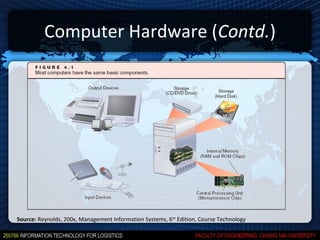
Computer Hardware (Contd.)


Source: Reynolds, 200x, Management Information Systems, 6th Edition, Course Technology
Moore’s Law

 Transistor densities on a single chip double
  every two years
   In 2009, the size of transistor is 11 nm.; A single
    chip contains 4 billion transistors
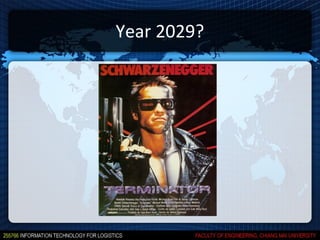
   In 2029, the size of transistor would likely to be 1
    nm; A single chip would contain 4,096 transistors
Year 2029?
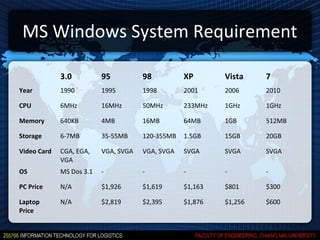
MS Windows System Requirement

             3.0          95          98          XP       Vista    7
Year         1990         1995        1998        2001     2006     2010

CPU          6MHz         16MHz       50MHz       233MHz   1GHz     1GHz

Memory       640KB        4MB         16MB        64MB     1GB      512MB

Storage      6-7MB        35-55MB     120-355MB   1.5GB    15GB     20GB

Video Card   CGA, EGA,    VGA, SVGA   VGA, SVGA   SVGA     SVGA     SVGA
             VGA
OS           MS Dos 3.1   -           -           -        -        -

PC Price     N/A          $1,926      $1,619      $1,163   $801     $300

Laptop       N/A          $2,819      $2,395      $1,876   $1,256   $600
Price
Processor

 Also called Central Processing Unit (CPU)
 An electronic circuit that can execute
  computer programs
 Often measured in:
   Megahertz (MHz): millions of cycles per second
   Gigahertz (GHz): billions of cycles per second
Memory

 Main memory
   Located physically close to the CPU, but not on
    the CPU chip itself
   Rapidly provides data and instructions to the CPU
 Storage Capacity
   Eight bits together form a byte (B)
Memory (Contd.)

 Random access memory (RAM)
   Temporary and volatile
 Types of RAM
   Dynamic RAM (DRAM)
      Double Data Rate Synchronous Dynamic RAM (DDR
       SDRAM)
   Static RAM (SRAM)
Memory (Contd.)

 Read-only memory (ROM)
   Nonvolatile
   Provides permanent storage for data and
    instructions that do not change
   Store Basic Input/Output System (BIOS)
 Cache memory
   High-speed memory that a processor can access
    more rapidly than main memory
Secondary Storage

 Compared with memory, offers the
  advantages of nonvolatility, greater capacity,
  and greater economy
 On a cost-per-megabyte basis
   Most forms of secondary storage are considerably
    less expensive than primary memory
 Storage media that allow faster access
   Generally more expensive than slower media
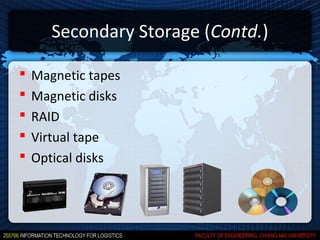
Secondary Storage (Contd.)

   Magnetic tapes
   Magnetic disks
   RAID
   Virtual tape
   Optical disks
Secondary Storage (Contd.)

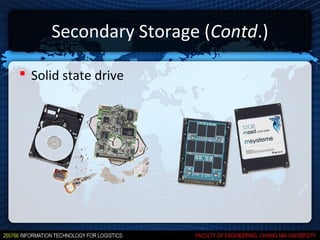
 Solid state drive
Secondary Storage (Contd.)

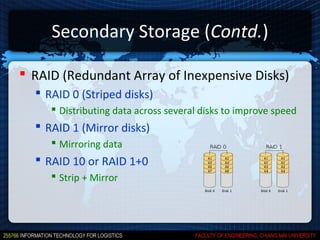
 RAID (Redundant Array of Inexpensive Disks)
   RAID 0 (Striped disks)
      Distributing data across several disks to improve speed
   RAID 1 (Mirror disks)
      Mirroring data
   RAID 10 or RAID 1+0
      Strip + Mirror
Secondary Storage (Contd.)

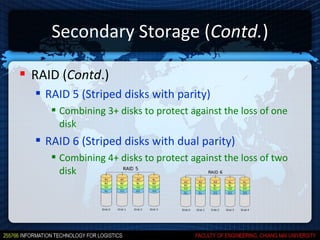
 RAID (Contd.)
   RAID 5 (Striped disks with parity)
      Combining 3+ disks to protect against the loss of one
       disk
   RAID 6 (Striped disks with dual parity)
      Combining 4+ disks to protect against the loss of two
       disk
Secondary Storage (Contd.)

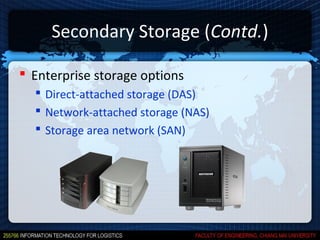
 Enterprise storage options
   Direct-attached storage (DAS)
   Network-attached storage (NAS)
   Storage area network (SAN)
Secondary Storage (Contd.)
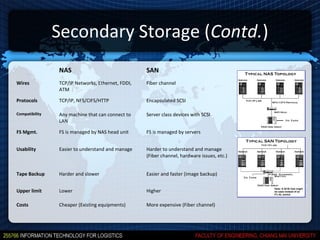
                NAS                                SAN
Wires           TCP/IP Networks, Ethernet, FDDI,   Fiber channel
                ATM

Protocols       TCP/IP, NFS/CIFS/HTTP              Encapsulated SCSI

Compatibility   Any machine that can connect to    Server class devices with SCSI
                LAN

FS Mgmt.        FS is managed by NAS head unit     FS is managed by servers


Usability       Easier to understand and manage    Harder to understand and manage
                                                   (Fiber channel, hardware issues, etc.)


Tape Backup     Harder and slower                  Easier and faster (image backup)


Upper limit     Lower                              Higher

Costs           Cheaper (Existing equipments)      More expensive (Fiber channel)
Input Devices

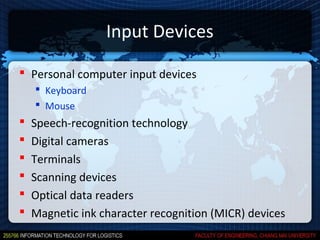
 Personal computer input devices
     Keyboard
     Mouse
   Speech-recognition technology
   Digital cameras
   Terminals
   Scanning devices
   Optical data readers
   Magnetic ink character recognition (MICR) devices
Input Devices (Contd.)
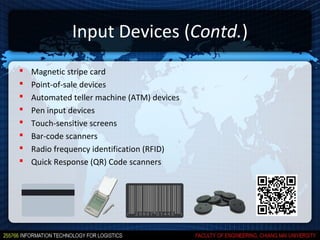
   Magnetic stripe card
   Point-of-sale devices
   Automated teller machine (ATM) devices
   Pen input devices
   Touch-sensitive screens
   Bar-code scanners
   Radio frequency identification (RFID)
   Quick Response (QR) Code scanners
Output Devices

   Display monitors
   Plasma displays
   Liquid crystal displays (LCDs)
   Organic light-emitting diodes
   Printers and plotters
   Digital audio player
Quick Assignment #1
Quick Assignment #1

 15 minutes
 Form two groups of 4-5 people
 Quote for cost of a laptop (hardware only)
  which can run SAP Business ByDesign client
  efficiently
 Strive for the lowest cost!
SAP System Requirements

 Source:
   http://www.sap.com/solutions/technology/cloud/business-by-design/imple

 Recommended System
   CPU: Intel Core 2 Duo (2.4 GHz)
   Memory: 2 GB
Sample System

 ACER Aspire 4752G-52454G75Mncc
       CPU: Intel Core i5-2450M (2.50 GHz)
       Memory: 4GB DDR3
       HDD: 750 GB
       Monitor: 14”
       Price: 21,900 THB


Source: http://www.chichang.com
Software
Types of Software

 System software
 Application software
Types of Software (Contd.)

 System software
   Controls operations of computer hardware
   Supports application programs’ problem-solving
    capabilities
   Examples
      Operating systems
      Utility programs
      Middleware
Types of Software (Contd.)

 Application software
    Interact with systems software
    Help performing common tasks, such as:
       Creating and formatting text documents
       Performing calculations
       Managing information
    Examples
         Word processing & spreadsheet
         Database
         Email
         Etc
System Software: Operating Systems

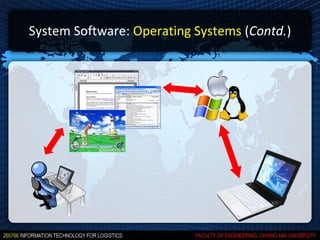
 Set of programs that controls computer hardware
  and acts as an interface with application programs
 Tasks performed by OS
      Common computer hardware functions
      User interface and input/output management
      Task processing and management
      System memory and resource management
      File management
      Networking
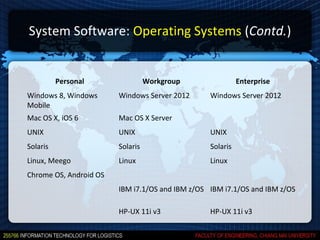
System Software: Operating Systems (Contd.)


          Personal                Workgroup                Enterprise
Windows 8, Windows      Windows Server 2012      Windows Server 2012
Mobile
Mac OS X, iOS 6         Mac OS X Server
UNIX                    UNIX                     UNIX
Solaris                 Solaris                  Solaris
Linux, Meego            Linux                    Linux
Chrome OS, Android OS
                        IBM i7.1/OS and IBM z/OS IBM i7.1/OS and IBM z/OS

                        HP-UX 11i v3             HP-UX 11i v3
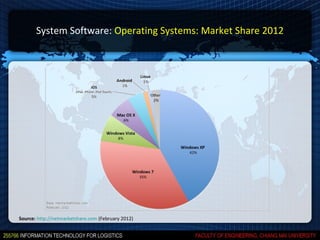
System Software: Operating Systems: Market Share 2012


Source: http://netmarketshare.com (February 2012)
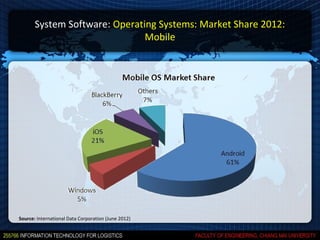
System Software: Operating Systems: Market Share 2012:
                               Mobile


Source: International Data Corporation (June 2012)
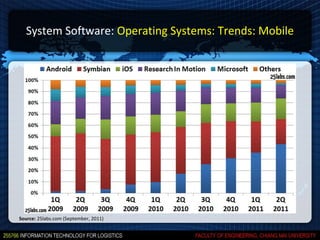
System Software: Operating Systems: Trends: Mobile


Source: 25labs.com (September, 2011)
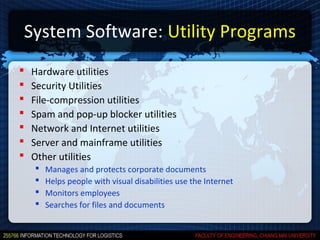
System Software: Utility Programs
   Hardware utilities
   Security Utilities
   File-compression utilities
   Spam and pop-up blocker utilities
   Network and Internet utilities
   Server and mainframe utilities
   Other utilities
       Manages and protects corporate documents
       Helps people with visual disabilities use the Internet
       Monitors employees
       Searches for files and documents
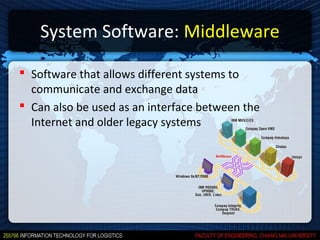
System Software: Middleware

 Software that allows different systems to
  communicate and exchange data
 Can also be used as an interface between the
  Internet and older legacy systems
Application Software

 Mode of application software
   Proprietary software
   Off-the-shelf software
Application Software: Modes

 Proprietary software
   One-of-a-kind program for a specific application,
    usually developed and owned by a single company
 Off-the-shelf software
   Generally software, that are ready-made and
    available for sale, lease, or license to the general
    public
Application Software: Types

 Types of application software
   Personal application software
   Workgroup application software
   Enterprise application software
Application Software: Personal

 Personal Application Software
      Word processing
      Spreadsheet analysis
      Presentation software
      Database applications
      Graphics program
      Personal information managers
      Software suites and integrated software packages
      Other personal application software
Application Software: Workgroup
 Workgroup Application Software
    Support teamwork, whether people are in the same location or
     dispersed around the world
    Groupware
        Software that helps groups of people work together more efficiently and
         effectively
    Example
          Online chat
          Instant messaging
          Telephony
          Videoconferencing
          Application sharing
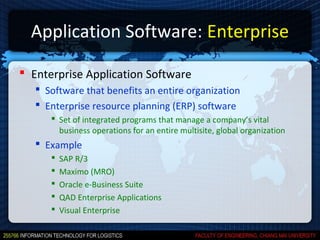
Application Software: Enterprise

 Enterprise Application Software
    Software that benefits an entire organization
    Enterprise resource planning (ERP) software
       Set of integrated programs that manage a company’s vital
        business operations for an entire multisite, global organization
    Example
         SAP R/3
         Maximo (MRO)
         Oracle e-Business Suite
         QAD Enterprise Applications
         Visual Enterprise
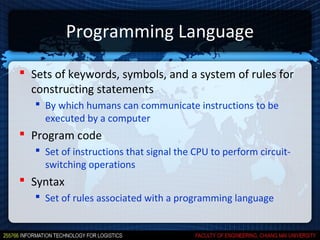
Programming Language

 Sets of keywords, symbols, and a system of rules for
  constructing statements
    By which humans can communicate instructions to be
     executed by a computer
 Program code
    Set of instructions that signal the CPU to perform circuit-
     switching operations
 Syntax
    Set of rules associated with a programming language
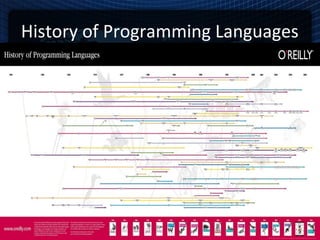
History of Programming Languages
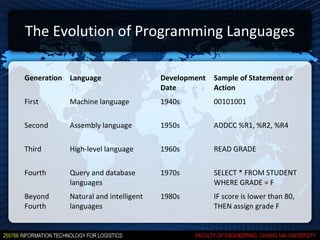
The Evolution of Programming Languages

Generation Language                  Development   Sample of Statement or
                                     Date          Action
First      Machine language          1940s         00101001

Second     Assembly language         1950s         ADDCC %R1, %R2, %R4

Third      High-level language       1960s         READ GRADE

Fourth     Query and database        1970s         SELECT * FROM STUDENT
           languages                               WHERE GRADE = F
Beyond     Natural and intelligent   1980s         IF score is lower than 80,
Fourth     languages                               THEN assign grade F
Copyrights and Licenses

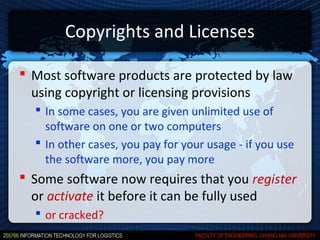
 Most software products are protected by law
  using copyright or licensing provisions
   In some cases, you are given unlimited use of
    software on one or two computers
   In other cases, you pay for your usage - if you use
    the software more, you pay more
 Some software now requires that you register
  or activate it before it can be fully used
   or cracked?
Open-Source Software

 Software freely available to anyone in a form
  that can be easily modified
 More reliable and secure than commercial
  software
 Can contain hidden costs, particularly for user
  support or solving problems with the software
Open-Source Licenses

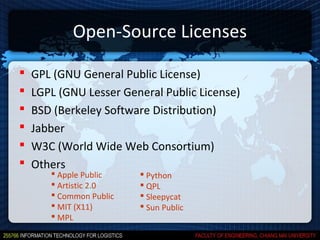
   GPL (GNU General Public License)
   LGPL (GNU Lesser General Public License)
   BSD (Berkeley Software Distribution)
   Jabber
   W3C (World Wide Web Consortium)
   Others
        Apple Public     Python
        Artistic 2.0     QPL
        Common Public    Sleepycat
        MIT (X11)        Sun Public
        MPL
Open-Source Licenses (Contd.)
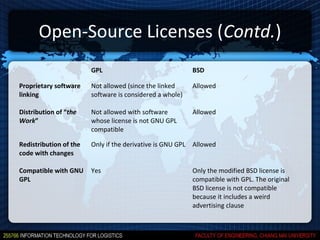
                        GPL                                 BSD

Proprietary software    Not allowed (since the linked       Allowed
linking                 software is considered a whole)

Distribution of “the    Not allowed with software           Allowed
Work”                   whose license is not GNU GPL
                        compatible

Redistribution of the   Only if the derivative is GNU GPL   Allowed
code with changes

Compatible with GNU     Yes                                 Only the modified BSD license is
GPL                                                         compatible with GPL. The original
                                                            BSD license is not compatible
                                                            because it includes a weird
                                                            advertising clause
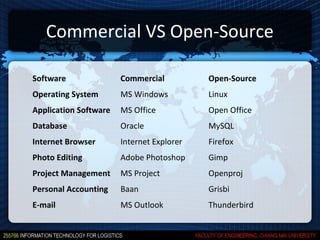
Commercial VS Open-Source

Software               Commercial          Open-Source
Operating System       MS Windows          Linux
Application Software   MS Office           Open Office
Database               Oracle              MySQL
Internet Browser       Internet Explorer   Firefox
Photo Editing          Adobe Photoshop     Gimp
Project Management     MS Project          Openproj
Personal Accounting    Baan                Grisbi
E-mail                 MS Outlook          Thunderbird
Database Systems
Database Management

 Without data and the ability to process it an
  organization could not successfully complete
  most business activities
 For data to be transformed into useful
  information, it must first be organized in a
  meaningful way
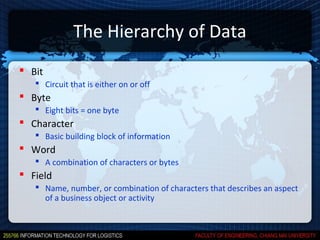
The Hierarchy of Data
 Bit
    Circuit that is either on or off
 Byte
    Eight bits = one byte
 Character
    Basic building block of information
 Word
    A combination of characters or bytes
 Field
    Name, number, or combination of characters that describes an aspect
     of a business object or activity
The Hierarchy of Data (Contd.)

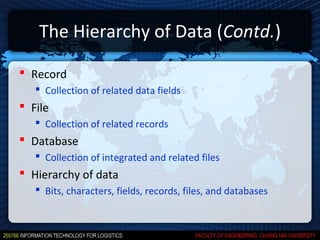
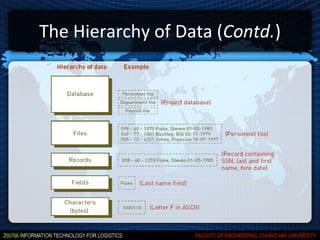
 Record
    Collection of related data fields
 File
    Collection of related records
 Database
    Collection of integrated and related files
 Hierarchy of data
    Bits, characters, fields, records, files, and databases
The Hierarchy of Data (Contd.)
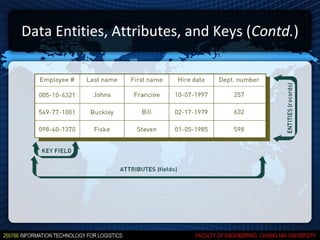
Data Entities, Attributes, and Keys (Contd.)
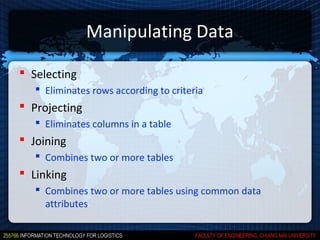
Manipulating Data

 Selecting
    Eliminates rows according to criteria
 Projecting
    Eliminates columns in a table
 Joining
    Combines two or more tables
 Linking
    Combines two or more tables using common data
     attributes
Database Management Systems (DBMS)

 Group of programs used as an interface
  between a database and application programs
  or a database and the user
 Used to manage all kinds of data for all kinds
  of purposes
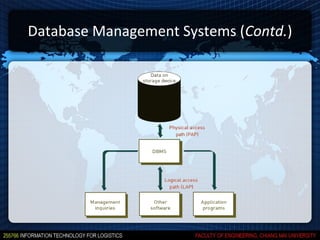
Database Management Systems (Contd.)
Selecting a Database Management System

 Important characteristics of databases:
     Database size
     Database cost
     Concurrent users
     Performance
     Integration
     Vendor
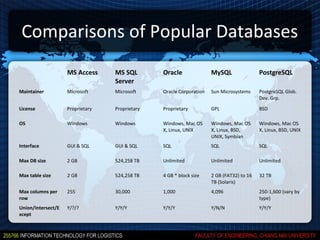
Comparisons of Popular Databases
                    MS Access     MS SQL        Oracle               MySQL                PostgreSQL
                                  Server
Maintainer          Microsoft     Microsoft     Oracle Corporation   Sun Microsystems     PostgreSQL Glob.
                                                                                          Dev. Grp.

License             Proprietary   Proprietary   Proprietary          GPL                  BSD

OS                  Windows       Windows       Windows, Mac OS      Windows, Mac OS      Windows, Mac OS
                                                X, Linux, UNIX       X, Linux, BSD,       X, Linux, BSD, UNIX
                                                                     UNIX, Symbian
Interface           GUI & SQL     GUI & SQL     SQL                  SQL                  SQL

Max DB size         2 GB          524,258 TB    Unlimited            Unlimited            Unlimited

Max table size      2 GB          524,258 TB    4 GB * block size    2 GB (FAT32) to 16   32 TB
                                                                     TB (Solaris)
Max columns per     255           30,000        1,000                4,096                250-1,600 (vary by
row                                                                                       type)
Union/Intersect/E   Y/?/?         Y/Y/Y         Y/Y/Y                Y/N/N                Y/Y/Y
xcept
Telecommunication and Networking
Telecommunications in Business

 Better business communication
    e-mail, voice mail, instant messaging, faxing, file transfer,
     mobile telephony, and teleconferencing
 Greater efficiency
    Information delivery is immediate and not constrained by
     geographical distance
 Better distribution of data
    Central storage with both local and remote access
 Yet, security in telecommunications is a challenge
Telecommunications in Daily Use

   Cellular phones
   Videoconferencing
   Wireless payments and warehousing
   Peer-to-peer file sharing
   Web-empowered commerce
Telecommunications Channel Characteristics


 Simplex channel
   Transmits data in only one direction
 Half-duplex channel
   Transmits data in either direction, but not
    simultaneously
 Full-duplex channel
   Permits data transmission in both directions at the
    same time
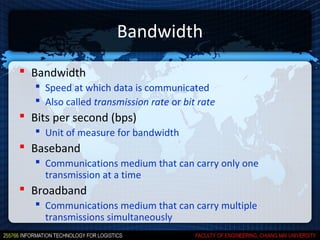
Bandwidth
 Bandwidth
    Speed at which data is communicated
    Also called transmission rate or bit rate
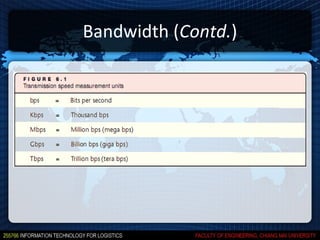
 Bits per second (bps)
    Unit of measure for bandwidth
 Baseband
    Communications medium that can carry only one
     transmission at a time
 Broadband
    Communications medium that can carry multiple
     transmissions simultaneously
Bandwidth (Contd.)
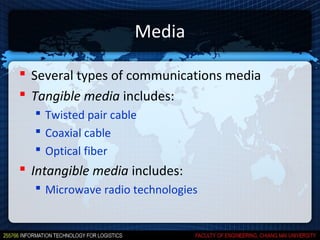
Media

 Several types of communications media
 Tangible media includes:
   Twisted pair cable
   Coaxial cable
   Optical fiber
 Intangible media includes:
   Microwave radio technologies
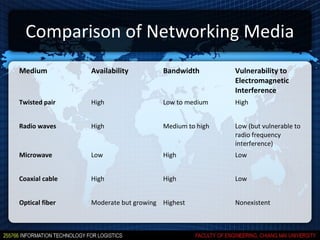
Comparison of Networking Media
Medium          Availability         Bandwidth        Vulnerability to
                                                      Electromagnetic
                                                      Interference
Twisted pair    High                 Low to medium    High


Radio waves     High                 Medium to high   Low (but vulnerable to
                                                      radio frequency
                                                      interference)
Microwave       Low                  High             Low


Coaxial cable   High                 High             Low


Optical fiber   Moderate but growing Highest          Nonexistent
Networking

 A combination of devices (or nodes)
  connected through a communication media
 Any compatible device that can transmit
  and receive on a network can be part of a
  network
Types of Networks

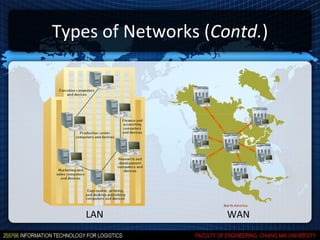
 Computer networks are classified by reach
  and complexity
 Basic types of networks
   LANs, MANs, and WANs
 Other types of networks
   WLANs
Types of Networks (Contd.)


    LAN              WAN
Networking Hardware

 Network interface card (NIC)
   Connects a device to a hub, switch, bridge, or
    router, which connects to a LAN or WAN
 Switch
   A hub that sends communications only to
    designated devices on the network
 Router
   Routes data packets to the next node on the path
    to the final destination
Networking Software

 Network operating system (NOS)
   Systems software that controls the computer
    systems and devices on a network
 Network management software
   Protects software from being copied, modified, or
    downloaded illegally
   Locate errors and potential network problems
TCP/IP

 Transmission Control Protocol/ Internet
  Protocol
   TCP ensures packets arrive accurately and in
    proper order
   IP ensures efficient delivery of packets from node
    to node
 DNS (Domain Name Service)
   Associates a character-based name with an IP
    address
TCP/IP (Contd.)

 IP number
    Unique numerical identification for a network device
 Static IP address
    A permanent address assigned to a device
 Dynamic IP address
    Temporary IP number assigned to a device for the
     duration of the connection
    Provides flexibility when the number of IP addresses is
     limited
TCP/IP (Contd.)

 IPv6
   Shorthand notation based on the Hex system
   Example of an IPv6 address in Hex shorthand
    notation:
      FDDC:AC10:8132:BA32:4F12:1070:DD13:6921
Wireless Protocols

 IEEE 802.11
   A family of wireless protocols known as Wi-Fi
    (Wireless Fidelity)
   Supports wireless communication within 100
    meters of router
   802.11 subtypes support various distances and
    speeds up to 248 Mbps
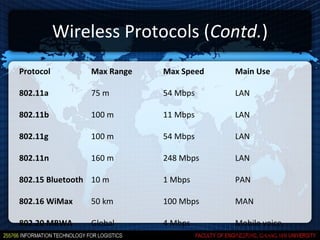
Wireless Protocols (Contd.)
Protocol        Max Range   Max Speed   Main Use

802.11a         75 m        54 Mbps     LAN

802.11b         100 m       11 Mbps     LAN

802.11g         100 m       54 Mbps     LAN

802.11n         160 m       248 Mbps    LAN

802.15 Bluetooth 10 m       1 Mbps      PAN

802.16 WiMax    50 km       100 Mbps    MAN

802.20 MBWA     Global      4 Mbps      Mobile voice,
                                        data, Internet
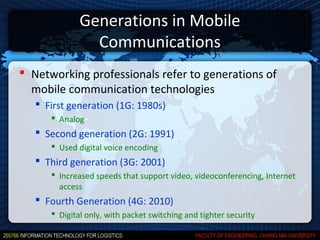
Generations in Mobile
                Communications
 Networking professionals refer to generations of
  mobile communication technologies
    First generation (1G: 1980s)
       Analog
    Second generation (2G: 1991)
       Used digital voice encoding
    Third generation (3G: 2001)
       Increased speeds that support video, videoconferencing, Internet
        access
    Fourth Generation (4G: 2010)
       Digital only, with packet switching and tighter security
Emerging Technologies
Parallel Computing

 Parallel computing
   Simultaneous execution of the same task on
    multiple processors to obtain results faster
 Massively parallel processing
   Systems with thousands of such processors
 Grid computing
   Use of a collection of computers to work in a
    coordinated manner to solve a common problem
Cloud Computing

 Uses giant cluster of computers, that serves as
  a host, to run applications that require high-
  performance computing
 Supports a wider variety of applications than
  grid computing
 Pools computing resources so they can be
  managed primarily by software rather than
  people
Green Computing
 The study and practice of using computing resources
  efficiently
 To account for the triple bottom line
 Triple bottom line
    People, Planet, Profit
    Social, Ecological, Economic success
 Processes
    Reduce the use of hazardous materials
    Maximize energy efficiency
    Promote recyclability or biodegradability of defunct
     products and factory waste
Server Consolidation

 An approach to the efficient usage of
  computer server resources in order to reduce
  the total number of servers or server locations
  that an organization requires
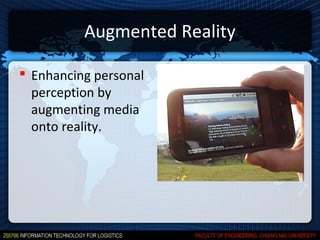
Augmented Reality

 Enhancing personal
  perception by
  augmenting media
  onto reality.
Quick Assignment #2
Quick Assignment #2

 15 minutes
 Form two groups of 4-5 people
 Quote for cost of an office computer with an
  ERP package
 Strive for the lowest cost!
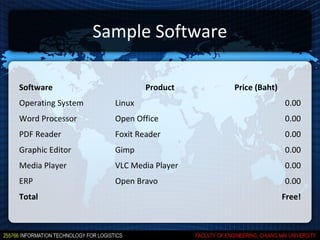
Sample Software

Software                     Product    Price (Baht)
Operating System     Linux                             0.00
Word Processor       Open Office                       0.00
PDF Reader           Foxit Reader                      0.00
Graphic Editor       Gimp                              0.00
Media Player         VLC Media Player                  0.00
ERP                  Open Bravo                        0.00
Total                                                  Free!
Capstone Exercise

02 computer components

  • 1.
  • 2.
    Computer Components  Hardware  Software  Database systems  Emerging technologies
  • 3.
  • 4.
    Hardware  Any machinerythat assists in the input, processing, storage, and output activities of an information system  When making hardware decisions, businesses must consider how the hardware can support  Objectives of the information system  Goals of the organization
  • 5.
    Computer Hardware  Processor  Memory  Secondary storage  Input/Output device  Networking
  • 6.
    Computer Hardware (Contd.) Source:Reynolds, 200x, Management Information Systems, 6th Edition, Course Technology
  • 7.
    Moore’s Law  Transistordensities on a single chip double every two years  In 2009, the size of transistor is 11 nm.; A single chip contains 4 billion transistors  In 2029, the size of transistor would likely to be 1 nm; A single chip would contain 4,096 transistors
  • 8.
  • 9.
    MS Windows SystemRequirement 3.0 95 98 XP Vista 7 Year 1990 1995 1998 2001 2006 2010 CPU 6MHz 16MHz 50MHz 233MHz 1GHz 1GHz Memory 640KB 4MB 16MB 64MB 1GB 512MB Storage 6-7MB 35-55MB 120-355MB 1.5GB 15GB 20GB Video Card CGA, EGA, VGA, SVGA VGA, SVGA SVGA SVGA SVGA VGA OS MS Dos 3.1 - - - - - PC Price N/A $1,926 $1,619 $1,163 $801 $300 Laptop N/A $2,819 $2,395 $1,876 $1,256 $600 Price
  • 10.
    Processor  Also calledCentral Processing Unit (CPU)  An electronic circuit that can execute computer programs  Often measured in:  Megahertz (MHz): millions of cycles per second  Gigahertz (GHz): billions of cycles per second
  • 11.
    Memory  Main memory  Located physically close to the CPU, but not on the CPU chip itself  Rapidly provides data and instructions to the CPU  Storage Capacity  Eight bits together form a byte (B)
  • 12.
    Memory (Contd.)  Randomaccess memory (RAM)  Temporary and volatile  Types of RAM  Dynamic RAM (DRAM)  Double Data Rate Synchronous Dynamic RAM (DDR SDRAM)  Static RAM (SRAM)
  • 13.
    Memory (Contd.)  Read-onlymemory (ROM)  Nonvolatile  Provides permanent storage for data and instructions that do not change  Store Basic Input/Output System (BIOS)  Cache memory  High-speed memory that a processor can access more rapidly than main memory
  • 14.
    Secondary Storage  Comparedwith memory, offers the advantages of nonvolatility, greater capacity, and greater economy  On a cost-per-megabyte basis  Most forms of secondary storage are considerably less expensive than primary memory  Storage media that allow faster access  Generally more expensive than slower media
  • 15.
    Secondary Storage (Contd.)  Magnetic tapes  Magnetic disks  RAID  Virtual tape  Optical disks
  • 16.
  • 17.
    Secondary Storage (Contd.) RAID (Redundant Array of Inexpensive Disks)  RAID 0 (Striped disks)  Distributing data across several disks to improve speed  RAID 1 (Mirror disks)  Mirroring data  RAID 10 or RAID 1+0  Strip + Mirror
  • 18.
    Secondary Storage (Contd.) RAID (Contd.)  RAID 5 (Striped disks with parity)  Combining 3+ disks to protect against the loss of one disk  RAID 6 (Striped disks with dual parity)  Combining 4+ disks to protect against the loss of two disk
  • 19.
    Secondary Storage (Contd.) Enterprise storage options  Direct-attached storage (DAS)  Network-attached storage (NAS)  Storage area network (SAN)
  • 20.
    Secondary Storage (Contd.) NAS SAN Wires TCP/IP Networks, Ethernet, FDDI, Fiber channel ATM Protocols TCP/IP, NFS/CIFS/HTTP Encapsulated SCSI Compatibility Any machine that can connect to Server class devices with SCSI LAN FS Mgmt. FS is managed by NAS head unit FS is managed by servers Usability Easier to understand and manage Harder to understand and manage (Fiber channel, hardware issues, etc.) Tape Backup Harder and slower Easier and faster (image backup) Upper limit Lower Higher Costs Cheaper (Existing equipments) More expensive (Fiber channel)
  • 21.
    Input Devices  Personalcomputer input devices  Keyboard  Mouse  Speech-recognition technology  Digital cameras  Terminals  Scanning devices  Optical data readers  Magnetic ink character recognition (MICR) devices
  • 22.
    Input Devices (Contd.)  Magnetic stripe card  Point-of-sale devices  Automated teller machine (ATM) devices  Pen input devices  Touch-sensitive screens  Bar-code scanners  Radio frequency identification (RFID)  Quick Response (QR) Code scanners
  • 23.
    Output Devices  Display monitors  Plasma displays  Liquid crystal displays (LCDs)  Organic light-emitting diodes  Printers and plotters  Digital audio player
  • 24.
  • 25.
    Quick Assignment #1 15 minutes  Form two groups of 4-5 people  Quote for cost of a laptop (hardware only) which can run SAP Business ByDesign client efficiently  Strive for the lowest cost!
  • 26.
    SAP System Requirements Source:  http://www.sap.com/solutions/technology/cloud/business-by-design/imple  Recommended System  CPU: Intel Core 2 Duo (2.4 GHz)  Memory: 2 GB
  • 27.
    Sample System  ACERAspire 4752G-52454G75Mncc  CPU: Intel Core i5-2450M (2.50 GHz)  Memory: 4GB DDR3  HDD: 750 GB  Monitor: 14”  Price: 21,900 THB Source: http://www.chichang.com
  • 28.
  • 29.
    Types of Software System software  Application software
  • 30.
    Types of Software(Contd.)  System software  Controls operations of computer hardware  Supports application programs’ problem-solving capabilities  Examples  Operating systems  Utility programs  Middleware
  • 31.
    Types of Software(Contd.)  Application software  Interact with systems software  Help performing common tasks, such as:  Creating and formatting text documents  Performing calculations  Managing information  Examples  Word processing & spreadsheet  Database  Email  Etc
  • 32.
    System Software: OperatingSystems  Set of programs that controls computer hardware and acts as an interface with application programs  Tasks performed by OS  Common computer hardware functions  User interface and input/output management  Task processing and management  System memory and resource management  File management  Networking
  • 33.
  • 34.
    System Software: OperatingSystems (Contd.) Personal Workgroup Enterprise Windows 8, Windows Windows Server 2012 Windows Server 2012 Mobile Mac OS X, iOS 6 Mac OS X Server UNIX UNIX UNIX Solaris Solaris Solaris Linux, Meego Linux Linux Chrome OS, Android OS IBM i7.1/OS and IBM z/OS IBM i7.1/OS and IBM z/OS HP-UX 11i v3 HP-UX 11i v3
  • 35.
    System Software: OperatingSystems: Market Share 2012 Source: http://netmarketshare.com (February 2012)
  • 36.
    System Software: OperatingSystems: Market Share 2012: Mobile Source: International Data Corporation (June 2012)
  • 37.
    System Software: OperatingSystems: Trends: Mobile Source: 25labs.com (September, 2011)
  • 38.
    System Software: UtilityPrograms  Hardware utilities  Security Utilities  File-compression utilities  Spam and pop-up blocker utilities  Network and Internet utilities  Server and mainframe utilities  Other utilities  Manages and protects corporate documents  Helps people with visual disabilities use the Internet  Monitors employees  Searches for files and documents
  • 39.
    System Software: Middleware Software that allows different systems to communicate and exchange data  Can also be used as an interface between the Internet and older legacy systems
  • 40.
    Application Software  Modeof application software  Proprietary software  Off-the-shelf software
  • 41.
    Application Software: Modes Proprietary software  One-of-a-kind program for a specific application, usually developed and owned by a single company  Off-the-shelf software  Generally software, that are ready-made and available for sale, lease, or license to the general public
  • 42.
    Application Software: Types Types of application software  Personal application software  Workgroup application software  Enterprise application software
  • 43.
    Application Software: Personal Personal Application Software  Word processing  Spreadsheet analysis  Presentation software  Database applications  Graphics program  Personal information managers  Software suites and integrated software packages  Other personal application software
  • 44.
    Application Software: Workgroup Workgroup Application Software  Support teamwork, whether people are in the same location or dispersed around the world  Groupware  Software that helps groups of people work together more efficiently and effectively  Example  Online chat  Instant messaging  Telephony  Videoconferencing  Application sharing
  • 45.
    Application Software: Enterprise Enterprise Application Software  Software that benefits an entire organization  Enterprise resource planning (ERP) software  Set of integrated programs that manage a company’s vital business operations for an entire multisite, global organization  Example  SAP R/3  Maximo (MRO)  Oracle e-Business Suite  QAD Enterprise Applications  Visual Enterprise
  • 46.
    Programming Language  Setsof keywords, symbols, and a system of rules for constructing statements  By which humans can communicate instructions to be executed by a computer  Program code  Set of instructions that signal the CPU to perform circuit- switching operations  Syntax  Set of rules associated with a programming language
  • 47.
  • 48.
    The Evolution ofProgramming Languages Generation Language Development Sample of Statement or Date Action First Machine language 1940s 00101001 Second Assembly language 1950s ADDCC %R1, %R2, %R4 Third High-level language 1960s READ GRADE Fourth Query and database 1970s SELECT * FROM STUDENT languages WHERE GRADE = F Beyond Natural and intelligent 1980s IF score is lower than 80, Fourth languages THEN assign grade F
  • 49.
    Copyrights and Licenses Most software products are protected by law using copyright or licensing provisions  In some cases, you are given unlimited use of software on one or two computers  In other cases, you pay for your usage - if you use the software more, you pay more  Some software now requires that you register or activate it before it can be fully used  or cracked?
  • 50.
    Open-Source Software  Softwarefreely available to anyone in a form that can be easily modified  More reliable and secure than commercial software  Can contain hidden costs, particularly for user support or solving problems with the software
  • 51.
    Open-Source Licenses  GPL (GNU General Public License)  LGPL (GNU Lesser General Public License)  BSD (Berkeley Software Distribution)  Jabber  W3C (World Wide Web Consortium)  Others  Apple Public  Python  Artistic 2.0  QPL  Common Public  Sleepycat  MIT (X11)  Sun Public  MPL
  • 52.
    Open-Source Licenses (Contd.) GPL BSD Proprietary software Not allowed (since the linked Allowed linking software is considered a whole) Distribution of “the Not allowed with software Allowed Work” whose license is not GNU GPL compatible Redistribution of the Only if the derivative is GNU GPL Allowed code with changes Compatible with GNU Yes Only the modified BSD license is GPL compatible with GPL. The original BSD license is not compatible because it includes a weird advertising clause
  • 53.
    Commercial VS Open-Source Software Commercial Open-Source Operating System MS Windows Linux Application Software MS Office Open Office Database Oracle MySQL Internet Browser Internet Explorer Firefox Photo Editing Adobe Photoshop Gimp Project Management MS Project Openproj Personal Accounting Baan Grisbi E-mail MS Outlook Thunderbird
  • 54.
  • 55.
    Database Management  Withoutdata and the ability to process it an organization could not successfully complete most business activities  For data to be transformed into useful information, it must first be organized in a meaningful way
  • 56.
    The Hierarchy ofData  Bit  Circuit that is either on or off  Byte  Eight bits = one byte  Character  Basic building block of information  Word  A combination of characters or bytes  Field  Name, number, or combination of characters that describes an aspect of a business object or activity
  • 57.
    The Hierarchy ofData (Contd.)  Record  Collection of related data fields  File  Collection of related records  Database  Collection of integrated and related files  Hierarchy of data  Bits, characters, fields, records, files, and databases
  • 58.
    The Hierarchy ofData (Contd.)
  • 59.
    Data Entities, Attributes,and Keys (Contd.)
  • 60.
    Manipulating Data  Selecting  Eliminates rows according to criteria  Projecting  Eliminates columns in a table  Joining  Combines two or more tables  Linking  Combines two or more tables using common data attributes
  • 61.
    Database Management Systems(DBMS)  Group of programs used as an interface between a database and application programs or a database and the user  Used to manage all kinds of data for all kinds of purposes
  • 62.
  • 63.
    Selecting a DatabaseManagement System  Important characteristics of databases:  Database size  Database cost  Concurrent users  Performance  Integration  Vendor
  • 64.
    Comparisons of PopularDatabases MS Access MS SQL Oracle MySQL PostgreSQL Server Maintainer Microsoft Microsoft Oracle Corporation Sun Microsystems PostgreSQL Glob. Dev. Grp. License Proprietary Proprietary Proprietary GPL BSD OS Windows Windows Windows, Mac OS Windows, Mac OS Windows, Mac OS X, Linux, UNIX X, Linux, BSD, X, Linux, BSD, UNIX UNIX, Symbian Interface GUI & SQL GUI & SQL SQL SQL SQL Max DB size 2 GB 524,258 TB Unlimited Unlimited Unlimited Max table size 2 GB 524,258 TB 4 GB * block size 2 GB (FAT32) to 16 32 TB TB (Solaris) Max columns per 255 30,000 1,000 4,096 250-1,600 (vary by row type) Union/Intersect/E Y/?/? Y/Y/Y Y/Y/Y Y/N/N Y/Y/Y xcept
  • 65.
  • 66.
    Telecommunications in Business Better business communication  e-mail, voice mail, instant messaging, faxing, file transfer, mobile telephony, and teleconferencing  Greater efficiency  Information delivery is immediate and not constrained by geographical distance  Better distribution of data  Central storage with both local and remote access  Yet, security in telecommunications is a challenge
  • 67.
    Telecommunications in DailyUse  Cellular phones  Videoconferencing  Wireless payments and warehousing  Peer-to-peer file sharing  Web-empowered commerce
  • 68.
    Telecommunications Channel Characteristics Simplex channel  Transmits data in only one direction  Half-duplex channel  Transmits data in either direction, but not simultaneously  Full-duplex channel  Permits data transmission in both directions at the same time
  • 69.
    Bandwidth  Bandwidth  Speed at which data is communicated  Also called transmission rate or bit rate  Bits per second (bps)  Unit of measure for bandwidth  Baseband  Communications medium that can carry only one transmission at a time  Broadband  Communications medium that can carry multiple transmissions simultaneously
  • 70.
  • 71.
    Media  Several typesof communications media  Tangible media includes:  Twisted pair cable  Coaxial cable  Optical fiber  Intangible media includes:  Microwave radio technologies
  • 72.
    Comparison of NetworkingMedia Medium Availability Bandwidth Vulnerability to Electromagnetic Interference Twisted pair High Low to medium High Radio waves High Medium to high Low (but vulnerable to radio frequency interference) Microwave Low High Low Coaxial cable High High Low Optical fiber Moderate but growing Highest Nonexistent
  • 73.
    Networking  A combinationof devices (or nodes) connected through a communication media  Any compatible device that can transmit and receive on a network can be part of a network
  • 74.
    Types of Networks Computer networks are classified by reach and complexity  Basic types of networks  LANs, MANs, and WANs  Other types of networks  WLANs
  • 75.
    Types of Networks(Contd.) LAN WAN
  • 76.
    Networking Hardware  Networkinterface card (NIC)  Connects a device to a hub, switch, bridge, or router, which connects to a LAN or WAN  Switch  A hub that sends communications only to designated devices on the network  Router  Routes data packets to the next node on the path to the final destination
  • 77.
    Networking Software  Networkoperating system (NOS)  Systems software that controls the computer systems and devices on a network  Network management software  Protects software from being copied, modified, or downloaded illegally  Locate errors and potential network problems
  • 78.
    TCP/IP  Transmission ControlProtocol/ Internet Protocol  TCP ensures packets arrive accurately and in proper order  IP ensures efficient delivery of packets from node to node  DNS (Domain Name Service)  Associates a character-based name with an IP address
  • 79.
    TCP/IP (Contd.)  IPnumber  Unique numerical identification for a network device  Static IP address  A permanent address assigned to a device  Dynamic IP address  Temporary IP number assigned to a device for the duration of the connection  Provides flexibility when the number of IP addresses is limited
  • 80.
    TCP/IP (Contd.)  IPv6  Shorthand notation based on the Hex system  Example of an IPv6 address in Hex shorthand notation:  FDDC:AC10:8132:BA32:4F12:1070:DD13:6921
  • 81.
    Wireless Protocols  IEEE802.11  A family of wireless protocols known as Wi-Fi (Wireless Fidelity)  Supports wireless communication within 100 meters of router  802.11 subtypes support various distances and speeds up to 248 Mbps
  • 82.
    Wireless Protocols (Contd.) Protocol Max Range Max Speed Main Use 802.11a 75 m 54 Mbps LAN 802.11b 100 m 11 Mbps LAN 802.11g 100 m 54 Mbps LAN 802.11n 160 m 248 Mbps LAN 802.15 Bluetooth 10 m 1 Mbps PAN 802.16 WiMax 50 km 100 Mbps MAN 802.20 MBWA Global 4 Mbps Mobile voice, data, Internet
  • 83.
    Generations in Mobile Communications  Networking professionals refer to generations of mobile communication technologies  First generation (1G: 1980s)  Analog  Second generation (2G: 1991)  Used digital voice encoding  Third generation (3G: 2001)  Increased speeds that support video, videoconferencing, Internet access  Fourth Generation (4G: 2010)  Digital only, with packet switching and tighter security
  • 84.
  • 85.
    Parallel Computing  Parallelcomputing  Simultaneous execution of the same task on multiple processors to obtain results faster  Massively parallel processing  Systems with thousands of such processors  Grid computing  Use of a collection of computers to work in a coordinated manner to solve a common problem
  • 86.
    Cloud Computing  Usesgiant cluster of computers, that serves as a host, to run applications that require high- performance computing  Supports a wider variety of applications than grid computing  Pools computing resources so they can be managed primarily by software rather than people
  • 87.
    Green Computing  Thestudy and practice of using computing resources efficiently  To account for the triple bottom line  Triple bottom line  People, Planet, Profit  Social, Ecological, Economic success  Processes  Reduce the use of hazardous materials  Maximize energy efficiency  Promote recyclability or biodegradability of defunct products and factory waste
  • 88.
    Server Consolidation  Anapproach to the efficient usage of computer server resources in order to reduce the total number of servers or server locations that an organization requires
  • 89.
    Augmented Reality  Enhancingpersonal perception by augmenting media onto reality.
  • 90.
  • 91.
    Quick Assignment #2 15 minutes  Form two groups of 4-5 people  Quote for cost of an office computer with an ERP package  Strive for the lowest cost!
  • 92.
    Sample Software Software Product Price (Baht) Operating System Linux 0.00 Word Processor Open Office 0.00 PDF Reader Foxit Reader 0.00 Graphic Editor Gimp 0.00 Media Player VLC Media Player 0.00 ERP Open Bravo 0.00 Total Free!
  • 93.