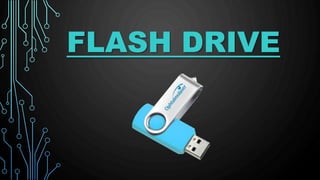
FLASH DRIVE
INTRODUCTION
A USB drive is a data storage device that
includes flash memory with an integrated
Universal Serial Bus (USB) interface
USB flash drives use the USB mass storage
standard, supported natively by modern
operating systems such as Linux, Mac OS X,
Windows, and other Unix-like systems, as well as
many BIOS boot ROMs
USB drives with USB 2.0 support can store more
data and transfer faster than much larger optical
disc drives like CD-RW or DVD-RW drives.
They are smaller, faster, have thousands of times
more capacity, and are more durable and reliable
because they have no moving parts
The term drive persists because computers read
and write flash drive data using the same system
commands as for a mechanical disk drive.
DEFINITIONOFAFLASHDRIVE
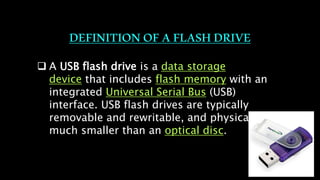
 A USB flash drive is a data storage
device that includes flash memory with an
integrated Universal Serial Bus (USB)
interface. USB flash drives are typically
removable and rewritable, and physically
much smaller than an optical disc.
• A pen drive, or a USB flash drive, is a portable data-storage
device.
Most weigh less than 30 grams
• Storage capacities as large as 2 TB are planned, with steady
improvements in size and price per capacity expected.
• USB flash drives are often used for the same purposes for
which floppy disks or CDs were used, i.e., for storage, back-up
and transfer of computer files.
• USB drives with USB 2.0 support can store more data and
transfer faster than much larger optical disc drives and can be
read by many other systems such as
the Xbox 360, PlayStation 3.
STRUCTURE OF FLASH DRIVE
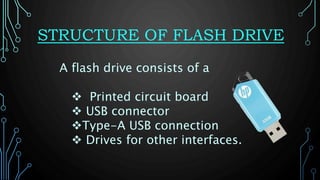
A flash drive consists of a
 Printed circuit board
 USB connector
Type-A USB connection
 Drives for other interfaces.
TECHNOLOGY USED
 Flash memory combines a number of older
technologies.
 The memory storage was based on earlier EPROM
and EEPROM technologies.
 Hardware designers later developed EEPROMs with
the erasure region broken up into smaller "fields"
that could be erased individually without affecting
the others.
 The development of high-speed serial data
interfaces such as USB and the simultaneous
development of small, high-speed, low-power
DESIGN AND IMPLEMENTATION
Internals of a typical USB flash drive
1 USB Standard-A plug
2 USB mass storage controller device
3 Test points
4 Flash memory chip
5 Crystal oscillator
6 LED
7 Write-protect switch (Optional)
8 Space for second flash memory chip
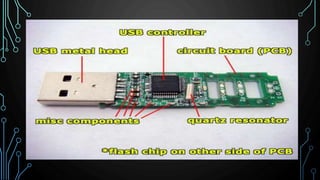
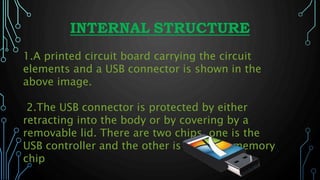
INTERNAL STRUCTURE
1.A printed circuit board carrying the circuit
elements and a USB connector is shown in the
above image.
2.The USB connector is protected by either
retracting into the body or by covering by a
removable lid. There are two chips, one is the
USB controller and the other is the flash memory
chip
ADVANTAGES
 Flash drives use little power, have no fragile moving parts, and for
most
capacities are small and light.
Data stored on flash drives is impervious to mechanical shock,
magnetic fields,
scratches and dust.
 Specially manufactured flash drives are available that have a tough
rubber
or metal casing designed to be waterproof and virtually "unbreakable".
These flash drives retain their memory after being submerged in water,
and even through a machine wash.
DISADVANTAGES
Flash drives can sustain only a limited
number of write and erase cycles before
the drive fails.
USB flash drives are more expensive
per unit of storage than large hard
drives, but are less expensive in
capacities of a few tens of gigabytes as
of 2011.
AVAILABLE BRANDS
1. Kingston:
Kingston's Data Traveler
USB Flash Drive is the latest in
portable flash memory
storage from the greatest
name in memory. Reliable and
easy to use.
2.Transcend:
JetFlash are a series
of flash based USB
drives designed and
manufactured
by Transcend , a multi-
national Taiwanese com
pany.
3.SANDISK:
Sandisk’s flask memory technologies
are used by many of the world's largest
data centers, embedded in the most
advanced smartphones, tablets, and
laptops, and are trusted by consumers
around the world.
4.HP:
HP offers a broad range
of flash drive to enhance
storage capabilities for
your business and home
PCs.
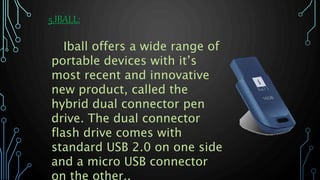
5.IBALL:
Iball offers a wide range of
portable devices with it’s
most recent and innovative
new product, called the
hybrid dual connector pen
drive. The dual connector
flash drive comes with
standard USB 2.0 on one side
and a micro USB connector
on the other..
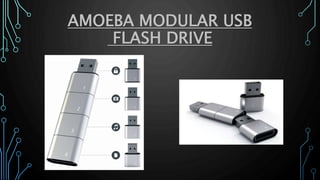
AMOEBA MODULAR USB
FLASH DRIVE
WORLD’S SMALLEST FLASH DRIVE
TOP 5 FLASH DRIVES
• Layani Malsha
• Layani.malsha@gmail.com
• https://infotecinformation.blogspot
.com/

Flash drive

  • 1.
  • 2.
    INTRODUCTION A USB driveis a data storage device that includes flash memory with an integrated Universal Serial Bus (USB) interface USB flash drives use the USB mass storage standard, supported natively by modern operating systems such as Linux, Mac OS X, Windows, and other Unix-like systems, as well as many BIOS boot ROMs
  • 3.
    USB drives withUSB 2.0 support can store more data and transfer faster than much larger optical disc drives like CD-RW or DVD-RW drives. They are smaller, faster, have thousands of times more capacity, and are more durable and reliable because they have no moving parts The term drive persists because computers read and write flash drive data using the same system commands as for a mechanical disk drive.
  • 4.
    DEFINITIONOFAFLASHDRIVE  A USBflash drive is a data storage device that includes flash memory with an integrated Universal Serial Bus (USB) interface. USB flash drives are typically removable and rewritable, and physically much smaller than an optical disc.
  • 5.
    • A pendrive, or a USB flash drive, is a portable data-storage device. Most weigh less than 30 grams • Storage capacities as large as 2 TB are planned, with steady improvements in size and price per capacity expected. • USB flash drives are often used for the same purposes for which floppy disks or CDs were used, i.e., for storage, back-up and transfer of computer files. • USB drives with USB 2.0 support can store more data and transfer faster than much larger optical disc drives and can be read by many other systems such as the Xbox 360, PlayStation 3.
  • 6.
    STRUCTURE OF FLASHDRIVE A flash drive consists of a  Printed circuit board  USB connector Type-A USB connection  Drives for other interfaces.
  • 7.
    TECHNOLOGY USED  Flashmemory combines a number of older technologies.  The memory storage was based on earlier EPROM and EEPROM technologies.  Hardware designers later developed EEPROMs with the erasure region broken up into smaller "fields" that could be erased individually without affecting the others.  The development of high-speed serial data interfaces such as USB and the simultaneous development of small, high-speed, low-power
  • 8.
    DESIGN AND IMPLEMENTATION Internalsof a typical USB flash drive 1 USB Standard-A plug 2 USB mass storage controller device 3 Test points 4 Flash memory chip 5 Crystal oscillator 6 LED 7 Write-protect switch (Optional) 8 Space for second flash memory chip
  • 10.
    INTERNAL STRUCTURE 1.A printedcircuit board carrying the circuit elements and a USB connector is shown in the above image. 2.The USB connector is protected by either retracting into the body or by covering by a removable lid. There are two chips, one is the USB controller and the other is the flash memory chip
  • 11.
    ADVANTAGES  Flash drivesuse little power, have no fragile moving parts, and for most capacities are small and light. Data stored on flash drives is impervious to mechanical shock, magnetic fields, scratches and dust.  Specially manufactured flash drives are available that have a tough rubber or metal casing designed to be waterproof and virtually "unbreakable". These flash drives retain their memory after being submerged in water, and even through a machine wash.
  • 12.
    DISADVANTAGES Flash drives cansustain only a limited number of write and erase cycles before the drive fails. USB flash drives are more expensive per unit of storage than large hard drives, but are less expensive in capacities of a few tens of gigabytes as of 2011.
  • 13.
    AVAILABLE BRANDS 1. Kingston: Kingston'sData Traveler USB Flash Drive is the latest in portable flash memory storage from the greatest name in memory. Reliable and easy to use.
  • 14.
    2.Transcend: JetFlash are aseries of flash based USB drives designed and manufactured by Transcend , a multi- national Taiwanese com pany.
  • 15.
    3.SANDISK: Sandisk’s flask memorytechnologies are used by many of the world's largest data centers, embedded in the most advanced smartphones, tablets, and laptops, and are trusted by consumers around the world.
  • 16.
    4.HP: HP offers abroad range of flash drive to enhance storage capabilities for your business and home PCs.
  • 17.
    5.IBALL: Iball offers awide range of portable devices with it’s most recent and innovative new product, called the hybrid dual connector pen drive. The dual connector flash drive comes with standard USB 2.0 on one side and a micro USB connector on the other..
  • 18.
  • 19.
  • 20.
  • 22.
    • Layani Malsha •Layani.malsha@gmail.com • https://infotecinformation.blogspot .com/