ProSAFE Switch Series
Proteggere la rete LAN con gli Switch
Andrea Rossi
Senior System Engineer
andrea.rossi@netgear.com
Formazione Online
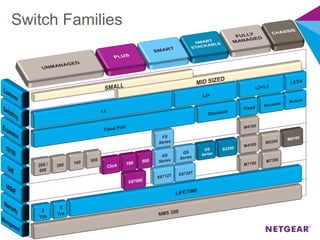
Switch Families
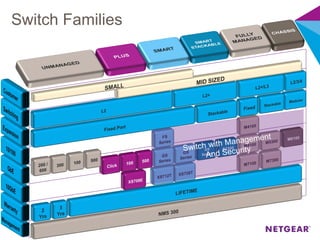
Switch Families
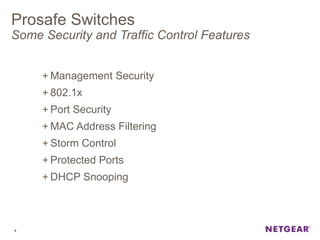
Prosafe Switches
Some Security and Traffic Control Features
+ Management Security
+ 802.1x
+ Port Security
+ MAC Address Filtering
+ Storm Control
+ Protected Ports
+ DHCP Snooping
4
Management Security
+ Management Security protect the management access to the
switch configuring:
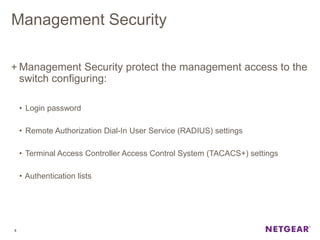
• Login password
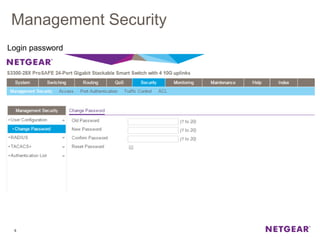
• Remote Authorization Dial-In User Service (RADIUS) settings
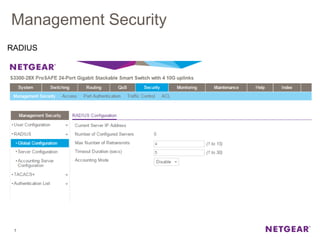
• Terminal Access Controller Access Control System (TACACS+) settings
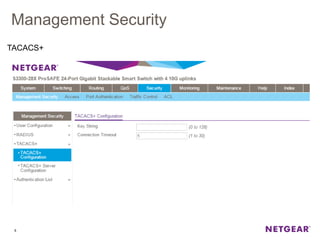
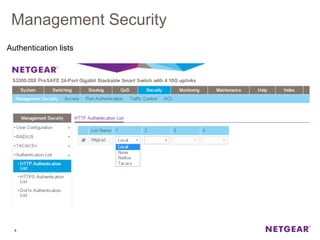
• Authentication lists
5
Management Security
6
Login password
Management Security
7
RADIUS
Management Security
8
TACACS+
Management Security
9
Authentication lists
Management Security
10
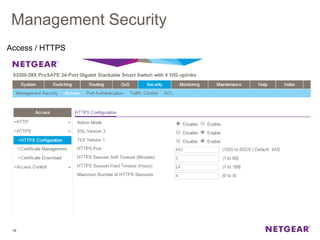
Access / HTTPS
Management Security
11
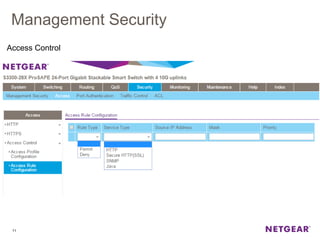
Access Control
802.1x
It is a port-based authentication mode, when enabled globally
and on the port, successful authentication of any one
supplicant attached to the port results in all users being able
to use the port without restrictions.
At any given time, only one supplicant is allowed to attempt
authentication on a port in this mode.
Ports in this mode are under bidirectional control.
12
802.1x
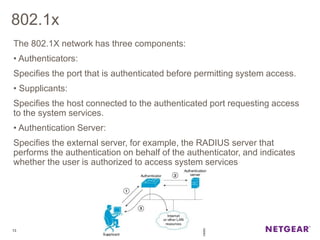
The 802.1X network has three components:
• Authenticators:
Specifies the port that is authenticated before permitting system access.
• Supplicants:
Specifies the host connected to the authenticated port requesting access
to the system services.
• Authentication Server:
Specifies the external server, for example, the RADIUS server that
performs the authentication on behalf of the authenticator, and indicates
whether the user is authorized to access system services
13
802.1x
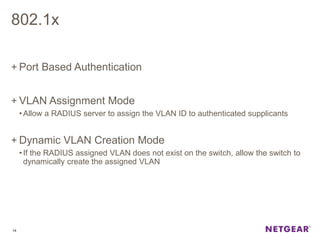
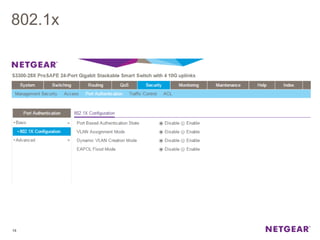
+ Port Based Authentication
+ VLAN Assignment Mode
•Allow a RADIUS server to assign the VLAN ID to authenticated supplicants
+ Dynamic VLAN Creation Mode
•If the RADIUS assigned VLAN does not exist on the switch, allow the switch to
dynamically create the assigned VLAN
14
802.1x
15
802.1x
16
Port Security
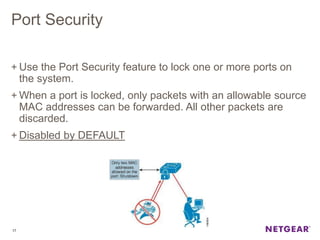
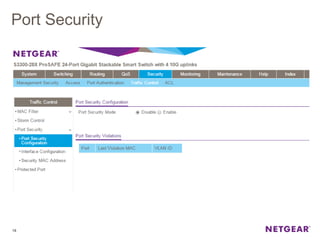
+ Use the Port Security feature to lock one or more ports on
the system.
+ When a port is locked, only packets with an allowable source
MAC addresses can be forwarded. All other packets are
discarded.
+ Disabled by DEFAULT
17
Port Security
18
Port Security
19
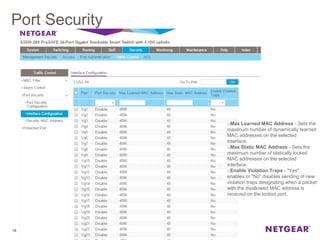
oMax Learned MAC Address - Sets the
maximum number of dynamically learned
MAC addresses on the selected
interface.
oMax Static MAC Address - Sets the
maximum number of statically locked
MAC addresses on the selected
interface.
oEnable Violation Traps - "Yes"
enables or "No" disables sending of new
violation traps designating when a packet
with the disallowed MAC address is
received on the locked port.
Port Security
20
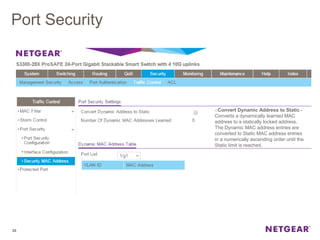
oConvert Dynamic Address to Static -
Converts a dynamically learned MAC
address to a statically locked address.
The Dynamic MAC address entries are
converted to Static MAC address entries
in a numerically ascending order until the
Static limit is reached.
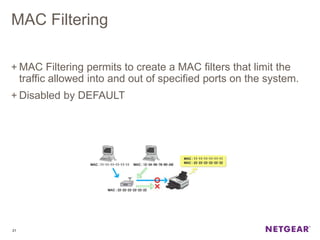
MAC Filtering
+ MAC Filtering permits to create a MAC filters that limit the
traffic allowed into and out of specified ports on the system.
+ Disabled by DEFAULT
21
MAC Filtering
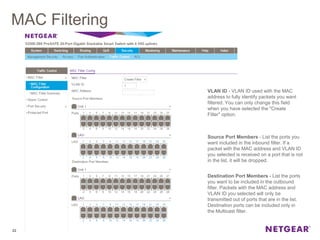
22
VLAN ID - VLAN ID used with the MAC
address to fully identify packets you want
filtered. You can only change this field
when you have selected the "Create
Filter" option.
Source Port Members - List the ports you
want included in the inbound filter. If a
packet with the MAC address and VLAN ID
you selected is received on a port that is not
in the list, it will be dropped.
Destination Port Members - List the ports
you want to be included in the outbound
filter. Packets with the MAC address and
VLAN ID you selected will only be
transmitted out of ports that are in the list.
Destination ports can be included only in
the Multicast filter.
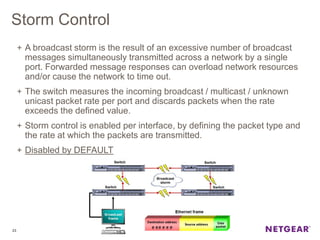
Storm Control
+ A broadcast storm is the result of an excessive number of broadcast
messages simultaneously transmitted across a network by a single
port. Forwarded message responses can overload network resources
and/or cause the network to time out.
+ The switch measures the incoming broadcast / multicast / unknown
unicast packet rate per port and discards packets when the rate
exceeds the defined value.
+ Storm control is enabled per interface, by defining the packet type and
the rate at which the packets are transmitted.
+ Disabled by DEFAULT
23
Storm Control
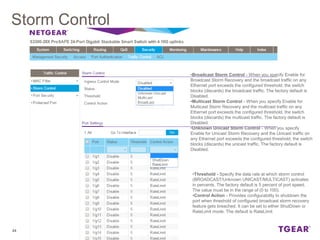
24
•Broadcast Storm Control - When you specify Enable for
Broadcast Storm Recovery and the broadcast traffic on any
Ethernet port exceeds the configured threshold, the switch
blocks (discards) the broadcast traffic. The factory default is
Disabled.
•Multicast Storm Control - When you specify Enable for
Multicast Storm Recovery and the multicast traffic on any
Ethernet port exceeds the configured threshold, the switch
blocks (discards) the multicast traffic. The factory default is
Disabled.
•Unknown Unicast Storm Control - When you specify
Enable for Unicast Storm Recovery and the Unicast traffic on
any Ethernet port exceeds the configured threshold, the switch
blocks (discards) the unicast traffic. The factory default is
Disabled.
•Threshold - Specify the data rate at which storm control
(BROADCAST/Unknown UNICAST/MULTICAST) activates
in percents. The factory default is 5 percent of port speed.
The value must be in the range of (0 to 100).
•Control Action - Provides configurability to shutdown the
port when threshold of configured broadcast storm recovery
feature gets breached. It can be set to either ShutDown or
RateLimit mode. The default is RateLimit
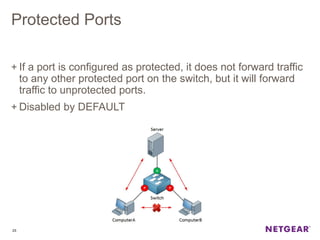
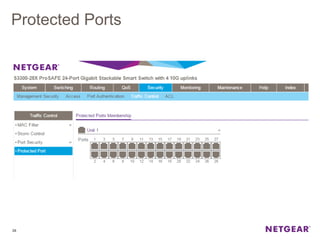
Protected Ports
+ If a port is configured as protected, it does not forward traffic
to any other protected port on the switch, but it will forward
traffic to unprotected ports.
+ Disabled by DEFAULT
25
Protected Ports
26
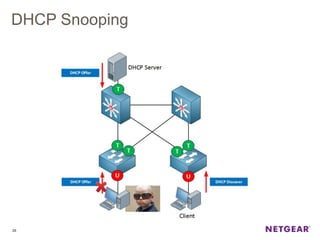
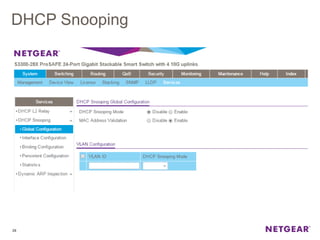
DHCP Snooping
+ DHCP Snooping is a useful feature that provides security
by filtering untrusted DHCP messages and by building and
maintaining a DHCP snooping binding table.
+ A known attack is when an unauthorized DHCP server
responds to a client that is requesting an IP address.
+ DHCP snooping acts like a firewall between untrusted
hosts and DHCP servers.
+ It also provides way to differentiate between untrusted
interfaces connected to the end-user and trusted interfaces
connected to the DHCP server or another switch.
+ Disabled bt DEFAULT
27
DHCP Snooping
28
DHCP Snooping
29
DHCP Snooping
30
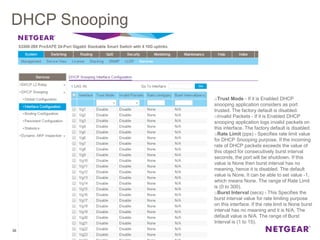
oTrust Mode - If it is Enabled DHCP
snooping application considers as port
trusted. The factory default is disabled.
oInvalid Packets - If it is Enabled DHCP
snooping application logs invalid packets on
this interface. The factory default is disabled.
oRate Limit (pps) - Specifies rate limit value
for DHCP Snooping purpose. If the incoming
rate of DHCP packets exceeds the value of
this object for consecutively burst interval
seconds, the port will be shutdown. If this
value is None then burst interval has no
meaning, hence it is disabled. The default
value is None. It can be able to set value -1,
which means None. The range of Rate Limit
is (0 to 300).
oBurst Interval (secs) - This Specifies the
burst interval value for rate limiting purpose
on this interface. If the rate limit is None burst
interval has no meaning and it is N/A. The
default value is N/A. The range of Burst
Interval is (1 to 15).

Webinar NETGEAR Prosafe Switch, la sicurezza della LAN

  • 1.
    ProSAFE Switch Series Proteggerela rete LAN con gli Switch Andrea Rossi Senior System Engineer andrea.rossi@netgear.com Formazione Online
  • 2.
  • 3.
  • 4.
    Prosafe Switches Some Securityand Traffic Control Features + Management Security + 802.1x + Port Security + MAC Address Filtering + Storm Control + Protected Ports + DHCP Snooping 4
  • 5.
    Management Security + ManagementSecurity protect the management access to the switch configuring: • Login password • Remote Authorization Dial-In User Service (RADIUS) settings • Terminal Access Controller Access Control System (TACACS+) settings • Authentication lists 5
  • 6.
  • 7.
  • 8.
  • 9.
  • 10.
  • 11.
  • 12.
    802.1x It is aport-based authentication mode, when enabled globally and on the port, successful authentication of any one supplicant attached to the port results in all users being able to use the port without restrictions. At any given time, only one supplicant is allowed to attempt authentication on a port in this mode. Ports in this mode are under bidirectional control. 12
  • 13.
    802.1x The 802.1X networkhas three components: • Authenticators: Specifies the port that is authenticated before permitting system access. • Supplicants: Specifies the host connected to the authenticated port requesting access to the system services. • Authentication Server: Specifies the external server, for example, the RADIUS server that performs the authentication on behalf of the authenticator, and indicates whether the user is authorized to access system services 13
  • 14.
    802.1x + Port BasedAuthentication + VLAN Assignment Mode •Allow a RADIUS server to assign the VLAN ID to authenticated supplicants + Dynamic VLAN Creation Mode •If the RADIUS assigned VLAN does not exist on the switch, allow the switch to dynamically create the assigned VLAN 14
  • 15.
  • 16.
  • 17.
    Port Security + Usethe Port Security feature to lock one or more ports on the system. + When a port is locked, only packets with an allowable source MAC addresses can be forwarded. All other packets are discarded. + Disabled by DEFAULT 17
  • 18.
  • 19.
    Port Security 19 oMax LearnedMAC Address - Sets the maximum number of dynamically learned MAC addresses on the selected interface. oMax Static MAC Address - Sets the maximum number of statically locked MAC addresses on the selected interface. oEnable Violation Traps - "Yes" enables or "No" disables sending of new violation traps designating when a packet with the disallowed MAC address is received on the locked port.
  • 20.
    Port Security 20 oConvert DynamicAddress to Static - Converts a dynamically learned MAC address to a statically locked address. The Dynamic MAC address entries are converted to Static MAC address entries in a numerically ascending order until the Static limit is reached.
  • 21.
    MAC Filtering + MACFiltering permits to create a MAC filters that limit the traffic allowed into and out of specified ports on the system. + Disabled by DEFAULT 21
  • 22.
    MAC Filtering 22 VLAN ID- VLAN ID used with the MAC address to fully identify packets you want filtered. You can only change this field when you have selected the "Create Filter" option. Source Port Members - List the ports you want included in the inbound filter. If a packet with the MAC address and VLAN ID you selected is received on a port that is not in the list, it will be dropped. Destination Port Members - List the ports you want to be included in the outbound filter. Packets with the MAC address and VLAN ID you selected will only be transmitted out of ports that are in the list. Destination ports can be included only in the Multicast filter.
  • 23.
    Storm Control + Abroadcast storm is the result of an excessive number of broadcast messages simultaneously transmitted across a network by a single port. Forwarded message responses can overload network resources and/or cause the network to time out. + The switch measures the incoming broadcast / multicast / unknown unicast packet rate per port and discards packets when the rate exceeds the defined value. + Storm control is enabled per interface, by defining the packet type and the rate at which the packets are transmitted. + Disabled by DEFAULT 23
  • 24.
    Storm Control 24 •Broadcast StormControl - When you specify Enable for Broadcast Storm Recovery and the broadcast traffic on any Ethernet port exceeds the configured threshold, the switch blocks (discards) the broadcast traffic. The factory default is Disabled. •Multicast Storm Control - When you specify Enable for Multicast Storm Recovery and the multicast traffic on any Ethernet port exceeds the configured threshold, the switch blocks (discards) the multicast traffic. The factory default is Disabled. •Unknown Unicast Storm Control - When you specify Enable for Unicast Storm Recovery and the Unicast traffic on any Ethernet port exceeds the configured threshold, the switch blocks (discards) the unicast traffic. The factory default is Disabled. •Threshold - Specify the data rate at which storm control (BROADCAST/Unknown UNICAST/MULTICAST) activates in percents. The factory default is 5 percent of port speed. The value must be in the range of (0 to 100). •Control Action - Provides configurability to shutdown the port when threshold of configured broadcast storm recovery feature gets breached. It can be set to either ShutDown or RateLimit mode. The default is RateLimit
  • 25.
    Protected Ports + Ifa port is configured as protected, it does not forward traffic to any other protected port on the switch, but it will forward traffic to unprotected ports. + Disabled by DEFAULT 25
  • 26.
  • 27.
    DHCP Snooping + DHCPSnooping is a useful feature that provides security by filtering untrusted DHCP messages and by building and maintaining a DHCP snooping binding table. + A known attack is when an unauthorized DHCP server responds to a client that is requesting an IP address. + DHCP snooping acts like a firewall between untrusted hosts and DHCP servers. + It also provides way to differentiate between untrusted interfaces connected to the end-user and trusted interfaces connected to the DHCP server or another switch. + Disabled bt DEFAULT 27
  • 28.
  • 29.
  • 30.
    DHCP Snooping 30 oTrust Mode- If it is Enabled DHCP snooping application considers as port trusted. The factory default is disabled. oInvalid Packets - If it is Enabled DHCP snooping application logs invalid packets on this interface. The factory default is disabled. oRate Limit (pps) - Specifies rate limit value for DHCP Snooping purpose. If the incoming rate of DHCP packets exceeds the value of this object for consecutively burst interval seconds, the port will be shutdown. If this value is None then burst interval has no meaning, hence it is disabled. The default value is None. It can be able to set value -1, which means None. The range of Rate Limit is (0 to 300). oBurst Interval (secs) - This Specifies the burst interval value for rate limiting purpose on this interface. If the rate limit is None burst interval has no meaning and it is N/A. The default value is N/A. The range of Burst Interval is (1 to 15).