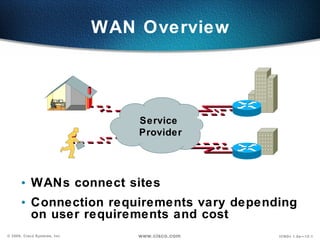
WAN Overview WANs connect sites Connection requirements vary depending on user requirements and cost Service  Provider
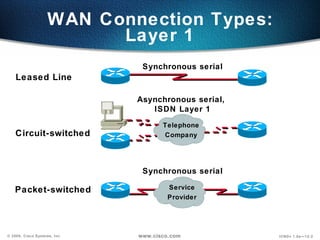
WAN Connection Types: Layer 1 Leased Line Synchronous serial Telephone Company Circuit-switched Asynchronous serial,  ISDN Layer 1 Service Provider Packet-switched Synchronous serial
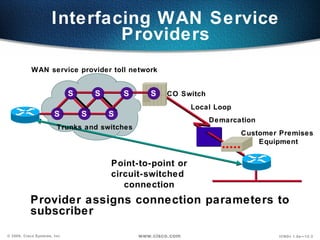
Interfacing WAN Service Providers Provider assigns connection parameters to subscriber Point-to-point or circuit-switched  connection CO Switch Customer Premises  Equipment Demarcation Local Loop WAN service provider toll network Trunks and switches S S S S S S S
Serial Point-to-Point Connections Router connections Network connections at the CSU/DSU EIA/TIA-232 EIA/TIA-449 EIA-530 V.35 X.21 CSU/ DSU End user device Service Provider DTE DCE
Typical WAN Encapsulation Protocols: Layer 2 Leased Line Circuit-switched PPP, SLIP, HDLC HDLC, PPP, SLIP Packet-switched X.25, Frame Relay, ATM Telephone Company Service Provider
HDLC Command Router(config-if)#encapsulation hdlc Enable hdlc encapsulation HDLC is the default encapsulation on  synchronous serial interfaces
PPP can carry packets from several protocol suites using Network Control Programs PPP controls the setup of several link options using LCP  An Overview of PPP PPP Encapsulation TCP/IP Novell IPX AppleTalk Multiple protocol  encapsulations using  NCPs in PPP  Link setup and control  using LCP in PPP
Layering PPP Elements PPP—A data link with network-layer services Synchronous or Asynchronous Physical Media Link Control Protocol  Authentication, other options Network Control Protocol  PPP Data Link Layer Physical Layer Network Layer IPCP IPXCP Many Others IP IPX Layer 3  Protocols
PPP LCP Configuration Options Feature  How It Operates Protocol Authentication PAP CHAP Perform Challenge Handshake Require a password Compression Compress data at source;  reproduce data at  destination Stacker or Predictor Error  Detection Avoid frame looping Monitor data dropped on link Multilink Load balancing across  multiple links Multilink  Protocol (MP) Quality Magic Number
PPP Authentication Overview Two PPP authentication protocols:  PAP and CHAP PPP Session Establishment 1 Link Establishment Phase 2 Optional Authentication Phase 3  Network-Layer Protocol Phase Dialup or  Circuit-Switched  Network
Selecting a PPP Authentication Protocol (cont.) Use “secret” known only to authenticator and peer Remote Router (SantaCruz) Central-Site Router  (HQ) Hostname: santacruz Password: boardwalk  username santacruz password boardwalk  CHAP 3-Way Handshake Challenge Response Accept/Reject
Configuring PPP and Authentication Overview Service Provider Verify who  you are. Router to Be Authenticated (The router that initiated the call.) ppp encapsulation hostname    username / password ppp authentication Authenticating Router (The router that received the call.) ppp encapsulation hostname username / password ppp authentication Enabling PPP Enabling PPP Authentication Enabling PPP Enabling PPP Authentication        
Configuring PPP Router(config-if)#encapsulation  ppp Enable PPP encapsulation
Configuring PPP Authentication Router(config)# hostname  name Assigns a host name to your router Router(config)#username  name  password  password Identifies the username and password of authenticating router
Configuring PPP Authentication (cont.) Router(config-if)#ppp authentication {chap | chap pap | pap chap | pap} Enables PAP and/or CHAP authentication
Configuring CHAP Example hostname left username right password sameone ! int serial 0 ip address 10.0.1.1 255.255.255.0 encapsulation ppp ppp authentication CHAP hostname right username left password sameone ! int serial 0 ip address 10.0.1.2 255.255.255.0 encapsulation ppp ppp authentication CHAP Left router Right router PSTN/ISDN
Verifying  HDLC and PPP Encapsulation Configuration Router#show interface s0 Serial0 is up, line protocol is up Hardware is HD64570 Internet address is 10.140.1.2/24 MTU 1500 bytes, BW 1544 Kbit, DLY 20000 usec, rely 255/255, load 1/255 Encapsulation PPP, loopback not set, keepalive set (10 sec) LCP Open Open: IPCP, CDPCP Last input 00:00:05, output 00:00:05, output hang never Last clearing of "show interface" counters never Queueing strategy: fifo Output queue 0/40, 0 drops; input queue 0/75, 0 drops 5 minute input rate 0 bits/sec, 0 packets/sec 5 minute output rate 0 bits/sec, 0 packets/sec 38021 packets input, 5656110 bytes, 0 no buffer Received 23488 broadcasts, 0 runts, 0 giants, 0 throttles 0 input errors, 0 CRC, 0 frame, 0 overrun, 0 ignored, 0 abort 38097 packets output, 2135697 bytes, 0 underruns 0 output errors, 0 collisions, 6045 interface resets 0 output buffer failures, 0 output buffers swapped out 482 carrier transitions DCD=up  DSR=up  DTR=up  RTS=up  CTS=up
Verifying PPP Authentication with the  debug ppp authentication  Command 4d20h: %LINK-3-UPDOWN: Interface Serial0, changed state to up 4d20h: Se0 PPP: Treating connection as a dedicated line 4d20h: Se0 PPP: Phase is AUTHENTICATING, by both 4d20h: Se0 CHAP: O CHALLENGE id 2 len 28 from ”left" 4d20h: Se0 CHAP: I CHALLENGE id 3 len 28 from ”right" 4d20h: Se0 CHAP: O RESPONSE id 3 len 28 from ”left" 4d20h: Se0 CHAP: I RESPONSE id 2 len 28 from ”right" 4d20h: Se0 CHAP: O SUCCESS id 2 len 4 4d20h: Se0 CHAP: I SUCCESS id 3 len 4 4d20h: %LINEPROTO-5-UPDOWN: Line protocol on Interface Serial0, changed state to up debug ppp authentication  successful CHAP output Left router Right router Service  Provider

PPP

  • 1.
    WAN Overview WANsconnect sites Connection requirements vary depending on user requirements and cost Service Provider
  • 2.
    WAN Connection Types:Layer 1 Leased Line Synchronous serial Telephone Company Circuit-switched Asynchronous serial, ISDN Layer 1 Service Provider Packet-switched Synchronous serial
  • 3.
    Interfacing WAN ServiceProviders Provider assigns connection parameters to subscriber Point-to-point or circuit-switched connection CO Switch Customer Premises Equipment Demarcation Local Loop WAN service provider toll network Trunks and switches S S S S S S S
  • 4.
    Serial Point-to-Point ConnectionsRouter connections Network connections at the CSU/DSU EIA/TIA-232 EIA/TIA-449 EIA-530 V.35 X.21 CSU/ DSU End user device Service Provider DTE DCE
  • 5.
    Typical WAN EncapsulationProtocols: Layer 2 Leased Line Circuit-switched PPP, SLIP, HDLC HDLC, PPP, SLIP Packet-switched X.25, Frame Relay, ATM Telephone Company Service Provider
  • 6.
    HDLC Command Router(config-if)#encapsulationhdlc Enable hdlc encapsulation HDLC is the default encapsulation on synchronous serial interfaces
  • 7.
    PPP can carrypackets from several protocol suites using Network Control Programs PPP controls the setup of several link options using LCP An Overview of PPP PPP Encapsulation TCP/IP Novell IPX AppleTalk Multiple protocol encapsulations using NCPs in PPP Link setup and control using LCP in PPP
  • 8.
    Layering PPP ElementsPPP—A data link with network-layer services Synchronous or Asynchronous Physical Media Link Control Protocol Authentication, other options Network Control Protocol PPP Data Link Layer Physical Layer Network Layer IPCP IPXCP Many Others IP IPX Layer 3 Protocols
  • 9.
    PPP LCP ConfigurationOptions Feature How It Operates Protocol Authentication PAP CHAP Perform Challenge Handshake Require a password Compression Compress data at source; reproduce data at destination Stacker or Predictor Error Detection Avoid frame looping Monitor data dropped on link Multilink Load balancing across multiple links Multilink Protocol (MP) Quality Magic Number
  • 10.
    PPP Authentication OverviewTwo PPP authentication protocols: PAP and CHAP PPP Session Establishment 1 Link Establishment Phase 2 Optional Authentication Phase 3 Network-Layer Protocol Phase Dialup or Circuit-Switched Network
  • 11.
    Selecting a PPPAuthentication Protocol (cont.) Use “secret” known only to authenticator and peer Remote Router (SantaCruz) Central-Site Router (HQ) Hostname: santacruz Password: boardwalk username santacruz password boardwalk CHAP 3-Way Handshake Challenge Response Accept/Reject
  • 12.
    Configuring PPP andAuthentication Overview Service Provider Verify who you are. Router to Be Authenticated (The router that initiated the call.) ppp encapsulation hostname username / password ppp authentication Authenticating Router (The router that received the call.) ppp encapsulation hostname username / password ppp authentication Enabling PPP Enabling PPP Authentication Enabling PPP Enabling PPP Authentication        
  • 13.
  • 14.
    Configuring PPP AuthenticationRouter(config)# hostname name Assigns a host name to your router Router(config)#username name password password Identifies the username and password of authenticating router
  • 15.
    Configuring PPP Authentication(cont.) Router(config-if)#ppp authentication {chap | chap pap | pap chap | pap} Enables PAP and/or CHAP authentication
  • 16.
    Configuring CHAP Examplehostname left username right password sameone ! int serial 0 ip address 10.0.1.1 255.255.255.0 encapsulation ppp ppp authentication CHAP hostname right username left password sameone ! int serial 0 ip address 10.0.1.2 255.255.255.0 encapsulation ppp ppp authentication CHAP Left router Right router PSTN/ISDN
  • 17.
    Verifying HDLCand PPP Encapsulation Configuration Router#show interface s0 Serial0 is up, line protocol is up Hardware is HD64570 Internet address is 10.140.1.2/24 MTU 1500 bytes, BW 1544 Kbit, DLY 20000 usec, rely 255/255, load 1/255 Encapsulation PPP, loopback not set, keepalive set (10 sec) LCP Open Open: IPCP, CDPCP Last input 00:00:05, output 00:00:05, output hang never Last clearing of "show interface" counters never Queueing strategy: fifo Output queue 0/40, 0 drops; input queue 0/75, 0 drops 5 minute input rate 0 bits/sec, 0 packets/sec 5 minute output rate 0 bits/sec, 0 packets/sec 38021 packets input, 5656110 bytes, 0 no buffer Received 23488 broadcasts, 0 runts, 0 giants, 0 throttles 0 input errors, 0 CRC, 0 frame, 0 overrun, 0 ignored, 0 abort 38097 packets output, 2135697 bytes, 0 underruns 0 output errors, 0 collisions, 6045 interface resets 0 output buffer failures, 0 output buffers swapped out 482 carrier transitions DCD=up DSR=up DTR=up RTS=up CTS=up
  • 18.
    Verifying PPP Authenticationwith the debug ppp authentication Command 4d20h: %LINK-3-UPDOWN: Interface Serial0, changed state to up 4d20h: Se0 PPP: Treating connection as a dedicated line 4d20h: Se0 PPP: Phase is AUTHENTICATING, by both 4d20h: Se0 CHAP: O CHALLENGE id 2 len 28 from ”left" 4d20h: Se0 CHAP: I CHALLENGE id 3 len 28 from ”right" 4d20h: Se0 CHAP: O RESPONSE id 3 len 28 from ”left" 4d20h: Se0 CHAP: I RESPONSE id 2 len 28 from ”right" 4d20h: Se0 CHAP: O SUCCESS id 2 len 4 4d20h: Se0 CHAP: I SUCCESS id 3 len 4 4d20h: %LINEPROTO-5-UPDOWN: Line protocol on Interface Serial0, changed state to up debug ppp authentication successful CHAP output Left router Right router Service Provider