Man-In-The-Middle Attacks
Definition
• Man-in-the-Middle (MitM) attacks happen when traffic
between two parties is observed or manipulated by an
unknown third party.
• A MitM attack is a cybercrime method used to steal
personal information or login credentials. Cyber
criminals also use MitM attacks as a means to spy on,
corrupt information, or disrupt communications
between two parties.
2
Since the 1980s,
MitM attacks
have been used
to infiltrate
traffic between
innocent parties.
Methods
Man-in-the-Middle attacks can happen in a number of
ways:
• Types of Spoofing (IP, DNS, HTTPS)
• Hijacking (Secure Socket Layer, Email)
• Wi-Fi Eavesdropping
• Theft of Browsing Cookies
3
Man-in-the-Browser:
• When a Man-in-the-Browser attack takes place, the
attacker uses a Phishing method in order to
administer malware to a device.
• Malware is software meant to damage a network,
server or personal computer.
4
Phishing is a
method of
sending
fraudulent
emails or text
messages to
trick a user into
revealing
personal
information.
Man-in-the-Browser Continued
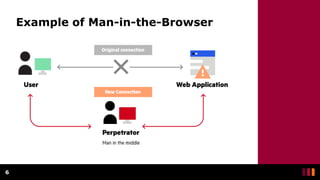
• A Man-in-the-Browser attack happens when malware
installs itself on a victim’s browser in order to record
information sent between targeted websites and the
user.
• Online banking institutions are prone to this form of
cybercrime.
5
Example of Man-in-the-Browser
6
IP Spoofing
• All devices that connect to the internet have an IP
Address.
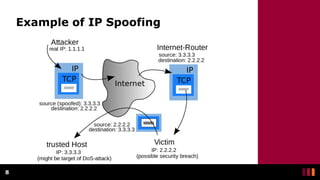
• Spoofing happens when someone or something
impersonates a trusted source.
• Attackers use IP Spoofing in order to deceive users
into revealing sensitive information by “spoofing”
their IP and posing as a website or someone familiar.
7
An IP Address is
like your home
address.
Example of IP Spoofing
8
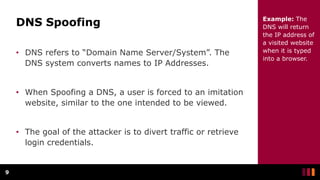
DNS Spoofing
• DNS refers to “Domain Name Server/System”. The
DNS system converts names to IP Addresses.
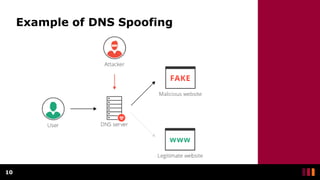
• When Spoofing a DNS, a user is forced to an imitation
website, similar to the one intended to be viewed.
• The goal of the attacker is to divert traffic or retrieve
login credentials.
9
Example: The
DNS will return
the IP address of
a visited website
when it is typed
into a browser.
Example of DNS Spoofing
10
HTTPS Spoofing
• HTTPS stands for Hypertext Transfer Protocol Secure.
This protocol is used by the Web to format and
transmit messages.
• Ensure that when visiting a website, the URL indicates
that it uses “https” rather than “http”.
11
HTTPS Spoofing
• In HTTPS Spoofing, the attacker manipulates the
browser into believing it is visiting a trusted website.
• After redirecting your browser, the attacker uses the
vulnerable website to monitor communication and
steal shared information.
12
SSL Hijacking
• SSL stands for Secure Sockets Layer, which was a
protocol developed in order to communicate over the
internet securely.
• Sometimes when a device visits an unsecure website
(http), it is automatically redirected to the secure
version (https).
• An attacker utilizes a computer and secure server to
reroute information of a user right before connection
to a legitimate server, this is SSL Hijacking.
13
Email Hijacking
• Email Hijacking occurs when attackers target financial
organizations for email information.
• After obtaining access to email accounts, attackers
can monitor all financial transactions.
• Attackers then follow up by “spoofing” the financial
institution’s email and possibly providing users with
instructions that would result in the attacker receiving
funds.
14
Wi-fi Eavesdropping
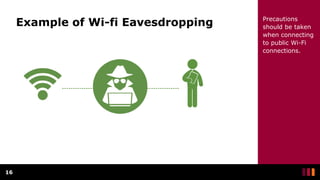
• Wi-Fi connections can be configured and appear to
have a valid name, such as the Wi-fi of a favourite
coffee shop.
• If a user connects to the fraudulent Wi-Fi connection,
the user’s online activities can be observed and
personal information like banking cards can be
attained.
15
Precautions
should be taken
when connecting
to public Wi-Fi
connections.
Example of Wi-fi Eavesdropping
16
Precautions
should be taken
when connecting
to public Wi-Fi
connections.
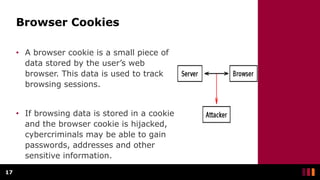
Browser Cookies
• A browser cookie is a small piece of
data stored by the user’s web
browser. This data is used to track
browsing sessions.
• If browsing data is stored in a cookie
and the browser cookie is hijacked,
cybercriminals may be able to gain
passwords, addresses and other
sensitive information.
17
Protection
• Ensure that the browser is using “https” when
browsing the web.
• Be on alert of Phishing emails that request credentials
to be updated.
18
Protection Continued
• Refrain from connecting to public Wi-Fi connections
without a VPN.
• Make use of internet security applications to thwart
MitB attacks.
19

Man in the Middle.pptx

  • 1.
  • 2.
    Definition • Man-in-the-Middle (MitM)attacks happen when traffic between two parties is observed or manipulated by an unknown third party. • A MitM attack is a cybercrime method used to steal personal information or login credentials. Cyber criminals also use MitM attacks as a means to spy on, corrupt information, or disrupt communications between two parties. 2 Since the 1980s, MitM attacks have been used to infiltrate traffic between innocent parties.
  • 3.
    Methods Man-in-the-Middle attacks canhappen in a number of ways: • Types of Spoofing (IP, DNS, HTTPS) • Hijacking (Secure Socket Layer, Email) • Wi-Fi Eavesdropping • Theft of Browsing Cookies 3
  • 4.
    Man-in-the-Browser: • When aMan-in-the-Browser attack takes place, the attacker uses a Phishing method in order to administer malware to a device. • Malware is software meant to damage a network, server or personal computer. 4 Phishing is a method of sending fraudulent emails or text messages to trick a user into revealing personal information.
  • 5.
    Man-in-the-Browser Continued • AMan-in-the-Browser attack happens when malware installs itself on a victim’s browser in order to record information sent between targeted websites and the user. • Online banking institutions are prone to this form of cybercrime. 5
  • 6.
  • 7.
    IP Spoofing • Alldevices that connect to the internet have an IP Address. • Spoofing happens when someone or something impersonates a trusted source. • Attackers use IP Spoofing in order to deceive users into revealing sensitive information by “spoofing” their IP and posing as a website or someone familiar. 7 An IP Address is like your home address.
  • 8.
    Example of IPSpoofing 8
  • 9.
    DNS Spoofing • DNSrefers to “Domain Name Server/System”. The DNS system converts names to IP Addresses. • When Spoofing a DNS, a user is forced to an imitation website, similar to the one intended to be viewed. • The goal of the attacker is to divert traffic or retrieve login credentials. 9 Example: The DNS will return the IP address of a visited website when it is typed into a browser.
  • 10.
    Example of DNSSpoofing 10
  • 11.
    HTTPS Spoofing • HTTPSstands for Hypertext Transfer Protocol Secure. This protocol is used by the Web to format and transmit messages. • Ensure that when visiting a website, the URL indicates that it uses “https” rather than “http”. 11
  • 12.
    HTTPS Spoofing • InHTTPS Spoofing, the attacker manipulates the browser into believing it is visiting a trusted website. • After redirecting your browser, the attacker uses the vulnerable website to monitor communication and steal shared information. 12
  • 13.
    SSL Hijacking • SSLstands for Secure Sockets Layer, which was a protocol developed in order to communicate over the internet securely. • Sometimes when a device visits an unsecure website (http), it is automatically redirected to the secure version (https). • An attacker utilizes a computer and secure server to reroute information of a user right before connection to a legitimate server, this is SSL Hijacking. 13
  • 14.
    Email Hijacking • EmailHijacking occurs when attackers target financial organizations for email information. • After obtaining access to email accounts, attackers can monitor all financial transactions. • Attackers then follow up by “spoofing” the financial institution’s email and possibly providing users with instructions that would result in the attacker receiving funds. 14
  • 15.
    Wi-fi Eavesdropping • Wi-Ficonnections can be configured and appear to have a valid name, such as the Wi-fi of a favourite coffee shop. • If a user connects to the fraudulent Wi-Fi connection, the user’s online activities can be observed and personal information like banking cards can be attained. 15 Precautions should be taken when connecting to public Wi-Fi connections.
  • 16.
    Example of Wi-fiEavesdropping 16 Precautions should be taken when connecting to public Wi-Fi connections.
  • 17.
    Browser Cookies • Abrowser cookie is a small piece of data stored by the user’s web browser. This data is used to track browsing sessions. • If browsing data is stored in a cookie and the browser cookie is hijacked, cybercriminals may be able to gain passwords, addresses and other sensitive information. 17
  • 18.
    Protection • Ensure thatthe browser is using “https” when browsing the web. • Be on alert of Phishing emails that request credentials to be updated. 18
  • 19.
    Protection Continued • Refrainfrom connecting to public Wi-Fi connections without a VPN. • Make use of internet security applications to thwart MitB attacks. 19

Editor's Notes

  • #3 References: https://us.norton.com/internetsecurity-wifi-what-is-a-man-in-the-middle-attack.html https://www.csoonline.com/article/3340117/what-is-a-man-in-the-middle-attack-how-mitm-attacks-work-and-how-to-prevent-them.html
  • #4 References: https://us.norton.com/internetsecurity-wifi-what-is-a-man-in-the-middle-attack.html https://www.csoonline.com/article/3340117/what-is-a-man-in-the-middle-attack-how-mitm-attacks-work-and-how-to-prevent-them.html
  • #5 References: https://us.norton.com/internetsecurity-wifi-what-is-a-man-in-the-middle-attack.html https://www.csoonline.com/article/3340117/what-is-a-man-in-the-middle-attack-how-mitm-attacks-work-and-how-to-prevent-them.html
  • #6 References: https://us.norton.com/internetsecurity-wifi-what-is-a-man-in-the-middle-attack.html https://www.csoonline.com/article/3340117/what-is-a-man-in-the-middle-attack-how-mitm-attacks-work-and-how-to-prevent-them.html
  • #7 References: https://www.imperva.com/learn/application-security/man-in-the-middle-attack-mitm/
  • #8 References: https://us.norton.com/internetsecurity-wifi-what-is-a-man-in-the-middle-attack.html https://www.csoonline.com/article/3340117/what-is-a-man-in-the-middle-attack-how-mitm-attacks-work-and-how-to-prevent-them.html
  • #9 References: https://en.wikipedia.org/wiki/IP_address_spoofing
  • #10 References: https://us.norton.com/internetsecurity-wifi-what-is-a-man-in-the-middle-attack.html https://www.csoonline.com/article/3340117/what-is-a-man-in-the-middle-attack-how-mitm-attacks-work-and-how-to-prevent-them.html
  • #11 References: https://www.imperva.com/learn/application-security/dns-hijacking-redirection/
  • #12 References: https://us.norton.com/internetsecurity-wifi-what-is-a-man-in-the-middle-attack.html https://www.csoonline.com/article/3340117/what-is-a-man-in-the-middle-attack-how-mitm-attacks-work-and-how-to-prevent-them.html
  • #13 References: https://us.norton.com/internetsecurity-wifi-what-is-a-man-in-the-middle-attack.html https://www.csoonline.com/article/3340117/what-is-a-man-in-the-middle-attack-how-mitm-attacks-work-and-how-to-prevent-them.html
  • #14 References: https://us.norton.com/internetsecurity-wifi-what-is-a-man-in-the-middle-attack.html https://www.csoonline.com/article/3340117/what-is-a-man-in-the-middle-attack-how-mitm-attacks-work-and-how-to-prevent-them.html
  • #15 References: https://us.norton.com/internetsecurity-wifi-what-is-a-man-in-the-middle-attack.html https://www.csoonline.com/article/3340117/what-is-a-man-in-the-middle-attack-how-mitm-attacks-work-and-how-to-prevent-them.html https://unit42.paloaltonetworks.com/threat-brief-conversation-hijacking-spear-phishing/
  • #16 References: https://us.norton.com/internetsecurity-wifi-what-is-a-man-in-the-middle-attack.html https://www.csoonline.com/article/3340117/what-is-a-man-in-the-middle-attack-how-mitm-attacks-work-and-how-to-prevent-them.html
  • #17 References: https://due.com/blog/12-reasons-never-use-public-wi-fi/
  • #18 References: https://us.norton.com/internetsecurity-wifi-what-is-a-man-in-the-middle-attack.html https://www.csoonline.com/article/3340117/what-is-a-man-in-the-middle-attack-how-mitm-attacks-work-and-how-to-prevent-them.html https://www.wikiwand.com/en/HTTP_cookie
  • #19 References: https://us.norton.com/internetsecurity-wifi-what-is-a-man-in-the-middle-attack.html https://www.csoonline.com/article/3340117/what-is-a-man-in-the-middle-attack-how-mitm-attacks-work-and-how-to-prevent-them.html
  • #20 References: https://us.norton.com/internetsecurity-wifi-what-is-a-man-in-the-middle-attack.html https://www.csoonline.com/article/3340117/what-is-a-man-in-the-middle-attack-how-mitm-attacks-work-and-how-to-prevent-them.html