Web 2.0

WHAT IS IT & WHY DO I USE IT?
What is Web 2.0?

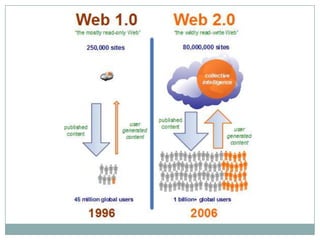
 Web 2.0 is a neologism that signifies the transformation
  from the “read web to the “read-write” web.
     “the Web was shifting from being a medium, in which information
      was transmitted and consumed, into being a platform, in which
      content was created, shared, remixed, repurposed, and passed
      along.”
 Web 2.0 works as a customizable network system to link
  users to information and each other
 Web 2.0 is not just a technological revolution, but also a
  social revolution!
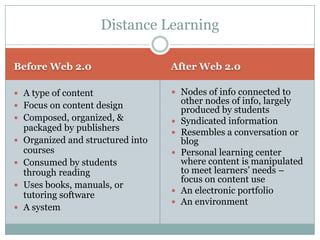
Distance Learning

Before Web 2.0                      After Web 2.0

 A type of content                  Nodes of info connected to
 Focus on content design
                                        other nodes of info, largely
                                        produced by students
 Composed, organized, &               Syndicated information
    packaged by publishers             Resembles a conversation or
   Organized and structured into       blog
    courses                            Personal learning center
   Consumed by students                where content is manipulated
    through reading                     to meet learners’ needs –
                                        focus on content use
   Uses books, manuals, or
    tutoring software                  An electronic portfolio
                                       An environment
   A system
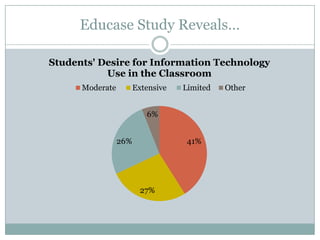
Educase Study Reveals…

Students' Desire for Information Technology
           Use in the Classroom
      Moderate         Extensive   Limited   Other


                          6%


                 26%                41%


                         27%
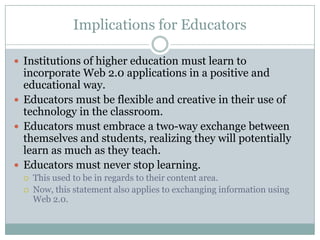
Implications for Educators

 Institutions of higher education must learn to
  incorporate Web 2.0 applications in a positive and
  educational way.
 Educators must be flexible and creative in their use of
  technology in the classroom.
 Educators must embrace a two-way exchange between
  themselves and students, realizing they will potentially
  learn as much as they teach.
 Educators must never stop learning.
     This used to be in regards to their content area.
     Now, this statement also applies to exchanging information using
      Web 2.0.
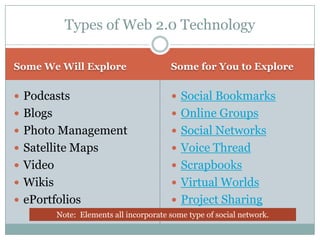
Types of Web 2.0 Technology

Some We Will Explore                     Some for You to Explore


 Podcasts                                Social Bookmarks
 Blogs                                   Online Groups
 Photo Management                        Social Networks
 Satellite Maps                          Voice Thread
 Video                                   Scrapbooks
 Wikis                                   Virtual Worlds
 ePortfolios                             Project Sharing
          Note: Elements all incorporate some type of social network.
Podcasts

What Are They?                        Podcasts in Education

 Podcasts are audio files that are    Lectures can be posted online or
  posted online so that users can       downloaded from other
  automatically download the files      universities through places such
  to listen whenever they want.         as the iTunes store
     Most commonly in MP3 format          Instant world-wide access
 Podcasting allows individuals to     Adds an auditory dimension to
  have a self-published, syndicated     courses to meet the needs of
  radio show                            varied learning styles
                                       Allows absent students to easily
                                        obtain lecture content
                                       New medium for class projects
                                       Transportability of material
Podcasting Sites

Specfic                          General Search Sites

   Podcasts for Teachers           Podcast Alley
   Podcasts for Educators          Podcast.net
   PodCop                          AllPodcasts
   Spanish PodFrecasts             Podcasting Station
   Beginning French                Podcast Bunker
   Moritz Law                      Podcasting Tools
   Theories of Communication       iTunes
   Scientific American             Replay Media
   Learn Out Loud                  Family Friendly Podcasts
   Language Arts Podcasts          Podcast Network
   Mathgrad.com                    NPR Podcasts
   Small Business Expo             Internet Archive
   White House Podcasts            Podscope
Blogs: What
Are They?
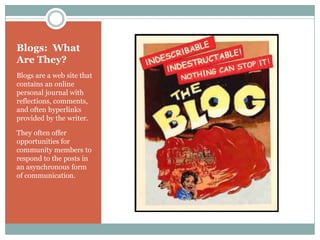
Blogs are a web site that
contains an online
personal journal with
reflections, comments,
and often hyperlinks
provided by the writer.

They often offer
opportunities for
community members to
respond to the posts in
an asynchronous form
of communication.
Blogs

How do they work?              Using RSS to Manage


 Blogs in Plain English        RSS (really simple
                                   syndication) is a way to
                                   manage blogs & news
                                   posts so the
                                   information you are
                                   interested in “feeds”
                                   directly to you.
                                      RSS in Plain English
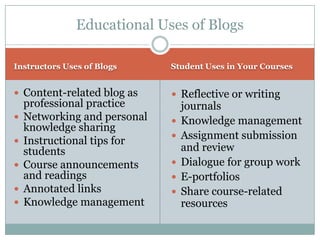
Educational Uses of Blogs

Instructors Uses of Blogs     Student Uses in Your Courses


 Content-related blog as      Reflective or writing
    professional practice         journals
   Networking and personal      Knowledge management
    knowledge sharing
   Instructional tips for       Assignment submission
    students                      and review
   Course announcements         Dialogue for group work
    and readings                 E-portfolios
   Annotated links              Share course-related
   Knowledge management          resources
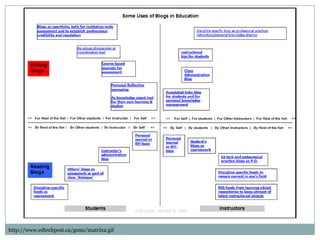
http://www.edtechpost.ca/gems/matrix2.gif
Blogs

Technology Blogs              Subject Matter Blogs

 Social Computing             English4Today
    Magazine                         Includes podcasts
   Read/WriteWeb              Emergiblog (nursing)
   Techcrunch                 Education Trends
   Weblogg-ed                 Civil War History
   Techweb                    Officer.com
   The Gadgeteer              Education Blog List
   Boing Boing                Internet Stocks
   Syndicated Learning        Higher Education
Photo Management

What is Photo
                          Educational Uses
Management?

 Photo management         Not just for art class!
 sites allow users to      Great way to create a
                            class presentation based
 organize their digital     on a field trip/field
 photos and share them      experience
 with people world-        Post photos of specimens
                            or objects for students to
 wide.                      view – such as plant ID
                           Store & organize your
                            digital pictures by
                            subject, course or other
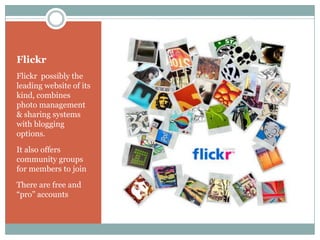
Flickr
Flickr possibly the
leading website of its
kind, combines
photo management
& sharing systems
with blogging
options.
It also offers
community groups
for members to join
There are free and
“pro” accounts
Satellite Maps

Google Earth                          Educational Uses

 Google Earth is a virtual globe      Use demos to get your students
                                        excited about geography
  browser, arguably the most           Use different Google Earth layers
  popular of those available for        to study:
  free on the Internet.                    Economics
     (NASA's World Wind and ESRI's        Demographics
      upcoming ArcGIS Explorer are         Transportation
      competitors).                    Use real-time coordinates to
                                        demonstrate distance calculations
 Virtual globes allow users to
                                       View tectonic plate-shift evidence
  interactively display and            Study major land forms.
  investigate geographic data.         The only limit to Google Earth's
                                        classroom uses is your
                                        imagination.
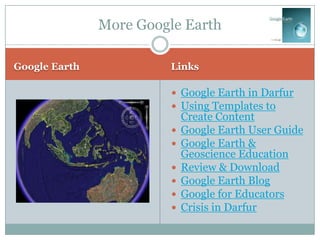
More Google Earth

Google Earth             Links

                          Google Earth in Darfur
                          Using Templates to
                             Create Content
                            Google Earth User Guide
                            Google Earth &
                             Geoscience Education
                            Review & Download
                            Google Earth Blog
                            Google for Educators
                            Crisis in Darfur
Video

What is YouTube?                   Educational Uses


 YouTube is a video                Great for visual
 sharing website that                learners!
 allows users to                    Engaging enrichments
 upload, view, and share            Gives historical
 videos.                             context, examples, or
    Other sites also host video
                                     demonstrations
     sharing
    YouTube is one of the          Scaffolding for higher
     industry leaders.               level learning
Video

Links about Video      Other Video Sites

                           Metacafe
 Techlearning             Google Video
 NCLB Research            AOL Video
                           Jumpcut
 Video for the            Yahoo Video
  Classroom                MSN Video
                           Ebaum’s World
 KQED                     Spike
                           United Streaming
 Annenberg Media          EVC
                           Video Placement
 7 Strategies
                           Internet Archive
                           EPA (Specialty sites have videos!)
Wikis

What Are They?                          Educational Uses

 "Wiki Wiki" is Hawaiian for            Collaborative writing
  "quick".
                                         Coordinating planning
 A wiki is computer software
  that allows users to easily            Easily create simple
  create, edit and link web                 websites
  pages.
     It is like combining a web page      Project development with
      & a Word document                     peer review
 Wikis are used to create:                Data collection
   Collaborative websites
   Power community websites
                                           Review classes & teachers
   Intranets                              Presentations
 Wiki in Plain English                    Create courses
Wikis

Using Wikis                Wiki Sites


 Wiki Design Principles     Pbwiki
 Using Wiki in                Video

  Education                  Wet Paint
 Wikis in Higher            Wikispaces
  Education
 7 Things You Should
  Know
 Wiki Comparisons
ePortfolios

What is the purpose?             Educational Uses

 "The portfolio can provide      Metacognition
  an opportunity to                  development
  demonstrate one's ability to      History of development &
  collect, organize, interpret       growth
  and reflect on documents          Make connections between
  and sources of information.        learning experiences
 It is also a tool for
  continuing professional           Authentic assessment tool
  development, encouraging          Personal knowledge
  individuals to take                management
  responsibility for and            Showcase competencies
  demonstrate the results of        Interdisciplinary synthesis
  their own learning."
ePortfolios

More Information            Web Sites


 ePortfolios (Awesome!)     Free Basic ePortfolio sites
                               My eCoach
 7 Things You Should          OSP
                               rCampus
  Know                         DIGIcation

 ePortfolio.eu
                             Subscriber/Institutional
 ePortfolios for             use sites
  Learning                       Foliotek
                                 Live Text
 Sample Portfolio               iWebfolio
                                 ELGG
Web 2.0 Websites

More Info                  More Practice with 2.0


 eLearn Magazine           23 Things to Do
 Stephen’s Web
 Educase Study
 Robin Good
 eLearn Space
 TVUSD
 Gliffy
Questions?
Your Turn!

 Social Bookmarks
   Social Bookmarks in Plain
    English
 Online Groups
 Social Networks
   Social Networking in Plain
    English
 Voice Thread
 Scrapbooks
 Virtual Worlds
 Project Sharing

Web 2.0

  • 1.
    Web 2.0 WHAT ISIT & WHY DO I USE IT?
  • 3.
    What is Web2.0?  Web 2.0 is a neologism that signifies the transformation from the “read web to the “read-write” web.  “the Web was shifting from being a medium, in which information was transmitted and consumed, into being a platform, in which content was created, shared, remixed, repurposed, and passed along.”  Web 2.0 works as a customizable network system to link users to information and each other  Web 2.0 is not just a technological revolution, but also a social revolution!
  • 5.
    Distance Learning Before Web2.0 After Web 2.0  A type of content  Nodes of info connected to  Focus on content design other nodes of info, largely produced by students  Composed, organized, &  Syndicated information packaged by publishers  Resembles a conversation or  Organized and structured into blog courses  Personal learning center  Consumed by students where content is manipulated through reading to meet learners’ needs – focus on content use  Uses books, manuals, or tutoring software  An electronic portfolio  An environment  A system
  • 6.
    Educase Study Reveals… Students'Desire for Information Technology Use in the Classroom Moderate Extensive Limited Other 6% 26% 41% 27%
  • 7.
    Implications for Educators Institutions of higher education must learn to incorporate Web 2.0 applications in a positive and educational way.  Educators must be flexible and creative in their use of technology in the classroom.  Educators must embrace a two-way exchange between themselves and students, realizing they will potentially learn as much as they teach.  Educators must never stop learning.  This used to be in regards to their content area.  Now, this statement also applies to exchanging information using Web 2.0.
  • 8.
    Types of Web2.0 Technology Some We Will Explore Some for You to Explore  Podcasts  Social Bookmarks  Blogs  Online Groups  Photo Management  Social Networks  Satellite Maps  Voice Thread  Video  Scrapbooks  Wikis  Virtual Worlds  ePortfolios  Project Sharing Note: Elements all incorporate some type of social network.
  • 10.
    Podcasts What Are They? Podcasts in Education  Podcasts are audio files that are  Lectures can be posted online or posted online so that users can downloaded from other automatically download the files universities through places such to listen whenever they want. as the iTunes store  Most commonly in MP3 format  Instant world-wide access  Podcasting allows individuals to  Adds an auditory dimension to have a self-published, syndicated courses to meet the needs of radio show varied learning styles  Allows absent students to easily obtain lecture content  New medium for class projects  Transportability of material
  • 11.
    Podcasting Sites Specfic General Search Sites  Podcasts for Teachers  Podcast Alley  Podcasts for Educators  Podcast.net  PodCop  AllPodcasts  Spanish PodFrecasts  Podcasting Station  Beginning French  Podcast Bunker  Moritz Law  Podcasting Tools  Theories of Communication  iTunes  Scientific American  Replay Media  Learn Out Loud  Family Friendly Podcasts  Language Arts Podcasts  Podcast Network  Mathgrad.com  NPR Podcasts  Small Business Expo  Internet Archive  White House Podcasts  Podscope
  • 12.
    Blogs: What Are They? Blogsare a web site that contains an online personal journal with reflections, comments, and often hyperlinks provided by the writer. They often offer opportunities for community members to respond to the posts in an asynchronous form of communication.
  • 13.
    Blogs How do theywork? Using RSS to Manage  Blogs in Plain English  RSS (really simple syndication) is a way to manage blogs & news posts so the information you are interested in “feeds” directly to you.  RSS in Plain English
  • 14.
    Educational Uses ofBlogs Instructors Uses of Blogs Student Uses in Your Courses  Content-related blog as  Reflective or writing professional practice journals  Networking and personal  Knowledge management knowledge sharing  Instructional tips for  Assignment submission students and review  Course announcements  Dialogue for group work and readings  E-portfolios  Annotated links  Share course-related  Knowledge management resources
  • 15.
  • 16.
    Blogs Technology Blogs Subject Matter Blogs  Social Computing  English4Today Magazine  Includes podcasts  Read/WriteWeb  Emergiblog (nursing)  Techcrunch  Education Trends  Weblogg-ed  Civil War History  Techweb  Officer.com  The Gadgeteer  Education Blog List  Boing Boing  Internet Stocks  Syndicated Learning  Higher Education
  • 17.
    Photo Management What isPhoto Educational Uses Management?  Photo management  Not just for art class! sites allow users to  Great way to create a class presentation based organize their digital on a field trip/field photos and share them experience with people world-  Post photos of specimens or objects for students to wide. view – such as plant ID  Store & organize your digital pictures by subject, course or other
  • 18.
    Flickr Flickr possibly the leadingwebsite of its kind, combines photo management & sharing systems with blogging options. It also offers community groups for members to join There are free and “pro” accounts
  • 19.
    Satellite Maps Google Earth Educational Uses  Google Earth is a virtual globe  Use demos to get your students excited about geography browser, arguably the most  Use different Google Earth layers popular of those available for to study: free on the Internet.  Economics  (NASA's World Wind and ESRI's  Demographics upcoming ArcGIS Explorer are  Transportation competitors).  Use real-time coordinates to demonstrate distance calculations  Virtual globes allow users to  View tectonic plate-shift evidence interactively display and  Study major land forms. investigate geographic data.  The only limit to Google Earth's classroom uses is your imagination.
  • 20.
    More Google Earth GoogleEarth Links  Google Earth in Darfur  Using Templates to Create Content  Google Earth User Guide  Google Earth & Geoscience Education  Review & Download  Google Earth Blog  Google for Educators  Crisis in Darfur
  • 21.
    Video What is YouTube? Educational Uses  YouTube is a video  Great for visual sharing website that learners! allows users to  Engaging enrichments upload, view, and share  Gives historical videos. context, examples, or  Other sites also host video demonstrations sharing  YouTube is one of the  Scaffolding for higher industry leaders. level learning
  • 22.
    Video Links about Video Other Video Sites  Metacafe  Techlearning  Google Video  NCLB Research  AOL Video  Jumpcut  Video for the  Yahoo Video Classroom  MSN Video  Ebaum’s World  KQED  Spike  United Streaming  Annenberg Media  EVC  Video Placement  7 Strategies  Internet Archive  EPA (Specialty sites have videos!)
  • 23.
    Wikis What Are They? Educational Uses  "Wiki Wiki" is Hawaiian for  Collaborative writing "quick".  Coordinating planning  A wiki is computer software that allows users to easily  Easily create simple create, edit and link web websites pages.  It is like combining a web page  Project development with & a Word document peer review  Wikis are used to create:  Data collection  Collaborative websites  Power community websites  Review classes & teachers  Intranets  Presentations  Wiki in Plain English  Create courses
  • 24.
    Wikis Using Wikis Wiki Sites  Wiki Design Principles  Pbwiki  Using Wiki in  Video Education  Wet Paint  Wikis in Higher  Wikispaces Education  7 Things You Should Know  Wiki Comparisons
  • 25.
    ePortfolios What is thepurpose? Educational Uses  "The portfolio can provide  Metacognition an opportunity to development demonstrate one's ability to  History of development & collect, organize, interpret growth and reflect on documents  Make connections between and sources of information. learning experiences  It is also a tool for continuing professional  Authentic assessment tool development, encouraging  Personal knowledge individuals to take management responsibility for and  Showcase competencies demonstrate the results of  Interdisciplinary synthesis their own learning."
  • 27.
    ePortfolios More Information Web Sites  ePortfolios (Awesome!)  Free Basic ePortfolio sites  My eCoach  7 Things You Should  OSP  rCampus Know  DIGIcation  ePortfolio.eu  Subscriber/Institutional  ePortfolios for use sites Learning  Foliotek  Live Text  Sample Portfolio  iWebfolio  ELGG
  • 28.
    Web 2.0 Websites MoreInfo More Practice with 2.0  eLearn Magazine  23 Things to Do  Stephen’s Web  Educase Study  Robin Good  eLearn Space  TVUSD  Gliffy
  • 29.
  • 30.
    Your Turn!  SocialBookmarks  Social Bookmarks in Plain English  Online Groups  Social Networks  Social Networking in Plain English  Voice Thread  Scrapbooks  Virtual Worlds  Project Sharing

Editor's Notes

  • #3 Click on graphic or video camera to watch video introduction.
  • #6 There is a current paradigm shift regarding everything that is web-based.
  • #7 Students are used to multi-tasking with technology. They expect to be stimulated in this manner. They also view their opinions and knowledge as important & desire to exchange their information with others.
  • #9 This list is not conclusive. For example, the collaborative learning presentation included information on simulations.
  • #14 Click on “Blogs in Plain English” to play a video that explains blogs. The same for “RSS in Plain English”
  • #16 Graphic shows who (student or instructor) uses blogs, how (reading or writing), and for what purpose (rest of the net, students, instructors, or self).
  • #24 Watch 4 minute video on how to use wikis by clicking on “Wiki in Plain English” link.
  • #29 If there is time remaining, have participants work on the 23 Things to Do, create a wiki, or other Web 2.0 project.
  • #31 Jigsaw remaining topics: Break class into groups & have each one explore the links. They can search & find other info if they desire. Then, each link will be pulled up, and the group will present what they learned.