Visual Management
Visual Management
• Visual Management is a set of techniques for creating a
workplace embracing visual communication and control
throughout the work environment.
• The visual management philosophy is underpinned by the
view that ‘what gets measured & displayed gets done’
• It makes it easy to understand the processes which have
been put into place
Visual Management Goals
• Make everyone’s job easier
• Give all associates a high degree of ownership in
their work, and pride in their workplace
• Increase communication by making information
easier to understand
• Improve company overall success
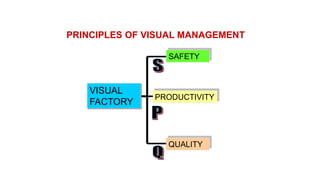
VISUAL
FACTORY
SAFETY
PRODUCTIVITY
QUALITY
PRINCIPLES OF VISUAL MANAGEMENT
The Visual Management
In the visual workplace, anyone will easily know the:
who, what, when, where, why, and how of an area
within 5 minutes
The foundation of
continuous improvement
How do we create Visual
Management?
Workplace Organization
The Visual Workplace
• is safe.
• is clean and organized.
• is easily understood.
• is managed through involvement by
all.
• creates high quality products.
• communicates progress.
Workplace Organization
A Vital Link To Continuous Improvement
What is it?
• 5S is a workplace organization technique
• It is a way to involve associates in the ownership of their workspace
• It helps create and maintain the efficiency and effectiveness of a work
area
What’s it for?
• It is a way to create:
• Cleaner work areas
• More organization
• Safer working conditions
• Less wasted time
• Efficient work processes and practices
• More available space
Different types of workplaces
• There are basically three different types of workplaces:
1. Third Class : People throw trash around and no one cleans up.
2. Second Class: People throw trash around and someone else pick it
up.
3. First Class : No one throws trash around and everyone works to keep
things clean.
The 5S Principles
•SEIRI :Sort out
•SEITON :Straighten/Set in Order
•SEISO :Shining
•SEIKETSU :STANDARDIZE
•SHITSUKE :Sustain
5s
Ford’s CANDO Toyota’s 5S Six Sigma DMAIC
C – Cleaning Up
A – Arranging
N – Neatness
D – Discipline
O – Ongoing Improvement
S –Sort
S – Straighten/Set in Order
S – Sweep
S – Standardize
S – Sustain
D – Define Phase
M – Measure Phase
A – Analyze Phase
I – Improve Phase
C – Control Phase
Eliminate waste
Sort
Set in
order
ShineSTANDARDIZE
SUSTAIN
1-The First S - Sorting
Separating the Needed from the Not-Needed
• Decide what you need.
• Remove unnecessary clutter.
• All tools, gauges, materials, classified and then stored.
• Remove items which are broken, unusable or only occasionally used.
The First S - Sorting
• Red Tag Technique:
• GIVE STAFF RED LABELS
• ASK STAFF TO GO THROUGH EVERY ITEM IN THE WORK PLACE
• ASK IF NEEDED & THOSE THAT ARE NEEDED,IN WHAT QUANTITY
• NOT NEEDED >> RED TAG IT
• STORE IN THE RED TAG AREA
RED
TAG
The First S - Sorting
• Place the suspected items in the RED TAG AREA for one week.
• Allow the staff to re-evaluate the needed items.
• At the end of week those need items should be returned.
CE
N
G-
LE-
XX
X
(--
)
File completed Tag at ____________
5S---REDTAG
Ente
r #
in
box
Ente
r #
in
box
Ente
r #
in
box
Item Name
&/or Description:
Department: Value per Item:
Classification: 1. Raw Material
2. Work-in-Process
3. Component
4. Finished Product
5. Machine / Equipment
6. Mold / Jig
7. Tool / Fitting
8. Other______________
Reason: 1. Unnecessary
2. Defective
3. Leftover Material
4. Unknown
5. Other______________
Action: 1. Eliminate
2. Return
3. Move to Red Tag Storage
4. Other_______________
Completed:
Tag Attached:
Year_____ Month_____ Day____
Action Taken:
Year_____ Month_____ Day_____
The First S - Sorting
• Organisation:
Priority Frequency of use How to use
Low Less than once
per year
Once per year
Throw away
Store away from
the workplace
Average Once per month
Once per week
Store together but
offline
High Once Per Day Locate at the
workplace
The First S - Sorting
• Expected Results of Sorting :
• Elimination of wastes of resources, material, spaces, …etc.
• Reduce WIP inventory
2-The Second S – Set in order
A place for everything and everything in its place, clean and ready to
use
Organise layout of tools and equipment
•Designated locations
•Use tapes and labels
•Ensure everything is available as it is needed
and at the “point of use”
The Second S – Set in order
Workplace Checkpoints:-
• Storage places clearly marked?
• Tools classified and stored by frequency of use?
(Low, Average and high)
• Pallets stacked correctly?
• Safety equipment easily accessible?
• Floors in good condition?
The Second S – Set in order
• Expected Results of Sorting :
• No more Searching.
• Reduce Setting up time
• Prevent : misplacing, Leaking oil, wasting energy or materials .. Etc.
• Improve:
• Space Utilization.
• Eliminate:
• Searching time
• Dangerous conditions
Does this look well
Straightened?
Outlines or Footprints
A little out of place
3-The Third S – Shining
Cleaning for Inspection
• Identify and eliminate causes of dirt and grime – remove the
need to clean.
• Sweep, dust, polish and paint.
• Divide areas into zones.
• Define responsibilities for cleaning.
• Tools and equipment must be owned by an individual.
• Focus on removing the need to clean.
The Third S – Shining
• Expected Results of Sorting :
• Higher Quality work and products.
• More Comfortable and safer work environment.
• Greater visibility and retrieval time.
• Lower maintenance time.
Before and After
A well shined facility
4-The Fourth S - Standardizing
Developing Common Methods for Consistency
• Generate a maintenance system for the first three
• Develop procedures, schedules, practices
• Continue to assess the use and disposal of items
• Regularly audit using checklists and measures of housekeeping
• Real challenge is to keep it clean
A Place For Everything
Even rags, gloves, and trash
A Place For Everything
Every item has a place, is labeled, and color coded
5- The Fifth S - Sustaining
Holding the Gains and Improving
• Determine 5S Level of Achievement
• Perform routine checks
• Analyze results of routine checks
• Measure progress and plan for continuous improvement
Visual Ranges Make It
Easier to Sustain
Visual Ranges Make It Easier to
Sustain
Sustain
Everyone needs to do their part to keep things where and
how they belong
CATEGORY ITEM Yes No OBSERVATIONS
Have unnecessary items been X-tagged?
Are items neatly arranged?
Are walkways/work areas clearly outlined?
Are designated areas marked for incoming material?
SORT Are materials located in designated areas?
(Organization) Are designated areas marked for outgoing material?
Is outgoing material located in designated area?
Are information boards orderly?
Is indicated information found?
Is information current?
Do excess materials have a specific location?
Are excess materials in their location?
Is there a place for everything?
Is everything in its place?
STABALIZE Is it easy to see what belongs where?
(Orderliness) Are things put away after use?
Are tools organized and located in specific place?
Are only red containers being used for scrap?
Is rejected material properly identified?
Is rejected material stored in a designated area?
Is process scrap located in separate containers?
Is defective material located in separate containers?
Are sort and stabilize complete?
Are work areas clean?
Are aisles clear?
Are tools clean?
Is any material found on the floor?
Is equipment clean?
SHINE Do machines show evidence of old oil leaks?
(Cleanliness) Is cell inventory correctly identified?
5S Checklist
5S Supportive
Strategies
• Color coding
• Point of use
• Safety
Color coding things is a fast, easy way to separate different
items and to visually determine if something is misplaced
Examples
Examples
Color Coded Scrap Hoppers
Part Color Coding
Different color for each part number
Colors correspond to colors of:
work units
tooling
gages
fixtures
settings
Color Coded Dies
2-Point of Use
• Tools
• Parts disposal
• Operating procedures
• Lock-out instructions
• Materials/Finished goods
• Information
Looking For Tools
Point of Use
(Shadow Board-Visual Control)
Point of Use
Not enough room to store at the point of use, so
make them mobile
Point of Use
Fixtures rotate so they take up less space and are kept
at the point of use
Point of use
Information
Safety: The 6th - S
Is of great concern when considering
workplace organization and the 5S’s
Safety the Sixths S
Safety
(Visual Control Signage)
Color coded guards and labeling
Sufficient Room to Exit the
Work Unit
One small exit for up to 9 operators
Exit
Safety
Well labeled, but what keeps people out of coils?
Safety
Color coded and visual
-easily accessible?
VISUAL MANAGEMENT INITIATIVES
1. Visual Control Boards.
2. Andon
3. Footprints
4. Signage
5. Obeya
4. Hansei
Visual Display
Information regarding
Q C D M S
• Q - Quality
C - Cost
D - Delivery
M - Material
S - Safety
What is Visual Control Board
1. A color-coded , physical visual control system used for monitoring of shop-floor activities and KPIs.
Use of Visual Control Board
1. Visual boards are used as activators and data communication centre.
2. The visual board area is used for shop-floor meetings.
3. A centre of periodical progress reviews and updates.
4. Used to drive the business processes from the boardroom to the shop floor.
Benefits of Visual Control
Board
1. It quickly gives visibility to the progress of each tasks for further action.
2. Identifies the resources and activities being undertaken.
VISUAL BOARD
This is an example of a pull board that could be used with internal operations, as shown, or even
with external customers.
Red zone indicates
the supplier is on the
verge of not satisfying
their customer. Very
low level of goods
maintained.
Yellow zone indicates
customer
requirements are
being met. Low level
of finished goods
maintained.
Green zone indicates
the customer’s needs
are being fulfilled.
Supplier is building
more than the
customer is requiring
and it may be time to
stop production until
demand is more in
line with supply.
The cards hanging on
the hooks in the
colored zones reflect
the part number
identified in the
section, a given
quantity of material in
one container. When a
card is on the hook it
indicates an empty
container.
Other pertinent information
(e.g.. Quality performance)
would be contained in the
information section.
VISUAL BOARD
1. Andon (Japanese for lantern) is a tool for visual
management and refers to a system of signals used to
indicate the operational status (at a glance) of a machine
or work center.
2. It can be used manually or automatically.
3. It also one of the principle elements of the Jidoka
quality-control method.
What is Andon?
ANDON
Use of Andon
1. Alerts management and other workers to quality or
process problem.
2. Gives the worker the ability to stop production when a
defect is found, and immediately call for assistance.
3. Indicates where the alert was generated, and may also
provide a description of the trouble whether shortage of material or
maintenance call or supervisor call.
.
ANDON
Defect created or found
Part shortage
Equipment/Tool malfunction
A safety problem exists
Common reasons
for manual
activation of the
Andon
ANDON
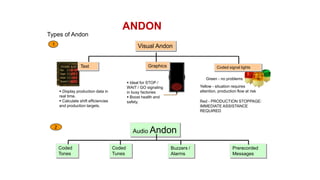
Types of Andon
Coded signal lightsText Graphics
Visual Andon
Green - no problems
Yellow - situation requires
attention, production flow at risk
Red - PRODUCTION STOPPAGE:
IMMEDIATE ASSISTANCE
REQUIRED
1
 Display production data in
real time.
 Calculate shift efficiencies
and production targets.
 Ideal for STOP /
WAIT / GO signaling
in busy factories
 Boost health and
safety.
Coded
Tones
Coded
Tunes
Prerecorded
Messages
Buzzers /
Alarms
Audio Andon2
ANDON
1. Markings on the floor or work area outlining specifically where items should be placed.
Benefit
1. To ease employees during storage or retrieval.
2. It avoids employees wasting time looking for things or pondering their next move.
3. The workplace becomes clean and better organized.
4. Operation on the shop floor and office become easier and safer
5. Visible location of parts or equipment for easy traceability and save time of searching
What is Footprint
 .
FOOTPRINT
a) Mark from the floor up to workbenches etc
b) Start with plastic tape to test out, then move to paint
1. A footprint is an outline of the items required at work areas indicating where the items
should be placed.
c) Use colours to code footprints as shown in the following example, as a guideline :
Light Blue - Raw parts/material
Black - Finished good/parts
Red - Non-conforming/KIV parts/material
White - Other than parts/material
Yellow – Border of work area
2. Rules about footprints or floor borders
FOOTPRINT
CREATING FOOTPRINT
Yellow for work area border
SOZAI
LINE
KANSEI
NG VISUAL BOARDQC CORNER5S CORNER
Light blue for raw material Black for finished part
Red for non-conforming part
White for equipment
TOOL CABINET
FOOTPRINT
Floor Labeling Example
Signage is any kind of graphics created to display information.
SIGNAGE
Displays
To make staff aware of
related data and
information
– charts, graphs etc
Controls
To guide the action of
staff members – sign
boards, dos and
don’ts signs
Signs Example
Designated Location
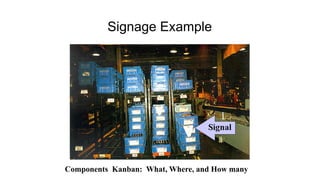
Components Kanban: What, Where, and How many
Signage Example
Designated Location Example
Egg Carton Display
Signage Example
Information Boards
Signs Example
The best visual displays are easy
to understand
Symbols
• are easily understood
• give immediate status
• engage viewer’s attention
Symbols make status visible and
easy to understand
What do these symbols tell us?
P1 Device
CAPABILITY
Machine Number
Machine Type
Restudy Date
Person Responsible
Characteristic
Potential
Study
LongTerm
Study
Cp Cpk Study Date
Capable
To add impact
to visual displays,
relate items to
a cost.
Product display for waste
awareness
Signage Examples
Lighted displays capture attention
Signage
Safety First ! Always.
• Make safety records visible
• Perform regular safety audits
• Display lost time injuries /
accidents
• Keep track of
where, when, why, and how
accidents occur
Obeya
• Japanese for "large room" or "war room" - refers to a form of
project management used in Asian companies
(including Toyota).
Obeya
Team decision-making tools
Visual Display & Visual
Measurement
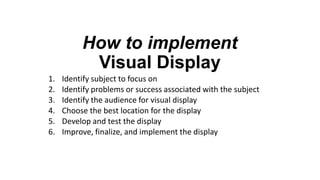
How to implement
Visual Display
1. Identify subject to focus on
2. Identify problems or success associated with the subject
3. Identify the audience for visual display
4. Choose the best location for the display
5. Develop and test the display
6. Improve, finalize, and implement the display
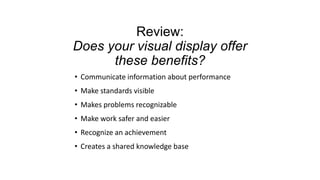
Review:
Does your visual display offer
these benefits?
• Communicate information about performance
• Make standards visible
• Makes problems recognizable
• Make work safer and easier
• Recognize an achievement
• Creates a shared knowledge base
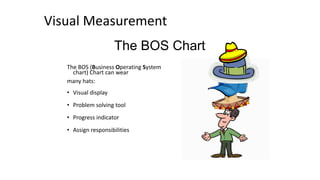
The BOS Chart
The BOS (Business Operating System
chart) Chart can wear
many hats:
• Visual display
• Problem solving tool
• Progress indicator
• Assign responsibilities
Visual Measurement
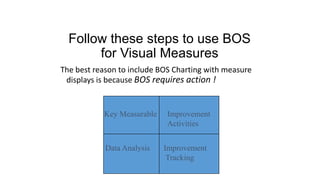
Follow these steps to use BOS
for Visual Measures
The best reason to include BOS Charting with measure
displays is because BOS requires action !
Key Measurable
Data Analysis
Improvement
Activities
Improvement
Tracking
25 50
10075
TREND LINE SUGGESTIONS
DATE:_______________
25 50
10075
25 50
10075
25 50
10075
25 50
10075
25 50
10075
25 50
10075
25 50
10075
Ref # Suggestions Resp
Comp
Date %Comp
Ref # Description
IMPROVEMENT TRACKINGANALYSIS (PARETO)
BOS Key MeasurableLINE:________________
Step 1
Involve users in the measurement
Team members collect data; track numbers:
• Total product produced
• per hour, per shift, per day, per week, etc.
• Average time to produce one unit
• PPM - number of defects
• Scrap - percentage of total produced
• Changeover time
• Downtime / Uptime
Step 2
Team determines what to BOS Chart
• Something needing
improvement
• Team has control
• Important to customer
• Important to our company
Step 3
Team members update BOS
• Use team meeting to study data
• Team plans improvement
activities
• Everyone participates
• Computers not required
Step 4
Make BOS results visible at the Work Unit
To develop Visual Measures
decide . . .
• What needs to be measured ?
• Who is the user / audience ?
• How often do we take the data ?
• Who will do the tracking ?
• How will we display data so that it speaks ?
• Where do we best locate the display ?
Reality Check for Measures
Answer these four questions about the measures you use:
• Are they simple and easy to use?
• Do they change over time?
• Do they provide rapid feedback?
• Do they foster continuous improvement?
VISUAL DISPLAY & MEASURES AUDIT
1. For each item listed fill in an observation to indicated whether or not the work group is currently working on this.
2. If there are any changes desired please indicate those in the “Desired Changes” column.
3. In the column labeled “Priority” indicate if the change can be implemented in:
1) 36 Hours
2) 5 Days
3) 2 Weeks
4. Fill in any additional items that are observed in the work area and fill in all categories.
ITEM OBSERVATION DESIRED CHANGES PRIORITY
Changeover Clock Dedicated Line-clock is not
needed
Redistribute the clock to a needy cell 1
P.I. Indicator
Production Counters
Changeover Graph
Bottleneck Operation
The Visual Management Check
List and Implementation
THE VISUAL FACTORY CHECKLIST
ATEGORY ITEM YES NO
Changeover tools are within reach
Tooling is well organized
Machines and equipment are clean and painted
Unnecessary items are cleared
Workplace organization and orderliness
5S Aisles are well marked and clear
There is a place for everything and everything in its place
Housekeeping responsibilities are assigned
Disciplined approach to clean work area
All bins are labeled and no parts are on the floor
All personal items are stored in lockers
Method to identify hold and reject parts
Supplier defects are segregated
Business Unit/department display visible
Cell displays conform to the unit/department standards
Using standard changeover clock
Part counter displayed
Downtime clock in use
Red box scrap method in use
Work instructions displayed at the point of use
Min/Max Limbo bars for inventory
Current part number and next part number displayed
Kanban system in use
Kanban system for MRO
Kanban system for Tooling
First piece displayed
Boundary Sample board
VISUAL Customer/Supplier information displayed
DISPLAY Bottleneck machines are identified
Bottleneck cycle time is on the balance board
Changeover signal to synchronize cell
Changeover stock staging area for fast changeover
Error proofing devices are on the PM check
ATPM boards using tags and action status in each cell
Cumulative downtime clock displayed in each cell
Proper lighting and air handling
Cell number, customer and product posted at each cell
Employee information board is in a standard format
Key measures are trended and up to date
Team project display with before/after/future pictures
Defects are displayed with arrows and action plans
Safety rules are posted and followed
Color coding and symbols are used for quick identification
THE VISUAL FACTORY
IMPLEMENTATION PLAN
Implementation Objectives:
1. Begin immediately and involve all cell members.
2. Capture before condition.
3. Identify areas of greatest opportunity.
Activities Week 1: Responsible:
Activities Week 2: Responsible:
Activities Week 3: Responsible:
Activities Week 4: Responsible:
Key Support People:
End of Visual Management

Visual Management

  • 1.
  • 2.
    Visual Management • VisualManagement is a set of techniques for creating a workplace embracing visual communication and control throughout the work environment. • The visual management philosophy is underpinned by the view that ‘what gets measured & displayed gets done’ • It makes it easy to understand the processes which have been put into place
  • 3.
    Visual Management Goals •Make everyone’s job easier • Give all associates a high degree of ownership in their work, and pride in their workplace • Increase communication by making information easier to understand • Improve company overall success
  • 4.
  • 5.
    The Visual Management Inthe visual workplace, anyone will easily know the: who, what, when, where, why, and how of an area within 5 minutes
  • 6.
  • 7.
    How do wecreate Visual Management? Workplace Organization
  • 8.
    The Visual Workplace •is safe. • is clean and organized. • is easily understood. • is managed through involvement by all. • creates high quality products. • communicates progress.
  • 9.
    Workplace Organization A VitalLink To Continuous Improvement
  • 11.
    What is it? •5S is a workplace organization technique • It is a way to involve associates in the ownership of their workspace • It helps create and maintain the efficiency and effectiveness of a work area
  • 12.
    What’s it for? •It is a way to create: • Cleaner work areas • More organization • Safer working conditions • Less wasted time • Efficient work processes and practices • More available space
  • 13.
    Different types ofworkplaces • There are basically three different types of workplaces: 1. Third Class : People throw trash around and no one cleans up. 2. Second Class: People throw trash around and someone else pick it up. 3. First Class : No one throws trash around and everyone works to keep things clean.
  • 14.
    The 5S Principles •SEIRI:Sort out •SEITON :Straighten/Set in Order •SEISO :Shining •SEIKETSU :STANDARDIZE •SHITSUKE :Sustain
  • 15.
    5s Ford’s CANDO Toyota’s5S Six Sigma DMAIC C – Cleaning Up A – Arranging N – Neatness D – Discipline O – Ongoing Improvement S –Sort S – Straighten/Set in Order S – Sweep S – Standardize S – Sustain D – Define Phase M – Measure Phase A – Analyze Phase I – Improve Phase C – Control Phase
  • 16.
  • 17.
    1-The First S- Sorting Separating the Needed from the Not-Needed • Decide what you need. • Remove unnecessary clutter. • All tools, gauges, materials, classified and then stored. • Remove items which are broken, unusable or only occasionally used.
  • 18.
    The First S- Sorting • Red Tag Technique: • GIVE STAFF RED LABELS • ASK STAFF TO GO THROUGH EVERY ITEM IN THE WORK PLACE • ASK IF NEEDED & THOSE THAT ARE NEEDED,IN WHAT QUANTITY • NOT NEEDED >> RED TAG IT • STORE IN THE RED TAG AREA RED TAG
  • 19.
    The First S- Sorting • Place the suspected items in the RED TAG AREA for one week. • Allow the staff to re-evaluate the needed items. • At the end of week those need items should be returned.
  • 20.
    CE N G- LE- XX X (-- ) File completed Tagat ____________ 5S---REDTAG Ente r # in box Ente r # in box Ente r # in box Item Name &/or Description: Department: Value per Item: Classification: 1. Raw Material 2. Work-in-Process 3. Component 4. Finished Product 5. Machine / Equipment 6. Mold / Jig 7. Tool / Fitting 8. Other______________ Reason: 1. Unnecessary 2. Defective 3. Leftover Material 4. Unknown 5. Other______________ Action: 1. Eliminate 2. Return 3. Move to Red Tag Storage 4. Other_______________ Completed: Tag Attached: Year_____ Month_____ Day____ Action Taken: Year_____ Month_____ Day_____
  • 21.
    The First S- Sorting • Organisation: Priority Frequency of use How to use Low Less than once per year Once per year Throw away Store away from the workplace Average Once per month Once per week Store together but offline High Once Per Day Locate at the workplace
  • 22.
    The First S- Sorting • Expected Results of Sorting : • Elimination of wastes of resources, material, spaces, …etc. • Reduce WIP inventory
  • 23.
    2-The Second S– Set in order A place for everything and everything in its place, clean and ready to use Organise layout of tools and equipment •Designated locations •Use tapes and labels •Ensure everything is available as it is needed and at the “point of use”
  • 24.
    The Second S– Set in order Workplace Checkpoints:- • Storage places clearly marked? • Tools classified and stored by frequency of use? (Low, Average and high) • Pallets stacked correctly? • Safety equipment easily accessible? • Floors in good condition?
  • 25.
    The Second S– Set in order • Expected Results of Sorting : • No more Searching. • Reduce Setting up time • Prevent : misplacing, Leaking oil, wasting energy or materials .. Etc. • Improve: • Space Utilization. • Eliminate: • Searching time • Dangerous conditions
  • 26.
    Does this lookwell Straightened?
  • 27.
    Outlines or Footprints Alittle out of place
  • 28.
    3-The Third S– Shining Cleaning for Inspection • Identify and eliminate causes of dirt and grime – remove the need to clean. • Sweep, dust, polish and paint. • Divide areas into zones. • Define responsibilities for cleaning. • Tools and equipment must be owned by an individual. • Focus on removing the need to clean.
  • 29.
    The Third S– Shining • Expected Results of Sorting : • Higher Quality work and products. • More Comfortable and safer work environment. • Greater visibility and retrieval time. • Lower maintenance time.
  • 30.
  • 31.
    A well shinedfacility
  • 32.
    A well shinedfacility
  • 33.
    4-The Fourth S- Standardizing Developing Common Methods for Consistency • Generate a maintenance system for the first three • Develop procedures, schedules, practices • Continue to assess the use and disposal of items • Regularly audit using checklists and measures of housekeeping • Real challenge is to keep it clean
  • 34.
    A Place ForEverything Even rags, gloves, and trash
  • 35.
    A Place ForEverything Every item has a place, is labeled, and color coded
  • 36.
    5- The FifthS - Sustaining Holding the Gains and Improving • Determine 5S Level of Achievement • Perform routine checks • Analyze results of routine checks • Measure progress and plan for continuous improvement
  • 37.
    Visual Ranges MakeIt Easier to Sustain
  • 38.
    Visual Ranges MakeIt Easier to Sustain
  • 39.
    Sustain Everyone needs todo their part to keep things where and how they belong
  • 40.
    CATEGORY ITEM YesNo OBSERVATIONS Have unnecessary items been X-tagged? Are items neatly arranged? Are walkways/work areas clearly outlined? Are designated areas marked for incoming material? SORT Are materials located in designated areas? (Organization) Are designated areas marked for outgoing material? Is outgoing material located in designated area? Are information boards orderly? Is indicated information found? Is information current? Do excess materials have a specific location? Are excess materials in their location? Is there a place for everything? Is everything in its place? STABALIZE Is it easy to see what belongs where? (Orderliness) Are things put away after use? Are tools organized and located in specific place? Are only red containers being used for scrap? Is rejected material properly identified? Is rejected material stored in a designated area? Is process scrap located in separate containers? Is defective material located in separate containers? Are sort and stabilize complete? Are work areas clean? Are aisles clear? Are tools clean? Is any material found on the floor? Is equipment clean? SHINE Do machines show evidence of old oil leaks? (Cleanliness) Is cell inventory correctly identified? 5S Checklist
  • 41.
    5S Supportive Strategies • Colorcoding • Point of use • Safety
  • 42.
    Color coding thingsis a fast, easy way to separate different items and to visually determine if something is misplaced
  • 43.
  • 44.
  • 45.
  • 46.
    Part Color Coding Differentcolor for each part number Colors correspond to colors of: work units tooling gages fixtures settings
  • 47.
  • 48.
    2-Point of Use •Tools • Parts disposal • Operating procedures • Lock-out instructions • Materials/Finished goods • Information Looking For Tools
  • 49.
    Point of Use (ShadowBoard-Visual Control)
  • 50.
    Point of Use Notenough room to store at the point of use, so make them mobile
  • 51.
    Point of Use Fixturesrotate so they take up less space and are kept at the point of use
  • 52.
  • 53.
    Safety: The 6th- S Is of great concern when considering workplace organization and the 5S’s
  • 54.
  • 55.
    Safety (Visual Control Signage) Colorcoded guards and labeling
  • 56.
    Sufficient Room toExit the Work Unit One small exit for up to 9 operators Exit
  • 57.
    Safety Well labeled, butwhat keeps people out of coils?
  • 58.
    Safety Color coded andvisual -easily accessible?
  • 59.
    VISUAL MANAGEMENT INITIATIVES 1.Visual Control Boards. 2. Andon 3. Footprints 4. Signage 5. Obeya 4. Hansei
  • 60.
    Visual Display Information regarding QC D M S • Q - Quality C - Cost D - Delivery M - Material S - Safety
  • 61.
    What is VisualControl Board 1. A color-coded , physical visual control system used for monitoring of shop-floor activities and KPIs. Use of Visual Control Board 1. Visual boards are used as activators and data communication centre. 2. The visual board area is used for shop-floor meetings. 3. A centre of periodical progress reviews and updates. 4. Used to drive the business processes from the boardroom to the shop floor. Benefits of Visual Control Board 1. It quickly gives visibility to the progress of each tasks for further action. 2. Identifies the resources and activities being undertaken. VISUAL BOARD
  • 62.
    This is anexample of a pull board that could be used with internal operations, as shown, or even with external customers. Red zone indicates the supplier is on the verge of not satisfying their customer. Very low level of goods maintained. Yellow zone indicates customer requirements are being met. Low level of finished goods maintained. Green zone indicates the customer’s needs are being fulfilled. Supplier is building more than the customer is requiring and it may be time to stop production until demand is more in line with supply. The cards hanging on the hooks in the colored zones reflect the part number identified in the section, a given quantity of material in one container. When a card is on the hook it indicates an empty container. Other pertinent information (e.g.. Quality performance) would be contained in the information section. VISUAL BOARD
  • 63.
    1. Andon (Japanesefor lantern) is a tool for visual management and refers to a system of signals used to indicate the operational status (at a glance) of a machine or work center. 2. It can be used manually or automatically. 3. It also one of the principle elements of the Jidoka quality-control method. What is Andon? ANDON
  • 64.
    Use of Andon 1.Alerts management and other workers to quality or process problem. 2. Gives the worker the ability to stop production when a defect is found, and immediately call for assistance. 3. Indicates where the alert was generated, and may also provide a description of the trouble whether shortage of material or maintenance call or supervisor call. . ANDON
  • 65.
    Defect created orfound Part shortage Equipment/Tool malfunction A safety problem exists Common reasons for manual activation of the Andon ANDON
  • 66.
    Types of Andon Codedsignal lightsText Graphics Visual Andon Green - no problems Yellow - situation requires attention, production flow at risk Red - PRODUCTION STOPPAGE: IMMEDIATE ASSISTANCE REQUIRED 1  Display production data in real time.  Calculate shift efficiencies and production targets.  Ideal for STOP / WAIT / GO signaling in busy factories  Boost health and safety. Coded Tones Coded Tunes Prerecorded Messages Buzzers / Alarms Audio Andon2 ANDON
  • 67.
    1. Markings onthe floor or work area outlining specifically where items should be placed. Benefit 1. To ease employees during storage or retrieval. 2. It avoids employees wasting time looking for things or pondering their next move. 3. The workplace becomes clean and better organized. 4. Operation on the shop floor and office become easier and safer 5. Visible location of parts or equipment for easy traceability and save time of searching What is Footprint  . FOOTPRINT
  • 68.
    a) Mark fromthe floor up to workbenches etc b) Start with plastic tape to test out, then move to paint 1. A footprint is an outline of the items required at work areas indicating where the items should be placed. c) Use colours to code footprints as shown in the following example, as a guideline : Light Blue - Raw parts/material Black - Finished good/parts Red - Non-conforming/KIV parts/material White - Other than parts/material Yellow – Border of work area 2. Rules about footprints or floor borders FOOTPRINT CREATING FOOTPRINT
  • 69.
    Yellow for workarea border SOZAI LINE KANSEI NG VISUAL BOARDQC CORNER5S CORNER Light blue for raw material Black for finished part Red for non-conforming part White for equipment TOOL CABINET FOOTPRINT
  • 70.
  • 71.
    Signage is anykind of graphics created to display information. SIGNAGE Displays To make staff aware of related data and information – charts, graphs etc Controls To guide the action of staff members – sign boards, dos and don’ts signs
  • 72.
  • 73.
    Components Kanban: What,Where, and How many Signage Example
  • 74.
  • 75.
  • 76.
  • 77.
    The best visualdisplays are easy to understand Symbols • are easily understood • give immediate status • engage viewer’s attention
  • 78.
    Symbols make statusvisible and easy to understand
  • 79.
    What do thesesymbols tell us? P1 Device CAPABILITY Machine Number Machine Type Restudy Date Person Responsible Characteristic Potential Study LongTerm Study Cp Cpk Study Date Capable
  • 80.
    To add impact tovisual displays, relate items to a cost.
  • 81.
    Product display forwaste awareness
  • 82.
  • 83.
    Signage Safety First !Always. • Make safety records visible • Perform regular safety audits • Display lost time injuries / accidents • Keep track of where, when, why, and how accidents occur
  • 84.
    Obeya • Japanese for"large room" or "war room" - refers to a form of project management used in Asian companies (including Toyota).
  • 86.
  • 87.
    Visual Display &Visual Measurement
  • 88.
    How to implement VisualDisplay 1. Identify subject to focus on 2. Identify problems or success associated with the subject 3. Identify the audience for visual display 4. Choose the best location for the display 5. Develop and test the display 6. Improve, finalize, and implement the display
  • 89.
    Review: Does your visualdisplay offer these benefits? • Communicate information about performance • Make standards visible • Makes problems recognizable • Make work safer and easier • Recognize an achievement • Creates a shared knowledge base
  • 90.
    The BOS Chart TheBOS (Business Operating System chart) Chart can wear many hats: • Visual display • Problem solving tool • Progress indicator • Assign responsibilities Visual Measurement
  • 91.
    Follow these stepsto use BOS for Visual Measures The best reason to include BOS Charting with measure displays is because BOS requires action ! Key Measurable Data Analysis Improvement Activities Improvement Tracking
  • 92.
    25 50 10075 TREND LINESUGGESTIONS DATE:_______________ 25 50 10075 25 50 10075 25 50 10075 25 50 10075 25 50 10075 25 50 10075 25 50 10075 Ref # Suggestions Resp Comp Date %Comp Ref # Description IMPROVEMENT TRACKINGANALYSIS (PARETO) BOS Key MeasurableLINE:________________
  • 93.
    Step 1 Involve usersin the measurement Team members collect data; track numbers: • Total product produced • per hour, per shift, per day, per week, etc. • Average time to produce one unit • PPM - number of defects • Scrap - percentage of total produced • Changeover time • Downtime / Uptime
  • 94.
    Step 2 Team determineswhat to BOS Chart • Something needing improvement • Team has control • Important to customer • Important to our company
  • 95.
    Step 3 Team membersupdate BOS • Use team meeting to study data • Team plans improvement activities • Everyone participates • Computers not required
  • 96.
    Step 4 Make BOSresults visible at the Work Unit
  • 97.
    To develop VisualMeasures decide . . . • What needs to be measured ? • Who is the user / audience ? • How often do we take the data ? • Who will do the tracking ? • How will we display data so that it speaks ? • Where do we best locate the display ?
  • 98.
    Reality Check forMeasures Answer these four questions about the measures you use: • Are they simple and easy to use? • Do they change over time? • Do they provide rapid feedback? • Do they foster continuous improvement?
  • 99.
    VISUAL DISPLAY &MEASURES AUDIT 1. For each item listed fill in an observation to indicated whether or not the work group is currently working on this. 2. If there are any changes desired please indicate those in the “Desired Changes” column. 3. In the column labeled “Priority” indicate if the change can be implemented in: 1) 36 Hours 2) 5 Days 3) 2 Weeks 4. Fill in any additional items that are observed in the work area and fill in all categories. ITEM OBSERVATION DESIRED CHANGES PRIORITY Changeover Clock Dedicated Line-clock is not needed Redistribute the clock to a needy cell 1 P.I. Indicator Production Counters Changeover Graph Bottleneck Operation
  • 100.
    The Visual ManagementCheck List and Implementation
  • 101.
    THE VISUAL FACTORYCHECKLIST ATEGORY ITEM YES NO Changeover tools are within reach Tooling is well organized Machines and equipment are clean and painted Unnecessary items are cleared Workplace organization and orderliness 5S Aisles are well marked and clear There is a place for everything and everything in its place Housekeeping responsibilities are assigned Disciplined approach to clean work area All bins are labeled and no parts are on the floor All personal items are stored in lockers Method to identify hold and reject parts Supplier defects are segregated Business Unit/department display visible Cell displays conform to the unit/department standards Using standard changeover clock Part counter displayed Downtime clock in use Red box scrap method in use Work instructions displayed at the point of use Min/Max Limbo bars for inventory Current part number and next part number displayed Kanban system in use Kanban system for MRO Kanban system for Tooling First piece displayed Boundary Sample board VISUAL Customer/Supplier information displayed DISPLAY Bottleneck machines are identified Bottleneck cycle time is on the balance board Changeover signal to synchronize cell Changeover stock staging area for fast changeover Error proofing devices are on the PM check ATPM boards using tags and action status in each cell Cumulative downtime clock displayed in each cell Proper lighting and air handling Cell number, customer and product posted at each cell Employee information board is in a standard format Key measures are trended and up to date Team project display with before/after/future pictures Defects are displayed with arrows and action plans Safety rules are posted and followed Color coding and symbols are used for quick identification
  • 102.
    THE VISUAL FACTORY IMPLEMENTATIONPLAN Implementation Objectives: 1. Begin immediately and involve all cell members. 2. Capture before condition. 3. Identify areas of greatest opportunity. Activities Week 1: Responsible: Activities Week 2: Responsible: Activities Week 3: Responsible: Activities Week 4: Responsible: Key Support People:
  • 103.
    End of VisualManagement