How to implement
5S for office
WORKPLACE MANAGMENT
INSTRUCTIONAL
DESIGN MODULE
Emami Limited, Amingaon
By Ashim Ghosh
1
Learner should understood below activities :-
 People should understand how to implement 5S for office
What learner should be able to do when the instruction
is complete.
By the end of the course, the learners should be able to:
 Explain about the 5S
 Do 5s at there workplace
What is the goal of the training
2
 Especially if you are doing 5S in other areas like shop floor then
you need to show that you are committed too.
 It will make your office much more effective and efficient working
place
 Clean and well organized office will boosts your morale
OBJECTIVE
3
 Lack of Awareness
 Lack of knowledge
Targeted trainee –All Staff
Analysis
4
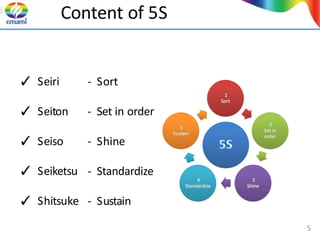
Content of 5S
- Sort
- Set in order
- Shine
- Standardize
- Sustain
✓ Seiri
✓ Seiton
✓ Seiso
✓ Seiketsu
✓ Shitsuke
5
What is mean by 5 S
• 5 S developed by Japanese and it is a participative
programme.
•5 S is a structured programme to implement
workplace organization & standardization and also it
represent 5 disciplines for maintaining visual
workplace
• It is a very effective approach to improving our work
environment, total quality and It becomes a base for
continuous improvement in the organization.
6
Wait….
Before start 5 S…..
• Get a camera and take a picture of your work
place (your table/ work area/ file rack etc…) and
save it.
• Because it will help you to compare your work
place after implementing 5S
7
1st
S - Sort
• It helps to segregate necessary and unnecessary items
and eliminate unnecessary items. It essentially means
organizing / putting things in order
• Clutter free Environment in Premises, inside office
• Go through what you have & then Categorize all items
as needed/not needed items
8
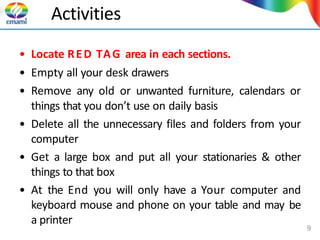
Activities
• Locate RED TAG area in each sections.
• Empty all your desk drawers
• Remove any old or unwanted furniture, calendars or
things that you don’t use on daily basis
• Delete all the unnecessary files and folders from your
computer
• Get a large box and put all your stationaries & other
things to that box
• At the End you will only have a Your computer and
keyboard mouse and phone on your table and may be
a printer
9
Activities
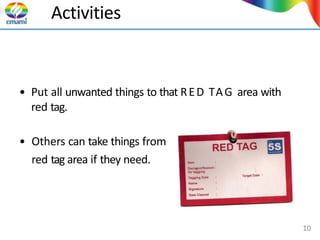
• Put all unwanted things to that RED TAG area with
red tag.
• Others can take things from
red tag area if they need.
10
From Now Onwards….
• You will only pull things from the box if you are going
to use that item
• When you pull any item ask yourself
✓Do you need it everyday, one or more times a
week but not daily (weekly), one or more times in a
month but not every week (monthly)
✓Assign marked space on you desk to keep these
three categories as you pull them out of the box
11
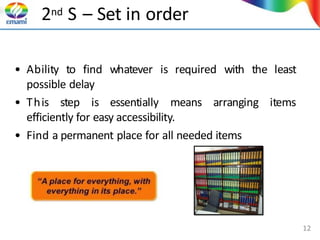
2nd S – Set in order
• Ability to find whatever is required with the least
possible delay
items
• This step is essentially means arranging
efficiently for easy accessibility.
• Find a permanent place for all needed items
12
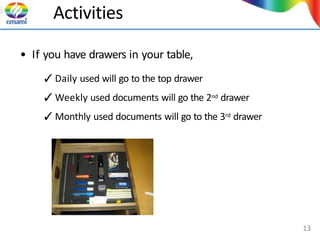
Activities
• If you have drawers in your table,
✓Daily used will go to the top drawer
✓Weekly used documents will go the 2nd drawer
✓Monthly used documents will go to the 3rd drawer
13
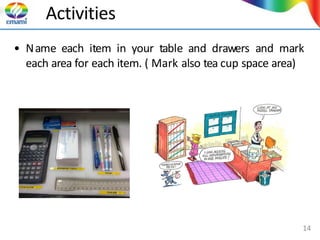
Activities
• Name each item in your table and drawers and mark
each area for each item. ( Mark also tea cup space area)
14
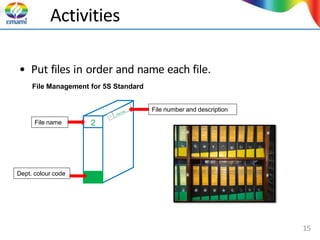
Activities
2
• Put files in order and name each file.
File Management for 5S Standard
File name
Dept. colour code
File number and description
15
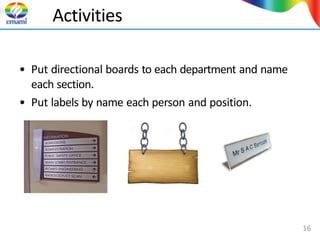
Activities
• Put directional boards to each department and name
each section.
• Put labels by name each person and position.
16
Activities
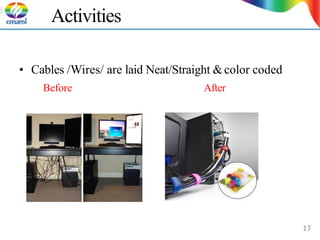
• Cables /Wires/ are laid Neat/Straight &color coded
Before After
17
Activities
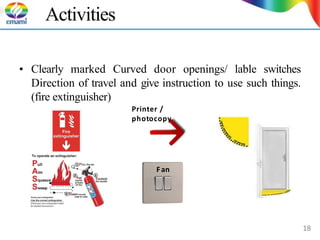
• Clearly marked Curved door openings/ lable switches
Direction of travel and give instruction to use such things.
(fire extinguisher)
Printer /
photocopy
Fan
18
3rd S - Shine
• This step eliminates dirt, dust and other foreign matter
to make workplace clean and polished
• Cleanliness is not only cleaning your area, it also helps
to identify issues/ problems in your area.
• Cleanliness will make healthy safe work place
19
Activities
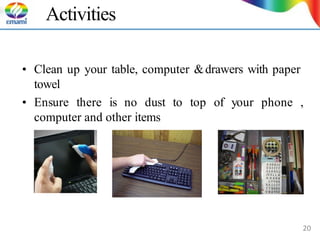
• Clean up your table, computer &drawers with paper
towel
• Ensure there is no dust to top of your phone ,
computer and other items
20
Activities
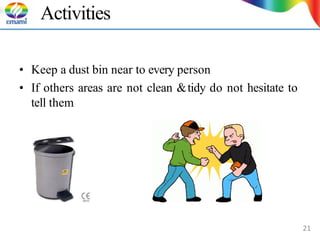
• Keep a dust bin near to every person
• If others areas are not clean &tidy do not hesitate to
tell them
21
Wait….
Time to click…
• It is the time to take a photo of your work place…
• Take photos in same locations and direction that
you take photos before implement 5 S
• Compare it with that you taken before
• Look carefully….
• Is there any changes..
• If yes…share it with others.. 22
4th S - Standardize
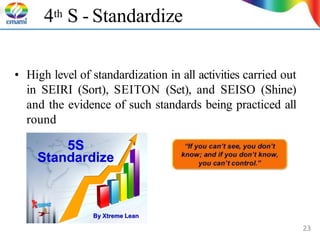
• High level of standardization in all activities carried out
in SEIRI (Sort), SEITON (Set), and SEISO (Shine)
and the evidence of such standards being practiced all
round
23
Activities
• Create standards and initiate steps to maintain them
• Create visual control systems
• Write a check list post it in front of you
–Daily wipe the table, computer, printer etc.
–Store away every thingin its place at end of the day
–Empty the dust bin at end of the day
24
Activities
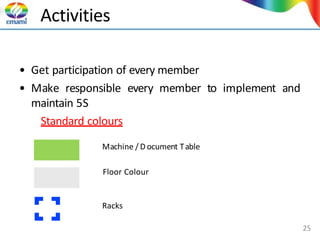
• Get participation of every member
• Make responsible every member to implement and
maintain 5S
Standard colours
Machine / D ocument Table
Floor Colour
Racks
25
5th S - Sustain
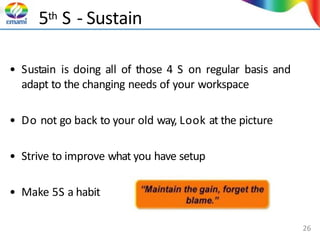
• Sustain is doing all of those 4 S on regular basis and
adapt to the changing needs of your workspace
• Do not go back to your old way, Look at the picture
• Strive to improve what you have setup
• Make 5S a habit
26
How to sustain 5 S
• Get management commitment
• Get every one involved
• Establish 5 S committee within the office and conduct
monthly review by 5s committee
• Reward and recognize bestperson who doing 5 S
within the office
27
What about the stuff in the box…
• Y ou will continue pulling the items from these boxes
only if you really need them
• Keep the boxes for a month, then you need to decide:
- if you have not used that item for a month then do
you really need it?
28
29

5s for a office area.pptx.pdf

  • 1.
    How to implement 5Sfor office WORKPLACE MANAGMENT INSTRUCTIONAL DESIGN MODULE Emami Limited, Amingaon By Ashim Ghosh 1
  • 2.
    Learner should understoodbelow activities :-  People should understand how to implement 5S for office What learner should be able to do when the instruction is complete. By the end of the course, the learners should be able to:  Explain about the 5S  Do 5s at there workplace What is the goal of the training 2
  • 3.
     Especially ifyou are doing 5S in other areas like shop floor then you need to show that you are committed too.  It will make your office much more effective and efficient working place  Clean and well organized office will boosts your morale OBJECTIVE 3
  • 4.
     Lack ofAwareness  Lack of knowledge Targeted trainee –All Staff Analysis 4
  • 5.
    Content of 5S -Sort - Set in order - Shine - Standardize - Sustain ✓ Seiri ✓ Seiton ✓ Seiso ✓ Seiketsu ✓ Shitsuke 5
  • 6.
    What is meanby 5 S • 5 S developed by Japanese and it is a participative programme. •5 S is a structured programme to implement workplace organization & standardization and also it represent 5 disciplines for maintaining visual workplace • It is a very effective approach to improving our work environment, total quality and It becomes a base for continuous improvement in the organization. 6
  • 7.
    Wait…. Before start 5S….. • Get a camera and take a picture of your work place (your table/ work area/ file rack etc…) and save it. • Because it will help you to compare your work place after implementing 5S 7
  • 8.
    1st S - Sort •It helps to segregate necessary and unnecessary items and eliminate unnecessary items. It essentially means organizing / putting things in order • Clutter free Environment in Premises, inside office • Go through what you have & then Categorize all items as needed/not needed items 8
  • 9.
    Activities • Locate REDTAG area in each sections. • Empty all your desk drawers • Remove any old or unwanted furniture, calendars or things that you don’t use on daily basis • Delete all the unnecessary files and folders from your computer • Get a large box and put all your stationaries & other things to that box • At the End you will only have a Your computer and keyboard mouse and phone on your table and may be a printer 9
  • 10.
    Activities • Put allunwanted things to that RED TAG area with red tag. • Others can take things from red tag area if they need. 10
  • 11.
    From Now Onwards…. •You will only pull things from the box if you are going to use that item • When you pull any item ask yourself ✓Do you need it everyday, one or more times a week but not daily (weekly), one or more times in a month but not every week (monthly) ✓Assign marked space on you desk to keep these three categories as you pull them out of the box 11
  • 12.
    2nd S –Set in order • Ability to find whatever is required with the least possible delay items • This step is essentially means arranging efficiently for easy accessibility. • Find a permanent place for all needed items 12
  • 13.
    Activities • If youhave drawers in your table, ✓Daily used will go to the top drawer ✓Weekly used documents will go the 2nd drawer ✓Monthly used documents will go to the 3rd drawer 13
  • 14.
    Activities • Name eachitem in your table and drawers and mark each area for each item. ( Mark also tea cup space area) 14
  • 15.
    Activities 2 • Put filesin order and name each file. File Management for 5S Standard File name Dept. colour code File number and description 15
  • 16.
    Activities • Put directionalboards to each department and name each section. • Put labels by name each person and position. 16
  • 17.
    Activities • Cables /Wires/are laid Neat/Straight &color coded Before After 17
  • 18.
    Activities • Clearly markedCurved door openings/ lable switches Direction of travel and give instruction to use such things. (fire extinguisher) Printer / photocopy Fan 18
  • 19.
    3rd S -Shine • This step eliminates dirt, dust and other foreign matter to make workplace clean and polished • Cleanliness is not only cleaning your area, it also helps to identify issues/ problems in your area. • Cleanliness will make healthy safe work place 19
  • 20.
    Activities • Clean upyour table, computer &drawers with paper towel • Ensure there is no dust to top of your phone , computer and other items 20
  • 21.
    Activities • Keep adust bin near to every person • If others areas are not clean &tidy do not hesitate to tell them 21
  • 22.
    Wait…. Time to click… •It is the time to take a photo of your work place… • Take photos in same locations and direction that you take photos before implement 5 S • Compare it with that you taken before • Look carefully…. • Is there any changes.. • If yes…share it with others.. 22
  • 23.
    4th S -Standardize • High level of standardization in all activities carried out in SEIRI (Sort), SEITON (Set), and SEISO (Shine) and the evidence of such standards being practiced all round 23
  • 24.
    Activities • Create standardsand initiate steps to maintain them • Create visual control systems • Write a check list post it in front of you –Daily wipe the table, computer, printer etc. –Store away every thingin its place at end of the day –Empty the dust bin at end of the day 24
  • 25.
    Activities • Get participationof every member • Make responsible every member to implement and maintain 5S Standard colours Machine / D ocument Table Floor Colour Racks 25
  • 26.
    5th S -Sustain • Sustain is doing all of those 4 S on regular basis and adapt to the changing needs of your workspace • Do not go back to your old way, Look at the picture • Strive to improve what you have setup • Make 5S a habit 26
  • 27.
    How to sustain5 S • Get management commitment • Get every one involved • Establish 5 S committee within the office and conduct monthly review by 5s committee • Reward and recognize bestperson who doing 5 S within the office 27
  • 28.
    What about thestuff in the box… • Y ou will continue pulling the items from these boxes only if you really need them • Keep the boxes for a month, then you need to decide: - if you have not used that item for a month then do you really need it? 28
  • 29.