Visual
Management
Visual Management
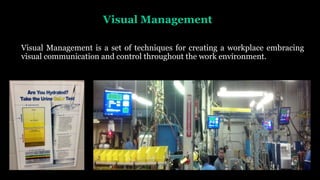
Visual Management is a set of techniques for creating a workplace embracing
visual communication and control throughout the work environment.
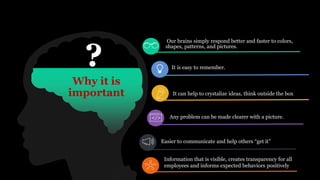
Why it is
important
Our brains simply respond better and faster to colors,
shapes, patterns, and pictures.
It is easy to remember.
It can help to crystalize ideas, think outside the box
Any problem can be made clearer with a picture.
Easier to communicate and help others “get it”
Information that is visible, creates transparency for all
employees and informs expected behaviors positively
?
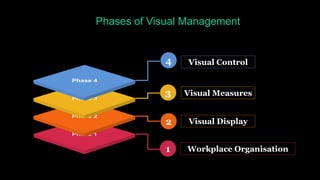
Phases of Visual Management
3
Visual Control
1
4
2
Visual Measures
Visual Display
Workplace Organisation
02
01
03
04
05
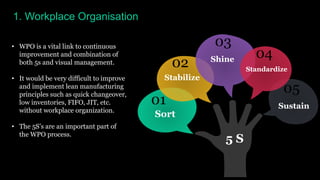
1. Workplace Organisation
• WPO is a vital link to continuous
improvement and combination of
both 5s and visual management.
• It would be very difficult to improve
and implement lean manufacturing
principles such as quick changeover,
low inventories, FIFO, JIT, etc.
without workplace organization.
• The 5S’s are an important part of
the WPO process.
5 S
Sort
Stabilize
Shine
Standardize
Sustain
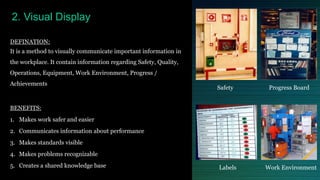
DEFINATION:
It is a method to visually communicate important information in
the workplace. It contain information regarding Safety, Quality,
Operations, Equipment, Work Environment, Progress /
Achievements
BENEFITS:
1. Makes work safer and easier
2. Communicates information about performance
3. Makes standards visible
4. Makes problems recognizable
5. Creates a shared knowledge base
2. Visual Display
Safety Progress Board
Labels Work Environment
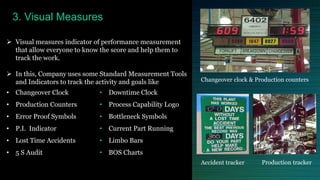
3. Visual Measures
 Visual measures indicator of performance measurement
that allow everyone to know the score and help them to
track the work.
 In this, Company uses some Standard Measurement Tools
and Indicators to track the activity and goals like
• Changeover Clock
• Production Counters
• Error Proof Symbols
• P.I. Indicator
• Lost Time Accidents
• 5 S Audit
• Downtime Clock
• Process Capability Logo
• Bottleneck Symbols
• Current Part Running
• Limbo Bars
• BOS Charts
Changeover clock & Production counters
Accident tracker Production tracker
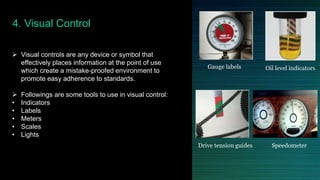
4. Visual Control
 Visual controls are any device or symbol that
effectively places information at the point of use
which create a mistake-proofed environment to
promote easy adherence to standards.
 Followings are some tools to use in visual control:
• Indicators
• Labels
• Meters
• Scales
• Lights
Gauge labels Oil level indicators
Drive tension guides Speedometer
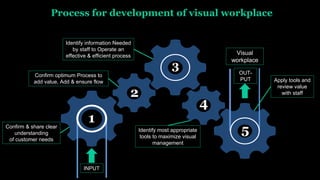
Process for development of visual workplace
Confirm & share clear
understanding
of customer needs
Confirm optimum Process to
add value, Add & ensure flow
1
2
3
4
5
Identify information Needed
by staff to Operate an
effective & efficient process
Identify most appropriate
tools to maximize visual
management
Apply tools and
review value
with staff
Visual
workplace
INPUT
OUT-
PUT
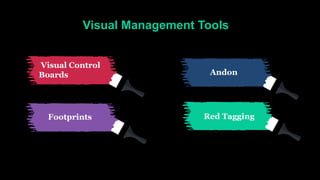
Visual Management Tools
Visual Control
Boards Andon
Footprints Red Tagging
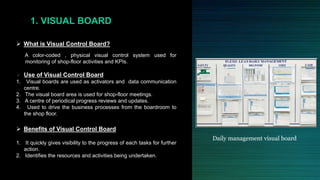
 What is Visual Control Board?
A color-coded , physical visual control system used for
monitoring of shop-floor activities and KPIs.
 Use of Visual Control Board
1. Visual boards are used as activators and data communication
centre.
2. The visual board area is used for shop-floor meetings.
3. A centre of periodical progress reviews and updates.
4. Used to drive the business processes from the boardroom to
the shop floor.
 Benefits of Visual Control Board
1. It quickly gives visibility to the progress of each tasks for further
action.
2. Identifies the resources and activities being undertaken.
1. VISUAL BOARD
Daily management visual board
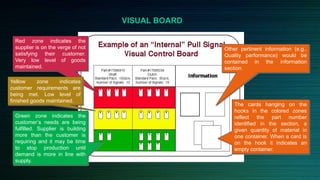
Red zone indicates the
supplier is on the verge of not
satisfying their customer.
Very low level of goods
maintained.
Yellow zone indicates
customer requirements are
being met. Low level of
finished goods maintained.
Green zone indicates the
customer’s needs are being
fulfilled. Supplier is building
more than the customer is
requiring and it may be time
to stop production until
demand is more in line with
supply.
The cards hanging on the
hooks in the colored zones
reflect the part number
identified in the section, a
given quantity of material in
one container. When a card is
on the hook it indicates an
empty container.
Other pertinent information (e.g..
Quality performance) would be
contained in the information
section.
VISUAL BOARD
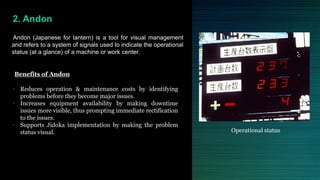
2. Andon
Andon (Japanese for lantern) is a tool for visual management
and refers to a system of signals used to indicate the operational
status (at a glance) of a machine or work center.
Benefits of Andon
• Reduces operation & maintenance costs by identifying
problems before they become major issues.
• Increases equipment availability by making downtime
issues more visible, thus prompting immediate rectification
to the issues.
• Supports Jidoka implementation by making the problem
status visual. Operational status
Andon
Text
Graphics
Color coded lights
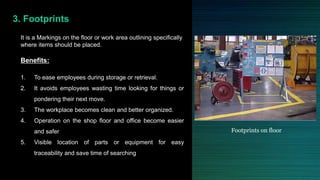
3. Footprints
It is a Markings on the floor or work area outlining specifically
where items should be placed.
Benefits:
1. To ease employees during storage or retrieval.
2. It avoids employees wasting time looking for things or
pondering their next move.
3. The workplace becomes clean and better organized.
4. Operation on the shop floor and office become easier
and safer
5. Visible location of parts or equipment for easy
traceability and save time of searching
Footprints on floor
Yellow for work area border
SOZAI
LINE
KANSEI
NG VISUAL BOARDQC CORNER5S CORNER
Light blue for raw material
Black for finished part
Red for non-conforming part
White for equipment
TOOL CABINET
Footprints
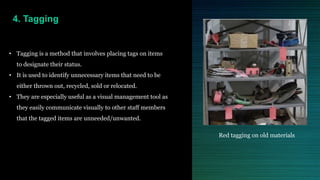
4. Tagging
• Tagging is a method that involves placing tags on items
to designate their status.
• It is used to identify unnecessary items that need to be
either thrown out, recycled, sold or relocated.
• They are especially useful as a visual management tool as
they easily communicate visually to other staff members
that the tagged items are unneeded/unwanted.
Red tagging on old materials
Improved safety and ergonomics01
02
03
04
05
06
07
08
Continuous improvement
Sets a baseline for Standard work
Less defects
Satisfy consumer demand
Quick changeover and less downtime
Create workflow
Reduce waste ad improve productivity
WHAT ARE
THE
BENEFITS?
“Make your workplace into a
showcase that can be understood by
everyone at a glance”
– Taiichi Ohno

Visual management

  • 1.
  • 2.
    Visual Management Visual Managementis a set of techniques for creating a workplace embracing visual communication and control throughout the work environment.
  • 3.
    Why it is important Ourbrains simply respond better and faster to colors, shapes, patterns, and pictures. It is easy to remember. It can help to crystalize ideas, think outside the box Any problem can be made clearer with a picture. Easier to communicate and help others “get it” Information that is visible, creates transparency for all employees and informs expected behaviors positively ?
  • 4.
    Phases of VisualManagement 3 Visual Control 1 4 2 Visual Measures Visual Display Workplace Organisation
  • 5.
    02 01 03 04 05 1. Workplace Organisation •WPO is a vital link to continuous improvement and combination of both 5s and visual management. • It would be very difficult to improve and implement lean manufacturing principles such as quick changeover, low inventories, FIFO, JIT, etc. without workplace organization. • The 5S’s are an important part of the WPO process. 5 S Sort Stabilize Shine Standardize Sustain
  • 6.
    DEFINATION: It is amethod to visually communicate important information in the workplace. It contain information regarding Safety, Quality, Operations, Equipment, Work Environment, Progress / Achievements BENEFITS: 1. Makes work safer and easier 2. Communicates information about performance 3. Makes standards visible 4. Makes problems recognizable 5. Creates a shared knowledge base 2. Visual Display Safety Progress Board Labels Work Environment
  • 7.
    3. Visual Measures Visual measures indicator of performance measurement that allow everyone to know the score and help them to track the work.  In this, Company uses some Standard Measurement Tools and Indicators to track the activity and goals like • Changeover Clock • Production Counters • Error Proof Symbols • P.I. Indicator • Lost Time Accidents • 5 S Audit • Downtime Clock • Process Capability Logo • Bottleneck Symbols • Current Part Running • Limbo Bars • BOS Charts Changeover clock & Production counters Accident tracker Production tracker
  • 8.
    4. Visual Control Visual controls are any device or symbol that effectively places information at the point of use which create a mistake-proofed environment to promote easy adherence to standards.  Followings are some tools to use in visual control: • Indicators • Labels • Meters • Scales • Lights Gauge labels Oil level indicators Drive tension guides Speedometer
  • 9.
    Process for developmentof visual workplace Confirm & share clear understanding of customer needs Confirm optimum Process to add value, Add & ensure flow 1 2 3 4 5 Identify information Needed by staff to Operate an effective & efficient process Identify most appropriate tools to maximize visual management Apply tools and review value with staff Visual workplace INPUT OUT- PUT
  • 10.
    Visual Management Tools VisualControl Boards Andon Footprints Red Tagging
  • 11.
     What isVisual Control Board? A color-coded , physical visual control system used for monitoring of shop-floor activities and KPIs.  Use of Visual Control Board 1. Visual boards are used as activators and data communication centre. 2. The visual board area is used for shop-floor meetings. 3. A centre of periodical progress reviews and updates. 4. Used to drive the business processes from the boardroom to the shop floor.  Benefits of Visual Control Board 1. It quickly gives visibility to the progress of each tasks for further action. 2. Identifies the resources and activities being undertaken. 1. VISUAL BOARD Daily management visual board
  • 12.
    Red zone indicatesthe supplier is on the verge of not satisfying their customer. Very low level of goods maintained. Yellow zone indicates customer requirements are being met. Low level of finished goods maintained. Green zone indicates the customer’s needs are being fulfilled. Supplier is building more than the customer is requiring and it may be time to stop production until demand is more in line with supply. The cards hanging on the hooks in the colored zones reflect the part number identified in the section, a given quantity of material in one container. When a card is on the hook it indicates an empty container. Other pertinent information (e.g.. Quality performance) would be contained in the information section. VISUAL BOARD
  • 13.
    2. Andon Andon (Japanesefor lantern) is a tool for visual management and refers to a system of signals used to indicate the operational status (at a glance) of a machine or work center. Benefits of Andon • Reduces operation & maintenance costs by identifying problems before they become major issues. • Increases equipment availability by making downtime issues more visible, thus prompting immediate rectification to the issues. • Supports Jidoka implementation by making the problem status visual. Operational status
  • 14.
  • 15.
    3. Footprints It isa Markings on the floor or work area outlining specifically where items should be placed. Benefits: 1. To ease employees during storage or retrieval. 2. It avoids employees wasting time looking for things or pondering their next move. 3. The workplace becomes clean and better organized. 4. Operation on the shop floor and office become easier and safer 5. Visible location of parts or equipment for easy traceability and save time of searching Footprints on floor
  • 16.
    Yellow for workarea border SOZAI LINE KANSEI NG VISUAL BOARDQC CORNER5S CORNER Light blue for raw material Black for finished part Red for non-conforming part White for equipment TOOL CABINET Footprints
  • 17.
    4. Tagging • Taggingis a method that involves placing tags on items to designate their status. • It is used to identify unnecessary items that need to be either thrown out, recycled, sold or relocated. • They are especially useful as a visual management tool as they easily communicate visually to other staff members that the tagged items are unneeded/unwanted. Red tagging on old materials
  • 18.
    Improved safety andergonomics01 02 03 04 05 06 07 08 Continuous improvement Sets a baseline for Standard work Less defects Satisfy consumer demand Quick changeover and less downtime Create workflow Reduce waste ad improve productivity WHAT ARE THE BENEFITS?
  • 19.
    “Make your workplaceinto a showcase that can be understood by everyone at a glance” – Taiichi Ohno

Editor's Notes

  • #2 http://www.leanprocess.net/5s-lean-visual-management/
  • #3 Provide real-time information on work place status by a combination of simple, effective visual information aids that allow employees to understand their influence on the organization overall performance hence allowing the employees to improve their performance.
  • #13 2018年2月23日(金)
  • #17 2018年2月23日(金)