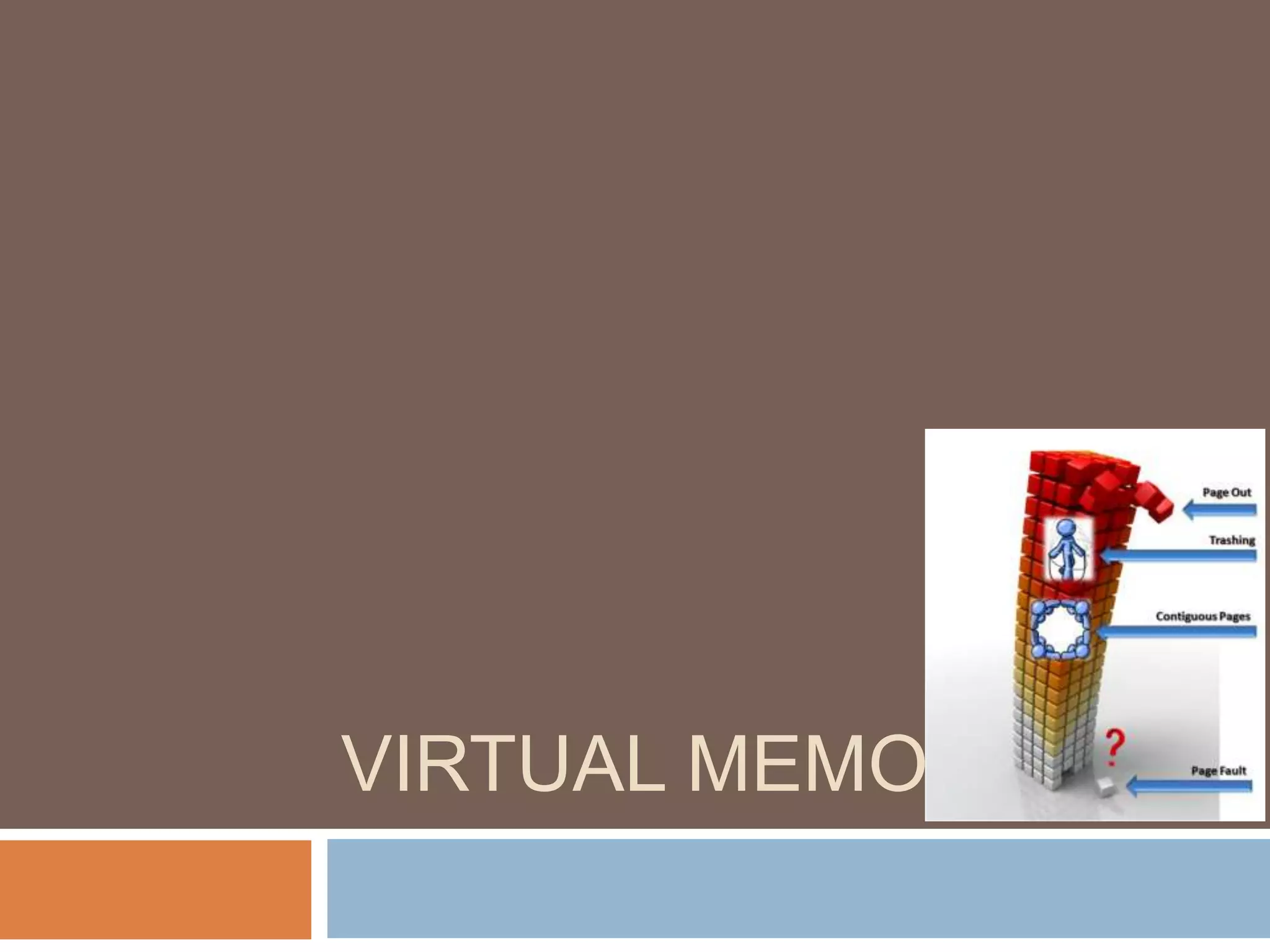
VIRTUAL MEMORY
Introduction
 Remember CACHE? it is used to keep the most commonly used
sections of RAM, so that we can accessed the data quickly. A cache
stores a subset of the address space of RAM. Thus, for each
address in cache, there is a corresponding address in RAM. This
subset of addresses (and copy of data) changes over time, based
on the behaviour of the program.
 What if we wanted more RAM than we had available? For example,
we might have 1GB of RAM, what if we wanted 10GB? We could
extend the amount of memory accessible by a program by using
hard disk.
Introduction (Cont…)
 In effect, RAM acts like cache for disk. The extension of memory is
called virtual memory.
 The problem with hard disk, it is really slow to access. If registers
can be accessed in 1 nanosecond, and cache in 5 ns and RAM in
about 100 ns, then hard disk is accessed in fractions of seconds. It
can be a million times slower to access hard disk than a register.
 The advantage of hard disk is it's easy to get lots of disk space for a
small cost.
What is virtual memory?
 Windows uses virtual memory to compensate for the lacks of RAM
needed to run a program or operation.
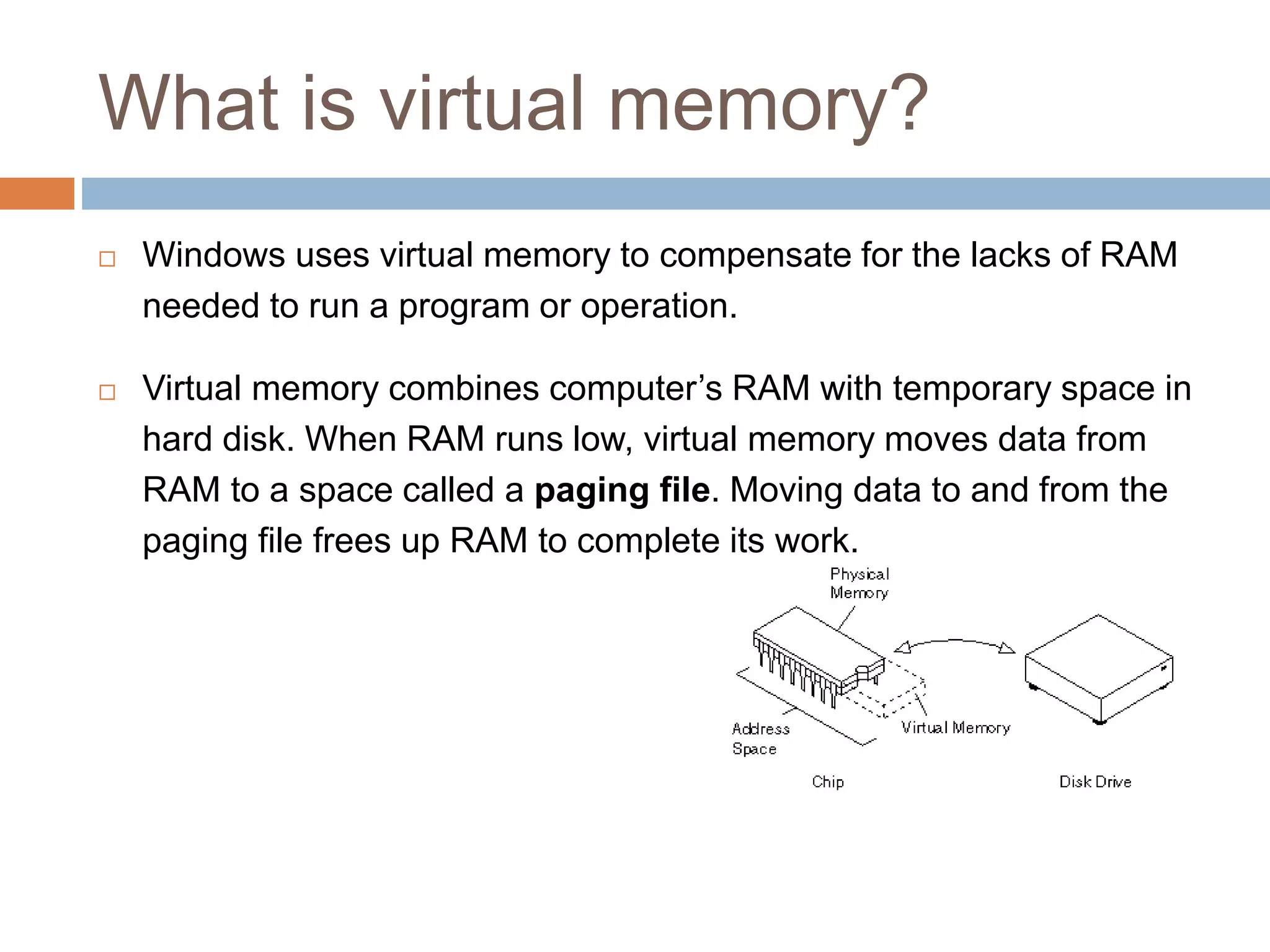
 Virtual memory combines computer’s RAM with temporary space in
hard disk. When RAM runs low, virtual memory moves data from
RAM to a space called a paging file. Moving data to and from the
paging file frees up RAM to complete its work.
How it works?
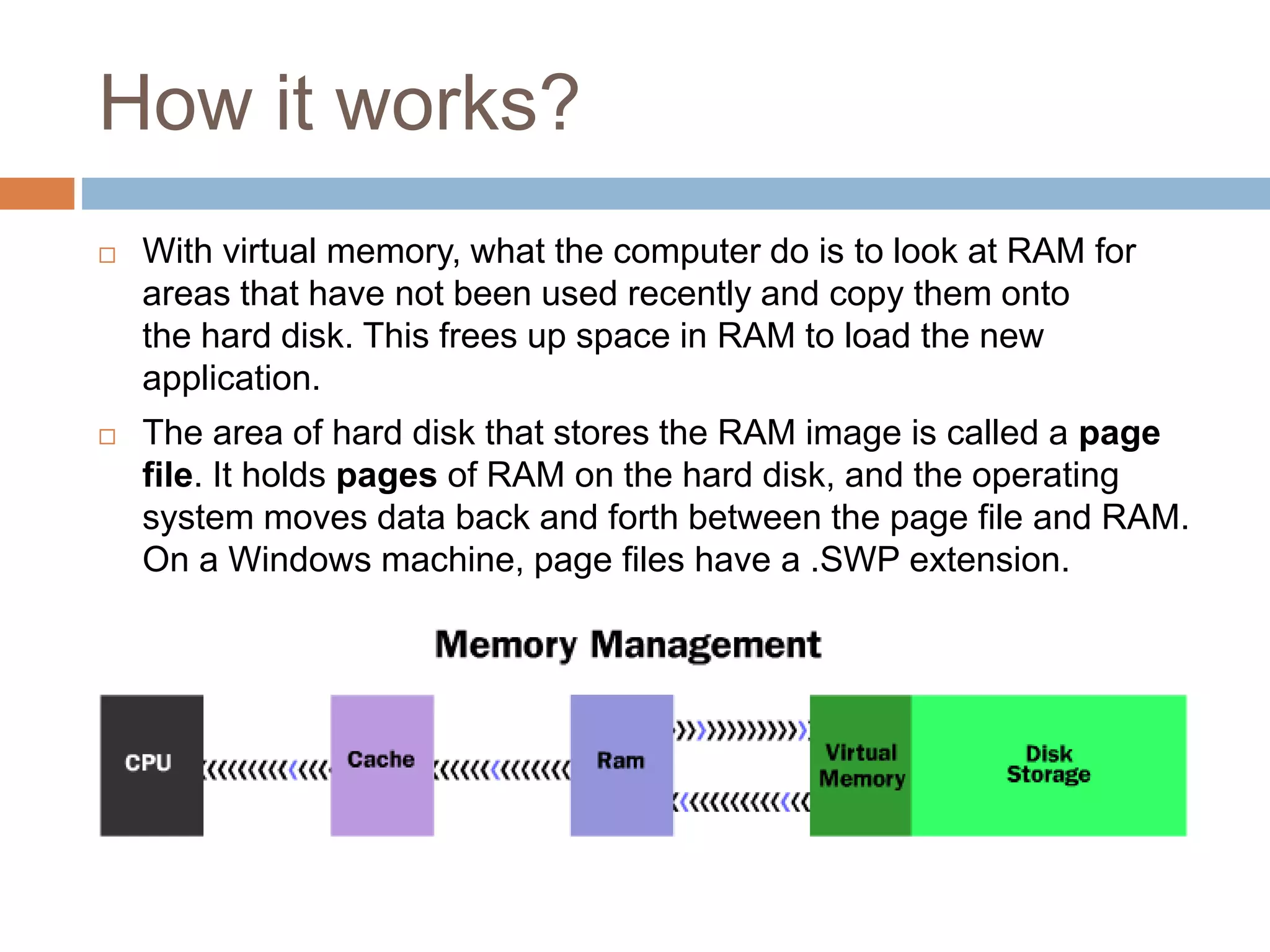
 With virtual memory, what the computer do is to look at RAM for
areas that have not been used recently and copy them onto
the hard disk. This frees up space in RAM to load the new
application.
 The area of hard disk that stores the RAM image is called a page
file. It holds pages of RAM on the hard disk, and the operating
system moves data back and forth between the page file and RAM.
On a Windows machine, page files have a .SWP extension.
Paging
 In a cache, we fetched quantities called data blocks or cache lines.
The same terminology where in virtual memory It is called a page.
 A page is a sequence of N bytes where N is a power of 2 (i.e. N2) .
Nowadays, page sizes are at least 4K in size and maybe as large
as 64 K or more.
 Let's assume that we have 1MB of RAM. We can subdivide the
RAM into 4K pages. Thus 1M / 4K = 256 pages. Thus, our RAM has
256 physical pages, which holding 4K.
 Let's assume we have 10MB of disk. Thus, we have 2560 disk
pages.
Page table
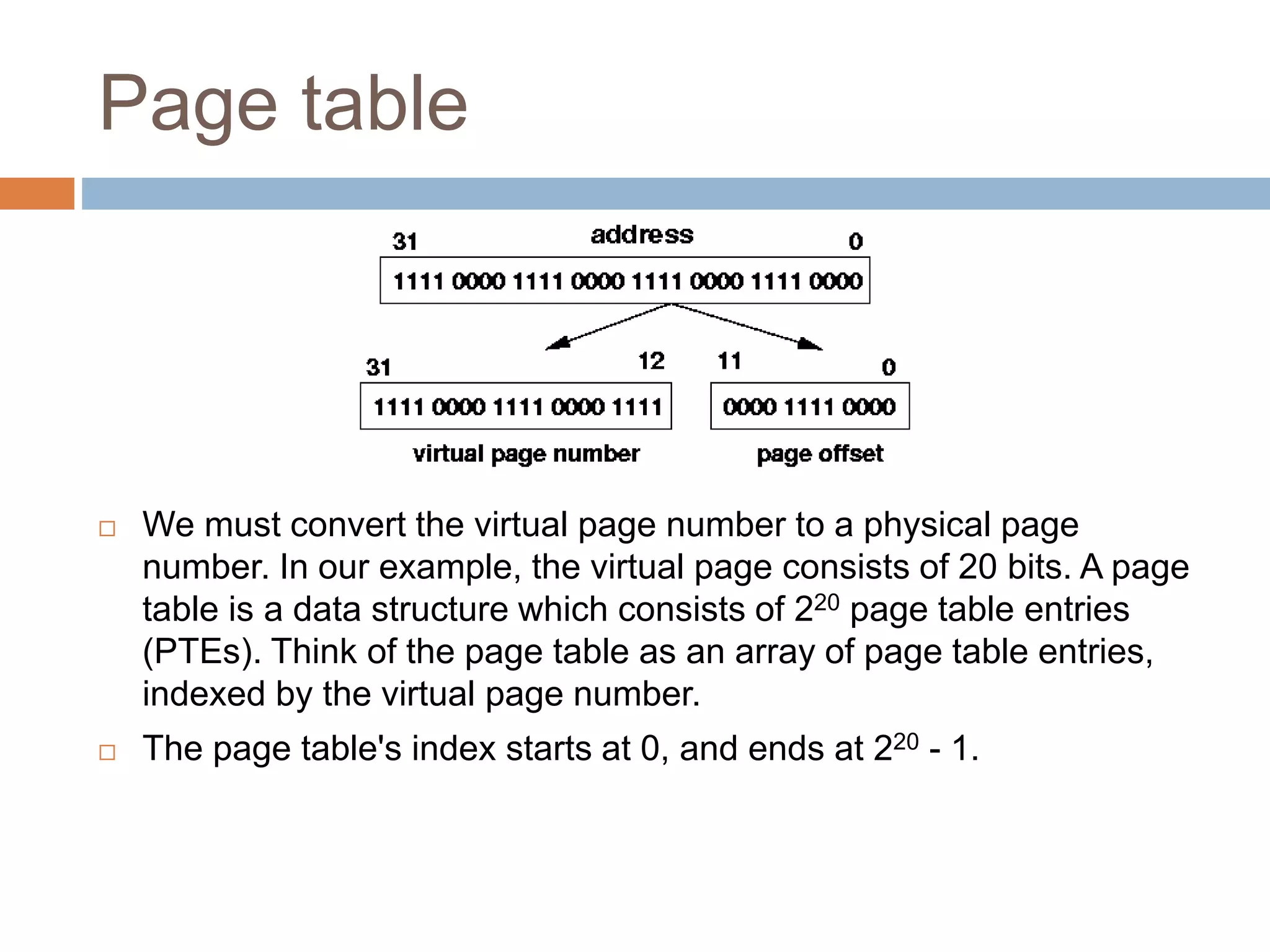
 We must convert the virtual page number to a physical page
number. In our example, the virtual page consists of 20 bits. A page
table is a data structure which consists of 220 page table entries
(PTEs). Think of the page table as an array of page table entries,
indexed by the virtual page number.
 The page table's index starts at 0, and ends at 220 - 1.
Page table (cont…)
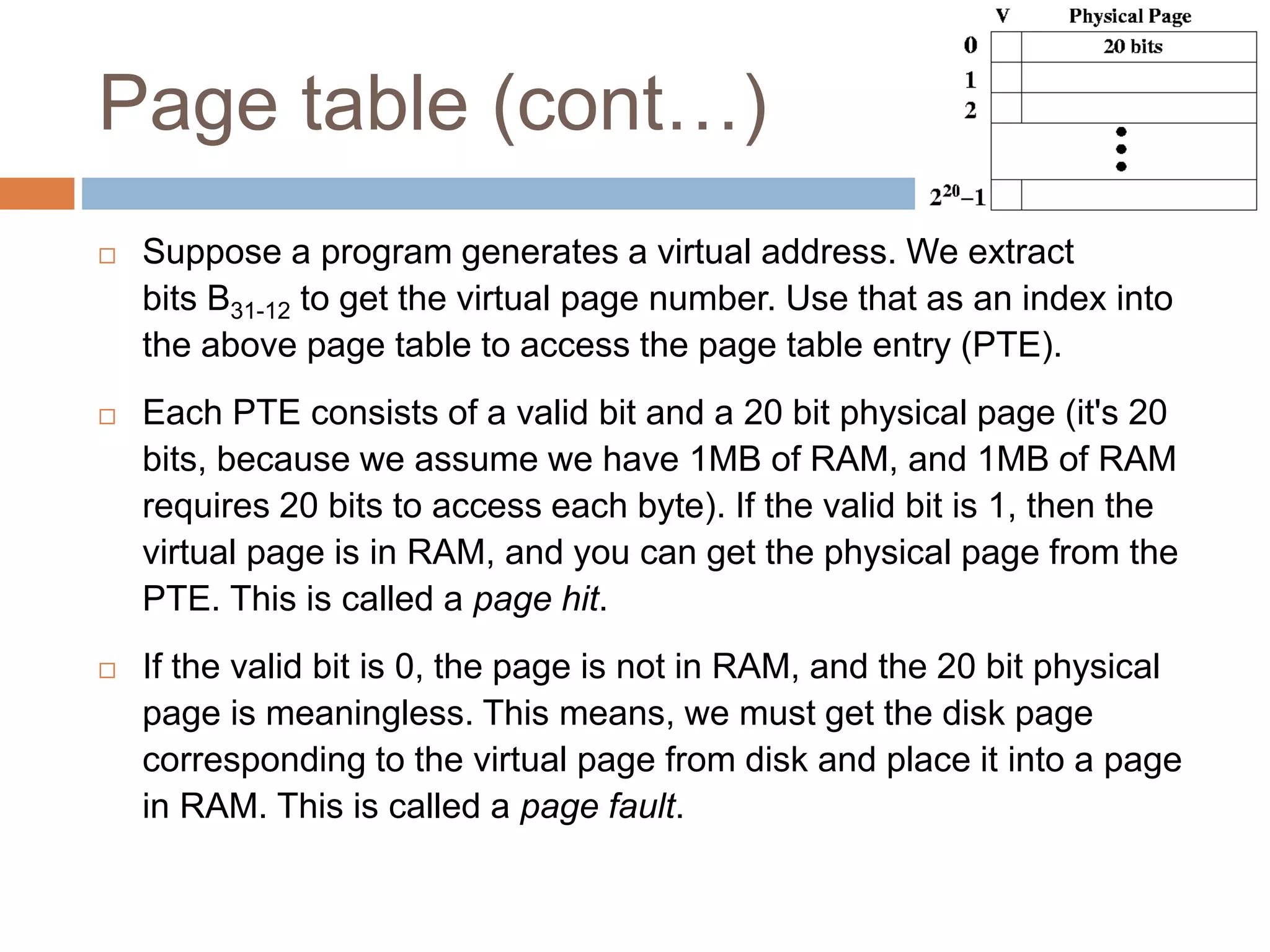
 Suppose a program generates a virtual address. We extract
bits B31-12 to get the virtual page number. Use that as an index into
the above page table to access the page table entry (PTE).
 Each PTE consists of a valid bit and a 20 bit physical page (it's 20
bits, because we assume we have 1MB of RAM, and 1MB of RAM
requires 20 bits to access each byte). If the valid bit is 1, then the
virtual page is in RAM, and you can get the physical page from the
PTE. This is called a page hit.
 If the valid bit is 0, the page is not in RAM, and the 20 bit physical
page is meaningless. This means, we must get the disk page
corresponding to the virtual page from disk and place it into a page
in RAM. This is called a page fault.
Page translation
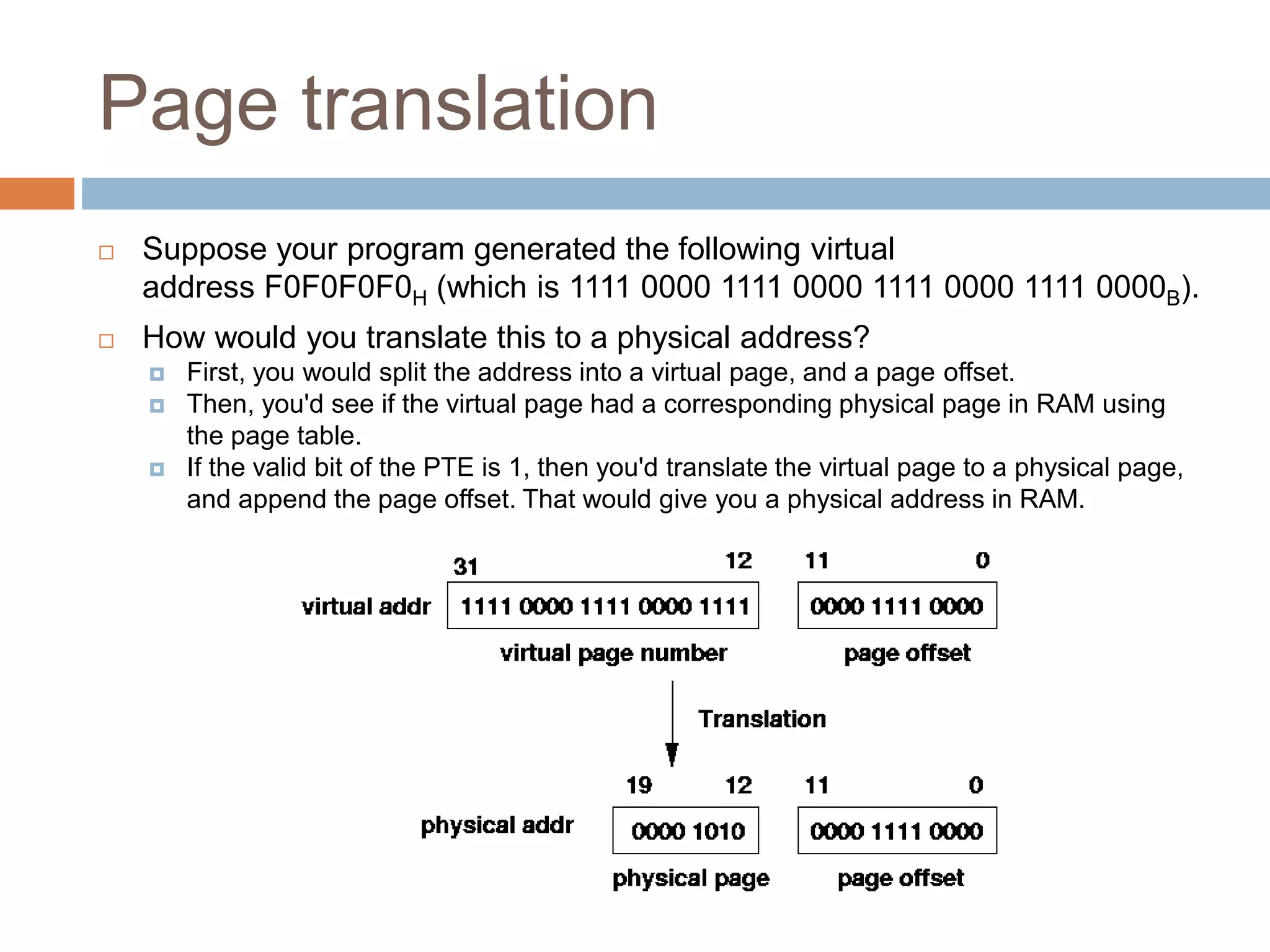
 Suppose your program generated the following virtual
address F0F0F0F0H (which is 1111 0000 1111 0000 1111 0000 1111 0000B).
 How would you translate this to a physical address?
 First, you would split the address into a virtual page, and a page offset.
 Then, you'd see if the virtual page had a corresponding physical page in RAM using
the page table.
 If the valid bit of the PTE is 1, then you'd translate the virtual page to a physical page,
and append the page offset. That would give you a physical address in RAM.
Conclusion
 The more RAM your computer has, the faster your programs will
generally run. If a lack of RAM is slowing your computer, you might
be tempted to increase virtual memory to compensate. However,
your computer can read data from RAM much more quickly than
from a hard disk, so adding RAM is a better solution.
 If you receive error messages that warn of low virtual memory, you
need to either add more RAM or increase the size of your paging
file so that you can run the programs on your
computer. Windows usually manages the size automatically, but you
can manually change the size of virtual memory if the default size is
not enough for your needs

Virtual memory (testing)

  • 1.
  • 2.
    Introduction  Remember CACHE?it is used to keep the most commonly used sections of RAM, so that we can accessed the data quickly. A cache stores a subset of the address space of RAM. Thus, for each address in cache, there is a corresponding address in RAM. This subset of addresses (and copy of data) changes over time, based on the behaviour of the program.  What if we wanted more RAM than we had available? For example, we might have 1GB of RAM, what if we wanted 10GB? We could extend the amount of memory accessible by a program by using hard disk.
  • 3.
    Introduction (Cont…)  Ineffect, RAM acts like cache for disk. The extension of memory is called virtual memory.  The problem with hard disk, it is really slow to access. If registers can be accessed in 1 nanosecond, and cache in 5 ns and RAM in about 100 ns, then hard disk is accessed in fractions of seconds. It can be a million times slower to access hard disk than a register.  The advantage of hard disk is it's easy to get lots of disk space for a small cost.
  • 4.
    What is virtualmemory?  Windows uses virtual memory to compensate for the lacks of RAM needed to run a program or operation.  Virtual memory combines computer’s RAM with temporary space in hard disk. When RAM runs low, virtual memory moves data from RAM to a space called a paging file. Moving data to and from the paging file frees up RAM to complete its work.
  • 5.
    How it works? With virtual memory, what the computer do is to look at RAM for areas that have not been used recently and copy them onto the hard disk. This frees up space in RAM to load the new application.  The area of hard disk that stores the RAM image is called a page file. It holds pages of RAM on the hard disk, and the operating system moves data back and forth between the page file and RAM. On a Windows machine, page files have a .SWP extension.
  • 6.
    Paging  In acache, we fetched quantities called data blocks or cache lines. The same terminology where in virtual memory It is called a page.  A page is a sequence of N bytes where N is a power of 2 (i.e. N2) . Nowadays, page sizes are at least 4K in size and maybe as large as 64 K or more.  Let's assume that we have 1MB of RAM. We can subdivide the RAM into 4K pages. Thus 1M / 4K = 256 pages. Thus, our RAM has 256 physical pages, which holding 4K.  Let's assume we have 10MB of disk. Thus, we have 2560 disk pages.
  • 7.
    Page table  Wemust convert the virtual page number to a physical page number. In our example, the virtual page consists of 20 bits. A page table is a data structure which consists of 220 page table entries (PTEs). Think of the page table as an array of page table entries, indexed by the virtual page number.  The page table's index starts at 0, and ends at 220 - 1.
  • 8.
    Page table (cont…) Suppose a program generates a virtual address. We extract bits B31-12 to get the virtual page number. Use that as an index into the above page table to access the page table entry (PTE).  Each PTE consists of a valid bit and a 20 bit physical page (it's 20 bits, because we assume we have 1MB of RAM, and 1MB of RAM requires 20 bits to access each byte). If the valid bit is 1, then the virtual page is in RAM, and you can get the physical page from the PTE. This is called a page hit.  If the valid bit is 0, the page is not in RAM, and the 20 bit physical page is meaningless. This means, we must get the disk page corresponding to the virtual page from disk and place it into a page in RAM. This is called a page fault.
  • 9.
    Page translation  Supposeyour program generated the following virtual address F0F0F0F0H (which is 1111 0000 1111 0000 1111 0000 1111 0000B).  How would you translate this to a physical address?  First, you would split the address into a virtual page, and a page offset.  Then, you'd see if the virtual page had a corresponding physical page in RAM using the page table.  If the valid bit of the PTE is 1, then you'd translate the virtual page to a physical page, and append the page offset. That would give you a physical address in RAM.
  • 10.
    Conclusion  The moreRAM your computer has, the faster your programs will generally run. If a lack of RAM is slowing your computer, you might be tempted to increase virtual memory to compensate. However, your computer can read data from RAM much more quickly than from a hard disk, so adding RAM is a better solution.  If you receive error messages that warn of low virtual memory, you need to either add more RAM or increase the size of your paging file so that you can run the programs on your computer. Windows usually manages the size automatically, but you can manually change the size of virtual memory if the default size is not enough for your needs