Virtual Memory
Amirkabir
University of Technology
Negar Neda
What is Virtual Memory?
Virtual Memory is an address mapping
Source:Amirhosein Peyberah
• What is Virtual Memory?
•
Virtual Memory is an address mapping
● Maps virtual address space to
physical address space
– Maps virtual addresses to physical RAM
– Maps virtual addresses to hardware devices
o Separation of user logical memory from physical memory
o Only part of the program needs to be in memory for execution.
o Virtual Memory is an address mapping maps virtual address space
to
physical address space
– Maps virtual addresses to physical RAM
– Maps virtual addresses to hardware devices
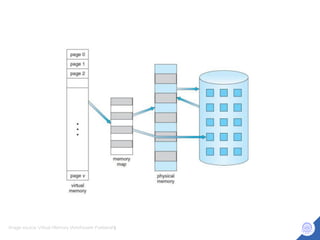
Image source: Virtual Memory (Amirhosein Pyeberah(
Virtual Memory Features
• Each process has its own virtual address space
– Process invisible to each other
– Process cannot access another process memory
• MMU checks protection bits on memory access
– Pages can be protected from being written or being executed or even
being read
– System can distinguish different protection level
Address space
• Physical addresses
– Addresses as used by the hardware
- DMA, peripherals
• Virtual addresses
– Addresses as used by software
• MMU must map logical to physical.
Memory Managment
Memory-Management Unit (MMU)
• The Memory Management Unit (MMU) is a
hardware component which manages virtual
address mappings
• Sits between the CPU core and memory
• The MMU operates on basic units of memory called pages
• Transparently handles all memory accesses from
Load/Store instructions
– Maps accesses using virtual addresses to
system RAM
– Handles permissions
– Generates an exception (page fault) on an invalid access
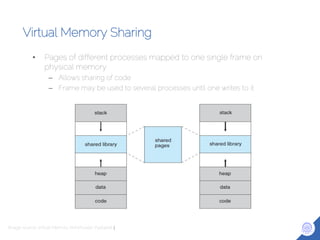
Virtual Memory Sharing
• Pages of different processes mapped to one single frame on
physical memory
– Allows sharing of code
– Frame may be used to several processes until one writes to it
Image source: Virtual Memory (Amirhosein Pyeberah(
Paging
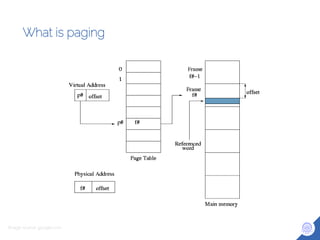
What is paging
Image source: google.com
Demand Paging
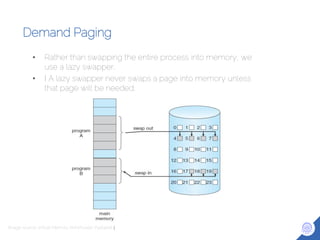
• Rather than swapping the entire process into memory, we
use a lazy swapper.
• I A lazy swapper never swaps a page into memory unless
that page will be needed.
Image source: Virtual Memory (Amirhosein Pyeberah(
Demand Paging
• Trap to the OS.
• Save the user registers and process state.
• Determine that the interrupt was a page fault.
• Check that the page reference was legal and determine the
location of the page on the disk.
Demand Paging (cont’d)
• Issue a read from the disk to a free frame:
– Wait in a queue for this device until the read request is serviced.
– Wait for the device seek and/or latency time.
– Begin the transfer of the page to a free frame.
• Issue a read from the disk to a free frame:
– Wait in a queue for this device until the read request is serviced.
– Wait for the device seek and/or latency time.
– Begin the transfer of the page to a free frame.
Page Fault
Page Fault
• A page fault is a CPU exception, generated
when software attempts to use an invalid virtual
address.
There are two cases:
– The virtual address is not mapped for the
process requesting it.
– The processes has insufficient
Image source: Virtual Memory (Amirhosein Pyeberah(
Handling Page Fault
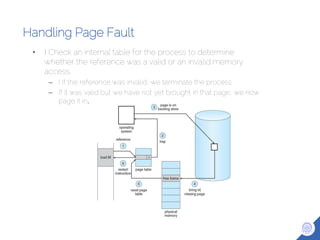
• I Check an internal table for the process to determine
whether the reference was a valid or an invalid memory
access.
– I If the reference was invalid, we terminate the process.
– If it was valid but we have not yet brought in that page, we now
page it in.
Translation Lookaside Buffer
Translation Lookaside Buffer (TLB)
• Each virtual memory reference can cause two physical
memory access
– One to fetch the page table
– One to fetch the data
• To overcome this problem a high-speed cache is set up for
page table entries called TLB
• TLB is part of the MMU consulted by the MMU when the
CPU access a virtual address.
– Contains page table entries that have been most recently used
– Functions like a cache
Translation Look aside Buffer
• First checks if page is already in main memory
– If not a page fault is issued
• The TLB is updated to include the new page entry
• The TLB holds the entries of the mapping
– Virtual address
– Physical address
– permissions
Negar Neda
Thank you !
Any Questions ?

Virtual Memory

  • 1.
  • 2.
    What is VirtualMemory? Virtual Memory is an address mapping Source:Amirhosein Peyberah • What is Virtual Memory? • Virtual Memory is an address mapping ● Maps virtual address space to physical address space – Maps virtual addresses to physical RAM – Maps virtual addresses to hardware devices o Separation of user logical memory from physical memory o Only part of the program needs to be in memory for execution. o Virtual Memory is an address mapping maps virtual address space to physical address space – Maps virtual addresses to physical RAM – Maps virtual addresses to hardware devices
  • 3.
    Image source: VirtualMemory (Amirhosein Pyeberah(
  • 4.
    Virtual Memory Features •Each process has its own virtual address space – Process invisible to each other – Process cannot access another process memory • MMU checks protection bits on memory access – Pages can be protected from being written or being executed or even being read – System can distinguish different protection level
  • 5.
    Address space • Physicaladdresses – Addresses as used by the hardware - DMA, peripherals • Virtual addresses – Addresses as used by software • MMU must map logical to physical.
  • 6.
  • 7.
    Memory-Management Unit (MMU) •The Memory Management Unit (MMU) is a hardware component which manages virtual address mappings • Sits between the CPU core and memory • The MMU operates on basic units of memory called pages • Transparently handles all memory accesses from Load/Store instructions – Maps accesses using virtual addresses to system RAM – Handles permissions – Generates an exception (page fault) on an invalid access
  • 8.
    Virtual Memory Sharing •Pages of different processes mapped to one single frame on physical memory – Allows sharing of code – Frame may be used to several processes until one writes to it Image source: Virtual Memory (Amirhosein Pyeberah(
  • 9.
  • 10.
    What is paging Imagesource: google.com
  • 11.
    Demand Paging • Ratherthan swapping the entire process into memory, we use a lazy swapper. • I A lazy swapper never swaps a page into memory unless that page will be needed. Image source: Virtual Memory (Amirhosein Pyeberah(
  • 12.
    Demand Paging • Trapto the OS. • Save the user registers and process state. • Determine that the interrupt was a page fault. • Check that the page reference was legal and determine the location of the page on the disk.
  • 13.
    Demand Paging (cont’d) •Issue a read from the disk to a free frame: – Wait in a queue for this device until the read request is serviced. – Wait for the device seek and/or latency time. – Begin the transfer of the page to a free frame. • Issue a read from the disk to a free frame: – Wait in a queue for this device until the read request is serviced. – Wait for the device seek and/or latency time. – Begin the transfer of the page to a free frame.
  • 14.
  • 15.
    Page Fault • Apage fault is a CPU exception, generated when software attempts to use an invalid virtual address. There are two cases: – The virtual address is not mapped for the process requesting it. – The processes has insufficient Image source: Virtual Memory (Amirhosein Pyeberah(
  • 16.
    Handling Page Fault •I Check an internal table for the process to determine whether the reference was a valid or an invalid memory access. – I If the reference was invalid, we terminate the process. – If it was valid but we have not yet brought in that page, we now page it in.
  • 17.
  • 18.
    Translation Lookaside Buffer(TLB) • Each virtual memory reference can cause two physical memory access – One to fetch the page table – One to fetch the data • To overcome this problem a high-speed cache is set up for page table entries called TLB • TLB is part of the MMU consulted by the MMU when the CPU access a virtual address. – Contains page table entries that have been most recently used – Functions like a cache
  • 19.
    Translation Look asideBuffer • First checks if page is already in main memory – If not a page fault is issued • The TLB is updated to include the new page entry • The TLB holds the entries of the mapping – Virtual address – Physical address – permissions
  • 20.
    Negar Neda Thank you! Any Questions ?