Virtual Memory
 Motivation: main memory acts as cache for secondary storage,
e.g., magnetic disk
 Virtual address space, i.e., space addressable by a program is
determined by ISA
 e.g., 64-bit MIPS address space size is 264 – recall jr instruction
 typically: main memory size  disk size  virtual address space size
 Program can “pretend” it has main memory of the size of the disk
– which is smaller than thevirtual memory (= whole virtual
address space), but bigger than the actual physical memory
(=DRAM main memory)
 Page table (as we shall see) transparently converts a virtual memory
address to a physical memory address, if the data is already in main;
if not, it issues call to OS to fetch the data from disk into main
 Virtual memory is organized in fixed-size (power of 2, typically at
least 4 KB) blocks, called pages. Physical memory is also
considered a collection of pages of the same size.
 the unit of data transfer between disk and physical memory is a page
Virtual Memory
Physical addresses
Disk addresses
Virtual addresses
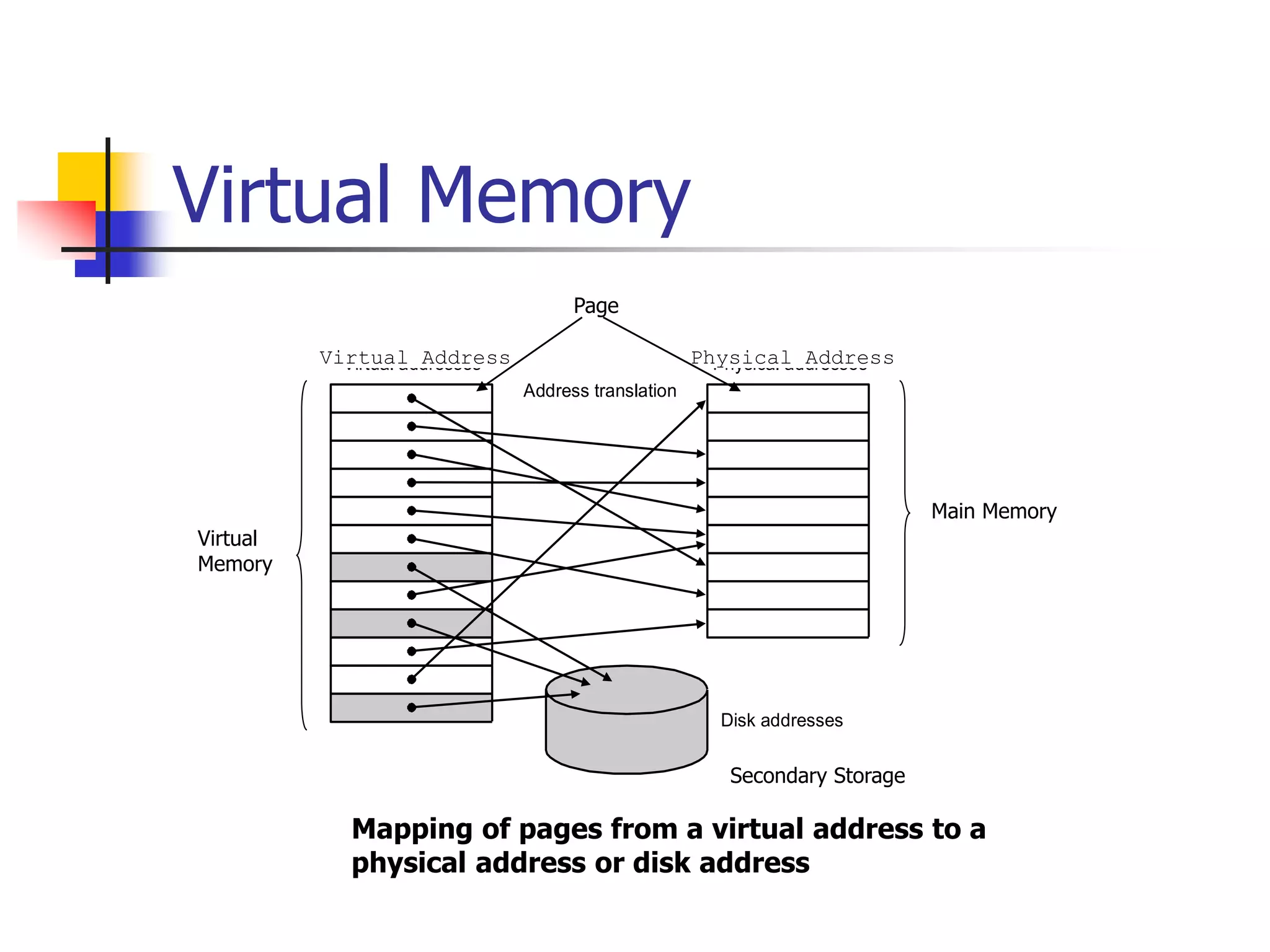
Address translation
Mapping of pages from a virtual address to a
physical address or disk address
Virtual Address Physical Address
Page
Main Memory
Virtual
Memory
Secondary Storage
Page Table Implements Virtual
to Physical Address Translation
Page offset
Virtual page number
Virtual address
Page offset
Physical page number
Physical address
Physical page number
Valid
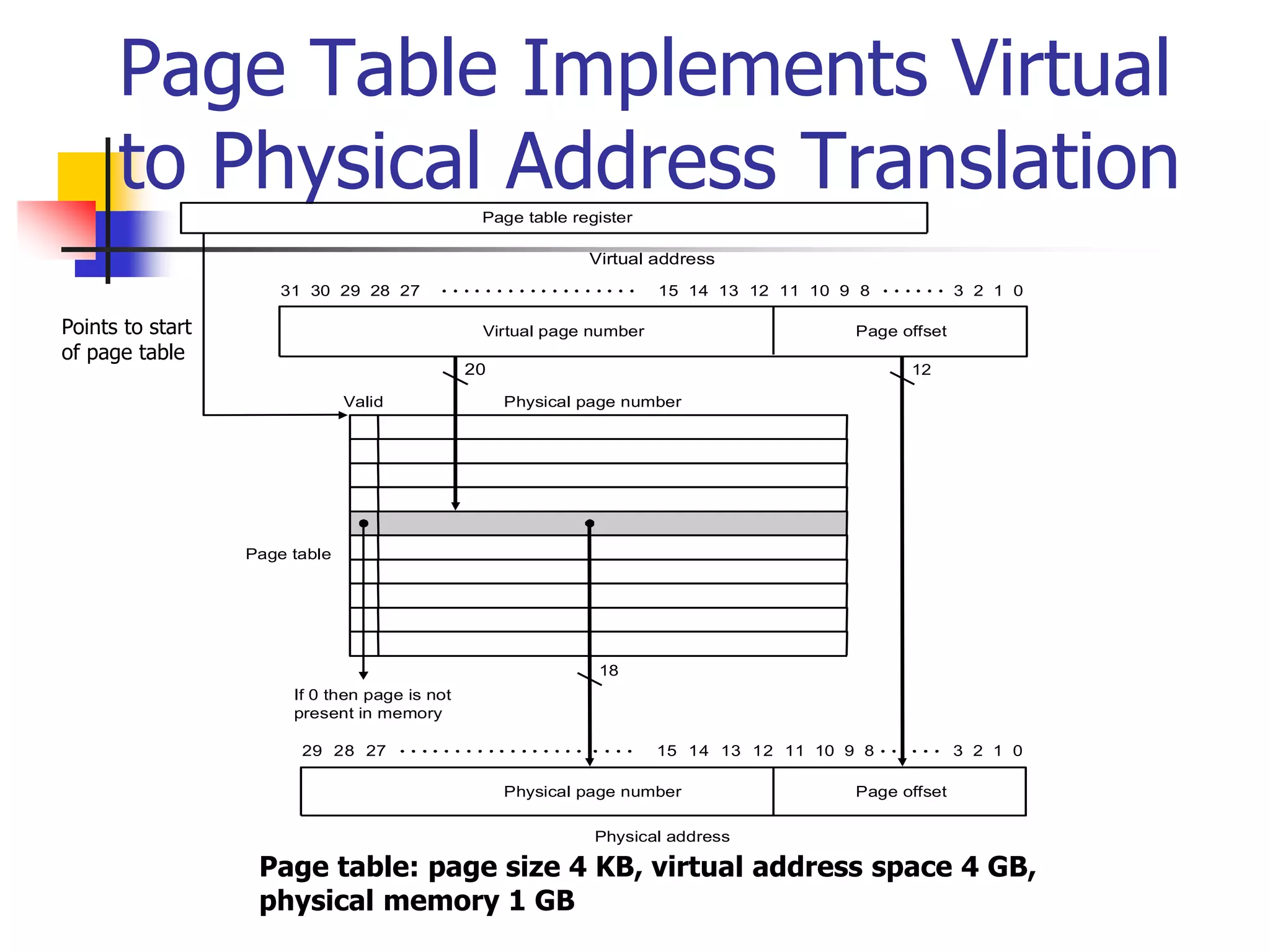
If 0 then page is not
present in memory
Page table register
Page table
20 12
18
31 30 29 28 27 15 14 13 12 11 10 9 8 3 2 1 0
29 28 27 15 14 13 12 11 10 9 8 3 2 1 0
Page table: page size 4 KB, virtual address space 4 GB,
physical memory 1 GB
Points to start
of page table
Example Problem
 Assume:
 32-bit virtual address
 4 KB page size
 4 bytes per page table entry
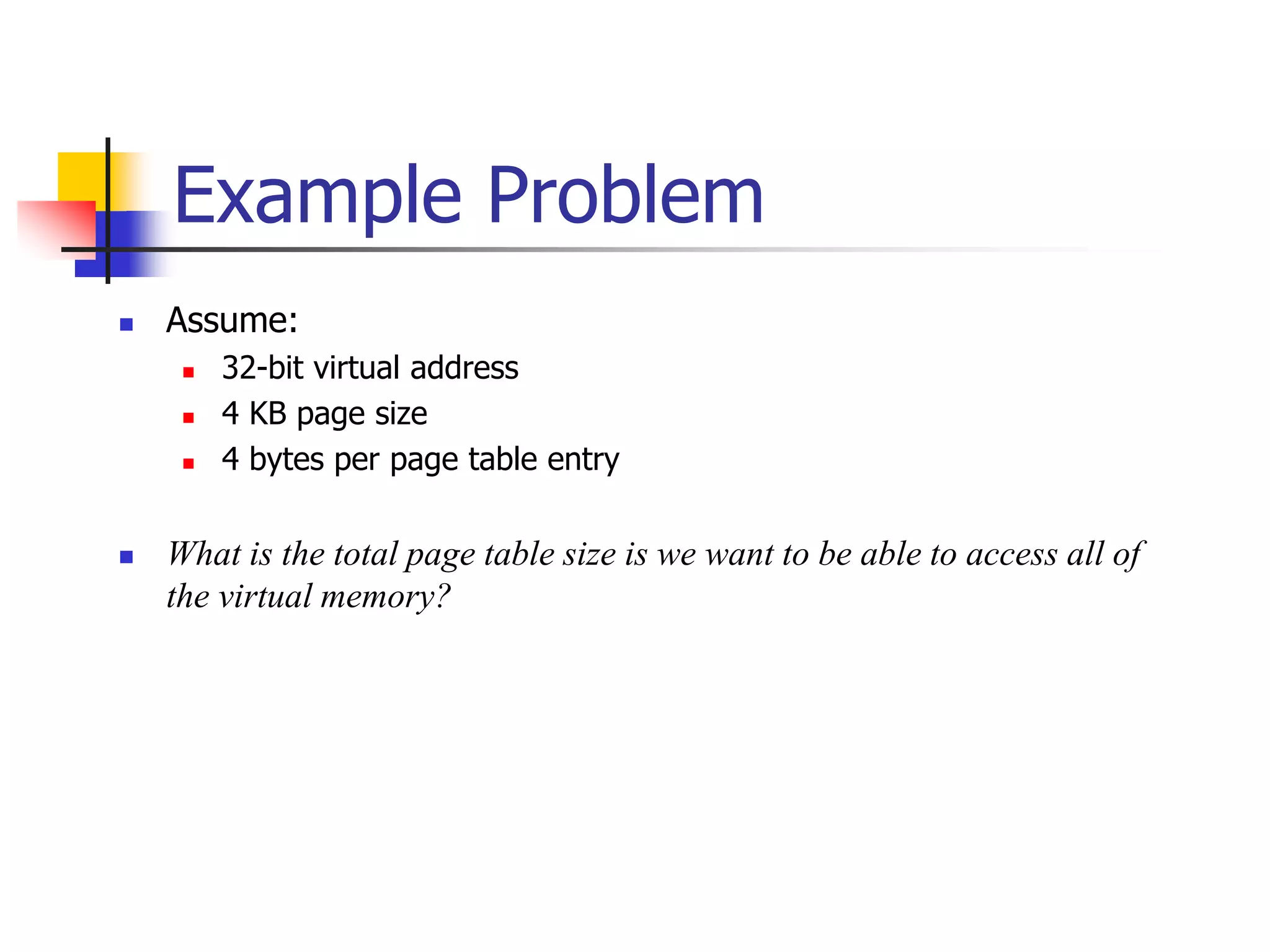
 What is the total page table size is we want to be able to access all of
the virtual memory?
Solution
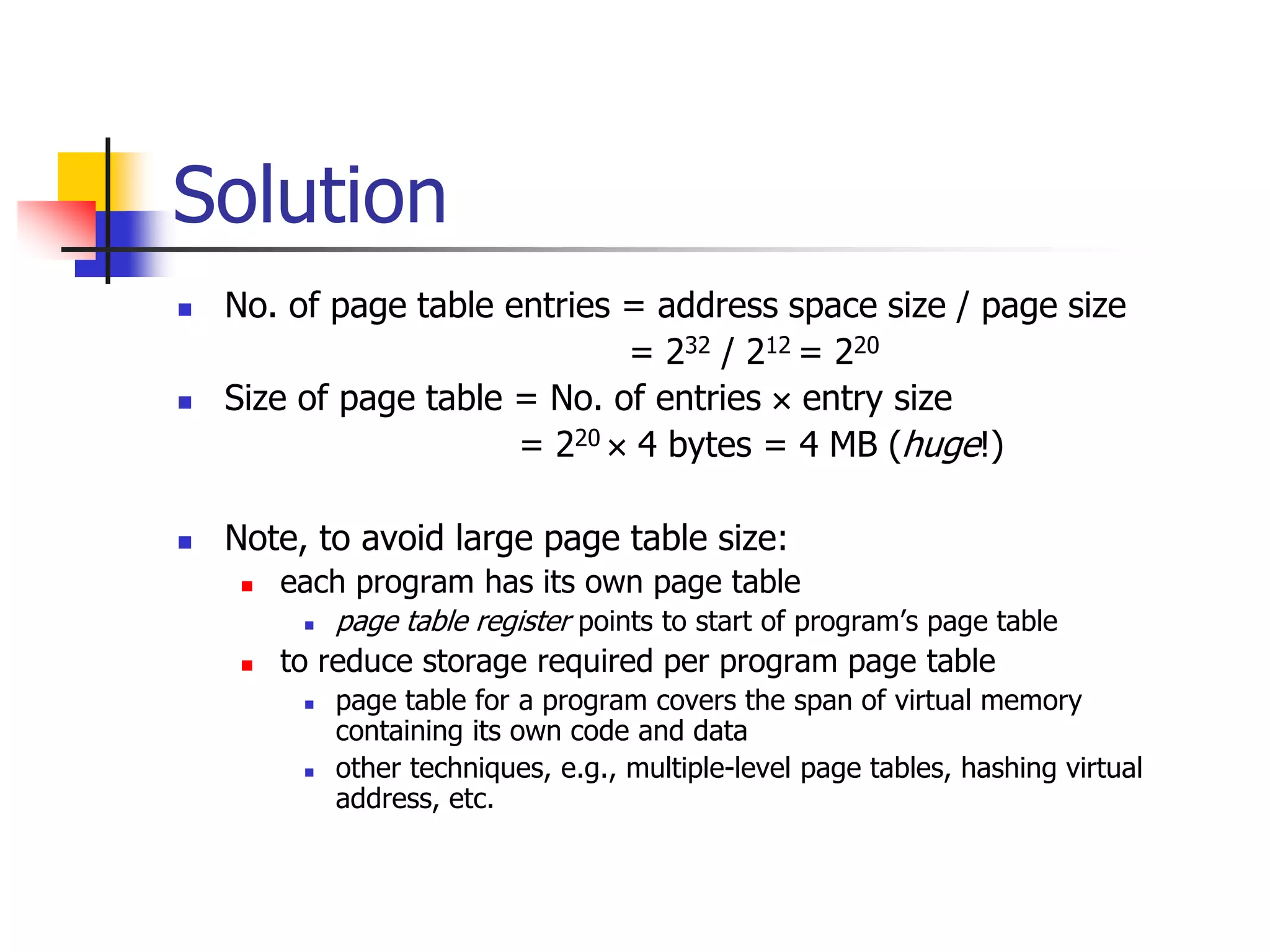
 No. of page table entries = address space size / page size
= 232 / 212 = 220
 Size of page table = No. of entries  entry size
= 220  4 bytes = 4 MB (huge!)
 Note, to avoid large page table size:
 each program has its own page table
 page table register points to start of program’s page table
 to reduce storage required per program page table
 page table for a program covers the span of virtual memory
containing its own code and data
 other techniques, e.g., multiple-level page tables, hashing virtual
address, etc.
Page Faults
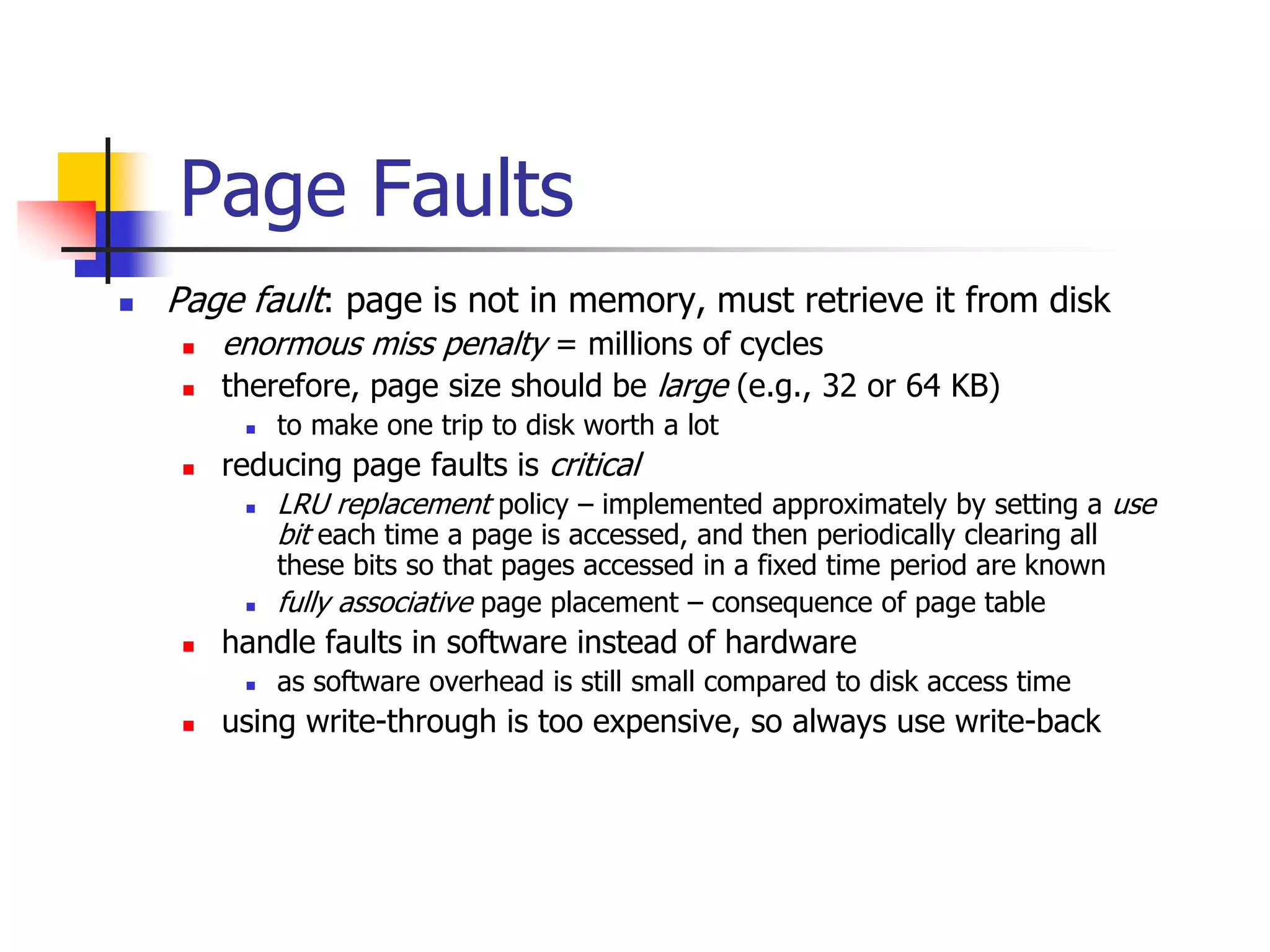
 Page fault: page is not in memory, must retrieve it from disk
 enormous miss penalty = millions of cycles
 therefore, page size should be large (e.g., 32 or 64 KB)
 to make one trip to disk worth a lot
 reducing page faults is critical
 LRU replacement policy – implemented approximately by setting a use
bit each time a page is accessed, and then periodically clearing all
these bits so that pages accessed in a fixed time period are known
 fully associative page placement – consequence of page table
 handle faults in software instead of hardware
 as software overhead is still small compared to disk access time
 using write-through is too expensive, so always use write-back
Resolving Page Faults using
the Page Table to Access Disk
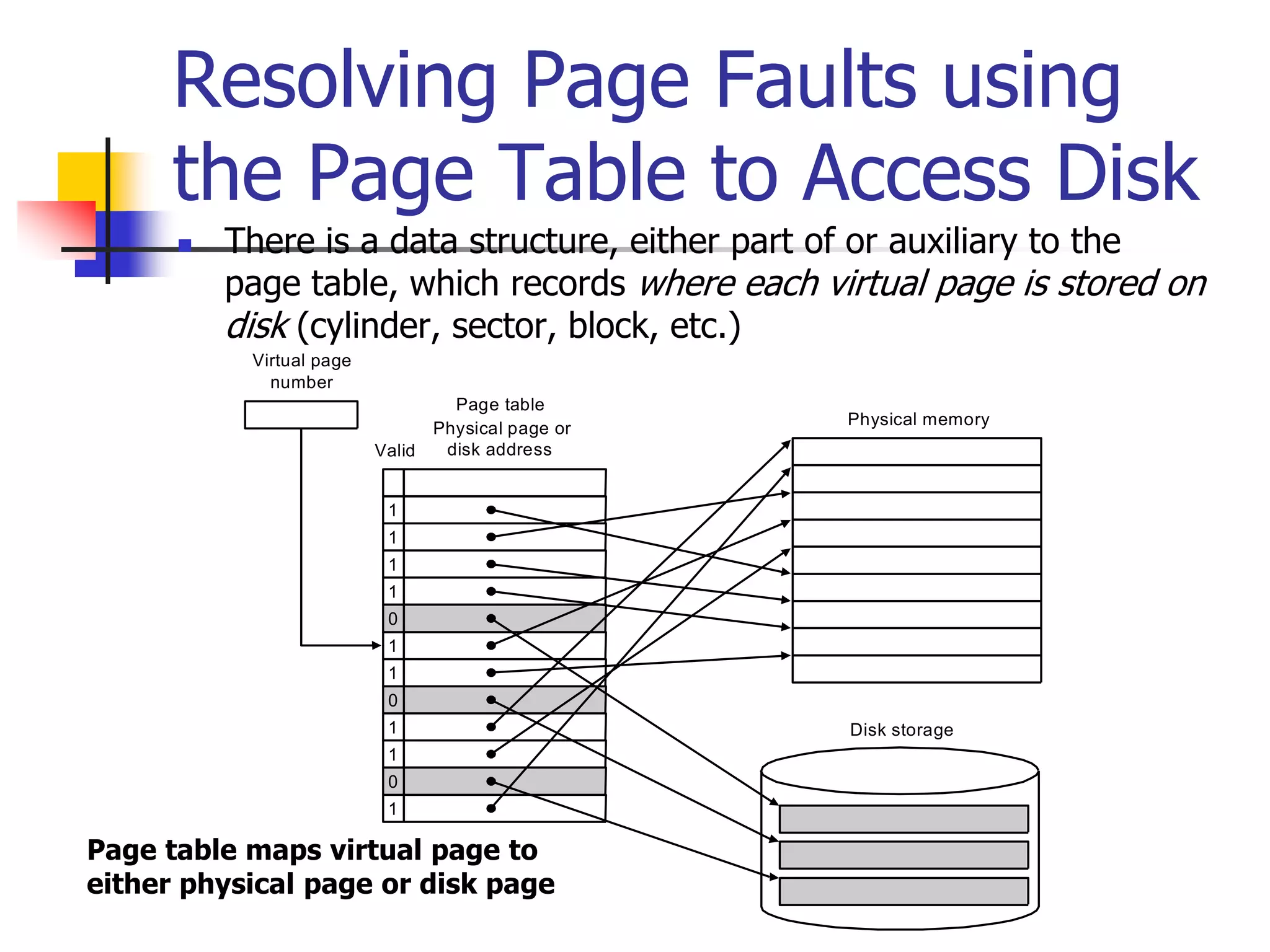
 There is a data structure, either part of or auxiliary to the
page table, which records where each virtual page is stored on
disk (cylinder, sector, block, etc.)
Physical memory
Disk storage
Valid
1
1
1
1
0
1
1
0
1
1
0
1
Page table
Virtual page
number
Physical page or
disk address
Page table maps virtual page to
either physical page or disk page
Making Address Translation
Fast with the
Translation-lookaside Buffer
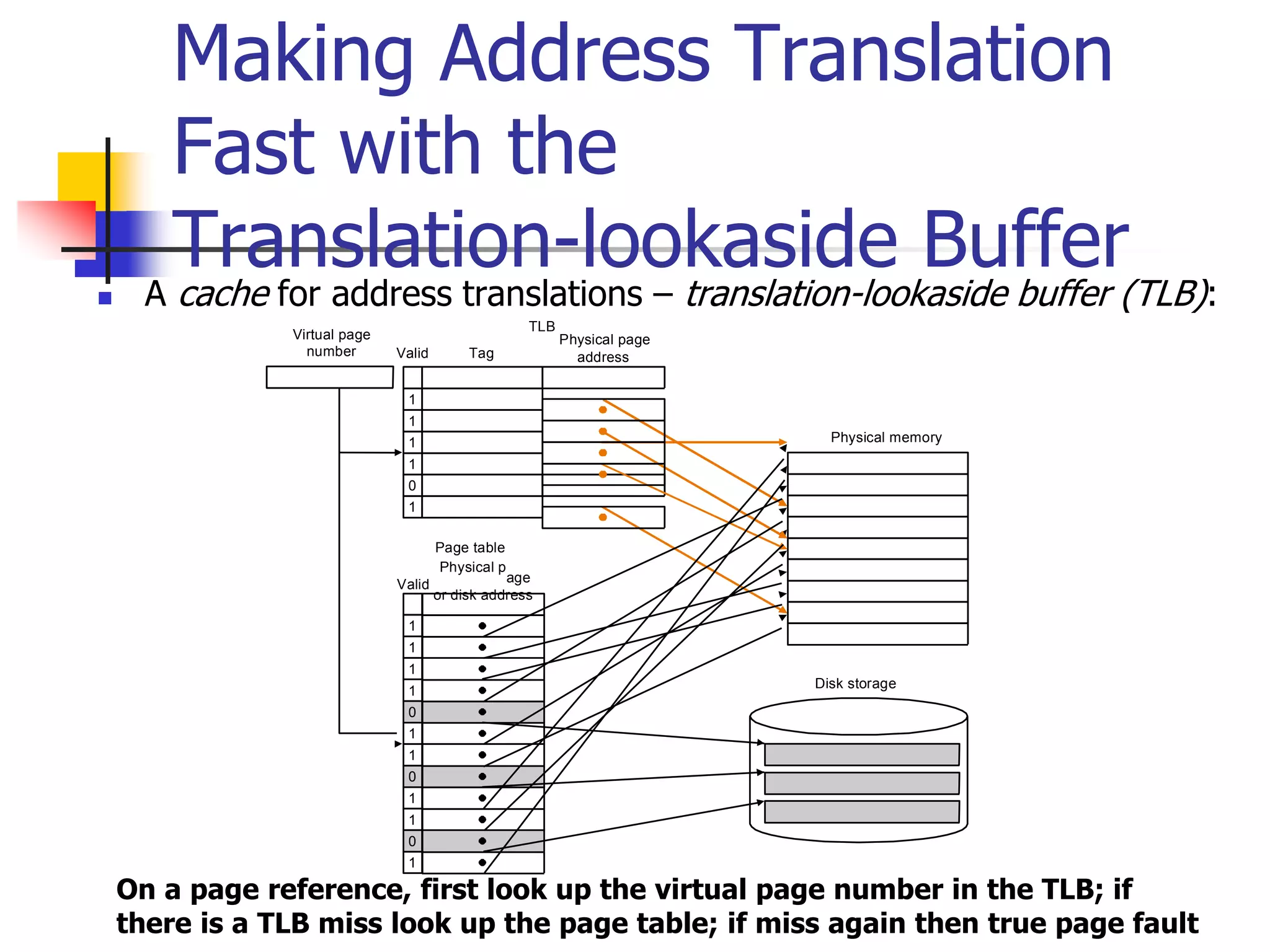
 A cache for address translations – translation-lookaside buffer (TLB):
Valid
1
1
1
1
0
1
1
0
1
1
0
1
Page table
Physical page
address
Valid
TLB
1
1
1
1
0
1
Tag
Virtual page
number
Physical p
age
or disk address
Physical memory
Disk storage
On a page reference, first look up the virtual page number in the TLB; if
there is a TLB miss look up the page table; if miss again then true page fault
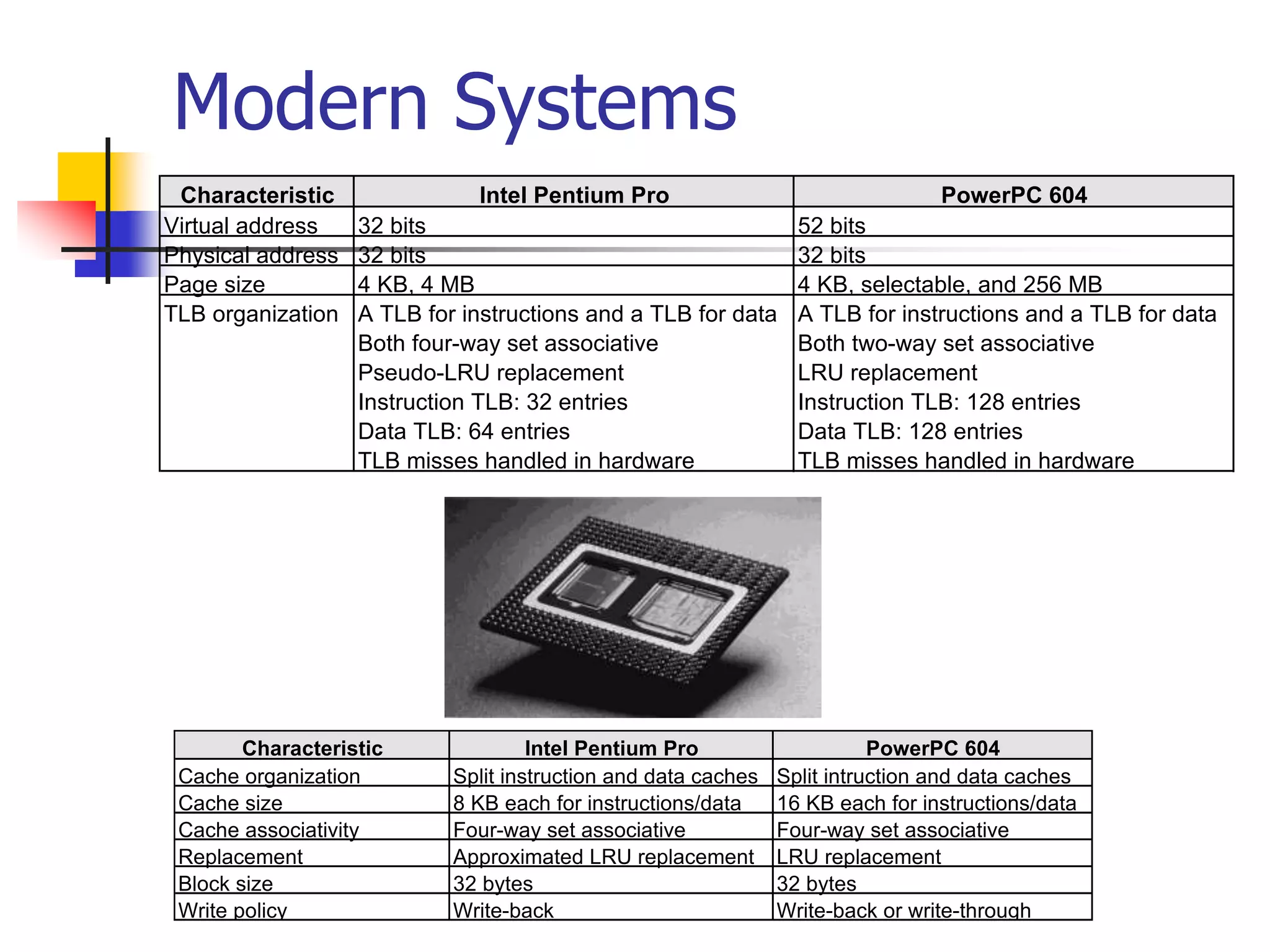
Modern Systems
Characteristic Intel Pentium Pro PowerPC 604
Virtual address 32 bits 52 bits
Physical address 32 bits 32 bits
Page size 4 KB, 4 MB 4 KB, selectable, and 256 MB
TLB organization A TLB for instructions and a TLB for data A TLB for instructions and a TLB for data
Both four-way set associative Both two-way set associative
Pseudo-LRU replacement LRU replacement
Instruction TLB: 32 entries Instruction TLB: 128 entries
Data TLB: 64 entries Data TLB: 128 entries
TLB misses handled in hardware TLB misses handled in hardware
Characteristic Intel Pentium Pro PowerPC 604
Cache organization Split instruction and data caches Split intruction and data caches
Cache size 8 KB each for instructions/data 16 KB each for instructions/data
Cache associativity Four-way set associative Four-way set associative
Replacement Approximated LRU replacement LRU replacement
Block size 32 bytes 32 bytes
Write policy Write-back Write-back or write-through
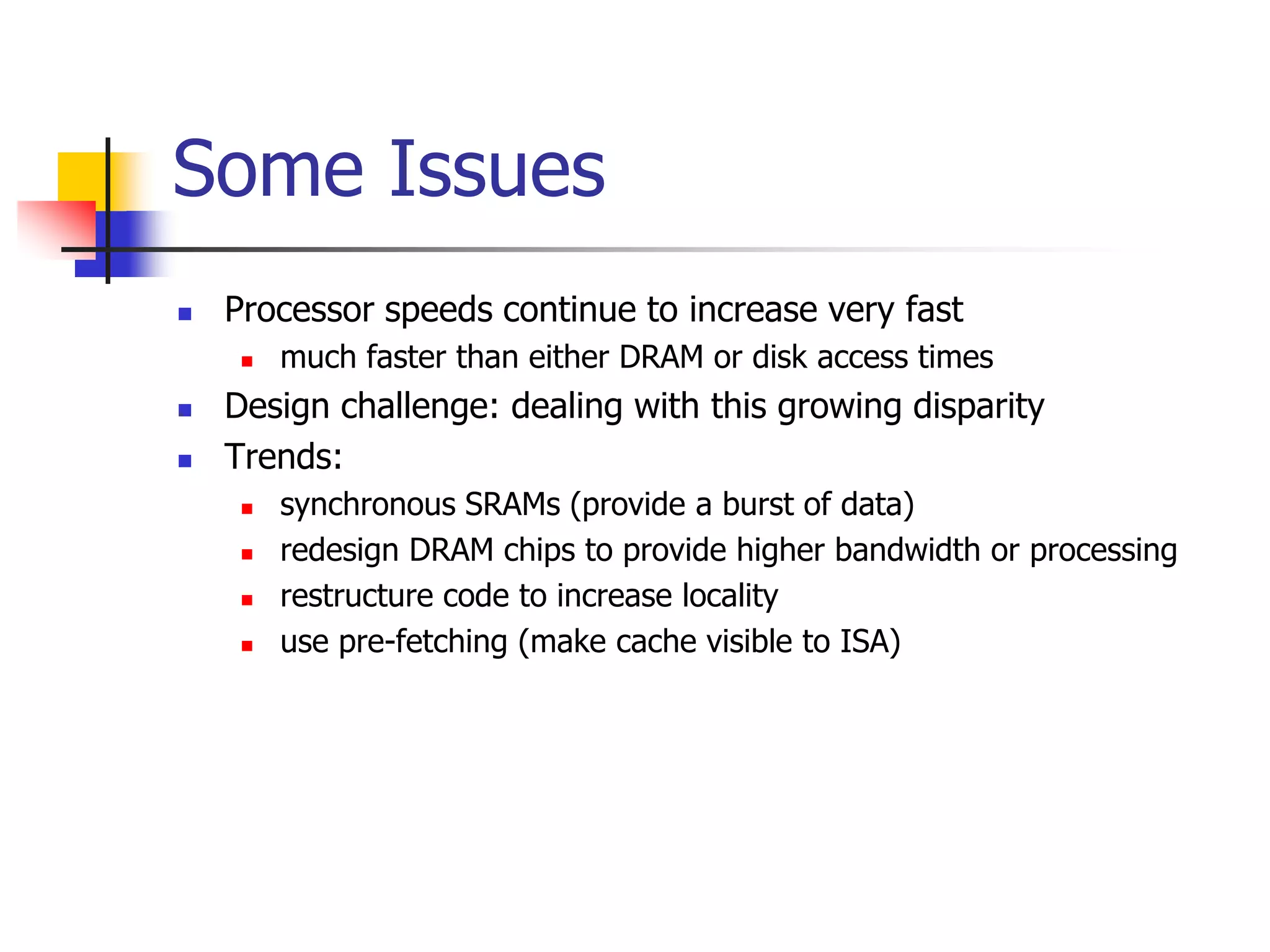
 Processor speeds continue to increase very fast
 much faster than either DRAM or disk access times
 Design challenge: dealing with this growing disparity
 Trends:
 synchronous SRAMs (provide a burst of data)
 redesign DRAM chips to provide higher bandwidth or processing
 restructure code to increase locality
 use pre-fetching (make cache visible to ISA)
Some Issues

Virtual memory translation.pptx

  • 1.
    Virtual Memory  Motivation:main memory acts as cache for secondary storage, e.g., magnetic disk  Virtual address space, i.e., space addressable by a program is determined by ISA  e.g., 64-bit MIPS address space size is 264 – recall jr instruction  typically: main memory size  disk size  virtual address space size  Program can “pretend” it has main memory of the size of the disk – which is smaller than thevirtual memory (= whole virtual address space), but bigger than the actual physical memory (=DRAM main memory)  Page table (as we shall see) transparently converts a virtual memory address to a physical memory address, if the data is already in main; if not, it issues call to OS to fetch the data from disk into main  Virtual memory is organized in fixed-size (power of 2, typically at least 4 KB) blocks, called pages. Physical memory is also considered a collection of pages of the same size.  the unit of data transfer between disk and physical memory is a page
  • 2.
    Virtual Memory Physical addresses Diskaddresses Virtual addresses Address translation Mapping of pages from a virtual address to a physical address or disk address Virtual Address Physical Address Page Main Memory Virtual Memory Secondary Storage
  • 3.
    Page Table ImplementsVirtual to Physical Address Translation Page offset Virtual page number Virtual address Page offset Physical page number Physical address Physical page number Valid If 0 then page is not present in memory Page table register Page table 20 12 18 31 30 29 28 27 15 14 13 12 11 10 9 8 3 2 1 0 29 28 27 15 14 13 12 11 10 9 8 3 2 1 0 Page table: page size 4 KB, virtual address space 4 GB, physical memory 1 GB Points to start of page table
  • 4.
    Example Problem  Assume: 32-bit virtual address  4 KB page size  4 bytes per page table entry  What is the total page table size is we want to be able to access all of the virtual memory?
  • 5.
    Solution  No. ofpage table entries = address space size / page size = 232 / 212 = 220  Size of page table = No. of entries  entry size = 220  4 bytes = 4 MB (huge!)  Note, to avoid large page table size:  each program has its own page table  page table register points to start of program’s page table  to reduce storage required per program page table  page table for a program covers the span of virtual memory containing its own code and data  other techniques, e.g., multiple-level page tables, hashing virtual address, etc.
  • 6.
    Page Faults  Pagefault: page is not in memory, must retrieve it from disk  enormous miss penalty = millions of cycles  therefore, page size should be large (e.g., 32 or 64 KB)  to make one trip to disk worth a lot  reducing page faults is critical  LRU replacement policy – implemented approximately by setting a use bit each time a page is accessed, and then periodically clearing all these bits so that pages accessed in a fixed time period are known  fully associative page placement – consequence of page table  handle faults in software instead of hardware  as software overhead is still small compared to disk access time  using write-through is too expensive, so always use write-back
  • 7.
    Resolving Page Faultsusing the Page Table to Access Disk  There is a data structure, either part of or auxiliary to the page table, which records where each virtual page is stored on disk (cylinder, sector, block, etc.) Physical memory Disk storage Valid 1 1 1 1 0 1 1 0 1 1 0 1 Page table Virtual page number Physical page or disk address Page table maps virtual page to either physical page or disk page
  • 8.
    Making Address Translation Fastwith the Translation-lookaside Buffer  A cache for address translations – translation-lookaside buffer (TLB): Valid 1 1 1 1 0 1 1 0 1 1 0 1 Page table Physical page address Valid TLB 1 1 1 1 0 1 Tag Virtual page number Physical p age or disk address Physical memory Disk storage On a page reference, first look up the virtual page number in the TLB; if there is a TLB miss look up the page table; if miss again then true page fault
  • 9.
    Modern Systems Characteristic IntelPentium Pro PowerPC 604 Virtual address 32 bits 52 bits Physical address 32 bits 32 bits Page size 4 KB, 4 MB 4 KB, selectable, and 256 MB TLB organization A TLB for instructions and a TLB for data A TLB for instructions and a TLB for data Both four-way set associative Both two-way set associative Pseudo-LRU replacement LRU replacement Instruction TLB: 32 entries Instruction TLB: 128 entries Data TLB: 64 entries Data TLB: 128 entries TLB misses handled in hardware TLB misses handled in hardware Characteristic Intel Pentium Pro PowerPC 604 Cache organization Split instruction and data caches Split intruction and data caches Cache size 8 KB each for instructions/data 16 KB each for instructions/data Cache associativity Four-way set associative Four-way set associative Replacement Approximated LRU replacement LRU replacement Block size 32 bytes 32 bytes Write policy Write-back Write-back or write-through
  • 10.
     Processor speedscontinue to increase very fast  much faster than either DRAM or disk access times  Design challenge: dealing with this growing disparity  Trends:  synchronous SRAMs (provide a burst of data)  redesign DRAM chips to provide higher bandwidth or processing  restructure code to increase locality  use pre-fetching (make cache visible to ISA) Some Issues