Virtual Memory

Background
Demand Paging
Page Replacement
Allocation of Frames
Thrashing
Background
Virtual memory – separation of user logical memory
from physical memory.
– Only part of the program needs to be in memory for
  execution.
– Logical address space can therefore be much larger than
  physical address space.
– Allows address spaces to be shared by several processes.

Virtual memory can be implemented via:
– Demand paging
– Demand segmentation
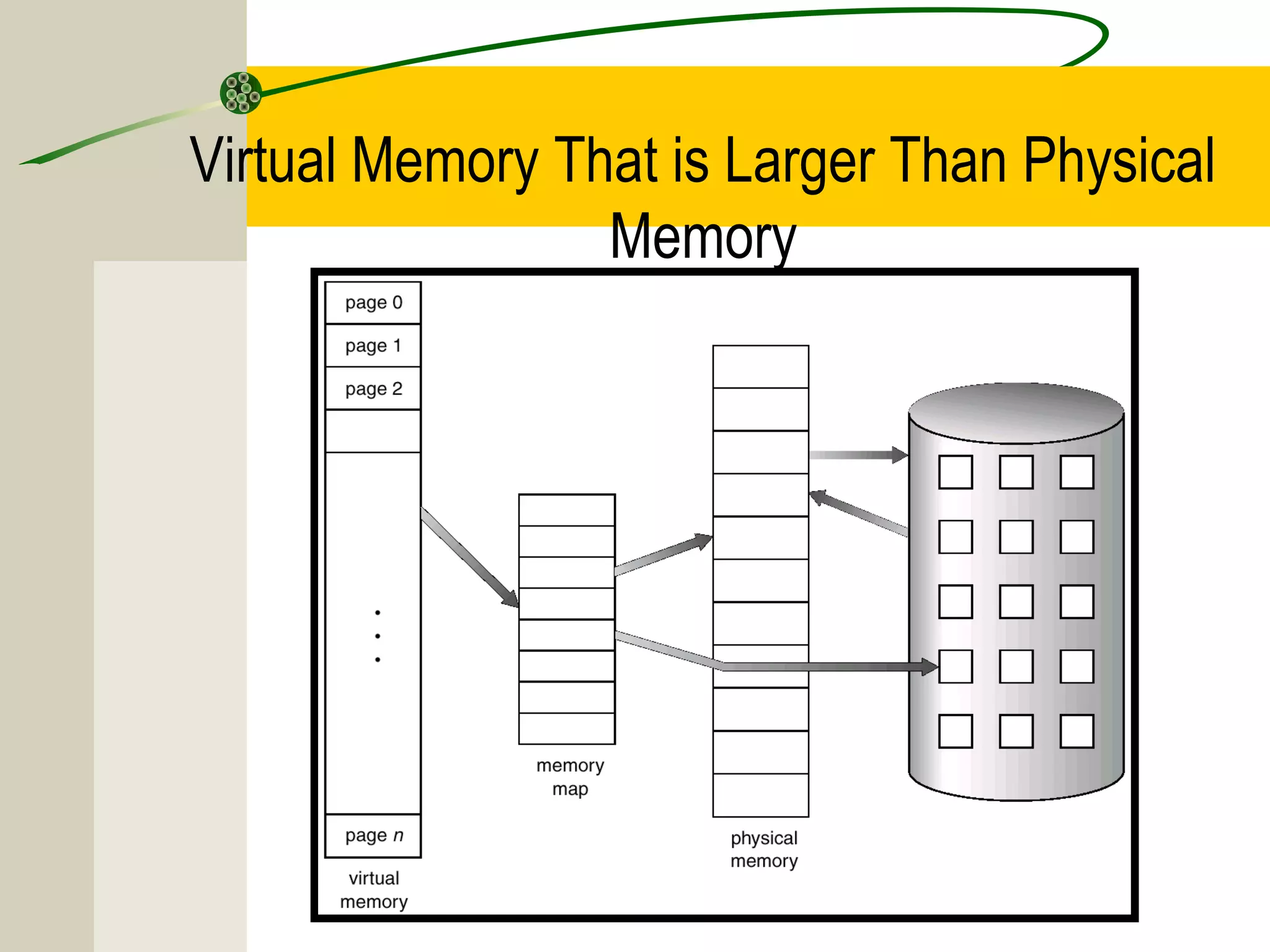
Virtual Memory That is Larger Than Physical
                 Memory
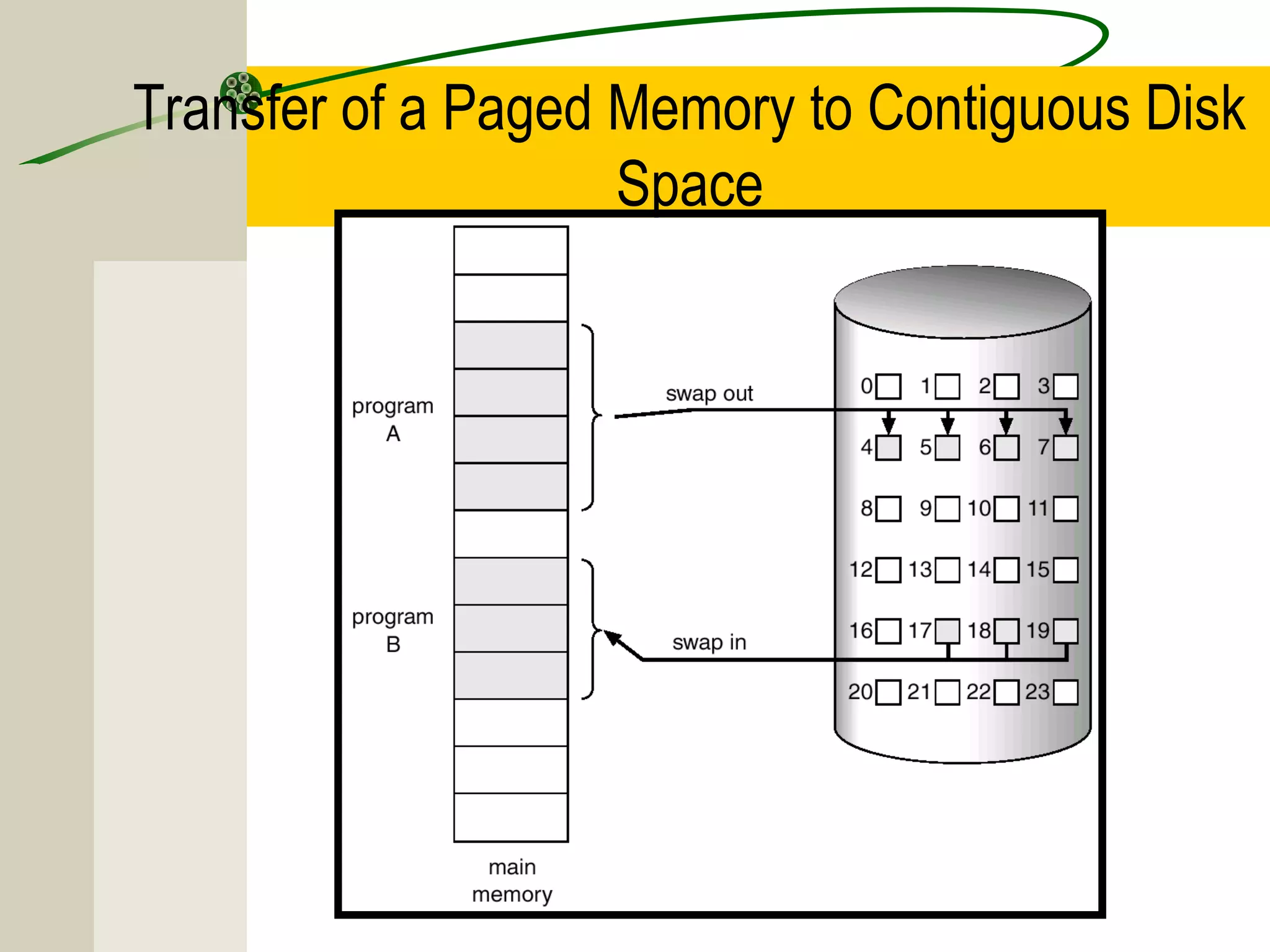
Demand Paging
Similar to Paging System with Swapping
Bring a page into memory only when it is needed.
–   Less I/O needed
–   Less memory needed
–   Faster response
–   More users

Page is needed ⇒ reference to it
– invalid reference ⇒ abort
– not-in-memory ⇒ bring to memory
Transfer of a Paged Memory to Contiguous Disk
                    Space
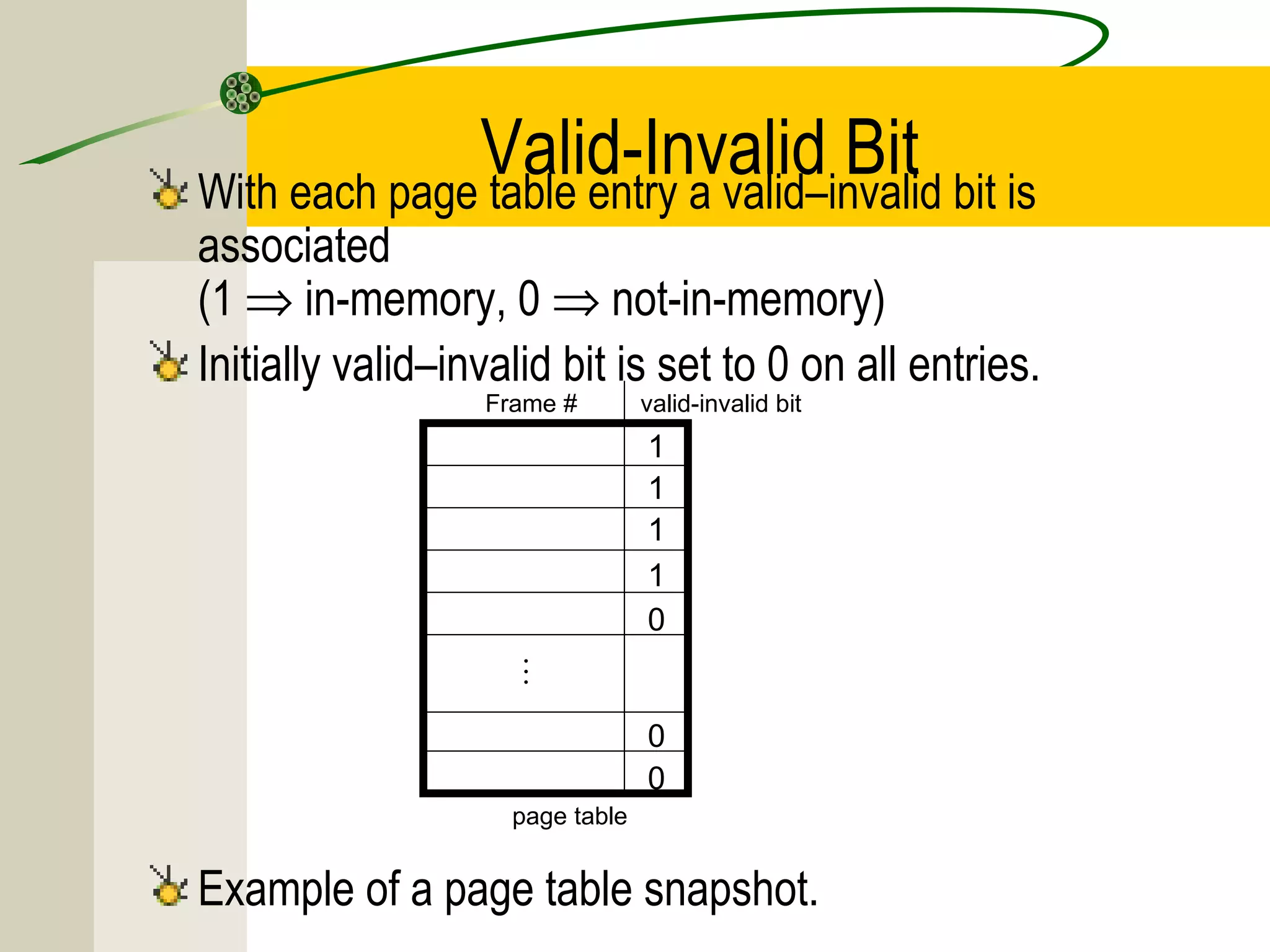
Valid-Invalid Bit bit is
With each page table entry a valid–invalid
associated
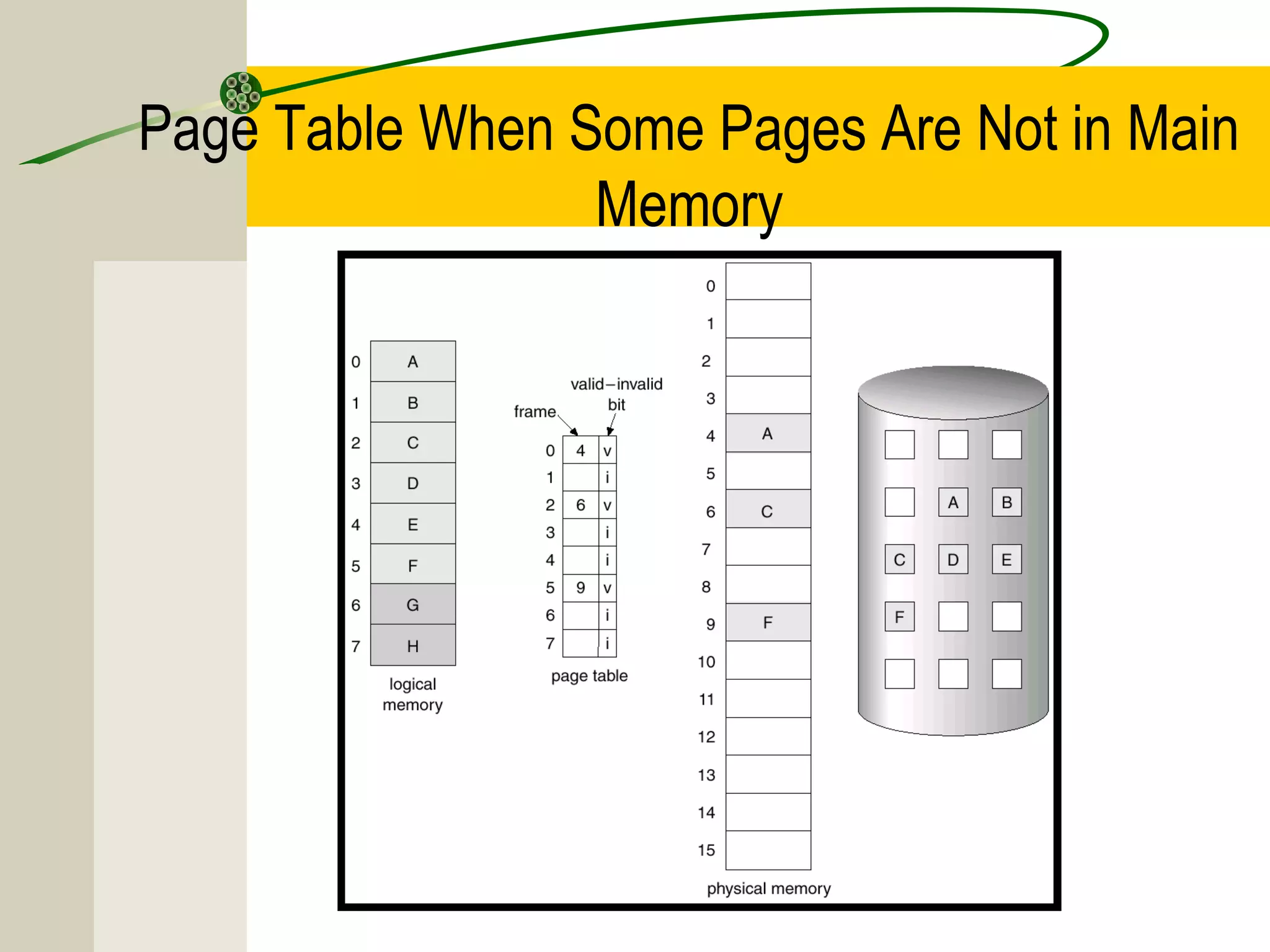
(1 ⇒ in-memory, 0 ⇒ not-in-memory)
Initially valid–invalid bit is set to 0 on all entries.
                  Frame #        valid-invalid bit
                                 1
                                 1
                                 1
                                 1
                                 0
                     

                                 0
                                 0
                    page table


Example of a page table snapshot.
Page Table When Some Pages Are Not in Main
                 Memory
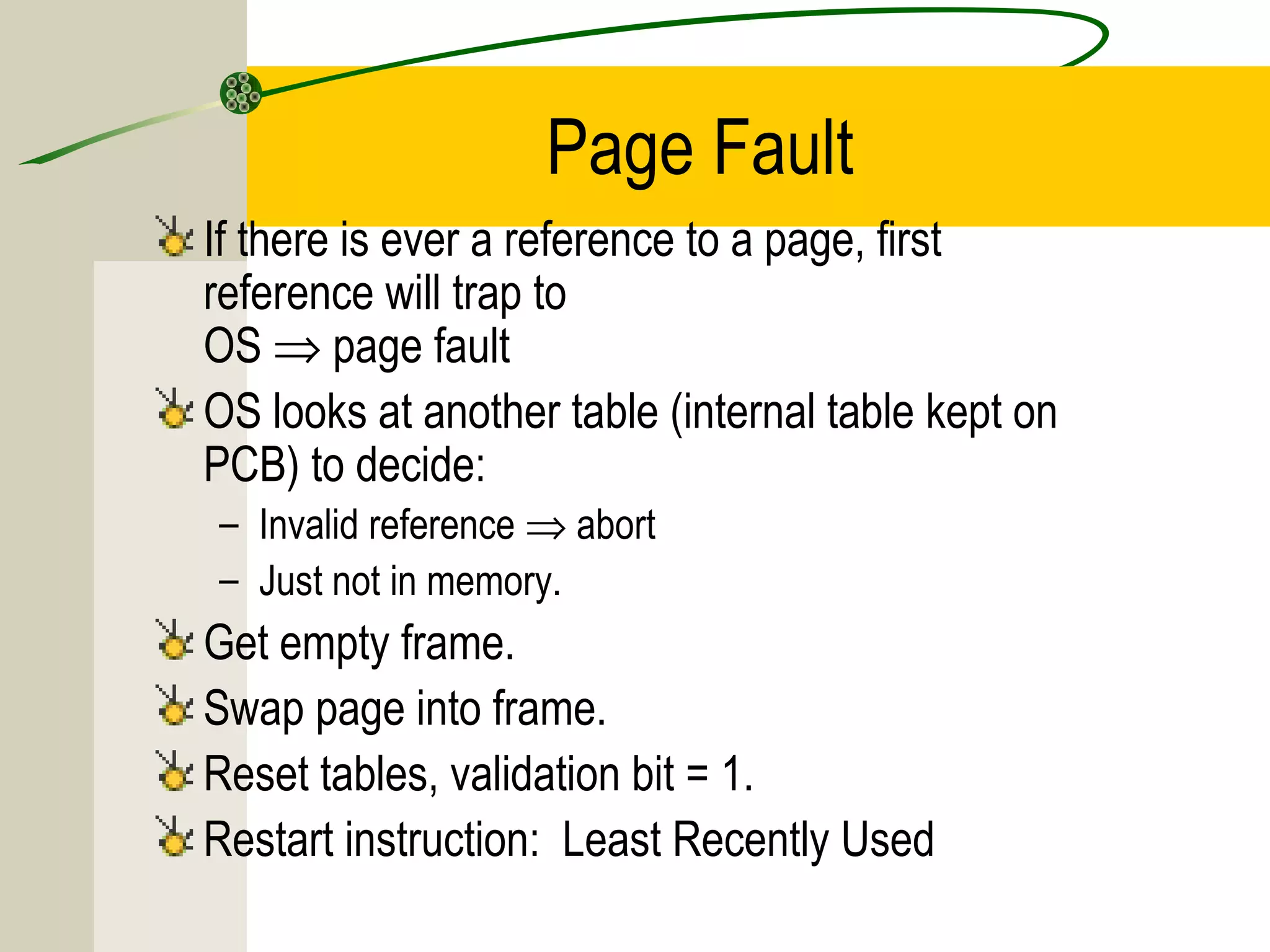
Page Fault
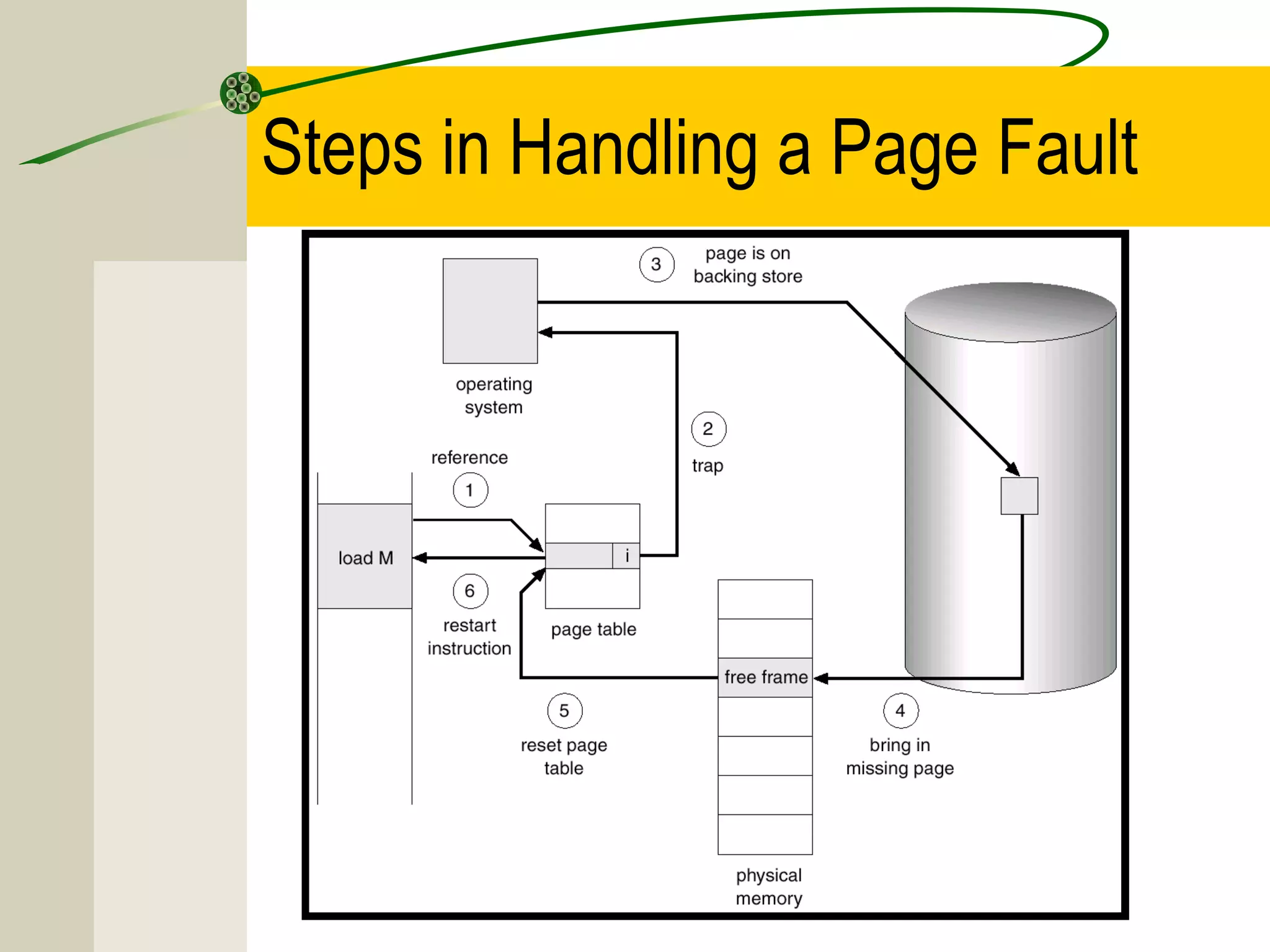
If there is ever a reference to a page, first
reference will trap to
OS ⇒ page fault
OS looks at another table (internal table kept on
PCB) to decide:
– Invalid reference ⇒ abort
– Just not in memory.
Get empty frame.
Swap page into frame.
Reset tables, validation bit = 1.
Restart instruction: Least Recently Used
Steps in Handling a Page Fault
What happens if there is no free frame?

Page replacement – find some page in memory,
but not really in use, swap it out.
– algorithm
– performance – want an algorithm which will result in
  minimum number of page faults.

Same page may be brought into memory several
times.
Performance of Demand Paging
Page Fault Rate 0 ≤ p ≤ 1.0
– if p = 0 no page faults
– if p = 1, every reference is a fault

Effective Access Time (EAT)
              EAT = (1 – p) x memory access
                   + p (page fault overhead
                   + [swap page out ]
                   + swap page in
                   + restart overhead)
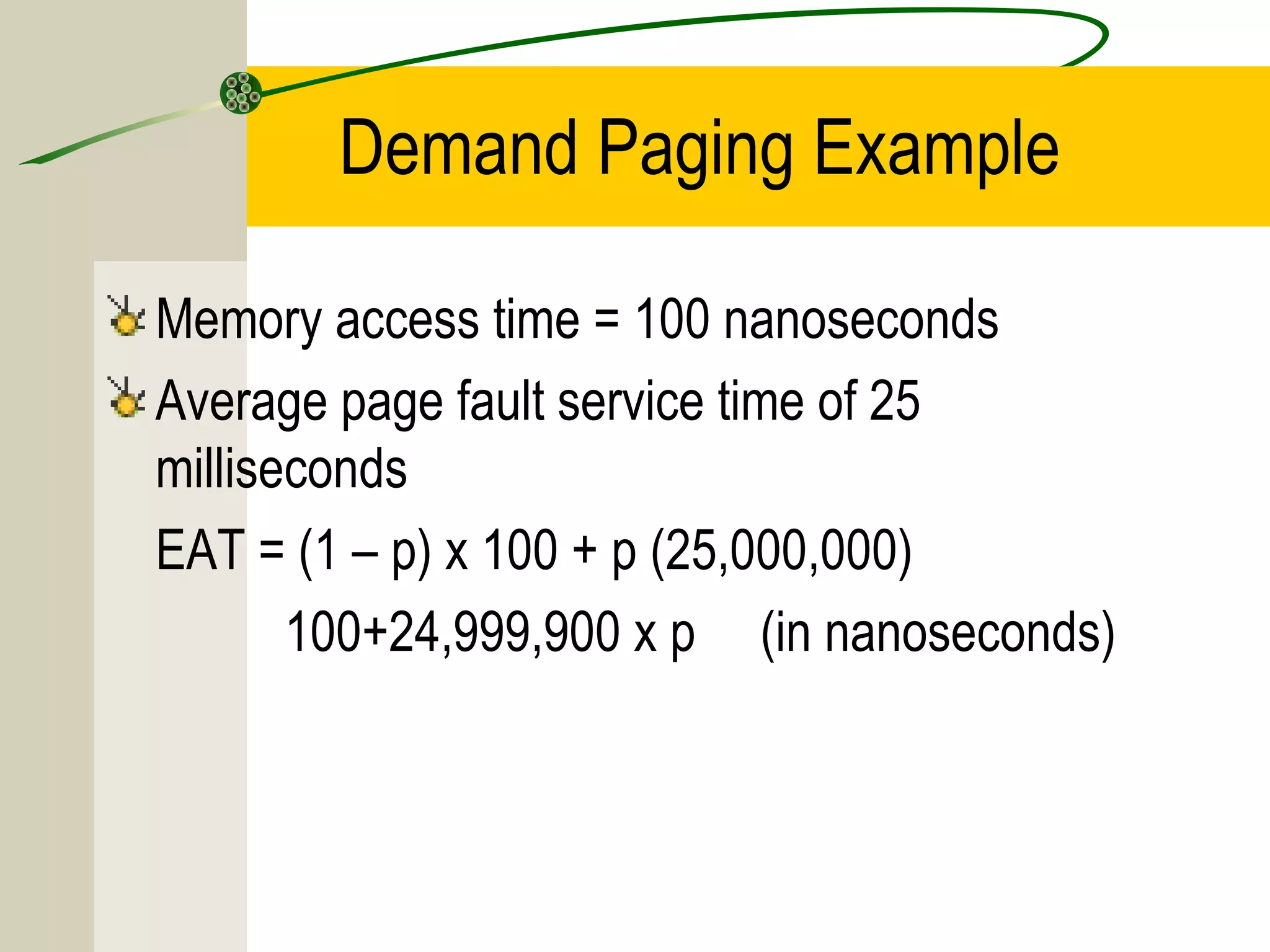
Demand Paging Example

Memory access time = 100 nanoseconds
Average page fault service time of 25
milliseconds
EAT = (1 – p) x 100 + p (25,000,000)
       100+24,999,900 x p (in nanoseconds)
Page Replacement

Prevent over-allocation of memory by modifying page-
fault service routine to include page replacement.

Use modify (dirty) bit to reduce overhead of page
transfers – only modified pages are written to disk.

Page replacement completes separation between
logical memory and physical memory – large virtual
memory can be provided on a smaller physical memory.
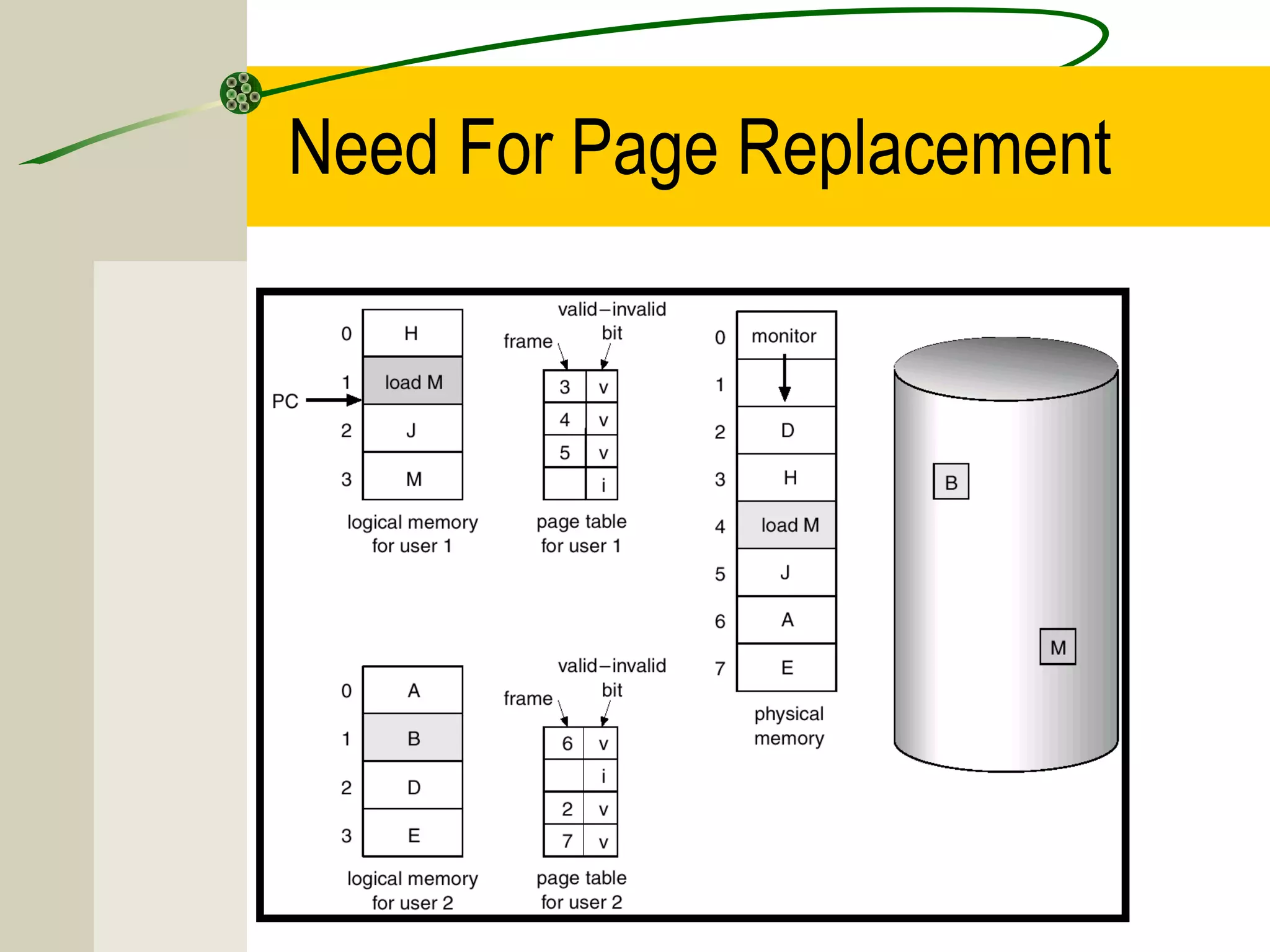
Need For Page Replacement
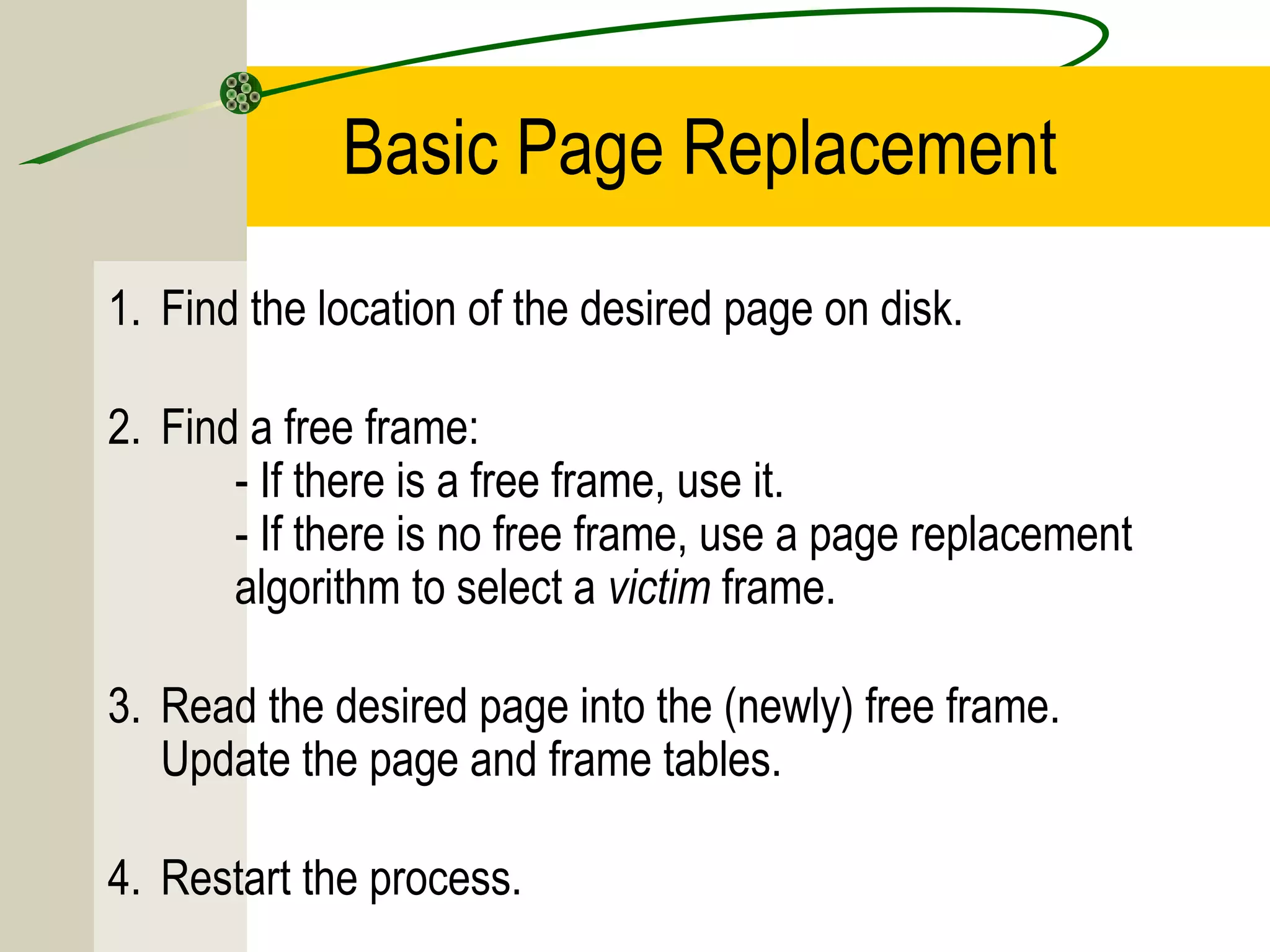
Basic Page Replacement
1. Find the location of the desired page on disk.

2. Find a free frame:
       - If there is a free frame, use it.
       - If there is no free frame, use a page replacement
       algorithm to select a victim frame.

3. Read the desired page into the (newly) free frame.
   Update the page and frame tables.

4. Restart the process.
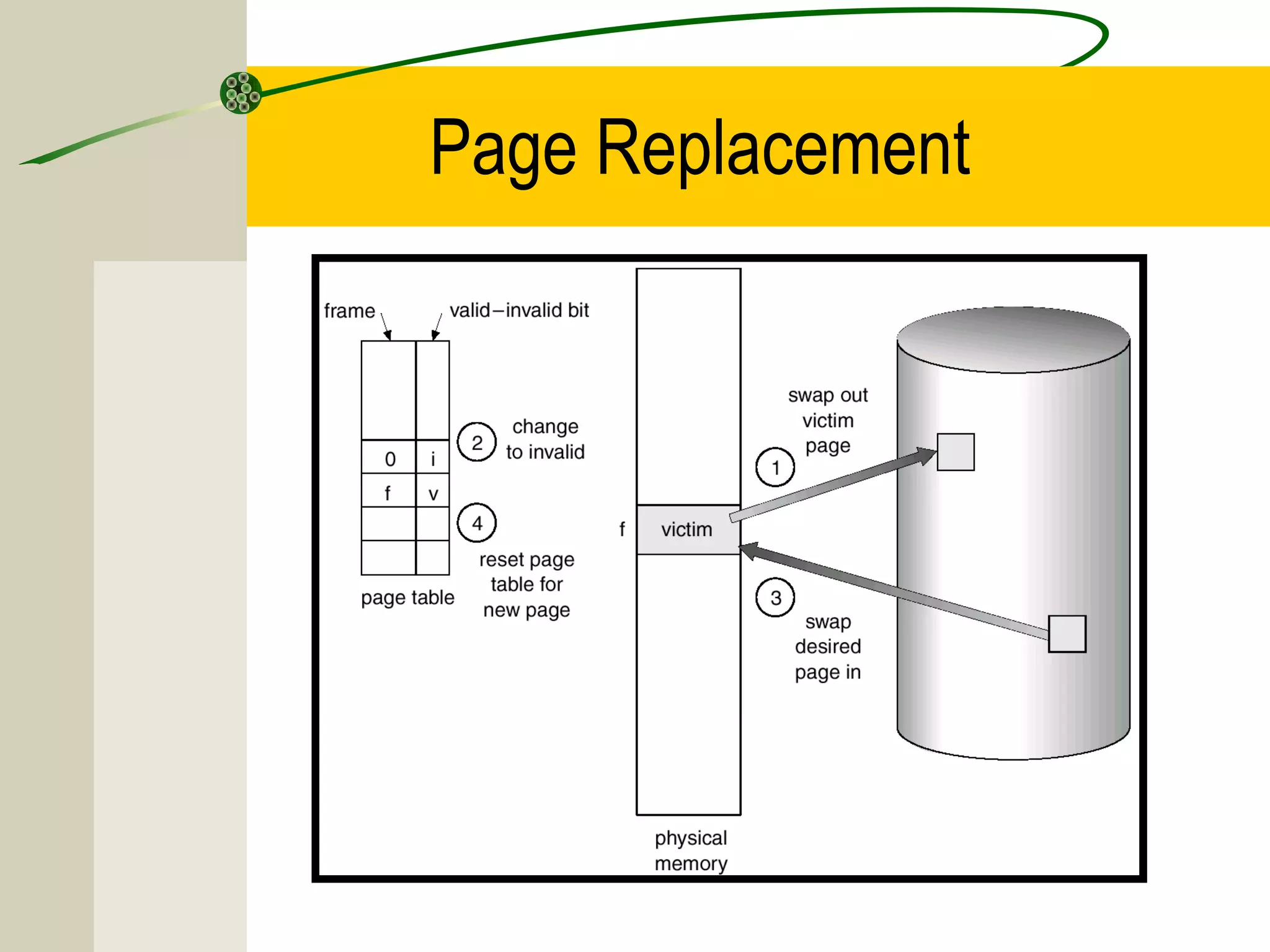
Page Replacement
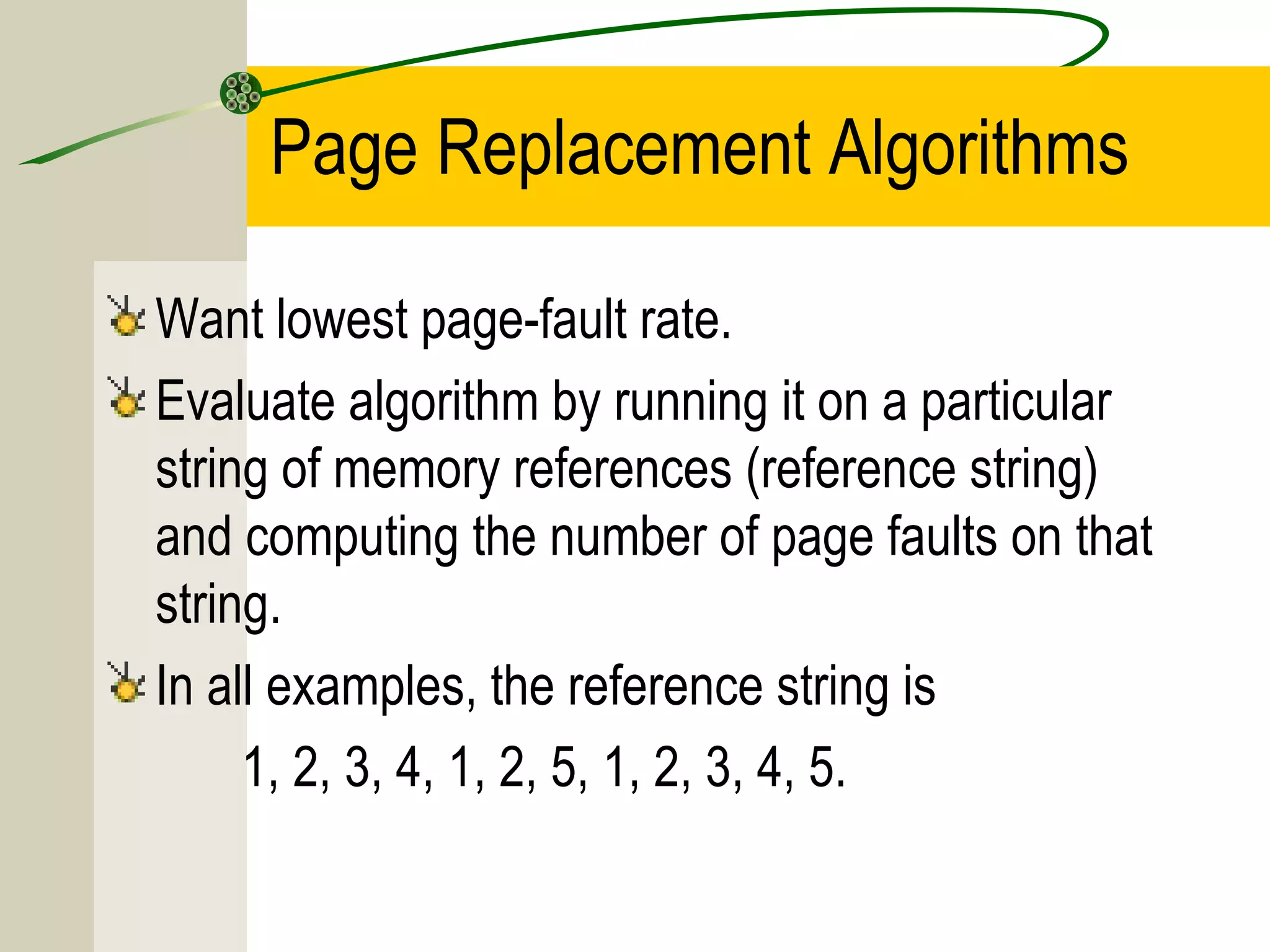
Page Replacement Algorithms

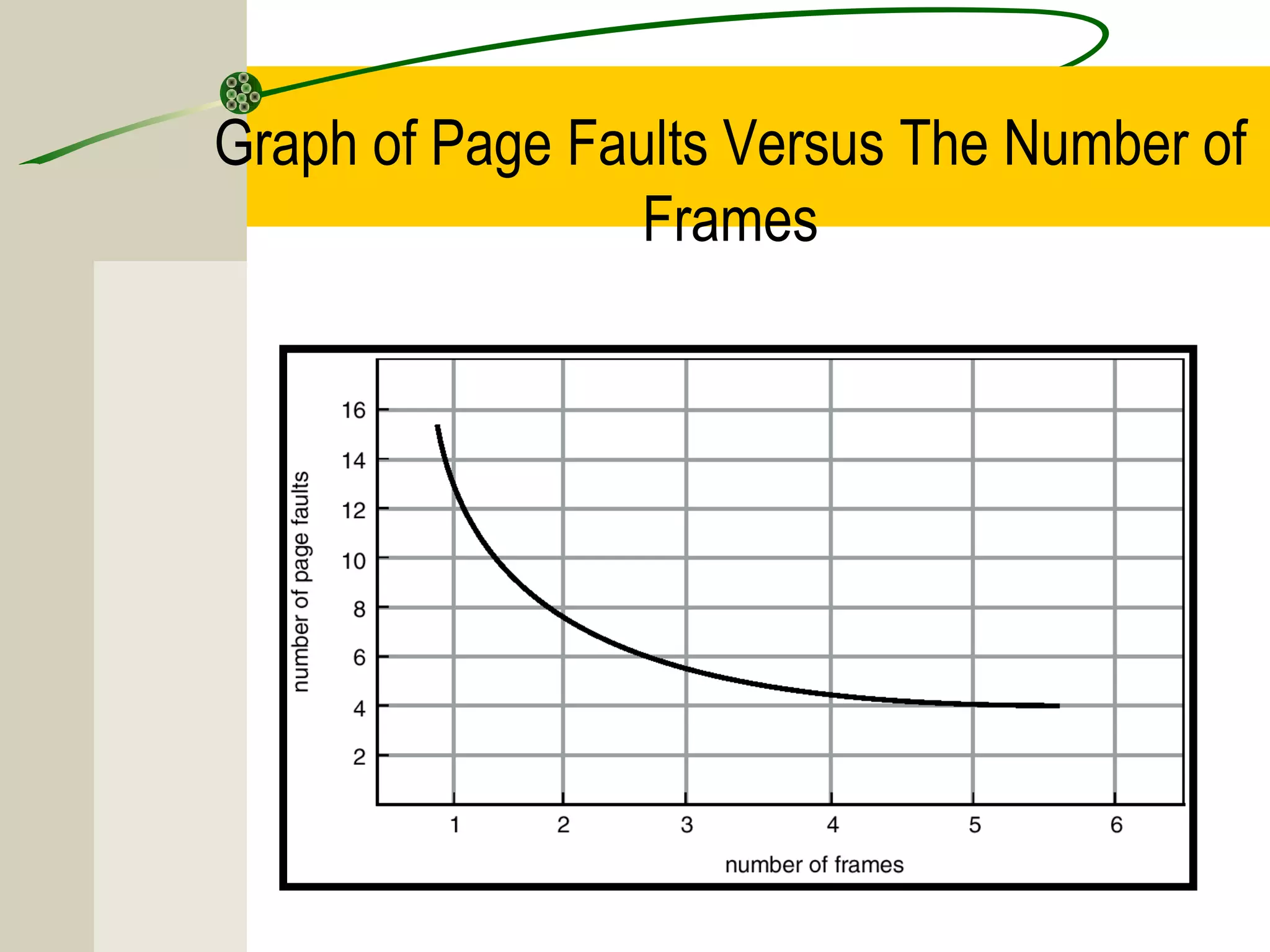
Want lowest page-fault rate.
Evaluate algorithm by running it on a particular
string of memory references (reference string)
and computing the number of page faults on that
string.
In all examples, the reference string is
     1, 2, 3, 4, 1, 2, 5, 1, 2, 3, 4, 5.
Graph of Page Faults Versus The Number of
                 Frames
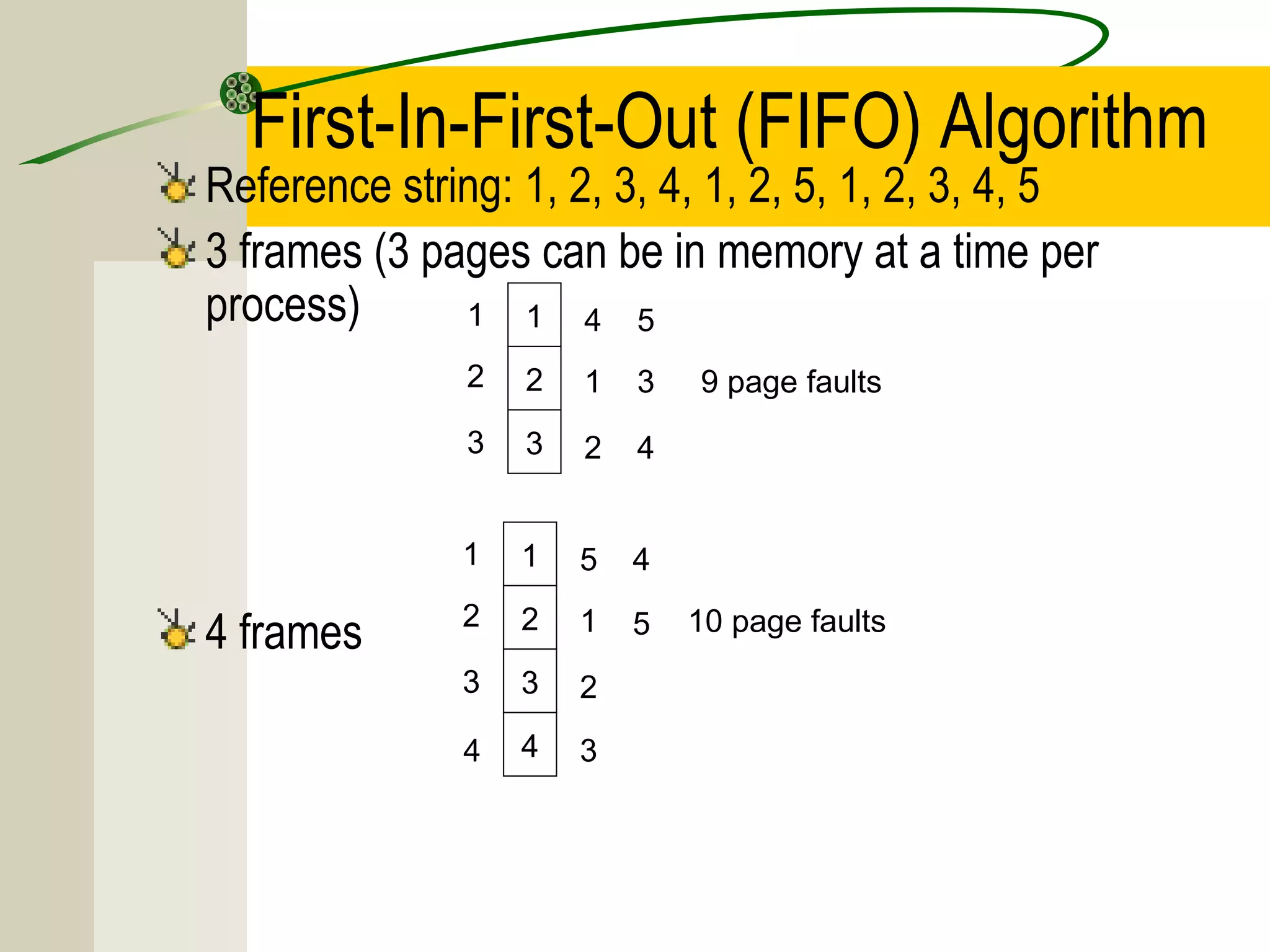
First-In-First-Out (FIFO) Algorithm
Reference string: 1, 2, 3, 4, 1, 2, 5, 1, 2, 3, 4, 5
3 frames (3 pages can be in memory at a time per
process)      1 1 4 5
               2   2   1   3   9 page faults
               3   3   2   4


              1    1   5   4

4 frames      2    2   1   5   10 page faults
              3    3   2

               4   4   3
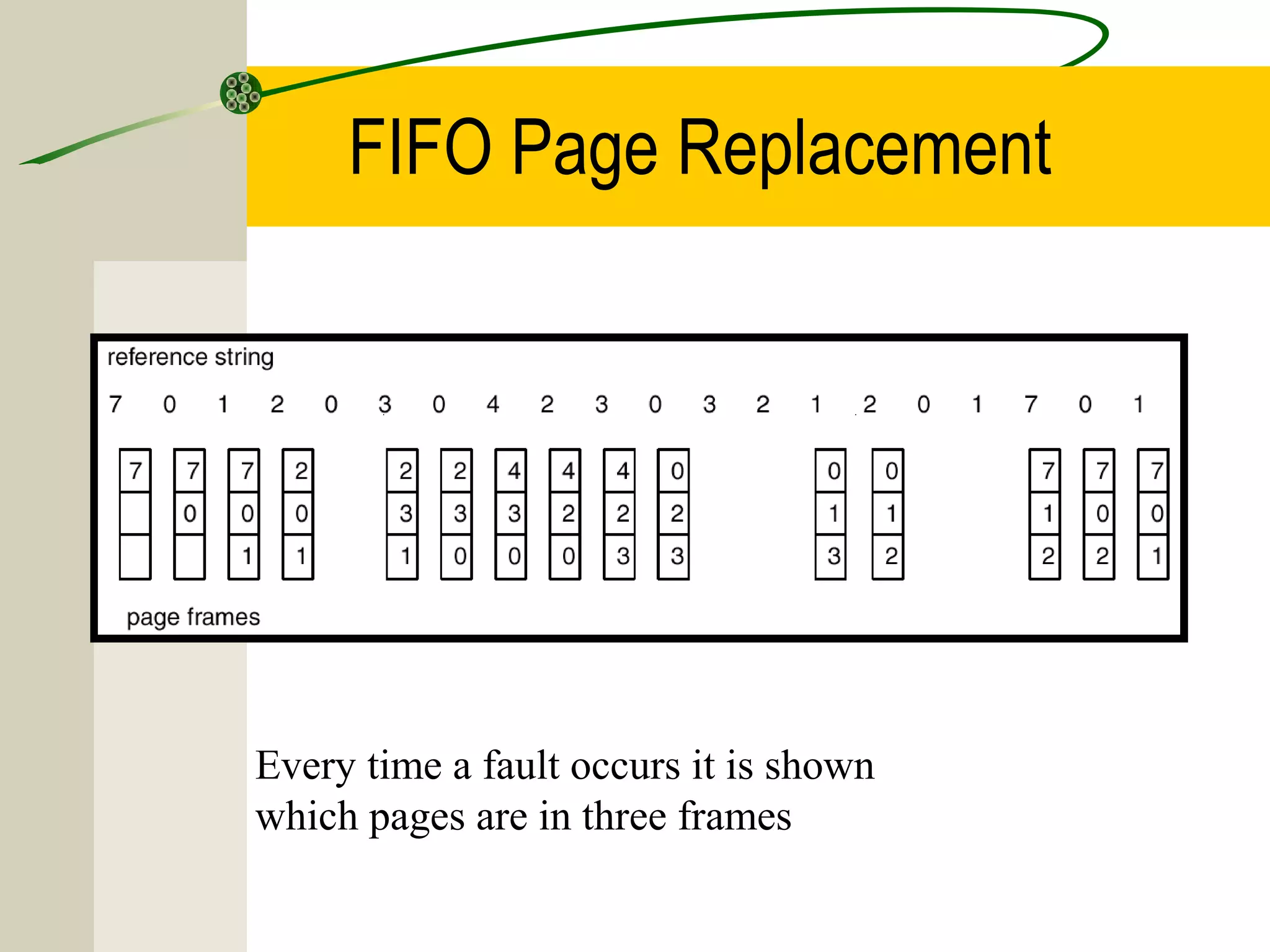
FIFO Page Replacement


Every time a fault occurs it is shown
which pages are in three frames
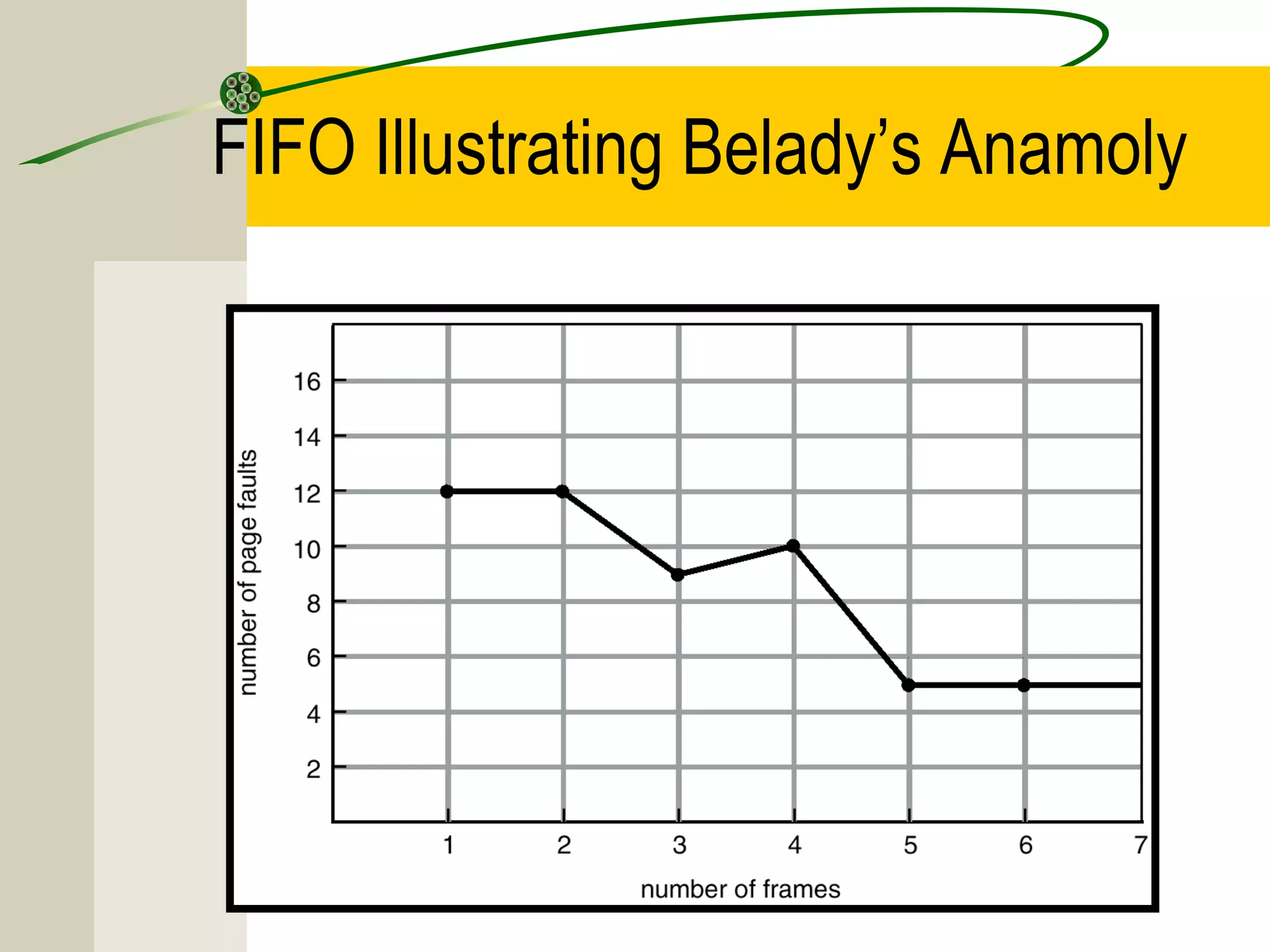
FIFO Illustrating Belady’s Anamoly
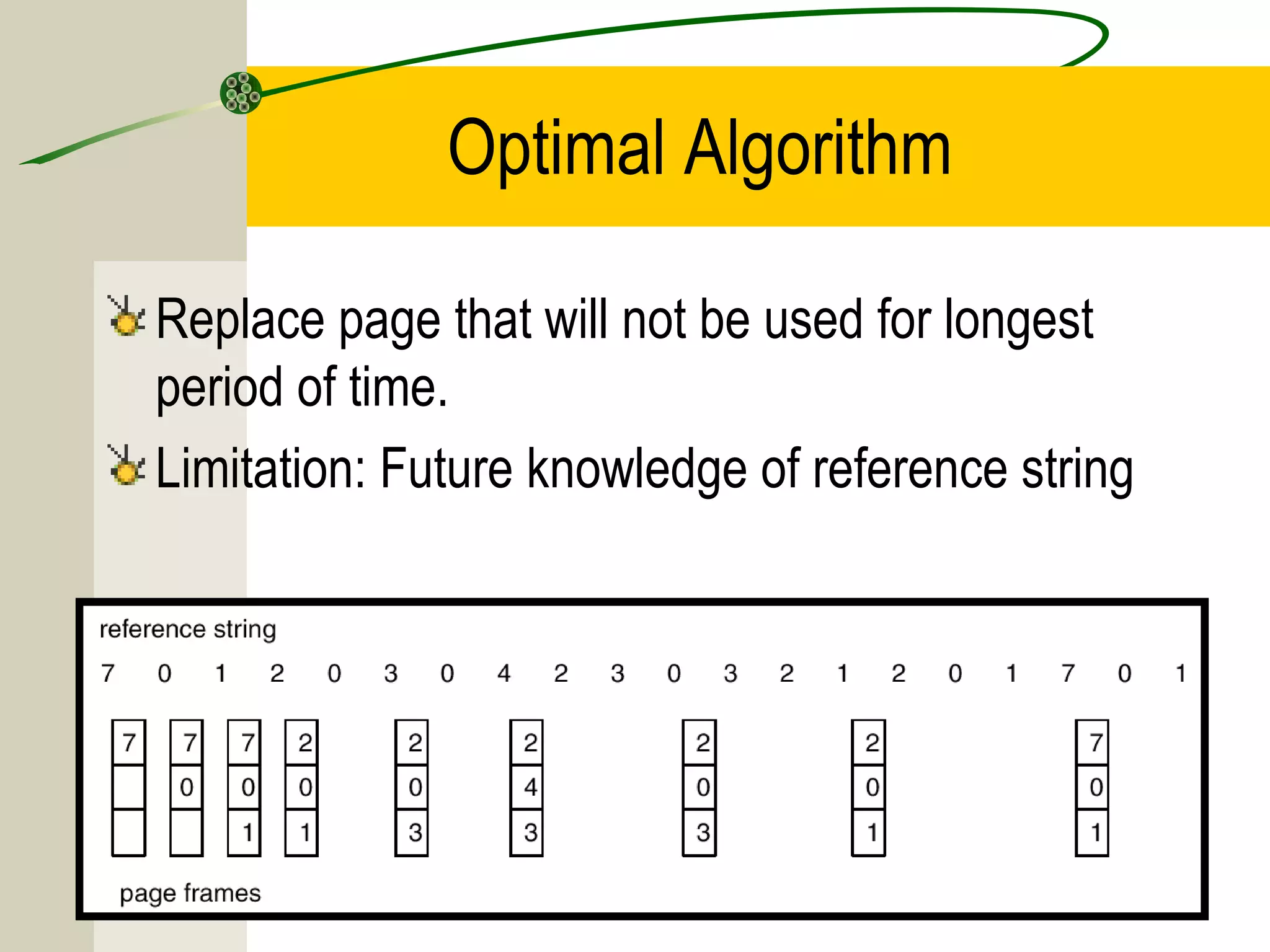
Optimal Algorithm

Replace page that will not be used for longest
period of time.
Limitation: Future knowledge of reference string
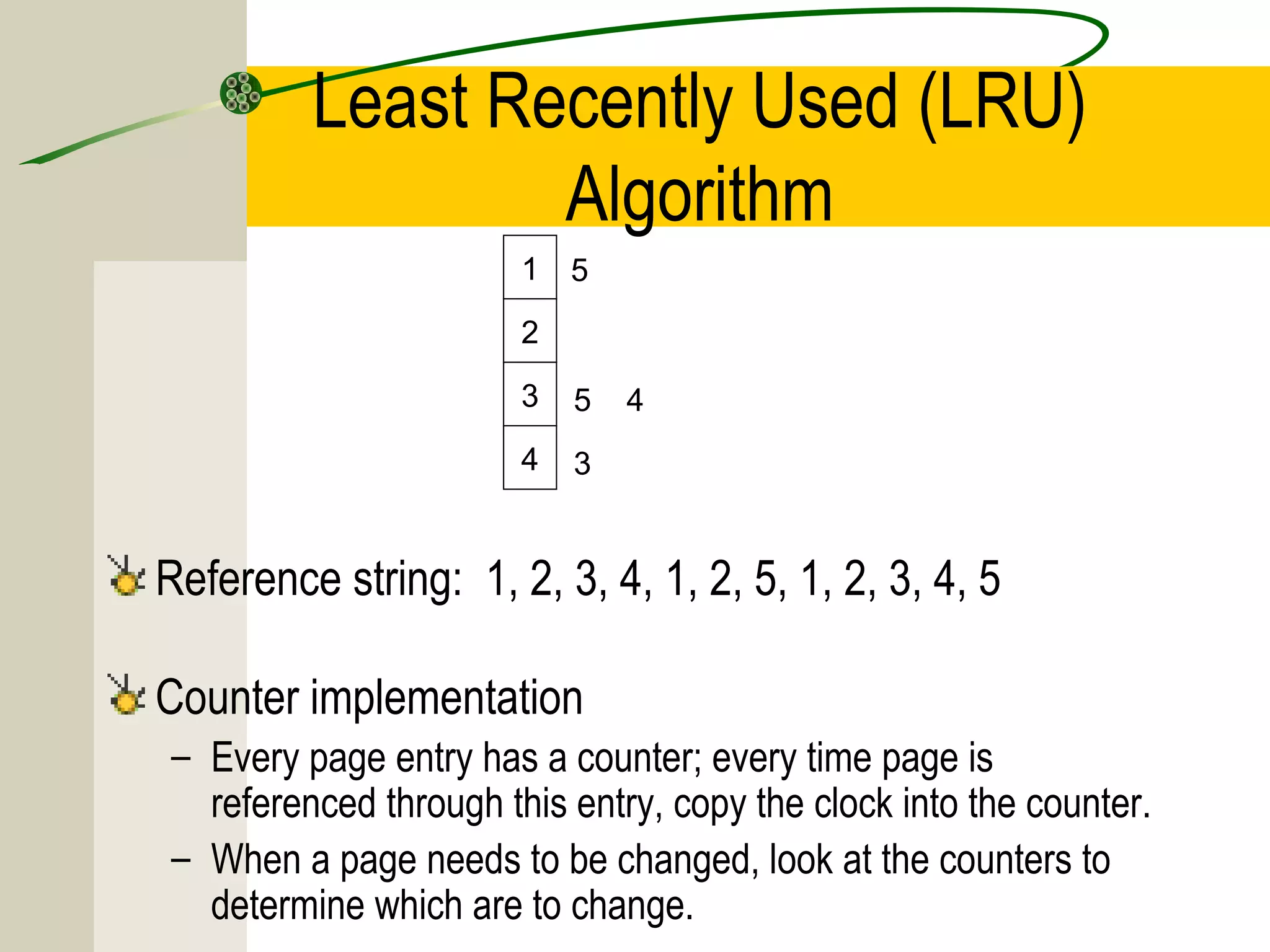
Least Recently Used (LRU)
                 Algorithm
                       1   5
                       2

                       3   5   4
                       4   3


Reference string: 1, 2, 3, 4, 1, 2, 5, 1, 2, 3, 4, 5

Counter implementation
– Every page entry has a counter; every time page is
  referenced through this entry, copy the clock into the counter.
– When a page needs to be changed, look at the counters to
  determine which are to change.
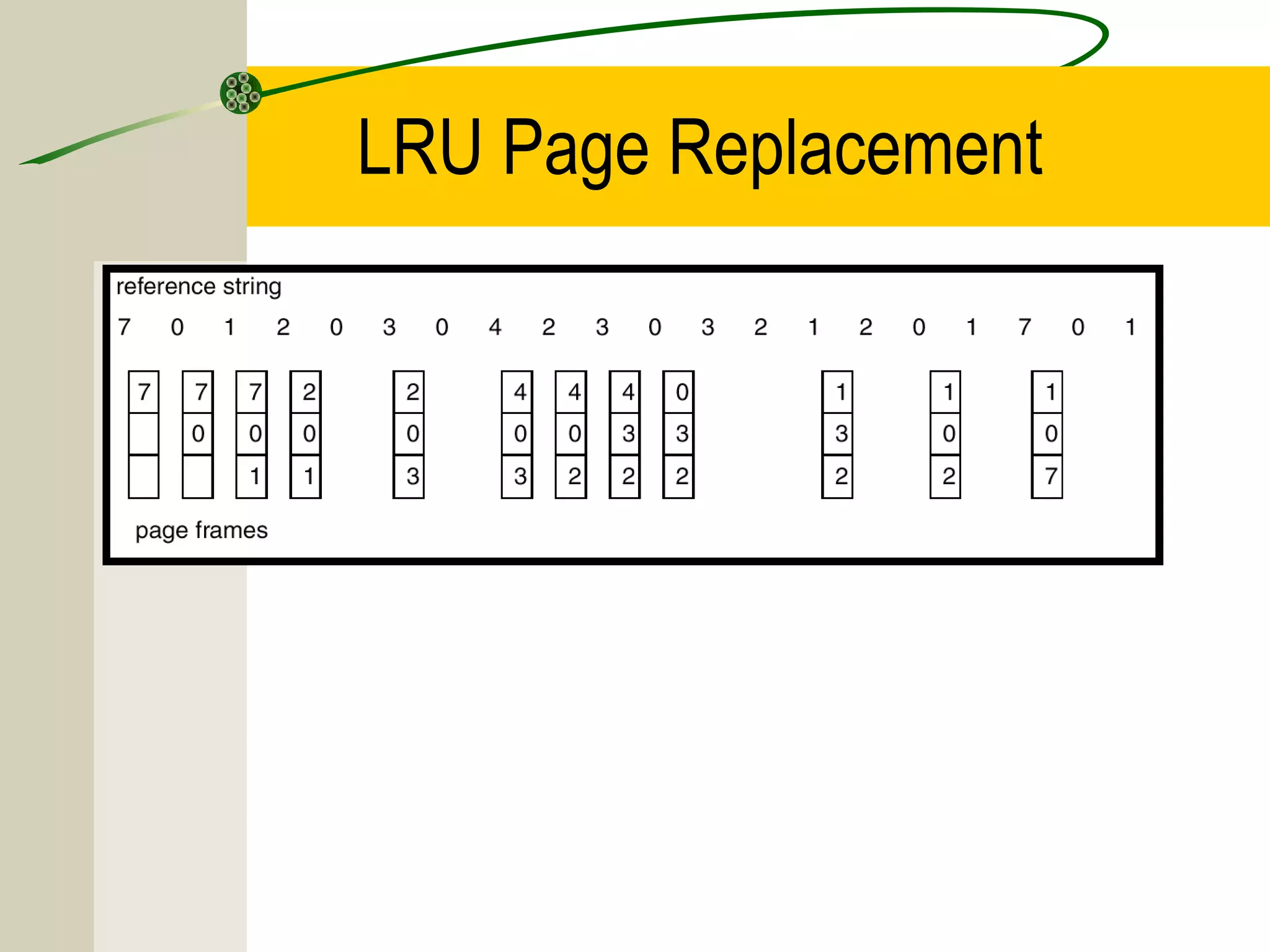
LRU Page Replacement
LRU Algorithm (Cont.)

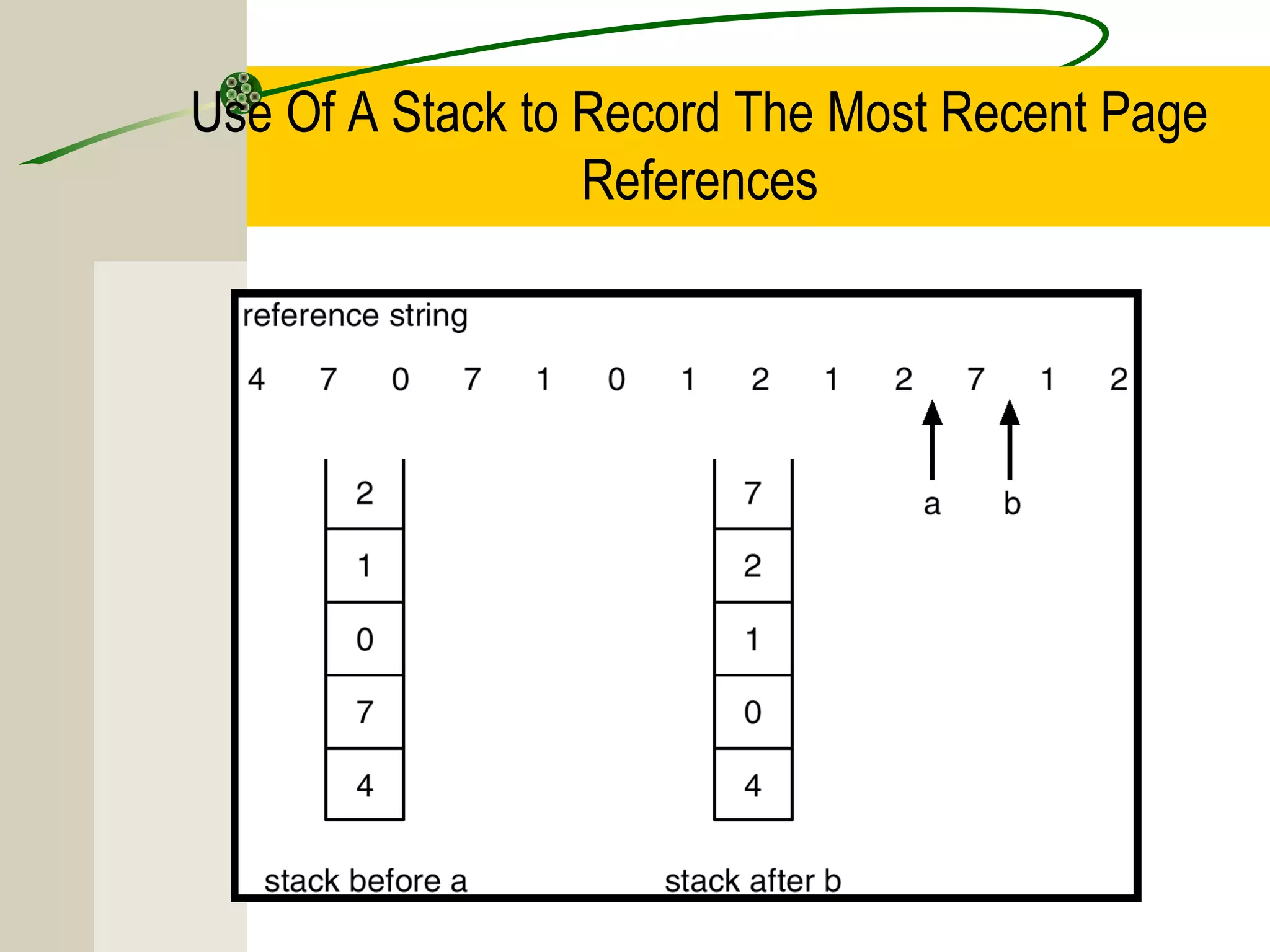
Stack implementation – keep a stack of page
numbers in a double link form:
– Page referenced:
   • move it to the top
   • requires pointers to be changed
   • update is expensive
– No search for replacement
Use Of A Stack to Record The Most Recent Page
                  References
LRU Approximation Algorithms
Reference bit
– With each page associate a bit, initially = 0
– When page is referenced bit set to 1.
– Replace the one which is 0 (if one exists). We do not
  know the order, however.
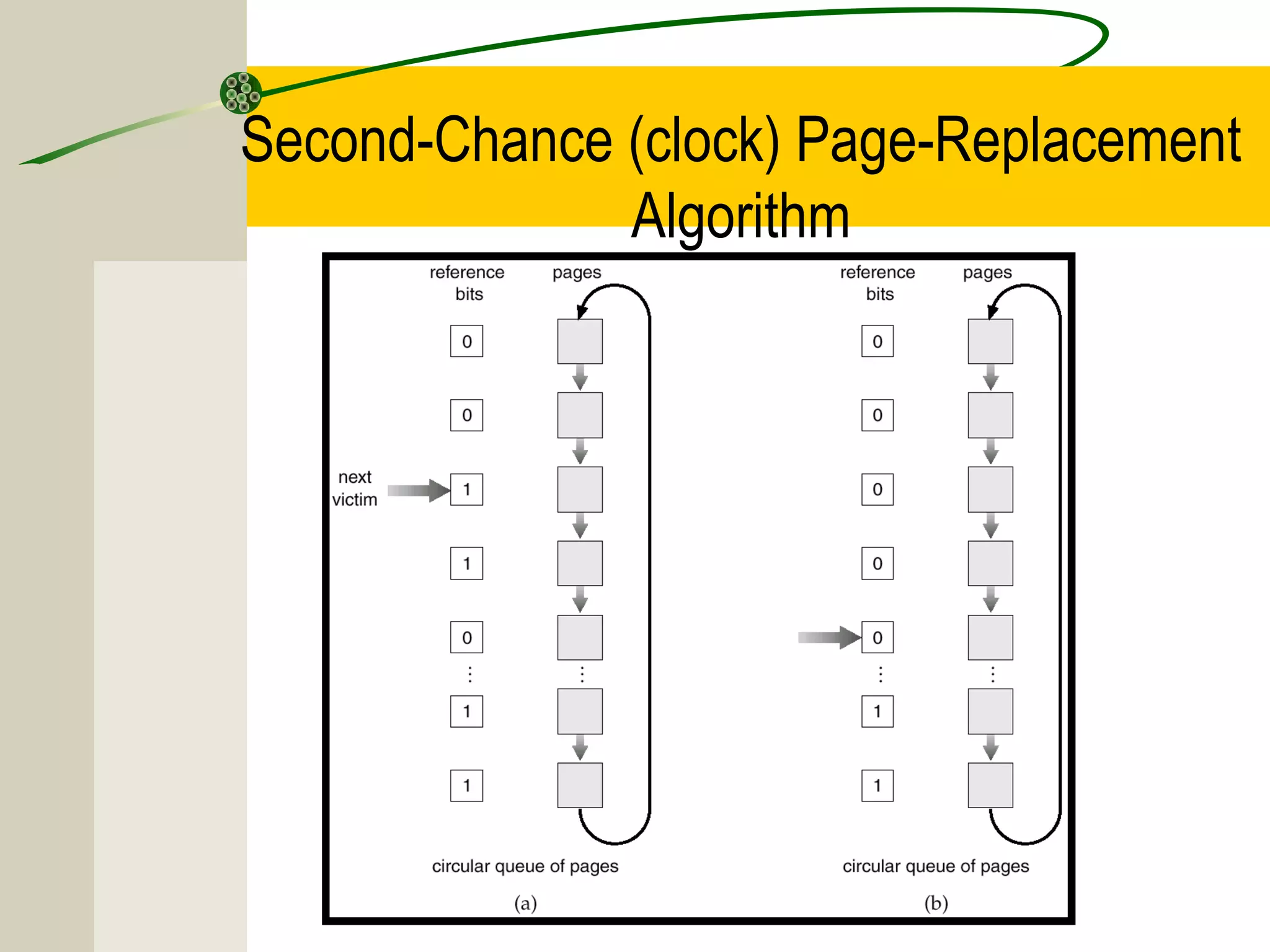
Second chance
– Need reference bit.
– Clock replacement.
– If page to be replaced (in clock order) has reference bit
  = 1 then:
    • set reference bit 0.
    • leave page in memory.
    • replace next page (in clock order), subject to same rules.
Second-Chance (clock) Page-Replacement
              Algorithm
Counting Algorithms

Keep a counter of the number of references that have
been made to each page.

LFU Algorithm: replaces page with smallest count.

MFU Algorithm: based on the argument that the page
with the smallest count was probably just brought in and
has yet to be used.
Thrashing

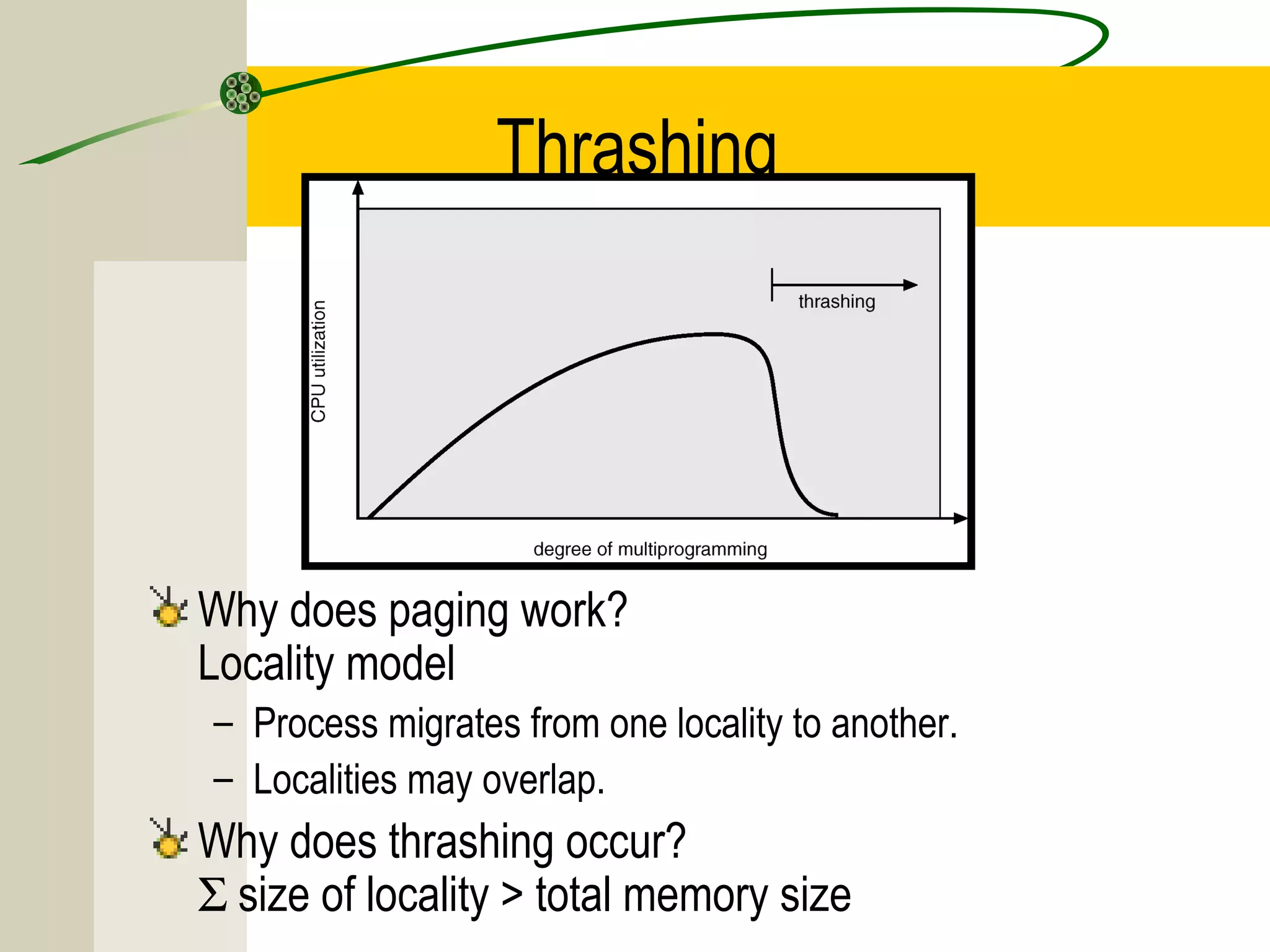
If a process does not have “enough” pages, the page-
fault rate is very high. This leads to:
– low CPU utilization.
– operating system thinks that it needs to increase the degree
  of multiprogramming.
– another process added to the system.

Thrashing ≡ a process is busy swapping pages in and
out.
Thrashing


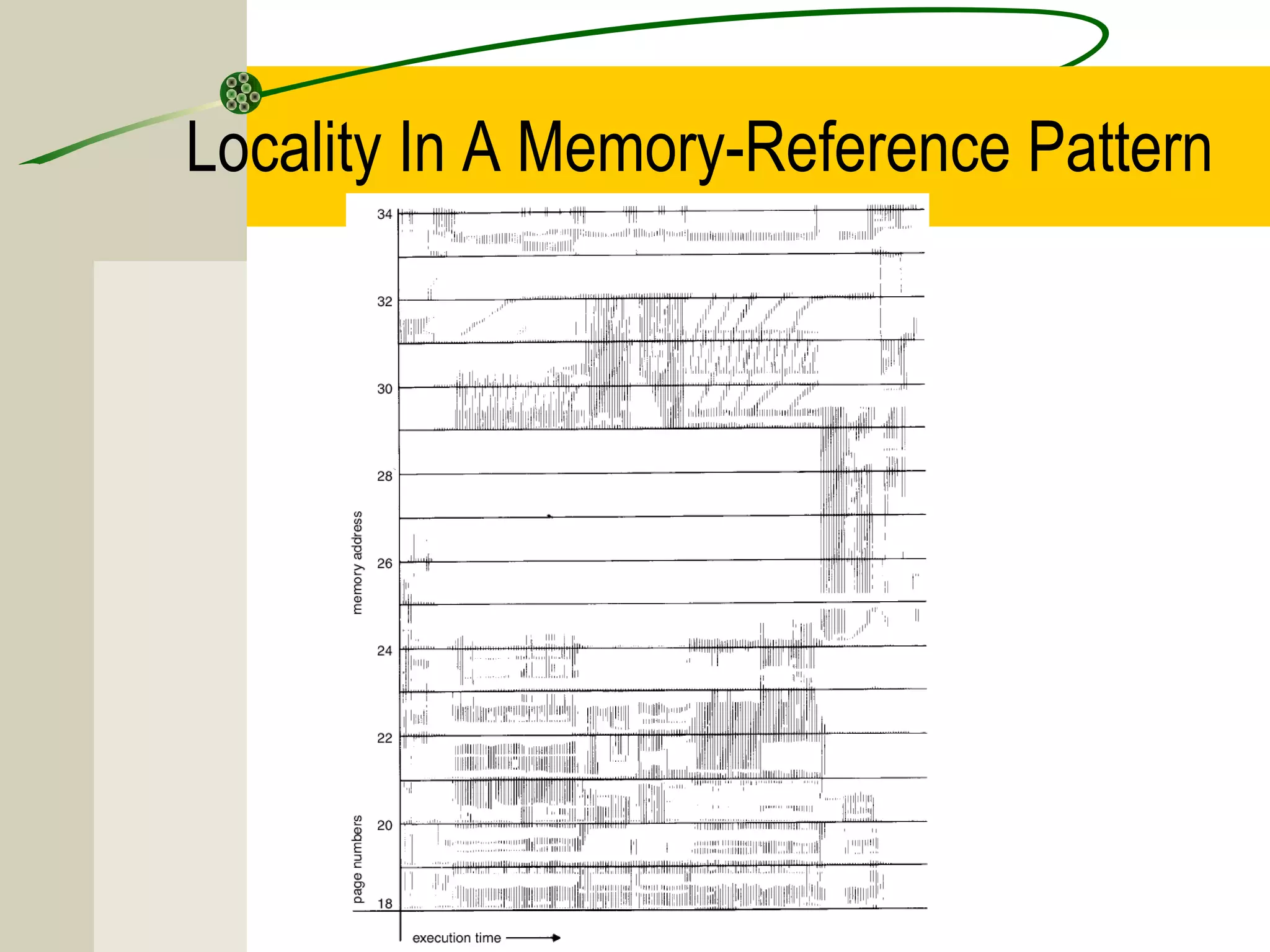
Why does paging work?
Locality model
– Process migrates from one locality to another.
– Localities may overlap.
Why does thrashing occur?
Σ size of locality > total memory size
Locality In A Memory-Reference Pattern
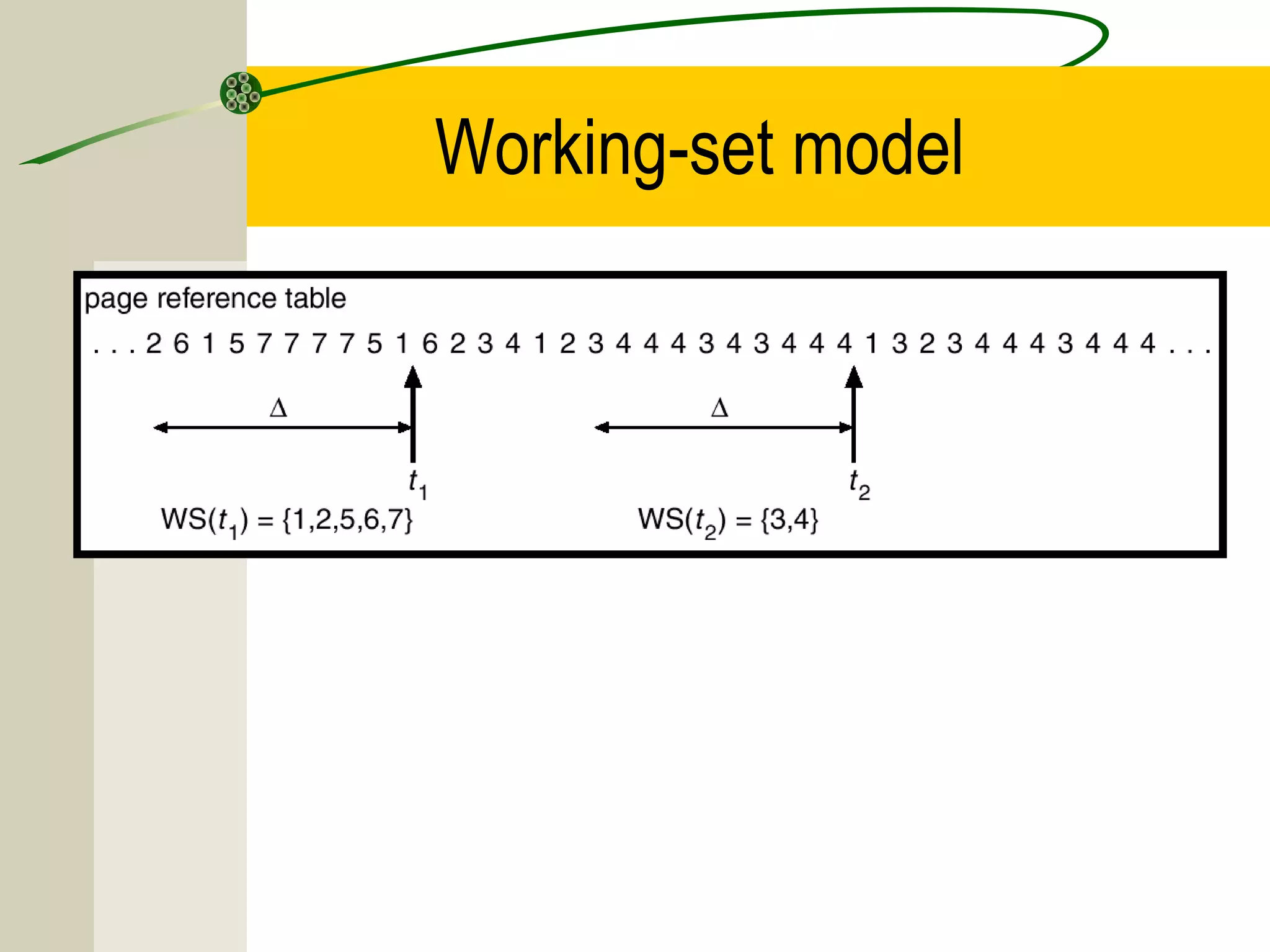
Working-Set Model
∆ ≡ working-set window ≡ a fixed number of page
references
Example: 10,000 instruction
WSSi (working set of Process Pi) =
total number of pages referenced in the most recent ∆
(varies in time)
– if ∆ too small will not encompass entire locality.
– if ∆ too large will encompass several localities.
– if ∆ = ∞ ⇒ will encompass entire program.
D = Σ WSSi ≡ total demand frames
if D > m ⇒ Thrashing
Policy if D > m, then suspend one of the processes.
Working-set model
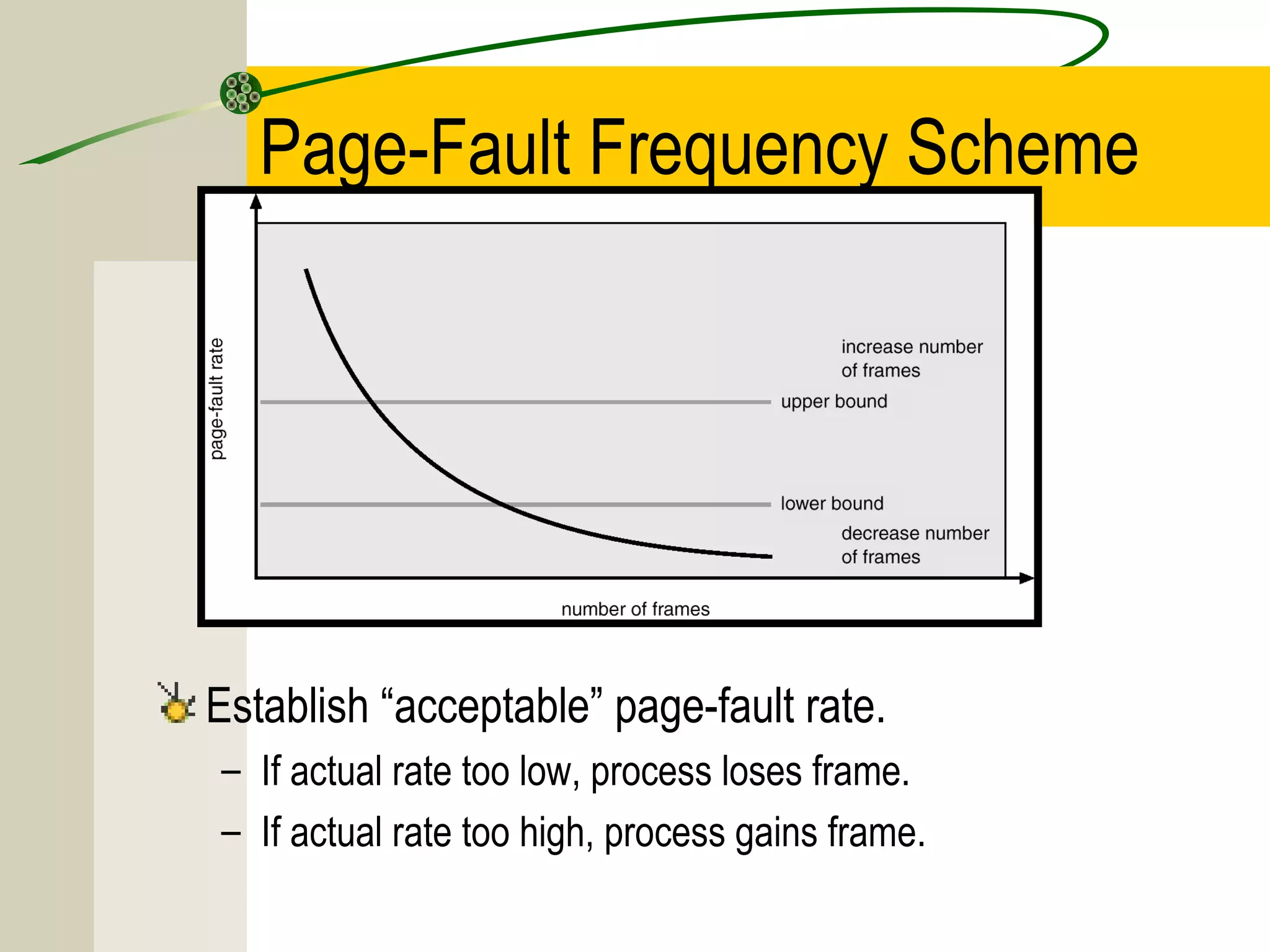
Page-Fault Frequency Scheme


Establish “acceptable” page-fault rate.
– If actual rate too low, process loses frame.
– If actual rate too high, process gains frame.

Virtual memory

  • 1.
    Virtual Memory Background Demand Paging PageReplacement Allocation of Frames Thrashing
  • 2.
    Background Virtual memory –separation of user logical memory from physical memory. – Only part of the program needs to be in memory for execution. – Logical address space can therefore be much larger than physical address space. – Allows address spaces to be shared by several processes. Virtual memory can be implemented via: – Demand paging – Demand segmentation
  • 3.
    Virtual Memory Thatis Larger Than Physical Memory
  • 4.
    Demand Paging Similar toPaging System with Swapping Bring a page into memory only when it is needed. – Less I/O needed – Less memory needed – Faster response – More users Page is needed ⇒ reference to it – invalid reference ⇒ abort – not-in-memory ⇒ bring to memory
  • 5.
    Transfer of aPaged Memory to Contiguous Disk Space
  • 6.
    Valid-Invalid Bit bitis With each page table entry a valid–invalid associated (1 ⇒ in-memory, 0 ⇒ not-in-memory) Initially valid–invalid bit is set to 0 on all entries. Frame # valid-invalid bit 1 1 1 1 0  0 0 page table Example of a page table snapshot.
  • 7.
    Page Table WhenSome Pages Are Not in Main Memory
  • 8.
    Page Fault If thereis ever a reference to a page, first reference will trap to OS ⇒ page fault OS looks at another table (internal table kept on PCB) to decide: – Invalid reference ⇒ abort – Just not in memory. Get empty frame. Swap page into frame. Reset tables, validation bit = 1. Restart instruction: Least Recently Used
  • 9.
    Steps in Handlinga Page Fault
  • 10.
    What happens ifthere is no free frame? Page replacement – find some page in memory, but not really in use, swap it out. – algorithm – performance – want an algorithm which will result in minimum number of page faults. Same page may be brought into memory several times.
  • 11.
    Performance of DemandPaging Page Fault Rate 0 ≤ p ≤ 1.0 – if p = 0 no page faults – if p = 1, every reference is a fault Effective Access Time (EAT) EAT = (1 – p) x memory access + p (page fault overhead + [swap page out ] + swap page in + restart overhead)
  • 12.
    Demand Paging Example Memoryaccess time = 100 nanoseconds Average page fault service time of 25 milliseconds EAT = (1 – p) x 100 + p (25,000,000) 100+24,999,900 x p (in nanoseconds)
  • 13.
    Page Replacement Prevent over-allocationof memory by modifying page- fault service routine to include page replacement. Use modify (dirty) bit to reduce overhead of page transfers – only modified pages are written to disk. Page replacement completes separation between logical memory and physical memory – large virtual memory can be provided on a smaller physical memory.
  • 14.
    Need For PageReplacement
  • 15.
    Basic Page Replacement 1.Find the location of the desired page on disk. 2. Find a free frame: - If there is a free frame, use it. - If there is no free frame, use a page replacement algorithm to select a victim frame. 3. Read the desired page into the (newly) free frame. Update the page and frame tables. 4. Restart the process.
  • 16.
  • 17.
    Page Replacement Algorithms Wantlowest page-fault rate. Evaluate algorithm by running it on a particular string of memory references (reference string) and computing the number of page faults on that string. In all examples, the reference string is 1, 2, 3, 4, 1, 2, 5, 1, 2, 3, 4, 5.
  • 18.
    Graph of PageFaults Versus The Number of Frames
  • 19.
    First-In-First-Out (FIFO) Algorithm Referencestring: 1, 2, 3, 4, 1, 2, 5, 1, 2, 3, 4, 5 3 frames (3 pages can be in memory at a time per process) 1 1 4 5 2 2 1 3 9 page faults 3 3 2 4 1 1 5 4 4 frames 2 2 1 5 10 page faults 3 3 2 4 4 3
  • 20.
    FIFO Page Replacement Everytime a fault occurs it is shown which pages are in three frames
  • 21.
  • 22.
    Optimal Algorithm Replace pagethat will not be used for longest period of time. Limitation: Future knowledge of reference string
  • 23.
    Least Recently Used(LRU) Algorithm 1 5 2 3 5 4 4 3 Reference string: 1, 2, 3, 4, 1, 2, 5, 1, 2, 3, 4, 5 Counter implementation – Every page entry has a counter; every time page is referenced through this entry, copy the clock into the counter. – When a page needs to be changed, look at the counters to determine which are to change.
  • 24.
  • 25.
    LRU Algorithm (Cont.) Stackimplementation – keep a stack of page numbers in a double link form: – Page referenced: • move it to the top • requires pointers to be changed • update is expensive – No search for replacement
  • 26.
    Use Of AStack to Record The Most Recent Page References
  • 27.
    LRU Approximation Algorithms Referencebit – With each page associate a bit, initially = 0 – When page is referenced bit set to 1. – Replace the one which is 0 (if one exists). We do not know the order, however. Second chance – Need reference bit. – Clock replacement. – If page to be replaced (in clock order) has reference bit = 1 then: • set reference bit 0. • leave page in memory. • replace next page (in clock order), subject to same rules.
  • 28.
  • 29.
    Counting Algorithms Keep acounter of the number of references that have been made to each page. LFU Algorithm: replaces page with smallest count. MFU Algorithm: based on the argument that the page with the smallest count was probably just brought in and has yet to be used.
  • 30.
    Thrashing If a processdoes not have “enough” pages, the page- fault rate is very high. This leads to: – low CPU utilization. – operating system thinks that it needs to increase the degree of multiprogramming. – another process added to the system. Thrashing ≡ a process is busy swapping pages in and out.
  • 31.
    Thrashing Why does pagingwork? Locality model – Process migrates from one locality to another. – Localities may overlap. Why does thrashing occur? Σ size of locality > total memory size
  • 32.
    Locality In AMemory-Reference Pattern
  • 33.
    Working-Set Model ∆ ≡working-set window ≡ a fixed number of page references Example: 10,000 instruction WSSi (working set of Process Pi) = total number of pages referenced in the most recent ∆ (varies in time) – if ∆ too small will not encompass entire locality. – if ∆ too large will encompass several localities. – if ∆ = ∞ ⇒ will encompass entire program. D = Σ WSSi ≡ total demand frames if D > m ⇒ Thrashing Policy if D > m, then suspend one of the processes.
  • 34.
  • 35.
    Page-Fault Frequency Scheme Establish“acceptable” page-fault rate. – If actual rate too low, process loses frame. – If actual rate too high, process gains frame.