Get fimilar with
Virtual Machines
(for Desktop PCs)
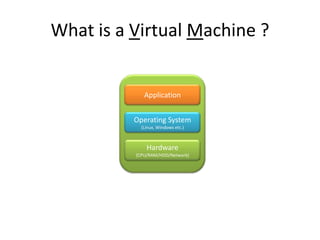
What is a Virtual Machine ?
Application
Operating System
(Linux, Windows etc.)
Hardware
(CPU/RAM/HDD/Network)
What type of hypervisor is this?
Type 2
What kind of software will u need to
run a VM ?
Virtual Box
(it‘s free and no registration needed)
What Operating Systems can I
virtualize ?
Any OS wich is supported!
SUSE, Ubuntu, Windows XP, Windows 7 etc.
What are reasons for virtualization ?
• A VM can work like normal PC
• There is no difference in running software and
applications
• VMs run isolated
• VMs can run parellel on a system with
different Operating Systems
• Safe Costs of purchasing new hardware
• Consume less energy
How to get started ?
Watch my tutorial on Youtube
„Install Virtual Box and setup an Ubuntu VM“
More Information
• VMware
– VMware Player
– VMware Workstation
– VMware ESXi
• Citrix
– XenServer, XenApp or XenDesktop
• Microsoft Hyper-V

Virtual Machines

  • 1.
    Get fimilar with VirtualMachines (for Desktop PCs)
  • 2.
    What is aVirtual Machine ? Application Operating System (Linux, Windows etc.) Hardware (CPU/RAM/HDD/Network)
  • 3.
    What type ofhypervisor is this? Type 2
  • 4.
    What kind ofsoftware will u need to run a VM ? Virtual Box (it‘s free and no registration needed)
  • 5.
    What Operating Systemscan I virtualize ? Any OS wich is supported! SUSE, Ubuntu, Windows XP, Windows 7 etc.
  • 6.
    What are reasonsfor virtualization ? • A VM can work like normal PC • There is no difference in running software and applications • VMs run isolated • VMs can run parellel on a system with different Operating Systems • Safe Costs of purchasing new hardware • Consume less energy
  • 7.
    How to getstarted ? Watch my tutorial on Youtube „Install Virtual Box and setup an Ubuntu VM“
  • 8.
    More Information • VMware –VMware Player – VMware Workstation – VMware ESXi • Citrix – XenServer, XenApp or XenDesktop • Microsoft Hyper-V

Editor's Notes

  • #9 Otherwise look forHave a eye on