Quick Overview of
Virtual PC

Tyler S. Farmer
Sr. Technology Specialist II
Education Solutions Group
Microsoft Corporation
Virtual PC Product Overview
Product Description
  Virtualization solution, simultaneously run multiple
  operating systems on a single workstation
  Create separate VM’s on top of your Windows
  desktop, you can install other x86-based operating
  systems including OS/2 or other versions of
  Windows as a “guest operating system”
  Each virtual machine emulates a complete
  hardware system – from processor to network card
  – in a self-contained, isolated software
  environment, enabling the simultaneous operation
  of otherwise incompatible environments
Virtual PC Product Overview
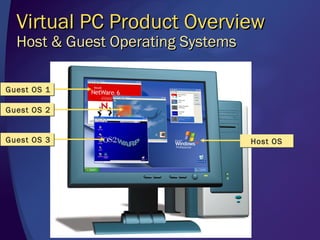
  Host & Guest Operating Systems

Guest OS 1

Guest OS 2


Guest OS 3                         Host OS
Virtual PC
Technical Features
  4 network adapters
  Virtual Network capabilities
    Not connected, local only, virtual, NAT
  XML file-based configurations
  Support 4 GB of physical RAM
  VM Additions (drag/drop, copy/paste, mouse
  movements,
  Hard drives (dynamic virtual, fixed)
  Differencing & Undo disks
Solutions
Rapid Reconfiguration
  Technical support professionals must
  reconfigure and reboot their PCs to match
  the user’s configuration
  Training professionals must reconfigure
  machines between classes
  Developers must test and debug their
  software on a number of different platforms
  Architects must test leading edge software
  and perform what-if scenarios
  Legacy application only supports legacy
  Operating System
  Version for the Macintosh!
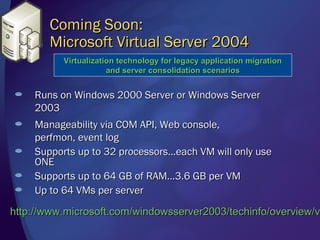
Coming Soon:
       Microsoft Virtual Server 2004
          Virtualization technology for legacy application migration
                      and server consolidation scenarios


    Runs on Windows 2000 Server or Windows Server
    2003
    Manageability via COM API, Web console,
    perfmon, event log
    Supports up to 32 processors…each VM will only use
    ONE
    Supports up to 64 GB of RAM…3.6 GB per VM
    Up to 64 VMs per server

http://www.microsoft.com/windowsserver2003/techinfo/overview/v
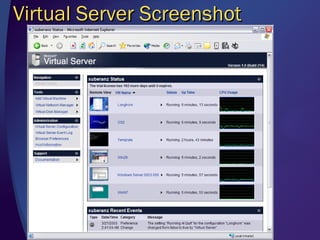
Virtual Server Screenshot
© 2003 Microsoft Corporation. All rights reserved.
This presentation is for informational purposes only. Microsoft makes no warranties, express or implied, in this summary.

Virtual pc

  • 1.
    Quick Overview of VirtualPC Tyler S. Farmer Sr. Technology Specialist II Education Solutions Group Microsoft Corporation
  • 2.
    Virtual PC ProductOverview Product Description Virtualization solution, simultaneously run multiple operating systems on a single workstation Create separate VM’s on top of your Windows desktop, you can install other x86-based operating systems including OS/2 or other versions of Windows as a “guest operating system” Each virtual machine emulates a complete hardware system – from processor to network card – in a self-contained, isolated software environment, enabling the simultaneous operation of otherwise incompatible environments
  • 3.
    Virtual PC ProductOverview Host & Guest Operating Systems Guest OS 1 Guest OS 2 Guest OS 3 Host OS
  • 4.
    Virtual PC Technical Features 4 network adapters Virtual Network capabilities Not connected, local only, virtual, NAT XML file-based configurations Support 4 GB of physical RAM VM Additions (drag/drop, copy/paste, mouse movements, Hard drives (dynamic virtual, fixed) Differencing & Undo disks
  • 5.
    Solutions Rapid Reconfiguration Technical support professionals must reconfigure and reboot their PCs to match the user’s configuration Training professionals must reconfigure machines between classes Developers must test and debug their software on a number of different platforms Architects must test leading edge software and perform what-if scenarios Legacy application only supports legacy Operating System Version for the Macintosh!
  • 6.
    Coming Soon: Microsoft Virtual Server 2004 Virtualization technology for legacy application migration and server consolidation scenarios Runs on Windows 2000 Server or Windows Server 2003 Manageability via COM API, Web console, perfmon, event log Supports up to 32 processors…each VM will only use ONE Supports up to 64 GB of RAM…3.6 GB per VM Up to 64 VMs per server http://www.microsoft.com/windowsserver2003/techinfo/overview/v
  • 7.
  • 8.
    © 2003 MicrosoftCorporation. All rights reserved. This presentation is for informational purposes only. Microsoft makes no warranties, express or implied, in this summary.

Editor's Notes

  • #9 © 2003 Microsoft Corporation. All rights reserved. This presentation is for informational purposes only. Microsoft makes no warranties, express or implied, in this summary.