Unit - 10
Virtualization
Concepts
Operating System (OS)
GTU # 3140702
 Looping
Outline
• Virtualization
• Virtual Machines
• VM Advantages & Dis-advantages
• Virtual Machine Application
• Type of Virtual Machine
• VirtualBox
• VMware Workstation
• Microsoft Hyper – V
• Uses of Virtual Machine
What is Virtualization?
Section - 1
What is Virtualization?
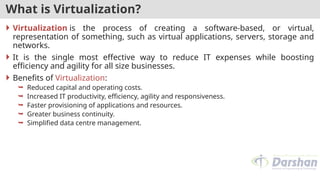
 Virtualization is the process of creating a software-based, or virtual,
representation of something, such as virtual applications, servers, storage and
networks.
 It is the single most effective way to reduce IT expenses while boosting
efficiency and agility for all size businesses.
 Benefits of Virtualization:
 Reduced capital and operating costs.
 Increased IT productivity, efficiency, agility and responsiveness.
 Faster provisioning of applications and resources.
 Greater business continuity.
 Simplified data centre management.
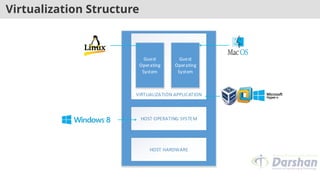
Virtualization Structure
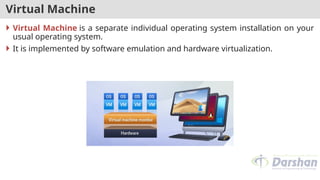
Virtual Machine
 Virtual Machine is a separate individual operating system installation on your
usual operating system.
 It is implemented by software emulation and hardware virtualization.
Virtual Machine – Cont.
 Virtual machine is a software implementation of a physical machine - computer
- that works and executes analogically to it.
 Virtual machines are divided in two categories based on their use and
correspondence to real machine.
 System virtual machines: It provides a complete system platform that
executes complete operating system.
 Process virtual machines: It will run a single program.
Virtual Machine Advantages & Dis-advantages
 VM Advantages:
 Multiple OS environments can exist simultaneously on the same machine,
separate from each other;
 Virtual machine can offer an instruction set architecture that differs from real
computer.
 Easy maintenance, application provisioning, availability and convenient
recovery.
Virtual Machine Advantages & Dis-advantages
 VM Dis-advantages:
 When multiple virtual machines are simultaneously running on a host
computer, each virtual machine may introduce an unstable performance, which
depends on the workload on the system by other running virtual machines.
 Virtual machine is not that much efficient as a real one when accessing the
hardware.
Virtual Machine Applications
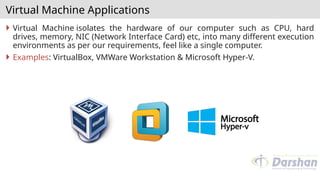
 Virtual Machine isolates the hardware of our computer such as CPU, hard
drives, memory, NIC (Network Interface Card) etc, into many different execution
environments as per our requirements, feel like a single computer.
 Examples: VirtualBox, VMWare Workstation & Microsoft Hyper-V.
Type of Virtual Machine
 Full Virtualization:
 Virtual machine simulates hardware to allow an unmodified guest OS to be run
in isolation.
 There is two type of full virtualizations in the enterprise market.
 On both full virtualization types, guest operating system’s source information
will not be modified.
1. Software assisted full virtualization
2. Hardware-assisted full virtualization
Full Virtualization
 It is also referred as true or pure virtualization.
 It completely relies on binary translation to trap and virtualize the execution of
sensitive, non-virtualizable instructions sets.
 It emulates the hardware using the software instruction sets.
 Due to binary translation, it often criticized for performance issue.
 Example:
 VMware Workstation
 VirtualBox
 Microsoft Hyper - V
 VMware Server
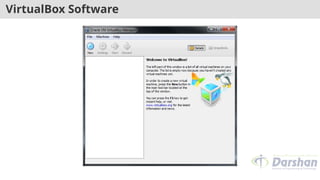
VirtualBox
 VirtualBox is a great, open-source application that runs on Windows, macOS,
and Linux.
 One of the best parts about VirtualBox is that there’s no commercial version.
 This means you get all features for free, including advanced features like
snapshots.
 This allows you to save a virtual machine’s state and revert to that state in the
future, which is great for testing.
VirtualBox Software
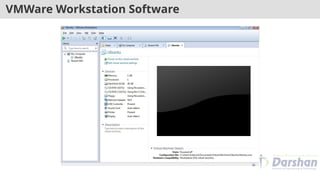
VMware Workstation
 VMware Workstation allows for the installation of multiple instances of different
operating systems, including client and server operating systems.
 It helps the network or system administrators to check, test and verify the client
server environment.
 Administrator can also switch between different virtual machines at same time.
 VMware Workstation has its limitations, including hardware support, operating
system issues, and network protocols hurdles.
VMWare Workstation Software
Microsoft Hyper-V
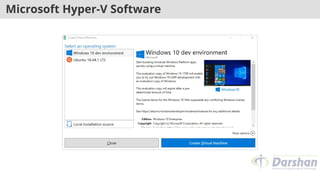
 Hyper-V is virtualization software that virtualizes software.
 It can not only virtualize operating systems but also entire hardware
components, such as hard drives and network switches. Unlike VirtualBox.
 Hyper-V is not limited to the user’s device. You can use it for server
virtualization.
 Hyper-V is available in three versions.
1. Hyper-V for Windows Servers
2. Hyper-V Servers
3. Hyper-V on Windows 10
Microsoft Hyper-V Software
Uses of Virtual Machine
 Take trial on newer versions of operating systems
 Virtualization from your own desktop
 Test with different operating systems
 Utilizing software that requests an outdated operating system
 Run software formatted for other operating systems
 Test software on many different platforms
 Compile different servers for business use
 Safety and Security
Operating System (OS)
GTU # 3140702

Virtualization Concepts: Virtual machines

  • 1.
  • 2.
     Looping Outline • Virtualization •Virtual Machines • VM Advantages & Dis-advantages • Virtual Machine Application • Type of Virtual Machine • VirtualBox • VMware Workstation • Microsoft Hyper – V • Uses of Virtual Machine
  • 3.
  • 4.
    What is Virtualization? Virtualization is the process of creating a software-based, or virtual, representation of something, such as virtual applications, servers, storage and networks.  It is the single most effective way to reduce IT expenses while boosting efficiency and agility for all size businesses.  Benefits of Virtualization:  Reduced capital and operating costs.  Increased IT productivity, efficiency, agility and responsiveness.  Faster provisioning of applications and resources.  Greater business continuity.  Simplified data centre management.
  • 5.
  • 6.
    Virtual Machine  VirtualMachine is a separate individual operating system installation on your usual operating system.  It is implemented by software emulation and hardware virtualization.
  • 7.
    Virtual Machine –Cont.  Virtual machine is a software implementation of a physical machine - computer - that works and executes analogically to it.  Virtual machines are divided in two categories based on their use and correspondence to real machine.  System virtual machines: It provides a complete system platform that executes complete operating system.  Process virtual machines: It will run a single program.
  • 8.
    Virtual Machine Advantages& Dis-advantages  VM Advantages:  Multiple OS environments can exist simultaneously on the same machine, separate from each other;  Virtual machine can offer an instruction set architecture that differs from real computer.  Easy maintenance, application provisioning, availability and convenient recovery.
  • 9.
    Virtual Machine Advantages& Dis-advantages  VM Dis-advantages:  When multiple virtual machines are simultaneously running on a host computer, each virtual machine may introduce an unstable performance, which depends on the workload on the system by other running virtual machines.  Virtual machine is not that much efficient as a real one when accessing the hardware.
  • 10.
    Virtual Machine Applications Virtual Machine isolates the hardware of our computer such as CPU, hard drives, memory, NIC (Network Interface Card) etc, into many different execution environments as per our requirements, feel like a single computer.  Examples: VirtualBox, VMWare Workstation & Microsoft Hyper-V.
  • 11.
    Type of VirtualMachine  Full Virtualization:  Virtual machine simulates hardware to allow an unmodified guest OS to be run in isolation.  There is two type of full virtualizations in the enterprise market.  On both full virtualization types, guest operating system’s source information will not be modified. 1. Software assisted full virtualization 2. Hardware-assisted full virtualization
  • 12.
    Full Virtualization  Itis also referred as true or pure virtualization.  It completely relies on binary translation to trap and virtualize the execution of sensitive, non-virtualizable instructions sets.  It emulates the hardware using the software instruction sets.  Due to binary translation, it often criticized for performance issue.  Example:  VMware Workstation  VirtualBox  Microsoft Hyper - V  VMware Server
  • 13.
    VirtualBox  VirtualBox isa great, open-source application that runs on Windows, macOS, and Linux.  One of the best parts about VirtualBox is that there’s no commercial version.  This means you get all features for free, including advanced features like snapshots.  This allows you to save a virtual machine’s state and revert to that state in the future, which is great for testing.
  • 14.
  • 15.
    VMware Workstation  VMwareWorkstation allows for the installation of multiple instances of different operating systems, including client and server operating systems.  It helps the network or system administrators to check, test and verify the client server environment.  Administrator can also switch between different virtual machines at same time.  VMware Workstation has its limitations, including hardware support, operating system issues, and network protocols hurdles.
  • 16.
  • 17.
    Microsoft Hyper-V  Hyper-Vis virtualization software that virtualizes software.  It can not only virtualize operating systems but also entire hardware components, such as hard drives and network switches. Unlike VirtualBox.  Hyper-V is not limited to the user’s device. You can use it for server virtualization.  Hyper-V is available in three versions. 1. Hyper-V for Windows Servers 2. Hyper-V Servers 3. Hyper-V on Windows 10
  • 18.
  • 19.
    Uses of VirtualMachine  Take trial on newer versions of operating systems  Virtualization from your own desktop  Test with different operating systems  Utilizing software that requests an outdated operating system  Run software formatted for other operating systems  Test software on many different platforms  Compile different servers for business use  Safety and Security

  • 20.