SMARTPHONE


VIDEO WORKSHOP
CHRIS SNIDER • LEARN.CHRISSNIDERDESIGN.COM
@chrissnider @csnider
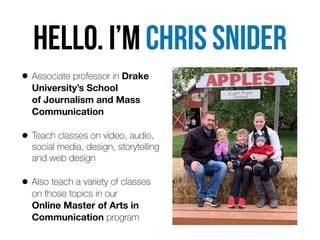
HELLo. I’m Chris snider
• Associate professor in Drake
University’s School 

of Journalism and Mass
Communication


• Teach classes on video, audio,
social media, design, storytelling
and web design


• Also teach a variety of classes


on those topics in our 

Online Master of Arts in

Communication program
• I’m passionate about how businesses can use social
media and digital media


• Formerly editor at Juice Magazine and the Des Moines
Register


• Continue to run social media accounts and build websites


for clients and several related to Drake University
INTRODUCTIONS
• Name


• Where you work / What you do


• Your experience with shooting and editing video


• What you hope to do with the skills you gain in this workshop
Raise your hand if you’ve NEVER
mad
e
a
vide
o
We’ve all made videos before
I
t
’
s
2022
That doesn’t mean
we’ve maDe good ones
Video is more popular and more


in-demand than ever


The problem is… most people don’t
know how to make quality video
But you can do it with only a smartphone.
https://vimeo.com/264354792
FiLMiC Pro Reel - 2018
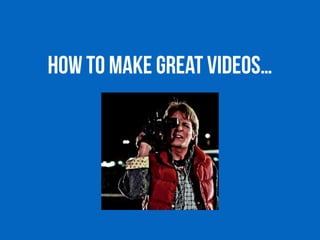
How to make great videos…
1. Keep the visuals changing
Shoot in shots
• Don’t shoot in one continuous movement or hold one
shot for too long


• Shoot a series of unique shots and put them together
to tell the story


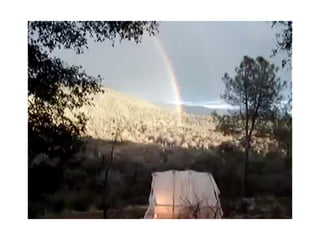
• This is a terrible video (with millions of views)…
If things get static,


the story dies.
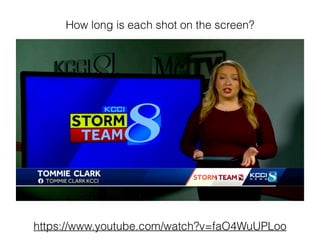
How long is each shot on the screen?
https://www.youtube.com/watch?v=faO4WuUPLoo
Move, point, shoot, stop.


Move, point, shoot, stop.


Move, point, shoot, stop.
• Frame your shot, then press record until it gets boring.


• Then stop and move on to the next one.


• Shoot more than you think you’ll need (you don’t have
to use it all)
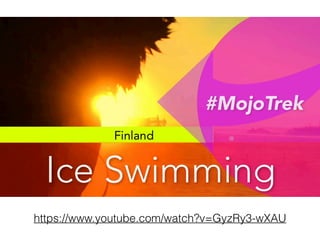
https://www.youtube.com/watch?v=GyzRy3-wXAU
Camera movement…
• Pan - move the camera horizontally


• Tilt - move the camera vertically


• Zoom - move toward/away from to subject


• Always begin and end stable
… avoid camera movement
• Any sort of camera movement is advanced technique


• Hold the camera still and let the movement happen
inside your composed shot
https://www.youtube.com/watch?v=aeuK8YePo-M
When to use camera movement
• When there is no action on the screen, some slow
movement may be necessary to keep the viewer engaged


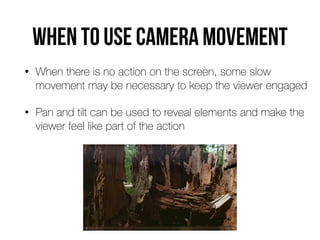
• Pan and tilt can be used to reveal elements and make the
viewer feel like part of the action
2. ComposE your shots
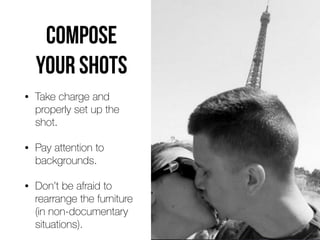
COMPOSE
YOUR SHOTS
• Take charge and
properly set up the
shot.


• Pay attention to
backgrounds.


• Don’t be afraid to
rearrange the furniture


(in non-documentary
situations).
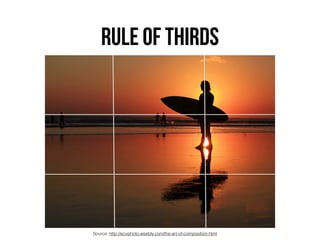
RULE OF THIRDS
Source: http://ecvphoto.weebly.com/the-art-of-composition.html
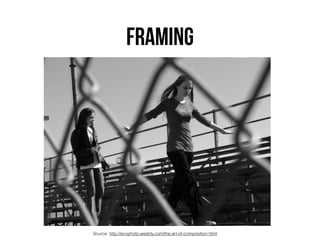
FRAMING
Source: http://ecvphoto.weebly.com/the-art-of-composition.html
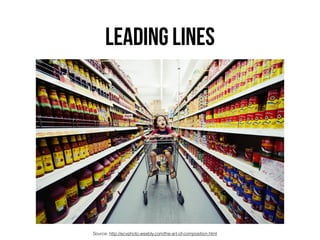
LEADING LINES
Source: http://ecvphoto.weebly.com/the-art-of-composition.html
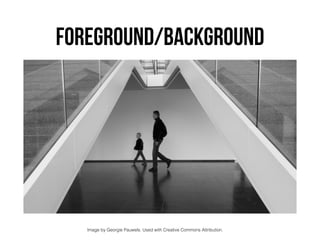
FOREGROUND/BACKGROUND
Image by Georgie Pauwels. Used with Creative Commons Attribution.
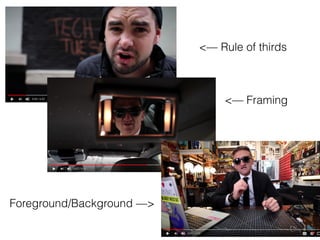
<— Framing
<— Rule of thirds
Foreground/Background —>
3. Shoot wide, medium & Close-Up
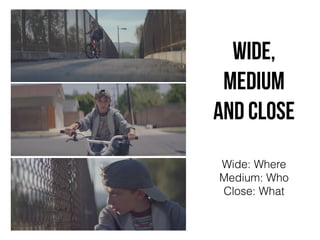
wide,
medium
and cLose
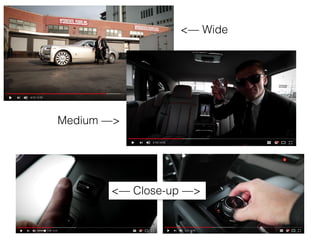
Wide: Where


Medium: Who


Close: What
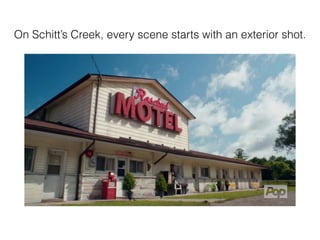
On Schitt’s Creek, every scene starts with an exterior shot.
<— Wide
Medium —>
<— Close-up —>
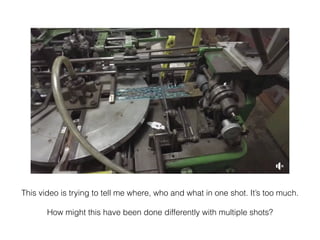
This video is trying to tell me where, who and what in one shot. It’s too much.


How might this have been done differently with multiple shots?
Go to Facebook or Instagram and look at the
fi
rst video you see from a brand
How are they doing?


• Shooting in shots


• Avoiding camera movement


• Composing shots (rule of thirds, framing,


leading lines, foreground/background)


• Shooting wide, medium close-up
Let’s shoot, Part 1
• Shoot at least
fi
ve shots of someone doing an action
(using a prop, walking around campus or ????)


• Include wide, medium and close-up shots


• Hold the camera steady


• Compose shots - rule of thirds, framing, leading lines,
foreground/background
Shooting in shots
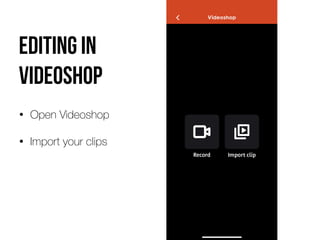
Editing in
videoshop
• Open Videoshop


• Import your clips
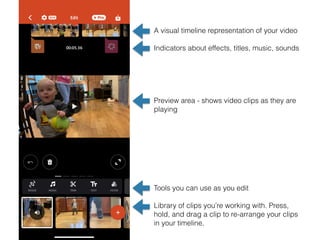
A visual timeline representation of your video


Indicators about effects, titles, music, sounds


Preview area - shows video clips as they are
playing


Tools you can use as you edit


Library of clips you’re working with. Press,
hold, and drag a clip to re-arrange your clips
in your timeline.
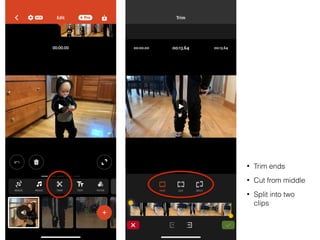
• Trim ends


• Cut from middle


• Split into two
clips
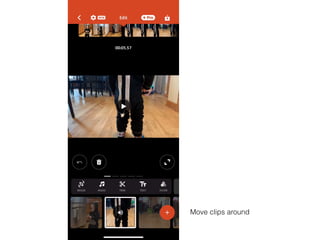
Move clips around
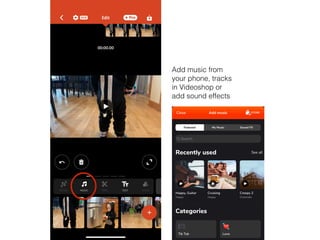
Add music from
your phone, tracks
in Videoshop or
add sound effects
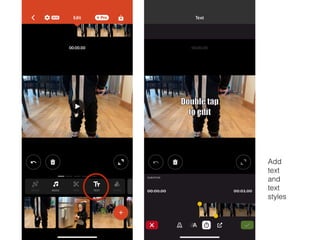
Add
text
and
text
styles
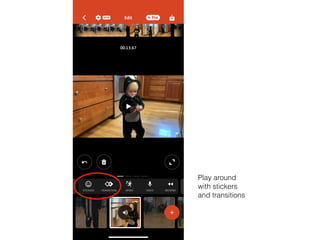
Play around
with stickers
and transitions
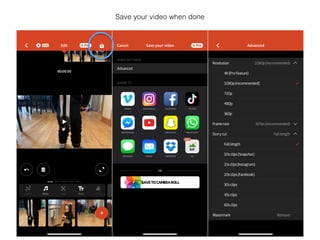
Save your video when done
Ti
p
s
FOR BETTER VIDEO
Shoot in sequences
• Think in terms of scenes


• For each scene, follow the action, shoot wide, medium
and close-up


• Reconstruct the event so it appears to happen in real
time. Look for things that repeat (so you can shoot
more than once). Or have your subject repeat them (if
possible)
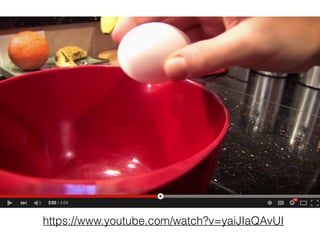
https://www.youtube.com/watch?v=yaiJIaQAvUI
Zoom with your feet,


not with your lens
• Shoot at your camera’s widest setting for stability


• 10x zoom = 10x shakiness


• Can be uncomfortable to get in close, but it’s our best
option
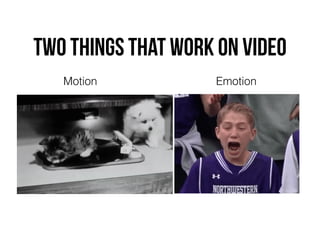
Two things that work on video
Motion Emotion
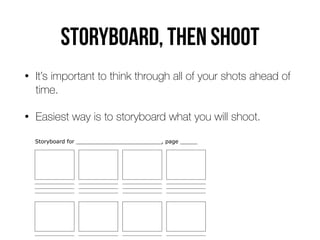
Storyboard, then shoot
• It’s important to think through all of your shots ahead of
time.


• Easiest way is to storyboard what you will shoot.
Use Pattern interrupts
Pattern Interrupts are elements in your video that are di
ff
erent than the rest
of your video (they literally "interrupt" the “pattern"). Pattern Interrupts can be:


• On-screen graphics


• Animations


• New background or setting


• B roll shots


• Di
ff
erent camera angles


• Sound e
ff
ects
Lunch break
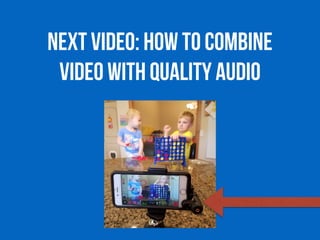
NEXT VIDEO: How to combine
video with quality audio
–Dirck Halstead, DigitalJournalist.org
“If you close your eyes while watching a news
program like 60 Minutes, you will
fi
nd that you
can absorb the story with no problem. The
images enhance the story, but it is the sound
that is vital to understanding.”
• When it comes to video and multimedia, sound is 

the most important element.


• Sound has the power to make a good project into an
extraordinary piece of work, but also to undermine and
even ruin the strongest of stories.
Types of sound
• Your sound may consist of a mix of:


• Standups


• Interviews


• Voiceover


• Natural sound


• Music


• Sound e
ff
ects
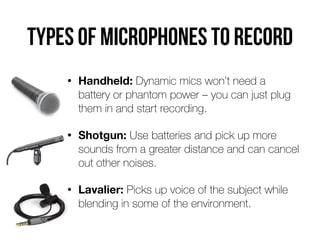
Types of microphones to record
• Handheld: Dynamic mics won’t need a
battery or phantom power – you can just plug
them in and start recording.


• Shotgun: Use batteries and pick up more
sounds from a greater distance and can cancel
out other noises.


• Lavalier: Picks up voice of the subject while
blending in some of the environment.
Some sound rules
• When placing the mic for an interview, closer is better


• Wear headphones to hear any sound issues


• Continue to record important sound even if the picture is
poor. You can always split the audio and video later


• Avoid locations with bad acoustics.


• Avoid distracting background noises (busy areas, heavy
machinery, lawnmowers, etc.)
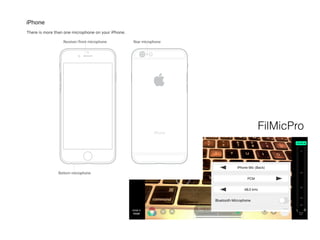
FilMicPro
Hardwar
e
FOR BETTER smartphone VIDEO
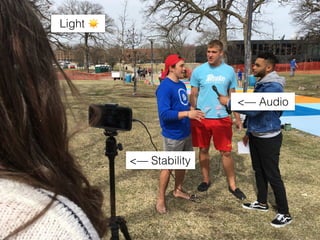
Smartphone video has


four main weaknesses
Hard to keep phone stable


(stabilization does get better every year)


Lack of quality audio when too far from camera


Not great in low-light situations


Limited zoom options (also getting better)
<— Stability
<— Audio
Light ☀
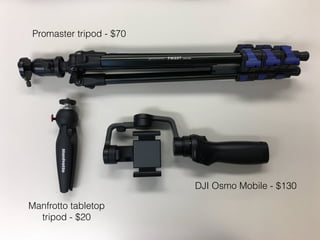
Promaster tripod - $70
Manfrotto tabletop
tripod - $20
DJI Osmo Mobile - $130
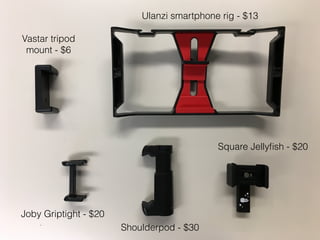
Joby Griptight - $20
Shoulderpod - $30
Square Jelly
fi
sh - $20
Ulanzi smartphone rig - $13
Vastar tripod
mount - $6
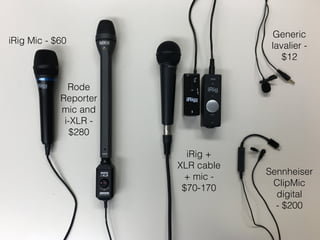
iRig Mic - $60
Rode
Reporter
mic and
i-XLR -
$280
iRig +
XLR cable
+ mic -
$70-170
Generic
lavalier -
$12
Sennheiser
ClipMic
digital


- $200
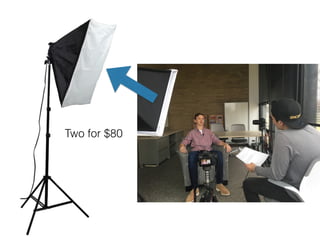
Two for $80
Interviews
Interview setup
• Find a good location.


• Good: room with padded couches and thick drapes


• Bad: kitchen, large hallway, gymnasium


• Do you hear any background noises that will be
distracting when played back? Refrigerator running,
clock ticking, etc.
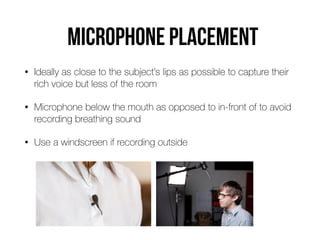
Microphone placemenT
• Ideally as close to the subject’s lips as possible to capture their
rich voice but less of the room


• Microphone below the mouth as opposed to in-front of to avoid
recording breathing sound


• Use a windscreen if recording outside
Video logistics
• Try to put the subject in their natural environment


• Keep the background simple


• Avoid putting subjects in front of windows or you will
have lighting issues


• Who is someone you could interview for a
story? What location would make sense for the
interview?
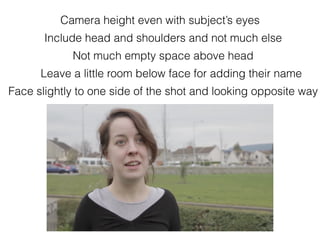
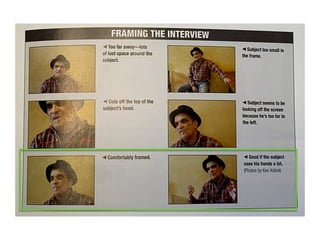
Camera height even with subject’s eyes
Not much empty space above head
Include head and shoulders and not much else
Face slightly to one side of the shot and looking opposite way
Leave a little room below face for adding their name
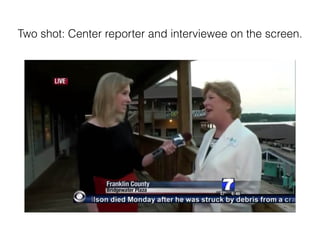
Two shot: Center reporter and interviewee on the screen.
Let’s shoot and edit, part 2
• What we’re focusing on


• Quality audio - one interview of 20+ seconds


• Variety of shots - B-roll


• Shooting in sequences - can you create a 2-shot sequence?


• Tripod for steady video
Interview with b-roll
Topic: Weather story OR Historic Meredith Hall OR ?????
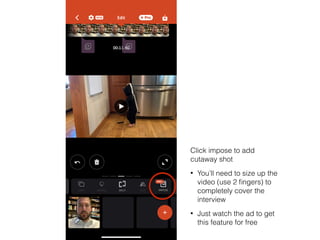
Click impose to add
cutaway shot


• You’ll need to size up the
video (use 2
fi
ngers) to
completely cover the
interview


• Just watch the ad to get
this feature for free
App
s
FOR BETTER VIDEO
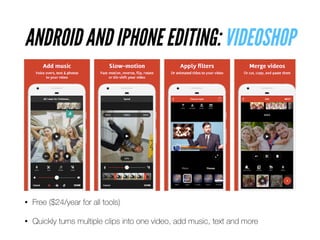
ANDROID AND IPHONE EDITING: VIDEOSHOP
• Free ($24/year for all tools)


• Quickly turns multiple clips into one video, add music, text and more
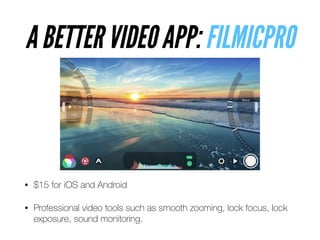
A BETTER VIDEO APP: FILMICPRO
• $15 for iOS and Android


• Professional video tools such as smooth zooming, lock focus, lock
exposure, sound monitoring.
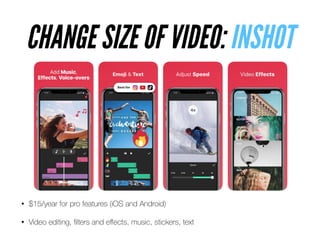
• $15/year for pro features (iOS and Android)


• Video editing,
fi
lters and e
ff
ects, music, stickers, text
CHANGE SIZE OF VIDEO: INSHOT
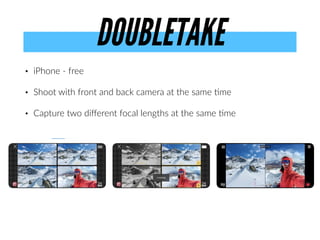
• iPhone - free


• Shoot with front and back camera at the same
ti
me


• Capture two di
ff
erent focal lengths at the same
ti
me
DOUBLETAKE
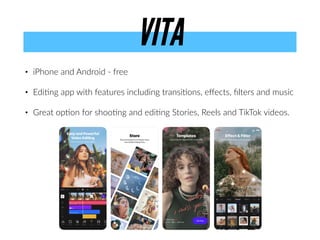
• iPhone and Android - free


• Edi
ti
ng app with features including transi
ti
ons, e
ff
ects,
fi
lters and music


• Great op
ti
on for shoo
ti
ng and edi
ti
ng Stories, Reels and TikTok videos.
VITA
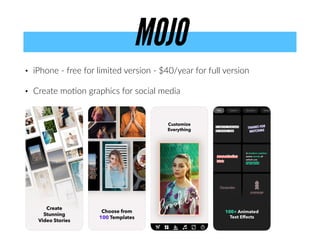
• iPhone - free for limited version - $40/year for full version


• Create mo
ti
on graphics for social media
MOJO
Let’s shoot and edit, part 3
• What we’re focusing on


• Storyboard


• Quality audio


• Variety of shots


• Tripod for steady video
5 shots about you
QUESTIONS?
Follow Chris:


twitter: @chrissnider


Instagram: @csnider


chrissniderdesign.com

Video Workshop March 2022

  • 1.
    SMARTPHONE 
 VIDEO WORKSHOP CHRIS SNIDER• LEARN.CHRISSNIDERDESIGN.COM @chrissnider @csnider
  • 2.
    HELLo. I’m Chrissnider • Associate professor in Drake University’s School 
 of Journalism and Mass Communication • Teach classes on video, audio, social media, design, storytelling and web design • Also teach a variety of classes 
 on those topics in our 
 Online Master of Arts in Communication program
  • 3.
    • I’m passionateabout how businesses can use social media and digital media • Formerly editor at Juice Magazine and the Des Moines Register • Continue to run social media accounts and build websites 
 for clients and several related to Drake University
  • 4.
    INTRODUCTIONS • Name • Whereyou work / What you do • Your experience with shooting and editing video • What you hope to do with the skills you gain in this workshop
  • 5.
    Raise your handif you’ve NEVER mad e a vide o
  • 6.
    We’ve all madevideos before I t ’ s 2022 That doesn’t mean we’ve maDe good ones
  • 7.
    Video is morepopular and more 
 in-demand than ever The problem is… most people don’t know how to make quality video But you can do it with only a smartphone.
  • 8.
  • 9.
    How to makegreat videos…
  • 10.
    1. Keep thevisuals changing
  • 11.
    Shoot in shots •Don’t shoot in one continuous movement or hold one shot for too long • Shoot a series of unique shots and put them together to tell the story • This is a terrible video (with millions of views)…
  • 13.
    If things getstatic, 
 the story dies.
  • 14.
    How long iseach shot on the screen? https://www.youtube.com/watch?v=faO4WuUPLoo
  • 15.
    Move, point, shoot,stop. Move, point, shoot, stop. Move, point, shoot, stop. • Frame your shot, then press record until it gets boring. • Then stop and move on to the next one. • Shoot more than you think you’ll need (you don’t have to use it all)
  • 16.
  • 17.
    Camera movement… • Pan- move the camera horizontally • Tilt - move the camera vertically • Zoom - move toward/away from to subject • Always begin and end stable
  • 18.
    … avoid cameramovement • Any sort of camera movement is advanced technique • Hold the camera still and let the movement happen inside your composed shot
  • 19.
  • 20.
    When to usecamera movement • When there is no action on the screen, some slow movement may be necessary to keep the viewer engaged • Pan and tilt can be used to reveal elements and make the viewer feel like part of the action
  • 21.
  • 22.
    COMPOSE YOUR SHOTS • Takecharge and properly set up the shot. • Pay attention to backgrounds. • Don’t be afraid to rearrange the furniture 
 (in non-documentary situations).
  • 23.
    RULE OF THIRDS Source:http://ecvphoto.weebly.com/the-art-of-composition.html
  • 24.
  • 25.
  • 26.
    FOREGROUND/BACKGROUND Image by GeorgiePauwels. Used with Creative Commons Attribution.
  • 27.
    <— Framing <— Ruleof thirds Foreground/Background —>
  • 28.
    3. Shoot wide,medium & Close-Up
  • 29.
  • 30.
    On Schitt’s Creek,every scene starts with an exterior shot.
  • 31.
  • 32.
    This video istrying to tell me where, who and what in one shot. It’s too much. How might this have been done differently with multiple shots?
  • 33.
    Go to Facebookor Instagram and look at the fi rst video you see from a brand How are they doing? • Shooting in shots • Avoiding camera movement • Composing shots (rule of thirds, framing, 
 leading lines, foreground/background) • Shooting wide, medium close-up
  • 34.
    Let’s shoot, Part1 • Shoot at least fi ve shots of someone doing an action (using a prop, walking around campus or ????) • Include wide, medium and close-up shots • Hold the camera steady • Compose shots - rule of thirds, framing, leading lines, foreground/background Shooting in shots
  • 36.
    Editing in videoshop • OpenVideoshop • Import your clips
  • 37.
    A visual timelinerepresentation of your video Indicators about effects, titles, music, sounds Preview area - shows video clips as they are playing Tools you can use as you edit Library of clips you’re working with. Press, hold, and drag a clip to re-arrange your clips in your timeline.
  • 38.
    • Trim ends •Cut from middle • Split into two clips
  • 39.
  • 40.
    Add music from yourphone, tracks in Videoshop or add sound effects
  • 41.
  • 42.
  • 43.
    Save your videowhen done
  • 45.
  • 46.
    Shoot in sequences •Think in terms of scenes • For each scene, follow the action, shoot wide, medium and close-up • Reconstruct the event so it appears to happen in real time. Look for things that repeat (so you can shoot more than once). Or have your subject repeat them (if possible)
  • 47.
  • 48.
    Zoom with yourfeet, 
 not with your lens • Shoot at your camera’s widest setting for stability • 10x zoom = 10x shakiness • Can be uncomfortable to get in close, but it’s our best option
  • 49.
    Two things thatwork on video Motion Emotion
  • 50.
    Storyboard, then shoot •It’s important to think through all of your shots ahead of time. • Easiest way is to storyboard what you will shoot.
  • 51.
    Use Pattern interrupts PatternInterrupts are elements in your video that are di ff erent than the rest of your video (they literally "interrupt" the “pattern"). Pattern Interrupts can be: • On-screen graphics • Animations • New background or setting • B roll shots • Di ff erent camera angles • Sound e ff ects
  • 53.
  • 54.
    NEXT VIDEO: Howto combine video with quality audio
  • 55.
    –Dirck Halstead, DigitalJournalist.org “Ifyou close your eyes while watching a news program like 60 Minutes, you will fi nd that you can absorb the story with no problem. The images enhance the story, but it is the sound that is vital to understanding.”
  • 56.
    • When itcomes to video and multimedia, sound is 
 the most important element. • Sound has the power to make a good project into an extraordinary piece of work, but also to undermine and even ruin the strongest of stories.
  • 57.
    Types of sound •Your sound may consist of a mix of: • Standups • Interviews • Voiceover • Natural sound • Music • Sound e ff ects
  • 58.
    Types of microphonesto record • Handheld: Dynamic mics won’t need a battery or phantom power – you can just plug them in and start recording. • Shotgun: Use batteries and pick up more sounds from a greater distance and can cancel out other noises. • Lavalier: Picks up voice of the subject while blending in some of the environment.
  • 59.
    Some sound rules •When placing the mic for an interview, closer is better • Wear headphones to hear any sound issues • Continue to record important sound even if the picture is poor. You can always split the audio and video later • Avoid locations with bad acoustics. • Avoid distracting background noises (busy areas, heavy machinery, lawnmowers, etc.)
  • 60.
  • 61.
  • 62.
    Smartphone video has 
 fourmain weaknesses Hard to keep phone stable 
 (stabilization does get better every year) Lack of quality audio when too far from camera Not great in low-light situations Limited zoom options (also getting better)
  • 63.
  • 64.
    Promaster tripod -$70 Manfrotto tabletop tripod - $20 DJI Osmo Mobile - $130
  • 65.
    Joby Griptight -$20 Shoulderpod - $30 Square Jelly fi sh - $20 Ulanzi smartphone rig - $13 Vastar tripod mount - $6
  • 66.
    iRig Mic -$60 Rode Reporter mic and i-XLR - $280 iRig + XLR cable + mic - $70-170 Generic lavalier - $12 Sennheiser ClipMic digital 
 - $200
  • 67.
  • 68.
  • 69.
    Interview setup • Finda good location. • Good: room with padded couches and thick drapes • Bad: kitchen, large hallway, gymnasium • Do you hear any background noises that will be distracting when played back? Refrigerator running, clock ticking, etc.
  • 70.
    Microphone placemenT • Ideallyas close to the subject’s lips as possible to capture their rich voice but less of the room • Microphone below the mouth as opposed to in-front of to avoid recording breathing sound • Use a windscreen if recording outside
  • 71.
    Video logistics • Tryto put the subject in their natural environment • Keep the background simple • Avoid putting subjects in front of windows or you will have lighting issues • Who is someone you could interview for a story? What location would make sense for the interview?
  • 72.
    Camera height evenwith subject’s eyes Not much empty space above head Include head and shoulders and not much else Face slightly to one side of the shot and looking opposite way Leave a little room below face for adding their name
  • 74.
    Two shot: Centerreporter and interviewee on the screen.
  • 75.
    Let’s shoot andedit, part 2 • What we’re focusing on • Quality audio - one interview of 20+ seconds • Variety of shots - B-roll • Shooting in sequences - can you create a 2-shot sequence? • Tripod for steady video Interview with b-roll Topic: Weather story OR Historic Meredith Hall OR ?????
  • 76.
    Click impose toadd cutaway shot • You’ll need to size up the video (use 2 fi ngers) to completely cover the interview • Just watch the ad to get this feature for free
  • 78.
  • 79.
    ANDROID AND IPHONEEDITING: VIDEOSHOP • Free ($24/year for all tools) • Quickly turns multiple clips into one video, add music, text and more
  • 80.
    A BETTER VIDEOAPP: FILMICPRO • $15 for iOS and Android • Professional video tools such as smooth zooming, lock focus, lock exposure, sound monitoring.
  • 81.
    • $15/year forpro features (iOS and Android) • Video editing, fi lters and e ff ects, music, stickers, text CHANGE SIZE OF VIDEO: INSHOT
  • 82.
    • iPhone -free • Shoot with front and back camera at the same ti me • Capture two di ff erent focal lengths at the same ti me DOUBLETAKE
  • 83.
    • iPhone andAndroid - free • Edi ti ng app with features including transi ti ons, e ff ects, fi lters and music • Great op ti on for shoo ti ng and edi ti ng Stories, Reels and TikTok videos. VITA
  • 84.
    • iPhone -free for limited version - $40/year for full version • Create mo ti on graphics for social media MOJO
  • 85.
    Let’s shoot andedit, part 3 • What we’re focusing on • Storyboard • Quality audio • Variety of shots • Tripod for steady video 5 shots about you
  • 86.