CREATE COMPELLING 

SOCIAL MEDIA VISUALS
CHRIS SNIDER • LEARN.CHRISSNIDERDESIGN.COM
@chrissnider @csnider
HELLO. I’M CHRIS SNIDER
• Associate professor in Drake
University’s School 

of Journalism and Mass
Communication
• Teach classes on video, audio,
social media, design, storytelling
and web design to both
undergrads and in our 100%

online Master of Arts in
Communication program
@chrissnider @csnider
• I’m passionate about how businesses can use social
media and digital media to achieve their goals
• Formerly editor at Juice Magazine and The Des Moines
Register and design at St. Louis Post Dispatch and
Baltimore Sun
• I conduct a yearly survey on how first-year students use and
feel about social media
@chrissnider @csnider
WHAT DO YOU NEED?
• Go to menti.com and put in the code.
• Then answer the question: What do you need help with
when it comes to design?
TODAY’S PLAN:
DESIGN TIPS, TOOLS

& YOUR QUESTIONS
HOW TO PLAY ALONG
• Find something that you shared on one of your accounts that
felt a little lacking in design polish - whether you designed
it or not.
• Have that image in mind while you follow along with this
presentation. How can you improve the design?
WHY VISUALS MATTERS
• Humans are visual creatures.
• Half of your brain is directly 

or indirectly involved with
processing visual information.
• We are more likely to
remember things we see.
Source: https://news.mit.edu/1996/visualprocessing
ONE BIG TAKEAWAY
• If… the best way to improve your social media success is to
create better content.
• And if… humans process information well through visuals.
• Then … visuals should be a big part of your social
media content strategy.
DESIGN TIPS
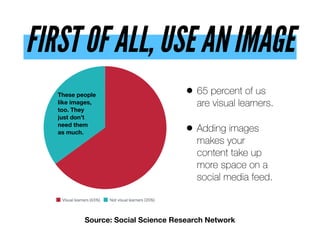
FIRST OF ALL, USE AN IMAGE
• 65 percent of us
are visual learners.
• Adding images
makes your
content take up
more space on a
social media feed.
Source: Social Science Research Network
These people
like images,
too. They
just don’t
need them 

as much.
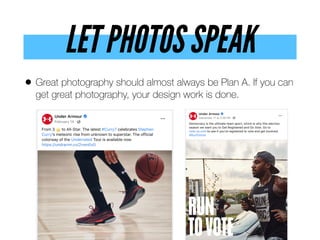
LET PHOTOS SPEAK
• Great photography should almost always be Plan A. If you can
get great photography, your design work is done.
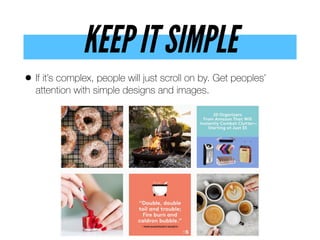
KEEP IT SIMPLE
• If it’s complex, people will just scroll on by. Get peoples’
attention with simple designs and images.
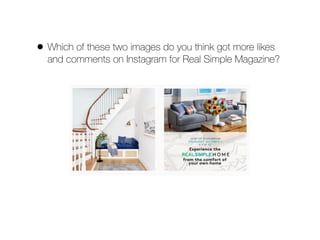
• Which of these two images do you think got more likes
and comments on Instagram for Real Simple Magazine?
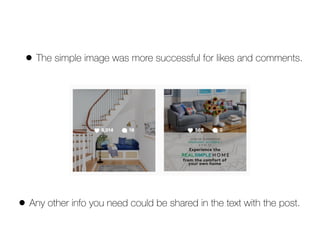
• The simple image was more successful for likes and comments.
• Any other info you need could be shared in the text with the post.
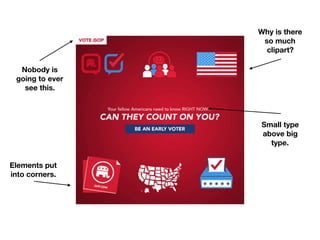
Elements put
into corners.
Nobody is
going to ever
see this.
Small type
above big
type.
Why is there
so much
clipart?
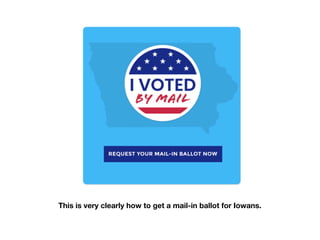
This is very clearly how to get a mail-in ballot for Iowans.
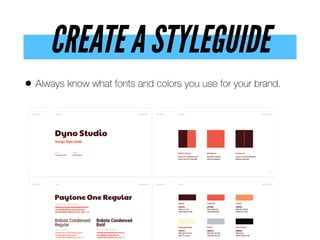
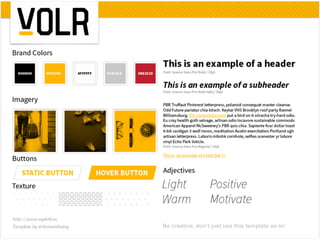
CREATE A STYLEGUIDE
• Always know what fonts and colors you use for your brand.
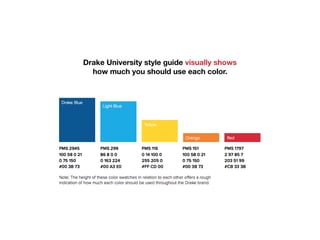
Drake University style guide visually shows
how much you should use each color.
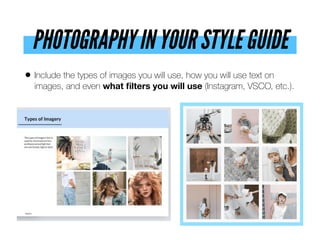
PHOTOGRAPHY IN YOUR STYLE GUIDE
• Include the types of images you will use, how you will use text on
images, and even what filters you will use (Instagram, VSCO, etc.).
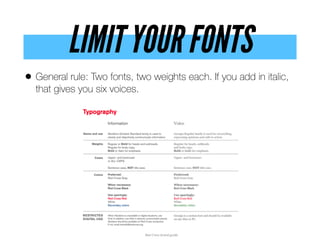
LIMIT YOUR FONTS
• General rule: Two fonts, two weights each. If you add in italic,
that gives you six voices.
If you’ve never watched the Font Conference video on YouTube, please do.
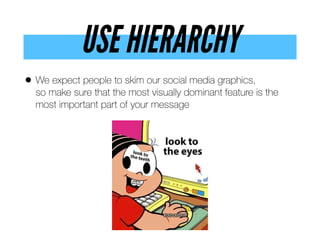
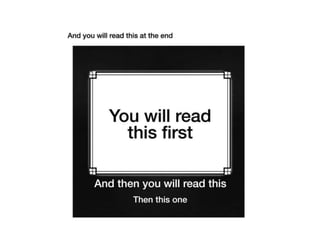
USE HIERARCHY
• We expect people to skim our social media graphics, 

so make sure that the most visually dominant feature is the
most important part of your message
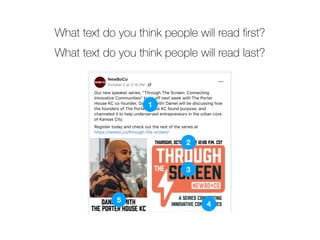
What text do you think people will read first?
5
1
3
4
2
What text do you think people will read last?
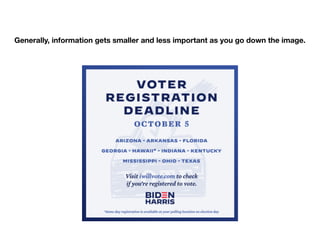
Generally, information gets smaller and less important as you go down the image.
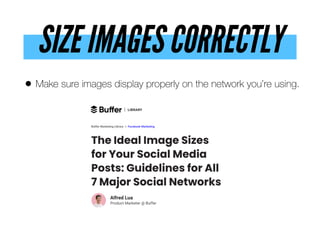
SIZE IMAGES CORRECTLY
• Make sure images display properly on the network you’re using.
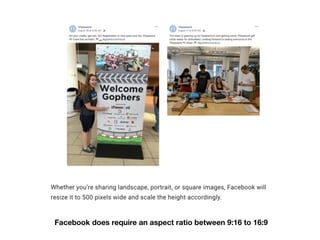
 Facebook does require an aspect ratio between 9:16 to 16:9
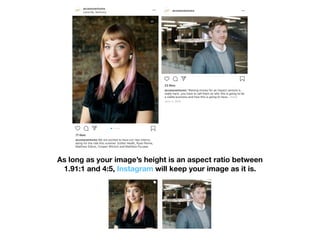
As long as your image’s height is an aspect ratio between
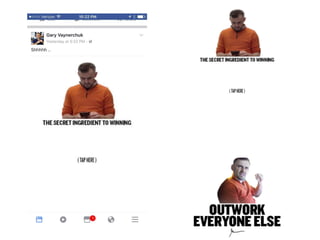
1.91:1 and 4:5, Instagram will keep your image as it is.
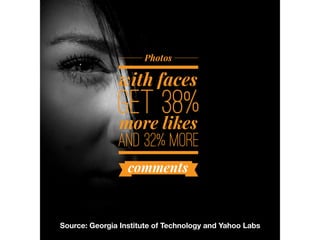
SHOW FACES
“(We) pay more attention to faces than 

we do to anything else. We know
experimentally that people respond
differently to faces than they do to 

other object categories." 

- Researcher Dr. Owen Churches
Source: Georgia Institute of Technology and Yahoo Labs
USE COLOR
• Color helps to set the mood, create an atmosphere,
convey emotions, and even evoke strong individual
experiences from someone’s past.
• Up to 90% of snap judgments made about products can be
based on color alone
• What is the presentation was in red instead of blue…
USE COLOR
• Color helps to set the mood, create an atmosphere,
convey emotions, and even evoke strong individual
experiences from someone’s past.
• Up to 90% of snap judgments made about products can be
based on color alone
• What is the presentation was in red instead of blue…
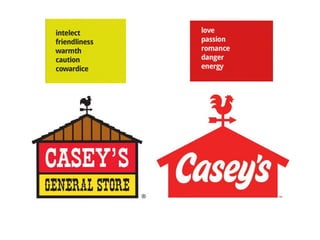
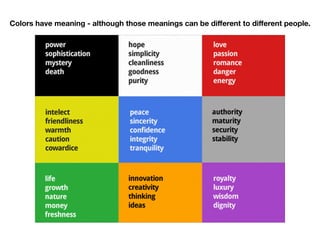
Colors have meaning - although those meanings can be different to different people.
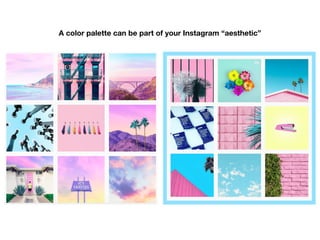
A color palette can be part of your Instagram “aesthetic”
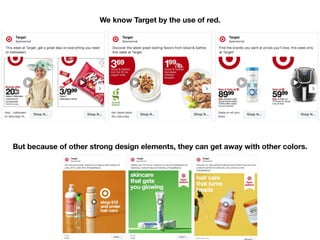
We know Target by the use of red.
But because of other strong design elements, they can get away with other colors.
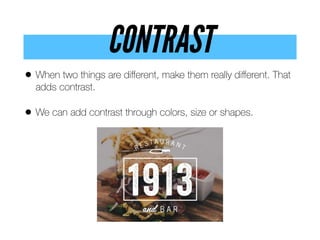
CONTRAST
• When two things are different, make them really different. That
adds contrast.
• We can add contrast through colors, size or shapes.
CONTRAST
• Contrast between text and background helps people with low vision
see your content.
• The ideal contrast between a text color and its background
should be at least 4.5 to 1. For larger text that ratio decreases,
but it increases for smaller text.
• Avoid green and red or blue and yellow combinations, as they’re
difficult to read.
• Text can be difficult to read on images, so use a solid background
or opaque overlay.
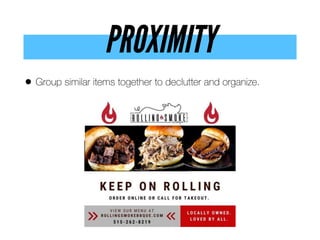
PROXIMITY
• Group similar items together to declutter and organize.
SPACE
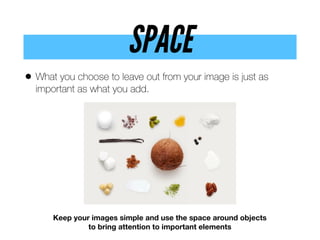
• What you choose to leave out from your image is just as
important as what you add.
Keep your images simple and use the space around objects
to bring attention to important elements
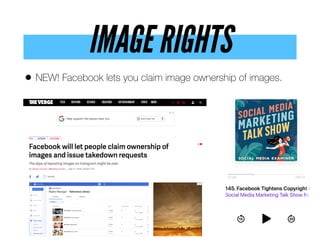
IMAGE RIGHTS
• NEW! Facebook lets you claim image ownership of images.
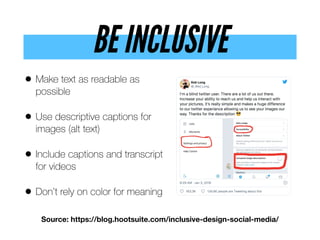
BE INCLUSIVE
• Make text as readable as
possible
• Use descriptive captions for
images (alt text)
• Include captions and transcript
for videos
• Don’t rely on color for meaning
Source: https://blog.hootsuite.com/inclusive-design-social-media/
DESIGN TOOLS
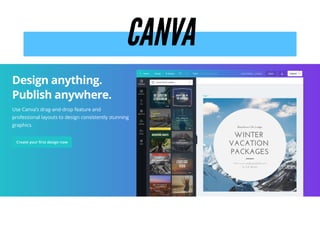
CANVA
PIKTOCHART
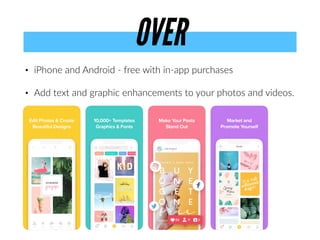
• iPhone and Android - free with in-app purchases
• Add text and graphic enhancements to your photos and videos.
OVER
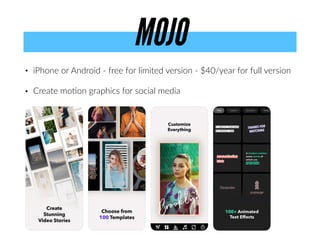
• iPhone or Android - free for limited version - $40/year for full version
• Create moAon graphics for social media
MOJO
LET’S STAY IN TOUCH
@chrissnider @csnider
Go to bit.ly/snider-signup to choose from:
• Get slides from today’s presentation
• Sign up for my weekly social media newsletter
• Get info about Drake’s Master of Arts in Communication program
• Learn about my online social media course
QUESTIONS?
@chrissnider @csnider

Creating Compelling Social Media Visuals

  • 2.
    CREATE COMPELLING 
 SOCIALMEDIA VISUALS CHRIS SNIDER • LEARN.CHRISSNIDERDESIGN.COM @chrissnider @csnider
  • 3.
    HELLO. I’M CHRISSNIDER • Associate professor in Drake University’s School 
 of Journalism and Mass Communication • Teach classes on video, audio, social media, design, storytelling and web design to both undergrads and in our 100%
 online Master of Arts in Communication program @chrissnider @csnider
  • 4.
    • I’m passionateabout how businesses can use social media and digital media to achieve their goals • Formerly editor at Juice Magazine and The Des Moines Register and design at St. Louis Post Dispatch and Baltimore Sun • I conduct a yearly survey on how first-year students use and feel about social media @chrissnider @csnider
  • 5.
    WHAT DO YOUNEED? • Go to menti.com and put in the code. • Then answer the question: What do you need help with when it comes to design?
  • 6.
    TODAY’S PLAN: DESIGN TIPS,TOOLS
 & YOUR QUESTIONS
  • 7.
    HOW TO PLAYALONG • Find something that you shared on one of your accounts that felt a little lacking in design polish - whether you designed it or not. • Have that image in mind while you follow along with this presentation. How can you improve the design?
  • 8.
    WHY VISUALS MATTERS •Humans are visual creatures. • Half of your brain is directly 
 or indirectly involved with processing visual information. • We are more likely to remember things we see. Source: https://news.mit.edu/1996/visualprocessing
  • 9.
    ONE BIG TAKEAWAY •If… the best way to improve your social media success is to create better content. • And if… humans process information well through visuals. • Then … visuals should be a big part of your social media content strategy.
  • 11.
  • 12.
    FIRST OF ALL,USE AN IMAGE • 65 percent of us are visual learners. • Adding images makes your content take up more space on a social media feed. Source: Social Science Research Network These people like images, too. They just don’t need them 
 as much.
  • 13.
    LET PHOTOS SPEAK •Great photography should almost always be Plan A. If you can get great photography, your design work is done.
  • 14.
    KEEP IT SIMPLE •If it’s complex, people will just scroll on by. Get peoples’ attention with simple designs and images.
  • 15.
    • Which ofthese two images do you think got more likes and comments on Instagram for Real Simple Magazine?
  • 16.
    • The simpleimage was more successful for likes and comments. • Any other info you need could be shared in the text with the post.
  • 17.
    Elements put into corners. Nobodyis going to ever see this. Small type above big type. Why is there so much clipart?
  • 19.
    This is veryclearly how to get a mail-in ballot for Iowans.
  • 20.
    CREATE A STYLEGUIDE •Always know what fonts and colors you use for your brand.
  • 22.
    Drake University styleguide visually shows how much you should use each color.
  • 23.
    PHOTOGRAPHY IN YOURSTYLE GUIDE • Include the types of images you will use, how you will use text on images, and even what filters you will use (Instagram, VSCO, etc.).
  • 24.
    LIMIT YOUR FONTS •General rule: Two fonts, two weights each. If you add in italic, that gives you six voices.
  • 25.
    If you’ve neverwatched the Font Conference video on YouTube, please do.
  • 26.
    USE HIERARCHY • Weexpect people to skim our social media graphics, 
 so make sure that the most visually dominant feature is the most important part of your message
  • 28.
    What text doyou think people will read first? 5 1 3 4 2 What text do you think people will read last?
  • 29.
    Generally, information getssmaller and less important as you go down the image.
  • 30.
    SIZE IMAGES CORRECTLY •Make sure images display properly on the network you’re using.
  • 31.
     Facebook does requirean aspect ratio between 9:16 to 16:9
  • 33.
    As long asyour image’s height is an aspect ratio between 1.91:1 and 4:5, Instagram will keep your image as it is.
  • 34.
    SHOW FACES “(We) paymore attention to faces than 
 we do to anything else. We know experimentally that people respond differently to faces than they do to 
 other object categories." 
 - Researcher Dr. Owen Churches
  • 35.
    Source: Georgia Instituteof Technology and Yahoo Labs
  • 36.
    USE COLOR • Colorhelps to set the mood, create an atmosphere, convey emotions, and even evoke strong individual experiences from someone’s past. • Up to 90% of snap judgments made about products can be based on color alone • What is the presentation was in red instead of blue…
  • 37.
    USE COLOR • Colorhelps to set the mood, create an atmosphere, convey emotions, and even evoke strong individual experiences from someone’s past. • Up to 90% of snap judgments made about products can be based on color alone • What is the presentation was in red instead of blue…
  • 38.
    Colors have meaning- although those meanings can be different to different people.
  • 40.
    A color palettecan be part of your Instagram “aesthetic”
  • 41.
    We know Targetby the use of red. But because of other strong design elements, they can get away with other colors.
  • 42.
    CONTRAST • When twothings are different, make them really different. That adds contrast. • We can add contrast through colors, size or shapes.
  • 43.
    CONTRAST • Contrast betweentext and background helps people with low vision see your content. • The ideal contrast between a text color and its background should be at least 4.5 to 1. For larger text that ratio decreases, but it increases for smaller text. • Avoid green and red or blue and yellow combinations, as they’re difficult to read. • Text can be difficult to read on images, so use a solid background or opaque overlay.
  • 45.
    PROXIMITY • Group similaritems together to declutter and organize.
  • 46.
    SPACE • What youchoose to leave out from your image is just as important as what you add. Keep your images simple and use the space around objects to bring attention to important elements
  • 47.
    IMAGE RIGHTS • NEW!Facebook lets you claim image ownership of images.
  • 48.
    BE INCLUSIVE • Maketext as readable as possible • Use descriptive captions for images (alt text) • Include captions and transcript for videos • Don’t rely on color for meaning Source: https://blog.hootsuite.com/inclusive-design-social-media/
  • 49.
  • 50.
  • 51.
  • 52.
    • iPhone andAndroid - free with in-app purchases • Add text and graphic enhancements to your photos and videos. OVER
  • 53.
    • iPhone orAndroid - free for limited version - $40/year for full version • Create moAon graphics for social media MOJO
  • 54.
    LET’S STAY INTOUCH @chrissnider @csnider Go to bit.ly/snider-signup to choose from: • Get slides from today’s presentation • Sign up for my weekly social media newsletter • Get info about Drake’s Master of Arts in Communication program • Learn about my online social media course
  • 55.