Ventilator Education
Presentation by Rachelle Solum CRT 2014
Objectives: After this presentation you should be able to :
• Define key ventilator terms
• Understand 3 common vent modes and settings used on ventilators
• Identify the 2 vents we use, find patient data and setting data on them
• Identify 3 common vent alarms and be able to troubleshoot problems
and know what actions to take associated with those alarms
• Identify a clinometer and HME and their uses
• Identify LTV1200 exhalation port and sensors
DEFINITIONS
This section will define some commonly used terms
when discussing ventilators
Definitions
Tidal Volume
(Vt)
Rate/frequency
PEEP
FiO2
Pressure Support
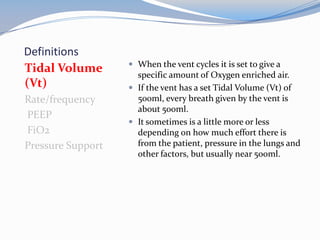
 When the vent cycles it is set to give a
specific amount of Oxygen enriched air.
 If the vent has a set Tidal Volume (Vt) of
500ml, every breath given by the vent is
about 500ml.
 It sometimes is a little more or less
depending on how much effort there is
from the patient, pressure in the lungs and
other factors, but usually near 500ml.
Definitions
Tidal Volume (Vt)
Rate/frequency
PEEP
FiO2
Pressure Support
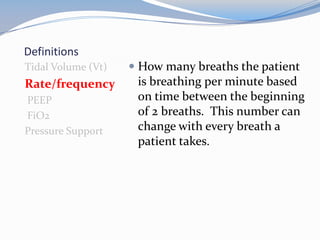
 How many breaths the patient
is breathing per minute based
on time between the beginning
of 2 breaths. This number can
change with every breath a
patient takes.
Definitions
Tidal Volume (Vt)
Rate/frequency
PEEP
FiO2
Pressure Support
 Positive End-Expiratory Pressure
 Air is pulled by the lungs into tiny
little air sacs called alveoli, which
are wet inside.
 Coughing, mucous production
and suctioning of the lungs can
collapse the alveoli and make
them resistant to re-opening.
 PEEP is a constant pressure inside
the patient's lungs that minimizes
the collapse of the alveoli and
helps recruit collapsed alveoli.
Definitions
Tidal Volume (Vt)
Rate/frequency
PEEP
FiO2
Pressure Support
 Fraction of Inspired Oxygen
 It's the oxygen setting on the
vent expressed as a percent.
 The range is 21% (room air) to
100%
Definitions
Tidal Volume (Vt)
Rate/frequency
PEEP
FiO2
Pressure
Support
 It is an extra push of pressure
to help with each breath.
 It increases the volume of
breath and works with PEEP
to increase the number of full
alveoli and helps patient get a
breath with less work.
Ventilator Modes and Settings
This section will explain the different vent modes and
settings we use most commonly
Ventilator Modes
 Assist Control (AC)
 Synchronized Intermittent
Mechanical Ventilation
(SIMV)
 Pressure Support (PS)
 These are the most
common vent modes
used
 The settings used in the
examples are not always
the numbers used.
 They are all tailored to
each patient depending
on their needs.
Assist Control (AC)
 This is the highest support available on the vent.
 Example: AC12, 500, 30%, +5 means that the rate is set
at 12, tidal volume (Vt) is set at 500, FiO2 is 30% and
PEEP is +5.
 The very least the patient gets is 12 full breaths per
minute with a Vt of 500ml.
 If the patient takes more than 12 breaths, the vent
senses their inspiratory effort and gives them the full
Vt of 500ml with each breath over 12.
Synchronized Intermittent
Mechanical Ventilation (SIMV)
 Example: SIMV12, 500, 30%, +5, +15 means that the rate is
set at 12, tidal volume (Vt) is set at 500, FiO2 is 30%, PEEP
is +5, and the pressure support (PS) is +15.
 Again, like AC, the very least the patient gets is 12 full
breaths per minute with a Vt of 500ml.
 If the patient takes more than 12 breaths, the vent senses
their inspiratory effort and gives them a breath with a PS of
+15 to help boost the volume. Those breaths are more work
and start to exercise the diaphragm and lungs.
 This is a mode that we use to start the weaning process.
Often we reduce the rate gradually (example: SIMV rate is
lowered 1 breath per day) to wean the patient.
Pressure Support (PS)
 Example: PS15, 30%, +5 means that pressure support is set
at +15, FiO2 is 30% and PEEP is +5.
 There is no set rate and no set tidal volume(Vt).
 ALL the patients breaths are at their own volume with a
pressure support behind them of +15.
 Pressure Support helps overcome the increased work of
breathing with an artificial airway and the resistance of the
vent circuit.
 This mode is usually used before trach mask trials begin.
 This is technically & sometimes referred to as CPAP mode.
Vent Changes
 ONLY a Respiratory Staff member is allowed to change ANY
ventilator settings on the vent.
 Parameters that we are NOT allowed to change without a Doctor’s
order:
• Mode(AC, SIMV, PS)
• Rate
• Tidal Volume (Vt)
• PEEP
• Pressure Support(PS)
 Our protocol allows us to titrate the FiO2 to maintain a Pulse Oximetry
(POX) level of 90% or above. This includes giving 100% O2 when
patient will be placed in a supine position, exerting effort or being
suctioned, when it is indicated.
Our Ventilators
This section will show you where to read the actual
patient data and where to read the vent settings on
each of the vents we are currently using
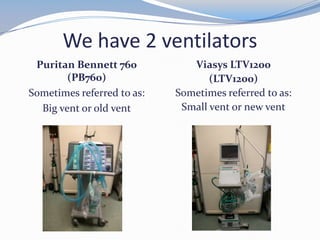
We have 2 ventilators
Puritan Bennett 760
(PB760)
Sometimes referred to as:
Big vent or old vent
Viasys LTV1200
(LTV1200)
Sometimes referred to as:
Small vent or new vent
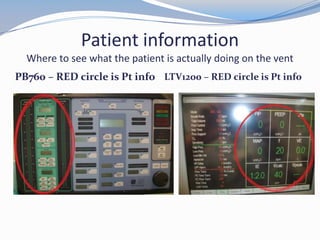
Patient information
Where to see what the patient is actually doing on the vent
PB760 – RED circle is Pt info LTV1200 – RED circle is Pt info
Patient information
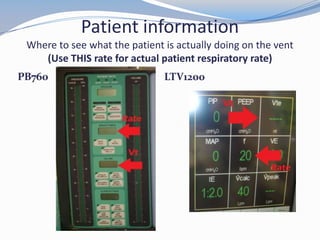
Where to see what the patient is actually doing on the vent
(Use THIS rate for actual patient respiratory rate)
PB760 LTV1200
Ventilator Settings
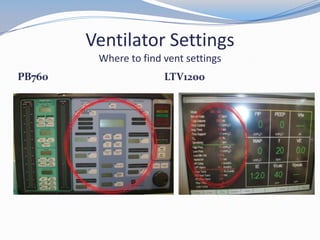
Where to find vent settings
PB760 LTV1200
Ventilator Settings
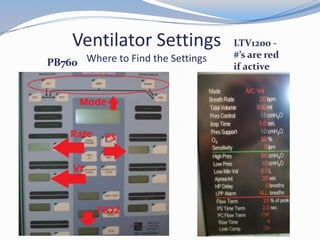
Where to Find the SettingsPB760
LTV1200 -
#’s are red
if active
100% FiO2
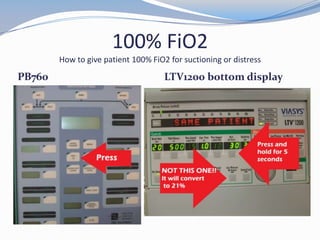
How to give patient 100% FiO2 for suctioning or distress
PB760 LTV1200 bottom display
Alarms
This section will explain some common alarms, and how
YOU can troubleshoot ventilator alarms
Common Alarms
 High Pressure
 High Rate/Frequency
 Disconnect, Low Volume or Low Pressure
High Pressure
 Usually this alarm is activated when patient COUGHS
or NEEDS SUCTIONING.
 Action: Suction patient
 Sometimes activated when vent circuit is compressed.
 Action: Check vent circuit for kinks or compressions and
straighten out vent circuit.
 Lungs are not compliant with current vent
settings, patient “fighting” vent settings, or alarm set
to low.
 Action: Contact Respiratory Staff
High Rate/Frequency
 This alarm is activated when patient breathes more
times per minute than the alarm is set for, usually 40
breaths per minute. It may be due to anxiety, pain or
fatigue.
 Action: Contact Respiratory Staff, especially if patient is
weaning, diaphoretic or appears to be struggling with
breathing.
 Action: Check if patient needs anxiety or pain
medication.
Disconnect, Low Volume
or Low Pressure
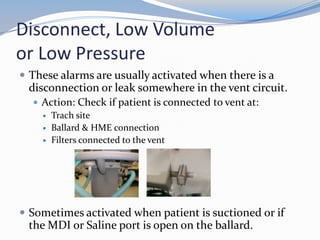
 These alarms are usually activated when there is a
disconnection or leak somewhere in the vent circuit.
 Action: Check if patient is connected to vent at:
 Trach site
 Ballard & HME connection
 Filters connected to the vent
 Sometimes activated when patient is suctioned or if
the MDI or Saline port is open on the ballard.
Other Alarm Information
 There are many other alarms that may be activated. If
you can hear or see an alarm that you are unfamiliar
with, please contact Respiratory Staff.
 There is no need to worry if an alarm warning is on the
vent, but there is no audible alarm. The vents will
display the last alarm activated.
 Notify Respiratory Staff immediately after checking
patient if a vent is alarming in room, but no hallway
light or alarm is activated!
Additional Information
This section will provide some items you need to be
aware of when caring for our ventilated patients
Head Of Bed
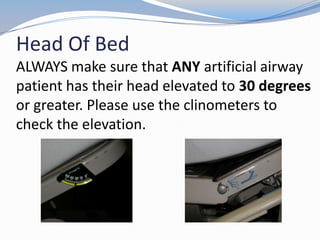
ALWAYS make sure that ANY artificial airway
patient has their head elevated to 30 degrees
or greater. Please use the clinometers to
check the elevation.
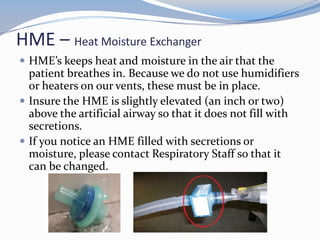
HME – Heat Moisture Exchanger
 HME’s keeps heat and moisture in the air that the
patient breathes in. Because we do not use humidifiers
or heaters on our vents, these must be in place.
 Insure the HME is slightly elevated (an inch or two)
above the artificial airway so that it does not fill with
secretions.
 If you notice an HME filled with secretions or
moisture, please contact Respiratory Staff so that it
can be changed.
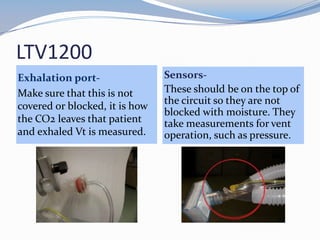
LTV1200
Exhalation port-
Make sure that this is not
covered or blocked, it is how
the CO2 leaves that patient
and exhaled Vt is measured.
Sensors-
These should be on the top of
the circuit so they are not
blocked with moisture. They
take measurements for vent
operation, such as pressure.
For more information
 Please ask any Respiratory Staff member

Ventilator Education

  • 1.
    Ventilator Education Presentation byRachelle Solum CRT 2014
  • 2.
    Objectives: After thispresentation you should be able to : • Define key ventilator terms • Understand 3 common vent modes and settings used on ventilators • Identify the 2 vents we use, find patient data and setting data on them • Identify 3 common vent alarms and be able to troubleshoot problems and know what actions to take associated with those alarms • Identify a clinometer and HME and their uses • Identify LTV1200 exhalation port and sensors
  • 3.
    DEFINITIONS This section willdefine some commonly used terms when discussing ventilators
  • 4.
    Definitions Tidal Volume (Vt) Rate/frequency PEEP FiO2 Pressure Support When the vent cycles it is set to give a specific amount of Oxygen enriched air.  If the vent has a set Tidal Volume (Vt) of 500ml, every breath given by the vent is about 500ml.  It sometimes is a little more or less depending on how much effort there is from the patient, pressure in the lungs and other factors, but usually near 500ml.
  • 5.
    Definitions Tidal Volume (Vt) Rate/frequency PEEP FiO2 PressureSupport  How many breaths the patient is breathing per minute based on time between the beginning of 2 breaths. This number can change with every breath a patient takes.
  • 6.
    Definitions Tidal Volume (Vt) Rate/frequency PEEP FiO2 PressureSupport  Positive End-Expiratory Pressure  Air is pulled by the lungs into tiny little air sacs called alveoli, which are wet inside.  Coughing, mucous production and suctioning of the lungs can collapse the alveoli and make them resistant to re-opening.  PEEP is a constant pressure inside the patient's lungs that minimizes the collapse of the alveoli and helps recruit collapsed alveoli.
  • 7.
    Definitions Tidal Volume (Vt) Rate/frequency PEEP FiO2 PressureSupport  Fraction of Inspired Oxygen  It's the oxygen setting on the vent expressed as a percent.  The range is 21% (room air) to 100%
  • 8.
    Definitions Tidal Volume (Vt) Rate/frequency PEEP FiO2 Pressure Support It is an extra push of pressure to help with each breath.  It increases the volume of breath and works with PEEP to increase the number of full alveoli and helps patient get a breath with less work.
  • 9.
    Ventilator Modes andSettings This section will explain the different vent modes and settings we use most commonly
  • 10.
    Ventilator Modes  AssistControl (AC)  Synchronized Intermittent Mechanical Ventilation (SIMV)  Pressure Support (PS)  These are the most common vent modes used  The settings used in the examples are not always the numbers used.  They are all tailored to each patient depending on their needs.
  • 11.
    Assist Control (AC) This is the highest support available on the vent.  Example: AC12, 500, 30%, +5 means that the rate is set at 12, tidal volume (Vt) is set at 500, FiO2 is 30% and PEEP is +5.  The very least the patient gets is 12 full breaths per minute with a Vt of 500ml.  If the patient takes more than 12 breaths, the vent senses their inspiratory effort and gives them the full Vt of 500ml with each breath over 12.
  • 12.
    Synchronized Intermittent Mechanical Ventilation(SIMV)  Example: SIMV12, 500, 30%, +5, +15 means that the rate is set at 12, tidal volume (Vt) is set at 500, FiO2 is 30%, PEEP is +5, and the pressure support (PS) is +15.  Again, like AC, the very least the patient gets is 12 full breaths per minute with a Vt of 500ml.  If the patient takes more than 12 breaths, the vent senses their inspiratory effort and gives them a breath with a PS of +15 to help boost the volume. Those breaths are more work and start to exercise the diaphragm and lungs.  This is a mode that we use to start the weaning process. Often we reduce the rate gradually (example: SIMV rate is lowered 1 breath per day) to wean the patient.
  • 13.
    Pressure Support (PS) Example: PS15, 30%, +5 means that pressure support is set at +15, FiO2 is 30% and PEEP is +5.  There is no set rate and no set tidal volume(Vt).  ALL the patients breaths are at their own volume with a pressure support behind them of +15.  Pressure Support helps overcome the increased work of breathing with an artificial airway and the resistance of the vent circuit.  This mode is usually used before trach mask trials begin.  This is technically & sometimes referred to as CPAP mode.
  • 14.
    Vent Changes  ONLYa Respiratory Staff member is allowed to change ANY ventilator settings on the vent.  Parameters that we are NOT allowed to change without a Doctor’s order: • Mode(AC, SIMV, PS) • Rate • Tidal Volume (Vt) • PEEP • Pressure Support(PS)  Our protocol allows us to titrate the FiO2 to maintain a Pulse Oximetry (POX) level of 90% or above. This includes giving 100% O2 when patient will be placed in a supine position, exerting effort or being suctioned, when it is indicated.
  • 15.
    Our Ventilators This sectionwill show you where to read the actual patient data and where to read the vent settings on each of the vents we are currently using
  • 16.
    We have 2ventilators Puritan Bennett 760 (PB760) Sometimes referred to as: Big vent or old vent Viasys LTV1200 (LTV1200) Sometimes referred to as: Small vent or new vent
  • 17.
    Patient information Where tosee what the patient is actually doing on the vent PB760 – RED circle is Pt info LTV1200 – RED circle is Pt info
  • 18.
    Patient information Where tosee what the patient is actually doing on the vent (Use THIS rate for actual patient respiratory rate) PB760 LTV1200
  • 19.
    Ventilator Settings Where tofind vent settings PB760 LTV1200
  • 20.
    Ventilator Settings Where toFind the SettingsPB760 LTV1200 - #’s are red if active
  • 21.
    100% FiO2 How togive patient 100% FiO2 for suctioning or distress PB760 LTV1200 bottom display
  • 22.
    Alarms This section willexplain some common alarms, and how YOU can troubleshoot ventilator alarms
  • 23.
    Common Alarms  HighPressure  High Rate/Frequency  Disconnect, Low Volume or Low Pressure
  • 24.
    High Pressure  Usuallythis alarm is activated when patient COUGHS or NEEDS SUCTIONING.  Action: Suction patient  Sometimes activated when vent circuit is compressed.  Action: Check vent circuit for kinks or compressions and straighten out vent circuit.  Lungs are not compliant with current vent settings, patient “fighting” vent settings, or alarm set to low.  Action: Contact Respiratory Staff
  • 25.
    High Rate/Frequency  Thisalarm is activated when patient breathes more times per minute than the alarm is set for, usually 40 breaths per minute. It may be due to anxiety, pain or fatigue.  Action: Contact Respiratory Staff, especially if patient is weaning, diaphoretic or appears to be struggling with breathing.  Action: Check if patient needs anxiety or pain medication.
  • 26.
    Disconnect, Low Volume orLow Pressure  These alarms are usually activated when there is a disconnection or leak somewhere in the vent circuit.  Action: Check if patient is connected to vent at:  Trach site  Ballard & HME connection  Filters connected to the vent  Sometimes activated when patient is suctioned or if the MDI or Saline port is open on the ballard.
  • 27.
    Other Alarm Information There are many other alarms that may be activated. If you can hear or see an alarm that you are unfamiliar with, please contact Respiratory Staff.  There is no need to worry if an alarm warning is on the vent, but there is no audible alarm. The vents will display the last alarm activated.  Notify Respiratory Staff immediately after checking patient if a vent is alarming in room, but no hallway light or alarm is activated!
  • 28.
    Additional Information This sectionwill provide some items you need to be aware of when caring for our ventilated patients
  • 29.
    Head Of Bed ALWAYSmake sure that ANY artificial airway patient has their head elevated to 30 degrees or greater. Please use the clinometers to check the elevation.
  • 30.
    HME – HeatMoisture Exchanger  HME’s keeps heat and moisture in the air that the patient breathes in. Because we do not use humidifiers or heaters on our vents, these must be in place.  Insure the HME is slightly elevated (an inch or two) above the artificial airway so that it does not fill with secretions.  If you notice an HME filled with secretions or moisture, please contact Respiratory Staff so that it can be changed.
  • 31.
    LTV1200 Exhalation port- Make surethat this is not covered or blocked, it is how the CO2 leaves that patient and exhaled Vt is measured. Sensors- These should be on the top of the circuit so they are not blocked with moisture. They take measurements for vent operation, such as pressure.
  • 32.
    For more information Please ask any Respiratory Staff member