Working with ADO.NET


Objectives
    In this lesson, you will learn to:
         • Identify the features of ADO.NET
         • Identify the components of the ADO.NET object model
         • Connect to a database by creating a data adapter
         • Access a database through a dataset
         • Preview the data adapter result


 ©NIIT           Creating Data Centric Applications using   Lesson 1A / Slide 1 of 18
                              ADO.NET
Working with ADO.NET


An Introduction to ADO.NET
    •    Applications need to communicate with a database for the following tasks:
           • Retrieving the data stored in the database and presenting it in a user-
             friendly format
           • Updating the database, that is, inserting, modifying, and deleting data
    •    ADO.NET is a model used by .NET applications to communicate with a
         database for retrieving, accessing, and updating data.


 ©NIIT              Creating Data Centric Applications using   Lesson 1A / Slide 2 of 18
                                 ADO.NET
Working with ADO.NET


Features of ADO.NET
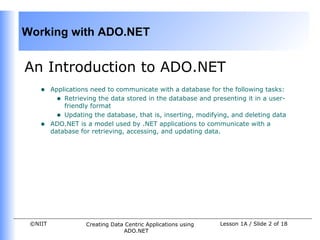
    •    Disconnected data architecture :
           • Applications connect to the database only while retrieving and updating
             data.
           • A database can cater to the needs of several applications simultaneously
             since the interaction is for a shorter duration.
    •    Data cached in datasets :
           • A dataset is the most common method of accessing data in ADO.NET.
           • A dataset is a cached set of database records.
           • A dataset is independent of data source and you remain disconnected from
             the data source.
    •    Scalability
           • Database operations are performed on the dataset instead of on the
             database, therefore, database can meet the increasing demands of users
             more efficiently.


 ©NIIT             Creating Data Centric Applications using   Lesson 1A / Slide 3 of 18
                                ADO.NET
Working with ADO.NET


Features of ADO.NET (Contd.)
    •    Data transfer in XML format
           • Data is transferred from a database into a dataset and from the dataset to
             another component by using XML.
           • You can transmit a dataset between different types of applications that
             support XML.
    •    Interaction with the database is done through data commands:
           • A DataCommand object can be used for accessing or updating the data
             using either a SQL statement or a stored procedure.
           • You can retrieve, insert, delete, or modify data from a database by
             executing data commands.


 ©NIIT              Creating Data Centric Applications using   Lesson 1A / Slide 4 of 18
                                 ADO.NET
Working with ADO.NET


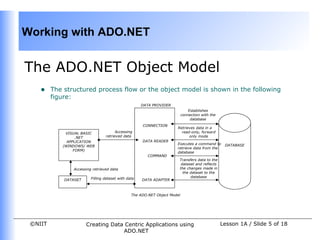
The ADO.NET Object Model
    •    The structured process flow or the object model is shown in the following
         figure:
                                                     DATA PROVIDER
                                                                               Establishes
                                                                           connection with the
                                                                                database
                                                     CONNECTION
                                                                      Retrieves data in a
             VISUAL BASIC              Accessing                        read-only, forward
                  .NET           retrieved data                             only mode
              APPLICATION                            DATA READER
                                                                      Executes a command to       DATABASE
            (WINDOWS/ WEB
                                                                      retrieve data from the
                 FORM)
                                                                      database
                                                        COMMAND
                                                                       Transfers data to the
                                                                        dataset and reflects
                Accessing retrieved data                               the changes made in
                                                                         the dataset to the
                         Filling dataset with data                           database
             DATASET                                 DATA ADAPTER


                                                The ADO.NET Object Model


 ©NIIT                 Creating Data Centric Applications using                                  Lesson 1A / Slide 5 of 18
                                    ADO.NET
Working with ADO.NET


The ADO.NET Object Model (Contd.)
    •    The data residing in a database is retrieved through data provider.
    •    An application can access data either through a dataset or through a
         DataReader object:
           • Using a dataset: The data is cached in a dataset and the application
             accesses the data from the dataset.
           • Using a data reader: A DataReader object, which is a component of the
             data provider, uses the Connection object to connect to the database.
    •    The key components of the ADO.NET are as follows:
           • Data Provider
           • Dataset


 ©NIIT             Creating Data Centric Applications using   Lesson 1A / Slide 6 of 18
                                ADO.NET
Working with ADO.NET


Data Provider
    • A data provider is used for connecting to a database, retrieving data, storing
      the data in a dataset, reading the retrieved data, and updating the database.
    • There are two types of data providers:
        • OLE DB data provider : Works with all the OLE DB providers, such as SQL
          OLE DB provider, Oracle OLE DB provider, and Jet OLE DB provider.
        • SQL Server data provider : Is used to work specifically with Microsoft SQL
          Server.
    Connection
    • Used to establish a connection with a data source
    • Two of the most common Connection objects used are OleDbConnection and
      SqlConnection.


 ©NIIT            Creating Data Centric Applications using   Lesson 1A / Slide 7 of 18
                               ADO.NET
Working with ADO.NET


Data Adapter
    •    Data is transferred to and from a database through a data adapter.
    •    The changes in the database are actually done by the data adapter.
    •    You access data from a database by configuring a data adapter.
    •    Two widely used data adapter are:
           • SqlDataAdapter : Configured to access data specifically from Microsoft SQL
             Server
           • OleDbDataAdapter : Configured to access data from any database that is
             supported by an OLE DB data provider


 ©NIIT              Creating Data Centric Applications using   Lesson 1A / Slide 8 of 18
                                 ADO.NET
Working with ADO.NET


Data Adapter (Contd.)
    Properties and Methods
    • SelectCommand : Refers to a SQL statement or a stored procedure to retrieve
       data from the database
    • InsertCommand : Refers to a data command to insert data into a database
    • UpdateCommand : Refers to a data command to update a database
    • DeleteCommand : Refers to a data command to delete data from a database
    • Fill() Method : Fills the dataset with the records from a database
    • Update() Method : Executes the corresponding InsertCommand,
       UpdateCommand, or DeleteCommand
    Creating a data adapter
    • There are three methods to create a data adapter:
         • Through a wizard
         • Using the Server Explorer window
         • Programmatically


 ©NIIT           Creating Data Centric Applications using   Lesson 1A / Slide 9 of 18
                              ADO.NET
Working with ADO.NET


Data Command and Data Reader
    Data Command
    • An object representing a SQL statement or a stored procedure that is used to
       retrieve, insert, delete, or modify data in a data source
    • Derived from the OleDbCommand class
    Data Reader
    • Used to retrieve data from a data source in a read-only and forward-only mode
    • A data reader uses :
         • Connection object to connect to the database
         • Command object to execute SQL statements or procedures


 ©NIIT           Creating Data Centric Applications using   Lesson 1A / Slide 10 of 18
                              ADO.NET
Working with ADO.NET


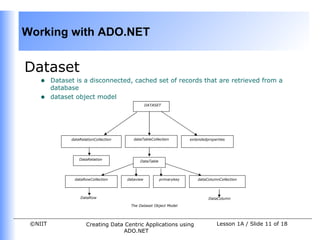
Dataset
    •    Dataset is a disconnected, cached set of records that are retrieved from a
         database
    •    dataset object model
                                                   DATASET


               dataRelationCollection      dataTableCollection         extendedproperties


                   DataRelation
                                              DataTable


                dataRowCollection       dataview          primarykey       dataColumnCollection


                   DataRow                                                      DataColumn

                                         The Dataset Object Model


 ©NIIT                 Creating Data Centric Applications using                     Lesson 1A / Slide 11 of 18
                                    ADO.NET
Working with ADO.NET


Dataset ( Contd.)
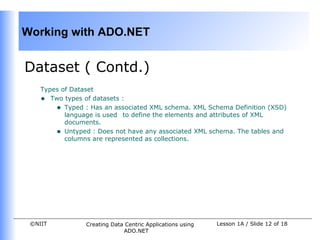
    Types of Dataset
    • Two types of datasets :
        • Typed : Has an associated XML schema. XML Schema Definition (XSD)
           language is used to define the elements and attributes of XML
           documents.
        • Untyped : Does not have any associated XML schema. The tables and
           columns are represented as collections.


 ©NIIT           Creating Data Centric Applications using   Lesson 1A / Slide 12 of 18
                              ADO.NET
Working with ADO.NET


                  Demo
         Connecting to a Database


 ©NIIT     Creating Data Centric Applications using   Lesson 1A / Slide 13 of 18
                        ADO.NET
Working with ADO.NET


Problem Statement
    •    The call center application needs to provide the facility of viewing the customer
         details for the Sales department.
           • Create an application to display the customer details for the Sales
             department.


 ©NIIT              Creating Data Centric Applications using   Lesson 1A / Slide 14 of 18
                                 ADO.NET
Working with ADO.NET


Solution
    •    To design the application, you need to perform the following steps:
         1.   Create a data adapter.
         2.   Create a data set.
         3.   Preview the database records.


 ©NIIT            Creating Data Centric Applications using   Lesson 1A / Slide 15 of 18
                               ADO.NET
Working with ADO.NET


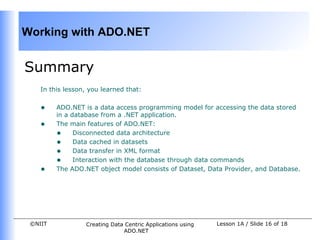
Summary
    In this lesson, you learned that:


    •    ADO.NET is a data access programming model for accessing the data stored
         in a database from a .NET application.
    •    The main features of ADO.NET:
         • Disconnected data architecture
         • Data cached in datasets
         • Data transfer in XML format
         • Interaction with the database through data commands
    •    The ADO.NET object model consists of Dataset, Data Provider, and Database.


 ©NIIT            Creating Data Centric Applications using   Lesson 1A / Slide 16 of 18
                               ADO.NET
Working with ADO.NET


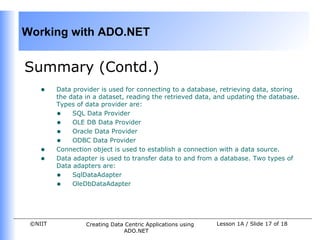
Summary (Contd.)
    •    Data provider is used for connecting to a database, retrieving data, storing
         the data in a dataset, reading the retrieved data, and updating the database.
         Types of data provider are:
         • SQL Data Provider
         • OLE DB Data Provider
         • Oracle Data Provider
         • ODBC Data Provider
    •    Connection object is used to establish a connection with a data source.
    •    Data adapter is used to transfer data to and from a database. Two types of
         Data adapters are:
         • SqlDataAdapter
         • OleDbDataAdapter


 ©NIIT            Creating Data Centric Applications using   Lesson 1A / Slide 17 of 18
                               ADO.NET
Working with ADO.NET


Summary (Contd.)
    •    Three methods of creating Data adapter are:
         • Through a wizard
         • Using the Server Explorer window
         • Programmatically
    •    Data command is a object representing a SQL statement or a stored
         procedure that is used to retrieve, insert, delete, or modify data in a data
         source.
    •    Data reader is used to retrieve data from a data source in a read-only and
         forward-only mode.
    •    Data is retrieved through datasets. Datasets are of two types i.e. Typed and
         Untyped.
         • Typed datasets — A typed dataset is derived from the base DataSet
              class and has an associated XML schema.
         • Untyped datasets — An untyped dataset does not have any associated
              XML schema. The tables and columns in an untyped dataset are
              represented as collections.
 ©NIIT            Creating Data Centric Applications using   Lesson 1A / Slide 18 of 18
                               ADO.NET

Vb.net session 05

  • 1.
    Working with ADO.NET Objectives In this lesson, you will learn to: • Identify the features of ADO.NET • Identify the components of the ADO.NET object model • Connect to a database by creating a data adapter • Access a database through a dataset • Preview the data adapter result ©NIIT Creating Data Centric Applications using Lesson 1A / Slide 1 of 18 ADO.NET
  • 2.
    Working with ADO.NET AnIntroduction to ADO.NET • Applications need to communicate with a database for the following tasks: • Retrieving the data stored in the database and presenting it in a user- friendly format • Updating the database, that is, inserting, modifying, and deleting data • ADO.NET is a model used by .NET applications to communicate with a database for retrieving, accessing, and updating data. ©NIIT Creating Data Centric Applications using Lesson 1A / Slide 2 of 18 ADO.NET
  • 3.
    Working with ADO.NET Featuresof ADO.NET • Disconnected data architecture : • Applications connect to the database only while retrieving and updating data. • A database can cater to the needs of several applications simultaneously since the interaction is for a shorter duration. • Data cached in datasets : • A dataset is the most common method of accessing data in ADO.NET. • A dataset is a cached set of database records. • A dataset is independent of data source and you remain disconnected from the data source. • Scalability • Database operations are performed on the dataset instead of on the database, therefore, database can meet the increasing demands of users more efficiently. ©NIIT Creating Data Centric Applications using Lesson 1A / Slide 3 of 18 ADO.NET
  • 4.
    Working with ADO.NET Featuresof ADO.NET (Contd.) • Data transfer in XML format • Data is transferred from a database into a dataset and from the dataset to another component by using XML. • You can transmit a dataset between different types of applications that support XML. • Interaction with the database is done through data commands: • A DataCommand object can be used for accessing or updating the data using either a SQL statement or a stored procedure. • You can retrieve, insert, delete, or modify data from a database by executing data commands. ©NIIT Creating Data Centric Applications using Lesson 1A / Slide 4 of 18 ADO.NET
  • 5.
    Working with ADO.NET TheADO.NET Object Model • The structured process flow or the object model is shown in the following figure: DATA PROVIDER Establishes connection with the database CONNECTION Retrieves data in a VISUAL BASIC Accessing read-only, forward .NET retrieved data only mode APPLICATION DATA READER Executes a command to DATABASE (WINDOWS/ WEB retrieve data from the FORM) database COMMAND Transfers data to the dataset and reflects Accessing retrieved data the changes made in the dataset to the Filling dataset with data database DATASET DATA ADAPTER The ADO.NET Object Model ©NIIT Creating Data Centric Applications using Lesson 1A / Slide 5 of 18 ADO.NET
  • 6.
    Working with ADO.NET TheADO.NET Object Model (Contd.) • The data residing in a database is retrieved through data provider. • An application can access data either through a dataset or through a DataReader object: • Using a dataset: The data is cached in a dataset and the application accesses the data from the dataset. • Using a data reader: A DataReader object, which is a component of the data provider, uses the Connection object to connect to the database. • The key components of the ADO.NET are as follows: • Data Provider • Dataset ©NIIT Creating Data Centric Applications using Lesson 1A / Slide 6 of 18 ADO.NET
  • 7.
    Working with ADO.NET DataProvider • A data provider is used for connecting to a database, retrieving data, storing the data in a dataset, reading the retrieved data, and updating the database. • There are two types of data providers: • OLE DB data provider : Works with all the OLE DB providers, such as SQL OLE DB provider, Oracle OLE DB provider, and Jet OLE DB provider. • SQL Server data provider : Is used to work specifically with Microsoft SQL Server. Connection • Used to establish a connection with a data source • Two of the most common Connection objects used are OleDbConnection and SqlConnection. ©NIIT Creating Data Centric Applications using Lesson 1A / Slide 7 of 18 ADO.NET
  • 8.
    Working with ADO.NET DataAdapter • Data is transferred to and from a database through a data adapter. • The changes in the database are actually done by the data adapter. • You access data from a database by configuring a data adapter. • Two widely used data adapter are: • SqlDataAdapter : Configured to access data specifically from Microsoft SQL Server • OleDbDataAdapter : Configured to access data from any database that is supported by an OLE DB data provider ©NIIT Creating Data Centric Applications using Lesson 1A / Slide 8 of 18 ADO.NET
  • 9.
    Working with ADO.NET DataAdapter (Contd.) Properties and Methods • SelectCommand : Refers to a SQL statement or a stored procedure to retrieve data from the database • InsertCommand : Refers to a data command to insert data into a database • UpdateCommand : Refers to a data command to update a database • DeleteCommand : Refers to a data command to delete data from a database • Fill() Method : Fills the dataset with the records from a database • Update() Method : Executes the corresponding InsertCommand, UpdateCommand, or DeleteCommand Creating a data adapter • There are three methods to create a data adapter: • Through a wizard • Using the Server Explorer window • Programmatically ©NIIT Creating Data Centric Applications using Lesson 1A / Slide 9 of 18 ADO.NET
  • 10.
    Working with ADO.NET DataCommand and Data Reader Data Command • An object representing a SQL statement or a stored procedure that is used to retrieve, insert, delete, or modify data in a data source • Derived from the OleDbCommand class Data Reader • Used to retrieve data from a data source in a read-only and forward-only mode • A data reader uses : • Connection object to connect to the database • Command object to execute SQL statements or procedures ©NIIT Creating Data Centric Applications using Lesson 1A / Slide 10 of 18 ADO.NET
  • 11.
    Working with ADO.NET Dataset • Dataset is a disconnected, cached set of records that are retrieved from a database • dataset object model DATASET dataRelationCollection dataTableCollection extendedproperties DataRelation DataTable dataRowCollection dataview primarykey dataColumnCollection DataRow DataColumn The Dataset Object Model ©NIIT Creating Data Centric Applications using Lesson 1A / Slide 11 of 18 ADO.NET
  • 12.
    Working with ADO.NET Dataset( Contd.) Types of Dataset • Two types of datasets : • Typed : Has an associated XML schema. XML Schema Definition (XSD) language is used to define the elements and attributes of XML documents. • Untyped : Does not have any associated XML schema. The tables and columns are represented as collections. ©NIIT Creating Data Centric Applications using Lesson 1A / Slide 12 of 18 ADO.NET
  • 13.
    Working with ADO.NET Demo Connecting to a Database ©NIIT Creating Data Centric Applications using Lesson 1A / Slide 13 of 18 ADO.NET
  • 14.
    Working with ADO.NET ProblemStatement • The call center application needs to provide the facility of viewing the customer details for the Sales department. • Create an application to display the customer details for the Sales department. ©NIIT Creating Data Centric Applications using Lesson 1A / Slide 14 of 18 ADO.NET
  • 15.
    Working with ADO.NET Solution • To design the application, you need to perform the following steps: 1. Create a data adapter. 2. Create a data set. 3. Preview the database records. ©NIIT Creating Data Centric Applications using Lesson 1A / Slide 15 of 18 ADO.NET
  • 16.
    Working with ADO.NET Summary In this lesson, you learned that: • ADO.NET is a data access programming model for accessing the data stored in a database from a .NET application. • The main features of ADO.NET: • Disconnected data architecture • Data cached in datasets • Data transfer in XML format • Interaction with the database through data commands • The ADO.NET object model consists of Dataset, Data Provider, and Database. ©NIIT Creating Data Centric Applications using Lesson 1A / Slide 16 of 18 ADO.NET
  • 17.
    Working with ADO.NET Summary(Contd.) • Data provider is used for connecting to a database, retrieving data, storing the data in a dataset, reading the retrieved data, and updating the database. Types of data provider are: • SQL Data Provider • OLE DB Data Provider • Oracle Data Provider • ODBC Data Provider • Connection object is used to establish a connection with a data source. • Data adapter is used to transfer data to and from a database. Two types of Data adapters are: • SqlDataAdapter • OleDbDataAdapter ©NIIT Creating Data Centric Applications using Lesson 1A / Slide 17 of 18 ADO.NET
  • 18.
    Working with ADO.NET Summary(Contd.) • Three methods of creating Data adapter are: • Through a wizard • Using the Server Explorer window • Programmatically • Data command is a object representing a SQL statement or a stored procedure that is used to retrieve, insert, delete, or modify data in a data source. • Data reader is used to retrieve data from a data source in a read-only and forward-only mode. • Data is retrieved through datasets. Datasets are of two types i.e. Typed and Untyped. • Typed datasets — A typed dataset is derived from the base DataSet class and has an associated XML schema. • Untyped datasets — An untyped dataset does not have any associated XML schema. The tables and columns in an untyped dataset are represented as collections. ©NIIT Creating Data Centric Applications using Lesson 1A / Slide 18 of 18 ADO.NET