Collaborate


Knowledge Byte
    In this section, you will learn about:


         •   Selecting a design pattern depending on the business requirements.
         •   The various design patterns that form a part of the TheServerSide.com
             catalog.


 ©NIIT                          Collaborate                 Lesson 1C / Slide 1 of 24
Collaborate


Selecting a Design Pattern
    •    Design patterns enable you to design robust software by identifying the key
         steps undertaken during the application design phase, such as:
           • Identifying components and their internal structure and relationship
             among various components that constitutes a distributed application.
           • Determining and analyzing the level of communication among the
             components.
           • Defining the architecture of the presentation layer that is robust
    •    The guidelines for selecting a design pattern are.
           • You need to identify the need for each type of design pattern. Once the
             purpose of each group of pattern is identified, choose the appropriate
             design pattern that helps to solve your problem.
           • You need to identify the type of problem that a design pattern solves and
             helps in narrowing the list of suitable design patterns that are applied to
             the given problem.


 ©NIIT                           Collaborate                   Lesson 1C / Slide 2 of 24
Collaborate


Selecting a Design Pattern(Contd.)
    •    You need to understand the problem and the related solution of each pattern,
         which enables you to select appropriate patterns. Based on the solution of
         each patterns, a final choice can be made to select a final design pattern.
    •    You need to analyze and understand interrelations among patterns. The
         relevant patterns are grouped together to analyze the complete design and
         flow of applications.


 ©NIIT                          Collaborate                  Lesson 1C / Slide 3 of 24
Collaborate


The TheServerSide.com Patterns
    •    The TheServerSide.com is an independent online Java community for
         enterprise developers and architects.
    •    The TheServerSide community includes TheServerSide.NET,
         TheServerSide.com, and TheServerSide Symposiums.
    •    TheServerSide.NET community focuses on enterprise development using
         Microsoft .NET framework.
    •    TheServerSide Symposium discusses development issues that are related to an
         enterprise development environment.
    •    TheServerSide.com organizes design patterns in different catalogs based on
         their functionality.


 ©NIIT                         Collaborate                 Lesson 1C / Slide 4 of 24
Collaborate


The TheServerSide.com Patterns
(Contd.)
    •    The TheServerSide.com patterns catalog includes:
           • EJB Layer architectural Patterns
           • Inter-tier data-Transfer Patterns
           • Transaction and Persistence Patterns
           • Client-side EJB Interaction Patterns
    •    The EJB layer architectural category patterns include:
           • Session Facade: Provides an abstraction layer hiding all the underlying
             communication complexities in an EJB application. The use of session
             façade in an EJB application reduces remote method overhead by
             providing business components to act as interfaces to the clients.
           • Message Façade: Uses message-driven beans instead of session beans to
             enable asynchronous and fault-tolerant access.


 ©NIIT                         Collaborate                  Lesson 1C / Slide 5 of 24
Collaborate


The TheServerSide.com Patterns
(Contd.)
    •    EJB Command: Encapsulates the business logic in command beans and
         implements loose-coupling between the client and the business-logic tier.
         This loose coupling results in reducing the number of remote invocations.
    •    Data Transfer Object Factory: Enables transferring of data objects by
         providing a factory.
    •    Generic Attribute Access: Provides the technique to dynamically set and
         retrieve attributes of an entity bean using HashMaps.
    •    Business Interface: Enables consistency checking of EJB interfaces during
         compile time. This pattern provides business interface to enable consistency
         checking, which needs to be implemented by both the local/remote interface
         and by the enterprise bean class.


 ©NIIT                        Collaborate                   Lesson 1C / Slide 6 of 24
Collaborate


The TheServerSide.com Patterns
(Contd.)
    •    The inter-tier data-transfer category patterns include:
          • Data-Transfer Object: Enables bulk transfer of data using serializable
               objects.
          • Domain Data-Transfer Object: Is an extension of Data-Transfer Object
               that enables transfer of data for a specific domain.
          • Custom Data-Transfer Object: Provides guidelines to transfer data as
               per the client requirements.
          • Data-Transfer HashMap: Enables grouping of arbitrary data between
               client and EJB tier using HashMaps.
          • Data-Transfer RowSet: Enables the use of RowSets to transfer
               relational data from ResultSet in the EJB tier to the client tier.


 ©NIIT                       Collaborate                 Lesson 1C / Slide 7 of 24
Collaborate


The TheServerSide.com Patterns
(Contd.)
    •    The transaction and persistence category patterns include:
          • Version Number: Provides a solution to maintain consistency and
               checks concurrency problems in the usage of use cases in an
               application.
          • JDBC for Reading: Performs listing of data in relational databases
               using JDBC.
          • Data-Access Command Beans: Is similar to EJB Command pattern
               that enables data access using Command beans.
          • Dual Persistent Entity Bean: Enables creation of entity bean that
               supports both Bean Managed Persistence (BMP) and Container
               Managed Persistence (CMP) through inheritance.


 ©NIIT                       Collaborate                 Lesson 1C / Slide 8 of 24
Collaborate


The TheServerSide.com Patterns
(Contd.)
    •    The client-side EJB interaction category patterns include:
          • EJB Home Factory: Improves the performance of EJB Home Interface
                by implementing caching with the use of EJB Home Factory.
          • Business Delegate: Reduces the coupling between the presentation
                and the business-tier. Business delegate pattern provides a proxy
                object to serve as an entry point to access business-logics and
                integration-tier data.


 ©NIIT                       Collaborate                 Lesson 1C / Slide 9 of 24
Collaborate


The TheServerSide.com Patterns
(Contd.)
    •    Following are the design patterns that are similar between J2EE pattern
         catalog and TheServerSide.com pattern catalog:
          • Service provided to Worker and Dispatcher View
          • Session Façade, Message Façade, and EJB Command
          • Service Locator and EJB Home Factory
          • Domain Data-Transfer Object, Custom Data-Transfer Object, Data-
               Transfer HashMap, and Data-Transfer RowSet
          • Value Object Assembler and Data-Transfer Object Factory
          • Data-Access Object and Data-Access Command Bean


 ©NIIT                       Collaborate                 Lesson 1C / Slide 10 of 24
Collaborate


From the Expert’s Desk

    In this section, you will learn:


         •    Best Practice on:
              • Guidelines for Developing Class Diagrams
              • Using Proven Design Patterns
         •    FAQs on Legacy Systems


 ©NIIT                           Collaborate           Lesson 1C / Slide 11 of 24
Collaborate


Best Practices
Guidelines for Developing Class Diagrams
    •    A UML class diagram depicts the static view of a system.
    •    The view includes the classes and interfaces of the system, their inter-
         relationships along with the operations and attributes of the classes.
    •    A Class diagram is used to analyze the requirements of the given system in
         the form of a conceptual model.
    •    As class diagrams plays a vital role to identify the requirements for
         designing a software system, different styles are applied at different stages
         of software design.


 ©NIIT                        Collaborate                   Lesson 1C / Slide 12 of 24
Collaborate


Best Practices
Guidelines for Developing Class Diagrams (Contd.)
    •    General Guidelines
          • The general guidelines for developing class diagrams include:
          • Focus should be given on identifying the responsibilities for classes
              instead of the specific attributes or operations, while creating a
              domain class diagram.
          • Visibility of operations and attributes should be depicted in the
              detailed design model of the system.
          • The design model of a class diagram should reflect the naming
              convention of the implementing language, as it depicts the source
              code of the structure.
          • Depict the association classes in the analysis diagram so that it can be
              re-enforced in the design phase to enable implementation in
              languages that do not support native code for this concept.


 ©NIIT                       Collaborate                  Lesson 1C / Slide 13 of 24
Collaborate


Best Practices
Guidelines for Developing Class Diagrams (Contd.)
    •    Class Style Guidelines
          • Certain guidelines relating to naming a class are:
                 • Class name should be realistic and should depict the real world
                      object, for which the class is being made.
                 • Class name should be a proper complete noun to make it more
                      descriptive and easier to understand.
                 • Operations should be named in a manner that clearly depicts
                      the functionality that the operations represent.


 ©NIIT                       Collaborate                 Lesson 1C / Slide 14 of 24
Collaborate


Best Practices
Guidelines for Developing Class Diagrams (Contd.)

    •    Class Style Guidelines(contd.)
         • Certain guidelines relating to naming a class are(contd.):
              • Attributes should also be named precisely and clearly, so that the
                   characteristics that the attributes represented are understandable.
              • The static operations/attributes should be listed before instance
                   operations/attributes.
              • Operations names should be consistent among each other, to
                   make the design easier to learn and understand. In addition,
                   names of the parameter variables should be consistent.


 ©NIIT                        Collaborate                  Lesson 1C / Slide 15 of 24
Collaborate


Best Practices
Guidelines for Developing Class Diagrams (Contd.)
    •    Relationship Guidelines
         • Following are some guidelines regarding depicting relationships in class
              diagrams:
              • Dependency should be depicted when the relationship is transitory.
              • Depict the relationship as a tree, when both the classes have
                   dependency relationship over the same class.
              • Avoid using ‘*’ to depict multiplicity on UML diagrams.
              • To simplify the diagram, it is always a good practice to depict the
                   type of the attribute instead of depicting the relationship in the
                   diagram.
              • Implied relationship should not be modeled that runs the risk of
                   maintaining additional code.


 ©NIIT                        Collaborate                 Lesson 1C / Slide 16 of 24
Collaborate


Best Practices
Guidelines for Developing Class Diagrams (Contd.)

    •    Association Guidelines
         • The association guidelines to depict association relationship in a class
             diagram include:
             • A general convention is to center the name of the association over
                   the association path, and the name of the association should be in
                   active voice.
             • The reading direction of an association name should be same as
                   the unidirectional relationship, to maintain consistency.
             • Role names should be indicated for the classes having multiple
                   association relationships.


 ©NIIT                        Collaborate                  Lesson 1C / Slide 17 of 24
Collaborate


Best Practices
Guidelines for Developing Class Diagrams (Contd.)

    •    Inheritance Guidelines
         • Inheritance enables reuse of code and data. It models ‘is a’ and ‘is like’
              relationships in a UML diagram.
         • Some of the guidelines are as follows:
              • It is a general convention to place a subclass under superclass in
                    the diagram.
              • A subclass should inherit all the attributes and operations from its
                    superclass.


 ©NIIT                        Collaborate                  Lesson 1C / Slide 18 of 24
Collaborate


Best Practices
Using Proven Design Patterns

    •    Design patterns are one of the important reusable resources available to
         architects as well as to developers that help in designing and developing an
         efficient application.
    •    Following are the core J2EE design patterns that are in frequent use in
         application development:
         • Session Facade: Provides an abstraction layer hiding all the underlying
               communication complexities in an EJB application. The use of session
               façade in an EJB application reduces remote method overhead by
               providing business components to act as interfaces to the clients.
         • Model view Controller: Decouples the data access, data presentation,
               and user interaction layers. As a result, high degree of maintainability
               and reusability among components is achieved. As the components are
               not tightly integrated to each other, several views can be added without
               affecting the underlying code and other components as well.

 ©NIIT                         Collaborate                  Lesson 1C / Slide 19 of 24
Collaborate


Best Practices
Using Proven Design Patterns (Contd.)

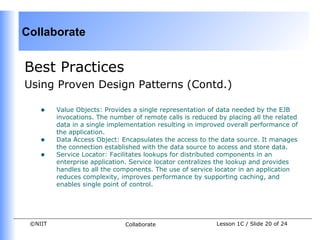
    •    Value Objects: Provides a single representation of data needed by the EJB
         invocations. The number of remote calls is reduced by placing all the related
         data in a single implementation resulting in improved overall performance of
         the application.
    •    Data Access Object: Encapsulates the access to the data source. It manages
         the connection established with the data source to access and store data.
    •    Service Locator: Facilitates lookups for distributed components in an
         enterprise application. Service locator centralizes the lookup and provides
         handles to all the components. The use of service locator in an application
         reduces complexity, improves performance by supporting caching, and
         enables single point of control.


 ©NIIT                        Collaborate                   Lesson 1C / Slide 20 of 24
Collaborate


FAQs
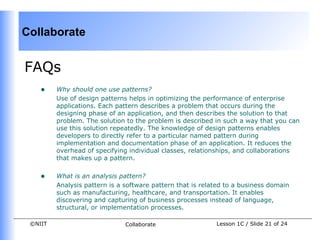
    •    Why should one use patterns?
         Use of design patterns helps in optimizing the performance of enterprise
         applications. Each pattern describes a problem that occurs during the
         designing phase of an application, and then describes the solution to that
         problem. The solution to the problem is described in such a way that you can
         use this solution repeatedly. The knowledge of design patterns enables
         developers to directly refer to a particular named pattern during
         implementation and documentation phase of an application. It reduces the
         overhead of specifying individual classes, relationships, and collaborations
         that makes up a pattern.


    •    What is an analysis pattern?
         Analysis pattern is a software pattern that is related to a business domain
         such as manufacturing, healthcare, and transportation. It enables
         discovering and capturing of business processes instead of language,
         structural, or implementation processes.

 ©NIIT                         Collaborate                  Lesson 1C / Slide 21 of 24
Collaborate


FAQs (Contd.)
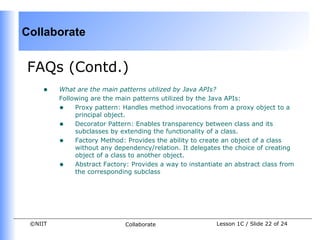
    •    What are the main patterns utilized by Java APIs?
         Following are the main patterns utilized by the Java APIs:
         • Proxy pattern: Handles method invocations from a proxy object to a
              principal object.
         • Decorator Pattern: Enables transparency between class and its
              subclasses by extending the functionality of a class.
         • Factory Method: Provides the ability to create an object of a class
              without any dependency/relation. It delegates the choice of creating
              object of a class to another object.
         • Abstract Factory: Provides a way to instantiate an abstract class from
              the corresponding subclass


 ©NIIT                       Collaborate                 Lesson 1C / Slide 22 of 24
Collaborate


Challenge
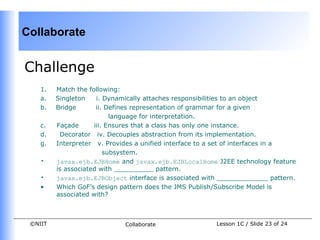
    1.   Match the following:
    a.   Singleton    i. Dynamically attaches responsibilities to an object
    b.   Bridge       ii. Defines representation of grammar for a given
                           language for interpretation.
    c.   Façade      iii. Ensures that a class has only one instance.
    d.    Decorator iv. Decouples abstraction from its implementation.
    g.   Interpreter v. Provides a unified interface to a set of interfaces in a
                         subsystem.
    •    javax.ejb.EJBHome and javax.ejb.EJBLocalHome J2EE technology feature
         is associated with __________ pattern.
    •    javax.ejb.EJBObject interface is associated with _____________ pattern.
    •    Which GoF’s design pattern does the JMS Publish/Subscribe Model is
         associated with?


 ©NIIT                       Collaborate                Lesson 1C / Slide 23 of 24
Collaborate


Solutions to Challenge
    1.   a. – iii, b. – iv, c. – v, d. –i, e. –ii
    2.   Factory Method
    3.   Proxy Pattern
    4.   Observer design pattern


 ©NIIT                             Collaborate      Lesson 1C / Slide 24 of 24

Ajs 2 c

  • 1.
    Collaborate Knowledge Byte In this section, you will learn about: • Selecting a design pattern depending on the business requirements. • The various design patterns that form a part of the TheServerSide.com catalog. ©NIIT Collaborate Lesson 1C / Slide 1 of 24
  • 2.
    Collaborate Selecting a DesignPattern • Design patterns enable you to design robust software by identifying the key steps undertaken during the application design phase, such as: • Identifying components and their internal structure and relationship among various components that constitutes a distributed application. • Determining and analyzing the level of communication among the components. • Defining the architecture of the presentation layer that is robust • The guidelines for selecting a design pattern are. • You need to identify the need for each type of design pattern. Once the purpose of each group of pattern is identified, choose the appropriate design pattern that helps to solve your problem. • You need to identify the type of problem that a design pattern solves and helps in narrowing the list of suitable design patterns that are applied to the given problem. ©NIIT Collaborate Lesson 1C / Slide 2 of 24
  • 3.
    Collaborate Selecting a DesignPattern(Contd.) • You need to understand the problem and the related solution of each pattern, which enables you to select appropriate patterns. Based on the solution of each patterns, a final choice can be made to select a final design pattern. • You need to analyze and understand interrelations among patterns. The relevant patterns are grouped together to analyze the complete design and flow of applications. ©NIIT Collaborate Lesson 1C / Slide 3 of 24
  • 4.
    Collaborate The TheServerSide.com Patterns • The TheServerSide.com is an independent online Java community for enterprise developers and architects. • The TheServerSide community includes TheServerSide.NET, TheServerSide.com, and TheServerSide Symposiums. • TheServerSide.NET community focuses on enterprise development using Microsoft .NET framework. • TheServerSide Symposium discusses development issues that are related to an enterprise development environment. • TheServerSide.com organizes design patterns in different catalogs based on their functionality. ©NIIT Collaborate Lesson 1C / Slide 4 of 24
  • 5.
    Collaborate The TheServerSide.com Patterns (Contd.) • The TheServerSide.com patterns catalog includes: • EJB Layer architectural Patterns • Inter-tier data-Transfer Patterns • Transaction and Persistence Patterns • Client-side EJB Interaction Patterns • The EJB layer architectural category patterns include: • Session Facade: Provides an abstraction layer hiding all the underlying communication complexities in an EJB application. The use of session façade in an EJB application reduces remote method overhead by providing business components to act as interfaces to the clients. • Message Façade: Uses message-driven beans instead of session beans to enable asynchronous and fault-tolerant access. ©NIIT Collaborate Lesson 1C / Slide 5 of 24
  • 6.
    Collaborate The TheServerSide.com Patterns (Contd.) • EJB Command: Encapsulates the business logic in command beans and implements loose-coupling between the client and the business-logic tier. This loose coupling results in reducing the number of remote invocations. • Data Transfer Object Factory: Enables transferring of data objects by providing a factory. • Generic Attribute Access: Provides the technique to dynamically set and retrieve attributes of an entity bean using HashMaps. • Business Interface: Enables consistency checking of EJB interfaces during compile time. This pattern provides business interface to enable consistency checking, which needs to be implemented by both the local/remote interface and by the enterprise bean class. ©NIIT Collaborate Lesson 1C / Slide 6 of 24
  • 7.
    Collaborate The TheServerSide.com Patterns (Contd.) • The inter-tier data-transfer category patterns include: • Data-Transfer Object: Enables bulk transfer of data using serializable objects. • Domain Data-Transfer Object: Is an extension of Data-Transfer Object that enables transfer of data for a specific domain. • Custom Data-Transfer Object: Provides guidelines to transfer data as per the client requirements. • Data-Transfer HashMap: Enables grouping of arbitrary data between client and EJB tier using HashMaps. • Data-Transfer RowSet: Enables the use of RowSets to transfer relational data from ResultSet in the EJB tier to the client tier. ©NIIT Collaborate Lesson 1C / Slide 7 of 24
  • 8.
    Collaborate The TheServerSide.com Patterns (Contd.) • The transaction and persistence category patterns include: • Version Number: Provides a solution to maintain consistency and checks concurrency problems in the usage of use cases in an application. • JDBC for Reading: Performs listing of data in relational databases using JDBC. • Data-Access Command Beans: Is similar to EJB Command pattern that enables data access using Command beans. • Dual Persistent Entity Bean: Enables creation of entity bean that supports both Bean Managed Persistence (BMP) and Container Managed Persistence (CMP) through inheritance. ©NIIT Collaborate Lesson 1C / Slide 8 of 24
  • 9.
    Collaborate The TheServerSide.com Patterns (Contd.) • The client-side EJB interaction category patterns include: • EJB Home Factory: Improves the performance of EJB Home Interface by implementing caching with the use of EJB Home Factory. • Business Delegate: Reduces the coupling between the presentation and the business-tier. Business delegate pattern provides a proxy object to serve as an entry point to access business-logics and integration-tier data. ©NIIT Collaborate Lesson 1C / Slide 9 of 24
  • 10.
    Collaborate The TheServerSide.com Patterns (Contd.) • Following are the design patterns that are similar between J2EE pattern catalog and TheServerSide.com pattern catalog: • Service provided to Worker and Dispatcher View • Session Façade, Message Façade, and EJB Command • Service Locator and EJB Home Factory • Domain Data-Transfer Object, Custom Data-Transfer Object, Data- Transfer HashMap, and Data-Transfer RowSet • Value Object Assembler and Data-Transfer Object Factory • Data-Access Object and Data-Access Command Bean ©NIIT Collaborate Lesson 1C / Slide 10 of 24
  • 11.
    Collaborate From the Expert’sDesk In this section, you will learn: • Best Practice on: • Guidelines for Developing Class Diagrams • Using Proven Design Patterns • FAQs on Legacy Systems ©NIIT Collaborate Lesson 1C / Slide 11 of 24
  • 12.
    Collaborate Best Practices Guidelines forDeveloping Class Diagrams • A UML class diagram depicts the static view of a system. • The view includes the classes and interfaces of the system, their inter- relationships along with the operations and attributes of the classes. • A Class diagram is used to analyze the requirements of the given system in the form of a conceptual model. • As class diagrams plays a vital role to identify the requirements for designing a software system, different styles are applied at different stages of software design. ©NIIT Collaborate Lesson 1C / Slide 12 of 24
  • 13.
    Collaborate Best Practices Guidelines forDeveloping Class Diagrams (Contd.) • General Guidelines • The general guidelines for developing class diagrams include: • Focus should be given on identifying the responsibilities for classes instead of the specific attributes or operations, while creating a domain class diagram. • Visibility of operations and attributes should be depicted in the detailed design model of the system. • The design model of a class diagram should reflect the naming convention of the implementing language, as it depicts the source code of the structure. • Depict the association classes in the analysis diagram so that it can be re-enforced in the design phase to enable implementation in languages that do not support native code for this concept. ©NIIT Collaborate Lesson 1C / Slide 13 of 24
  • 14.
    Collaborate Best Practices Guidelines forDeveloping Class Diagrams (Contd.) • Class Style Guidelines • Certain guidelines relating to naming a class are: • Class name should be realistic and should depict the real world object, for which the class is being made. • Class name should be a proper complete noun to make it more descriptive and easier to understand. • Operations should be named in a manner that clearly depicts the functionality that the operations represent. ©NIIT Collaborate Lesson 1C / Slide 14 of 24
  • 15.
    Collaborate Best Practices Guidelines forDeveloping Class Diagrams (Contd.) • Class Style Guidelines(contd.) • Certain guidelines relating to naming a class are(contd.): • Attributes should also be named precisely and clearly, so that the characteristics that the attributes represented are understandable. • The static operations/attributes should be listed before instance operations/attributes. • Operations names should be consistent among each other, to make the design easier to learn and understand. In addition, names of the parameter variables should be consistent. ©NIIT Collaborate Lesson 1C / Slide 15 of 24
  • 16.
    Collaborate Best Practices Guidelines forDeveloping Class Diagrams (Contd.) • Relationship Guidelines • Following are some guidelines regarding depicting relationships in class diagrams: • Dependency should be depicted when the relationship is transitory. • Depict the relationship as a tree, when both the classes have dependency relationship over the same class. • Avoid using ‘*’ to depict multiplicity on UML diagrams. • To simplify the diagram, it is always a good practice to depict the type of the attribute instead of depicting the relationship in the diagram. • Implied relationship should not be modeled that runs the risk of maintaining additional code. ©NIIT Collaborate Lesson 1C / Slide 16 of 24
  • 17.
    Collaborate Best Practices Guidelines forDeveloping Class Diagrams (Contd.) • Association Guidelines • The association guidelines to depict association relationship in a class diagram include: • A general convention is to center the name of the association over the association path, and the name of the association should be in active voice. • The reading direction of an association name should be same as the unidirectional relationship, to maintain consistency. • Role names should be indicated for the classes having multiple association relationships. ©NIIT Collaborate Lesson 1C / Slide 17 of 24
  • 18.
    Collaborate Best Practices Guidelines forDeveloping Class Diagrams (Contd.) • Inheritance Guidelines • Inheritance enables reuse of code and data. It models ‘is a’ and ‘is like’ relationships in a UML diagram. • Some of the guidelines are as follows: • It is a general convention to place a subclass under superclass in the diagram. • A subclass should inherit all the attributes and operations from its superclass. ©NIIT Collaborate Lesson 1C / Slide 18 of 24
  • 19.
    Collaborate Best Practices Using ProvenDesign Patterns • Design patterns are one of the important reusable resources available to architects as well as to developers that help in designing and developing an efficient application. • Following are the core J2EE design patterns that are in frequent use in application development: • Session Facade: Provides an abstraction layer hiding all the underlying communication complexities in an EJB application. The use of session façade in an EJB application reduces remote method overhead by providing business components to act as interfaces to the clients. • Model view Controller: Decouples the data access, data presentation, and user interaction layers. As a result, high degree of maintainability and reusability among components is achieved. As the components are not tightly integrated to each other, several views can be added without affecting the underlying code and other components as well. ©NIIT Collaborate Lesson 1C / Slide 19 of 24
  • 20.
    Collaborate Best Practices Using ProvenDesign Patterns (Contd.) • Value Objects: Provides a single representation of data needed by the EJB invocations. The number of remote calls is reduced by placing all the related data in a single implementation resulting in improved overall performance of the application. • Data Access Object: Encapsulates the access to the data source. It manages the connection established with the data source to access and store data. • Service Locator: Facilitates lookups for distributed components in an enterprise application. Service locator centralizes the lookup and provides handles to all the components. The use of service locator in an application reduces complexity, improves performance by supporting caching, and enables single point of control. ©NIIT Collaborate Lesson 1C / Slide 20 of 24
  • 21.
    Collaborate FAQs • Why should one use patterns? Use of design patterns helps in optimizing the performance of enterprise applications. Each pattern describes a problem that occurs during the designing phase of an application, and then describes the solution to that problem. The solution to the problem is described in such a way that you can use this solution repeatedly. The knowledge of design patterns enables developers to directly refer to a particular named pattern during implementation and documentation phase of an application. It reduces the overhead of specifying individual classes, relationships, and collaborations that makes up a pattern. • What is an analysis pattern? Analysis pattern is a software pattern that is related to a business domain such as manufacturing, healthcare, and transportation. It enables discovering and capturing of business processes instead of language, structural, or implementation processes. ©NIIT Collaborate Lesson 1C / Slide 21 of 24
  • 22.
    Collaborate FAQs (Contd.) • What are the main patterns utilized by Java APIs? Following are the main patterns utilized by the Java APIs: • Proxy pattern: Handles method invocations from a proxy object to a principal object. • Decorator Pattern: Enables transparency between class and its subclasses by extending the functionality of a class. • Factory Method: Provides the ability to create an object of a class without any dependency/relation. It delegates the choice of creating object of a class to another object. • Abstract Factory: Provides a way to instantiate an abstract class from the corresponding subclass ©NIIT Collaborate Lesson 1C / Slide 22 of 24
  • 23.
    Collaborate Challenge 1. Match the following: a. Singleton i. Dynamically attaches responsibilities to an object b. Bridge ii. Defines representation of grammar for a given language for interpretation. c. Façade iii. Ensures that a class has only one instance. d. Decorator iv. Decouples abstraction from its implementation. g. Interpreter v. Provides a unified interface to a set of interfaces in a subsystem. • javax.ejb.EJBHome and javax.ejb.EJBLocalHome J2EE technology feature is associated with __________ pattern. • javax.ejb.EJBObject interface is associated with _____________ pattern. • Which GoF’s design pattern does the JMS Publish/Subscribe Model is associated with? ©NIIT Collaborate Lesson 1C / Slide 23 of 24
  • 24.
    Collaborate Solutions to Challenge 1. a. – iii, b. – iv, c. – v, d. –i, e. –ii 2. Factory Method 3. Proxy Pattern 4. Observer design pattern ©NIIT Collaborate Lesson 1C / Slide 24 of 24