Introduction to ADO.net Architecture Explaining the Basics Classification: Confidential  2011-09-21
Introduction to ADO.NET What we cover… ADO.NET Benefits of ADO.NET ADO.NET Core Concepts and Architecture The ADO.NET Object Model The  DataSet  and Data Views Managed Providers Classification: Confidential  2011-09-21
Little Back Ground This new data component, introduced with .NET, presented an exciting new approach to data access.  The techniques, and logic used to connect to databases with ADO.NET weren’t startlingly different from those used with its predecessor, ADO.NET had a lot to offer. What was unique about this technology was the architecture beneath it all, its powerful approach to data management, and the flexibility in the next level of data-presenting devices. Classification: Confidential  2011-09-21
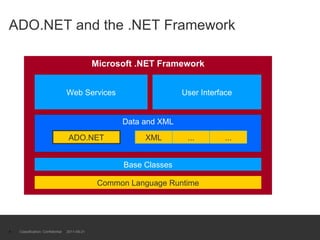
ADO.NET and the .NET Framework Classification: Confidential  2011-09-21 Microsoft .NET Framework Common Language Runtime Base Classes Web Services User Interface Data and XML ADO.NET XML ... ...
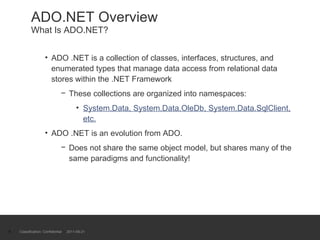
ADO.NET Overview What Is ADO.NET? ADO .NET is a collection of classes, interfaces, structures, and enumerated types that manage data access from relational data stores within the .NET Framework These collections are organized into namespaces: System.Data, System.Data.OleDb, System.Data.SqlClient, etc. ADO .NET is an evolution from ADO. Does not share the same object model, but shares many of the same paradigms and functionality! Classification: Confidential  2011-09-21
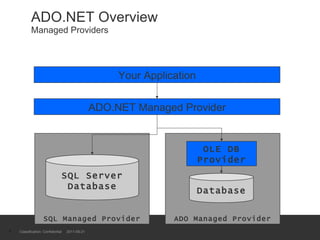
ADO.NET Overview Managed Providers Merges ADO and OLEDB into one layer Each provider contains a set of classes that implement common interfaces Initial managed provider implementations: ADO Managed Provider: provides access to any  OLE DB data source SQL Server Managed Provider: provides optimal performance when using SQL Server Exchange Managed Provider: retrieve and update data in Microsoft Exchange Classification: Confidential  2011-09-21
ADO.NET Overview Managed Providers Classification: Confidential  2011-09-21 SQL Managed Provider SQL Server Database ADO.NET Managed Provider ADO Managed Provider OLE DB Provider Database Your Application
Benefits of ADO.NET Interoperability through use of XML Open standard for data that describes itself Human readable and  decipherable  text Used internally but accessible externally  Can use XML to read and write and move data Scalability through the disconnected  DataSet Connections are not maintained for long periods Database locking does not occur Locking support with ServiceComponents Works the way the Web works: “Hit and Run!” Maintainability  Separation of data logic and user interface Classification: Confidential  2011-09-21
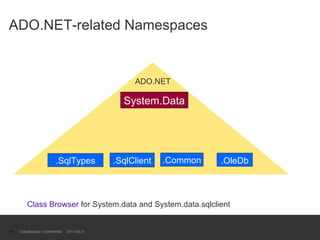
Core Concepts and Architecture The ADO.NET Object Model Objects of System.Data .NET data providers ADO.NET namespace hierarchy Organizes the object model Includes:  System.Data  System.Data.OleDb System.Data.Common System.Data.SqlClient System.Data.SqlTypes Classification: Confidential  2011-09-21
ADO.NET-related Namespaces Classification: Confidential  2011-09-21 ADO.NET System.Data .OleDb .SqlClient .SqlTypes .Common Class Browser  for System.data and System.data.sqlclient
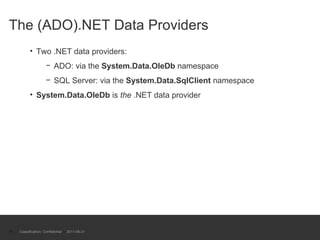
The (ADO).NET Data Providers Two .NET data providers: ADO: via the  System.Data.OleDb  namespace SQL Server: via the  System.Data.SqlClient  namespace System.Data.OleDb  is  the  .NET data provider Classification: Confidential  2011-09-21
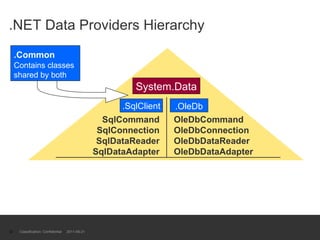
.NET Data Providers Hierarchy Classification: Confidential  2011-09-21 System.Data .OleDb .SqlClient OleDbCommand OleDbConnection OleDbDataReader OleDbDataAdapter SqlCommand SqlConnection SqlDataReader SqlDataAdapter .Common   Contains classes shared by both
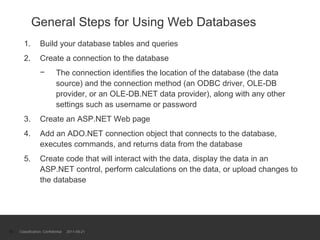
General Steps for Using Web Databases Build your database tables and queries Create a connection to the database The connection identifies the location of the database (the data source) and the connection method (an ODBC driver, OLE-DB provider, or an OLE-DB.NET data provider), along with any other settings such as username or password Create an ASP.NET Web page Add an ADO.NET connection object that connects to the database, executes commands, and returns data from the database Create code that will interact with the data, display the data in an ASP.NET control, perform calculations on the data, or upload changes to the database Classification: Confidential  2011-09-21
ADO.Net – Introducing the objects Connection used to talk to DB;properties include dataSource, username and password SQLConnection and OleDbConnection Command An SQL statement or Stored Procedure SQLCommand and OleDbComand DataReader- read only, forward only view of data CF ADO Recordset DataSet - main object for DB access DataView - filtered view of DataSet DataAdapter - Initialises DataSet tables Classification: Confidential  2011-09-21
Introducing the Objects  cont. Connections . For connection to and managing transactions against a database.  Commands . For issuing SQL commands against a database.  DataReaders . For reading a forward-only stream of data records from a SQL Server data source.  DataSets . For storing, remoting and programming against flat data, XML data and relational data.  DataAdapters . For pushing data into a  DataSet , and reconciling data against a database. Classification: Confidential  2011-09-21
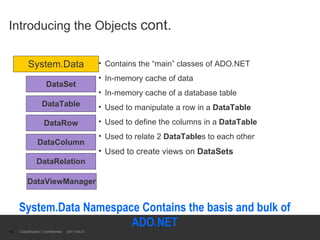
Introducing the Objects  cont. Contains the “main” classes of ADO.NET In-memory cache of data In-memory cache of a database table Used to manipulate a row in a  DataTable Used to define the columns in a  DataTable Used to relate 2  DataTable s to each other Used to create views on  DataSets Classification: Confidential  2011-09-21 System.Data DataTable DataRow DataRelation DataColumn DataViewManager DataSet System.Data Namespace Contains the basis and bulk of ADO.NET
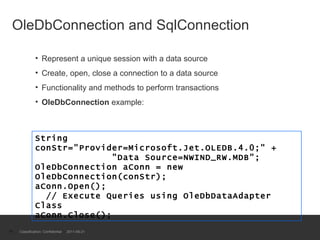
OleDbConnection and SqlConnection  Represent a unique session with a data source Create, open, close a connection to a data source Functionality and methods to perform transactions OleDbConnection  example: Classification: Confidential  2011-09-21 String conStr="Provider=Microsoft.Jet.OLEDB.4.0;" +   "Data Source=NWIND_RW.MDB"; OleDbConnection aConn = new OleDbConnection(conStr); aConn.Open();   // Execute Queries using OleDbDataAdapter Class aConn.Close();
Data Connection Properties  SQL Server Name Default name of the MSDE version of SQL Server is MachineName\NetSDK MachineName is the name of your local computer Also referred to as (local)\NetSDK or localhost Not required in the Connection String – assumed to be SQL Server if it uses the SQLClient class Classification: Confidential  2011-09-21
Dataset object DataSet  object represents a cache of data, with database-like structures such as tables, columns, relationships, and constraints. DataSet  can and does behave much like a database, it is important to remember that  DataSet  objects do not interact directly with databases, or other source data. Allows the developer to work with a programming model that is always consistent, regardless of where the source data resides. Data coming from a database, an XML file, from code, or user input can all be placed into  DataSet  objects. Changes made to the  DataSet  can be tracked and verified before updating the source data. The  GetChanges  method of the  DataSet  object actually creates a second  DatSet  that contains only the changes to the data. This  DataSet  is then used by a  DataAdapter  (or other objects) to update the original data source.  For long-running applications this is often the best approach. Classification: Confidential  2011-09-21
DataAdapter To perform a select query to a SQL database, you create a  SqlConnection  to the database passing the connection string, and then construct a  SqlDataAdapter  object that contains your query statement. To populate a  DataSet  object with the results from the query, you call the command's  Fill  method.  Dim myConnection As New SqlConnection("server=(local)\NetSDK;database=pubs;Trusted_Connection=yes") Dim myCommand As New SqlDataAdapter("select * from Authors", myConnection) Dim ds As New DataSet() myCommand.Fill(ds, "Authors")  Classification: Confidential  2011-09-21
DataReader Object For Web applications, you are usually performing short operations with each request (commonly to simply display the data). You often don't need to hold a  DataSet  object over a series of several requests. For situations like these, you can use a  SqlDataReader .  A  SqlDataReader  provides a forward-only, read-only pointer over data retrieved from a SQL database. To use a  SqlDataReader , you declare a  SqlCommand  instead of a  SqlDataAdapter .  The  SqlCommand  exposes an  ExecuteReader  method that returns a  SqlDataReader . Note also that you must explicitly open and close the  SqlConnection  when you use a  SqlCommand . After a call to  ExecuteReader , the  SqlDataReader  can be bound to an ASP.NET server control.  Classification: Confidential  2011-09-21
Working Data - The DataSet An in-memory cache of data from a data source Logical  or  physical representation of data Designed to be disconnected from the data source Connect, execute query, disconnect Can use XML  To read and write data  To read and write XMLSchema Classification: Confidential  2011-09-21
Properties & Methods of Interest Collections are used to add & remove tables & relations Properties of Interest: Tables : Returns the collection of  DataTable  objects Namespace : Gets or sets the namespace of the  DataSet Using Properties Samples: myDataSet.Tables.Add( myTable ); myDataTableCollection = myDataSet.Tables Classification: Confidential  2011-09-21
The DataTable May be mapped to a physical table in the data source Can be related to one another through  DataRelation s Properties of Interest: Columns : Returns  ColumnsCollection  of  DataColumn s Rows : Returns  DataRow  objects as a  RowsCollection ParentRelations : Returns the  RelationsCollection Constraints : Returns the table’s  ConstraintsCollection DataSet : Returns the  DataSet  of the  DataTable   PrimaryKey : Gets the  DataColumn s that make up the table’s primary key Classification: Confidential  2011-09-21
Viewing Data - The DataView Create multiple views on  DataTable  objects Bindable to user interface controls Properties of Interest: Table : Retrieves or sets the associated  DataTable Sort : Gets or sets the table’s sort columns and sort order RowFilter : Gets or sets the expression used to filter rows RowStateFilter : Gets or sets the row state filter None ,  Unchanged ,  New ,  Deleted ,  ModifiedCurrent , and others Classification: Confidential  2011-09-21
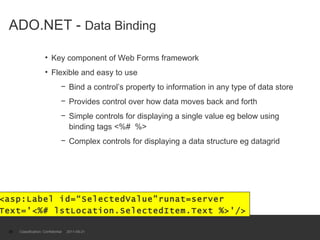
ADO.NET -  Data Binding Key component of Web Forms framework Flexible and easy to use Bind a control’s property to information in any type of data store Provides control over how data moves back and forth Simple controls for displaying a single value eg below using binding tags <%#  %> Complex controls for displaying a data structure eg datagrid Classification: Confidential  2011-09-21 <asp:Label id=“SelectedValue”runat=server  Text='<%# lstLocation.SelectedItem.Text %>'/>
Accessing XML-based Data The  DataSet  was designed to abstract data in a way that is independent of the actual data source.  Change the focus of your samples from SQL to XML. The  DataSet  supports a  ReadXml  method that takes a  FileStream  object as its parameter.  The file you read in this case must contain both a schema and the data you wish to read.  Datagrid example17 –  read XML data Classification: Confidential  2011-09-21
Classification: Confidential  2011-09-21 Into to ADO.Net Architecture Harman Application Developer Thanks

Introduction to ado

  • 1.
    Introduction to ADO.netArchitecture Explaining the Basics Classification: Confidential 2011-09-21
  • 2.
    Introduction to ADO.NETWhat we cover… ADO.NET Benefits of ADO.NET ADO.NET Core Concepts and Architecture The ADO.NET Object Model The DataSet and Data Views Managed Providers Classification: Confidential 2011-09-21
  • 3.
    Little Back GroundThis new data component, introduced with .NET, presented an exciting new approach to data access. The techniques, and logic used to connect to databases with ADO.NET weren’t startlingly different from those used with its predecessor, ADO.NET had a lot to offer. What was unique about this technology was the architecture beneath it all, its powerful approach to data management, and the flexibility in the next level of data-presenting devices. Classification: Confidential 2011-09-21
  • 4.
    ADO.NET and the.NET Framework Classification: Confidential 2011-09-21 Microsoft .NET Framework Common Language Runtime Base Classes Web Services User Interface Data and XML ADO.NET XML ... ...
  • 5.
    ADO.NET Overview WhatIs ADO.NET? ADO .NET is a collection of classes, interfaces, structures, and enumerated types that manage data access from relational data stores within the .NET Framework These collections are organized into namespaces: System.Data, System.Data.OleDb, System.Data.SqlClient, etc. ADO .NET is an evolution from ADO. Does not share the same object model, but shares many of the same paradigms and functionality! Classification: Confidential 2011-09-21
  • 6.
    ADO.NET Overview ManagedProviders Merges ADO and OLEDB into one layer Each provider contains a set of classes that implement common interfaces Initial managed provider implementations: ADO Managed Provider: provides access to any OLE DB data source SQL Server Managed Provider: provides optimal performance when using SQL Server Exchange Managed Provider: retrieve and update data in Microsoft Exchange Classification: Confidential 2011-09-21
  • 7.
    ADO.NET Overview ManagedProviders Classification: Confidential 2011-09-21 SQL Managed Provider SQL Server Database ADO.NET Managed Provider ADO Managed Provider OLE DB Provider Database Your Application
  • 8.
    Benefits of ADO.NETInteroperability through use of XML Open standard for data that describes itself Human readable and decipherable text Used internally but accessible externally Can use XML to read and write and move data Scalability through the disconnected DataSet Connections are not maintained for long periods Database locking does not occur Locking support with ServiceComponents Works the way the Web works: “Hit and Run!” Maintainability Separation of data logic and user interface Classification: Confidential 2011-09-21
  • 9.
    Core Concepts andArchitecture The ADO.NET Object Model Objects of System.Data .NET data providers ADO.NET namespace hierarchy Organizes the object model Includes: System.Data System.Data.OleDb System.Data.Common System.Data.SqlClient System.Data.SqlTypes Classification: Confidential 2011-09-21
  • 10.
    ADO.NET-related Namespaces Classification:Confidential 2011-09-21 ADO.NET System.Data .OleDb .SqlClient .SqlTypes .Common Class Browser for System.data and System.data.sqlclient
  • 11.
    The (ADO).NET DataProviders Two .NET data providers: ADO: via the System.Data.OleDb namespace SQL Server: via the System.Data.SqlClient namespace System.Data.OleDb is the .NET data provider Classification: Confidential 2011-09-21
  • 12.
    .NET Data ProvidersHierarchy Classification: Confidential 2011-09-21 System.Data .OleDb .SqlClient OleDbCommand OleDbConnection OleDbDataReader OleDbDataAdapter SqlCommand SqlConnection SqlDataReader SqlDataAdapter .Common Contains classes shared by both
  • 13.
    General Steps forUsing Web Databases Build your database tables and queries Create a connection to the database The connection identifies the location of the database (the data source) and the connection method (an ODBC driver, OLE-DB provider, or an OLE-DB.NET data provider), along with any other settings such as username or password Create an ASP.NET Web page Add an ADO.NET connection object that connects to the database, executes commands, and returns data from the database Create code that will interact with the data, display the data in an ASP.NET control, perform calculations on the data, or upload changes to the database Classification: Confidential 2011-09-21
  • 14.
    ADO.Net – Introducingthe objects Connection used to talk to DB;properties include dataSource, username and password SQLConnection and OleDbConnection Command An SQL statement or Stored Procedure SQLCommand and OleDbComand DataReader- read only, forward only view of data CF ADO Recordset DataSet - main object for DB access DataView - filtered view of DataSet DataAdapter - Initialises DataSet tables Classification: Confidential 2011-09-21
  • 15.
    Introducing the Objects cont. Connections . For connection to and managing transactions against a database. Commands . For issuing SQL commands against a database. DataReaders . For reading a forward-only stream of data records from a SQL Server data source. DataSets . For storing, remoting and programming against flat data, XML data and relational data. DataAdapters . For pushing data into a DataSet , and reconciling data against a database. Classification: Confidential 2011-09-21
  • 16.
    Introducing the Objects cont. Contains the “main” classes of ADO.NET In-memory cache of data In-memory cache of a database table Used to manipulate a row in a DataTable Used to define the columns in a DataTable Used to relate 2 DataTable s to each other Used to create views on DataSets Classification: Confidential 2011-09-21 System.Data DataTable DataRow DataRelation DataColumn DataViewManager DataSet System.Data Namespace Contains the basis and bulk of ADO.NET
  • 17.
    OleDbConnection and SqlConnection Represent a unique session with a data source Create, open, close a connection to a data source Functionality and methods to perform transactions OleDbConnection example: Classification: Confidential 2011-09-21 String conStr=&quot;Provider=Microsoft.Jet.OLEDB.4.0;&quot; + &quot;Data Source=NWIND_RW.MDB&quot;; OleDbConnection aConn = new OleDbConnection(conStr); aConn.Open(); // Execute Queries using OleDbDataAdapter Class aConn.Close();
  • 18.
    Data Connection Properties SQL Server Name Default name of the MSDE version of SQL Server is MachineName\NetSDK MachineName is the name of your local computer Also referred to as (local)\NetSDK or localhost Not required in the Connection String – assumed to be SQL Server if it uses the SQLClient class Classification: Confidential 2011-09-21
  • 19.
    Dataset object DataSet object represents a cache of data, with database-like structures such as tables, columns, relationships, and constraints. DataSet can and does behave much like a database, it is important to remember that DataSet objects do not interact directly with databases, or other source data. Allows the developer to work with a programming model that is always consistent, regardless of where the source data resides. Data coming from a database, an XML file, from code, or user input can all be placed into DataSet objects. Changes made to the DataSet can be tracked and verified before updating the source data. The GetChanges method of the DataSet object actually creates a second DatSet that contains only the changes to the data. This DataSet is then used by a DataAdapter (or other objects) to update the original data source. For long-running applications this is often the best approach. Classification: Confidential 2011-09-21
  • 20.
    DataAdapter To performa select query to a SQL database, you create a SqlConnection to the database passing the connection string, and then construct a SqlDataAdapter object that contains your query statement. To populate a DataSet object with the results from the query, you call the command's Fill method. Dim myConnection As New SqlConnection(&quot;server=(local)\NetSDK;database=pubs;Trusted_Connection=yes&quot;) Dim myCommand As New SqlDataAdapter(&quot;select * from Authors&quot;, myConnection) Dim ds As New DataSet() myCommand.Fill(ds, &quot;Authors&quot;) Classification: Confidential 2011-09-21
  • 21.
    DataReader Object ForWeb applications, you are usually performing short operations with each request (commonly to simply display the data). You often don't need to hold a DataSet object over a series of several requests. For situations like these, you can use a SqlDataReader . A SqlDataReader provides a forward-only, read-only pointer over data retrieved from a SQL database. To use a SqlDataReader , you declare a SqlCommand instead of a SqlDataAdapter . The SqlCommand exposes an ExecuteReader method that returns a SqlDataReader . Note also that you must explicitly open and close the SqlConnection when you use a SqlCommand . After a call to ExecuteReader , the SqlDataReader can be bound to an ASP.NET server control. Classification: Confidential 2011-09-21
  • 22.
    Working Data -The DataSet An in-memory cache of data from a data source Logical or physical representation of data Designed to be disconnected from the data source Connect, execute query, disconnect Can use XML To read and write data To read and write XMLSchema Classification: Confidential 2011-09-21
  • 23.
    Properties & Methodsof Interest Collections are used to add & remove tables & relations Properties of Interest: Tables : Returns the collection of DataTable objects Namespace : Gets or sets the namespace of the DataSet Using Properties Samples: myDataSet.Tables.Add( myTable ); myDataTableCollection = myDataSet.Tables Classification: Confidential 2011-09-21
  • 24.
    The DataTable Maybe mapped to a physical table in the data source Can be related to one another through DataRelation s Properties of Interest: Columns : Returns ColumnsCollection of DataColumn s Rows : Returns DataRow objects as a RowsCollection ParentRelations : Returns the RelationsCollection Constraints : Returns the table’s ConstraintsCollection DataSet : Returns the DataSet of the DataTable PrimaryKey : Gets the DataColumn s that make up the table’s primary key Classification: Confidential 2011-09-21
  • 25.
    Viewing Data -The DataView Create multiple views on DataTable objects Bindable to user interface controls Properties of Interest: Table : Retrieves or sets the associated DataTable Sort : Gets or sets the table’s sort columns and sort order RowFilter : Gets or sets the expression used to filter rows RowStateFilter : Gets or sets the row state filter None , Unchanged , New , Deleted , ModifiedCurrent , and others Classification: Confidential 2011-09-21
  • 26.
    ADO.NET - Data Binding Key component of Web Forms framework Flexible and easy to use Bind a control’s property to information in any type of data store Provides control over how data moves back and forth Simple controls for displaying a single value eg below using binding tags <%# %> Complex controls for displaying a data structure eg datagrid Classification: Confidential 2011-09-21 <asp:Label id=“SelectedValue”runat=server Text='<%# lstLocation.SelectedItem.Text %>'/>
  • 27.
    Accessing XML-based DataThe DataSet was designed to abstract data in a way that is independent of the actual data source. Change the focus of your samples from SQL to XML. The DataSet supports a ReadXml method that takes a FileStream object as its parameter. The file you read in this case must contain both a schema and the data you wish to read. Datagrid example17 – read XML data Classification: Confidential 2011-09-21
  • 28.
    Classification: Confidential 2011-09-21 Into to ADO.Net Architecture Harman Application Developer Thanks

Editor's Notes

  • #27 We will cover this when we discuss ASP.NET and Web Forms.