ADO.NET
.NET Data Access and Manipulation
Presented By: Wani Zahoor
Overview
 What is ADO.NET?
 Disconnected vs. connected data access models
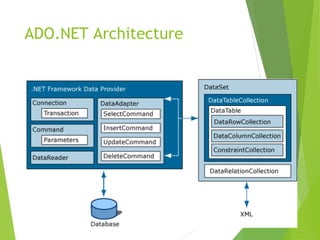
 ADO.NET Architecture
 ADO.NET Core Objects
 Steps of Data Access
 Advanced Techniques and UI Tools
What is ADO.NET?
 A data-access technology that enables applications to connect to data stores
and manipulate data contained in them in various ways
 Former version was ADO (ActiveX Data Object)
What is ADO.NET?
 An object oriented framework that allows you to interact with database
systems
Objective of ADO.NET
 Support disconnected data architecture,
 Tight integration with XML,
 Common data representation
 Ability to combine data from multiple and varied data sources
 Optimized facilities for interacting with a database
ADO.NET Architecture
ADO.NET Core Objects
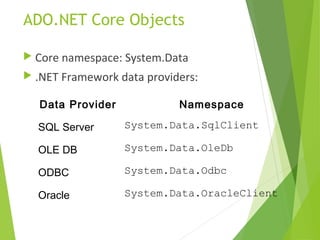
 Core namespace: System.Data
 .NET Framework data providers:
Data Provider Namespace
SQL Server System.Data.SqlClient
OLE DB System.Data.OleDb
ODBC System.Data.Odbc
Oracle System.Data.OracleClient
ADO.NET Core Objects
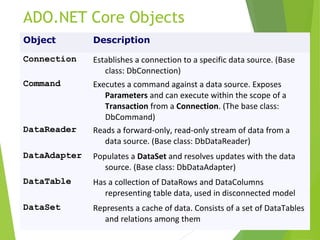
Object Description
Connection Establishes a connection to a specific data source. (Base
class: DbConnection)
Command Executes a command against a data source. Exposes
Parameters and can execute within the scope of a
Transaction from a Connection. (The base class:
DbCommand)
DataReader Reads a forward-only, read-only stream of data from a
data source. (Base class: DbDataReader)
DataAdapter Populates a DataSet and resolves updates with the data
source. (Base class: DbDataAdapter)
DataTable Has a collection of DataRows and DataColumns
representing table data, used in disconnected model
DataSet Represents a cache of data. Consists of a set of DataTables
and relations among them
Connected Data Access Model
Disconnected Data Access
Model
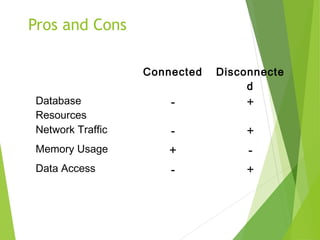
Pros and Cons
Connected Disconnecte
d
Database
Resources
- +
Network Traffic - +
Memory Usage + -
Data Access - +
Steps of Data Access:
Disconnected Environment
 Defining the connection string
 Defining the connection
 Defining the command
 Defining the data adapter
 Creating a new DataSet object
 SELECT -> fill the dataset object with the result of
the query through the data adapter
 Reading the records from the DataTables in the
datasets using the DataRow and DataColumn
objects
 UPDATE, INSERT or DELETE -> update the
database through the data adapter
using System;
using System.Data;
using System.Data.SqlClient;
namespace SampleClass
{
class Program
{
static void Main(string[] args)
{
string connStr =
Properties.Settings.Default.connStr;
SqlConnection conn = new SqlConnection(connStr);
string queryString = "SELECT * from titles;";
SqlDataAdapter da = new
SqlDataAdapter(queryString,conn);
DataSet ds = new DataSet();
da.fill(ds);
// Work on the data in memory using
// the DataSet (ds) object
}
}
}
EXAMPLE
Disconnected –
Update, Delete, Insert
SqlDataAdapter da = new SqlDataAdapter();
DataSet ds = new DataSet();
SqlCommandBuilder cmdBuilder = new
SqlCommandBuilder(da);
da.Fill(ds);
DataRow dr = ds.Tables[0].Rows[0];
dr.Delete();
da.UpdateCommand = builder.GetUpdateCommand();
da.Update(ds);
DataRow dr = ds.Tables[0].Rows[0];
dr["CustomerName"] = "John";
da.UpdateCommand = builder.GetUpdateCommand();
da.Update(ds);
DELETE
UPDATE
INITIAL CODE
DataRow dr = ds.Tables[0].NewRow();
dr["CustomerName"] = "John";
dr["CustomerSurName"] = "Smith";
ds.Tables[0].Rows.Add(dr);
da.UpdateCommand = builder.GetUpdateCommand();
da.Update(ds);
INSERT
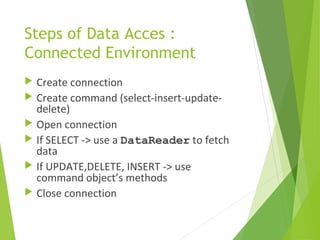
Steps of Data Acces :
Connected Environment
 Create connection
 Create command (select-insert-update-
delete)
 Open connection
 If SELECT -> use a DataReader to fetch
data
 If UPDATE,DELETE, INSERT -> use
command object’s methods
 Close connection
static void Main()
{
string connectionString =
Properties.Settings.Default.connStr;
string queryString = "SELECT CategoryID, CategoryName FROM
dbo.Categories;";
SqlConnection connection = new
SqlConnection(connectionString);
SqlCommand command = new SqlCommand(queryString,connection);
try
{
connection.Open();
SqlDataReader reader = command.ExecuteReader();
while (reader.Read())
{
Console.WriteLine("t{0}t{1}“,reader[0],reader[1]);
}
reader.Close();
connection.close();
}
catch (Exception ex)
{
Console.WriteLine(ex.Message);
}
}
EXAMPLE
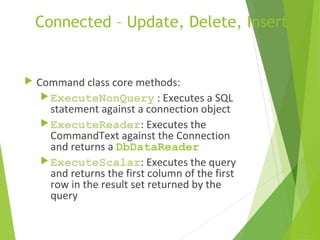
Connected – Update, Delete, Insert
 Command class core methods:
ExecuteNonQuery : Executes a SQL
statement against a connection object
ExecuteReader: Executes the
CommandText against the Connection
and returns a DbDataReader
ExecuteScalar: Executes the query
and returns the first column of the first
row in the result set returned by the
query
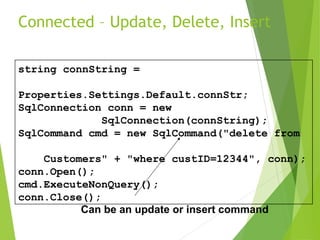
Connected – Update, Delete, Insert
string connString =
Properties.Settings.Default.connStr;
SqlConnection conn = new
SqlConnection(connString);
SqlCommand cmd = new SqlCommand("delete from
Customers" + "where custID=12344", conn);
conn.Open();
cmd.ExecuteNonQuery();
conn.Close();
Can be an update or insert command
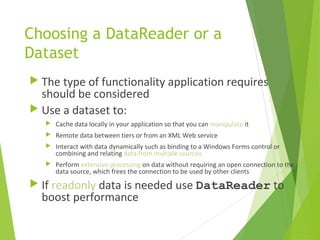
Choosing a DataReader or a
Dataset
 The type of functionality application requires
should be considered
 Use a dataset to:
 Cache data locally in your application so that you can manipulate it
 Remote data between tiers or from an XML Web service
 Interact with data dynamically such as binding to a Windows Forms control or
combining and relating data from multiple sources
 Perform extensive processing on data without requiring an open connection to the
data source, which frees the connection to be used by other clients
 If readonly data is needed use DataReader to
boost performance
After .NET Framework 2.0
An example of databinding model

ADO.NET

  • 1.
    ADO.NET .NET Data Accessand Manipulation Presented By: Wani Zahoor
  • 2.
    Overview  What isADO.NET?  Disconnected vs. connected data access models  ADO.NET Architecture  ADO.NET Core Objects  Steps of Data Access  Advanced Techniques and UI Tools
  • 3.
    What is ADO.NET? A data-access technology that enables applications to connect to data stores and manipulate data contained in them in various ways  Former version was ADO (ActiveX Data Object)
  • 4.
    What is ADO.NET? An object oriented framework that allows you to interact with database systems
  • 5.
    Objective of ADO.NET Support disconnected data architecture,  Tight integration with XML,  Common data representation  Ability to combine data from multiple and varied data sources  Optimized facilities for interacting with a database
  • 6.
  • 7.
    ADO.NET Core Objects Core namespace: System.Data  .NET Framework data providers: Data Provider Namespace SQL Server System.Data.SqlClient OLE DB System.Data.OleDb ODBC System.Data.Odbc Oracle System.Data.OracleClient
  • 8.
    ADO.NET Core Objects ObjectDescription Connection Establishes a connection to a specific data source. (Base class: DbConnection) Command Executes a command against a data source. Exposes Parameters and can execute within the scope of a Transaction from a Connection. (The base class: DbCommand) DataReader Reads a forward-only, read-only stream of data from a data source. (Base class: DbDataReader) DataAdapter Populates a DataSet and resolves updates with the data source. (Base class: DbDataAdapter) DataTable Has a collection of DataRows and DataColumns representing table data, used in disconnected model DataSet Represents a cache of data. Consists of a set of DataTables and relations among them
  • 9.
  • 10.
  • 11.
    Pros and Cons ConnectedDisconnecte d Database Resources - + Network Traffic - + Memory Usage + - Data Access - +
  • 12.
    Steps of DataAccess: Disconnected Environment  Defining the connection string  Defining the connection  Defining the command  Defining the data adapter  Creating a new DataSet object  SELECT -> fill the dataset object with the result of the query through the data adapter  Reading the records from the DataTables in the datasets using the DataRow and DataColumn objects  UPDATE, INSERT or DELETE -> update the database through the data adapter
  • 13.
    using System; using System.Data; usingSystem.Data.SqlClient; namespace SampleClass { class Program { static void Main(string[] args) { string connStr = Properties.Settings.Default.connStr; SqlConnection conn = new SqlConnection(connStr); string queryString = "SELECT * from titles;"; SqlDataAdapter da = new SqlDataAdapter(queryString,conn); DataSet ds = new DataSet(); da.fill(ds); // Work on the data in memory using // the DataSet (ds) object } } } EXAMPLE
  • 14.
    Disconnected – Update, Delete,Insert SqlDataAdapter da = new SqlDataAdapter(); DataSet ds = new DataSet(); SqlCommandBuilder cmdBuilder = new SqlCommandBuilder(da); da.Fill(ds); DataRow dr = ds.Tables[0].Rows[0]; dr.Delete(); da.UpdateCommand = builder.GetUpdateCommand(); da.Update(ds); DataRow dr = ds.Tables[0].Rows[0]; dr["CustomerName"] = "John"; da.UpdateCommand = builder.GetUpdateCommand(); da.Update(ds); DELETE UPDATE INITIAL CODE DataRow dr = ds.Tables[0].NewRow(); dr["CustomerName"] = "John"; dr["CustomerSurName"] = "Smith"; ds.Tables[0].Rows.Add(dr); da.UpdateCommand = builder.GetUpdateCommand(); da.Update(ds); INSERT
  • 15.
    Steps of DataAcces : Connected Environment  Create connection  Create command (select-insert-update- delete)  Open connection  If SELECT -> use a DataReader to fetch data  If UPDATE,DELETE, INSERT -> use command object’s methods  Close connection
  • 16.
    static void Main() { stringconnectionString = Properties.Settings.Default.connStr; string queryString = "SELECT CategoryID, CategoryName FROM dbo.Categories;"; SqlConnection connection = new SqlConnection(connectionString); SqlCommand command = new SqlCommand(queryString,connection); try { connection.Open(); SqlDataReader reader = command.ExecuteReader(); while (reader.Read()) { Console.WriteLine("t{0}t{1}“,reader[0],reader[1]); } reader.Close(); connection.close(); } catch (Exception ex) { Console.WriteLine(ex.Message); } } EXAMPLE
  • 17.
    Connected – Update,Delete, Insert  Command class core methods: ExecuteNonQuery : Executes a SQL statement against a connection object ExecuteReader: Executes the CommandText against the Connection and returns a DbDataReader ExecuteScalar: Executes the query and returns the first column of the first row in the result set returned by the query
  • 18.
    Connected – Update,Delete, Insert string connString = Properties.Settings.Default.connStr; SqlConnection conn = new SqlConnection(connString); SqlCommand cmd = new SqlCommand("delete from Customers" + "where custID=12344", conn); conn.Open(); cmd.ExecuteNonQuery(); conn.Close(); Can be an update or insert command
  • 19.
    Choosing a DataReaderor a Dataset  The type of functionality application requires should be considered  Use a dataset to:  Cache data locally in your application so that you can manipulate it  Remote data between tiers or from an XML Web service  Interact with data dynamically such as binding to a Windows Forms control or combining and relating data from multiple sources  Perform extensive processing on data without requiring an open connection to the data source, which frees the connection to be used by other clients  If readonly data is needed use DataReader to boost performance
  • 20.
    After .NET Framework2.0 An example of databinding model