ACCESSING
RELATIONAL DATA
USING MICROSOFT
VISUAL STUDIO .NET
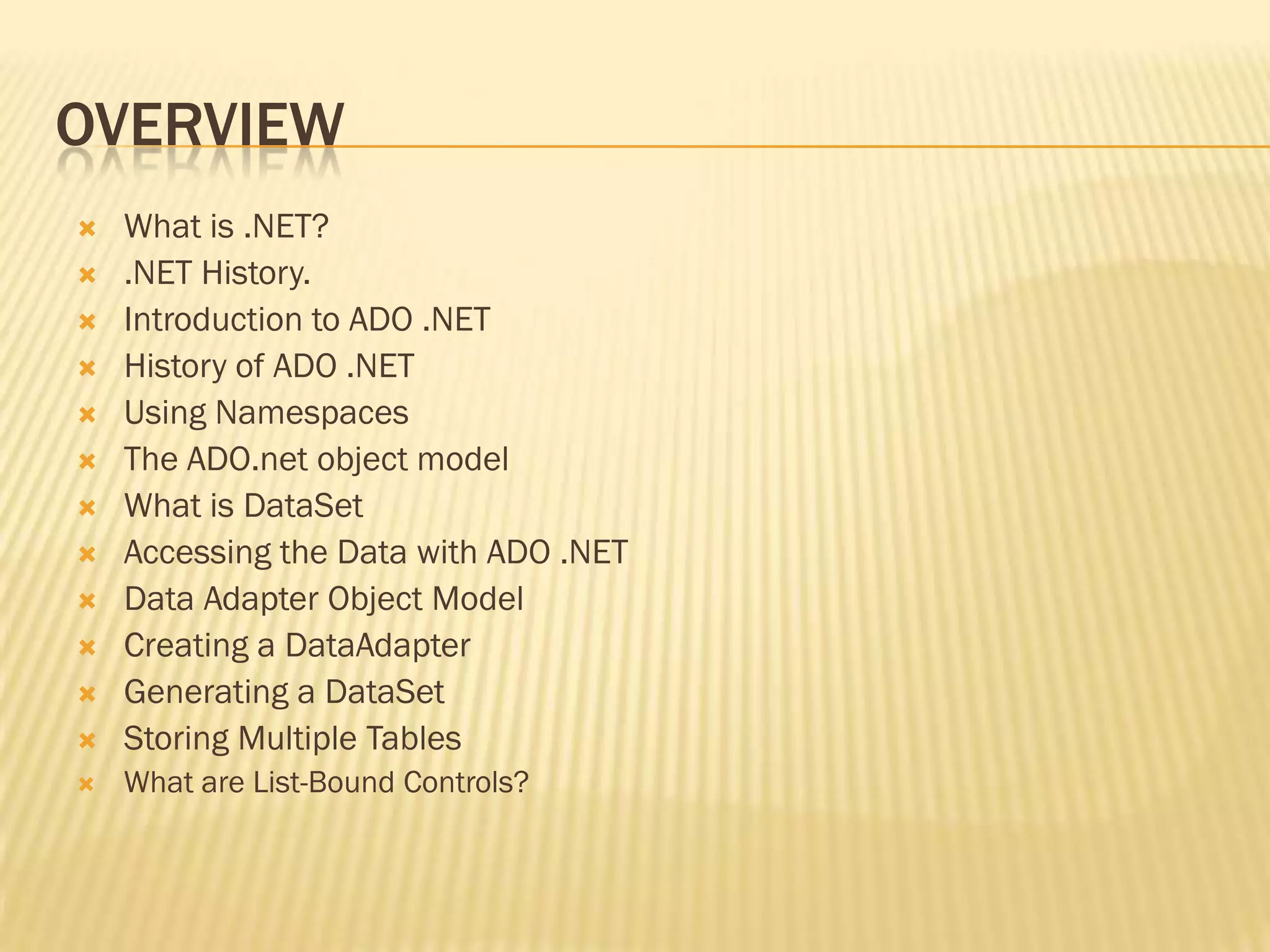
OVERVIEW
 What is .NET?
 .NET History.
 Introduction to ADO .NET
 History of ADO .NET
 Using Namespaces
 The ADO.net object model
 What is DataSet
 Accessing the Data with ADO .NET
 Data Adapter Object Model
 Creating a DataAdapter
 Generating a DataSet
 Storing Multiple Tables
 What are List-Bound Controls?
.NET
 It erases the boundaries between applications and the Internet. Instead
of interacting with an application or a single Web site, .NET will connect
the user to an array of computers and services that will exchange and
combine objects and data.
 A Microsoft operating system platform that incorporates
applications, a suite of tools and services the company's Web
strategy. There are four main principles of .NET from the
perspective of the user:
 Software will be rented as a hosted service over the Internet instead of
purchased on a store shelf. Essentially, the Internet will be housing all
your applications and data.
 Users will have access to their information on the Internet from any
device, anytime, anywhere.
HISTORY
.NET Framework
Developer(s) Microsoft
Initial release 13 February 2002; 12 years ago
Latest release 4.5.1 (4.5.50938.18408) /
17 October 2013; 5 months ago
Operating system Windows 98 or later,Windows NT
4.0 or later
Type Software framework
License Proprietary; BCL underMicrosoft
Reference Source License
[1]
Website www.microsoft.com/net
INTRODUCTION
 ADO Stand form ActiveX Data Object (Network Enable
Technology).
 It is use for the database connection during the web developing
or software developing.
 ADO.NET is a set of classes that expose data access services
for .NET Framework programmers.
 ADO.NET provides a rich set of components for creating
distributed, data-sharing applications.
 ADO.NET supports a variety of development needs, including
the creation of front-end database clients and middle-tier
business objects used by applications, tools, languages, or
Internet browsers.
CONT…
ADO.NET provides a set of classes for working with
data. ADO.NET provides:
 An evolutionary, more flexible successor to ADO
 A system designed for disconnected environments
 A programming model with advanced XML support
 A set of classes, interfaces, structures, and
enumerations that manage data access from
within
the .NET Framework
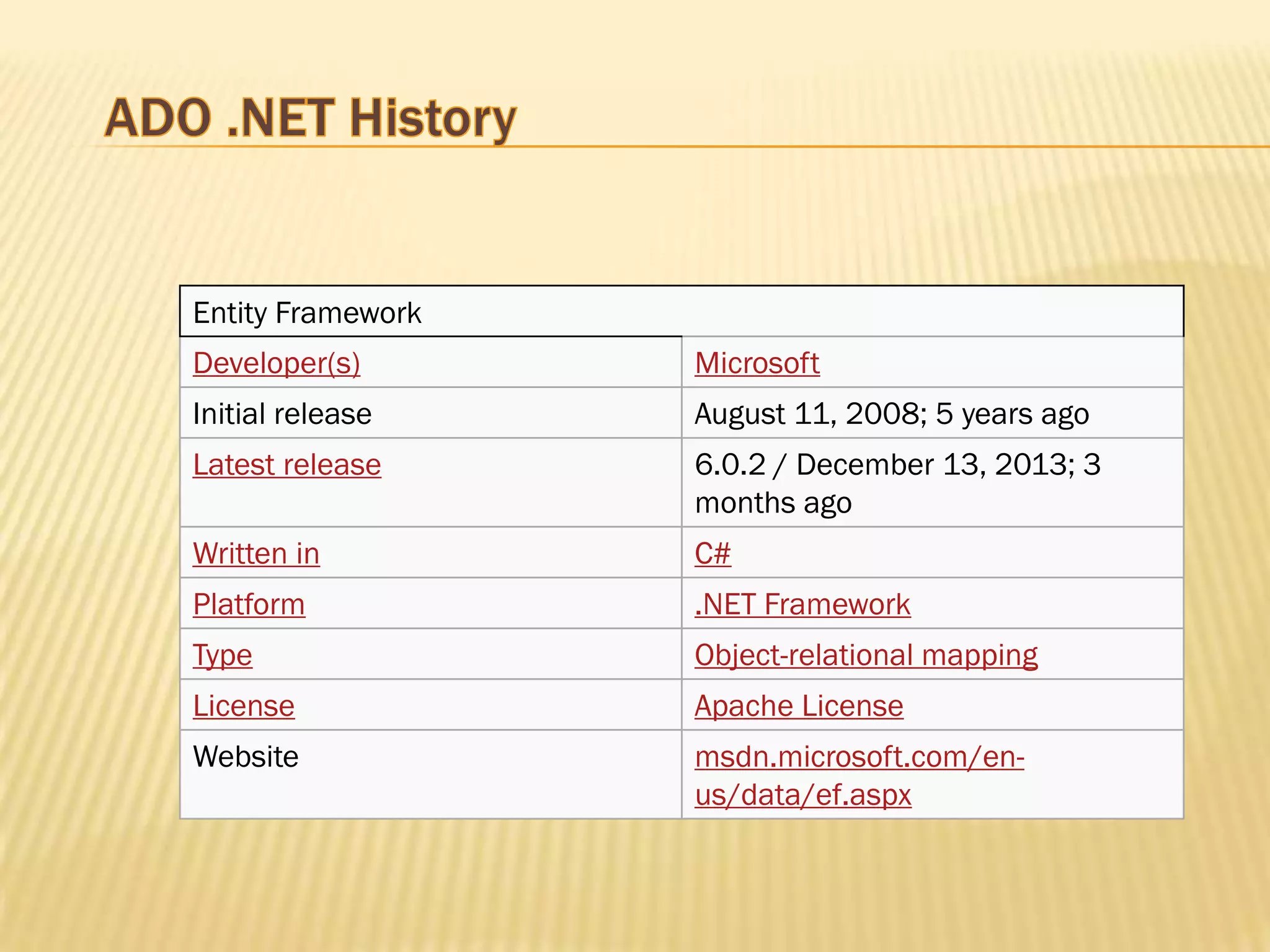
Entity Framework
Developer(s) Microsoft
Initial release August 11, 2008; 5 years ago
Latest release 6.0.2 / December 13, 2013; 3
months ago
Written in C#
Platform .NET Framework
Type Object-relational mapping
License Apache License
Website msdn.microsoft.com/en-
us/data/ef.aspx
WHAT'S NEW IN ADO.NET?
1.SqlClient Data provider:-
 Streaming support from SQL Server to an application supports scenarios
where data on the server is unstructured.
 Support has been added for asynchronous programming.
 Connection failures will now be logged in the extended events log.
2.ADO.NET Entity Framework :-
The .NET Framework 4.5 adds APIs that enable new scenarios when working
with the Entity Framework 5.0.
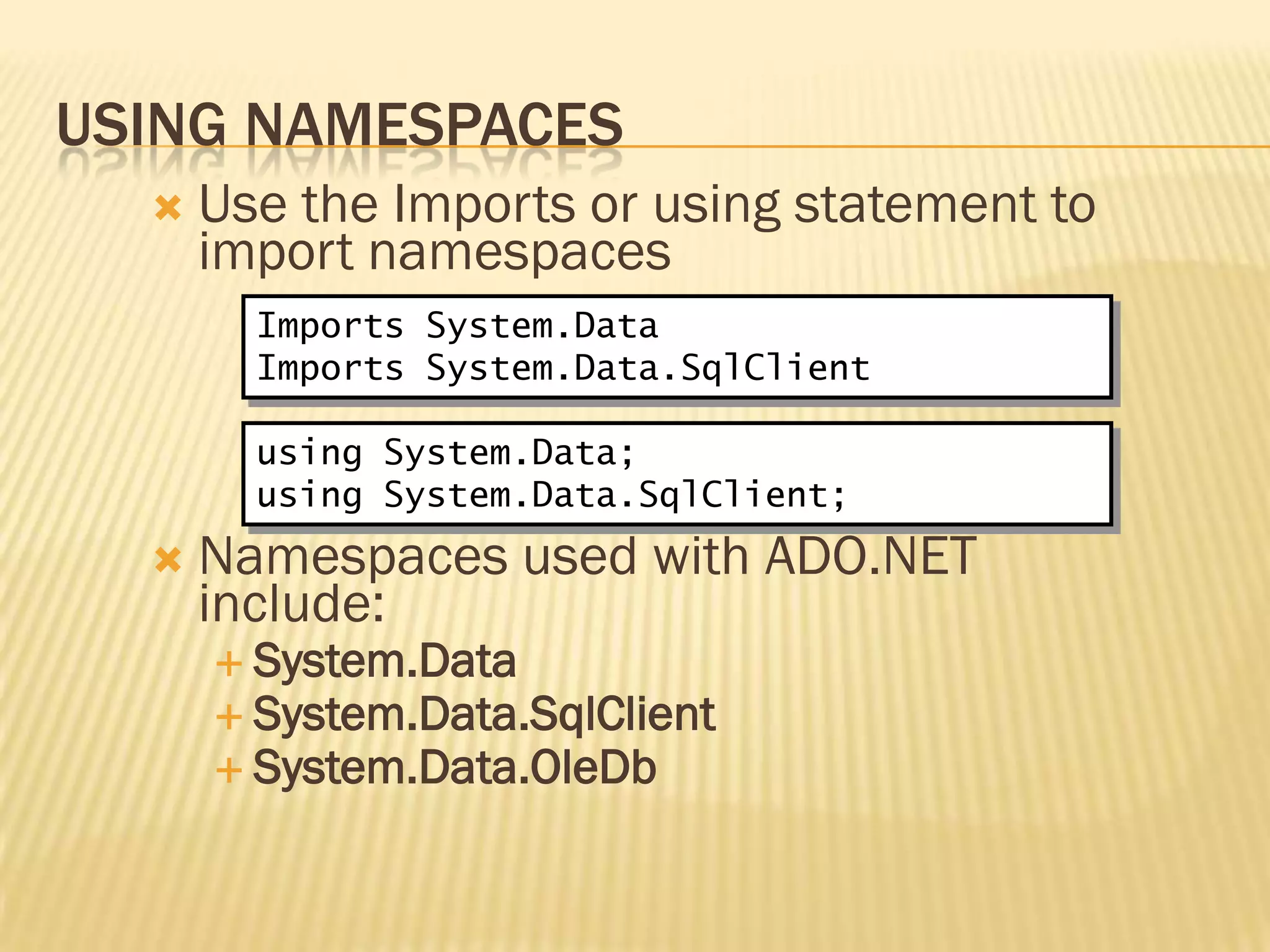
USING NAMESPACES
 Use the Imports or using statement to
import namespaces
 Namespaces used with ADO.NET
include:
 System.Data
 System.Data.SqlClient
 System.Data.OleDb
Imports System.Data
Imports System.Data.SqlClient
using System.Data;
using System.Data.SqlClient;
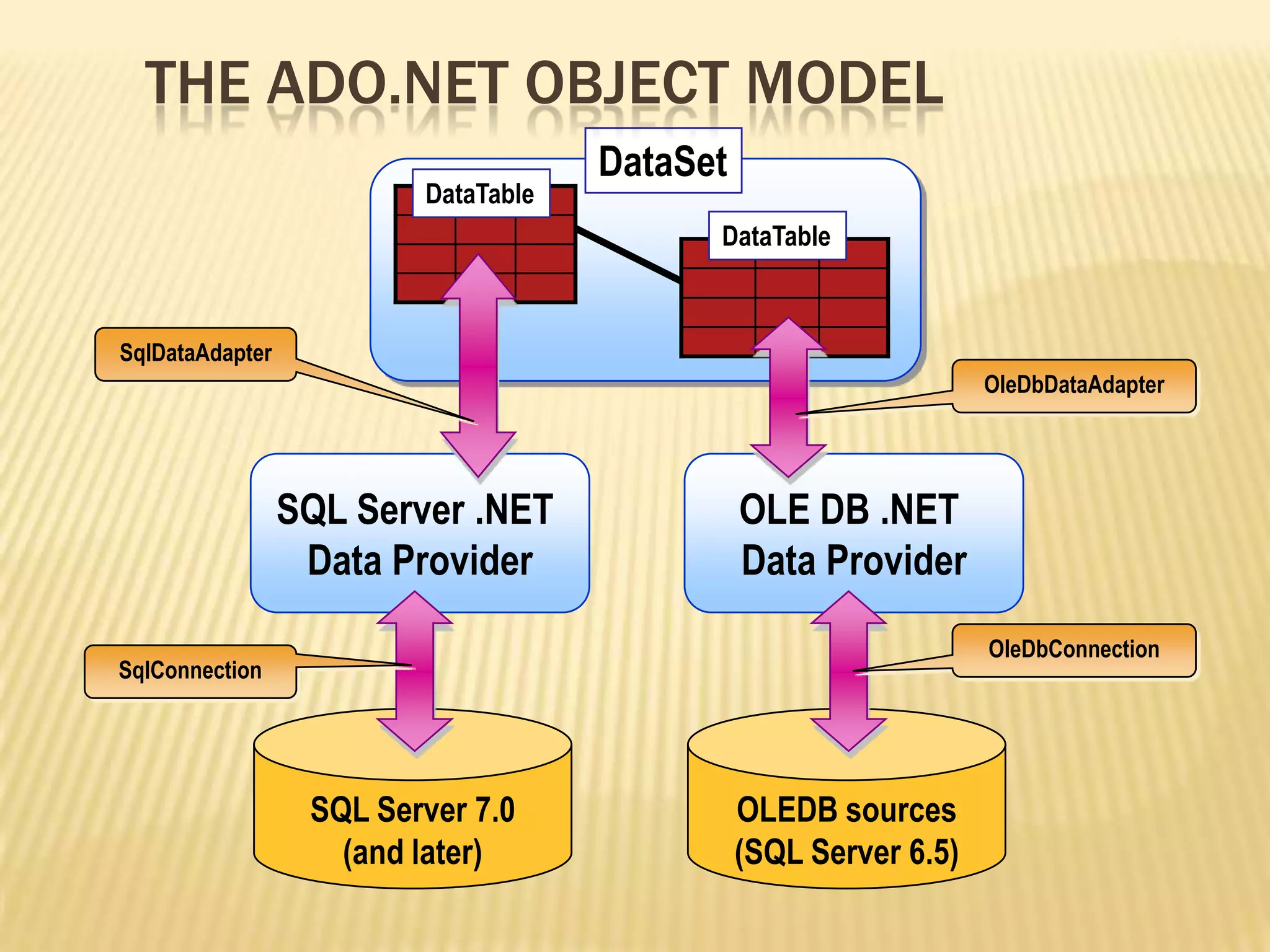
DataSet
SQL Server .NET
Data Provider
OLE DB .NET
Data Provider
SQL Server 7.0
(and later)
OLEDB sources
(SQL Server 6.5)
OleDbConnection
OleDbDataAdapter
SqlDataAdapter
SqlConnection
DataTable
DataTable
THE ADO.NET OBJECT MODEL
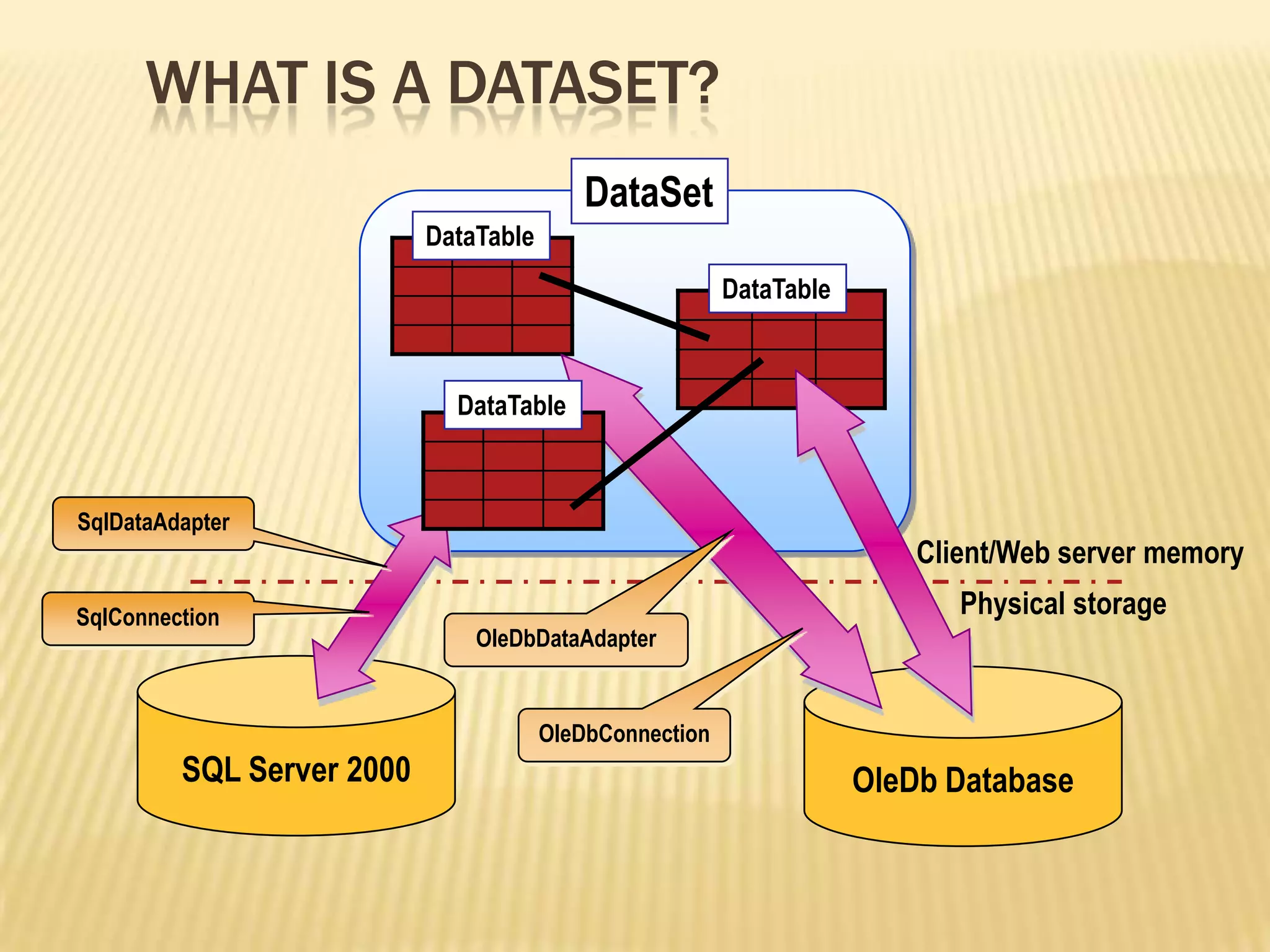
SQL Server 2000
DataSet
DataTable
DataTable
Physical storage
OleDb Database
SqlDataAdapter
SqlConnection
DataTable
Client/Web server memory
OleDbDataAdapter
OleDbConnection
WHAT IS A DATASET?
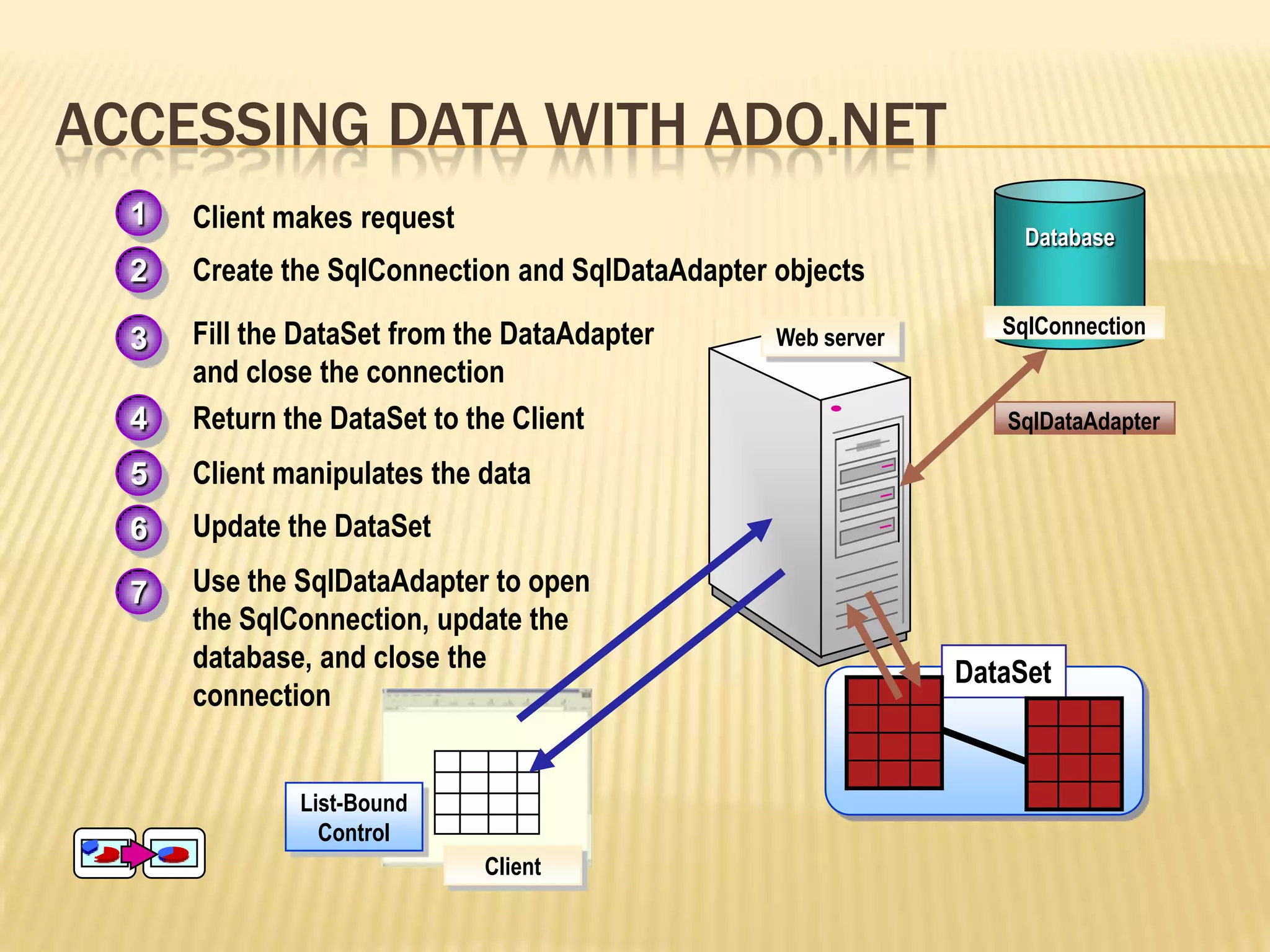
ACCESSING DATA WITH ADO.NET
Database
4. Return the DataSet to the Client
5. Client manipulates the data
2. Create the SqlConnection and SqlDataAdapter objects
3. Fill the DataSet from the DataAdapter
and close the connection
SqlDataAdapter
SqlConnection
List-Bound
Control
1. Client makes request1
2
3
4
5
6. Update the DataSet
7. Use the SqlDataAdapter to open
the SqlConnection, update the
database, and close the
connection
6
7
Client
Web server
DataSet
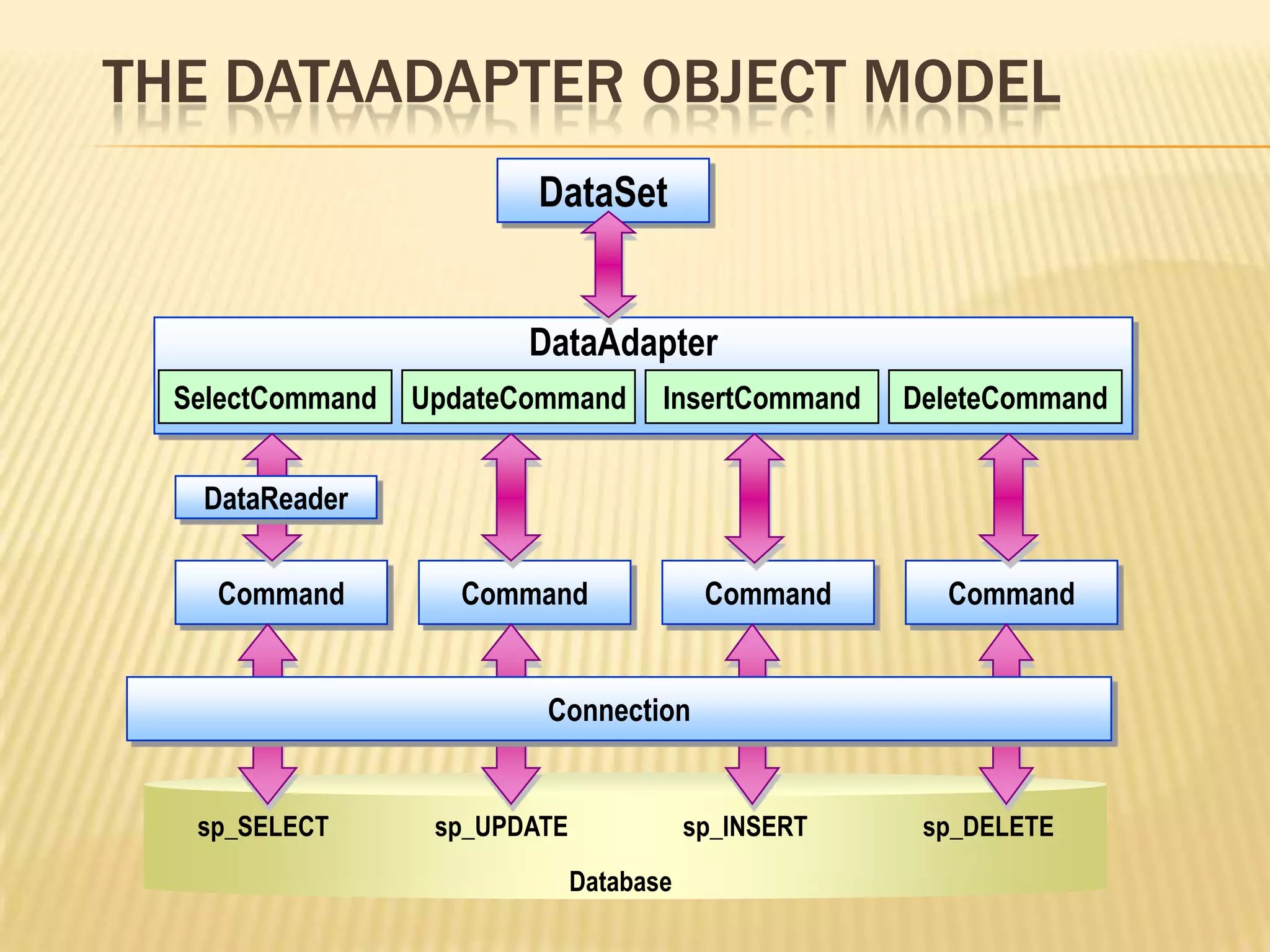
THE DATAADAPTER OBJECT MODEL
sp_SELECT
Command
SelectCommand UpdateCommand InsertCommand DeleteCommand
DataAdapter
Command Command Command
Connection
sp_UPDATE sp_INSERT sp_DELETE
Database
DataSet
DataReader
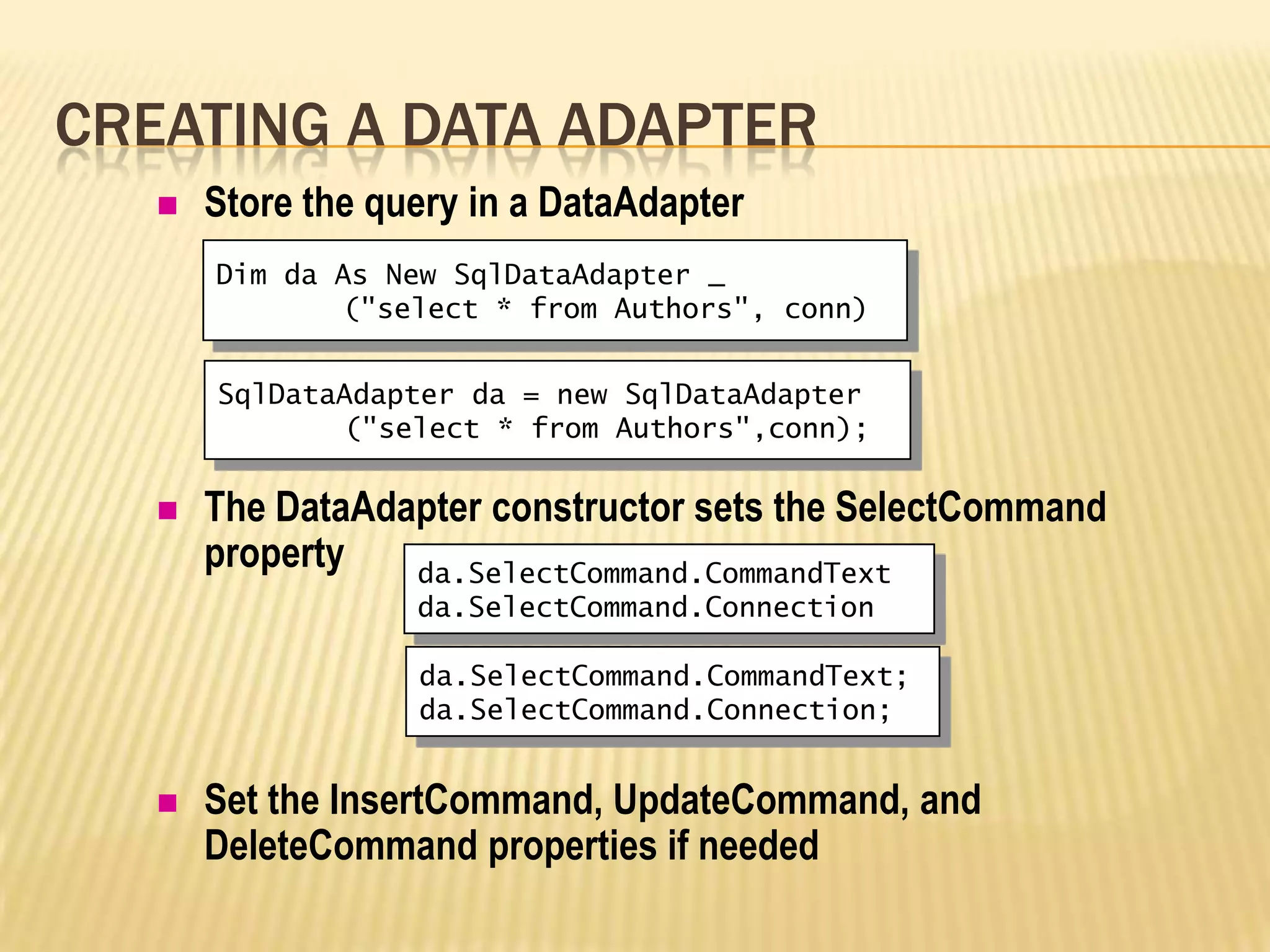
 Store the query in a DataAdapter
 The DataAdapter constructor sets the SelectCommand
property
 Set the InsertCommand, UpdateCommand, and
DeleteCommand properties if needed
CREATING A DATA ADAPTER
Dim da As New SqlDataAdapter _
("select * from Authors", conn)
da.SelectCommand.CommandText
da.SelectCommand.Connection
SqlDataAdapter da = new SqlDataAdapter
("select * from Authors",conn);
da.SelectCommand.CommandText;
da.SelectCommand.Connection;
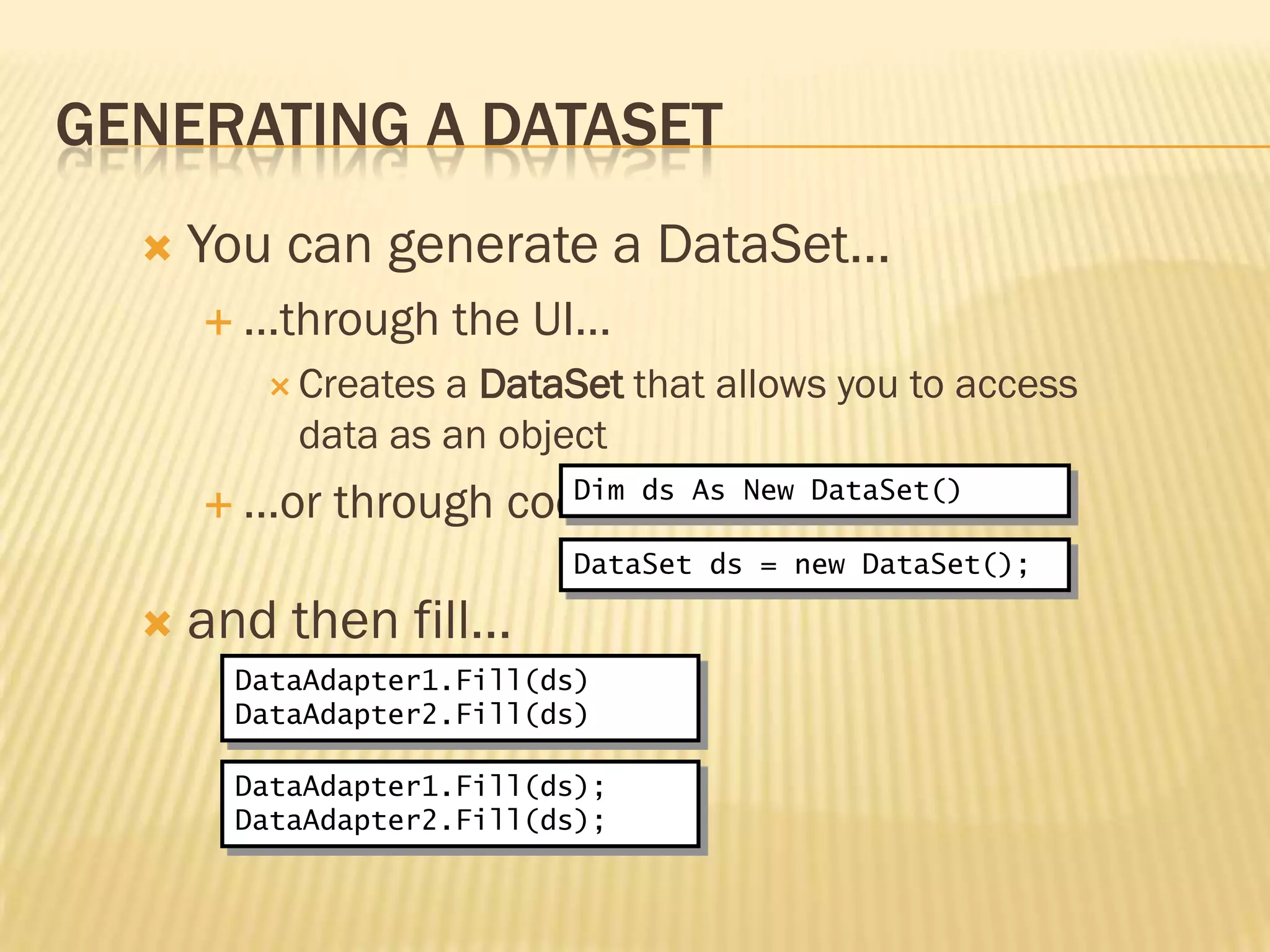
GENERATING A DATASET
 You can generate a DataSet…
 …through the UI…
 Creates a DataSet that allows you to access
data as an object
 …or through code…
 and then fill…
Dim ds As New DataSet()
DataAdapter1.Fill(ds)
DataAdapter2.Fill(ds)
DataSet ds = new DataSet();
DataAdapter1.Fill(ds);
DataAdapter2.Fill(ds);
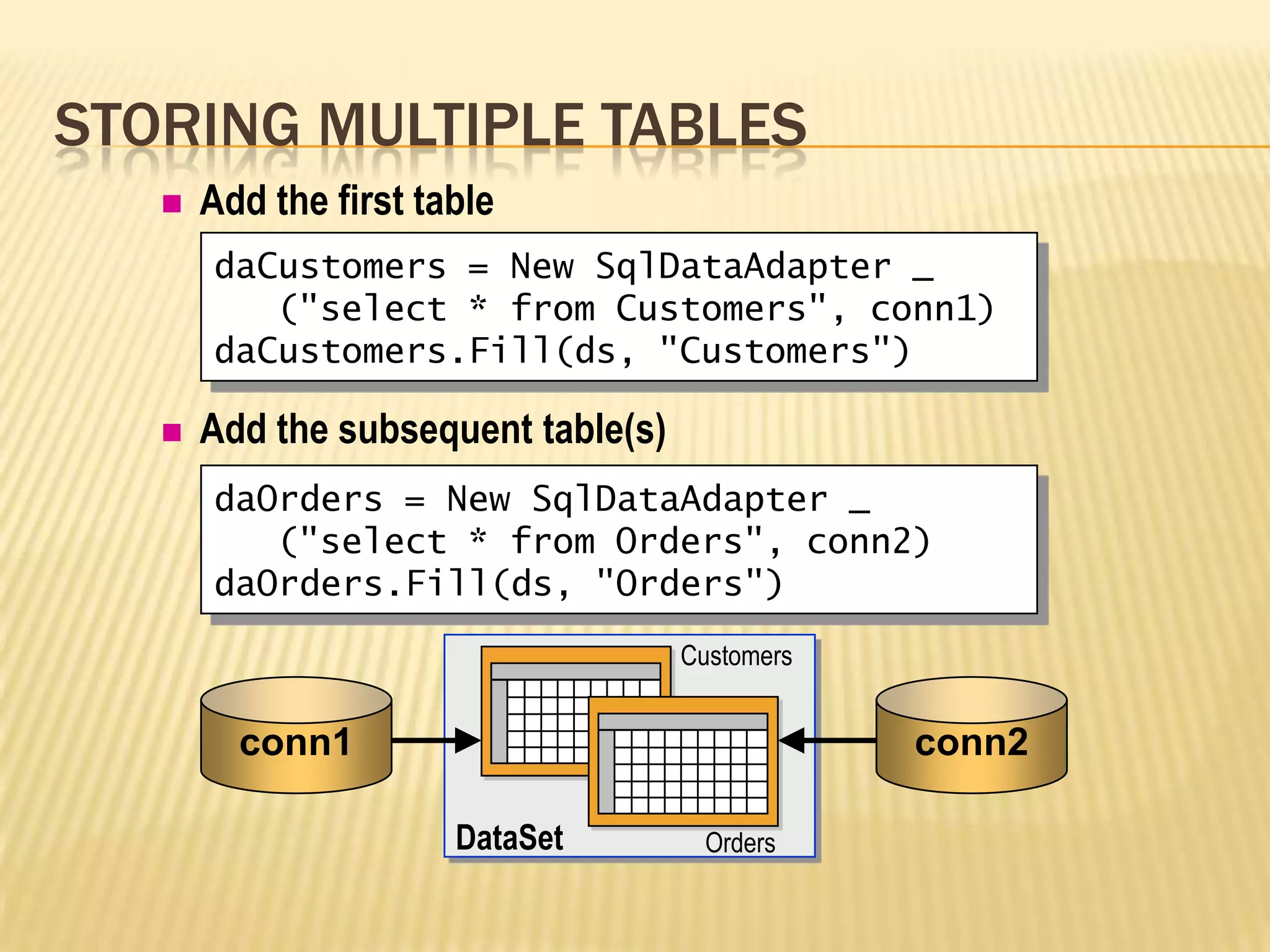
STORING MULTIPLE TABLES
 Add the first table
 Add the subsequent table(s)
daCustomers = New SqlDataAdapter _
("select * from Customers", conn1)
daCustomers.Fill(ds, "Customers")
Orders
Customers
daOrders = New SqlDataAdapter _
("select * from Orders", conn2)
daOrders.Fill(ds, "Orders")
conn2conn1
DataSet
WHAT ARE LIST-BOUND CONTROLS?
 Controls that connect to a data source and display the
data
 List-bound controls include the following:
 DropDownList
 ListBox
 CheckBoxList
 RadioButtonList
 DataGrid
 DataList
 Repeater
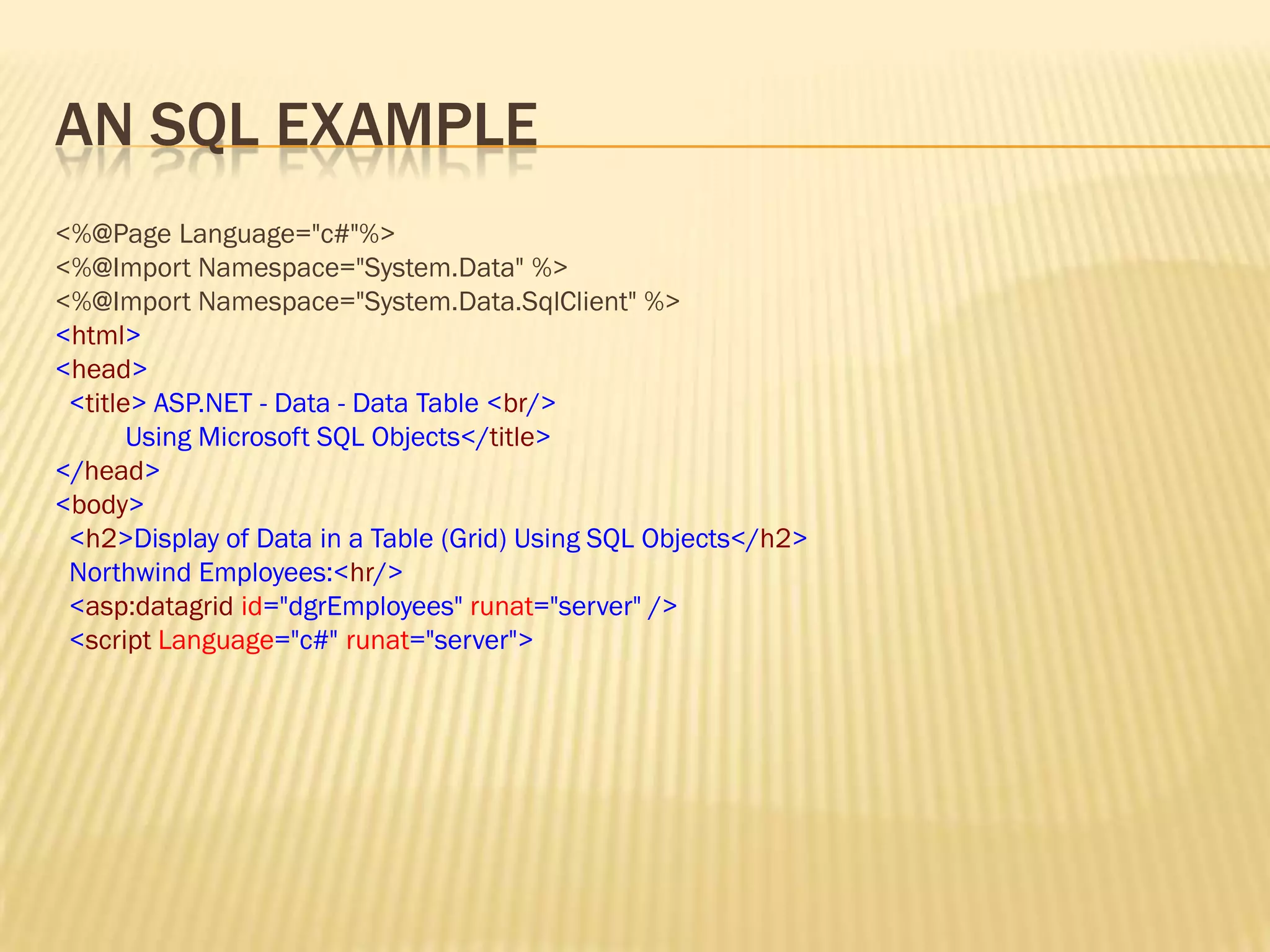
AN SQL EXAMPLE
<%@Page Language="c#"%>
<%@Import Namespace="System.Data" %>
<%@Import Namespace="System.Data.SqlClient" %>
<html>
<head>
<title> ASP.NET - Data - Data Table <br/>
Using Microsoft SQL Objects</title>
</head>
<body>
<h2>Display of Data in a Table (Grid) Using SQL Objects</h2>
Northwind Employees:<hr/>
<asp:datagrid id="dgrEmployees" runat="server" />
<script Language="c#" runat="server">
ADO .NET by Sonu Vishwakarma

ADO .NET by Sonu Vishwakarma

  • 2.
  • 3.
    OVERVIEW  What is.NET?  .NET History.  Introduction to ADO .NET  History of ADO .NET  Using Namespaces  The ADO.net object model  What is DataSet  Accessing the Data with ADO .NET  Data Adapter Object Model  Creating a DataAdapter  Generating a DataSet  Storing Multiple Tables  What are List-Bound Controls?
  • 4.
    .NET  It erasesthe boundaries between applications and the Internet. Instead of interacting with an application or a single Web site, .NET will connect the user to an array of computers and services that will exchange and combine objects and data.  A Microsoft operating system platform that incorporates applications, a suite of tools and services the company's Web strategy. There are four main principles of .NET from the perspective of the user:  Software will be rented as a hosted service over the Internet instead of purchased on a store shelf. Essentially, the Internet will be housing all your applications and data.  Users will have access to their information on the Internet from any device, anytime, anywhere.
  • 5.
    HISTORY .NET Framework Developer(s) Microsoft Initialrelease 13 February 2002; 12 years ago Latest release 4.5.1 (4.5.50938.18408) / 17 October 2013; 5 months ago Operating system Windows 98 or later,Windows NT 4.0 or later Type Software framework License Proprietary; BCL underMicrosoft Reference Source License [1] Website www.microsoft.com/net
  • 6.
    INTRODUCTION  ADO Standform ActiveX Data Object (Network Enable Technology).  It is use for the database connection during the web developing or software developing.  ADO.NET is a set of classes that expose data access services for .NET Framework programmers.  ADO.NET provides a rich set of components for creating distributed, data-sharing applications.  ADO.NET supports a variety of development needs, including the creation of front-end database clients and middle-tier business objects used by applications, tools, languages, or Internet browsers.
  • 7.
    CONT… ADO.NET provides aset of classes for working with data. ADO.NET provides:  An evolutionary, more flexible successor to ADO  A system designed for disconnected environments  A programming model with advanced XML support  A set of classes, interfaces, structures, and enumerations that manage data access from within the .NET Framework
  • 8.
    Entity Framework Developer(s) Microsoft Initialrelease August 11, 2008; 5 years ago Latest release 6.0.2 / December 13, 2013; 3 months ago Written in C# Platform .NET Framework Type Object-relational mapping License Apache License Website msdn.microsoft.com/en- us/data/ef.aspx
  • 9.
    WHAT'S NEW INADO.NET? 1.SqlClient Data provider:-  Streaming support from SQL Server to an application supports scenarios where data on the server is unstructured.  Support has been added for asynchronous programming.  Connection failures will now be logged in the extended events log. 2.ADO.NET Entity Framework :- The .NET Framework 4.5 adds APIs that enable new scenarios when working with the Entity Framework 5.0.
  • 10.
    USING NAMESPACES  Usethe Imports or using statement to import namespaces  Namespaces used with ADO.NET include:  System.Data  System.Data.SqlClient  System.Data.OleDb Imports System.Data Imports System.Data.SqlClient using System.Data; using System.Data.SqlClient;
  • 11.
    DataSet SQL Server .NET DataProvider OLE DB .NET Data Provider SQL Server 7.0 (and later) OLEDB sources (SQL Server 6.5) OleDbConnection OleDbDataAdapter SqlDataAdapter SqlConnection DataTable DataTable THE ADO.NET OBJECT MODEL
  • 12.
    SQL Server 2000 DataSet DataTable DataTable Physicalstorage OleDb Database SqlDataAdapter SqlConnection DataTable Client/Web server memory OleDbDataAdapter OleDbConnection WHAT IS A DATASET?
  • 13.
    ACCESSING DATA WITHADO.NET Database 4. Return the DataSet to the Client 5. Client manipulates the data 2. Create the SqlConnection and SqlDataAdapter objects 3. Fill the DataSet from the DataAdapter and close the connection SqlDataAdapter SqlConnection List-Bound Control 1. Client makes request1 2 3 4 5 6. Update the DataSet 7. Use the SqlDataAdapter to open the SqlConnection, update the database, and close the connection 6 7 Client Web server DataSet
  • 14.
    THE DATAADAPTER OBJECTMODEL sp_SELECT Command SelectCommand UpdateCommand InsertCommand DeleteCommand DataAdapter Command Command Command Connection sp_UPDATE sp_INSERT sp_DELETE Database DataSet DataReader
  • 15.
     Store thequery in a DataAdapter  The DataAdapter constructor sets the SelectCommand property  Set the InsertCommand, UpdateCommand, and DeleteCommand properties if needed CREATING A DATA ADAPTER Dim da As New SqlDataAdapter _ ("select * from Authors", conn) da.SelectCommand.CommandText da.SelectCommand.Connection SqlDataAdapter da = new SqlDataAdapter ("select * from Authors",conn); da.SelectCommand.CommandText; da.SelectCommand.Connection;
  • 16.
    GENERATING A DATASET You can generate a DataSet…  …through the UI…  Creates a DataSet that allows you to access data as an object  …or through code…  and then fill… Dim ds As New DataSet() DataAdapter1.Fill(ds) DataAdapter2.Fill(ds) DataSet ds = new DataSet(); DataAdapter1.Fill(ds); DataAdapter2.Fill(ds);
  • 17.
    STORING MULTIPLE TABLES Add the first table  Add the subsequent table(s) daCustomers = New SqlDataAdapter _ ("select * from Customers", conn1) daCustomers.Fill(ds, "Customers") Orders Customers daOrders = New SqlDataAdapter _ ("select * from Orders", conn2) daOrders.Fill(ds, "Orders") conn2conn1 DataSet
  • 18.
    WHAT ARE LIST-BOUNDCONTROLS?  Controls that connect to a data source and display the data  List-bound controls include the following:  DropDownList  ListBox  CheckBoxList  RadioButtonList  DataGrid  DataList  Repeater
  • 19.
    AN SQL EXAMPLE <%@PageLanguage="c#"%> <%@Import Namespace="System.Data" %> <%@Import Namespace="System.Data.SqlClient" %> <html> <head> <title> ASP.NET - Data - Data Table <br/> Using Microsoft SQL Objects</title> </head> <body> <h2>Display of Data in a Table (Grid) Using SQL Objects</h2> Northwind Employees:<hr/> <asp:datagrid id="dgrEmployees" runat="server" /> <script Language="c#" runat="server">