ASP.NET 
Validating user input 
Validating user input on the 
client and/or server side 
By-Guddu Kumar
Goals 
Check validity of data from the end user 
How 
Check user input on the client side or on the server 
side 
Examples 
Is the name TextBox empty? 
Does the email TextBox contain a structurally valid 
email address?
 Verifies that a control value is correctly 
entered by the user 
 Blocks the processing of a page until all 
controls are valid 
 Avoids spoofing 
or the addition of 
malicious code
Client-side validation 
 Done in the browser 
 Uses JavaScript 
 Users can disable 
JavaScript! 
 Different browsers → 
different JavaScript 
versions 
 Does not require HTTP 
request + response 
Server-side validation 
 Done on the server 
 Uses C# 
 Requires HTTP request 
+ response
 Best practice 
 Client-side validation and server-side 
validation 
 Client-side saves time 
 No HTTP request/response 
 Server-side 
 Provides security 
 JavaScript not disable
ASP.NET performs browser detection 
• Client supports JavaScript 
• Use client-side validation + server-side validation 
• Client does not support JavaScript 
• Use server-side validation
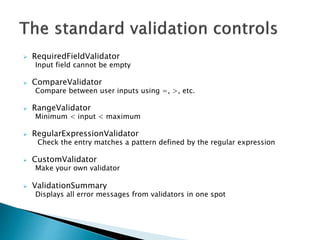
 RequiredFieldValidator 
Input field cannot be empty 
 CompareValidator 
Compare between user inputs using =, >, etc. 
 RangeValidator 
Minimum < input < maximum 
 RegularExpressionValidator 
Check the entry matches a pattern defined by the regular expression 
 CustomValidator 
Make your own validator 
 ValidationSummary 
Displays all error messages from validators in one spot
 ControlToValidate 
The control to be validated 
 ErrorMessage 
The message used in the ValidationSummary 
 Text 
The error message used in the validation control 
 CssClass 
Style appearance of the messages
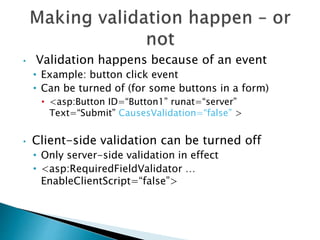
• Validation happens because of an event 
• Example: button click event 
• Can be turned of (for some buttons in a form) 
• <asp:Button ID=“Button1” runat=“server” 
Text=“Submit” CausesValidation=“false” > 
• Client-side validation can be turned off 
• Only server-side validation in effect 
• <asp:RequiredFieldValidator … 
EnableClientScript=“false”>
 The RequiredFieldValidator control ensures that the required field is not 
empty. It is generally tied to a text box to force input into the text box. 
The syntax for the control: 
<asp:RequiredFieldValidator ID="rfvcandidate" 
runat="server" ControlToValidate="ddlcandidate" 
ErrorMessage="Please choose a candidate" 
InitialValue="Please choose a candidate"> 
</asp:RequiredFieldValidator>
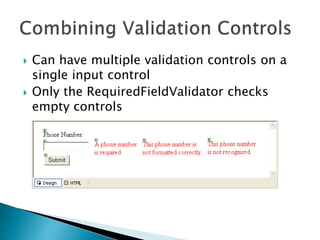
 Can have multiple validation controls on a 
single input control 
 Only the RequiredFieldValidator checks 
empty controls
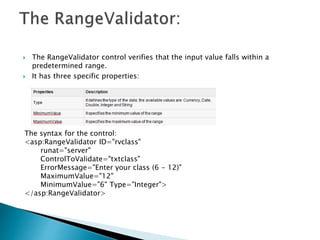
 The RangeValidator control verifies that the input value falls within a 
predetermined range. 
 It has three specific properties: 
The syntax for the control: 
<asp:RangeValidator ID="rvclass" 
runat="server" 
ControlToValidate="txtclass" 
ErrorMessage="Enter your class (6 - 12)" 
MaximumValue="12" 
MinimumValue="6" Type="Integer"> 
</asp:RangeValidator>
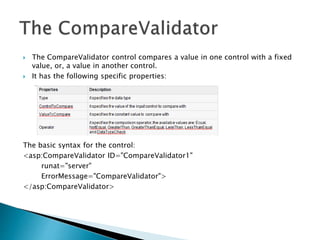
 The CompareValidator control compares a value in one control with a fixed 
value, or, a value in another control. 
 It has the following specific properties: 
The basic syntax for the control: 
<asp:CompareValidator ID="CompareValidator1" 
runat="server" 
ErrorMessage="CompareValidator"> 
</asp:CompareValidator>
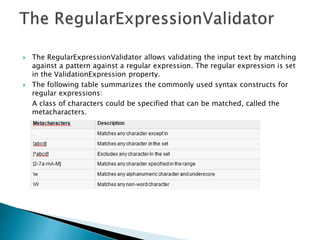
 The RegularExpressionValidator allows validating the input text by matching 
against a pattern against a regular expression. The regular expression is set 
in the ValidationExpression property. 
 The following table summarizes the commonly used syntax constructs for 
regular expressions: 
A class of characters could be specified that can be matched, called the 
metacharacters.
Quantifiers could be added to specify number of times a character could 
appear.
 The CustomValidator control allows writing application specific custom 
validation routines for both the client side and the server side validation. 
 The server side validation routine should be written in any .Net language, 
like C# or VB.Net. 
The basic syntax for the control: 
<asp:CustomValidator ID="CustomValidator1" runat="server" 
ClientValidationFunction=.cvf_func. 
ErrorMessage="CustomValidator"></asp:CustomValidator>
 The ValidationSummary control does not perform any validation but shows a 
summary of all errors in the page. The summary displays the values of the 
ErrorMessage property of all validation controls that failed validation. 
 Using Page.IsValid property we can check for page errors. When there are no 
errors IsValid returns true and user can proceed to next page. 
if (Page.IsValid) 
{ //validation complete proceed } 
The syntax for the control: 
<asp:ValidationSummary ID="ValidationSummary1" runat="server" 
DisplayMode = "BulletList" ShowSummary = "true" 
HeaderText="Errors:" />
 Create an ASP.NET Web Form 
with TextBox and Button 
controls 
 Add a RequiredFieldValidator 
control 
 Add a RangeValidator control 
 Add a 
RegularExpressionValidator 
control
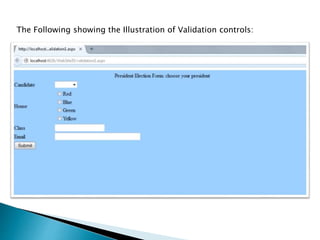
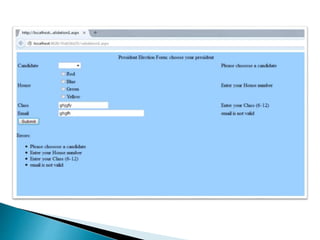
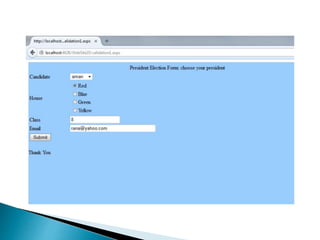
The Following showing the Illustration of Validation controls:
Thank You

Asp.NET Validation controls

  • 1.
    ASP.NET Validating userinput Validating user input on the client and/or server side By-Guddu Kumar
  • 2.
    Goals Check validityof data from the end user How Check user input on the client side or on the server side Examples Is the name TextBox empty? Does the email TextBox contain a structurally valid email address?
  • 3.
     Verifies thata control value is correctly entered by the user  Blocks the processing of a page until all controls are valid  Avoids spoofing or the addition of malicious code
  • 4.
    Client-side validation Done in the browser  Uses JavaScript  Users can disable JavaScript!  Different browsers → different JavaScript versions  Does not require HTTP request + response Server-side validation  Done on the server  Uses C#  Requires HTTP request + response
  • 5.
     Best practice  Client-side validation and server-side validation  Client-side saves time  No HTTP request/response  Server-side  Provides security  JavaScript not disable
  • 6.
    ASP.NET performs browserdetection • Client supports JavaScript • Use client-side validation + server-side validation • Client does not support JavaScript • Use server-side validation
  • 7.
     RequiredFieldValidator Inputfield cannot be empty  CompareValidator Compare between user inputs using =, >, etc.  RangeValidator Minimum < input < maximum  RegularExpressionValidator Check the entry matches a pattern defined by the regular expression  CustomValidator Make your own validator  ValidationSummary Displays all error messages from validators in one spot
  • 8.
     ControlToValidate Thecontrol to be validated  ErrorMessage The message used in the ValidationSummary  Text The error message used in the validation control  CssClass Style appearance of the messages
  • 9.
    • Validation happensbecause of an event • Example: button click event • Can be turned of (for some buttons in a form) • <asp:Button ID=“Button1” runat=“server” Text=“Submit” CausesValidation=“false” > • Client-side validation can be turned off • Only server-side validation in effect • <asp:RequiredFieldValidator … EnableClientScript=“false”>
  • 11.
     The RequiredFieldValidatorcontrol ensures that the required field is not empty. It is generally tied to a text box to force input into the text box. The syntax for the control: <asp:RequiredFieldValidator ID="rfvcandidate" runat="server" ControlToValidate="ddlcandidate" ErrorMessage="Please choose a candidate" InitialValue="Please choose a candidate"> </asp:RequiredFieldValidator>
  • 12.
     Can havemultiple validation controls on a single input control  Only the RequiredFieldValidator checks empty controls
  • 13.
     The RangeValidatorcontrol verifies that the input value falls within a predetermined range.  It has three specific properties: The syntax for the control: <asp:RangeValidator ID="rvclass" runat="server" ControlToValidate="txtclass" ErrorMessage="Enter your class (6 - 12)" MaximumValue="12" MinimumValue="6" Type="Integer"> </asp:RangeValidator>
  • 14.
     The CompareValidatorcontrol compares a value in one control with a fixed value, or, a value in another control.  It has the following specific properties: The basic syntax for the control: <asp:CompareValidator ID="CompareValidator1" runat="server" ErrorMessage="CompareValidator"> </asp:CompareValidator>
  • 15.
     The RegularExpressionValidatorallows validating the input text by matching against a pattern against a regular expression. The regular expression is set in the ValidationExpression property.  The following table summarizes the commonly used syntax constructs for regular expressions: A class of characters could be specified that can be matched, called the metacharacters.
  • 16.
    Quantifiers could beadded to specify number of times a character could appear.
  • 17.
     The CustomValidatorcontrol allows writing application specific custom validation routines for both the client side and the server side validation.  The server side validation routine should be written in any .Net language, like C# or VB.Net. The basic syntax for the control: <asp:CustomValidator ID="CustomValidator1" runat="server" ClientValidationFunction=.cvf_func. ErrorMessage="CustomValidator"></asp:CustomValidator>
  • 18.
     The ValidationSummarycontrol does not perform any validation but shows a summary of all errors in the page. The summary displays the values of the ErrorMessage property of all validation controls that failed validation.  Using Page.IsValid property we can check for page errors. When there are no errors IsValid returns true and user can proceed to next page. if (Page.IsValid) { //validation complete proceed } The syntax for the control: <asp:ValidationSummary ID="ValidationSummary1" runat="server" DisplayMode = "BulletList" ShowSummary = "true" HeaderText="Errors:" />
  • 19.
     Create anASP.NET Web Form with TextBox and Button controls  Add a RequiredFieldValidator control  Add a RangeValidator control  Add a RegularExpressionValidator control
  • 20.
    The Following showingthe Illustration of Validation controls:
  • 23.