How, why and where to use
WordPress multisite
Extending WordPress
About Me:


Utsav singh @rathour


WordPress Enthusiast, A wannabe entrepreneur

CEO/Founder Code Pixelz Media (@codepixelzmedia)
Blogs at http://codepixelz.com
What is Multisite?


 Multiple Website. What else?
 So what is WordPress multisite?
 Obviously Multiple Websites hosted in WordPress.


   So what's the catch?
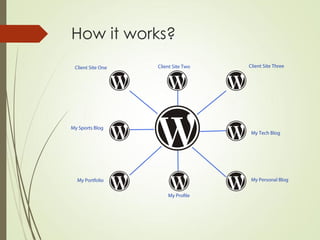
 All of these sites are under single installation of WP
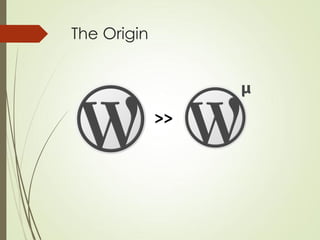
The Origin


             >>
Ba dum tsss.....


          MultiSite
Regular v/s Multisite

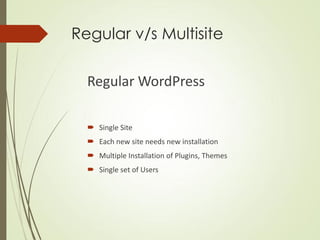
  Regular WordPress

   Single Site
   Each new site needs new installation
   Multiple Installation of Plugins, Themes
   Single set of Users
Regular v/s Multisite


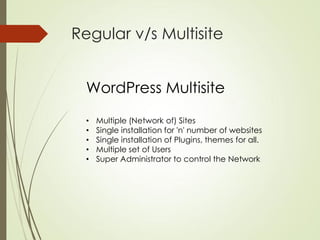
  WordPress Multisite
  •   Multiple (Network of) Sites
  •   Single installation for 'n' number of websites
  •   Single installation of Plugins, themes for all.
  •   Multiple set of Users
  •   Super Administrator to control the Network
How it works?
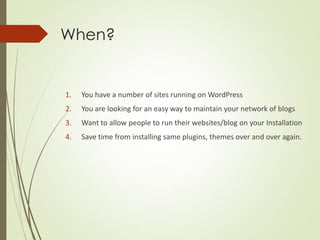
When?


1.   You have a number of sites running on WordPress
2.   You are looking for an easy way to maintain your network of blogs
3.   Want to allow people to run their websites/blog on your Installation
4.   Save time from installing same plugins, themes over and over again.
Where to?

 Personal
  Multiple Blogs, websites
 Academic
  Different sites focusing on different faculties, courses or
  academia.
 Organizational
  Team or division based information site or blogs.
  Regular Blogging
  Network of blogs
 Hosting Sites
  Host different sites of client under one roof, easier to
  maintain.
Where not to?

Just because you can, doesn't mean you have to


 Diffierent Post Type of same niche.
  (Try custom post type)


 Users Need To Install Themes/Plugins


 Single Website or blog
Who's using this?

 WordPress (WordPress.com)
 BestBuy
 Powersites.net
 New York Times (nytimes.com/blogs)
Did you know?

 New York Times has 60+ blogs covering
  a wide range of topics


 Powersites.net has 17000+ small business websites


 WordPress.com hosts 57,600,799 (while creating this
  presentation) blogs
How do I get started?
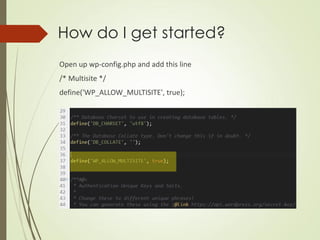
Open up wp-config.php and add this line
/* Multisite */
define('WP_ALLOW_MULTISITE', true);
How do I get started?

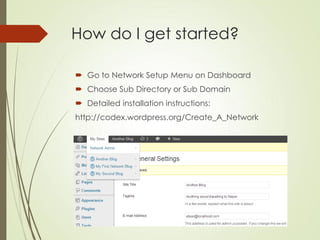
 Go to Network Setup Menu on Dashboard
 Choose Sub Directory or Sub Domain
 Detailed installation instructions:
http://codex.wordpress.org/Create_A_Network
Data Handling


 Creates new set of tables for each Site


 New tables added
  _blogs, _registration_log, _signups, _site, _sitemeta


 New tables for every new site/blog
Should I be using it?

Are you kidding me?


I spent my 10-15 minutes explaining why you should.


Go ahead


Try it.
Build it.
Make wonders.
Conquer the World.
That's it, Me Lord!
Thanks for bearing :)
Still got questions?

Utsav Singh Rathour: How, Why and Where to use WordPress multisite

  • 2.
    How, why andwhere to use WordPress multisite Extending WordPress
  • 3.
    About Me: Utsav singh@rathour WordPress Enthusiast, A wannabe entrepreneur CEO/Founder Code Pixelz Media (@codepixelzmedia) Blogs at http://codepixelz.com
  • 4.
    What is Multisite? Multiple Website. What else?  So what is WordPress multisite?  Obviously Multiple Websites hosted in WordPress. So what's the catch?  All of these sites are under single installation of WP
  • 5.
  • 6.
  • 7.
    Regular v/s Multisite Regular WordPress  Single Site  Each new site needs new installation  Multiple Installation of Plugins, Themes  Single set of Users
  • 8.
    Regular v/s Multisite WordPress Multisite • Multiple (Network of) Sites • Single installation for 'n' number of websites • Single installation of Plugins, themes for all. • Multiple set of Users • Super Administrator to control the Network
  • 9.
  • 10.
    When? 1. You have a number of sites running on WordPress 2. You are looking for an easy way to maintain your network of blogs 3. Want to allow people to run their websites/blog on your Installation 4. Save time from installing same plugins, themes over and over again.
  • 11.
    Where to?  Personal Multiple Blogs, websites  Academic Different sites focusing on different faculties, courses or academia.  Organizational Team or division based information site or blogs. Regular Blogging Network of blogs  Hosting Sites Host different sites of client under one roof, easier to maintain.
  • 12.
    Where not to? Justbecause you can, doesn't mean you have to  Diffierent Post Type of same niche. (Try custom post type)  Users Need To Install Themes/Plugins  Single Website or blog
  • 13.
    Who's using this? WordPress (WordPress.com)  BestBuy  Powersites.net  New York Times (nytimes.com/blogs)
  • 14.
    Did you know? New York Times has 60+ blogs covering a wide range of topics  Powersites.net has 17000+ small business websites  WordPress.com hosts 57,600,799 (while creating this presentation) blogs
  • 15.
    How do Iget started? Open up wp-config.php and add this line /* Multisite */ define('WP_ALLOW_MULTISITE', true);
  • 16.
    How do Iget started?  Go to Network Setup Menu on Dashboard  Choose Sub Directory or Sub Domain  Detailed installation instructions: http://codex.wordpress.org/Create_A_Network
  • 17.
    Data Handling  Createsnew set of tables for each Site  New tables added _blogs, _registration_log, _signups, _site, _sitemeta  New tables for every new site/blog
  • 18.
    Should I beusing it? Are you kidding me? I spent my 10-15 minutes explaining why you should. Go ahead Try it. Build it. Make wonders. Conquer the World.
  • 19.
    That's it, MeLord! Thanks for bearing :)
  • 20.