
Exploring WordPress Multisite
@LisaSabinWilson | WordCamp Milwaukee 2012
About Your Presenter:
Lisa Sabin-Wilson
✤   Wisconsin (Go Pack!)
                                Lisa Sabin-Wilson
                                    Author of books.
✤   WordPress user since 2003       Designer of sites.
                                   Lover of WordPress.
✤   Author since 2006
                                http://lisasabin-wilson.com
                                     @LisaSabinWilson
✤   Twitter: @LisaSabinWilson
                                Thanks for coming!
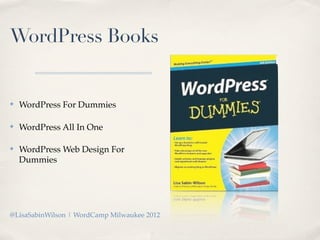
WordPress Books


✤   WordPress For Dummies

✤   WordPress All In One

✤   WordPress Web Design For
    Dummies


@LisaSabinWilson | WordCamp Milwaukee 2012
Exploring WordPress Multisite
Run multiple sites with ONE installation of WordPress


@LisaSabinWilson | WordCamp Milwaukee 2012
Q&A
   Please hold questions until the end - there will be time!


@LisaSabinWilson | WordCamp Milwaukee 2012
The Who, What & Why of
      WordPress Multisite
@LisaSabinWilson | WordCamp Milwaukee 2012
What Is WordPress Multisite??

 ✤   Multi Site is what allows multiple WordPress web sites to be
     powered off a single install.

 ✤   Your WordPress site is already Multisite capable out of the box, it just
     needs to be activated with a single line of code added to the wp-
     config.php file.

 ✤   WordPress.com is the largest and most prominent example of
     Multisite at work. WordPress.com hosts over 400K blogs in their
     network

@LisaSabinWilson | WordCamp Milwaukee 2012
Why Use Multisite?

✤   Run multiple sites with one installation of WordPress.

✤   Saves time by upgrading multiple sites with one action.

✤   Install plugins and themes only once for multiple sites.

✤   Allow people to run a blog in your network.


@LisaSabinWilson | WordCamp Milwaukee 2012
Who Uses
Multisite??
Developers / Programmers
(a.k.a.: Geeks & Nerds)


Generally speaking - they don’t really *use*
Multisite - mostly they dive into Multisite in
order to tear it apart, break it and put it back
together again so they know how it works.
Who Uses
Multisite??
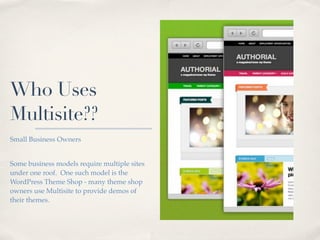
Small Business Owners


Some business models require multiple sites
under one roof. One such model is the
WordPress Theme Shop - many theme shop
owners use Multisite to provide demos of
their themes.
Who Uses
Multisite??
The Owner of Multiple Sites


People who own and operate more than one
or two web sites powered by WordPress will
sometimes utilize the Multisite feature to
make their life easier (more about that later!)
Who Uses
Multisite??
Community Managers


People who host and manage online
communities. In the past, this was limited to
discussion forums and maybe one blog. Now
they host multiple blogs from multiple users,
forums, member profiles and more.
Multisite
Showcase
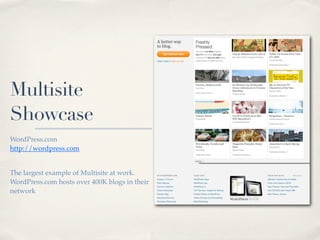
WordPress.com
http://wordpress.com


The largest example of Multisite at work.
WordPress.com hosts over 400K blogs in their
network
Multisite
Showcase
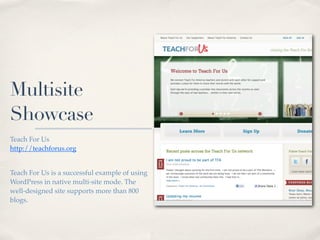
Teach For Us
http://teachforus.org


Teach For Us is a successful example of using
WordPress in native multi-site mode. The
well-designed site supports more than 800
blogs.
Multisite
Showcase
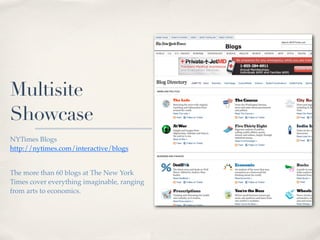
NYTimes Blogs
http://nytimes.com/interactive/blogs


The more than 60 blogs at The New York
Times cover everything imaginable, ranging
from arts to economics.
Multisite
Showcase
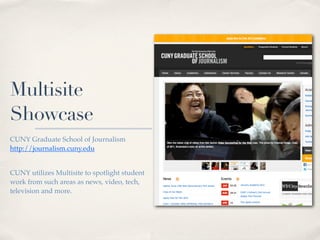
CUNY Graduate School of Journalism
http://journalism.cuny.edu


CUNY utilizes Multisite to spotlight student
work from such areas as news, video, tech,
television and more.
Exploring WordPress Multisite:
Multisite Preparation
@LisaSabinWilson | WordCamp Milwaukee 2012
Before You Dive Into Multisite
Consider what you’re getting yourself into
Running a Blog
Network
✤   Respect user privacy.

✤   Increased responsibilities for the
    support needs of your
    community.

✤   Manage spam and splogs.

✤   Keep the server running
    smoothly.

✤   Provide your users with the
    features they want....and features
    that keep them coming back!
Managing
Multiple Sites
✤   It’s not impossible to go back to
    single user WordPress
    installations to manage your web
    sites - - but it ain’t easy either!

✤   Learning curve ahead - prepare
    yourself to re-learn a few of the
    standard WordPress tasks that
    you have become used to.

✤   Once a choice has been made on
    the URL structure (subdomain or
    subdirectory) - it is not easy to
    switch it. Thing this one through.
Multisite
Hosting
Environment


  How are you planning to use
 Multisite? A full blog network?
 A business venture? Managing
     just a few small sites?
Multisite
Hosting
Environment
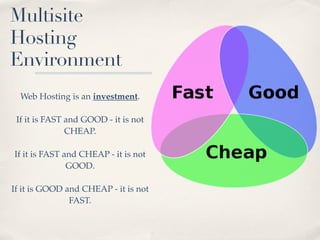
  Web Hosting is an investment.

 If it is FAST and GOOD - it is not
               CHEAP.

If it is FAST and CHEAP - it is not
               GOOD.

If it is GOOD and CHEAP - it is not
               FAST.
Multisite
Hosting
Environment
          Shared Server:
  Multiple web sites hosted on a
 single server - sharing resources
  like CPU, Bandwidth, Memory
            and Space.

       Dedicated Server:
  One single web site hosted on
   one server. Does not share
   resources with other sites.
Multisite
Hosting
Environment

     Shared Server:
    Most economical.

   Dedicated Server:
    Most expensive.
Multisite
Hosting
Environment

 WordPress Multisite can be run
 on either a shared or dedicated
      hosting environment.

 Give strong consideration to the
 type of network you are running
   and if you can afford to share
          server resources.
Multisite
Hosting
Environment
    Community networks, in
particular, are resource intensive.
 When you invite users to utilize
  features on your site such as
publishing, uploading media and
participating in community - you
   are doubling/tripling your
           resource use.

As your community grows, so do
   your bandwidth, space and
 resource needs on your server.
Multisite
Hosting
Environment
   Control spam and splogs.

  Have a plan in place to combat
spam and splog signups on your
community. Spiders and bots can
 - and WILL - hit your site hard if
you do not have controls in place.

  Spam and Splog problems can
 really eat up CPU’s on a server.
WordPress Multisite Requirements

✤   Requires the basic WordPress installation on your hosting server:

    ✤   PHP version 5.2.5 or greater

    ✤   MySQL version 5.0 or greater

    ✤   Apache mod_rewrite (for pretty permalinks)


@LisaSabinWilson | WordCamp Milwaukee 2012
WordPress Multisite Requirements

✤   Make sure your hosting provider supports:

    ✤   Apache mod_rewrite (for pretty permalinks)

    ✤   Wildcard DNS
        This allows you to use the subdomain feature for Multisite. Wildcard
        domains allow you to use any word for the subdomain (that’s why its
        called “Wildcard”).


@LisaSabinWilson | WordCamp Milwaukee 2012
WordPress Multisite Preparation
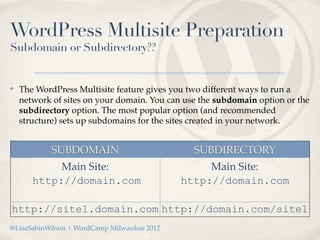
Subdomain or Subdirectory??


✤   The WordPress Multisite feature gives you two different ways to run a
    network of sites on your domain. You can use the subdomain option or the
    subdirectory option. The most popular option (and recommended
    structure) sets up subdomains for the sites created in your network.

✤

            SUBDOMAIN                          SUBDIRECTORY
            Main Site:                            Main Site:
       http://domain.com                     http://domain.com

http://site1.domain.com http://domain.com/site1
@LisaSabinWilson | WordCamp Milwaukee 2012
WordPress Multisite Preparation
Subdomain or Subdirectory??


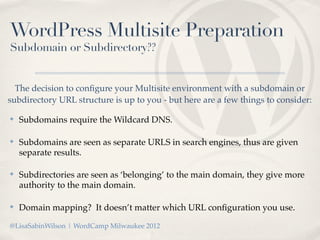
  The decision to configure your Multisite environment with a subdomain or
subdirectory URL structure is up to you - but here are a few things to consider:

✤   Subdomains require the Wildcard DNS.

✤   Subdomains are seen as separate URLS in search engines, thus are given
    separate results.

✤   Subdirectories are seen as ‘belonging’ to the main domain, they give more
    authority to the main domain.

✤   Domain mapping? It doesn’t matter which URL configuration you use.

@LisaSabinWilson | WordCamp Milwaukee 2012
WordPress Multisite Preparation
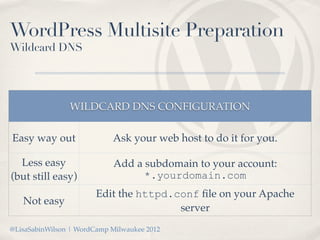
Wildcard DNS


                WILDCARD DNS CONFIGURATION

Easy way out                Ask your web host to do it for you.

  Less easy                 Add a subdomain to your account:
(but still easy)                  *.yourdomain.com
                        Edit the httpd.conf file on your Apache
   Not easy
                                        server
@LisaSabinWilson | WordCamp Milwaukee 2012
WordPress Multisite Preparation
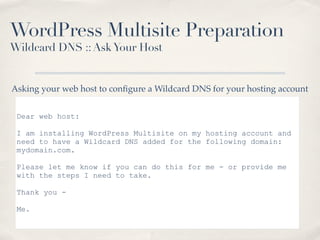
Wildcard DNS :: Ask Your Host


Asking your web host to configure a Wildcard DNS for your hosting account


 Dear web host:

 I am installing WordPress Multisite on my hosting account and
 need to have a Wildcard DNS added for the following domain:
 mydomain.com.

 Please let me know if you can do this for me - or provide me
 with the steps I need to take.

 Thank you -

 Me.
WordPress Multisite Preparation
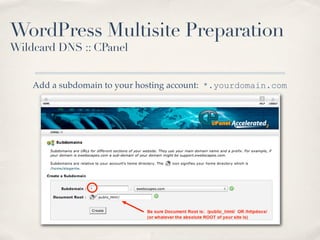
Wildcard DNS :: CPanel


    Add a subdomain to your hosting account: *.yourdomain.com
WordPress Multisite Preparation
Wildcard DNS :: WHM (Web Host Manager)


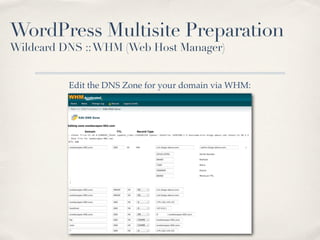
                                  Login to WHM
                          Click icon for DNS Functions
                          Click icon for Edit DNS Zone
                       Select the domain you’d like to edit

Under Add New Entries Below this Line, fill in the fields so that they look like:
                                      
                   *      14400       IN        A     1.2.3.4
                                           
                       where 1.2.3.4 is the IP of the account

@LisaSabinWilson | WordCamp Milwaukee 2012
WordPress Multisite Preparation
Wildcard DNS :: WHM (Web Host Manager)


          Edit the DNS Zone for your domain via WHM:
WordPress Multisite Preparation
  Wildcard DNS :: httpd.conf


              Edit the httpd.conf file on your Apache Web Server
               (if you have access and know what you are doing!)

Log in as root and open the httpd.conf file (usually this file is located in /etc/
               httpd/conf) with a text editor such as vim or nano.

                Then find the VirtualHost entry for the website.

                                          .....

  @LisaSabinWilson | WordCamp Milwaukee 2012
WordPress Multisite Preparation
Wildcard DNS :: httpd.conf


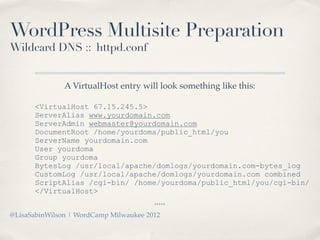
               A VirtualHost entry will look something like this:

      <VirtualHost 67.15.245.5>
      ServerAlias www.yourdomain.com
      ServerAdmin webmaster@yourdomain.com
      DocumentRoot /home/yourdoma/public_html/you
      ServerName yourdomain.com
      User yourdoma
      Group yourdoma
      BytesLog /usr/local/apache/domlogs/yourdomain.com-bytes_log
      CustomLog /usr/local/apache/domlogs/yourdomain.com combined
      ScriptAlias /cgi-bin/ /home/yourdoma/public_html/you/cgi-bin/
      </VirtualHost>
                                        .....
@LisaSabinWilson | WordCamp Milwaukee 2012
WordPress Multisite Preparation
Wildcard DNS :: httpd.conf


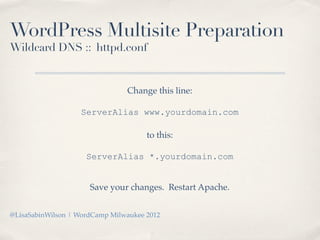
                                Change this line:

                   ServerAlias www.yourdomain.com

                                      to this:

                     ServerAlias *.yourdomain.com


                      Save your changes. Restart Apache.


@LisaSabinWilson | WordCamp Milwaukee 2012
Exploring WordPress Multisite:
Enabling & Configuring Multisite
@LisaSabinWilson | WordCamp Milwaukee 2012
Activating Multisite
Gather the right tools


✤   What you will need:

    ✤   A text based editor like Notepad (PC) or Textmate (Mac)

    ✤   Access to your web server via FTP


@LisaSabinWilson | WordCamp Milwaukee 2012
Activating Multisite
wp-config.php


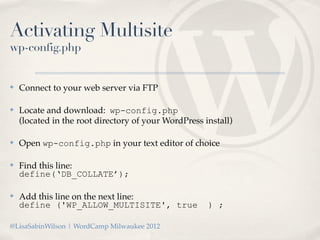
✤   Connect to your web server via FTP

✤   Locate and download: wp-config.php
    (located in the root directory of your WordPress install)

✤   Open wp-config.php in your text editor of choice

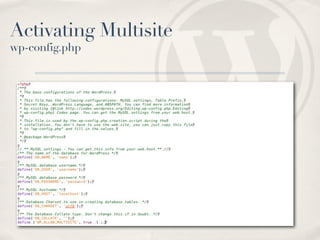
✤   Find this line:
    define(‘DB_COLLATE’);

✤   Add this line on the next line:
    define ('WP_ALLOW_MULTISITE', true                ) ;

@LisaSabinWilson | WordCamp Milwaukee 2012
Activating Multisite
wp-config.php
Activating Multisite
wp-config.php


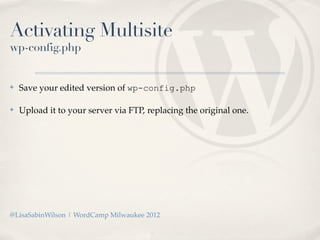
✤   Save your edited version of wp-config.php

✤   Upload it to your server via FTP, replacing the original one.


@LisaSabinWilson | WordCamp Milwaukee 2012
Activating Multisite
Network Setup


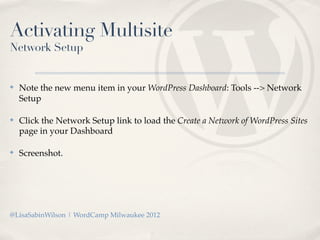
✤   Note the new menu item in your WordPress Dashboard: Tools --> Network
    Setup

✤   Click the Network Setup link to load the Create a Network of WordPress Sites
    page in your Dashboard

✤   Screenshot.


@LisaSabinWilson | WordCamp Milwaukee 2012
Activating Multisite
Network Setup


      The final steps for Network Setup completion requires you to
      edit files on your web server - so have that Text Editor handy!


@LisaSabinWilson | WordCamp Milwaukee 2012
Activating Multisite
blogs.dir


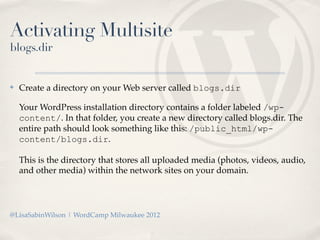
✤   Create a directory on your Web server called blogs.dir

    Your WordPress installation directory contains a folder labeled /wp-
    content/. In that folder, you create a new directory called blogs.dir. The
    entire path should look something like this: /public_html/wp-
    content/blogs.dir.

    This is the directory that stores all uploaded media (photos, videos, audio,
    and other media) within the network sites on your domain.


@LisaSabinWilson | WordCamp Milwaukee 2012
Activating Multisite
wp-config.php


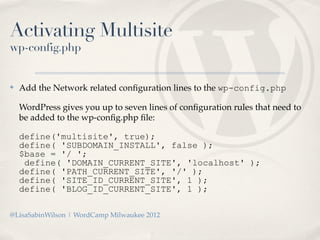
✤   Add the Network related configuration lines to the wp-config.php

    WordPress gives you up to seven lines of configuration rules that need to
    be added to the wp-config.php file:

    define('multisite', true);
    define( 'SUBDOMAIN_INSTALL', false );
    $base = '/ ';
     define( 'DOMAIN_CURRENT_SITE', 'localhost' );
    define( 'PATH_CURRENT_SITE', '/' );
    define( 'SITE_ID_CURRENT_SITE', 1 );
    define( 'BLOG_ID_CURRENT_SITE', 1 );

@LisaSabinWilson | WordCamp Milwaukee 2012
Activating Multisite
.htaccess


 ✤   Add the Network related lines to the .htaccess:
     RewriteEngine On
     RewriteBase /
     RewriteRule ^index.php$ - [L]
     # uploaded files
     RewriteRule ^([_0-9a-zA-Z-]+/)?files/(.+) wp-includes/ms-files.php?file=$2 [L]
     # add a trailing slash to /wp-admin
     RewriteRule ^([_0-9a-zA-Z-]+/)?wp-admin$ $1wp-admin/ [R=301,L]
     RewriteCond %{REQUEST_FILENAME} -f [OR]
     RewriteCond %{REQUEST_FILENAME} -d
     RewriteRule ^ - [L]
     RewriteRule ^[_0-9a-zA-Z-]+/(wp-(content|admin|includes).*) $1 [L]
     RewriteRule ^[_0-9a-zA-Z-]+/(.*.php)$ $1 [L]
     RewriteRule . index.php [L]


@LisaSabinWilson | WordCamp Milwaukee 2012
Multisite Activation
Live demo


@LisaSabinWilson | WordCamp Milwaukee 2012
Exploring the Multisite Database


@LisaSabinWilson | WordCamp Milwaukee 2012
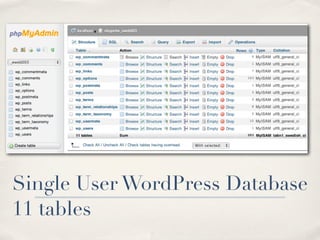
Single User WordPress Database
11 tables
Multisite Database
 6 new core tables added


*"   wp_blogs: contains one record per site and is used for site lookup.
*"   wp_blog_versions: used internally for upgrades.
*"   wp_registration_log: information on sites created when a user signs up
*"   wp_signups: contains information on users who signed up for the network.
*"   wp_site: This database table contains one record per WordPress network.
*"   wp_sitemeta: This database table contains network settings.


 @LisaSabinWilson | WordCamp Milwaukee 2012
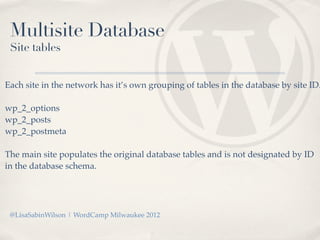
Multisite Database
 Site tables


Each site in the network has it’s own grouping of tables in the database by site ID.

wp_2_options
wp_2_posts
wp_2_postmeta

The main site populates the original database tables and is not designated by ID
in the database schema.


 @LisaSabinWilson | WordCamp Milwaukee 2012
Exploring the Multisite Fileserver


@LisaSabinWilson | WordCamp Milwaukee 2012
/wp-content/blogs.dir

Uploaded files (media, images, etc) are saved in a folder that
               corresponds to the SITE ID:

             /wp-content/blogs.dir/2/files/


@LisaSabinWilson | WordCamp Milwaukee 2012
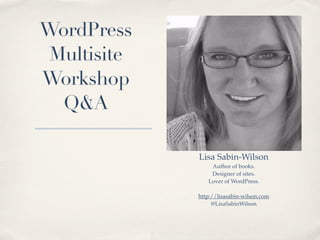
WordPress
 Multisite
Workshop
  Q&A

             Lisa Sabin-Wilson
                 Author of books.
                 Designer of sites.
                Lover of WordPress.

             http://lisasabin-wilson.com
                  @LisaSabinWilson

Exploring WordPress Multisite

  • 1.
  • 2.
    About Your Presenter: LisaSabin-Wilson ✤ Wisconsin (Go Pack!) Lisa Sabin-Wilson Author of books. ✤ WordPress user since 2003 Designer of sites. Lover of WordPress. ✤ Author since 2006 http://lisasabin-wilson.com @LisaSabinWilson ✤ Twitter: @LisaSabinWilson Thanks for coming!
  • 3.
    WordPress Books ✤ WordPress For Dummies ✤ WordPress All In One ✤ WordPress Web Design For Dummies @LisaSabinWilson | WordCamp Milwaukee 2012
  • 4.
    Exploring WordPress Multisite Runmultiple sites with ONE installation of WordPress @LisaSabinWilson | WordCamp Milwaukee 2012
  • 5.
    Q&A Please hold questions until the end - there will be time! @LisaSabinWilson | WordCamp Milwaukee 2012
  • 6.
    The Who, What& Why of WordPress Multisite @LisaSabinWilson | WordCamp Milwaukee 2012
  • 7.
    What Is WordPressMultisite?? ✤ Multi Site is what allows multiple WordPress web sites to be powered off a single install. ✤ Your WordPress site is already Multisite capable out of the box, it just needs to be activated with a single line of code added to the wp- config.php file. ✤ WordPress.com is the largest and most prominent example of Multisite at work. WordPress.com hosts over 400K blogs in their network @LisaSabinWilson | WordCamp Milwaukee 2012
  • 8.
    Why Use Multisite? ✤ Run multiple sites with one installation of WordPress. ✤ Saves time by upgrading multiple sites with one action. ✤ Install plugins and themes only once for multiple sites. ✤ Allow people to run a blog in your network. @LisaSabinWilson | WordCamp Milwaukee 2012
  • 9.
    Who Uses Multisite?? Developers /Programmers (a.k.a.: Geeks & Nerds) Generally speaking - they don’t really *use* Multisite - mostly they dive into Multisite in order to tear it apart, break it and put it back together again so they know how it works.
  • 10.
    Who Uses Multisite?? Small BusinessOwners Some business models require multiple sites under one roof. One such model is the WordPress Theme Shop - many theme shop owners use Multisite to provide demos of their themes.
  • 11.
    Who Uses Multisite?? The Ownerof Multiple Sites People who own and operate more than one or two web sites powered by WordPress will sometimes utilize the Multisite feature to make their life easier (more about that later!)
  • 12.
    Who Uses Multisite?? Community Managers Peoplewho host and manage online communities. In the past, this was limited to discussion forums and maybe one blog. Now they host multiple blogs from multiple users, forums, member profiles and more.
  • 13.
    Multisite Showcase WordPress.com http://wordpress.com The largest exampleof Multisite at work. WordPress.com hosts over 400K blogs in their network
  • 14.
    Multisite Showcase Teach For Us http://teachforus.org TeachFor Us is a successful example of using WordPress in native multi-site mode. The well-designed site supports more than 800 blogs.
  • 15.
    Multisite Showcase NYTimes Blogs http://nytimes.com/interactive/blogs The morethan 60 blogs at The New York Times cover everything imaginable, ranging from arts to economics.
  • 16.
    Multisite Showcase CUNY Graduate Schoolof Journalism http://journalism.cuny.edu CUNY utilizes Multisite to spotlight student work from such areas as news, video, tech, television and more.
  • 17.
    Exploring WordPress Multisite: MultisitePreparation @LisaSabinWilson | WordCamp Milwaukee 2012
  • 18.
    Before You DiveInto Multisite Consider what you’re getting yourself into
  • 19.
    Running a Blog Network ✤ Respect user privacy. ✤ Increased responsibilities for the support needs of your community. ✤ Manage spam and splogs. ✤ Keep the server running smoothly. ✤ Provide your users with the features they want....and features that keep them coming back!
  • 20.
    Managing Multiple Sites ✤ It’s not impossible to go back to single user WordPress installations to manage your web sites - - but it ain’t easy either! ✤ Learning curve ahead - prepare yourself to re-learn a few of the standard WordPress tasks that you have become used to. ✤ Once a choice has been made on the URL structure (subdomain or subdirectory) - it is not easy to switch it. Thing this one through.
  • 21.
    Multisite Hosting Environment Howare you planning to use Multisite? A full blog network? A business venture? Managing just a few small sites?
  • 22.
    Multisite Hosting Environment WebHosting is an investment. If it is FAST and GOOD - it is not CHEAP. If it is FAST and CHEAP - it is not GOOD. If it is GOOD and CHEAP - it is not FAST.
  • 23.
    Multisite Hosting Environment Shared Server: Multiple web sites hosted on a single server - sharing resources like CPU, Bandwidth, Memory and Space. Dedicated Server: One single web site hosted on one server. Does not share resources with other sites.
  • 24.
    Multisite Hosting Environment Shared Server: Most economical. Dedicated Server: Most expensive.
  • 25.
    Multisite Hosting Environment WordPress Multisitecan be run on either a shared or dedicated hosting environment. Give strong consideration to the type of network you are running and if you can afford to share server resources.
  • 26.
    Multisite Hosting Environment Community networks, in particular, are resource intensive. When you invite users to utilize features on your site such as publishing, uploading media and participating in community - you are doubling/tripling your resource use. As your community grows, so do your bandwidth, space and resource needs on your server.
  • 27.
    Multisite Hosting Environment Control spam and splogs. Have a plan in place to combat spam and splog signups on your community. Spiders and bots can - and WILL - hit your site hard if you do not have controls in place. Spam and Splog problems can really eat up CPU’s on a server.
  • 28.
    WordPress Multisite Requirements ✤ Requires the basic WordPress installation on your hosting server: ✤ PHP version 5.2.5 or greater ✤ MySQL version 5.0 or greater ✤ Apache mod_rewrite (for pretty permalinks) @LisaSabinWilson | WordCamp Milwaukee 2012
  • 29.
    WordPress Multisite Requirements ✤ Make sure your hosting provider supports: ✤ Apache mod_rewrite (for pretty permalinks) ✤ Wildcard DNS This allows you to use the subdomain feature for Multisite. Wildcard domains allow you to use any word for the subdomain (that’s why its called “Wildcard”). @LisaSabinWilson | WordCamp Milwaukee 2012
  • 30.
    WordPress Multisite Preparation Subdomainor Subdirectory?? ✤ The WordPress Multisite feature gives you two different ways to run a network of sites on your domain. You can use the subdomain option or the subdirectory option. The most popular option (and recommended structure) sets up subdomains for the sites created in your network. ✤ SUBDOMAIN SUBDIRECTORY Main Site: Main Site: http://domain.com http://domain.com http://site1.domain.com http://domain.com/site1 @LisaSabinWilson | WordCamp Milwaukee 2012
  • 31.
    WordPress Multisite Preparation Subdomainor Subdirectory?? The decision to configure your Multisite environment with a subdomain or subdirectory URL structure is up to you - but here are a few things to consider: ✤ Subdomains require the Wildcard DNS. ✤ Subdomains are seen as separate URLS in search engines, thus are given separate results. ✤ Subdirectories are seen as ‘belonging’ to the main domain, they give more authority to the main domain. ✤ Domain mapping? It doesn’t matter which URL configuration you use. @LisaSabinWilson | WordCamp Milwaukee 2012
  • 32.
    WordPress Multisite Preparation WildcardDNS WILDCARD DNS CONFIGURATION Easy way out Ask your web host to do it for you. Less easy Add a subdomain to your account: (but still easy) *.yourdomain.com Edit the httpd.conf file on your Apache Not easy server @LisaSabinWilson | WordCamp Milwaukee 2012
  • 33.
    WordPress Multisite Preparation WildcardDNS :: Ask Your Host Asking your web host to configure a Wildcard DNS for your hosting account Dear web host: I am installing WordPress Multisite on my hosting account and need to have a Wildcard DNS added for the following domain: mydomain.com. Please let me know if you can do this for me - or provide me with the steps I need to take. Thank you - Me.
  • 34.
    WordPress Multisite Preparation WildcardDNS :: CPanel Add a subdomain to your hosting account: *.yourdomain.com
  • 35.
    WordPress Multisite Preparation WildcardDNS :: WHM (Web Host Manager) Login to WHM Click icon for DNS Functions Click icon for Edit DNS Zone Select the domain you’d like to edit Under Add New Entries Below this Line, fill in the fields so that they look like:   * 14400 IN A 1.2.3.4   where 1.2.3.4 is the IP of the account @LisaSabinWilson | WordCamp Milwaukee 2012
  • 36.
    WordPress Multisite Preparation WildcardDNS :: WHM (Web Host Manager) Edit the DNS Zone for your domain via WHM:
  • 37.
    WordPress Multisite Preparation Wildcard DNS :: httpd.conf Edit the httpd.conf file on your Apache Web Server (if you have access and know what you are doing!) Log in as root and open the httpd.conf file (usually this file is located in /etc/ httpd/conf) with a text editor such as vim or nano. Then find the VirtualHost entry for the website. ..... @LisaSabinWilson | WordCamp Milwaukee 2012
  • 38.
    WordPress Multisite Preparation WildcardDNS :: httpd.conf A VirtualHost entry will look something like this: <VirtualHost 67.15.245.5> ServerAlias www.yourdomain.com ServerAdmin webmaster@yourdomain.com DocumentRoot /home/yourdoma/public_html/you ServerName yourdomain.com User yourdoma Group yourdoma BytesLog /usr/local/apache/domlogs/yourdomain.com-bytes_log CustomLog /usr/local/apache/domlogs/yourdomain.com combined ScriptAlias /cgi-bin/ /home/yourdoma/public_html/you/cgi-bin/ </VirtualHost> ..... @LisaSabinWilson | WordCamp Milwaukee 2012
  • 39.
    WordPress Multisite Preparation WildcardDNS :: httpd.conf Change this line: ServerAlias www.yourdomain.com to this: ServerAlias *.yourdomain.com Save your changes. Restart Apache. @LisaSabinWilson | WordCamp Milwaukee 2012
  • 40.
    Exploring WordPress Multisite: Enabling& Configuring Multisite @LisaSabinWilson | WordCamp Milwaukee 2012
  • 41.
    Activating Multisite Gather theright tools ✤ What you will need: ✤ A text based editor like Notepad (PC) or Textmate (Mac) ✤ Access to your web server via FTP @LisaSabinWilson | WordCamp Milwaukee 2012
  • 42.
    Activating Multisite wp-config.php ✤ Connect to your web server via FTP ✤ Locate and download: wp-config.php (located in the root directory of your WordPress install) ✤ Open wp-config.php in your text editor of choice ✤ Find this line: define(‘DB_COLLATE’); ✤ Add this line on the next line: define ('WP_ALLOW_MULTISITE', true ) ; @LisaSabinWilson | WordCamp Milwaukee 2012
  • 43.
  • 44.
    Activating Multisite wp-config.php ✤ Save your edited version of wp-config.php ✤ Upload it to your server via FTP, replacing the original one. @LisaSabinWilson | WordCamp Milwaukee 2012
  • 45.
    Activating Multisite Network Setup ✤ Note the new menu item in your WordPress Dashboard: Tools --> Network Setup ✤ Click the Network Setup link to load the Create a Network of WordPress Sites page in your Dashboard ✤ Screenshot. @LisaSabinWilson | WordCamp Milwaukee 2012
  • 46.
    Activating Multisite Network Setup The final steps for Network Setup completion requires you to edit files on your web server - so have that Text Editor handy! @LisaSabinWilson | WordCamp Milwaukee 2012
  • 47.
    Activating Multisite blogs.dir ✤ Create a directory on your Web server called blogs.dir Your WordPress installation directory contains a folder labeled /wp- content/. In that folder, you create a new directory called blogs.dir. The entire path should look something like this: /public_html/wp- content/blogs.dir. This is the directory that stores all uploaded media (photos, videos, audio, and other media) within the network sites on your domain. @LisaSabinWilson | WordCamp Milwaukee 2012
  • 48.
    Activating Multisite wp-config.php ✤ Add the Network related configuration lines to the wp-config.php WordPress gives you up to seven lines of configuration rules that need to be added to the wp-config.php file: define('multisite', true); define( 'SUBDOMAIN_INSTALL', false ); $base = '/ '; define( 'DOMAIN_CURRENT_SITE', 'localhost' ); define( 'PATH_CURRENT_SITE', '/' ); define( 'SITE_ID_CURRENT_SITE', 1 ); define( 'BLOG_ID_CURRENT_SITE', 1 ); @LisaSabinWilson | WordCamp Milwaukee 2012
  • 49.
    Activating Multisite .htaccess ✤ Add the Network related lines to the .htaccess: RewriteEngine On RewriteBase / RewriteRule ^index.php$ - [L] # uploaded files RewriteRule ^([_0-9a-zA-Z-]+/)?files/(.+) wp-includes/ms-files.php?file=$2 [L] # add a trailing slash to /wp-admin RewriteRule ^([_0-9a-zA-Z-]+/)?wp-admin$ $1wp-admin/ [R=301,L] RewriteCond %{REQUEST_FILENAME} -f [OR] RewriteCond %{REQUEST_FILENAME} -d RewriteRule ^ - [L] RewriteRule ^[_0-9a-zA-Z-]+/(wp-(content|admin|includes).*) $1 [L] RewriteRule ^[_0-9a-zA-Z-]+/(.*.php)$ $1 [L] RewriteRule . index.php [L] @LisaSabinWilson | WordCamp Milwaukee 2012
  • 50.
  • 51.
    Exploring the MultisiteDatabase @LisaSabinWilson | WordCamp Milwaukee 2012
  • 52.
    Single User WordPressDatabase 11 tables
  • 53.
    Multisite Database 6new core tables added *" wp_blogs: contains one record per site and is used for site lookup. *" wp_blog_versions: used internally for upgrades. *" wp_registration_log: information on sites created when a user signs up *" wp_signups: contains information on users who signed up for the network. *" wp_site: This database table contains one record per WordPress network. *" wp_sitemeta: This database table contains network settings. @LisaSabinWilson | WordCamp Milwaukee 2012
  • 54.
    Multisite Database Sitetables Each site in the network has it’s own grouping of tables in the database by site ID. wp_2_options wp_2_posts wp_2_postmeta The main site populates the original database tables and is not designated by ID in the database schema. @LisaSabinWilson | WordCamp Milwaukee 2012
  • 55.
    Exploring the MultisiteFileserver @LisaSabinWilson | WordCamp Milwaukee 2012
  • 56.
    /wp-content/blogs.dir Uploaded files (media,images, etc) are saved in a folder that corresponds to the SITE ID: /wp-content/blogs.dir/2/files/ @LisaSabinWilson | WordCamp Milwaukee 2012
  • 57.
    WordPress Multisite Workshop Q&A Lisa Sabin-Wilson Author of books. Designer of sites. Lover of WordPress. http://lisasabin-wilson.com @LisaSabinWilson