Op#mizing	
  &	
  
Speeding	
  Up	
  a	
  
WordPress	
  Site	
  
Vinay	
  Paudel	
  
  tweet	
  @paudelvinay	
  
Email:	
  paudelvinay@gmail.com	
  
Blog	
  :	
  h:p://vinayp.com.np	
  
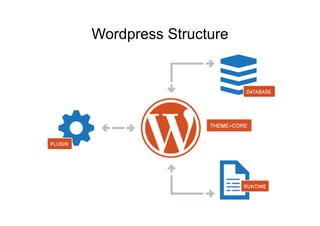
Wordpress Structure
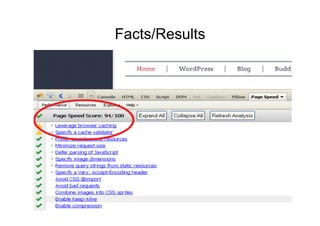
Facts/Results

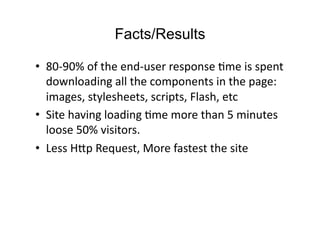
•  80-­‐90%	
  of	
  the	
  end-­‐user	
  response	
  Dme	
  is	
  spent	
  
   downloading	
  all	
  the	
  components	
  in	
  the	
  page:	
  
   images,	
  stylesheets,	
  scripts,	
  Flash,	
  etc	
  
•  Site	
  having	
  loading	
  Dme	
  more	
  than	
  5	
  minutes	
  
   loose	
  50%	
  visitors.	
  
•  Less	
  H:p	
  Request,	
  More	
  fastest	
  the	
  site	
  
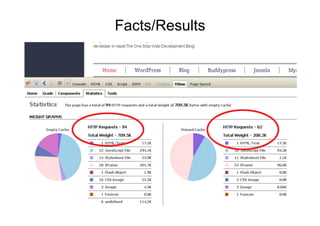
Facts/Results
Facts/Results
Optimize theme

•  well-coded theme.
•  Find any unclose tag on theme
•  Check malicious/unwanted code
  – Theme	
  AuthenDcity	
  Checker	
  (TAC)	
  (h:p://
    wordpress.org/extend/plugins/tac/)	
  
  – Exploit	
  Scanner	
  (h:p://wordpress.org/extend/
    plugins/exploit-­‐scanner/)	
  
Optimize theme
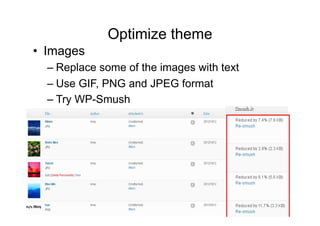
•  Images
  – Replace some of the images with text
  – Use GIF, PNG and JPEG format
  – Try WP-Smush
Optimize theme

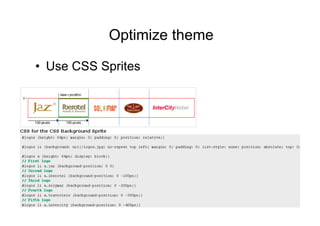
•  Use CSS Sprites
Optimize theme	
  

•  Combine minify and compress HTML, JS and
   CSS
  – Use compressor tools
  – Use Plugins
     •  WP Minify (http://wordpress.org/extend/plugins/wp-
        minify/ )
     •  Better WordPress Minify (http://wordpress.org/extend/
        plugins/bwp-minify/)


•  Put CSS on header and JavaScript on footer	
  
Optimize theme	
  
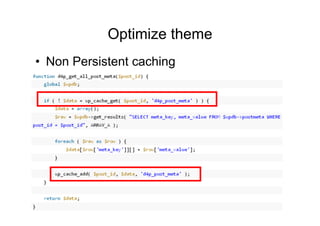
•  Non Persistent caching
Optimize theme	
  
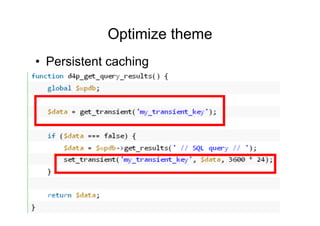
•  Persistent caching
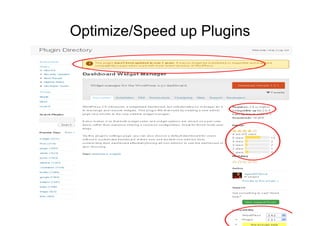
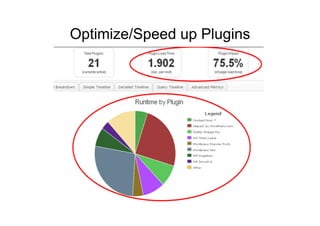
Optimize/Speed up Plugins

•  Be selective on plugins choice.
Optimize/Speed up Plugins	
  
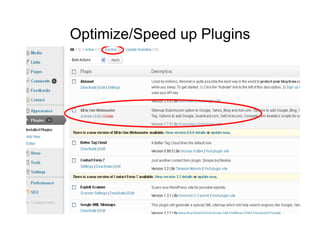
Optimize/Speed up Plugins	
  

•  Deactivate and delete unnecessary plugins
Optimize/Speed up Plugins	
  
Optimize/Speed up Plugins	
  

•  Check	
  plugins	
  performance	
  
   – P3	
  (Plugin	
  Performance	
  Profiler)	
  (h:p://
     wordpress.org/extend/plugins/p3-­‐profiler/)	
  
Optimize/Speed up Plugins	
  
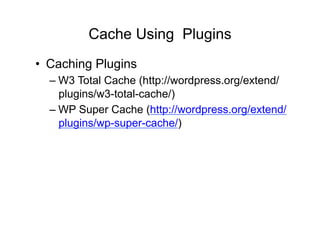
Cache Using Plugins
•  Caching Plugins
  – W3 Total Cache (http://wordpress.org/extend/
    plugins/w3-total-cache/)
  – WP Super Cache (http://wordpress.org/extend/
    plugins/wp-super-cache/)
Apply CDN using Plugins	
  

•  CDN (content delivery Network).
  – W3 Total Cache
  – image files, js files, css files, uploaded files
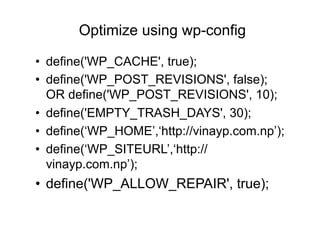
Optimize using wp-config

•  define('WP_CACHE', true);
•  define('WP_POST_REVISIONS', false);
   OR define('WP_POST_REVISIONS', 10);
•  define('EMPTY_TRASH_DAYS', 30);
•  define(‘WP_HOME’,‘http://vinayp.com.np’);
•  define(‘WP_SITEURL’,‘http://
   vinayp.com.np’);
•  define('WP_ALLOW_REPAIR', true);
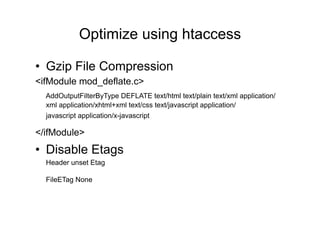
Optimize using htaccess	
  

•  Gzip File Compression
<ifModule mod_deflate.c>
    AddOutputFilterByType DEFLATE text/html text/plain text/xml application/
    xml application/xhtml+xml text/css text/javascript application/
    javascript application/x-javascript

</ifModule>	


•  Disable Etags
    Header unset Etag

    FileETag None     	
  	
  
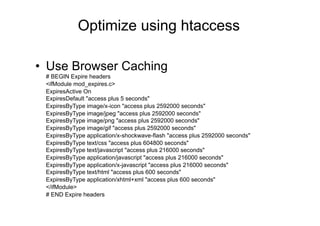
Optimize using htaccess

•  Use Browser Caching
 # BEGIN Expire headers
 <ifModule mod_expires.c>
 ExpiresActive On
 ExpiresDefault "access plus 5 seconds"
 ExpiresByType image/x-icon "access plus 2592000 seconds"
 ExpiresByType image/jpeg "access plus 2592000 seconds"
 ExpiresByType image/png "access plus 2592000 seconds"
 ExpiresByType image/gif "access plus 2592000 seconds"
 ExpiresByType application/x-shockwave-flash "access plus 2592000 seconds"
 ExpiresByType text/css "access plus 604800 seconds"
 ExpiresByType text/javascript "access plus 216000 seconds"
 ExpiresByType application/javascript "access plus 216000 seconds"
 ExpiresByType application/x-javascript "access plus 216000 seconds"
 ExpiresByType text/html "access plus 600 seconds"
 ExpiresByType application/xhtml+xml "access plus 600 seconds"
 </ifModule>
 # END Expire headers
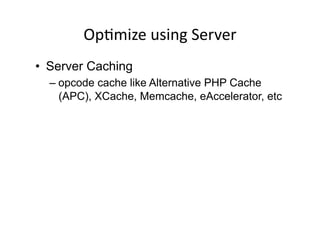
OpDmize	
  using	
  Server	
  
•  Server Caching
  – opcode cache like Alternative PHP Cache
    (APC), XCache, Memcache, eAccelerator, etc
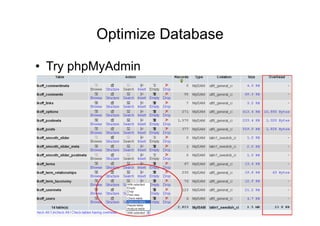
Optimize Database

•  Try phpMyAdmin
Optimize Database

•  Try plugin to optimize
  – WP-Optimize (http://wordpress.org/extend/
    plugins/wp-optimize)
  – OpDmize	
  DB	
  (h:p://yoast.com/wordpress/
    opDmize-­‐db/)	
  
•  Automatic Database Repair
  – {$your_site}/wp-­‐admin/maint/repair.php
•  Don’t backup your database during
   high traffic time
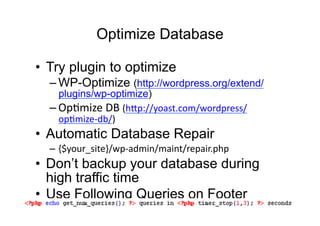
•  Use Following Queries on Footer
Optimize Database
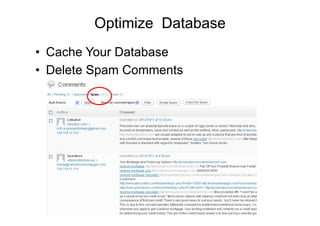
•  Cache Your Database
•  Delete Spam Comments
References

•  h:p://codex.wordpress.org/
   WordPress_OpDmizaDon	
  
•  h:p://codex.wordpress.org/
   WordPress_OpDmizaDon/Caching	
  
•  h:p://wp.tutsplus.com/tutorials/hosDng/
   opDmizing-­‐wordpress-­‐loading-­‐speed-­‐with-­‐
   header-­‐php-­‐htaccess/	
  
•  h:p://wp.smashingmagazine.com/2012/06/26/
   diy-­‐caching-­‐methods-­‐wordpress/	
  
•  h:p://sixrevisions.com/css/css-­‐sprites-­‐site-­‐
   speed/	
  
Thank	
  You	
  
QuesDons?	
  

Vinay Paudel: Optimizing and Speeding up a WordPress site

  • 2.
    Op#mizing  &   Speeding  Up  a   WordPress  Site  
  • 3.
    Vinay  Paudel   tweet  @paudelvinay   Email:  paudelvinay@gmail.com   Blog  :  h:p://vinayp.com.np  
  • 4.
  • 5.
    Facts/Results •  80-­‐90%  of  the  end-­‐user  response  Dme  is  spent   downloading  all  the  components  in  the  page:   images,  stylesheets,  scripts,  Flash,  etc   •  Site  having  loading  Dme  more  than  5  minutes   loose  50%  visitors.   •  Less  H:p  Request,  More  fastest  the  site  
  • 6.
  • 7.
  • 8.
    Optimize theme •  well-codedtheme. •  Find any unclose tag on theme •  Check malicious/unwanted code – Theme  AuthenDcity  Checker  (TAC)  (h:p:// wordpress.org/extend/plugins/tac/)   – Exploit  Scanner  (h:p://wordpress.org/extend/ plugins/exploit-­‐scanner/)  
  • 9.
    Optimize theme •  Images – Replace some of the images with text – Use GIF, PNG and JPEG format – Try WP-Smush
  • 10.
  • 11.
    Optimize theme   • Combine minify and compress HTML, JS and CSS – Use compressor tools – Use Plugins •  WP Minify (http://wordpress.org/extend/plugins/wp- minify/ ) •  Better WordPress Minify (http://wordpress.org/extend/ plugins/bwp-minify/) •  Put CSS on header and JavaScript on footer  
  • 12.
    Optimize theme   • Non Persistent caching
  • 13.
    Optimize theme   • Persistent caching
  • 14.
    Optimize/Speed up Plugins • Be selective on plugins choice.
  • 15.
  • 16.
    Optimize/Speed up Plugins   •  Deactivate and delete unnecessary plugins
  • 17.
  • 18.
    Optimize/Speed up Plugins   •  Check  plugins  performance   – P3  (Plugin  Performance  Profiler)  (h:p:// wordpress.org/extend/plugins/p3-­‐profiler/)  
  • 19.
  • 20.
    Cache Using Plugins • Caching Plugins – W3 Total Cache (http://wordpress.org/extend/ plugins/w3-total-cache/) – WP Super Cache (http://wordpress.org/extend/ plugins/wp-super-cache/)
  • 21.
    Apply CDN usingPlugins   •  CDN (content delivery Network). – W3 Total Cache – image files, js files, css files, uploaded files
  • 22.
    Optimize using wp-config • define('WP_CACHE', true); •  define('WP_POST_REVISIONS', false); OR define('WP_POST_REVISIONS', 10); •  define('EMPTY_TRASH_DAYS', 30); •  define(‘WP_HOME’,‘http://vinayp.com.np’); •  define(‘WP_SITEURL’,‘http:// vinayp.com.np’); •  define('WP_ALLOW_REPAIR', true);
  • 23.
    Optimize using htaccess   •  Gzip File Compression <ifModule mod_deflate.c> AddOutputFilterByType DEFLATE text/html text/plain text/xml application/ xml application/xhtml+xml text/css text/javascript application/ javascript application/x-javascript </ifModule>       •  Disable Etags Header unset Etag FileETag None    
  • 24.
    Optimize using htaccess • Use Browser Caching # BEGIN Expire headers <ifModule mod_expires.c> ExpiresActive On ExpiresDefault "access plus 5 seconds" ExpiresByType image/x-icon "access plus 2592000 seconds" ExpiresByType image/jpeg "access plus 2592000 seconds" ExpiresByType image/png "access plus 2592000 seconds" ExpiresByType image/gif "access plus 2592000 seconds" ExpiresByType application/x-shockwave-flash "access plus 2592000 seconds" ExpiresByType text/css "access plus 604800 seconds" ExpiresByType text/javascript "access plus 216000 seconds" ExpiresByType application/javascript "access plus 216000 seconds" ExpiresByType application/x-javascript "access plus 216000 seconds" ExpiresByType text/html "access plus 600 seconds" ExpiresByType application/xhtml+xml "access plus 600 seconds" </ifModule> # END Expire headers
  • 25.
    OpDmize  using  Server   •  Server Caching – opcode cache like Alternative PHP Cache (APC), XCache, Memcache, eAccelerator, etc
  • 26.
  • 27.
    Optimize Database •  Tryplugin to optimize – WP-Optimize (http://wordpress.org/extend/ plugins/wp-optimize) – OpDmize  DB  (h:p://yoast.com/wordpress/ opDmize-­‐db/)   •  Automatic Database Repair – {$your_site}/wp-­‐admin/maint/repair.php •  Don’t backup your database during high traffic time •  Use Following Queries on Footer
  • 28.
    Optimize Database •  CacheYour Database •  Delete Spam Comments
  • 29.
    References •  h:p://codex.wordpress.org/ WordPress_OpDmizaDon   •  h:p://codex.wordpress.org/ WordPress_OpDmizaDon/Caching   •  h:p://wp.tutsplus.com/tutorials/hosDng/ opDmizing-­‐wordpress-­‐loading-­‐speed-­‐with-­‐ header-­‐php-­‐htaccess/   •  h:p://wp.smashingmagazine.com/2012/06/26/ diy-­‐caching-­‐methods-­‐wordpress/   •  h:p://sixrevisions.com/css/css-­‐sprites-­‐site-­‐ speed/  
  • 30.