
@taylor4484 #multisite #WCSEA
Multisite Network
Do’s & Don’ts
Experiences From Some
Enterprise Solutions
presented by Taylor McCaslin
at WordCamp Seattle March 28, 2015
@taylor4484 #multisite #WCSEA
Product Manager
UX Designer
Interaction Designer
BA Theatre & Dance
Certificates in Business, Computer Science,
Digital Art & Media
Taylor McCaslin
@taylor4484 #multisite #WCSEA
Disclaimer
● My advice is based on my experience with what has worked
for me in the past
● Every project is unique
● There is an exception to every rule I makeup
● Plugins will do everything I say multisite won’t or shouldn’t
@taylor4484 #multisite #WCSEA
What people are saying
● “I tried to use multisite to manage multiple sites and just
got myself confused”
● “Multisite is amazing, why would anyone not use it?”
● “Multisite is hard”
● “We had a project that was running multisite and we
converted it to a standard wordpress install”
● “I don’t use anything but multisite”
@taylor4484 #multisite #WCSEA
How it’s being used
“multisite is now a utility for managing multiple sites using
one installation, where as the original vision was to enable
blogging networks“
@jjj on make.wordpress.org/core
Multisite
@taylor4484 #multisite #WCSEA
What is Multisite?
● A multisite network is a collection of sub-sites that all
share the same single WordPress installation
● Terminology
○ Install: an instance or installation of WordPress
○ Network: a set of websites that operate within the single WordPress
install configured for multisite
○ Site: one of the subsites on the multisite network
@taylor4484 #multisite #WCSEA
What ISN’T Multisite?
● A network of sites that can be moved to separate hosts
○ 1 host. 1 install of WordPress. Many sites.
● A set of sites that can easily be separated into their own
WordPress installs
○ just trust me here. modifying serialized data is not fun
● A set of sites that can have different IP addresses
○ see the first point
@taylor4484 #multisite #WCSEA
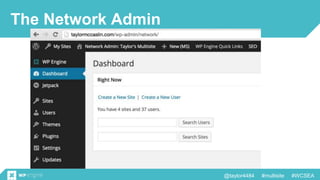
The Network Admin
@taylor4484 #multisite #WCSEA
Open or Closed Site?
● Terminology is hard…. and confusing.
Public Network / Untrusted
● Anyone can signup and create a site
(sometimes paid)
o WordPress.com
o Happytables.com
o University Student Blogs
● Concerts:
o file types / uploads
o scripts/embeds
o copyright
o DMCA
Private Network / Trusted
● Limited site and user creation
o Wordcamp.org
o Company intranets
o University network
 colleges ,department, etc
● Concerns:
o too many cooks (wanting super admin)
o or none at all (no one to manage network)
o code changes affect all sites!
@taylor4484 #multisite #WCSEA
Subfolders, Subdomains and Domain Mapping
● 1 primary network domain
o sub-domain (I prefer this one)
 mysite.com
 site2.mysite.com
 site3.mysite.com
o sub-folder
 mysite.com/site1
 mysite.com/site2
 mysite.com/site3
● Domain Mapping
o wordpress.org/plugins/wordpress-mu-domain-mapping/
 sunrise.php
o Pro-tip: Always use CNAMES!
o Premium plugins exist for selling domains to users
(wpmudev.org)
@taylor4484 #multisite #WCSEA
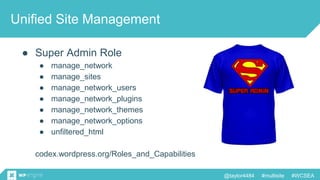
Unified Site Management
● Super Admin Role
● manage_network
● manage_sites
● manage_network_users
● manage_network_plugins
● manage_network_themes
● manage_network_options
● unfiltered_html
codex.wordpress.org/Roles_and_Capabilities
@taylor4484 #multisite #WCSEA
Shared Users
● All blogs have central user management
● Users login once to access all sites on the network
o Doesn’t play well with alternative login plugins (Duo2, 2FA, Google
Auth) - you’ll login for every site
● Caution: User profiles are the same for all sites
@taylor4484 #multisite #WCSEA
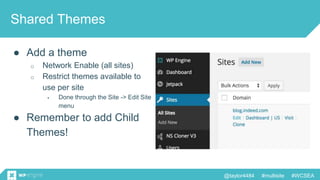
Shared Themes
● Add a theme
o Network Enable (all sites)
o Restrict themes available to
use per site
 Done through the Site -> Edit Site
menu
● Remember to add Child
Themes!
@taylor4484 #multisite #WCSEA
Shared Plugins
● Install plugin on the network
o Activate per site
o Network Activate
● Must Use Plugins
o Can’t be deactivated through the admin
● Caution: Some plugins have their own network settings!
@taylor4484 #multisite #WCSEA
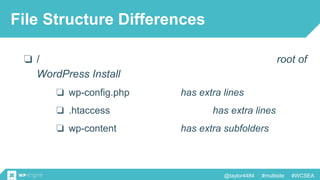
File Structure Differences
❏ / root of
WordPress Install
❏ wp-config.php has extra lines
❏ .htaccess has extra lines
❏ wp-content has extra subfolders
@taylor4484 #multisite #WCSEA
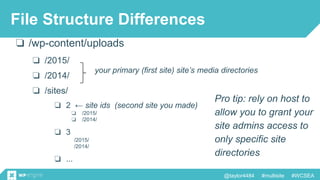
❏ /wp-content/uploads
❏ /2015/
❏ /2014/
❏ /sites/
your primary (first site) site’s media directories
File Structure Differences
❏ 2 ← site ids (second site you made)
❏ /2015/
❏ /2014/
❏ 3
/2015/
/2014/
❏ ...
Pro tip: rely on host to
allow you to grant your
site admins access to
only specific site
directories
@taylor4484 #multisite #WCSEA
DB Structure Differences
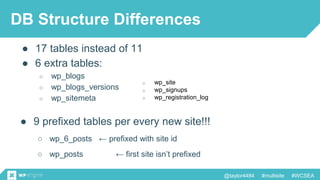
● 17 tables instead of 11
● 6 extra tables:
○ wp_blogs
○ wp_blogs_versions
○ wp_sitemeta
o wp_site
o wp_signups
o wp_registration_log
● 9 prefixed tables per every new site!!!
○ wp_6_posts ← prefixed with site id
○ wp_posts ← first site isn’t prefixed
@taylor4484 #multisite #WCSEA
Tables in ONE multisite DB
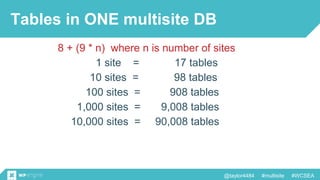
8 + (9 * n) where n is number of sites
1 site = 17 tables
10 sites = 98 tables
100 sites = 908 tables
1,000 sites = 9,008 tables
10,000 sites = 90,008 tables
@taylor4484 #multisite #WCSEA
Hosting
● Use a managed host
● Pro-Tips:
o automatic backups with 1 click restore (ability to download backup)
o built in staging sites (that magically with the networked sites)
o granular deploy to production controls (deploy only specific tables)
o look for extra security features (automatic ip blacklisting)
o know limitations (some hosts don’t allow subdomains or subfolders)
o use version control
● MMSN (massive multisite network)
o plan to spend $$$$ or hire a sysadmin
@taylor4484 #multisite #WCSEA
Pro Dev Tips
● define( 'DISALLOW_FILE_MODS', true );
o disable the Admin File Editor
● define( 'DO_NOT_UPGRADE_GLOBAL_TABLES', true );
o Prevents upgrade functions from doing expensive database queries on
global tables
● add_action( ‘network_admin_menu’, ‘my-settings’ );
o add extra submenus and menu options to the network admin panel'
@taylor4484 #multisite #WCSEA
Pro Dev Don'ts
● current_user_can(‘unfiltered_html’)
o Just don’t. You will regret this.
● loop through your network sites
o Unless you know what you’re doing, you’ll cripple your site performance,
if not crashing your site altogether.
@taylor4484 #multisite #WCSEA
Use Cases
Experiences From Some
Enterprise Solutions
@taylor4484 #multisite #WCSEA
To multisite or not?
“I want to allow users to create their own sites within some
constraints”
@taylor4484 #multisite #WCSEA
To multisite or not?
“I want to allow users to create their own sites within some
constraints”
● Use Multisite!
o This is what multisite was made to do, and it does it well!
● Pro-Tip: customize the admin!
o WordPress.com
o Happytables.com
@taylor4484 #multisite #WCSEA
To multisite or not?
“I want to centrally manage all my client’s sites”
@taylor4484 #multisite #WCSEA
To multisite or not?
“I want to centrally manage all my client’s sites”
● Don’t use Multisite
● Alternatives:
o Jetpack Site Management (update plugins across your site)
o Manage WP (premium)
o Infinite WP (free with paid addons)
o WP-CLI (script your way to site nirvana)
@taylor4484 #multisite #WCSEA
To multisite or not?
“I want to have a multisite network where each site is in a
different language”
@taylor4484 #multisite #WCSEA
To multisite or not?
“I want to have a multisite network where each site is in a
different language”
● Maybe Multisite, Maybe Not
● SEO optimization can be difficult when similar content is
across a network of sites
o Pro-tip: hreflang tags and canonical links are your friend
● Plugins like WPML are built specifically to do this
@taylor4484 #multisite #WCSEA
To multisite or not?
“I have a lot of content that is very different, and I want all my
sites to look different, but it’s still all my stuff”
@taylor4484 #multisite #WCSEA
To multisite or not?
“I have a lot of content that is very different, and I want all my
sites to look different, but it’s still all my stuff”
● Maybe Multisite, Maybe Not
● Why not map domains to categories and tags and create
custom templates for theme archives and categories
@taylor4484 #multisite #WCSEA
Multisite Network
Do’s & Don’ts
Experiences From Some
Enterprise Solutions
presented by Taylor McCaslin
at WordCamp Seattle March 28, 2015

WordPress Multisite Network Do’s & Don’ts

  • 1.
    @taylor4484 #multisite #WCSEA MultisiteNetwork Do’s & Don’ts Experiences From Some Enterprise Solutions presented by Taylor McCaslin at WordCamp Seattle March 28, 2015
  • 2.
    @taylor4484 #multisite #WCSEA ProductManager UX Designer Interaction Designer BA Theatre & Dance Certificates in Business, Computer Science, Digital Art & Media Taylor McCaslin
  • 3.
    @taylor4484 #multisite #WCSEA Disclaimer ●My advice is based on my experience with what has worked for me in the past ● Every project is unique ● There is an exception to every rule I makeup ● Plugins will do everything I say multisite won’t or shouldn’t
  • 4.
    @taylor4484 #multisite #WCSEA Whatpeople are saying ● “I tried to use multisite to manage multiple sites and just got myself confused” ● “Multisite is amazing, why would anyone not use it?” ● “Multisite is hard” ● “We had a project that was running multisite and we converted it to a standard wordpress install” ● “I don’t use anything but multisite”
  • 5.
    @taylor4484 #multisite #WCSEA Howit’s being used “multisite is now a utility for managing multiple sites using one installation, where as the original vision was to enable blogging networks“ @jjj on make.wordpress.org/core
  • 7.
  • 8.
    @taylor4484 #multisite #WCSEA Whatis Multisite? ● A multisite network is a collection of sub-sites that all share the same single WordPress installation ● Terminology ○ Install: an instance or installation of WordPress ○ Network: a set of websites that operate within the single WordPress install configured for multisite ○ Site: one of the subsites on the multisite network
  • 9.
    @taylor4484 #multisite #WCSEA WhatISN’T Multisite? ● A network of sites that can be moved to separate hosts ○ 1 host. 1 install of WordPress. Many sites. ● A set of sites that can easily be separated into their own WordPress installs ○ just trust me here. modifying serialized data is not fun ● A set of sites that can have different IP addresses ○ see the first point
  • 10.
  • 11.
    @taylor4484 #multisite #WCSEA Openor Closed Site? ● Terminology is hard…. and confusing. Public Network / Untrusted ● Anyone can signup and create a site (sometimes paid) o WordPress.com o Happytables.com o University Student Blogs ● Concerts: o file types / uploads o scripts/embeds o copyright o DMCA Private Network / Trusted ● Limited site and user creation o Wordcamp.org o Company intranets o University network  colleges ,department, etc ● Concerns: o too many cooks (wanting super admin) o or none at all (no one to manage network) o code changes affect all sites!
  • 12.
    @taylor4484 #multisite #WCSEA Subfolders,Subdomains and Domain Mapping ● 1 primary network domain o sub-domain (I prefer this one)  mysite.com  site2.mysite.com  site3.mysite.com o sub-folder  mysite.com/site1  mysite.com/site2  mysite.com/site3 ● Domain Mapping o wordpress.org/plugins/wordpress-mu-domain-mapping/  sunrise.php o Pro-tip: Always use CNAMES! o Premium plugins exist for selling domains to users (wpmudev.org)
  • 13.
    @taylor4484 #multisite #WCSEA UnifiedSite Management ● Super Admin Role ● manage_network ● manage_sites ● manage_network_users ● manage_network_plugins ● manage_network_themes ● manage_network_options ● unfiltered_html codex.wordpress.org/Roles_and_Capabilities
  • 14.
    @taylor4484 #multisite #WCSEA SharedUsers ● All blogs have central user management ● Users login once to access all sites on the network o Doesn’t play well with alternative login plugins (Duo2, 2FA, Google Auth) - you’ll login for every site ● Caution: User profiles are the same for all sites
  • 15.
    @taylor4484 #multisite #WCSEA SharedThemes ● Add a theme o Network Enable (all sites) o Restrict themes available to use per site  Done through the Site -> Edit Site menu ● Remember to add Child Themes!
  • 16.
    @taylor4484 #multisite #WCSEA SharedPlugins ● Install plugin on the network o Activate per site o Network Activate ● Must Use Plugins o Can’t be deactivated through the admin ● Caution: Some plugins have their own network settings!
  • 17.
    @taylor4484 #multisite #WCSEA FileStructure Differences ❏ / root of WordPress Install ❏ wp-config.php has extra lines ❏ .htaccess has extra lines ❏ wp-content has extra subfolders
  • 18.
    @taylor4484 #multisite #WCSEA ❏/wp-content/uploads ❏ /2015/ ❏ /2014/ ❏ /sites/ your primary (first site) site’s media directories File Structure Differences ❏ 2 ← site ids (second site you made) ❏ /2015/ ❏ /2014/ ❏ 3 /2015/ /2014/ ❏ ... Pro tip: rely on host to allow you to grant your site admins access to only specific site directories
  • 19.
    @taylor4484 #multisite #WCSEA DBStructure Differences ● 17 tables instead of 11 ● 6 extra tables: ○ wp_blogs ○ wp_blogs_versions ○ wp_sitemeta o wp_site o wp_signups o wp_registration_log ● 9 prefixed tables per every new site!!! ○ wp_6_posts ← prefixed with site id ○ wp_posts ← first site isn’t prefixed
  • 20.
    @taylor4484 #multisite #WCSEA Tablesin ONE multisite DB 8 + (9 * n) where n is number of sites 1 site = 17 tables 10 sites = 98 tables 100 sites = 908 tables 1,000 sites = 9,008 tables 10,000 sites = 90,008 tables
  • 21.
    @taylor4484 #multisite #WCSEA Hosting ●Use a managed host ● Pro-Tips: o automatic backups with 1 click restore (ability to download backup) o built in staging sites (that magically with the networked sites) o granular deploy to production controls (deploy only specific tables) o look for extra security features (automatic ip blacklisting) o know limitations (some hosts don’t allow subdomains or subfolders) o use version control ● MMSN (massive multisite network) o plan to spend $$$$ or hire a sysadmin
  • 22.
    @taylor4484 #multisite #WCSEA ProDev Tips ● define( 'DISALLOW_FILE_MODS', true ); o disable the Admin File Editor ● define( 'DO_NOT_UPGRADE_GLOBAL_TABLES', true ); o Prevents upgrade functions from doing expensive database queries on global tables ● add_action( ‘network_admin_menu’, ‘my-settings’ ); o add extra submenus and menu options to the network admin panel'
  • 23.
    @taylor4484 #multisite #WCSEA ProDev Don'ts ● current_user_can(‘unfiltered_html’) o Just don’t. You will regret this. ● loop through your network sites o Unless you know what you’re doing, you’ll cripple your site performance, if not crashing your site altogether.
  • 24.
    @taylor4484 #multisite #WCSEA UseCases Experiences From Some Enterprise Solutions
  • 25.
    @taylor4484 #multisite #WCSEA Tomultisite or not? “I want to allow users to create their own sites within some constraints”
  • 26.
    @taylor4484 #multisite #WCSEA Tomultisite or not? “I want to allow users to create their own sites within some constraints” ● Use Multisite! o This is what multisite was made to do, and it does it well! ● Pro-Tip: customize the admin! o WordPress.com o Happytables.com
  • 27.
    @taylor4484 #multisite #WCSEA Tomultisite or not? “I want to centrally manage all my client’s sites”
  • 28.
    @taylor4484 #multisite #WCSEA Tomultisite or not? “I want to centrally manage all my client’s sites” ● Don’t use Multisite ● Alternatives: o Jetpack Site Management (update plugins across your site) o Manage WP (premium) o Infinite WP (free with paid addons) o WP-CLI (script your way to site nirvana)
  • 29.
    @taylor4484 #multisite #WCSEA Tomultisite or not? “I want to have a multisite network where each site is in a different language”
  • 30.
    @taylor4484 #multisite #WCSEA Tomultisite or not? “I want to have a multisite network where each site is in a different language” ● Maybe Multisite, Maybe Not ● SEO optimization can be difficult when similar content is across a network of sites o Pro-tip: hreflang tags and canonical links are your friend ● Plugins like WPML are built specifically to do this
  • 31.
    @taylor4484 #multisite #WCSEA Tomultisite or not? “I have a lot of content that is very different, and I want all my sites to look different, but it’s still all my stuff”
  • 32.
    @taylor4484 #multisite #WCSEA Tomultisite or not? “I have a lot of content that is very different, and I want all my sites to look different, but it’s still all my stuff” ● Maybe Multisite, Maybe Not ● Why not map domains to categories and tags and create custom templates for theme archives and categories
  • 33.
    @taylor4484 #multisite #WCSEA MultisiteNetwork Do’s & Don’ts Experiences From Some Enterprise Solutions presented by Taylor McCaslin at WordCamp Seattle March 28, 2015

Editor's Notes

  • #22 Wordpress.com is run on $3.99/month hosting
  • #24 Just because stack exchange recommends it doesn’t mean it’s the right answer
  • #28 Family of Sites
  • #29 Family of Sites
  • #32 Family of Sites