Using the Financial
Reporting Feature
Nate Smith
• Joined Administrate January
2016
• Also not an accountant
Introductions
Adam Medley
• Joined Administrate June
2011
• Not an accountant
We do know Administrate!
What We’ll Cover…
1. Where We’ve Been / How We Got Here
• Terminology
• Functionality
2. Financial Workflows and Best Practices
• Invoice Finalisation
3. Financial Reporting
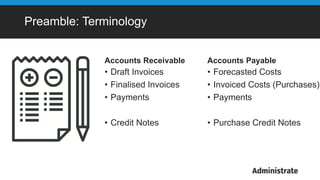
Accounts Receivable
• Draft Invoices
• Finalised Invoices
• Payments
• Credit Notes
Accounts Payable
• Forecasted Costs
• Invoiced Costs (Purchases)
• Payments
• Purchase Credit Notes
Preamble: Terminology
Which Finance Functions are Supported?
• Creating Invoices for Events and Items
• Workflow based
• Web Orders - WebLink and WordPress
• Opportunities
• Registrations
• REST API
• Directly, by hand
• Editing “Draft” Invoices
• Finalising Invoices
Which Finance Functions are Supported?
• Creating and Editing Credit Notes
• Creating and Editing Payments
• Creation and Selling of Items
• Controlling Stock of Items
• Forecasting Costs / Creating and
Editing Purchase Orders
• Event Profitability Reporting
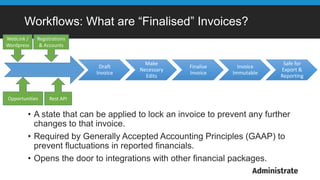
Workflows: What are “Finalised” Invoices?
• A state that can be applied to lock an invoice to prevent any further
changes to that invoice.
• Required by Generally Accepted Accounting Principles (GAAP) to
prevent fluctuations in reported financials.
• Opens the door to integrations with other financial packages.
Draft
Invoice
Make
Necessary
Edits
Finalise
Invoice
Invoice
Immutable
Safe for
Export &
Reporting
WebLink /
Wordpress
Opportunities Rest API
Registrations
& Accounts
Demo: Financial Workflows and Best Practices
Let’s see the full lifecycle for an event booking:
1. Create, Send, and Finalise an invoice
2. Receive a payment
3. Cancel a student and optionally issue a credit note
4. Transfer a student and optionally issue a credit note and re-invoice for
the new event
5. Restore a students booking to an event (undo a cancellation)
6. Refund a student
7. Forecast and record costs as purchase orders
Financial Reporting
Some examples:
• Exportable Invoices for Xero (or other system)
• Using the Reports Engine to Manage Debtors
• Using the Event List to view profitability
• Viewing Cost Breakdowns per event
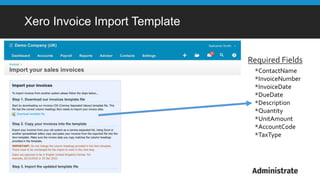
Xero Invoice Import Template
*ContactName
*InvoiceNumber
*InvoiceDate
*DueDate
*Description
*Quantity
*UnitAmount
*AccountCode
*TaxType
Required Fields
Financial Reporting
Some examples:
• Exportable Invoices for Xero (or other system)
• Using the Reports Engine to Manage Debtors
• Using the Event List to view profitability
• Viewing Cost Breakdowns per event
Resources
• For further training or queries on the
Financial functionality we’ll have a 30
minute Q&A in The Snug.
• 15 minute support sessions are available.
• Additionally, you can email:
support@getadministrate.com

LITE 2016 – Using the Financial Reporting Feature [Nate Smith & Adam Medley]

  • 1.
  • 2.
    Nate Smith • JoinedAdministrate January 2016 • Also not an accountant Introductions Adam Medley • Joined Administrate June 2011 • Not an accountant We do know Administrate!
  • 3.
    What We’ll Cover… 1.Where We’ve Been / How We Got Here • Terminology • Functionality 2. Financial Workflows and Best Practices • Invoice Finalisation 3. Financial Reporting
  • 5.
    Accounts Receivable • DraftInvoices • Finalised Invoices • Payments • Credit Notes Accounts Payable • Forecasted Costs • Invoiced Costs (Purchases) • Payments • Purchase Credit Notes Preamble: Terminology
  • 6.
    Which Finance Functionsare Supported? • Creating Invoices for Events and Items • Workflow based • Web Orders - WebLink and WordPress • Opportunities • Registrations • REST API • Directly, by hand • Editing “Draft” Invoices • Finalising Invoices
  • 7.
    Which Finance Functionsare Supported? • Creating and Editing Credit Notes • Creating and Editing Payments • Creation and Selling of Items • Controlling Stock of Items • Forecasting Costs / Creating and Editing Purchase Orders • Event Profitability Reporting
  • 8.
    Workflows: What are“Finalised” Invoices? • A state that can be applied to lock an invoice to prevent any further changes to that invoice. • Required by Generally Accepted Accounting Principles (GAAP) to prevent fluctuations in reported financials. • Opens the door to integrations with other financial packages. Draft Invoice Make Necessary Edits Finalise Invoice Invoice Immutable Safe for Export & Reporting WebLink / Wordpress Opportunities Rest API Registrations & Accounts
  • 9.
    Demo: Financial Workflowsand Best Practices Let’s see the full lifecycle for an event booking: 1. Create, Send, and Finalise an invoice 2. Receive a payment 3. Cancel a student and optionally issue a credit note 4. Transfer a student and optionally issue a credit note and re-invoice for the new event 5. Restore a students booking to an event (undo a cancellation) 6. Refund a student 7. Forecast and record costs as purchase orders
  • 10.
    Financial Reporting Some examples: •Exportable Invoices for Xero (or other system) • Using the Reports Engine to Manage Debtors • Using the Event List to view profitability • Viewing Cost Breakdowns per event
  • 11.
    Xero Invoice ImportTemplate *ContactName *InvoiceNumber *InvoiceDate *DueDate *Description *Quantity *UnitAmount *AccountCode *TaxType Required Fields
  • 12.
    Financial Reporting Some examples: •Exportable Invoices for Xero (or other system) • Using the Reports Engine to Manage Debtors • Using the Event List to view profitability • Viewing Cost Breakdowns per event
  • 13.
    Resources • For furthertraining or queries on the Financial functionality we’ll have a 30 minute Q&A in The Snug. • 15 minute support sessions are available. • Additionally, you can email: support@getadministrate.com

Editor's Notes

  • #3 *Nate* REMINDER: Questions after the session Workshops being filmed I’m here to give you an introduction and some background information. Adam is here to help show us how to realise that goal.
  • #4 *Nate* Although we’re not accountants, we want to show you how you can get reporting out of Administrate that can drive a robust accounting package like Xero.
  • #5 Quick recap on decision to EOL the accounting reports. Integration with Xero is being tested by a small number of early adopters – as announced by our chief product officer Troy You can still have great visibility AND great accounting
  • #6 *Nate* 2 minutes – Quickly point out we’ve mangled the terminology in the product, but the financial documents are symmetrical. Terminology will continue to be cleared up as the system gets updates. Presentation will be more heavily focused on invoice side.
  • #7 *Nate* 1 minute – Point out our focus on invoices as the primary use case.
  • #8 *Nate* 2 minutes – note the parallels between invoices where they exist. Reassure customers that the functionality they need for visibility / reporting will still exist.
  • #9 *Nate* UPDATE*** Notes, other po ref, other invoice ref can be edited when final
  • #10 *Adam* 10 minutes for demo, including the “Finalized Invoices” slide Possible image?
  • #11 7 minutes – will show off some examples of reports, perhaps walk through the “recipe” for the report. Full demo on building Xero report Just a quick demo of prebuilt report for remaining bullets
  • #12 *Nate*
  • #13 *Adam* 7 minutes – will show off some examples of reports, perhaps walk through the “recipe” for the report. Full demo on building Xero report Just a quick demo of prebuilt report for remaining bullets
  • #14 *Nate*