Downloaded 95 times
![Simulation Settings
[*10] to run show
number of eye and adds
[1.2ns] are delay [s]
4All Rights Reserved Copyright (C) Bee Technologies Inc.2010](https://image.slidesharecdn.com/usb2-0ltspicesetting-101125023734-phpapp01/85/Simulation-of-Eye-diagram-LTspice-4-320.jpg)
![Delay[s] and No. of eyes settings
Right click on plot to change
6All Rights Reserved Copyright (C) Bee Technologies Inc.2010](https://image.slidesharecdn.com/usb2-0ltspicesetting-101125023734-phpapp01/85/Simulation-of-Eye-diagram-LTspice-6-320.jpg)
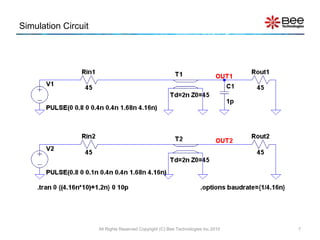
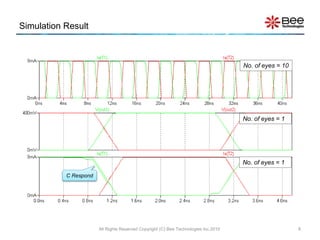

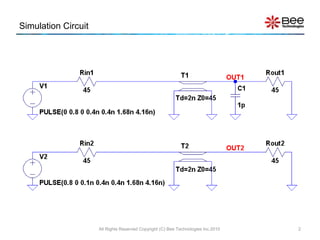
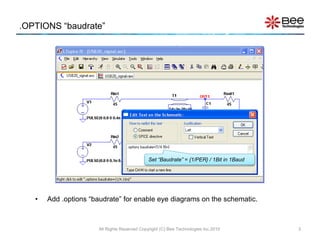
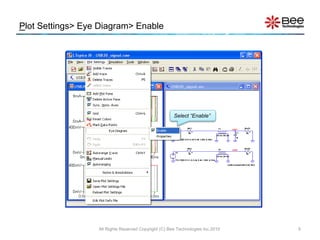
This document provides instructions for simulating an eye diagram using LTspice software. It explains that the .options "baudrate" command must be added to enable eye diagrams, with the baudrate set to the inverse of the period over one bit. It also describes how to enable the eye diagram plot, set the delay and number of eyes to simulate, and view the simulation results for different numbers of eyes.


![射頻電子實驗手冊 [實驗1 ~ 5] ADS入門, 傳輸線模擬, 直流模擬, 暫態模擬, 交流模擬](https://cdn.slidesharecdn.com/ss_thumbnails/simlab15-150613072411-lva1-app6892-thumbnail.jpg?width=640&height=640&fit=bounds)
![射頻電子實驗手冊 [實驗6] 阻抗匹配模擬](https://cdn.slidesharecdn.com/ss_thumbnails/simlab6-150613072411-lva1-app6892-thumbnail.jpg?width=640&height=640&fit=bounds)
![RF Circuit Design - [Ch2-2] Smith Chart](https://cdn.slidesharecdn.com/ss_thumbnails/ch2-2-150613064401-lva1-app6891-thumbnail.jpg?width=640&height=640&fit=bounds)
![Agilent ADS 模擬手冊 [實習1] 基本操作與射頻放大器設計](https://cdn.slidesharecdn.com/ss_thumbnails/1adsbasics-150613072812-lva1-app6891-thumbnail.jpg?width=640&height=640&fit=bounds)
![射頻電子 - [第三章] 史密斯圖與阻抗匹配](https://cdn.slidesharecdn.com/ss_thumbnails/ch3-150613065103-lva1-app6892-thumbnail.jpg?width=640&height=640&fit=bounds)

![Agilent ADS 模擬手冊 [實習2] 放大器設計](https://cdn.slidesharecdn.com/ss_thumbnails/2adsamp-150613072818-lva1-app6892-thumbnail.jpg?width=640&height=640&fit=bounds)

![射頻電子 - [第五章] 射頻放大器設計](https://cdn.slidesharecdn.com/ss_thumbnails/ch5-150613065105-lva1-app6892-thumbnail.jpg?width=640&height=640&fit=bounds)
![射頻電子 - [實驗第三章] 濾波器設計](https://cdn.slidesharecdn.com/ss_thumbnails/e3-150613065109-lva1-app6891-thumbnail.jpg?width=640&height=640&fit=bounds)


![射頻電子實驗手冊 - [實驗8] 低雜訊放大器模擬](https://cdn.slidesharecdn.com/ss_thumbnails/simlab8-150613072425-lva1-app6891-thumbnail.jpg?width=640&height=640&fit=bounds)
![射頻電子 - [實驗第四章] 微波濾波器與射頻多工器設計](https://cdn.slidesharecdn.com/ss_thumbnails/e4-150613065110-lva1-app6892-thumbnail.jpg?width=640&height=640&fit=bounds)
![射頻電子實驗手冊 - [實驗7] 射頻放大器模擬](https://cdn.slidesharecdn.com/ss_thumbnails/simlab7-150613072420-lva1-app6892-thumbnail.jpg?width=640&height=640&fit=bounds)


