Unity Makes Strength
“Why keep this valuable information in a corner?”


               hashdays 2012 - Xavier Mertens
$ whoami

• Xavier Mertens (@xme)
• Consultant @ day
• Blogger @ night
• BruCON co-organizer

                          2
$ cat disclaimer.txt

“The opinions expressed in this presentation
are those of the speaker and do not necessarily
reflect those of past, present employers,
partners or customers.”


                                                  3
Agenda

• Some facts
• Current situation
• Toolbox
• Examples

                      4
Defense vs. Attack
• Offensive security is funny
  (w00t! We break things)
• Defensive security can also
  be fun!
  (proud to not be pwn3d ;-)
• “Know your enemy!”

                                5
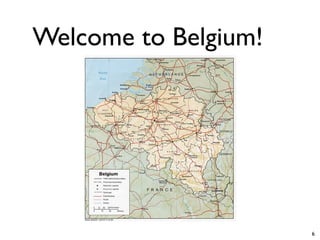
Welcome to Belgium!


                      6
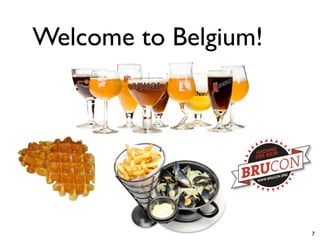
Welcome to Belgium!


                      7
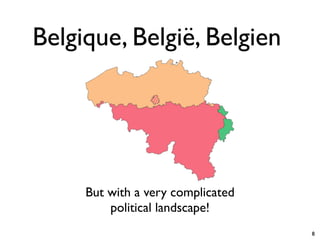
Belgique, België, Belgien


     But with a very complicated
         political landscape!
                                   8
Belgian Motto
      “L’union fait la force”

     (“Unity Makes Strength”)


                                9
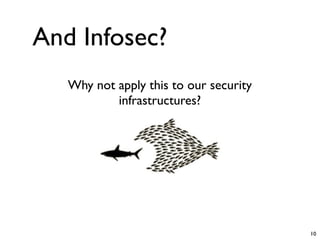
And Infosec?
   Why not apply this to our security
           infrastructures?


                                        10
Agenda

• Some facts
• Current situation
• Toolbox
• Examples

                      11
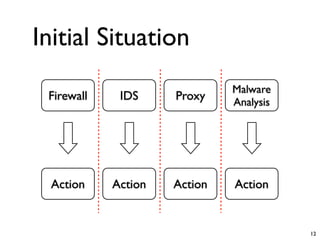
Initial Situation
                              Malware
 Firewall    IDS     Proxy    Analysis


  Action    Action   Action   Action


                                         12
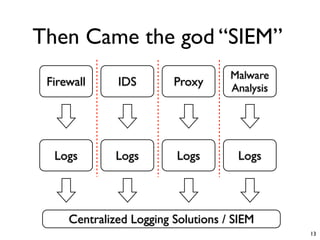
Then Came the god “SIEM”
                                    Malware
 Firewall     IDS        Proxy      Analysis


  Logs        Logs        Logs       Logs


     Centralized Logging Solutions / SIEM
                                               13
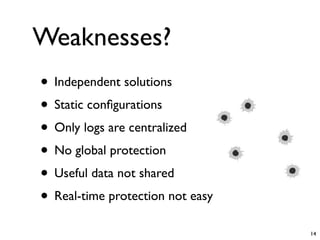
Weaknesses?
• Independent solutions
• Static configurations
• Only logs are centralized
• No global protection
• Useful data not shared
• Real-time protection not easy
                                  14
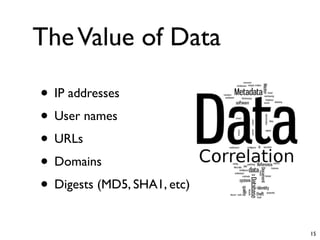
The Value of Data

• IP addresses
• User names
• URLs
• Domains
• Digests (MD5, SHA1, etc)
                             15
Multiple Sources

• Online repositories
• Internal resources
• Automatic process


                        16
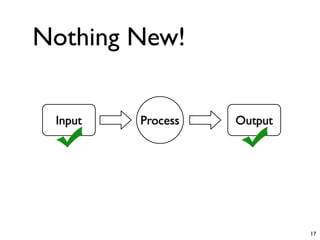
Nothing New!


 Input   Process   Output


                            17
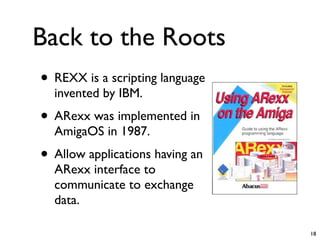
Back to the Roots
• REXX is a scripting language
  invented by IBM.
• ARexx was implemented in
  AmigaOS in 1987.
• Allow applications having an
  ARexx interface to
  communicate to exchange
  data.

                                 18
RTFM!
• Security is a big market ($$$)
• The “Microsoft Office” effect
  (<10% of features really used)
• Invest time to learn how your
  products work.
• Be a hacker: Learn how it work
  and make it work like you want.

                                    19
Backdoors...
• CLI
• WebAPI (JSON, XML)
• Databases
• Scripting languages
• Serial console

                        20
Protocols
• HTTP(S)
• TFTP
• SSH
• SNMP
• IF-MAP
• Proprietary tools (dbedit)
                               21
Automation is the Key
• We’re all lazy people!
• Expect!
       use Expect;
       my $e = Expect->new();
       my $c = “ssh $user@$host”;
       $e = Expect->spawn($c) or die “No SSH?”;
       $e->Expect($timeout,
       [
         qr’password: $’,
         sub {
            my $fh = shift;
            print $fh $passwordn”;
         }
       ]
                                                  22
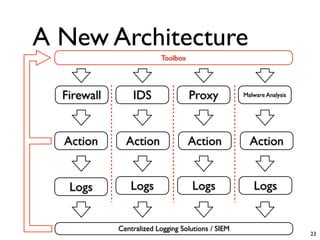
A New Architecture
                          Toolbox


  Firewall       IDS                Proxy           Malware Analysis


  Action       Action               Action            Action


   Logs          Logs               Logs               Logs


             Centralized Logging Solutions / SIEM
                                                                       23
Agenda

• Some facts
• Current situation
• Toolbox
• Examples

                      24
HTTPS
• Generate an API key
  https://10.0.0.1/api/?type=keygen&user=foo&password=bar

• Submit XML requests
  https://10.0.0.1/api/?type=config&key=xxx&action=set&xpath=/
  config/device/entry[@name=localhost]/vsys/
  entry[@name=vsys1]/address/
  entry[@name=NewHost]&element=<ip-
  netmask>192.168.0.1</ip-netmask><description>Test</
  description>


                                                                25
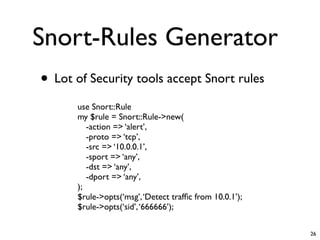
Snort-Rules Generator
• Lot of Security tools accept Snort rules
      use Snort::Rule
      my $rule = Snort::Rule->new(
         -action => ‘alert’,
         -proto => ‘tcp’,
         -src => ‘10.0.0.1’,
         -sport => ‘any’,
         -dst => ‘any’,
         -dport => ‘any’,
      );
      $rule->opts(‘msg’, ‘Detect traffic from 10.0.1’);
      $rule->opts(‘sid’, ‘666666’);

                                                         26
IF-MAP
• Open standard to allow authorized devices
  to publish/search relevant information
• Information could be
 • IP
 • Login
 • Location (devices)
 • Domain
                                              27
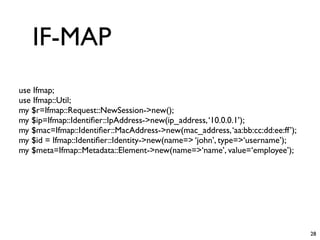
IF-MAP
use Ifmap;
use Ifmap::Util;
my $r=Ifmap::Request::NewSession->new();
my $ip=Ifmap::Identifier::IpAddress->new(ip_address, ‘10.0.0.1’);
my $mac=Ifmap::Identifier::MacAddress->new(mac_address, ‘aa:bb:cc:dd:ee:ff’);
my $id = Ifmap::Identifier::Identity->new(name=> ‘john’, type=>‘username’);
my $meta=Ifmap::Metadata::Element->new(name=>‘name’, value=‘employee’);


                                                                               28
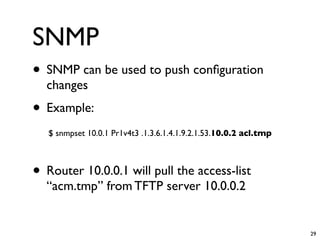
SNMP
• SNMP can be used to push configuration
  changes
• Example:
   $ snmpset 10.0.1 Pr1v4t3 .1.3.6.1.4.1.9.2.1.53.10.0.2 acl.tmp


• Router 10.0.0.1 will pull the access-list
  “acm.tmp” from TFTP server 10.0.0.2


                                                                   29
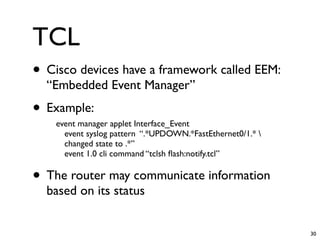
TCL
• Cisco devices have a framework called EEM:
  “Embedded Event Manager”
• Example:
    event manager applet Interface_Event
      event syslog pattern “.*UPDOWN.*FastEthernet0/1.* 
      changed state to .*”
      event 1.0 cli command “tclsh flash:notify.tcl”

• The router may communicate information
  based on its status


                                                            30
The Conductor
• OSSEC
• Log Management
• Active-Response
• Powerful alerts engine


                           31
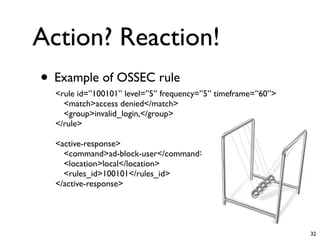
Action? Reaction!
• Example of OSSEC rule
  <rule id=”100101” level=”5” frequency=”5” timeframe=”60”>
    <match>access denied</match>
    <group>invalid_login,</group>
  </rule>

  <active-response>
    <command>ad-block-user</command>
    <location>local</location>
    <rules_id>100101</rules_id>
  </active-response>


                                                              32
Agenda

• Some facts
• Current situation
• Toolbox
• Examples

                      33
$ cat disclaimer2.txt
                <warning>
    Some slides contain examples based
on open source as well as v€ndor$ solutions.
     I’m not affiliated with any of them!
               </warning>


                                               34
Online Resources
• DNS-BH
    $ wget -N http://dns-bh.sagadc.org/domains.txt

•   Google SafeBrowsing
    use Net::Google::SafeBrowsing2;
    use Net::Google::SafeBrowsing2:::Sqlite;
    my gsb = Net::Google::SafeBrowsing2->new(
    key => “xxx”,
    storage => Net::Google::SafeBrowsing2::Sqlite->new(file =>
    “google.db”)
    );
    $gsb->update();
    my $match = $gsb->lookup(url => “http://evil.com”);
    if ($match eq MALWARE) { ... }

                                                                35
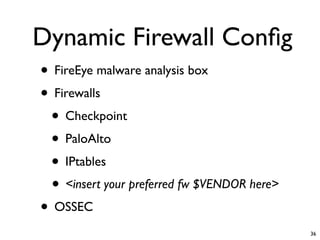
Dynamic Firewall Config
• FireEye malware analysis box
• Firewalls
 • Checkpoint
 • PaloAlto
 • IPtables
 • <insert your preferred fw $VENDOR here>
• OSSEC
                                             36
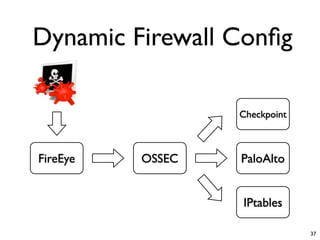
Dynamic Firewall Config

                  Checkpoint


FireEye   OSSEC   PaloAlto


                  IPtables

                               37
Dynamic User Blacklist

• Syslog Concentrator
• OSSEC
• SSL VPN
• LDAP directory

                         38
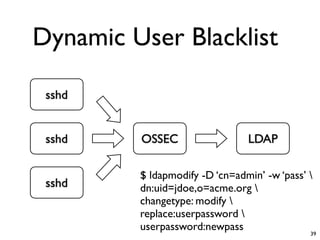
Dynamic User Blacklist

 sshd


 sshd    OSSEC                  LDAP

         $ ldapmodify -D ‘cn=admin’ -w ‘pass’ 
 sshd    dn:uid=jdoe,o=acme.org 
         changetype: modify 
         replace:userpassword 
         userpassword:newpass                 39
SMTP Malware Analysis

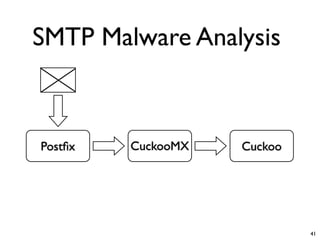
• Postfix MTA
• Cuckoo
• CuckooMX (Perl)

                        40
SMTP Malware Analysis


Postfix   CuckooMX   Cuckoo


                             41
MySQL Self-Defense

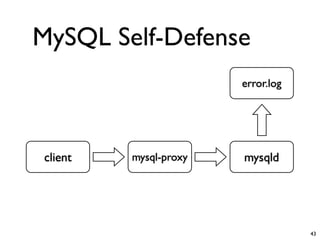
• MySQL Server
• MySQL Proxy
• lib_mysqludf_log

                     42
MySQL Self-Defense
                       error.log


client   mysql-proxy   mysqld


                                   43
Controls
• Security first!
• Strong controls must be implemented
• Authentication/Authorization
• Could break your compliance
• Use an OoB network
• Risk of DoS!
                                        44
Conclusions
• Don’t buy just “a box”
• RTFM
• Control
• It’s up to you!


                           45
Thank You!
Questions?
Beers!


             46

Unity makes strength

  • 1.
    Unity Makes Strength “Whykeep this valuable information in a corner?” hashdays 2012 - Xavier Mertens
  • 2.
    $ whoami • XavierMertens (@xme) • Consultant @ day • Blogger @ night • BruCON co-organizer 2
  • 3.
    $ cat disclaimer.txt “Theopinions expressed in this presentation are those of the speaker and do not necessarily reflect those of past, present employers, partners or customers.” 3
  • 4.
    Agenda • Some facts •Current situation • Toolbox • Examples 4
  • 5.
    Defense vs. Attack •Offensive security is funny (w00t! We break things) • Defensive security can also be fun! (proud to not be pwn3d ;-) • “Know your enemy!” 5
  • 6.
  • 7.
  • 8.
    Belgique, België, Belgien But with a very complicated political landscape! 8
  • 9.
    Belgian Motto “L’union fait la force” (“Unity Makes Strength”) 9
  • 10.
    And Infosec? Why not apply this to our security infrastructures? 10
  • 11.
    Agenda • Some facts •Current situation • Toolbox • Examples 11
  • 12.
    Initial Situation Malware Firewall IDS Proxy Analysis Action Action Action Action 12
  • 13.
    Then Came thegod “SIEM” Malware Firewall IDS Proxy Analysis Logs Logs Logs Logs Centralized Logging Solutions / SIEM 13
  • 14.
    Weaknesses? • Independent solutions •Static configurations • Only logs are centralized • No global protection • Useful data not shared • Real-time protection not easy 14
  • 15.
    The Value ofData • IP addresses • User names • URLs • Domains • Digests (MD5, SHA1, etc) 15
  • 16.
    Multiple Sources • Onlinerepositories • Internal resources • Automatic process 16
  • 17.
    Nothing New! Input Process Output 17
  • 18.
    Back to theRoots • REXX is a scripting language invented by IBM. • ARexx was implemented in AmigaOS in 1987. • Allow applications having an ARexx interface to communicate to exchange data. 18
  • 19.
    RTFM! • Security isa big market ($$$) • The “Microsoft Office” effect (<10% of features really used) • Invest time to learn how your products work. • Be a hacker: Learn how it work and make it work like you want. 19
  • 20.
    Backdoors... • CLI • WebAPI(JSON, XML) • Databases • Scripting languages • Serial console 20
  • 21.
    Protocols • HTTP(S) • TFTP •SSH • SNMP • IF-MAP • Proprietary tools (dbedit) 21
  • 22.
    Automation is theKey • We’re all lazy people! • Expect! use Expect; my $e = Expect->new(); my $c = “ssh $user@$host”; $e = Expect->spawn($c) or die “No SSH?”; $e->Expect($timeout, [ qr’password: $’, sub { my $fh = shift; print $fh $passwordn”; } ] 22
  • 23.
    A New Architecture Toolbox Firewall IDS Proxy Malware Analysis Action Action Action Action Logs Logs Logs Logs Centralized Logging Solutions / SIEM 23
  • 24.
    Agenda • Some facts •Current situation • Toolbox • Examples 24
  • 25.
    HTTPS • Generate anAPI key https://10.0.0.1/api/?type=keygen&user=foo&password=bar • Submit XML requests https://10.0.0.1/api/?type=config&key=xxx&action=set&xpath=/ config/device/entry[@name=localhost]/vsys/ entry[@name=vsys1]/address/ entry[@name=NewHost]&element=<ip- netmask>192.168.0.1</ip-netmask><description>Test</ description> 25
  • 26.
    Snort-Rules Generator • Lotof Security tools accept Snort rules use Snort::Rule my $rule = Snort::Rule->new( -action => ‘alert’, -proto => ‘tcp’, -src => ‘10.0.0.1’, -sport => ‘any’, -dst => ‘any’, -dport => ‘any’, ); $rule->opts(‘msg’, ‘Detect traffic from 10.0.1’); $rule->opts(‘sid’, ‘666666’); 26
  • 27.
    IF-MAP • Open standardto allow authorized devices to publish/search relevant information • Information could be • IP • Login • Location (devices) • Domain 27
  • 28.
    IF-MAP use Ifmap; use Ifmap::Util; my$r=Ifmap::Request::NewSession->new(); my $ip=Ifmap::Identifier::IpAddress->new(ip_address, ‘10.0.0.1’); my $mac=Ifmap::Identifier::MacAddress->new(mac_address, ‘aa:bb:cc:dd:ee:ff’); my $id = Ifmap::Identifier::Identity->new(name=> ‘john’, type=>‘username’); my $meta=Ifmap::Metadata::Element->new(name=>‘name’, value=‘employee’); 28
  • 29.
    SNMP • SNMP canbe used to push configuration changes • Example: $ snmpset 10.0.1 Pr1v4t3 .1.3.6.1.4.1.9.2.1.53.10.0.2 acl.tmp • Router 10.0.0.1 will pull the access-list “acm.tmp” from TFTP server 10.0.0.2 29
  • 30.
    TCL • Cisco deviceshave a framework called EEM: “Embedded Event Manager” • Example: event manager applet Interface_Event event syslog pattern “.*UPDOWN.*FastEthernet0/1.* changed state to .*” event 1.0 cli command “tclsh flash:notify.tcl” • The router may communicate information based on its status 30
  • 31.
    The Conductor • OSSEC •Log Management • Active-Response • Powerful alerts engine 31
  • 32.
    Action? Reaction! • Exampleof OSSEC rule <rule id=”100101” level=”5” frequency=”5” timeframe=”60”> <match>access denied</match> <group>invalid_login,</group> </rule> <active-response> <command>ad-block-user</command> <location>local</location> <rules_id>100101</rules_id> </active-response> 32
  • 33.
    Agenda • Some facts •Current situation • Toolbox • Examples 33
  • 34.
    $ cat disclaimer2.txt <warning> Some slides contain examples based on open source as well as v€ndor$ solutions. I’m not affiliated with any of them! </warning> 34
  • 35.
    Online Resources • DNS-BH $ wget -N http://dns-bh.sagadc.org/domains.txt • Google SafeBrowsing use Net::Google::SafeBrowsing2; use Net::Google::SafeBrowsing2:::Sqlite; my gsb = Net::Google::SafeBrowsing2->new( key => “xxx”, storage => Net::Google::SafeBrowsing2::Sqlite->new(file => “google.db”) ); $gsb->update(); my $match = $gsb->lookup(url => “http://evil.com”); if ($match eq MALWARE) { ... } 35
  • 36.
    Dynamic Firewall Config •FireEye malware analysis box • Firewalls • Checkpoint • PaloAlto • IPtables • <insert your preferred fw $VENDOR here> • OSSEC 36
  • 37.
    Dynamic Firewall Config Checkpoint FireEye OSSEC PaloAlto IPtables 37
  • 38.
    Dynamic User Blacklist •Syslog Concentrator • OSSEC • SSL VPN • LDAP directory 38
  • 39.
    Dynamic User Blacklist sshd sshd OSSEC LDAP $ ldapmodify -D ‘cn=admin’ -w ‘pass’ sshd dn:uid=jdoe,o=acme.org changetype: modify replace:userpassword userpassword:newpass 39
  • 40.
    SMTP Malware Analysis •Postfix MTA • Cuckoo • CuckooMX (Perl) 40
  • 41.
    SMTP Malware Analysis Postfix CuckooMX Cuckoo 41
  • 42.
    MySQL Self-Defense • MySQLServer • MySQL Proxy • lib_mysqludf_log 42
  • 43.
    MySQL Self-Defense error.log client mysql-proxy mysqld 43
  • 44.
    Controls • Security first! •Strong controls must be implemented • Authentication/Authorization • Could break your compliance • Use an OoB network • Risk of DoS! 44
  • 45.
    Conclusions • Don’t buyjust “a box” • RTFM • Control • It’s up to you! 45
  • 46.

Editor's Notes

  • #2 Welcome to my presentation! Let&amp;#x2019;s talk about same ways to improve our daily security. Q: How many of you have responsabilities to maintain security configurations?\n
  • #3 A few words about me. My name is Xavier Mertens, I&amp;#x2019;m working for a big telco company in .be (Security consultant). My second life (at night) is my blog, some projects like pastemon or give some spare time to the community (BruCON).\n
  • #4 \n
  • #5 \n
  • #6 I consider myself as a defensive security guy. But to defend properly, you need to know how attacks work.\n
  • #7 I&amp;#x2019;m coming from Belgium. Small country in the heart of Europe.\n
  • #8 Belgium is well-known for its beers, waffles and &amp;#x201C;moules-frites&amp;#x201D; dishes.\n
  • #9 Three regions, three official languages (FR, NL, GE), hundreds of ministers.\n
  • #10 \n
  • #11 \n
  • #12 \n
  • #13 In most networks, security solutions were deployed in &amp;#x201C;silos&amp;#x201D;. Each component (firewall, ids, ...) had a specific job and executed it independently of the others. \n
  • #14 \n
  • #15 Something suspicious detected in zone &amp;#x201C;a&amp;#x201D; cannot protect zone &amp;#x201C;b&amp;#x201D; or &amp;#x201C;c&amp;#x201D;.\n
  • #16 \n
  • #17 Manual input: it&amp;#x2019;s a pain! Online repositories: Trust?\n\n
  • #18 In fact, there is nothing new. In IT, everything is based on input/output. We have &amp;#x201C;data&amp;#x201D; (input) which are processed to generate new &amp;#x201C;data&amp;#x201D; (output)\n
  • #19 \n
  • #20 Security is a big market. Products are very expensive. You must investigate how to extract as much as possible power from them. Don&amp;#x2019;t be a victim of the Microsoft Office effect. Read manuals and explore!\n
  • #21 All security solutions have backdoors (in the positive sense ;-).\n
  • #22 Checkpoint provides a dbedit command line tool to managed the objects DB.\n
  • #23 \n
  • #24 \n
  • #25 \n
  • #26 \n
  • #27 \n
  • #28 \n
  • #29 \n
  • #30 \n
  • #31 \n
  • #32 \n
  • #33 Example of a cradle!\n
  • #34 \n
  • #35 \n
  • #36 \n
  • #37 \n
  • #38 \n
  • #39 \n
  • #40 \n
  • #41 \n
  • #42 \n
  • #43 \n
  • #44 \n
  • #45 \n
  • #46 \n
  • #47 \n